Ram Usage? Wierd, Need Help Urgently!

hullabalusa

New member
Local time
8:24 AM
Messages
3
First of all, my custom Rig:

Corsair AX600w 80+
ASUS MAXIMUS IV EXTREME P67 B3
Corsair Vengence 8Gb 1600mhz
i5 3570k OC@4GHz (Cooled by - Coolermaster Hyper 212)
Sapphire Vapor-x GHZ 7970
60Gb SSD (Intel 330)
2x 2Tb HDD's (WD)
NZXT Phantom Full Tower (White)
----------------------------------------------------------

Basically this - acf856e62970606617d17596797a85b5.png

Then it automatically closes random programs.

Before i re-installed W7 (was because of issues with something else that didn't turn out to be the case [Fixed that problem now though]) my RAM was absolutely perfect, no matter how much i had open, i never got this warning :/

At this moment i had these open:

Skype
Steam
Google Chrome
Minecraft (Feed The Beast) (2Gb used)
Minecraft Server (Feed The Beast) (1Gb used)
(And of course 2Gb for W7 as usual)

- Only seems to appear when i have any JAVA related stuff open (that iv noticed)

----------------------------------------------------------

1. Yes, everything is getting enough power.
2. Yes, everything is seated properly.
3. Yes, all the connections are properly connected.
4. Yes, i have tried different RAM slots.
5. Yes, i have disabled the Page file.

----------------------------------------------------------


Really hope someone could help me in my time of need :(
 

My Computer

Computer type
PC/Desktop
OS
w7 ultimate 64
Antivirus
AVG
Browser
chrome
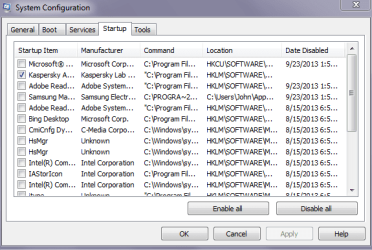
Hello and welcome hullabulusa mate what have you got in msconfig - Startup? I only run security se pic.
 

Attachments

  • START.PNG
    START.PNG
    13 KB · Views: 50

My Computer

Computer type
PC/Desktop
Computer Manufacturer/Model Number
Own build (new) Desk1 / Asus ROG Win 7 / Desk2 1st build
OS
Desk1 7 Home Prem / Desk2 10 Pro / Main lap Asus ROG 10 Pro 2 laptop Toshiba 7 Pro Asus P2520 7 & 10
CPU
Desk1 i5 3750K / Laptop i7 GTX 860M / Desk2 i5 2500
Motherboard
Desk1 Asus P877-V / Desk2 Gigabyte H67 UD3H / Laptop ?
Memory
Desk1 8GB (1866) / Desk2 16GB (1333) / Laptop 8Gb DDR3
Graphics Card(s)
Desk 1& 2NVidia GTX 650 & Laptops on board Intel
Sound Card
Desk 1 & 2 -XONAR DG Realtek High Def audio Laptop
Monitor(s) Displays
Desk 1 Benq HD 2450 / Desk2 Philips 24" / Laptop 17.5"
Screen Resolution
1920x1080 D1 & D2 & Laptop 1
Hard Drives
Desk1 Samsung 120GB 830 SSD
Asus ROG 256GB 850 Pro SSD
Desk2 Samsung 840 256 SSD
Toshiba 120GB EVO
PSU
Desk 1 Corsair HX 1050/ Laptop ? / Desk 2 Corsair HX 650
Case
Desk 1 Cooler HAF XM ? Toshiba laptop / Desk2 Coolermaster
Cooling
Fans on all Desk1 -2 Desk2 - all Coolermasters 5 Laptop ?
Keyboard
Desk 1 MS Sidewinder X6 Desk 2 MS Sidewinder X 4
Mouse
Desk 1&2 - Gigabyte MS 900 gamer - laptop - Logitec wireless
Internet Speed
ADSL2+
Other Info
One other Desktop (tester) and spare Toshba laptop both with SSD's
Running Kaspersky 2016 ISS on all machines config'd identically
Logitec audio stereo systems on each machine (x3)
Canon MG5250MFC
Router/modem TP-Link running WPA2SK
In addition to establishing a Clean Boot as suggested and working through the other Troubleshooting Steps for Windows 7,

I would uninstall Java and wait to see if any program really calls for it. I have been running without it for years, problem-free.
 
DItto on the suggestion to uninstall Java (and if you have it, the Java updater and Java FX).

If you must keep/use Java, then I'll bore you with the info in these two posts:

http://www.sevenforums.com/browsers-mail/288696-ie-10-not-keeping-temp-files.html#post2387775 << See the part under Generic advice:

http://www.sevenforums.com/browsers...-environment-7-update-25-a-2.html#post2458660

Since many infections get into a computer using Java...
...I would suggest using an offline scanner to check your computer.
What is Windows Defender Offline?
Use the USB or CD option.
 
Last edited:

My Computer

Computer type
Laptop
Computer Manufacturer/Model Number
Employer provided Dell Latitude
OS
W7 Pro SP1 64bit
CPU
i7
Memory
8GB
Graphics Card(s)
Intel HD Graphics
Hard Drives
crappy SSD
Antivirus
Employer mandated Symantec Endpoint Protection
Browser
Pale Moon 64bit, IE11 64bit & Chrome 64bit
I'll leave this one too.
 

My Computer

Computer type
PC/Desktop
Computer Manufacturer/Model Number
Own build (new) Desk1 / Asus ROG Win 7 / Desk2 1st build
OS
Desk1 7 Home Prem / Desk2 10 Pro / Main lap Asus ROG 10 Pro 2 laptop Toshiba 7 Pro Asus P2520 7 & 10
CPU
Desk1 i5 3750K / Laptop i7 GTX 860M / Desk2 i5 2500
Motherboard
Desk1 Asus P877-V / Desk2 Gigabyte H67 UD3H / Laptop ?
Memory
Desk1 8GB (1866) / Desk2 16GB (1333) / Laptop 8Gb DDR3
Graphics Card(s)
Desk 1& 2NVidia GTX 650 & Laptops on board Intel
Sound Card
Desk 1 & 2 -XONAR DG Realtek High Def audio Laptop
Monitor(s) Displays
Desk 1 Benq HD 2450 / Desk2 Philips 24" / Laptop 17.5"
Screen Resolution
1920x1080 D1 & D2 & Laptop 1
Hard Drives
Desk1 Samsung 120GB 830 SSD
Asus ROG 256GB 850 Pro SSD
Desk2 Samsung 840 256 SSD
Toshiba 120GB EVO
PSU
Desk 1 Corsair HX 1050/ Laptop ? / Desk 2 Corsair HX 650
Case
Desk 1 Cooler HAF XM ? Toshiba laptop / Desk2 Coolermaster
Cooling
Fans on all Desk1 -2 Desk2 - all Coolermasters 5 Laptop ?
Keyboard
Desk 1 MS Sidewinder X6 Desk 2 MS Sidewinder X 4
Mouse
Desk 1&2 - Gigabyte MS 900 gamer - laptop - Logitec wireless
Internet Speed
ADSL2+
Other Info
One other Desktop (tester) and spare Toshba laptop both with SSD's
Running Kaspersky 2016 ISS on all machines config'd identically
Logitec audio stereo systems on each machine (x3)
Canon MG5250MFC
Router/modem TP-Link running WPA2SK
I'll leave this one too.
Sorry. I saw Java and stuck my nose/post in.

Feel free to guide the OP in any direction that you wish.

Again, sorry if my posting caused a problem.
 

My Computer

Computer type
Laptop
Computer Manufacturer/Model Number
Employer provided Dell Latitude
OS
W7 Pro SP1 64bit
CPU
i7
Memory
8GB
Graphics Card(s)
Intel HD Graphics
Hard Drives
crappy SSD
Antivirus
Employer mandated Symantec Endpoint Protection
Browser
Pale Moon 64bit, IE11 64bit & Chrome 64bit
It's a Forum I think there's room for all of us.
 

My Computer

Computer type
PC/Desktop
Computer Manufacturer/Model Number
Self Built
OS
Win 10 Pro x64
CPU
Intel I5-2500K @3.3GHz
Motherboard
Asrock P67 Extreme4
Memory
16GB G.Skill Ripjaws X (4x4GB)
Graphics Card(s)
EVGA GeForce 750 Ti SC 2GB
Sound Card
ASUS Xonar DG 5.1 Channels 24-bit 96KHz PCI Interface Sound
Monitor(s) Displays
auria eq2367
Screen Resolution
1920 x 1080
Hard Drives
250GB Samsung 850 EVO SSD
1TB WD Blue
1TB Hitachi
PSU
SeaSonic X 650W 80 Plus Gold
Case
Corsair Obsidian 750D
Cooling
Corsair H60, Three 140mm case fans
Keyboard
Logitech Wireless Keyboard K520
Mouse
Logitech Wireless Mouse M310
Internet Speed
Wave Broadband ~ 100 dn 5 up
Antivirus
Windows Defender, Malwarebytes Premium
Browser
Edge, IE11, Chrome
Other Info
Laptop specs: HP g7-1365dx /
CPU: AMD A6-3420M APU with Radeon(tm) HD Graphics /
RAM: Crucial 8Gb (2x4Gb) /
SSD: Crucial M4-CT128M4SSD2 ATA Device/ FW 000F /
GFX: AMD Radeon HD 6520G /
OS: Windows 10 Pro x64
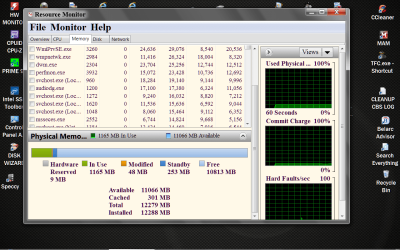
If I may; because the OP has posted a ram problem I would like the OP to post one of these.

Resource Monitor RAM.PNG

I also agree that Java is probably not need and can be causing problems with infection and proper operation of the system.

Also things in msconfig/Startup could also give us clues.
As per post #2.

I personally never assume their is only one problem.
 

My Computer

Computer type
PC/Desktop
Computer Manufacturer/Model Number
Home made Desktop
OS
Windows 10 Pro. 64/ version 1709 Windows 7 Pro/64
CPU
Intel i7-6800K @ 4.3
Motherboard
ASUS X-99 Deluxe II
Memory
Corsair Platinum 16 gig @2400
Graphics Card(s)
EVGA GTX 1070 OC
Monitor(s) Displays
Asus 27" LED LCD/VE278Q
Screen Resolution
1920-1080 or 1280-720 HDMI
Hard Drives
INTEL SSD 730-240 Gb Sata 3.0/
PSU
EVGA Platium 1200W
Case
Phanteks Luxe Tempered Glass 8 fans/ one radiator
Cooling
XSPC/ Water Cooled CPU
Keyboard
Das 4 Professional
Mouse
Logitech M705/MX Anywhere 2-S
Internet Speed
100 mbits
Antivirus
Microsoft Security Essentials/ Malwarebytes Premium 3.0/ SAS
Browser
I.E. 11 default/Firefox/ ISP Time Warner Cable/Spectrum
Other Info
LG BluRay Burner/
Sound system-KLipsch-THX/
Icy Dock ssd Hot Swap bays.
I'll leave this one too.
Sorry. I saw Java and stuck my nose/post in.

Feel free to guide the OP in any direction that you wish.

Again, sorry if my posting caused a problem.
There is no problem I will PM you.:)

Plus I do appreciate the reply re the forum Derek but it was unrelated to this thread.
 

My Computer

Computer type
PC/Desktop
Computer Manufacturer/Model Number
Own build (new) Desk1 / Asus ROG Win 7 / Desk2 1st build
OS
Desk1 7 Home Prem / Desk2 10 Pro / Main lap Asus ROG 10 Pro 2 laptop Toshiba 7 Pro Asus P2520 7 & 10
CPU
Desk1 i5 3750K / Laptop i7 GTX 860M / Desk2 i5 2500
Motherboard
Desk1 Asus P877-V / Desk2 Gigabyte H67 UD3H / Laptop ?
Memory
Desk1 8GB (1866) / Desk2 16GB (1333) / Laptop 8Gb DDR3
Graphics Card(s)
Desk 1& 2NVidia GTX 650 & Laptops on board Intel
Sound Card
Desk 1 & 2 -XONAR DG Realtek High Def audio Laptop
Monitor(s) Displays
Desk 1 Benq HD 2450 / Desk2 Philips 24" / Laptop 17.5"
Screen Resolution
1920x1080 D1 & D2 & Laptop 1
Hard Drives
Desk1 Samsung 120GB 830 SSD
Asus ROG 256GB 850 Pro SSD
Desk2 Samsung 840 256 SSD
Toshiba 120GB EVO
PSU
Desk 1 Corsair HX 1050/ Laptop ? / Desk 2 Corsair HX 650
Case
Desk 1 Cooler HAF XM ? Toshiba laptop / Desk2 Coolermaster
Cooling
Fans on all Desk1 -2 Desk2 - all Coolermasters 5 Laptop ?
Keyboard
Desk 1 MS Sidewinder X6 Desk 2 MS Sidewinder X 4
Mouse
Desk 1&2 - Gigabyte MS 900 gamer - laptop - Logitec wireless
Internet Speed
ADSL2+
Other Info
One other Desktop (tester) and spare Toshba laptop both with SSD's
Running Kaspersky 2016 ISS on all machines config'd identically
Logitec audio stereo systems on each machine (x3)
Canon MG5250MFC
Router/modem TP-Link running WPA2SK
First of all, my custom Rig:

Corsair AX600w 80+
ASUS MAXIMUS IV EXTREME P67 B3
Corsair Vengence 8Gb 1600mhz
i5 3570k OC@4GHz (Cooled by - Coolermaster Hyper 212)
Sapphire Vapor-x GHZ 7970
60Gb SSD (Intel 330)
2x 2Tb HDD's (WD)
NZXT Phantom Full Tower (White)
----------------------------------------------------------

Basically this - acf856e62970606617d17596797a85b5.png

Then it automatically closes random programs.

Before i re-installed W7 (was because of issues with something else that didn't turn out to be the case [Fixed that problem now though]) my RAM was absolutely perfect, no matter how much i had open, i never got this warning :/

At this moment i had these open:

Skype
Steam
Google Chrome
Minecraft (Feed The Beast) (2Gb used)
Minecraft Server (Feed The Beast) (1Gb used)
(And of course 2Gb for W7 as usual)

- Only seems to appear when i have any JAVA related stuff open (that iv noticed)

----------------------------------------------------------

1. Yes, everything is getting enough power.
2. Yes, everything is seated properly.
3. Yes, all the connections are properly connected.
4. Yes, i have tried different RAM slots.
5. Yes, i have disabled the Page file.

----------------------------------------------------------


Really hope someone could help me in my time of need :(
why you disabled page file, page files are good for pc may be should try by increase your page file size.:geek:
 

My Computer

Computer type
PC/Desktop
OS
Windows 8 Ultimate x64
CPU
intel i3 2100 @ 3.10 ghz
Motherboard
DH61WW ddr3
Memory
zion 2 gb & sontriam 4 gb ddr3 @1333mhz
Graphics Card(s)
Ati Radeon HD 6670 GDDR3 1GB
Monitor(s) Displays
Samsung 17.5 inches
Screen Resolution
1366x768
Hard Drives
WD CAVIAR 1 TB
PSU
Cooler Master Thunder 500 watt
Case
iball entilizer
Keyboard
Logitech K200
Mouse
Frontech
Internet Speed
1 mbps
Antivirus
eset
Browser
Google Chrome
First of all, my custom Rig:

Corsair AX600w 80+
ASUS MAXIMUS IV EXTREME P67 B3
Corsair Vengence 8Gb 1600mhz
i5 3570k OC@4GHz (Cooled by - Coolermaster Hyper 212)
Sapphire Vapor-x GHZ 7970
60Gb SSD (Intel 330)
2x 2Tb HDD's (WD)
NZXT Phantom Full Tower (White)
----------------------------------------------------------

Basically this - acf856e62970606617d17596797a85b5.png

Then it automatically closes random programs.

Before i re-installed W7 (was because of issues with something else that didn't turn out to be the case [Fixed that problem now though]) my RAM was absolutely perfect, no matter how much i had open, i never got this warning :/

At this moment i had these open:

Skype
Steam
Google Chrome
Minecraft (Feed The Beast) (2Gb used)
Minecraft Server (Feed The Beast) (1Gb used)
(And of course 2Gb for W7 as usual)

- Only seems to appear when i have any JAVA related stuff open (that iv noticed)

----------------------------------------------------------

1. Yes, everything is getting enough power.
2. Yes, everything is seated properly.
3. Yes, all the connections are properly connected.
4. Yes, i have tried different RAM slots.
5. Yes, i have disabled the Page file.

----------------------------------------------------------


Really hope someone could help me in my time of need :(
why you disabled page file, page files are good for pc may be should try by increase your page file size.:geek:

Ok ill try the page file
 

My Computer

Computer type
PC/Desktop
OS
w7 ultimate 64
Antivirus
AVG
Browser
chrome

My Computer

Computer type
PC/Desktop
Computer Manufacturer/Model Number
Home made Desktop
OS
Windows 10 Pro. 64/ version 1709 Windows 7 Pro/64
CPU
Intel i7-6800K @ 4.3
Motherboard
ASUS X-99 Deluxe II
Memory
Corsair Platinum 16 gig @2400
Graphics Card(s)
EVGA GTX 1070 OC
Monitor(s) Displays
Asus 27" LED LCD/VE278Q
Screen Resolution
1920-1080 or 1280-720 HDMI
Hard Drives
INTEL SSD 730-240 Gb Sata 3.0/
PSU
EVGA Platium 1200W
Case
Phanteks Luxe Tempered Glass 8 fans/ one radiator
Cooling
XSPC/ Water Cooled CPU
Keyboard
Das 4 Professional
Mouse
Logitech M705/MX Anywhere 2-S
Internet Speed
100 mbits
Antivirus
Microsoft Security Essentials/ Malwarebytes Premium 3.0/ SAS
Browser
I.E. 11 default/Firefox/ ISP Time Warner Cable/Spectrum
Other Info
LG BluRay Burner/
Sound system-KLipsch-THX/
Icy Dock ssd Hot Swap bays.
my signature is not showing everything I tried can you give me a picture tutorial:p
 

My Computer

Computer type
PC/Desktop
OS
Windows 8 Ultimate x64
CPU
intel i3 2100 @ 3.10 ghz
Motherboard
DH61WW ddr3
Memory
zion 2 gb & sontriam 4 gb ddr3 @1333mhz
Graphics Card(s)
Ati Radeon HD 6670 GDDR3 1GB
Monitor(s) Displays
Samsung 17.5 inches
Screen Resolution
1366x768
Hard Drives
WD CAVIAR 1 TB
PSU
Cooler Master Thunder 500 watt
Case
iball entilizer
Keyboard
Logitech K200
Mouse
Frontech
Internet Speed
1 mbps
Antivirus
eset
Browser
Google Chrome

I suggested you establish a Clean Boot, but you posted back msconfig showing a bunch of crap checked. Why? Uncheck everything but your AV now.

It also says in the steps to use free lightweight MSE for troubleshooting purposes, but I see AVG bloatware in msconfig. No one here has ever recommended AVG which is buggy bloatware. So you continue to ignore the steps you were to be working through.

Did you uninstall Java yet? From the screenshots which you posted using a format we don't use here, it's pretty clear Java is causing at least part of the problem.

Let us know when you get caught up.
 
If not solved

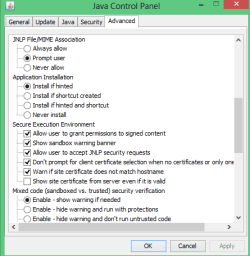
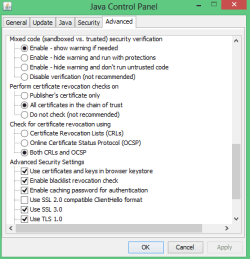
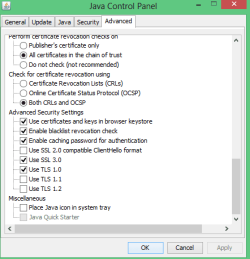
If not solved check this pics & do as same
Capture1.PNG
Capture2.PNG
Capture3.PNG
Capture4.PNG
:cool:
 

My Computer

Computer type
PC/Desktop
OS
Windows 8 Ultimate x64
CPU
intel i3 2100 @ 3.10 ghz
Motherboard
DH61WW ddr3
Memory
zion 2 gb & sontriam 4 gb ddr3 @1333mhz
Graphics Card(s)
Ati Radeon HD 6670 GDDR3 1GB
Monitor(s) Displays
Samsung 17.5 inches
Screen Resolution
1366x768
Hard Drives
WD CAVIAR 1 TB
PSU
Cooler Master Thunder 500 watt
Case
iball entilizer
Keyboard
Logitech K200
Mouse
Frontech
Internet Speed
1 mbps
Antivirus
eset
Browser
Google Chrome
Now as previously suggested try uninstalling Java and see what happens. If you need it then just reinstall it.

I have to run Java because of my pay office - (gov) which uses an Oracle based program and I have no problems or any reference to it in Processes. Now what is puzzling me is the three references to Java .exe in that link you sent?
 

My Computer

Computer type
PC/Desktop
Computer Manufacturer/Model Number
Own build (new) Desk1 / Asus ROG Win 7 / Desk2 1st build
OS
Desk1 7 Home Prem / Desk2 10 Pro / Main lap Asus ROG 10 Pro 2 laptop Toshiba 7 Pro Asus P2520 7 & 10
CPU
Desk1 i5 3750K / Laptop i7 GTX 860M / Desk2 i5 2500
Motherboard
Desk1 Asus P877-V / Desk2 Gigabyte H67 UD3H / Laptop ?
Memory
Desk1 8GB (1866) / Desk2 16GB (1333) / Laptop 8Gb DDR3
Graphics Card(s)
Desk 1& 2NVidia GTX 650 & Laptops on board Intel
Sound Card
Desk 1 & 2 -XONAR DG Realtek High Def audio Laptop
Monitor(s) Displays
Desk 1 Benq HD 2450 / Desk2 Philips 24" / Laptop 17.5"
Screen Resolution
1920x1080 D1 & D2 & Laptop 1
Hard Drives
Desk1 Samsung 120GB 830 SSD
Asus ROG 256GB 850 Pro SSD
Desk2 Samsung 840 256 SSD
Toshiba 120GB EVO
PSU
Desk 1 Corsair HX 1050/ Laptop ? / Desk 2 Corsair HX 650
Case
Desk 1 Cooler HAF XM ? Toshiba laptop / Desk2 Coolermaster
Cooling
Fans on all Desk1 -2 Desk2 - all Coolermasters 5 Laptop ?
Keyboard
Desk 1 MS Sidewinder X6 Desk 2 MS Sidewinder X 4
Mouse
Desk 1&2 - Gigabyte MS 900 gamer - laptop - Logitec wireless
Internet Speed
ADSL2+
Other Info
One other Desktop (tester) and spare Toshba laptop both with SSD's
Running Kaspersky 2016 ISS on all machines config'd identically
Logitec audio stereo systems on each machine (x3)
Canon MG5250MFC
Router/modem TP-Link running WPA2SK

My Computer

Computer type
PC/Desktop
Computer Manufacturer/Model Number
Own build (new) Desk1 / Asus ROG Win 7 / Desk2 1st build
OS
Desk1 7 Home Prem / Desk2 10 Pro / Main lap Asus ROG 10 Pro 2 laptop Toshiba 7 Pro Asus P2520 7 & 10
CPU
Desk1 i5 3750K / Laptop i7 GTX 860M / Desk2 i5 2500
Motherboard
Desk1 Asus P877-V / Desk2 Gigabyte H67 UD3H / Laptop ?
Memory
Desk1 8GB (1866) / Desk2 16GB (1333) / Laptop 8Gb DDR3
Graphics Card(s)
Desk 1& 2NVidia GTX 650 & Laptops on board Intel
Sound Card
Desk 1 & 2 -XONAR DG Realtek High Def audio Laptop
Monitor(s) Displays
Desk 1 Benq HD 2450 / Desk2 Philips 24" / Laptop 17.5"
Screen Resolution
1920x1080 D1 & D2 & Laptop 1
Hard Drives
Desk1 Samsung 120GB 830 SSD
Asus ROG 256GB 850 Pro SSD
Desk2 Samsung 840 256 SSD
Toshiba 120GB EVO
PSU
Desk 1 Corsair HX 1050/ Laptop ? / Desk 2 Corsair HX 650
Case
Desk 1 Cooler HAF XM ? Toshiba laptop / Desk2 Coolermaster
Cooling
Fans on all Desk1 -2 Desk2 - all Coolermasters 5 Laptop ?
Keyboard
Desk 1 MS Sidewinder X6 Desk 2 MS Sidewinder X 4
Mouse
Desk 1&2 - Gigabyte MS 900 gamer - laptop - Logitec wireless
Internet Speed
ADSL2+
Other Info
One other Desktop (tester) and spare Toshba laptop both with SSD's
Running Kaspersky 2016 ISS on all machines config'd identically
Logitec audio stereo systems on each machine (x3)
Canon MG5250MFC
Router/modem TP-Link running WPA2SK
Back
Top