RamDisk and Google.

barbarossa2241

New member
Member
VIP
Local time
4:27 AM
Messages
150
Location
Forest Hills , NY
Hi,

Just downloaded and installed RamDisk following this instructions :Guide * Windows 7 Ultimate Tweaks & Utilities *.

Since I do not know much about it my q is.............does this work with Chrome ? The instructions mention only IE and FireFox cache. Is this RamDisk a must have ?
 

My Computer

Computer Manufacturer/Model Number
Asus N53v-DH 72
OS
windows 7 home premium 64bit
CPU
Intel(R) Core(TM) i7-2670QM CPU @ 2.20GHz
Motherboard
ASUSTeK Computer Inc
Memory
6049 MB
Graphics Card(s)
NVIDIA GeForce GT 540M (1024 MB)
Monitor(s) Displays
15.6
Screen Resolution
1920-1080
Hard Drives
ST9750420AS (698 GB, IDE)

C: (NTFS) 293.0 GB (229.9 GB free)
D: (NTFS) 380.6 GB (380.5 GB free)
Total Size 673.6 GB (610.4 GB free)
Keyboard
Standard
Mouse
Optical
Internet Speed
D-12877kbps U-370kbps
In an article I recently read (at a website I won't mention) the Safari browser was
also mentioned and in an article on a different site (again which I won't mention)
they talked about Chrome being loaded to a RAM disk.

The recurring theme there was that yes Chrome could be loaded to a RAM disk however
it seemed that most people were having trouble keeping it stable in the sense that
after a certain period of time they had to reboot every time for it to actually work.

In my opinion, if you could load the whole OS to RAM disk then awesome, but from the
information I have seen about running browser cache from RAM disk then with the hardware
associated with new machines nowadays I personally wouldn't bother with it.
One test using Xbench was noted to have had results using random reads from RAM at
86.19mb/sec instead of 0.61mb/sec when the cache ran from the hard drive.
As I said earlier, with 6 or 8GB memory coming out on heaps of new machines now,
why would you bother, but then again I don't really know to much about it either.
 

My Computer

OS
Windows 7 Home Premium 64 Bit OS
Since I do not know much about it my q is.............does this work with Chrome ? The instructions mention only IE and FireFox cache. Is this RamDisk a must have ?
Yes this works with chrome.
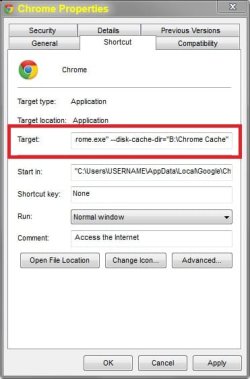
How to use with chrome.
1. Create a folder on ram disk called Chrome Cache.
2. Right click on your Chrome short cut and open Properties.
3. In the Target box type this at the end. --disk-cache-dir="B:\Chrome Cache"
4. Replace B: with your ram drive letter. (note there is a space after the \chrome.exe")
5. Apply and click ok.

Example of target text. "C:\Users\USERNAME\AppData\Local\Google\Chrome\Application\chrome.exe" --disk-cache-dir="B:\Chrome Cache"
 

Attachments

  • Chrome Properties.jpg
    Chrome Properties.jpg
    28.8 KB · Views: 139

My Computer

Computer type
PC/Desktop
Computer Manufacturer/Model Number
Custom 2014 Upgrade.
OS
Windows 7 Ultimate x64 sp1
CPU
Intel i5 4590 Haswell refresh 3.30GHz(3.7GHz Turbo) Quad.
Motherboard
Gigabyte GA-H97-HD3 LGA 1150
Memory
G.Skill Ripjaws F3-12800CL9D-8GBRL 16GB (4x4GB) (1600MHz)
Graphics Card(s)
Gigabyte GeForce GT 740 4GB
Sound Card
Onboard. Realtek High Definition Audio
Monitor(s) Displays
Asus VW266H x 2
Screen Resolution
1920x1200 @ 60Hz
Hard Drives
Samsung 840 EVO 120GB SSD /
Samsung 850 Pro Series 1TB SSD x 2 /
Western Digital WD Black 1TB /
Western Digital VelociRaptor 150 GB.
PSU
Corsair 650 hx modular
Case
Cooler Master
Cooling
3x fans
Keyboard
Logitech Media Keyboard 600
Mouse
Logitech Performance Mouse MX
Internet Speed
Cable Broadband 100mbs/D, 2mbs/U
Antivirus
MSE, Malwarebytes, AdwCleaner, SUPERAntiSpyware
Browser
Mozilla Firefox, Google Chrome
Other Info
1GB DataRam
Thank you guys. I am still deciding if I should use RamDisk or not. I do have 6 RAM memory and the Pc runs great so far. Oh, I do not play games on my PC.
 

My Computer

Computer Manufacturer/Model Number
Asus N53v-DH 72
OS
windows 7 home premium 64bit
CPU
Intel(R) Core(TM) i7-2670QM CPU @ 2.20GHz
Motherboard
ASUSTeK Computer Inc
Memory
6049 MB
Graphics Card(s)
NVIDIA GeForce GT 540M (1024 MB)
Monitor(s) Displays
15.6
Screen Resolution
1920-1080
Hard Drives
ST9750420AS (698 GB, IDE)

C: (NTFS) 293.0 GB (229.9 GB free)
D: (NTFS) 380.6 GB (380.5 GB free)
Total Size 673.6 GB (610.4 GB free)
Keyboard
Standard
Mouse
Optical
Internet Speed
D-12877kbps U-370kbps
The reason I'm responding to this older thread is because it was one of the first ones listed when I did a Google search and therefor still relevant to others that may be interested in RAM drives.

To address the last post: You probably won't get much benefit from a RAM drive, especially since you don't have very much RAM on your computer (relatively speaking). However, if you're running XP, Vista, and/or 7 32 bit, then you could use the RAM over 4GB that Windows can't see as a RAM drive to at least get some use from it for something.

I use RAM drives to hold whole program installs that are frequently read from or written to, such as for games that often load different areas (textures, sounds, and so on) within the game to dramatically increase the game's performance.

The down side to this is that you have to first move data you want to the RAM drive before using it and that it won't save data in the drive after powering down the computer. It is possible however to set up automated drive backups that will save and reload the data for you when you shut down or start Windows. You can also do this manually.
 
Last edited:

My Computer

Computer type
PC/Desktop
OS
Windows 7 Professional SP1 64bit, Manjaro Xfce, Debian 10 64bit Xfce
CPU
Intel i7-3930K @ 4.2GHz
Motherboard
ASUS P9X79 WS
Memory
Corsair Dominator 64GB Quad Channel DDR3 @ 1600MHz
Graphics Card(s)
EVGA GeForce GTX Titan Black Superclocked (×2, SLI)
Monitor(s) Displays
Sony Bravia 46"
Screen Resolution
1920×1080 (Full Screen), 1366×768 (Windows)
Hard Drives
Samsung 860 PRO 4TB SSD, Samsung 850 EVO 1TB SSD, Western Digital WD Gold 16TB 7200 RPM 512MB Cache HDD
PSU
Corsair AX1200 (1200W, 100.4A @ 12V)
Case
Corsair Obsidian 750D
Cooling
Corsair H110, 5 NOCTUA NF-A14 industrialPPC-3000 PWM Fans
Keyboard
Logitech K360
Mouse
Logitech M220
Browser
Firefox Developer Edition, Pale Moon, Tor
Back
Top