Ran windows update, now computer is running crappy, jerks, halts

sdowney717

New member
Power User
VIP
Local time
10:38 AM
Messages
705
Everything was fine!
For years.
I had updates OFF, last updates were done spring 2014.
I got another TV Tuner card, a Avermedia m791 combo pcie
Turned updates on. Windows said it had to update the windows update. So I said ok.
It then was able to install the driver for the tuner.

The tuner was a bust, did not work well at all, much pixelations, no channels picture on some channels, etc....
The other 2 tuners are perfect, they vbox usb 3560 and avermedia m780 pcie.

Since this failed tuner card and windows updating update (I did not do any critical updates) the computer is jerking, halting on all video. Like a scrolling notice on the screen bottom stopping and starting and the video and the sound is out of sync.

So what to do? try a restore point??
Do ALL updates??
I have many recorded shows I dont want to loose.

Will restore point undue system updates?

Also that failed cruddy tuner works perfect in an Intel MB core 2 duo win7 system. But in the HP AMD quad core system it was horrible.
 

My Computer My Computer

At a glance

Windows 7 Ultimate x64
OS
Windows 7 Ultimate x64
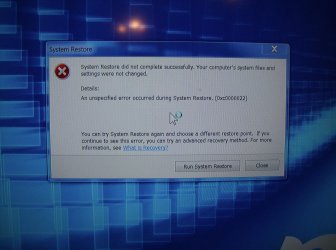
Well I attempted to restore to the earliest 2015 restore point, and it rebooted and said it failed.
So now I am attempting to do the next restore point.
 

Attachments

  • HPIM1089.jpg
    HPIM1089.jpg
    617.6 KB · Views: 0
  • HPIM1088.jpg
    HPIM1088.jpg
    360.5 KB · Views: 0

My Computer My Computer

At a glance

Windows 7 Ultimate x64
OS
Windows 7 Ultimate x64
well that failed too on the next restore point!
It is hosed.

I will run updates again and update EVERYTHING, and if that does not fix it, I will wipe windows and have to do a complete reinstall from scratch.

Why are the restore points failing?
 

My Computer My Computer

At a glance

Windows 7 Ultimate x64
OS
Windows 7 Ultimate x64
I will tell you this, I dont trust windows update to not screw up any computer I own.
I have loads of troubles with windows update over the years on various windows PC.
My best experience with windows updates is to turn them off and set it to never update.
That always gives good results UNTIL you have to install a new device and HAVE to use windows update to do it,
which thankfully I dont do often.
 

My Computer My Computer

At a glance

Windows 7 Ultimate x64
OS
Windows 7 Ultimate x64
Alright... Try this.

Go to Disk Cleanup. Select "Clean system files". Make sure you check your Windows Update box, and whatever else you want to clean up.

This may take a few hours depending on how much cleaning to do.

Then, run CMD as an administrator. Use this command.
dism.exe /online /cleanup-image /restorehealth

Post back if there's any improvement.
 

My Computer My Computer

At a glance

Windows 8 ProIntel Centrino Dual Core P7450 2.13GHz4gbATI Mobility Raedon HD3650
Computer Manufacturer/Model Number
Toshiba P300
OS
Windows 8 Pro
CPU
Intel Centrino Dual Core P7450 2.13GHz
Memory
4gb
Graphics Card(s)
ATI Mobility Raedon HD3650
Hard Drives
Toshiba MK3252GSX ATA
Internet Speed
Wish it were faster
Recent Critical Windows Update (Tue 3-3-2015) screwed up my system too

Hi, I just want to say that I identify with you. Yes, I installed Windows Critical update yesterday. And, today, I had to monkey with my system working fine until I logged in, then all of the signals to my video monitors turned-off. Yes, my screens went blank and I kept hearing the beeping ON and OFF of Windows acting like a device was added. I have a AMD Radeon HD 7800. Things were fine until that update.

Well, it screwed my work day, so I had to fix it. I went into Safe Mode and things worked just fine, except only one monitor of my two were visible.

So, I performed a system restore to before the update. VIOLA -- Everything was fixed and now I'm back up.

Crazy, I do not know how Microsoft can get away with doing stuff like this. CRAZY!!!

I kept looking on web, and I do not see that many people bitching about it yet. So, I guess it will just start hitting people soon, or maybe not. But I don't think my system is that different.

Sorry that happened to you.

My best, David Blaine Fullerton
 

My Computer My Computer

At a glance

Windows 7 Professional 64 bit
Computer type
PC/Desktop
OS
Windows 7 Professional 64 bit
Motherboard
Gigabyte
In add remove programs screen [Control Panel --> Programs --> Programs and Features]

Upper Left, click View Install updates (pause a bit, it will check for them)

The new Windows updates aren't uninstallable from there?
 

My Computer My Computer

At a glance

Windows 7 Ultimate Retail Box (64-bit install...AMD FX-8350 CPU v1.15 (or 1.0F) BIOS was requ...8G CAS-7 G-Skill DDR3 @1333 (2 fours) [mobo n...Radeon HD 7950 [3 gigs of GDDR5] MSI Twin Fro...
Computer type
PC/Desktop
Computer Manufacturer/Model Number
Self Built Custom
OS
Windows 7 Ultimate Retail Box (64-bit installed) + Service Pack 1
CPU
AMD FX-8350 CPU v1.15 (or 1.0F) BIOS was required!
Motherboard
MSI 890FXA-GD70
Memory
8G CAS-7 G-Skill DDR3 @1333 (2 fours) [mobo nonOC max rec'd]
Graphics Card(s)
Radeon HD 7950 [3 gigs of GDDR5] MSI Twin Frozr model
Sound Card
Realtek High Definition Audio (onboard mobo, ALC-889 chip)
Monitor(s) Displays
2 WS LED Monitors: One LG One Viewsonic
Screen Resolution
1920 by 1080
Hard Drives
SSD for OS: Samsung 840 Pro
SSD for VM and utilities: Adata SX900
7200 RPM SATA HDs for the rest: Hitachi and Seagate
PSU
Corsair TX850 - 850W max, in service since August 2010.
Case
Thermaltake Armor A90
Cooling
Thermaltake Spin Q CPU Cooler, in service since August 2010
Keyboard
Logitech G11
Mouse
Logitech M310 Wireless
Internet Speed
100 Megabit broadband supposedly upgraded from 50 (Cable)
Antivirus
Bitdefender Internet Security 2014 suite
Browser
Pale Moon 64-bit main, also IceDragon, Opera, and Maxthon.
Other Info
CompTIA A+ certified (220-800 series) in July 2013.
Back
Top