Solved random BSOD brand new g73jw win 7 ultimate 64bit fresh install

homamkeh

New member
Power User
VIP
Local time
7:09 AM
Messages
64
i have only had the asus g73jw for 3 days now. i have gotten 2 BSOD since yesterday. first when i tried to rotate display (as soon as i clicked apply) then today when i was just browsing. im kind of worried now.

attached are the dump file and xml file with the logs. below is what windows says is the issue after the restart.

is it a hardware or driver issue? i hate BSODs, i used to get so many with my G1s. why do i keep buying Asus laptops?!

anyone else having the similar issues?

Problem signature:
Problem Event Name: BlueScreen
OS Version: 6.1.7600.2.0.0.256.1
Locale ID: 1033

Additional information about the problem:
BCCode: d1
BCP1: 0000000000000558
BCP2: 0000000000000002
BCP3: 0000000000000000
BCP4: FFFFF88004201120
OS Version: 6_1_7600
Service Pack: 0_0
Product: 256_1
 

My Computer My Computer

At a glance

windows 7
OS
windows 7
The single dump file doesn't tell us much, but it does hint at network involvement.
As such I'd suggest updating your wired and wireless networking drivers.

Also, please update your webcam drivers to one that's more current (yours are from 2008)
Please remove the ISODrive program as it's from 2007.

I suggest starting all troubleshooting with the following diagnostic tests. They'll save you a lot of time and heartache if there is a hardware failure, and you'll have the disks on hand in case you need them in the future:
H/W Diagnostics:
Please start by running these bootable hardware diagnostics:
http://www.carrona.org/memdiag.html (read the details at the link)
http://www.carrona.org/hddiag.html (read the details at the link)

Also, please run one of these free, independent online malware scans to ensure that your current protection hasn't been compromised: http://www.carrona.org/malware.html (read the details at the link)

Beyond that, should the BSOD's continue, please run Driver Verifier according to these instructions:
Using Driver Verifier is an iffy proposition. Most times it'll crash and it'll tell you what the driver is. But sometimes it'll crash and won't tell you the driver. Other times it'll crash before you can log in to Windows. If you can't get to Safe Mode, then you'll have to resort to offline editing of the registry to disable Driver Verifier.

So, I'd suggest that you first backup your stuff and then make sure you've got access to another computer so you can contact us if problems arise. Then make a System Restore point (so you can restore the system using the Vista/Win7 Startup Repair feature).

Then, here's the procedure:
- Go to Start and type in "verifier" (without the quotes) and press Enter
- Select "Create custom settings (for code developers)" and click "Next"
- Select "Select individual settings from a full list" and click "Next"
- Select everything EXCEPT FOR "Low Resource Simulation" and click "Next"
NOTE: You can use Low Resource Simulation if you'd like. From my limited experimentation it makes the BSOD's come faster.
- Select "Select driver names from a list" and click "Next"
Then select all drivers NOT provided by Microsoft and click "Next"
- Select "Finish" on the next page.

Reboot the system and wait for it to crash to the Blue Screen. Continue to use your system normally, and if you know what causes the crash, do that repeatedly. The objective here is to get the system to crash because Driver Verifier is stressing the drivers out. If it doesn't crash for you, then let it run for at least 36 hours of continuous operation (an estimate on my part).

Reboot into Windows (after the crash) and turn off Driver Verifier by going back in and selecting "Delete existing settings" on the first page, then locate and zip up the memory dump file and upload it with your next post.

If you can't get into Windows because it crashes too soon, try it in Safe Mode.
If you can't get into Safe Mode, try using System Restore from your installation DVD to set the system back to the previous restore point that you created.

If that doesn't work, post back and we'll have to see about fixing the registry entry off-line:
Code:
Delete these registry keys (works in XP, Vista, Win7):
        HKEY_LOCAL_MACHINE\SYSTEM\CurrentControlSet\Control\Session Manager\Memory Management\VerifyDrivers
        HKEY_LOCAL_MACHINE\SYSTEM\CurrentControlSet\Control\Session Manager\Memory Management\VerifyDriverLevel
More info on this at this link: Using Driver Verifier to identify issues with Windows drivers for advanced users
Also, please provide us with this information: http://www.sevenforums.com/crashes-debugging/96879-blue-screen-death-bsod-posting-instructions.html

BSOD BUGCHECK SUMMARY
Code:
[FONT=lucida console]
Built by: 7600.16617.amd64fre.win7_gdr.100618-1621
Debug session time: Wed Oct 20 16:48:30.745 2010 (UTC - 4:00)
System Uptime: 0 days 15:20:43.807
BugCheck D1, {558, 2, 0, fffff88004201120}
*** WARNING: Unable to verify timestamp for win32k.sys
*** ERROR: Module load completed but symbols could not be loaded for win32k.sys
Probably caused by : memory_corruption
DEFAULT_BUCKET_ID:  CODE_CORRUPTION
BUGCHECK_STR:  0xD1
PROCESS_NAME:  System
Bugcheck code 000000D1
Arguments 00000000`00000558 00000000`00000002 00000000`00000000 fffff880`04201120
¨¨¨¨¨¨¨¨¨¨¨¨¨¨¨¨¨¨¨¨¨¨¨¨¨¨¨¨¨¨¨¨¨¨¨¨¨¨¨¨¨¨¨¨¨¨¨¨¨¨¨¨¨¨¨¨¨¨¨¨¨¨¨¨¨¨¨¨¨¨¨¨¨¨¨¨¨¨¨¨¨¨¨¨¨¨``
  
  [/FONT]
 

My Computer My Computer

At a glance

Win7 x64 + x86Intel i7 920, other Intel chips, and the Atom...12 gB; 4 gB Lenovo; 1 gB Samsung netbookATI 4870
Computer Manufacturer/Model Number
Home built (x64), Lenovo x61s Tablet, Samsung Netbook
OS
Win7 x64 + x86
CPU
Intel i7 920, other Intel chips, and the Atom in the netbook
Motherboard
Asus P6T Deluxe
Memory
12 gB; 4 gB Lenovo; 1 gB Samsung netbook
Graphics Card(s)
ATI 4870
Sound Card
Yes, I have one of these
Monitor(s) Displays
32" Sharp Aquos TV
Screen Resolution
800x600 - I have vision issues
Hard Drives
4 - 150 gB Velociraptors in RAID 5
Promise controller
PSU
1000 watt (can't recall the brand)
Case
Antec 300
Cooling
Big honking cooler that was rated highly at Toms Hardware
Keyboard
Microsoft Natural
Mouse
Logitech Trackman
Internet Speed
Cable
Other Info
GeekSquad UPS
CyberPower UPS
DLink DNS-323 NAS (2 tB)
Netgear wireless router as an access point
Netgear wired router FSV-318
Home network consists of
4 desktop computers (2 Vista, 2 Win7)
1 netbook (Win7)
4 laptop computers (XP, 2-Vista, Win7)
Wii and XBox 360
thanks for the reply, will follow your steps and post back. im gnna go ahead and update as many drivers as i can find. if bsod proceed. ill continue through the process.

regards
 

My Computer My Computer

At a glance

windows 7
OS
windows 7
it happened again! will follow the steps to correctly post BSOD files. why is this happening with a new system!
 

My Computer My Computer

At a glance

windows 7
OS
windows 7
win 7 ultimate 64bit fresh install on new hardware (asus g73jw)
BSOD happens randomly.

attached are the files relating to the BSOD based on the steps in the link Usasma provided.

thanks in advance!

i doubt this is related , but it is very weird and has never happened to me. the computer randomly froze today, i had to forcefully shut it down for it to work.


thanks in advance
 
Last edited:

My Computer My Computer

At a glance

windows 7
OS
windows 7
The BSOD's aren't Driver Verifier enabled (as I requested in my previous post).
Please enable Driver Verifier and follow the directions above.

Your webcam drivers are still outdated - as is the ISODrive program. Please uninstall it immediately!

BSOD BUGCHECK SUMMARY
Code:
[font=lucida console]
Built by: 7600.16617.amd64fre.win7_gdr.100618-1621
Debug session time: Sat Oct 23 17:29:33.632 2010 (UTC - 4:00)
System Uptime: 0 days 2:38:10.694
Probably caused by : ntkrnlmp.exe ( nt! ?? ::FNODOBFM::`string'+13bb2 )
BUGCHECK_STR:  0x1a_41201
DEFAULT_BUCKET_ID:  VISTA_DRIVER_FAULT
PROCESS_NAME:  VistaStartMenu
Bugcheck code 0000001A
Arguments 00000000`00041201 fffff680`00018478 a5a00001`a6b89847 fffffa80`14cf2570
¨¨¨¨¨¨¨¨¨¨¨¨¨¨¨¨¨¨¨¨¨¨¨¨¨¨¨¨¨¨¨¨¨¨¨¨¨¨¨¨¨¨¨¨¨¨¨¨¨¨¨¨¨¨¨¨¨¨¨¨¨¨¨¨¨¨¨¨¨¨¨¨¨¨¨¨¨¨¨¨¨¨¨¨¨¨``
Built by: 7600.16617.amd64fre.win7_gdr.100618-1621
Debug session time: Wed Oct 20 16:48:30.745 2010 (UTC - 4:00)
System Uptime: 0 days 15:20:43.807
BugCheck D1, {558, 2, 0, fffff88004201120}
*** WARNING: Unable to verify timestamp for win32k.sys
*** ERROR: Module load completed but symbols could not be loaded for win32k.sys
Probably caused by : memory_corruption
DEFAULT_BUCKET_ID:  CODE_CORRUPTION
BUGCHECK_STR:  0xD1
PROCESS_NAME:  System
Bugcheck code 000000D1
Arguments 00000000`00000558 00000000`00000002 00000000`00000000 fffff880`04201120
¨¨¨¨¨¨¨¨¨¨¨¨¨¨¨¨¨¨¨¨¨¨¨¨¨¨¨¨¨¨¨¨¨¨¨¨¨¨¨¨¨¨¨¨¨¨¨¨¨¨¨¨¨¨¨¨¨¨¨¨¨¨¨¨¨¨¨¨¨¨¨¨¨¨¨¨¨¨¨¨¨¨¨¨¨¨``
  
  [/font]
 

My Computer My Computer

At a glance

Win7 x64 + x86Intel i7 920, other Intel chips, and the Atom...12 gB; 4 gB Lenovo; 1 gB Samsung netbookATI 4870
Computer Manufacturer/Model Number
Home built (x64), Lenovo x61s Tablet, Samsung Netbook
OS
Win7 x64 + x86
CPU
Intel i7 920, other Intel chips, and the Atom in the netbook
Motherboard
Asus P6T Deluxe
Memory
12 gB; 4 gB Lenovo; 1 gB Samsung netbook
Graphics Card(s)
ATI 4870
Sound Card
Yes, I have one of these
Monitor(s) Displays
32" Sharp Aquos TV
Screen Resolution
800x600 - I have vision issues
Hard Drives
4 - 150 gB Velociraptors in RAID 5
Promise controller
PSU
1000 watt (can't recall the brand)
Case
Antec 300
Cooling
Big honking cooler that was rated highly at Toms Hardware
Keyboard
Microsoft Natural
Mouse
Logitech Trackman
Internet Speed
Cable
Other Info
GeekSquad UPS
CyberPower UPS
DLink DNS-323 NAS (2 tB)
Netgear wireless router as an access point
Netgear wired router FSV-318
Home network consists of
4 desktop computers (2 Vista, 2 Win7)
1 netbook (Win7)
4 laptop computers (XP, 2-Vista, Win7)
Wii and XBox 360
could not find an update for the webcam driver.

i uninstalled the iso program (after the above mentioned BSOD) , i am upgrading to a new one now.

i updated the wireless, and intel chipset.

i thought the driver verifier was to test for something wrong not that i had to have it enabled for the BSOD report to be meaningful. i will do it now.

if i do it now, will it matter the the BSOD was before i enabled it?

regards,
 

My Computer My Computer

At a glance

windows 7
OS
windows 7
Yes it does matter. The Driver Verifier will stress your drivers. When it does this it will cause a BSOD that will (hopefully) identify the driver that's at fault. You have to upload that memory dump in order for us to see what it says (as there's several different possibilities).

The possibilities are:
- the BSOD identifies a 3rd party driver that's at fault
- the BSOD identifies a Windows drivers that's at fault
- the BSOD identifies another component as being at fault
- it doesn't generate a BSOD
- it generates a BSOD, but doesn't save a dump file

But we're only stressing the 3rd party drivers, so any other result has to be interpreted.
 

My Computer My Computer

At a glance

Win7 x64 + x86Intel i7 920, other Intel chips, and the Atom...12 gB; 4 gB Lenovo; 1 gB Samsung netbookATI 4870
Computer Manufacturer/Model Number
Home built (x64), Lenovo x61s Tablet, Samsung Netbook
OS
Win7 x64 + x86
CPU
Intel i7 920, other Intel chips, and the Atom in the netbook
Motherboard
Asus P6T Deluxe
Memory
12 gB; 4 gB Lenovo; 1 gB Samsung netbook
Graphics Card(s)
ATI 4870
Sound Card
Yes, I have one of these
Monitor(s) Displays
32" Sharp Aquos TV
Screen Resolution
800x600 - I have vision issues
Hard Drives
4 - 150 gB Velociraptors in RAID 5
Promise controller
PSU
1000 watt (can't recall the brand)
Case
Antec 300
Cooling
Big honking cooler that was rated highly at Toms Hardware
Keyboard
Microsoft Natural
Mouse
Logitech Trackman
Internet Speed
Cable
Other Info
GeekSquad UPS
CyberPower UPS
DLink DNS-323 NAS (2 tB)
Netgear wireless router as an access point
Netgear wired router FSV-318
Home network consists of
4 desktop computers (2 Vista, 2 Win7)
1 netbook (Win7)
4 laptop computers (XP, 2-Vista, Win7)
Wii and XBox 360
ok i followed the steps and enabled the verifier. i then restarted, got a BSOD on startup: "IRQL_NOT_LESS_OR_EQUAL". it said "Collecting data for crash dump" & "Initializing disk for crash dump" but it never started. so i shut it off, unplugged my external sound card (which i am suspicious of) and started windows normally. It actually made it in this time. windows started i see my desktop. i wait a couple of min as it is sloowww. I plug in the sound card, im using the lappy normally for a couple of min then all of a sudden another BSOD, it says "Ksaud.sys - address blah blah blah. it is stuck at initializing disk for cash dump

so i shut it down forcefully, start windows normally while sound card plugged in. Same BSOD happened.

so i shut it down forcefully, took out the sound card, and it makes it to my desktop again. the verifier is still enabled, i will keep it running for a while and see if i get the "ksaud" BSOD. although i think the ksaud is actually caused from the sound card. i will check the sound card driver. although i am sure it is updated.

while the verifier was enabled, i ran "process explorer" and it caused a BSOD.

i am now following the bsod posting steps and will upload the files when done

does it matter how many BSOD i get, do they all show on the logs i will provide? or just the last one?


please tell me what i should do next

regards
 
Last edited:

My Computer My Computer

At a glance

windows 7
OS
windows 7
here it is
 

My Computer My Computer

At a glance

windows 7
OS
windows 7
here it is

These were caused by memory corruption but

WERE NOT VERIFIER ENABLED.

I would run memtest

Download a copy of Memtest86 and burn the ISO to a CD using Iso Recorder or another ISO burning program. Boot from the CD, and leave it running for at least 5 or 6 passes.


Just remember, any time Memtest reports errors, it can be either bad RAM or a bad motherboard slot. Test the sticks individually, and if you find a good one, test it in all slots.


Code:
Microsoft (R) Windows Debugger Version 6.11.0001.404 X86
Copyright (c) Microsoft Corporation. All rights reserved.


Loading Dump File [C:\Users\K\Desktop\bsod ver\Windows_NT6_BSOD_jcgriff2\102010-40529-01.dmp]
Mini Kernel Dump File: Only registers and stack trace are available

Symbol search path is: SRV*C:\Symbols*http://msdl.microsoft.com/download/symbols;srv*e:\symbols
*http://msdl.microsoft.com/download/symbols
Executable search path is: 
Windows 7 Kernel Version 7600 MP (8 procs) Free x64
Product: WinNt, suite: TerminalServer SingleUserTS
Built by: 7600.16617.amd64fre.win7_gdr.100618-1621
Machine Name:
Kernel base = 0xfffff800`02e58000 PsLoadedModuleList = 0xfffff800`03095e50
Debug session time: Wed Oct 20 16:48:30.745 2010 (GMT-4)
System Uptime: 0 days 15:20:43.807
Loading Kernel Symbols
.

Press ctrl-c (cdb, kd, ntsd) or ctrl-break (windbg) to abort symbol loads that take too long.
Run !sym noisy before .reload to track down problems loading symbols.

..............................................................
................................................................
..............................................
Loading User Symbols
Loading unloaded module list
...................
*******************************************************************************
*                                                                             *
*                        Bugcheck Analysis                                    *
*                                                                             *
*******************************************************************************

Use !analyze -v to get detailed debugging information.

BugCheck D1, {558, 2, 0, fffff88004201120}

*** WARNING: Unable to verify timestamp for win32k.sys
*** ERROR: Module load completed but symbols could not be loaded for win32k.sys
Probably caused by : memory_corruption

Followup: memory_corruption
---------

0: kd> !analyze -v
*******************************************************************************
*                                                                             *
*                        Bugcheck Analysis                                    *
*                                                                             *
*******************************************************************************

DRIVER_IRQL_NOT_LESS_OR_EQUAL (d1)
An attempt was made to access a pageable (or completely invalid) address at an
interrupt request level (IRQL) that is too high.  This is usually
caused by drivers using improper addresses.
If kernel debugger is available get stack backtrace.
Arguments:
Arg1: 0000000000000558, memory referenced
Arg2: 0000000000000002, IRQL
Arg3: 0000000000000000, value 0 = read operation, 1 = write operation
Arg4: fffff88004201120, address which referenced memory

Debugging Details:
------------------


READ_ADDRESS: GetPointerFromAddress: unable to read from fffff800031000e0
 0000000000000558 

CURRENT_IRQL:  2

FAULTING_IP: 
netbt!RemoteHashTimeout+16a
fffff880`04201120 498b6d00        mov     rbp,qword ptr [r13]

CUSTOMER_CRASH_COUNT:  1

DEFAULT_BUCKET_ID:  CODE_CORRUPTION

BUGCHECK_STR:  0xD1

PROCESS_NAME:  System

TRAP_FRAME:  fffff80000b9c320 -- (.trap 0xfffff80000b9c320)
NOTE: The trap frame does not contain all registers.
Some register values may be zeroed or incorrect.
rax=0000000000000002 rbx=0000000000000000 rcx=0000000008493730
rdx=0000000000000000 rsi=0000000000000000 rdi=0000000000000000
rip=fffff88004201120 rsp=fffff80000b9c4b0 rbp=0000000000000100
 r8=fffffa801092ad00  r9=0000000000000000 r10=fffffa800a247850
r11=0000000000000002 r12=0000000000000000 r13=0000000000000000
r14=0000000000000000 r15=0000000000000000
iopl=0         nv up ei pl nz na po nc
netbt!RemoteHashTimeout+0x16a:
fffff880`04201120 498b6d00        mov     rbp,qword ptr [r13] ds:00000000`00000000=????????????????
Resetting default scope

LAST_CONTROL_TRANSFER:  from fffff80002ec7ca9 to fffff80002ec8740

STACK_TEXT:  
fffff800`00b9c1d8 fffff800`02ec7ca9 : 00000000`0000000a 00000000`00000558 00000000`00000002 00000000`00000000 : nt!KeBugCheckEx
fffff800`00b9c1e0 fffff800`02ec6920 : 00000000`00000700 00000000`000003e8 fffff800`00b9c398 00000000`ffffffff : nt!KiBugCheckDispatch+0x69
fffff800`00b9c320 fffff880`04201120 : fffffa80`07f0a000 fffff880`04b33a24 fffffa80`10926c68 fffffa80`10926b10 : nt!KiPageFault+0x260
fffff800`00b9c4b0 fffff880`042011f7 : fffffa80`1092adf0 fffff800`00b9c600 fffffa80`1092adf0 fffffa80`1092ad02 : netbt!RemoteHashTimeout+0x16a
fffff800`00b9c540 fffff800`02ed429e : fffff800`00b9c618 00000000`00000000 00000000`40ff0088 00000000`00000000 : netbt!TimerExpiry+0x5b
fffff800`00b9c570 fffff800`02ed3dd6 : fffffa80`1092aeb0 00000000`003608ff 00000000`00000000 00000000`00000001 : nt!KiProcessTimerDpcTable+0x66
fffff800`00b9c5e0 fffff800`02ed44be : 00000080`9fe0101c fffff800`00b9cc58 00000000`003608ff fffff800`03047268 : nt!KiProcessExpiredTimerList+0xc6
fffff800`00b9cc30 fffff800`02ed3cb7 : 00000015`b7dffac2 00000015`003608ff 00000015`b7dffa08 00000000`000000ff : nt!KiTimerExpiration+0x1be
fffff800`00b9ccd0 fffff800`02ed0eea : fffff800`03042e80 fffff800`03050c40 00000000`00000001 fffff880`00000000 : nt!KiRetireDpcList+0x277
fffff800`00b9cd80 00000000`00000000 : fffff800`00b9d000 fffff800`00b97000 fffff800`00b9cd40 00000000`00000000 : nt!KiIdleLoop+0x5a


STACK_COMMAND:  kb

CHKIMG_EXTENSION: !chkimg -lo 50 -db !netbt
3 errors : !netbt (fffff880042010f9-fffff88004201cf1)
fffff880042010f0  02  00  8b  93  b0  01  00  00  8b *1d  7a  d1  02  00  88  44 ..........z....D
...
fffff88004201be0  83 *eb  20  48  89  41  18  4c  89  51  10  48  8b  44  0a  08 .. H.A.L.Q.H.D..
...
fffff88004201cf0  f6 *51  80  7d  0f  1c  b8  01  00  00  c0  48  89  b4  24  b0 .Q.}.......H..$.

MODULE_NAME: memory_corruption

IMAGE_NAME:  memory_corruption

FOLLOWUP_NAME:  memory_corruption

DEBUG_FLR_IMAGE_TIMESTAMP:  0

MEMORY_CORRUPTOR:  STRIDE

FAILURE_BUCKET_ID:  X64_MEMORY_CORRUPTION_STRIDE

BUCKET_ID:  X64_MEMORY_CORRUPTION_STRIDE

Followup: memory_corruption
---------

Old drivers

Code:
ISODrv64.sys        fffff880`01bcb000    fffff880`01be7000    0x0001c000    0x472be92e    11/2/2007 23:21:18                        
sncduvc.SYS        fffff880`07611000    fffff880`07619a80    0x00008a80    0x495894f2    12/29/2008 05:14:26                        
spldr.sys        fffff880`01610000    fffff880`01618000    0x00008000    0x4a0858bb    5/11/2009 12:56:27                        
ATK64AMD.sys        fffff880`05bc6000    fffff880`05bce000    0x00008000    0x4a0a1cb6    5/12/2009 21:04:54                        
GEARAspiWDM.sys        fffff880`05b9e000    fffff880`05bab000    0x0000d000    0x4a1151c0    5/18/2009 08:17:04                        
amdxata.sys        fffff880`01260000    fffff880`0126b000    0x0000b000    0x4a12f2eb    5/19/2009 13:56:59                        
ASMMAP64.sys        fffff880`04885000    fffff880`0488d000    0x00008000    0x4a4c7a36    7/2/2009 05:13:26
How To Find Drivers:
- search Google for the name of the driver
- compare the Google results with what's installed on your system to figure out which device/program it belongs to
- visit the web site of the manufacturer of the hardware/program to get the latest drivers (DON'T use Windows Update or the Update driver function of Device Manager).
- if there are difficulties in locating them, post back with questions and someone will try and help you locate the appropriate program.
- - The most common drivers are listed on this page: Driver Reference
- - Driver manufacturer links are on this page: Drivers and Downloads
 

My Computer My Computer

At a glance

Win 8 Release candidate 8400[email protected]4 gigsNvidia 9600M
Computer Manufacturer/Model Number
HP Pavillion dv-7 1005 Tx
OS
Win 8 Release candidate 8400
CPU
[email protected]
Memory
4 gigs
Graphics Card(s)
Nvidia 9600M
Sound Card
HD built-in
Monitor(s) Displays
17" Wxga
Screen Resolution
1440x900
Cooling
none
Internet Speed
45Mb down 5Mb up
i just got this laptop. is it for sure bad memory? I will run memtest and post back.

i ran it while verifier was on. it is still on right now. am i doing something wrong? should i do it again?

i just got this laptop, should i just return it and repurchase? i am worried as i bought it in the states and i am now in canada. I know the warranty covers it but i do not know if i can rma it to the straight to the retailer.

regards
 

My Computer My Computer

At a glance

windows 7
OS
windows 7
i just ran the memtest. passed with no errors. what should i do next?

thanks for replying, i really appreciate it :D
 

My Computer My Computer

At a glance

windows 7
OS
windows 7
Make sure you have turned Driver Verifier off and update the drivers ZigZag listed. Out of date drivers can and do cause memory corruption and BSOD's.
 

My Computer My Computer

At a glance

Windows 7 Ultimate 32 bitIntel(R) Pentium(R) 4 CPU 3.00GHz2.50 GB RAMNVIDIA GeForce 7600 GS
Computer Manufacturer/Model Number
Home built
OS
Windows 7 Ultimate 32 bit
CPU
Intel(R) Pentium(R) 4 CPU 3.00GHz
Motherboard
ASUS P4P800-VM Motherboard Chipset: Intel 865G + ICH5
Memory
2.50 GB RAM
Graphics Card(s)
NVIDIA GeForce 7600 GS
Sound Card
SoundMax Integrated Digital Audio (Chip)
Monitor(s) Displays
ViewSonic VX 1962 wm
Screen Resolution
1680 X 1050
Hard Drives
Seagate Barracuda 7200.10 80 GB
ST380215A ATA Device 18.6 GB
Western Digital "My Book" external hard drive 750 GB
Cooling
Fan based
Keyboard
Microsoft Comfort Curve Keyboard 2000 v10 USB
Mouse
Logitec optic USB
Internet Speed
3.01 Mb/s download 0.64 Mb/s upload
Make sure you have turned Driver Verifier off and update the drivers ZigZag listed. Out of date drivers can and do cause memory corruption and BSOD's.

here it is

These were caused by memory corruption but

WERE NOT VERIFIER ENABLED.

I would run memtest

Download a copy of Memtest86 and burn the ISO to a CD using Iso Recorder or another ISO burning program. Boot from the CD, and leave it running for at least 5 or 6 passes.


Just remember, any time Memtest reports errors, it can be either bad RAM or a bad motherboard slot. Test the sticks individually, and if you find a good one, test it in all slots.


Code:
Microsoft (R) Windows Debugger Version 6.11.0001.404 X86
Copyright (c) Microsoft Corporation. All rights reserved.


Loading Dump File [C:\Users\K\Desktop\bsod ver\Windows_NT6_BSOD_jcgriff2\102010-40529-01.dmp]
Mini Kernel Dump File: Only registers and stack trace are available

Symbol search path is: SRV*C:\Symbols*http://msdl.microsoft.com/download/symbols;srv*e:\symbols
*http://msdl.microsoft.com/download/symbols
Executable search path is: 
Windows 7 Kernel Version 7600 MP (8 procs) Free x64
Product: WinNt, suite: TerminalServer SingleUserTS
Built by: 7600.16617.amd64fre.win7_gdr.100618-1621
Machine Name:
Kernel base = 0xfffff800`02e58000 PsLoadedModuleList = 0xfffff800`03095e50
Debug session time: Wed Oct 20 16:48:30.745 2010 (GMT-4)
System Uptime: 0 days 15:20:43.807
Loading Kernel Symbols
.

Press ctrl-c (cdb, kd, ntsd) or ctrl-break (windbg) to abort symbol loads that take too long.
Run !sym noisy before .reload to track down problems loading symbols.

..............................................................
................................................................
..............................................
Loading User Symbols
Loading unloaded module list
...................
*******************************************************************************
*                                                                             *
*                        Bugcheck Analysis                                    *
*                                                                             *
*******************************************************************************

Use !analyze -v to get detailed debugging information.

BugCheck D1, {558, 2, 0, fffff88004201120}

*** WARNING: Unable to verify timestamp for win32k.sys
*** ERROR: Module load completed but symbols could not be loaded for win32k.sys
Probably caused by : memory_corruption

Followup: memory_corruption
---------

0: kd> !analyze -v
*******************************************************************************
*                                                                             *
*                        Bugcheck Analysis                                    *
*                                                                             *
*******************************************************************************

DRIVER_IRQL_NOT_LESS_OR_EQUAL (d1)
An attempt was made to access a pageable (or completely invalid) address at an
interrupt request level (IRQL) that is too high.  This is usually
caused by drivers using improper addresses.
If kernel debugger is available get stack backtrace.
Arguments:
Arg1: 0000000000000558, memory referenced
Arg2: 0000000000000002, IRQL
Arg3: 0000000000000000, value 0 = read operation, 1 = write operation
Arg4: fffff88004201120, address which referenced memory

Debugging Details:
------------------


READ_ADDRESS: GetPointerFromAddress: unable to read from fffff800031000e0
 0000000000000558 

CURRENT_IRQL:  2

FAULTING_IP: 
netbt!RemoteHashTimeout+16a
fffff880`04201120 498b6d00        mov     rbp,qword ptr [r13]

CUSTOMER_CRASH_COUNT:  1

DEFAULT_BUCKET_ID:  CODE_CORRUPTION

BUGCHECK_STR:  0xD1

PROCESS_NAME:  System

TRAP_FRAME:  fffff80000b9c320 -- (.trap 0xfffff80000b9c320)
NOTE: The trap frame does not contain all registers.
Some register values may be zeroed or incorrect.
rax=0000000000000002 rbx=0000000000000000 rcx=0000000008493730
rdx=0000000000000000 rsi=0000000000000000 rdi=0000000000000000
rip=fffff88004201120 rsp=fffff80000b9c4b0 rbp=0000000000000100
 r8=fffffa801092ad00  r9=0000000000000000 r10=fffffa800a247850
r11=0000000000000002 r12=0000000000000000 r13=0000000000000000
r14=0000000000000000 r15=0000000000000000
iopl=0         nv up ei pl nz na po nc
netbt!RemoteHashTimeout+0x16a:
fffff880`04201120 498b6d00        mov     rbp,qword ptr [r13] ds:00000000`00000000=????????????????
Resetting default scope

LAST_CONTROL_TRANSFER:  from fffff80002ec7ca9 to fffff80002ec8740

STACK_TEXT:  
fffff800`00b9c1d8 fffff800`02ec7ca9 : 00000000`0000000a 00000000`00000558 00000000`00000002 00000000`00000000 : nt!KeBugCheckEx
fffff800`00b9c1e0 fffff800`02ec6920 : 00000000`00000700 00000000`000003e8 fffff800`00b9c398 00000000`ffffffff : nt!KiBugCheckDispatch+0x69
fffff800`00b9c320 fffff880`04201120 : fffffa80`07f0a000 fffff880`04b33a24 fffffa80`10926c68 fffffa80`10926b10 : nt!KiPageFault+0x260
fffff800`00b9c4b0 fffff880`042011f7 : fffffa80`1092adf0 fffff800`00b9c600 fffffa80`1092adf0 fffffa80`1092ad02 : netbt!RemoteHashTimeout+0x16a
fffff800`00b9c540 fffff800`02ed429e : fffff800`00b9c618 00000000`00000000 00000000`40ff0088 00000000`00000000 : netbt!TimerExpiry+0x5b
fffff800`00b9c570 fffff800`02ed3dd6 : fffffa80`1092aeb0 00000000`003608ff 00000000`00000000 00000000`00000001 : nt!KiProcessTimerDpcTable+0x66
fffff800`00b9c5e0 fffff800`02ed44be : 00000080`9fe0101c fffff800`00b9cc58 00000000`003608ff fffff800`03047268 : nt!KiProcessExpiredTimerList+0xc6
fffff800`00b9cc30 fffff800`02ed3cb7 : 00000015`b7dffac2 00000015`003608ff 00000015`b7dffa08 00000000`000000ff : nt!KiTimerExpiration+0x1be
fffff800`00b9ccd0 fffff800`02ed0eea : fffff800`03042e80 fffff800`03050c40 00000000`00000001 fffff880`00000000 : nt!KiRetireDpcList+0x277
fffff800`00b9cd80 00000000`00000000 : fffff800`00b9d000 fffff800`00b97000 fffff800`00b9cd40 00000000`00000000 : nt!KiIdleLoop+0x5a


STACK_COMMAND:  kb

CHKIMG_EXTENSION: !chkimg -lo 50 -db !netbt
3 errors : !netbt (fffff880042010f9-fffff88004201cf1)
fffff880042010f0  02  00  8b  93  b0  01  00  00  8b *1d  7a  d1  02  00  88  44 ..........z....D
...
fffff88004201be0  83 *eb  20  48  89  41  18  4c  89  51  10  48  8b  44  0a  08 .. H.A.L.Q.H.D..
...
fffff88004201cf0  f6 *51  80  7d  0f  1c  b8  01  00  00  c0  48  89  b4  24  b0 .Q.}.......H..$.

MODULE_NAME: memory_corruption

IMAGE_NAME:  memory_corruption

FOLLOWUP_NAME:  memory_corruption

DEBUG_FLR_IMAGE_TIMESTAMP:  0

MEMORY_CORRUPTOR:  STRIDE

FAILURE_BUCKET_ID:  X64_MEMORY_CORRUPTION_STRIDE

BUCKET_ID:  X64_MEMORY_CORRUPTION_STRIDE

Followup: memory_corruption
---------
Old drivers

Code:
ISODrv64.sys        fffff880`01bcb000    fffff880`01be7000    0x0001c000    0x472be92e    11/2/2007 23:21:18                        
sncduvc.SYS        fffff880`07611000    fffff880`07619a80    0x00008a80    0x495894f2    12/29/2008 05:14:26                        
spldr.sys        fffff880`01610000    fffff880`01618000    0x00008000    0x4a0858bb    5/11/2009 12:56:27                        
ATK64AMD.sys        fffff880`05bc6000    fffff880`05bce000    0x00008000    0x4a0a1cb6    5/12/2009 21:04:54                        
GEARAspiWDM.sys        fffff880`05b9e000    fffff880`05bab000    0x0000d000    0x4a1151c0    5/18/2009 08:17:04                        
amdxata.sys        fffff880`01260000    fffff880`0126b000    0x0000b000    0x4a12f2eb    5/19/2009 13:56:59                        
ASMMAP64.sys        fffff880`04885000    fffff880`0488d000    0x00008000    0x4a4c7a36    7/2/2009 05:13:26
How To Find Drivers:
- search Google for the name of the driver
- compare the Google results with what's installed on your system to figure out which device/program it belongs to
- visit the web site of the manufacturer of the hardware/program to get the latest drivers (DON'T use Windows Update or the Update driver function of Device Manager).
- if there are difficulties in locating them, post back with questions and someone will try and help you locate the appropriate program.
- - The most common drivers are listed on this page: Driver Reference
- - Driver manufacturer links are on this page: Drivers and Downloads

ISODrv64.sys
uninstalled, will upgrade ultra iso


0x472be92e
could not find


sncduvc.SYS
this is the webcam driver, i checked device manager, it says its from 2010. why does it say it i old?


0x495894f2 12/29/2008 05:14:26
could not find


spldr.sys

this has sth to do with microsoft security? at least that is what i found and no clue how to update it.


0x4a0858bb 5/11/2009 12:56:27
could not find


ATK64AMD.sys

mine says 2009, will update from asus website anyway
. UPDATE: i downloaded the latest one. it is the same as what i have

0x4a0a1cb6 5/12/2009 21:04:54

could not find


GEARAspiWDM.sys
sth to do with itunes? i have the latest version though


0x4a1151c0
5/18/2009 08:17:04
could not find


amdxata.sys
Storage Filter Driver from AMD? dont know how to find the latest versoin


0x4a12f2eb 5/19/2009 13:56:59
could not find


ASMMAP64.sys
memory mapping driver from asus could not find


colors: think i found/solved or know how to solve the problem
could not find and need help
could not find and need help but i think i am on the right track

many thanks for all those who are trying to help. it is much appreciated
 
Last edited:

My Computer My Computer

At a glance

windows 7
OS
windows 7
The 0x4........ things are just memory address' and aren't updateable. (0x4a12f2eb)

The webcam uses several drivers and the one that was involved in the crash is the outdated one (sncduvc.SYS)
Not normally an issue - but you should rename the sncduvc.sys file to sncduvc.BAK (it's in the C:\Windows\System32\drivers folder). That will disable the webcam - but don't worry about it, you can rename it back (to .sys) when we're done)

spldr.sys is a Microsoft driver. As such the only way to update it is through Windows Update. If it doesn't update, then there's no newer version for your system (the version on my 64 bit Win7 system is from 19 Jul 2009)

ATK64AMD.sys - if you have the most recent one from the Asus website it's probably not necessary to update it. BUT, I recommend doing it anyway (in case the current version has an undetected corruption). The "best" way is to uninstall the old version before installing the new version (it gives the greatest chance of replacing all files).

GEARAspiWDM.sys is a CD filter driver that's licensed to many different programs. To figure out which one, rename the file to GEARAspiWDM.BAK and then see which CD/DVD program no longer works properly. FYI - I've never done this myself, so I can't tell you how long or which function of the program won't work. I'd just rename it and leave it at that until we're done troubleshooting.

amdxata.sys is an AMD Storage driver. BUT - your system has an Intel chipset (with Intel storage drivers) and an nVidia video card....very strange! I, personally, would rename the driver to .BAK to see what it does - BUT I am able to get into the hard drive to rename the file to .SYS if the system fails to boot. Can you do this? If not, then don't rename the file!!!

EDIT: Asus, it seems, has done the same thing as HP. It loads drivers for the different chipsets/processor that the drive image might encounter (look for AMD and Intel in the MSINFO32 report....Software Environment...System Drivers) While this is more efficient for Asus, it loads extra stuff on boot that may not be needed. And in order to get rid of it, you're forced to experiment with stopping services and removing drivers that might render your system unbootable.
ASMMAP64.sys is in the ATKGFNEX package in the same download as the ATK64AMD.sys was. It's in the ATK category of the download page (ATKACPI driver and hotkey-related utilities). This driver is the same date as the one on your system - but as I discussed earlier, it's a good idea to replace it just in case there's an issue with it.
 

My Computer My Computer

At a glance

Win7 x64 + x86Intel i7 920, other Intel chips, and the Atom...12 gB; 4 gB Lenovo; 1 gB Samsung netbookATI 4870
Computer Manufacturer/Model Number
Home built (x64), Lenovo x61s Tablet, Samsung Netbook
OS
Win7 x64 + x86
CPU
Intel i7 920, other Intel chips, and the Atom in the netbook
Motherboard
Asus P6T Deluxe
Memory
12 gB; 4 gB Lenovo; 1 gB Samsung netbook
Graphics Card(s)
ATI 4870
Sound Card
Yes, I have one of these
Monitor(s) Displays
32" Sharp Aquos TV
Screen Resolution
800x600 - I have vision issues
Hard Drives
4 - 150 gB Velociraptors in RAID 5
Promise controller
PSU
1000 watt (can't recall the brand)
Case
Antec 300
Cooling
Big honking cooler that was rated highly at Toms Hardware
Keyboard
Microsoft Natural
Mouse
Logitech Trackman
Internet Speed
Cable
Other Info
GeekSquad UPS
CyberPower UPS
DLink DNS-323 NAS (2 tB)
Netgear wireless router as an access point
Netgear wired router FSV-318
Home network consists of
4 desktop computers (2 Vista, 2 Win7)
1 netbook (Win7)
4 laptop computers (XP, 2-Vista, Win7)
Wii and XBox 360
Once they're all updated, then try the Driver Verifier again.
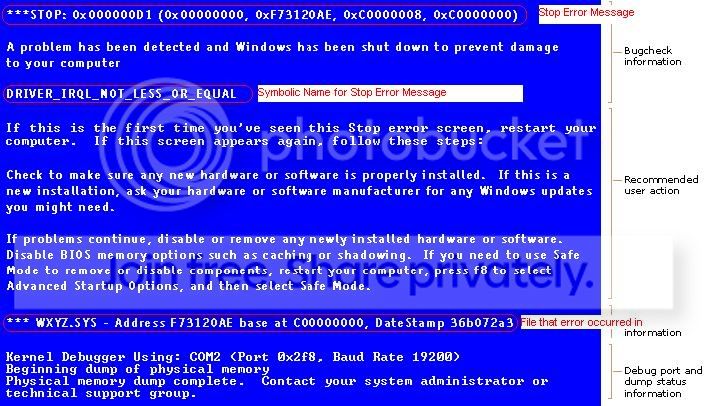
We'll need the memory dump if the system saves it. If not, then we'll have to make do with the following info:

Make sure that the system stops on the BSOD (so you can copy the needed info down).
Here's an image with the info that we need (the stuff in RED):
BSOD.jpg
 

My Computer My Computer

At a glance

Win7 x64 + x86Intel i7 920, other Intel chips, and the Atom...12 gB; 4 gB Lenovo; 1 gB Samsung netbookATI 4870
Computer Manufacturer/Model Number
Home built (x64), Lenovo x61s Tablet, Samsung Netbook
OS
Win7 x64 + x86
CPU
Intel i7 920, other Intel chips, and the Atom in the netbook
Motherboard
Asus P6T Deluxe
Memory
12 gB; 4 gB Lenovo; 1 gB Samsung netbook
Graphics Card(s)
ATI 4870
Sound Card
Yes, I have one of these
Monitor(s) Displays
32" Sharp Aquos TV
Screen Resolution
800x600 - I have vision issues
Hard Drives
4 - 150 gB Velociraptors in RAID 5
Promise controller
PSU
1000 watt (can't recall the brand)
Case
Antec 300
Cooling
Big honking cooler that was rated highly at Toms Hardware
Keyboard
Microsoft Natural
Mouse
Logitech Trackman
Internet Speed
Cable
Other Info
GeekSquad UPS
CyberPower UPS
DLink DNS-323 NAS (2 tB)
Netgear wireless router as an access point
Netgear wired router FSV-318
Home network consists of
4 desktop computers (2 Vista, 2 Win7)
1 netbook (Win7)
4 laptop computers (XP, 2-Vista, Win7)
Wii and XBox 360
The 0x4........ things are just memory address' and aren't updateable. (0x4a12f2eb)

The webcam uses several drivers and the one that was involved in the crash is the outdated one (sncduvc.SYS)
Not normally an issue - but you should rename the sncduvc.sys file to sncduvc.BAK (it's in the C:\Windows\System32\drivers folder). That will disable the webcam - but don't worry about it, you can rename it back (to .sys) when we're done)

spldr.sys is a Microsoft driver. As such the only way to update it is through Windows Update. If it doesn't update, then there's no newer version for your system (the version on my 64 bit Win7 system is from 19 Jul 2009)

ATK64AMD.sys - if you have the most recent one from the Asus website it's probably not necessary to update it. BUT, I recommend doing it anyway (in case the current version has an undetected corruption). The "best" way is to uninstall the old version before installing the new version (it gives the greatest chance of replacing all files).

GEARAspiWDM.sys is a CD filter driver that's licensed to many different programs. To figure out which one, rename the file to GEARAspiWDM.BAK and then see which CD/DVD program no longer works properly. FYI - I've never done this myself, so I can't tell you how long or which function of the program won't work. I'd just rename it and leave it at that until we're done troubleshooting.

amdxata.sys is an AMD Storage driver. BUT - your system has an Intel chipset (with Intel storage drivers) and an nVidia video card....very strange! I, personally, would rename the driver to .BAK to see what it does - BUT I am able to get into the hard drive to rename the file to .SYS if the system fails to boot. Can you do this? If not, then don't rename the file!!!

EDIT: Asus, it seems, has done the same thing as HP. It loads drivers for the different chipsets/processor that the drive image might encounter (look for AMD and Intel in the MSINFO32 report....Software Environment...System Drivers) While this is more efficient for Asus, it loads extra stuff on boot that may not be needed. And in order to get rid of it, you're forced to experiment with stopping services and removing drivers that might render your system unbootable.
ASMMAP64.sys is in the ATKGFNEX package in the same download as the ATK64AMD.sys was. It's in the ATK category of the download page (ATKACPI driver and hotkey-related utilities). This driver is the same date as the one on your system - but as I discussed earlier, it's a good idea to replace it just in case there's an issue with it.

what about the sound card "ksaud.sys" bsod? my system will not boot with verifier on while the sound card is plugged in, i get a BSOD screen on start up.

i will follow these steps and report back.

many thanks
 

My Computer My Computer

At a glance

windows 7
OS
windows 7
If the system won't boot without a BSOD when the sound card is plugged in (and verifier is turned on), then it's likely that there's a problem with your sound card drivers or the sound card itself.

To test, turn off Driver Verifier by booting with the sound card out. Then select "Delete existing settings" from the first screen in Driver Verifier. Shut the system down.
Reinstall the sound card, then boot the system up.
Uninstall the sound card software and drivers.
Download and install a fresh copy of the 64 bit Win7 drivers for your sound card (don't use Vista drivers).
Turn Driver Verifier on according to the previous instructions (it tests 3rd party drivers - such as the ksaud.sys driver).

See if it BSOD's again.
If so, the card is probably bad.
If not, then you've probably fixed it
Don't forget to turn Driver Verifier off by selecting "Delete existing settings" in the first screen.
 

My Computer My Computer

At a glance

Win7 x64 + x86Intel i7 920, other Intel chips, and the Atom...12 gB; 4 gB Lenovo; 1 gB Samsung netbookATI 4870
Computer Manufacturer/Model Number
Home built (x64), Lenovo x61s Tablet, Samsung Netbook
OS
Win7 x64 + x86
CPU
Intel i7 920, other Intel chips, and the Atom in the netbook
Motherboard
Asus P6T Deluxe
Memory
12 gB; 4 gB Lenovo; 1 gB Samsung netbook
Graphics Card(s)
ATI 4870
Sound Card
Yes, I have one of these
Monitor(s) Displays
32" Sharp Aquos TV
Screen Resolution
800x600 - I have vision issues
Hard Drives
4 - 150 gB Velociraptors in RAID 5
Promise controller
PSU
1000 watt (can't recall the brand)
Case
Antec 300
Cooling
Big honking cooler that was rated highly at Toms Hardware
Keyboard
Microsoft Natural
Mouse
Logitech Trackman
Internet Speed
Cable
Other Info
GeekSquad UPS
CyberPower UPS
DLink DNS-323 NAS (2 tB)
Netgear wireless router as an access point
Netgear wired router FSV-318
Home network consists of
4 desktop computers (2 Vista, 2 Win7)
1 netbook (Win7)
4 laptop computers (XP, 2-Vista, Win7)
Wii and XBox 360
I havnt had any BSOD in a few days. I have updated my chipset and wireless. reinstalled my sound card. weird thing is, after a restart, the audio icon (w7 native audio icom) sometimes does not show. same thing with the network manager icon. when i go to notification area icons and customize the icons, both are set to "show icon and notifications" when i switch them to sth else then back to "show icon and notifications" it says it is not active and will show the icon once it is. why is this happening? my network is online and i have internet. Sound is also working. the icons are not showing.

when i run driver verifier however, i still get BSOD on startup. Im sure it is the sound card. if i unplug it it does not BSOD on start up. i decided to keep it since the random BSOD stopped. will update if anything changes. will try and reinstall the driver again if that happens.

Many thanks for all your help. It is really appreciated.

regards
 

My Computer My Computer

At a glance

windows 7
OS
windows 7
Back
Top