Random BSOD couldn't find solution

standartuye

New member
Local time
4:56 PM
Messages
7
Hi guys

i have been getting random bsod since i purchased my laptop and i still couldnt find a solution

sometimes it happens sometimes not

here is my zip file

please look at last 2 dump files
 

My Computer

Computer type
PC/Desktop
OS
win 7 pro 64 bit
can someone help me please
 

My Computer

Computer type
PC/Desktop
OS
win 7 pro 64 bit
Hi,

The file points to "Memory corruption", meaning one or more of the computer memory modules could be damage.

*******************************************************************************
* *
* Bugcheck Analysis *
* *
*******************************************************************************

DRIVER_POWER_STATE_FAILURE (9f)
A driver is causing an inconsistent power state.
Arguments:
Arg1: 0000000000000003, A device object has been blocking an Irp for too long a time
Arg2: fffffa800e27f060, Physical Device Object of the stack
Arg3: fffff800047db3d8, Functional Device Object of the stack
Arg4: fffffa800f318010, The blocked IRP

Debugging Details:
------------------


DRVPOWERSTATE_SUBCODE: 3

IRP_ADDRESS: fffffa800f318010

DEVICE_OBJECT: 0000000000000000

CUSTOMER_CRASH_COUNT: 1

DEFAULT_BUCKET_ID: VISTA_DRIVER_FAULT

BUGCHECK_STR: 0x9F

CURRENT_IRQL: 0

LAST_CONTROL_TRANSFER: from 0000000000000000 to fffff800030925c0

STACK_TEXT:
fffff800`047db388 00000000`00000000 : 00000000`00000000 00000000`00000000 00000000`00000000 00000000`00000000 : nt!MiAllocatePoolPages+0x741


STACK_COMMAND: kb

FOLLOWUP_IP:
nt!MiAllocatePoolPages+741
fffff800`030925c0 48894c2408 mov qword ptr [rsp+8],rcx

SYMBOL_STACK_INDEX: 0

SYMBOL_NAME: nt!MiAllocatePoolPages+741

FOLLOWUP_NAME: MachineOwner

MODULE_NAME: nt

DEBUG_FLR_IMAGE_TIMESTAMP: 55afca65

IMAGE_NAME: memory_corruption

FAILURE_BUCKET_ID: X64_0x9F_nt!MiAllocatePoolPages+741

BUCKET_ID: X64_0x9F_nt!MiAllocatePoolPages+741

Followup: MachineOwner

 

My Computer

Computer Manufacturer/Model Number
HP-Pavilion m9280.uk-a
OS
Dual Boot, Vista Home premium & Windows 7. Both 32bit
CPU
2.30 gigahertz AMD Phenom 9600 Quad-Core
Motherboard
ASUSTek Computer INC. NARRA3 3.02
Memory
3582 Megabytes Usable Installed Memory (4 Gig)
Graphics Card(s)
ASUS NVIDIA Geforce GTS450
Sound Card
Realtek High Definition Audio
Monitor(s) Displays
Twin: - HP w2408h 24.0"
Screen Resolution
1920 * 1200 by 1920 * 1200
Hard Drives
1500.30 Gigabytes Usable Hard Drive Capacity
1188.54 Gigabytes Hard Drive Free Space

HL-DT-ST BD-RE GGW-H20L SCSI CdRom Device
KJWTGRQ YFS52R8XQ SCSI CdRom Device
TSSTcorp CDDVDW TS-H653N SCSI CdRom Device
Code:
*******************************************************************************
*                                                                             *
*                        Bugcheck Analysis                                    *
*                                                                             *
*******************************************************************************

Use !analyze -v to get detailed debugging information.

BugCheck 9F, {3, fffffa800e17e060, fffff800047e43d8, fffffa800e18aa50}
0x9F's are often USB-related error's. Unfortunately, in this case it appears to be a 3rd party driver for which WinDBG has no symbol information.

The best advice I can offer is to update all 3rd party drivers for your system, then see if the BSOD still persists.
 

My Computer

Computer type
PC/Desktop
Computer Manufacturer/Model Number
Golden Mk. I.4
OS
Windows 10 Pro x64 ; Xubuntu x64
CPU
Intel i7 860 @ 2.80 GHz O/C'ed to 4.0GHz
Motherboard
Gigabyte P55A-UD3R Rev.1. Award BIOS F13
Memory
16GB Corsair Vengance DDR3 @ 661 MHz Dual Channel (9-9-9-24)
Graphics Card(s)
EVGA NVidia GTX 560 1024MB
Sound Card
Realtek Integrated
Monitor(s) Displays
Dual Samsung SyncMaster 2494HS
Screen Resolution
1920*1080 and 1920*1080
Hard Drives
1*Samsung 840 EVO 120GB SSD;
1*OCZ Vertex 2 60GB SSD;
2*Samsung F3 SpinPoint 1TB in RAID0;
1*Samsung F1 SpinPoint 1TB;
2*Western Digital 1TB External USB 3.0
1*Western Digital 500GB External USB 3.0
1*Seagate 500GB External USB 2.0
PSU
Thermaltake ToughPower QFan 750W
Case
Thermaltake Element S VK60001W2Z
Cooling
Corsair H60 Water Cooling, 2*230mm and 2*80mm case fans
Keyboard
Logitech G110
Mouse
Logitech MX518
  • Like
Reactions: Arc
Code:
*******************************************************************************
*                                                                             *
*                        Bugcheck Analysis                                    *
*                                                                             *
*******************************************************************************

Use !analyze -v to get detailed debugging information.

BugCheck 9F, {3, fffffa800e17e060, fffff800047e43d8, fffffa800e18aa50}
0x9F's are often USB-related error's. Unfortunately, in this case it appears to be a 3rd party driver for which WinDBG has no symbol information.

The best advice I can offer is to update all 3rd party drivers for your system, then see if the BSOD still persists.


thank you for your help

what do you mean 3rd party. i have only mouse and wifi receiver pluggin in on my computer externally.
 

My Computer

Computer type
PC/Desktop
OS
win 7 pro 64 bit
Which brand of mouse? Is the WiFi dongle plugged into a USB port?
 

My Computer

Computer type
PC/Desktop
Computer Manufacturer/Model Number
Golden Mk. I.4
OS
Windows 10 Pro x64 ; Xubuntu x64
CPU
Intel i7 860 @ 2.80 GHz O/C'ed to 4.0GHz
Motherboard
Gigabyte P55A-UD3R Rev.1. Award BIOS F13
Memory
16GB Corsair Vengance DDR3 @ 661 MHz Dual Channel (9-9-9-24)
Graphics Card(s)
EVGA NVidia GTX 560 1024MB
Sound Card
Realtek Integrated
Monitor(s) Displays
Dual Samsung SyncMaster 2494HS
Screen Resolution
1920*1080 and 1920*1080
Hard Drives
1*Samsung 840 EVO 120GB SSD;
1*OCZ Vertex 2 60GB SSD;
2*Samsung F3 SpinPoint 1TB in RAID0;
1*Samsung F1 SpinPoint 1TB;
2*Western Digital 1TB External USB 3.0
1*Western Digital 500GB External USB 3.0
1*Seagate 500GB External USB 2.0
PSU
Thermaltake ToughPower QFan 750W
Case
Thermaltake Element S VK60001W2Z
Cooling
Corsair H60 Water Cooling, 2*230mm and 2*80mm case fans
Keyboard
Logitech G110
Mouse
Logitech MX518
Also consider disabling bluetooth in device manager; and disable Mediatek Wireless Utility from Startup.
 

My Computer

Computer type
PC/Desktop
Computer Manufacturer/Model Number
Self Assembled
OS
Microsoft Windows 10 Pro Insider Preview 64-bit
CPU
Intel(R) Core(TM) i3-4130 CPU @ 3.40GHz
Motherboard
Gigabyte Technology Co., Ltd. B85M-D3H
Memory
Corsair Vengence 4GB x2 (8.00GB Dual-Channel DDR3 @ 798MHz)
Graphics Card(s)
2047MB GeForce GTS 450 (ZOTAC International)
Sound Card
Onboard (Realtek High Definition Audio)
Monitor(s) Displays
LG Flatron E2040T
Screen Resolution
1600x900
Hard Drives
Western Digital 1 TB
Seagate 500 GB
PSU
Corsair VS550
Case
Cooler Master K380
Cooling
Cooler Master Seidon 120V Plus
Keyboard
Logitech MK260r
Mouse
Logitech MK260r
Internet Speed
PMPL Broadband
Antivirus
Windows Defender + MBAM
Browser
Firefox
Other Info
Dell Studio 15" Laptop
Which brand of mouse? Is the WiFi dongle plugged into a USB port?

it is old one
microsoft optical mouse 100

https://www.microsoft.com/hardware/en-ph/p/optical-mouse-100#overview

i have only mouse and wireless usb adapter which is

150Mbps High Power Wireless USB Adapter TL-WN7200ND - Welcome to TP-LINK


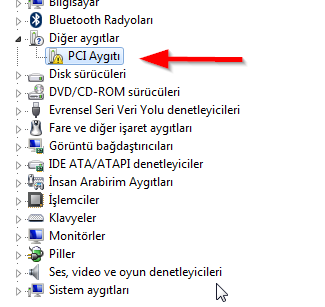
And also there is unidentified Pci device on device manager which i couldnt find out what it is

zTBO0J.png
 

My Computer

Computer type
PC/Desktop
OS
win 7 pro 64 bit
Please consider disabling Bluetooth and report us the situation.
 

My Computer

Computer type
PC/Desktop
Computer Manufacturer/Model Number
Self Assembled
OS
Microsoft Windows 10 Pro Insider Preview 64-bit
CPU
Intel(R) Core(TM) i3-4130 CPU @ 3.40GHz
Motherboard
Gigabyte Technology Co., Ltd. B85M-D3H
Memory
Corsair Vengence 4GB x2 (8.00GB Dual-Channel DDR3 @ 798MHz)
Graphics Card(s)
2047MB GeForce GTS 450 (ZOTAC International)
Sound Card
Onboard (Realtek High Definition Audio)
Monitor(s) Displays
LG Flatron E2040T
Screen Resolution
1600x900
Hard Drives
Western Digital 1 TB
Seagate 500 GB
PSU
Corsair VS550
Case
Cooler Master K380
Cooling
Cooler Master Seidon 120V Plus
Keyboard
Logitech MK260r
Mouse
Logitech MK260r
Internet Speed
PMPL Broadband
Antivirus
Windows Defender + MBAM
Browser
Firefox
Other Info
Dell Studio 15" Laptop
Back
Top