Random BSOD error 0x00000124 with quite a bit of testing done

sharp12

New member
Local time
3:15 PM
Messages
7
Hello there,

I replaced my old video card with a nvidia 770 evga and the temperatures on it are much better. No overheating is occurring on any of my pc components.

I am still getting bsod with stop code 124. Attached new zip file.

To recap, just about every component has been replaced except for my power supply. There is no overclocking and all temps are fine when stressed. Since the video card has been replaced, no more screen tearing to BSOD have been observed. It seems to occur randomly when gaming and when not gaming, just browsing internet, etc.


Win7 Ultimate 64bit
z87x-ud4h Gigabyte
180 GB Corsair GForce SSD (tested with OS installed)
1TB Caviar Black WD (tested with OS installed)
EVGA GTX 770
850W CoolerMaster
8GB Corsair Vengeance Pro 2133MHz (clocked at 1600MHz) // 6 GB Corsair Dominator 1600MHz (for testing)
i7 4770k 3.5GHz (turbo off)


-------------------------------------------------------------------------------


Hi there,

I have been getting BSOD (mainly 0x00000124 with occasional 0x0000004a) for about a month now. I've done several things to rule certain hardware components out, but am still unable to pinpoint the culprit. When it happens my computer bogs down for a few seconds before BSOD. Sound will stutter oddly and windows will not respond to clicking start button or resizing windows etc. My monitor displays a bunch of horizontal colors then BSOD.

Win7 Ultimate 64bit
z87x-ud4h Gigabyte
180 GB Corsair GForce SSD (tested with OS installed)
1TB Caviar Black WD (tested with OS installed)
XFX HD 6950
850W CoolerMaster
8GB Corsair Vengeance Pro 2133MHz (clocked at 1600MHz) // 6 GB Corsair Dominator 1600MHz (for testing)
i7 4770k 3.5GHz (turbo off)

I've ran memtest on my memory for about 16 hours with no errors. I did use both sticks at once however. I also switched my 8GB vengeance for the 6GB dominator, but still encounter BSOD. I made sure my timings were set correctly.

I ran chkdsk /r on both my harddrives with no errors. I took out my ssd from my computer and am now just using the 1TB (previously used for data), but still seem to encounter BSOD.

I have took out my video card and ran with onboard graphics. Same thing.

It seems like all I have left is PSU, MOBO, and processor.


This is the most recent BSOD, which I received 10 minutes into a fresh windows install.
 
Last edited:

My Computer My Computer

At a glance

Win7 Ultimate 64bitI7 4770k 3.5GHz (Turboboost Disabled)8GB Corsair Vengeance Pro2133MHz (Currently r...XFX HD 6950
Computer type
PC/Desktop
OS
Win7 Ultimate 64bit
CPU
I7 4770k 3.5GHz (Turboboost Disabled)
Motherboard
Gigabyte Z87X-UD4H rev 1.0
Memory
8GB Corsair Vengeance Pro2133MHz (Currently running 1600MHz)
Graphics Card(s)
XFX HD 6950
Hard Drives
180GB Corsair GForce SSD
1TB Caviar WD
Antivirus
Total Security Bitdefender
Browser
Chome
Welcome to SF :) .

There is only one bug check in the file uploaded as well as only one is logged
in the System Event log (i guess because it's a fresh install) too bad that wiped any evidence
that was left behind, however the bug check (uploaded) is not 0x124 rather it's 0x24.
I would like to have some more to get more perspective.

What you're describing sounds like a thermal issue / RAM / Motherboard.
When you got the horizontal lines (artifacts) on the screen, was it with the dedicated
GPU installed or while using the onboard graphics?
Does it always display those before it bug checks?
Where did you obtain the installation media?
Did you try a different one?


Fill out this form and post back the result:


Test for thermals and stability:

  • Download Speccy and post a Screenshot of the summary window, one at idle and another while putting load on the PC using Prime95 for the CPU side and Furmark for the GPU.
    • Before running Prime95 make sure to enable Round-off checking (see 1st post under the tutorial).

Reset the BIOS back to default in case you're unaware that your CPU is overclocked:

   Note
Write down the current value of the SATA Mode!
Its either AHCI or IDE.
After resetting the CMOS go back and verify the value for SATA Mode is what it was
when the OS was installed.


   Note
If any component is overclocked reset it back to stock speeds!


   Warning
The Following Method Should NOT Be Performed On An SSD!


Testing the HDD:


  1. Perform a Disk Check | Disk Check- Scroll down to OPTION TWO of the tutorial and use the /R switch in the CHKDSK command | chkdsk C: /R.
  2. Then Post the Disk Check results following | This Tutorial.
  3. Once back in Windows, download Crystal Disk Info and post a screenshot (multiple shots if you have more than one drive).
  4. Download SeaTools for DOS if you don't want to use a CD to test the HDD you can use YUMI – Multiboot USB Creator to create a bootable USB (instructions are found at the bottom of both pages).
  5. If SeaTools for DOS is unable to recognize your HDD:
  6. Visit HDDdiag and follow the instructions | Or follow the instructions below.
If SeaTools For DOS does not recognize the drive;
Boot into the BIOS using the *Fx key.
Look for an entry called SATA Mode (or something similar), it should be set to IDE / AHCI.
It's probably set to AHCI which is why SeaTools doesn't recognize them in the DOS environment.
Set it to IDE then save and exit usually by pressing the F10 key.
Now boot into SeaTools and it should detect the drives.
Start the Long Test and let it run.
Upon completion don't try to boot into Windows as it will only result in a BSOD, go back into the BIOS
and change the SATA setting back to what it was in the first place.


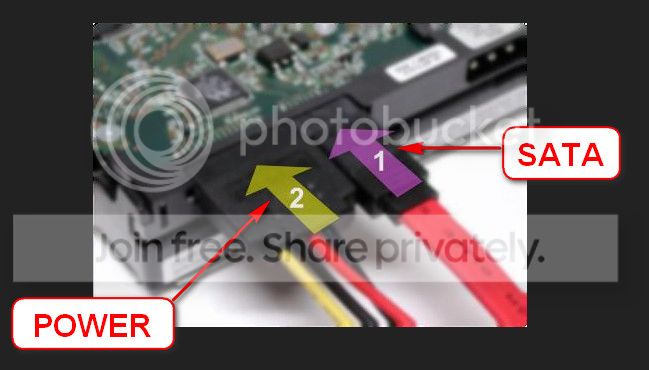
Re-seat the sata and power.

72974453_zps85c47d93.jpg

Let us know the results.


Good places to read more:


My Computer My Computer

At a glance

Windows 10Intel Core i5 3570K16GB 1600Mhz G.SkillGigabyte GTX 970 G1-Gaming
Computer type
PC/Desktop
OS
Windows 10
CPU
Intel Core i5 3570K
Motherboard
Asus P8Z77V-PRO
Memory
16GB 1600Mhz G.Skill
Graphics Card(s)
Gigabyte GTX 970 G1-Gaming
PSU
Seasonic 1000W Platinum
Case
Fractal Design Define R4
Cooling
Noctua NH-D14
Hi again!

Thanks for the help with testing my issues :) I have finished everything you have asked.

  • I get my BSOD just about daily, but I didn't get one yesterday probably due to the fact that I was testing for a good amount of time.
  • When I get the artifacts, it has happend with my discrete graphics card in place.
  • It does not always display the artifacts, sometimes the screen turns black and goes to BSOD after a few seconds.
  • I got my windows 7 ultimate from my university. I have been using it for a good 3 years without trying a different CD.
  • The recommended power supply was calculated to be 396W.
  • I ran the seatools long test and woke up hearing the sound of the disk spinning really fast and loud. The computer was also frozen at 30% after about 4 hours. I restarted comp and ran it again, which passed the long and short test after 2.5 hours.

I've attached the results here. Thanks again!
 

My Computer My Computer

At a glance

Win7 Ultimate 64bitI7 4770k 3.5GHz (Turboboost Disabled)8GB Corsair Vengeance Pro2133MHz (Currently r...XFX HD 6950
Computer type
PC/Desktop
OS
Win7 Ultimate 64bit
CPU
I7 4770k 3.5GHz (Turboboost Disabled)
Motherboard
Gigabyte Z87X-UD4H rev 1.0
Memory
8GB Corsair Vengeance Pro2133MHz (Currently running 1600MHz)
Graphics Card(s)
XFX HD 6950
Hard Drives
180GB Corsair GForce SSD
1TB Caviar WD
Antivirus
Total Security Bitdefender
Browser
Chome
Hi again!

Thanks for the help with testing my issues :) I have finished everything you have asked.

  • I get my BSOD just about daily, but I didn't get one yesterday probably due to the fact that I was testing for a good amount of time.
  • When I get the artifacts, it has happend with my discrete graphics card in place.
  • It does not always display the artifacts, sometimes the screen turns black and goes to BSOD after a few seconds.
  • I got my windows 7 ultimate from my university. I have been using it for a good 3 years without trying a different CD.
  • The recommended power supply was calculated to be 396W.
  • I ran the seatools long test and woke up hearing the sound of the disk spinning really fast and loud. The computer was also frozen at 30% after about 4 hours. I restarted comp and ran it again, which passed the long and short test after 2.5 hours.

I've attached the results here. Thanks again!

What I take from what you said along with the results you uploaded is we need to check the PC
dust accumulation and airflow
as the GPU is overheating !!
The CPU is suffering a fair bit as well.

And that we need to test the RAM as well.

Testing the RAM:

Test and Diagnose RAM Issues with Memtest86+:
   Tip

  • :info: Pay close attention to part 3 of the tutorial "If you have errors"
  • :tip: Test the RAM with Memtest86+ for at least 7-10 passes. It may take up to 22 passes to find problems. Make sure to run it once after the system has been on for a few hours and is warm, and then also run it again when the system has been off for a few hours and is cold.
When done with the testing procedure take a picture and upload it here.
Keep us posted :) .
 

My Computer My Computer

At a glance

Windows 10Intel Core i5 3570K16GB 1600Mhz G.SkillGigabyte GTX 970 G1-Gaming
Computer type
PC/Desktop
OS
Windows 10
CPU
Intel Core i5 3570K
Motherboard
Asus P8Z77V-PRO
Memory
16GB 1600Mhz G.Skill
Graphics Card(s)
Gigabyte GTX 970 G1-Gaming
PSU
Seasonic 1000W Platinum
Case
Fractal Design Define R4
Cooling
Noctua NH-D14
Thanks again for the follow up!

I did check out the dust on my graphics card. There wasn't much that accumulated as the last time I cleaned it out was about a month ago when I put in my new motherboard. I opened the card up and cleaned it out the best I could. Still getting around 60c idle temps with close to 80c playing games.

The CPU I'm pretty content with being under 70c with 100% load. I keep it under 80c when overclocked and this cooler has been able to do that. (Right now its not OC)

I've also ran memtest again and uploaded the results. I will run it again tonight when the pc has been off for a couple hours as instructed. I don't expect to see any errors but I will post those results tomorrow.

I also have not had any BSOD recently, which is unusual. It seemed to happen once every week - then this last month it started to happen once every day.
 

My Computer My Computer

At a glance

Win7 Ultimate 64bitI7 4770k 3.5GHz (Turboboost Disabled)8GB Corsair Vengeance Pro2133MHz (Currently r...XFX HD 6950
Computer type
PC/Desktop
OS
Win7 Ultimate 64bit
CPU
I7 4770k 3.5GHz (Turboboost Disabled)
Motherboard
Gigabyte Z87X-UD4H rev 1.0
Memory
8GB Corsair Vengeance Pro2133MHz (Currently running 1600MHz)
Graphics Card(s)
XFX HD 6950
Hard Drives
180GB Corsair GForce SSD
1TB Caviar WD
Antivirus
Total Security Bitdefender
Browser
Chome
Thanks for the update :) .

The PC appears to be clean enough but yet the GPU is hot!
88°C from the Speccy screenshot uploaded earlier.

I also have not had any BSOD recently, which is unusual. It seemed to happen once every week - then this last month it started to happen once every day.

This is both good news and somewhat weird as 0x124 bug checks don't tend to disappear,
what did you do beside testing, did you clear the CMOS?
 

My Computer My Computer

At a glance

Windows 10Intel Core i5 3570K16GB 1600Mhz G.SkillGigabyte GTX 970 G1-Gaming
Computer type
PC/Desktop
OS
Windows 10
CPU
Intel Core i5 3570K
Motherboard
Asus P8Z77V-PRO
Memory
16GB 1600Mhz G.Skill
Graphics Card(s)
Gigabyte GTX 970 G1-Gaming
PSU
Seasonic 1000W Platinum
Case
Fractal Design Define R4
Cooling
Noctua NH-D14
I did clear cmos and I also left the system memory underclocked at 1333 and processor on turbo 3.7GHz which were default settings.

Other than that, I've only installed the remaining drivers after that first BSOD.
 

My Computer My Computer

At a glance

Win7 Ultimate 64bitI7 4770k 3.5GHz (Turboboost Disabled)8GB Corsair Vengeance Pro2133MHz (Currently r...XFX HD 6950
Computer type
PC/Desktop
OS
Win7 Ultimate 64bit
CPU
I7 4770k 3.5GHz (Turboboost Disabled)
Motherboard
Gigabyte Z87X-UD4H rev 1.0
Memory
8GB Corsair Vengeance Pro2133MHz (Currently running 1600MHz)
Graphics Card(s)
XFX HD 6950
Hard Drives
180GB Corsair GForce SSD
1TB Caviar WD
Antivirus
Total Security Bitdefender
Browser
Chome
I just finished the cold run after 6 passes. No errors! :(

Maybe our next step should be to wait for another BSOD?
 

My Computer My Computer

At a glance

Win7 Ultimate 64bitI7 4770k 3.5GHz (Turboboost Disabled)8GB Corsair Vengeance Pro2133MHz (Currently r...XFX HD 6950
Computer type
PC/Desktop
OS
Win7 Ultimate 64bit
CPU
I7 4770k 3.5GHz (Turboboost Disabled)
Motherboard
Gigabyte Z87X-UD4H rev 1.0
Memory
8GB Corsair Vengeance Pro2133MHz (Currently running 1600MHz)
Graphics Card(s)
XFX HD 6950
Hard Drives
180GB Corsair GForce SSD
1TB Caviar WD
Antivirus
Total Security Bitdefender
Browser
Chome
I just finished the cold run after 6 passes. No errors! :(

Maybe our next step should be to wait for another BSOD?
Yes and no, let me explain.
Yes please post the bug checks whenever they occur.
And no, as in don't wait. I would raise the RAM speed to 1600MHz, preferably using the X.M.P if that is available in that speed, also making sure that the timings are correct (this is crucial!) and see
if the machine bug check's again if it does you could consider RAM'ing the RAM as it's delivering
the promised (paid for) speed.
 

My Computer My Computer

At a glance

Windows 10Intel Core i5 3570K16GB 1600Mhz G.SkillGigabyte GTX 970 G1-Gaming
Computer type
PC/Desktop
OS
Windows 10
CPU
Intel Core i5 3570K
Motherboard
Asus P8Z77V-PRO
Memory
16GB 1600Mhz G.Skill
Graphics Card(s)
Gigabyte GTX 970 G1-Gaming
PSU
Seasonic 1000W Platinum
Case
Fractal Design Define R4
Cooling
Noctua NH-D14
It is rated for 2133MHz, would you advise against raising it to this speed? Maybe 1600MHz for now?
 

My Computer My Computer

At a glance

Win7 Ultimate 64bitI7 4770k 3.5GHz (Turboboost Disabled)8GB Corsair Vengeance Pro2133MHz (Currently r...XFX HD 6950
Computer type
PC/Desktop
OS
Win7 Ultimate 64bit
CPU
I7 4770k 3.5GHz (Turboboost Disabled)
Motherboard
Gigabyte Z87X-UD4H rev 1.0
Memory
8GB Corsair Vengeance Pro2133MHz (Currently running 1600MHz)
Graphics Card(s)
XFX HD 6950
Hard Drives
180GB Corsair GForce SSD
1TB Caviar WD
Antivirus
Total Security Bitdefender
Browser
Chome
Yes, gradually raise it until it becomes unstable then pull it back to the last stable speed
if it stays that way then you can raise it again to confirm that it is the RAM speeds :) .
 

My Computer My Computer

At a glance

Windows 10Intel Core i5 3570K16GB 1600Mhz G.SkillGigabyte GTX 970 G1-Gaming
Computer type
PC/Desktop
OS
Windows 10
CPU
Intel Core i5 3570K
Motherboard
Asus P8Z77V-PRO
Memory
16GB 1600Mhz G.Skill
Graphics Card(s)
Gigabyte GTX 970 G1-Gaming
PSU
Seasonic 1000W Platinum
Case
Fractal Design Define R4
Cooling
Noctua NH-D14
Hello there,

I replaced my old video card with a nvidia 770 evga and the temperatures on it are much better. No overheating is occurring on any of my pc components.

I am still getting bsod with stop code 124. Attached new zip file.


Windows 7 Ultimate 64bit
z87x-ud4h Gigabyte
180 GB Corsair GForce SSD (tested with OS installed)
1TB Caviar Black WD (tested with OS installed)
EVGA GTX 770
850W CoolerMaster
8GB Corsair Vengeance Pro 2133MHz (clocked at 1600MHz) // 6 GB Corsair Dominator 1600MHz (for testing)
i7 4770k 3.5GHz (turbo off)
 

My Computer My Computer

At a glance

Win7 Ultimate 64bitI7 4770k 3.5GHz (Turboboost Disabled)8GB Corsair Vengeance Pro2133MHz (Currently r...XFX HD 6950
Computer type
PC/Desktop
OS
Win7 Ultimate 64bit
CPU
I7 4770k 3.5GHz (Turboboost Disabled)
Motherboard
Gigabyte Z87X-UD4H rev 1.0
Memory
8GB Corsair Vengeance Pro2133MHz (Currently running 1600MHz)
Graphics Card(s)
XFX HD 6950
Hard Drives
180GB Corsair GForce SSD
1TB Caviar WD
Antivirus
Total Security Bitdefender
Browser
Chome
Back
Top