Random BSOD & Lock Ups, code 0x000000f4

theoryace

New member
Local time
10:01 AM
Messages
16
Hello everybody,
I recently made a custom build PC and I get these weird crashes and bluescreens.
So I went to the computer store and they had it for like two weeks but they didn't find anything weird, maybe they are just bad at their work or it's something really weird.

These are some bluescreens I had in bluescreenview.
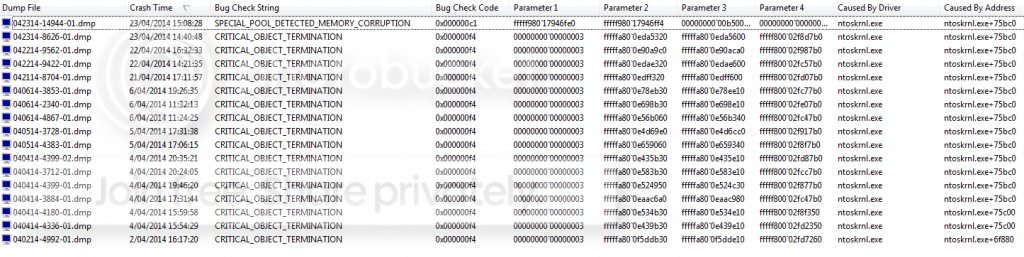
bluescreens_zps8819b193.png


This is a minidump or download the attached file
Minidump(dropbox)

Anyone willing to help me?
Kind Regards
 
Last edited:

My Computer My Computer

Computer type
PC/Desktop
Computer Manufacturer/Model Number
Custom Build
OS
Windows 7 Professional x64
CPU
Intel® Core™ i5-4670 Processor
Motherboard
MSI H87-G43 GAMING
Memory
CORSAIR VENGEANCE PRO 16 GB DIMM DDR3-1600
Graphics Card(s)
GeForce GTX 780
Hard Drives
SSD 840 EVO 250GB
Antivirus
Microsoft Security Essentials
Browser
Chrome

My Computer My Computer

Computer type
PC/Desktop
Computer Manufacturer/Model Number
Self Assembled
OS
Microsoft Windows 10 Pro Insider Preview 64-bit
CPU
Intel(R) Core(TM) i3-4130 CPU @ 3.40GHz
Motherboard
Gigabyte Technology Co., Ltd. B85M-D3H
Memory
Corsair Vengence 4GB x2 (8.00GB Dual-Channel DDR3 @ 798MHz)
Graphics Card(s)
2047MB GeForce GTS 450 (ZOTAC International)
Sound Card
Onboard (Realtek High Definition Audio)
Monitor(s) Displays
LG Flatron E2040T
Screen Resolution
1600x900
Hard Drives
Western Digital 1 TB
Seagate 500 GB
PSU
Corsair VS550
Case
Cooler Master K380
Cooling
Cooler Master Seidon 120V Plus
Keyboard
Logitech MK260r
Mouse
Logitech MK260r
Internet Speed
PMPL Broadband
Antivirus
Windows Defender + MBAM
Browser
Firefox
Other Info
Dell Studio 15" Laptop
Here you go!
 

My Computer My Computer

Computer type
PC/Desktop
Computer Manufacturer/Model Number
Custom Build
OS
Windows 7 Professional x64
CPU
Intel® Core™ i5-4670 Processor
Motherboard
MSI H87-G43 GAMING
Memory
CORSAIR VENGEANCE PRO 16 GB DIMM DDR3-1600
Graphics Card(s)
GeForce GTX 780
Hard Drives
SSD 840 EVO 250GB
Antivirus
Microsoft Security Essentials
Browser
Chrome
A stop 0xF4 is a storage related issue.

You have Samsung magician installed. Check for any possible updates to the firmware. If available, install it.

Re-seat the sata and power.

  • 72974453_zps85c47d93.jpg
Change the SATA cable. Apply the cable to another unused SATA port the motherboard.

Post a screenshot of the SSD using CrystalDiskInfo - Software - Crystal Dew World

Good job by enabling driver verifier! It caught some junks like MSI live update.
Code:
BugCheck C1, {fffff98017946fe0, fffff98017946ff4, b50014, 24}

*** WARNING: Unable to verify timestamp for amifldrv64.sys
*** ERROR: Module load completed but symbols could not be loaded for amifldrv64.sys
[COLOR=Red]Probably caused by : amifldrv64.sys[/COLOR] ( amifldrv64+1d6f )

Followup: MachineOwner
---------
You need to get rid of it. I'd recommend you to http://www.sevenforums.com/tutorials/219576-clean-up-factory-bloatware.html, with a special reference to Point #13
13. Consider a Clean Reinstall - Factory OEM Windows 7 which is often better than getting a new computer considering how pre-installed bloatware can corrupt Windows 7 even if it's completely cleaned up.
Let us know the results.
 

My Computer My Computer

Computer type
PC/Desktop
Computer Manufacturer/Model Number
Self Assembled
OS
Microsoft Windows 10 Pro Insider Preview 64-bit
CPU
Intel(R) Core(TM) i3-4130 CPU @ 3.40GHz
Motherboard
Gigabyte Technology Co., Ltd. B85M-D3H
Memory
Corsair Vengence 4GB x2 (8.00GB Dual-Channel DDR3 @ 798MHz)
Graphics Card(s)
2047MB GeForce GTS 450 (ZOTAC International)
Sound Card
Onboard (Realtek High Definition Audio)
Monitor(s) Displays
LG Flatron E2040T
Screen Resolution
1600x900
Hard Drives
Western Digital 1 TB
Seagate 500 GB
PSU
Corsair VS550
Case
Cooler Master K380
Cooling
Cooler Master Seidon 120V Plus
Keyboard
Logitech MK260r
Mouse
Logitech MK260r
Internet Speed
PMPL Broadband
Antivirus
Windows Defender + MBAM
Browser
Firefox
Other Info
Dell Studio 15" Laptop
I will reinstall Windows 7 with one of the iso's from the link you just gave if I get another BSOD because I just changed to another SATA port.
The CrystalDiskInfo you asked for are attached, one of my HDD and one of my SSD.
The SSD is on the lateste firmware, Samsung Magician -> Currently installed firmware: EXT0BB6Q.
 

My Computer My Computer

Computer type
PC/Desktop
Computer Manufacturer/Model Number
Custom Build
OS
Windows 7 Professional x64
CPU
Intel® Core™ i5-4670 Processor
Motherboard
MSI H87-G43 GAMING
Memory
CORSAIR VENGEANCE PRO 16 GB DIMM DDR3-1600
Graphics Card(s)
GeForce GTX 780
Hard Drives
SSD 840 EVO 250GB
Antivirus
Microsoft Security Essentials
Browser
Chrome
Test the HDD using Data Lifeguard Diagnostic for Windows.

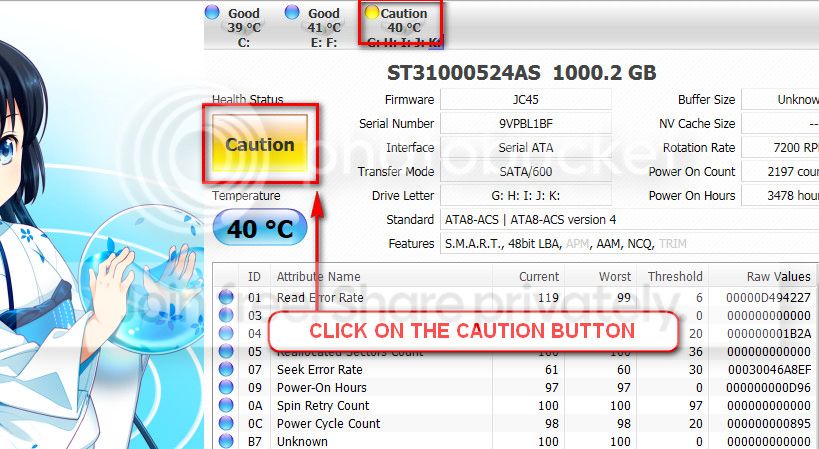
The caution indication can be converted to good using CrystalDiscInfo. Click on the caution Button, you will get another window ....
1_zps1eeadfca.jpg


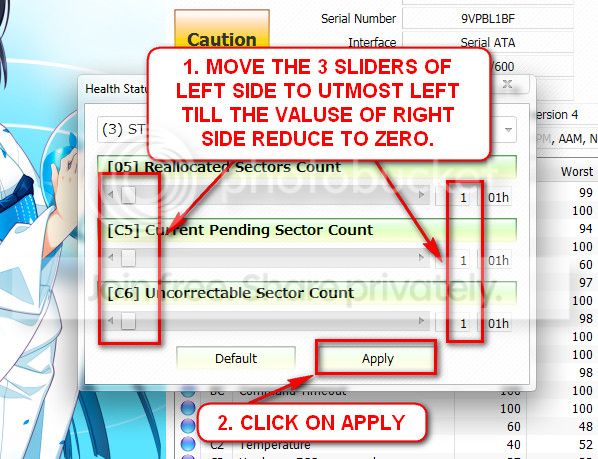
In the resulting window, there are three sliders in the left. Drag them to the ultimate left, and notice the values at the right side are converting to zeros.
2_zps50ae6eec.jpg


Now click the apply button, and notice that the caution is gone. But that is a temporary solution.
 

My Computer My Computer

Computer type
PC/Desktop
Computer Manufacturer/Model Number
Self Assembled
OS
Microsoft Windows 10 Pro Insider Preview 64-bit
CPU
Intel(R) Core(TM) i3-4130 CPU @ 3.40GHz
Motherboard
Gigabyte Technology Co., Ltd. B85M-D3H
Memory
Corsair Vengence 4GB x2 (8.00GB Dual-Channel DDR3 @ 798MHz)
Graphics Card(s)
2047MB GeForce GTS 450 (ZOTAC International)
Sound Card
Onboard (Realtek High Definition Audio)
Monitor(s) Displays
LG Flatron E2040T
Screen Resolution
1600x900
Hard Drives
Western Digital 1 TB
Seagate 500 GB
PSU
Corsair VS550
Case
Cooler Master K380
Cooling
Cooler Master Seidon 120V Plus
Keyboard
Logitech MK260r
Mouse
Logitech MK260r
Internet Speed
PMPL Broadband
Antivirus
Windows Defender + MBAM
Browser
Firefox
Other Info
Dell Studio 15" Laptop
I used the Data Lifeguard Diagnostic for Windows on my HDD.
Changing SATA port and cable did not work for the BSOD.
Going to try to reinstall windows 7!
 

My Computer My Computer

Computer type
PC/Desktop
Computer Manufacturer/Model Number
Custom Build
OS
Windows 7 Professional x64
CPU
Intel® Core™ i5-4670 Processor
Motherboard
MSI H87-G43 GAMING
Memory
CORSAIR VENGEANCE PRO 16 GB DIMM DDR3-1600
Graphics Card(s)
GeForce GTX 780
Hard Drives
SSD 840 EVO 250GB
Antivirus
Microsoft Security Essentials
Browser
Chrome
It also seems that the HDD should be replaced.

315049d1398345832-random-bsod-lock-ups-code-0x000000f4-hddtest.png
 

My Computer My Computer

Computer type
PC/Desktop
Computer Manufacturer/Model Number
Self Assembled
OS
Microsoft Windows 10 Pro Insider Preview 64-bit
CPU
Intel(R) Core(TM) i3-4130 CPU @ 3.40GHz
Motherboard
Gigabyte Technology Co., Ltd. B85M-D3H
Memory
Corsair Vengence 4GB x2 (8.00GB Dual-Channel DDR3 @ 798MHz)
Graphics Card(s)
2047MB GeForce GTS 450 (ZOTAC International)
Sound Card
Onboard (Realtek High Definition Audio)
Monitor(s) Displays
LG Flatron E2040T
Screen Resolution
1600x900
Hard Drives
Western Digital 1 TB
Seagate 500 GB
PSU
Corsair VS550
Case
Cooler Master K380
Cooling
Cooler Master Seidon 120V Plus
Keyboard
Logitech MK260r
Mouse
Logitech MK260r
Internet Speed
PMPL Broadband
Antivirus
Windows Defender + MBAM
Browser
Firefox
Other Info
Dell Studio 15" Laptop
I reinstalled windows 7 but now instead of bluescreens my pc just freezes and keeps running but nothing is responding.

Things I did:
- Change SATA port
- Change SATA cable
- Remove HDD from system
- Reinstalled Windows 7
 

My Computer My Computer

Computer type
PC/Desktop
Computer Manufacturer/Model Number
Custom Build
OS
Windows 7 Professional x64
CPU
Intel® Core™ i5-4670 Processor
Motherboard
MSI H87-G43 GAMING
Memory
CORSAIR VENGEANCE PRO 16 GB DIMM DDR3-1600
Graphics Card(s)
GeForce GTX 780
Hard Drives
SSD 840 EVO 250GB
Antivirus
Microsoft Security Essentials
Browser
Chrome
Shut the PC down. Remove the powe plug. Check that you seated everything properly. If you can, re-seat those.
 

My Computer My Computer

Computer type
PC/Desktop
Computer Manufacturer/Model Number
Self Assembled
OS
Microsoft Windows 10 Pro Insider Preview 64-bit
CPU
Intel(R) Core(TM) i3-4130 CPU @ 3.40GHz
Motherboard
Gigabyte Technology Co., Ltd. B85M-D3H
Memory
Corsair Vengence 4GB x2 (8.00GB Dual-Channel DDR3 @ 798MHz)
Graphics Card(s)
2047MB GeForce GTS 450 (ZOTAC International)
Sound Card
Onboard (Realtek High Definition Audio)
Monitor(s) Displays
LG Flatron E2040T
Screen Resolution
1600x900
Hard Drives
Western Digital 1 TB
Seagate 500 GB
PSU
Corsair VS550
Case
Cooler Master K380
Cooling
Cooler Master Seidon 120V Plus
Keyboard
Logitech MK260r
Mouse
Logitech MK260r
Internet Speed
PMPL Broadband
Antivirus
Windows Defender + MBAM
Browser
Firefox
Other Info
Dell Studio 15" Laptop
I just re-seated everything except my cpu, but could it be my mobo that's giving the BSOD/ lockups?
 

My Computer My Computer

Computer type
PC/Desktop
Computer Manufacturer/Model Number
Custom Build
OS
Windows 7 Professional x64
CPU
Intel® Core™ i5-4670 Processor
Motherboard
MSI H87-G43 GAMING
Memory
CORSAIR VENGEANCE PRO 16 GB DIMM DDR3-1600
Graphics Card(s)
GeForce GTX 780
Hard Drives
SSD 840 EVO 250GB
Antivirus
Microsoft Security Essentials
Browser
Chrome
The possibility always remains there. But we cannot test the motherboard at its own.

If we make it sure that the HDDs and SSDs are fine and up to the mark, cables are good and properly seated, there is no other external element that is causing any abnormal behavior to the discs (any sort of storage filters like defragger, backup tool, partition tool, antivirus or even a virus), then we may minimize the cause of a stop 0xF4 to a failing SATA port on the motherboard.

So it is necessary to see what is the situation after the re-seating.

OK? :) Let us know how it is going.
 

My Computer My Computer

Computer type
PC/Desktop
Computer Manufacturer/Model Number
Self Assembled
OS
Microsoft Windows 10 Pro Insider Preview 64-bit
CPU
Intel(R) Core(TM) i3-4130 CPU @ 3.40GHz
Motherboard
Gigabyte Technology Co., Ltd. B85M-D3H
Memory
Corsair Vengence 4GB x2 (8.00GB Dual-Channel DDR3 @ 798MHz)
Graphics Card(s)
2047MB GeForce GTS 450 (ZOTAC International)
Sound Card
Onboard (Realtek High Definition Audio)
Monitor(s) Displays
LG Flatron E2040T
Screen Resolution
1600x900
Hard Drives
Western Digital 1 TB
Seagate 500 GB
PSU
Corsair VS550
Case
Cooler Master K380
Cooling
Cooler Master Seidon 120V Plus
Keyboard
Logitech MK260r
Mouse
Logitech MK260r
Internet Speed
PMPL Broadband
Antivirus
Windows Defender + MBAM
Browser
Firefox
Other Info
Dell Studio 15" Laptop
Yesteday I re-seated everything, today I managed to play for 3 hours but unfortunately without success.. It crashed 10min ago :(
 

My Computer My Computer

Computer type
PC/Desktop
Computer Manufacturer/Model Number
Custom Build
OS
Windows 7 Professional x64
CPU
Intel® Core™ i5-4670 Processor
Motherboard
MSI H87-G43 GAMING
Memory
CORSAIR VENGEANCE PRO 16 GB DIMM DDR3-1600
Graphics Card(s)
GeForce GTX 780
Hard Drives
SSD 840 EVO 250GB
Antivirus
Microsoft Security Essentials
Browser
Chrome
We need to see the data again.
 

My Computer My Computer

Computer type
PC/Desktop
Computer Manufacturer/Model Number
Self Assembled
OS
Microsoft Windows 10 Pro Insider Preview 64-bit
CPU
Intel(R) Core(TM) i3-4130 CPU @ 3.40GHz
Motherboard
Gigabyte Technology Co., Ltd. B85M-D3H
Memory
Corsair Vengence 4GB x2 (8.00GB Dual-Channel DDR3 @ 798MHz)
Graphics Card(s)
2047MB GeForce GTS 450 (ZOTAC International)
Sound Card
Onboard (Realtek High Definition Audio)
Monitor(s) Displays
LG Flatron E2040T
Screen Resolution
1600x900
Hard Drives
Western Digital 1 TB
Seagate 500 GB
PSU
Corsair VS550
Case
Cooler Master K380
Cooling
Cooler Master Seidon 120V Plus
Keyboard
Logitech MK260r
Mouse
Logitech MK260r
Internet Speed
PMPL Broadband
Antivirus
Windows Defender + MBAM
Browser
Firefox
Other Info
Dell Studio 15" Laptop
Here you go!
 

My Computer My Computer

Computer type
PC/Desktop
Computer Manufacturer/Model Number
Custom Build
OS
Windows 7 Professional x64
CPU
Intel® Core™ i5-4670 Processor
Motherboard
MSI H87-G43 GAMING
Memory
CORSAIR VENGEANCE PRO 16 GB DIMM DDR3-1600
Graphics Card(s)
GeForce GTX 780
Hard Drives
SSD 840 EVO 250GB
Antivirus
Microsoft Security Essentials
Browser
Chrome
Bump!
I recently found out when I get an incoming call on my mobile phone and it's near my desktop it just freezes instantly.. could it be my phone thats causing those crashes? Maybe it's sending out signals that messes up my pc.. really weird but it happened 3 times when I get a phone call next to my desktop, it just freezes..
 

My Computer My Computer

Computer type
PC/Desktop
Computer Manufacturer/Model Number
Custom Build
OS
Windows 7 Professional x64
CPU
Intel® Core™ i5-4670 Processor
Motherboard
MSI H87-G43 GAMING
Memory
CORSAIR VENGEANCE PRO 16 GB DIMM DDR3-1600
Graphics Card(s)
GeForce GTX 780
Hard Drives
SSD 840 EVO 250GB
Antivirus
Microsoft Security Essentials
Browser
Chrome
Do you have the phone plugged into your pc when it happens?
 

My Computer My Computer

Computer type
PC/Desktop
Computer Manufacturer/Model Number
Custom Built
OS
Windows 10 Pro
CPU
AMD Ryzen 5 2400G Processor with Radeon RX Vega 11 Graphics
Motherboard
ASRock X470 Master SLI/AC AM4 AMD Promontory X470 SATA 6Gb/s
Memory
G.SKILL Ripjaws V Series 16GB (2 x 8GB) 288-Pin DDR4 SDRAM D
Graphics Card(s)
2047MB NVIDIA GeForce GTX 1060 6GB (EVGA)
Sound Card
Motherboard Built in
Monitor(s) Displays
Acer R240HY bidx 23.8-Inch IPS HDMI DVI VGA (1920 x 1080) Wi
Screen Resolution
1920 x 1080
Hard Drives
1TB Sandisk SSD PLUS (Main drive)
500 GB Seagate 7200 RPM (Games)
500 GB Western Digital 7200 RPM (Virtual Machines)
PSU
CORSAIR TX Series TX650M 650W 80+ Gold Modular Power Supply
Case
CORSAIR CARBIDE SPEC-02 Mid-Tower Gaming Case, Red LED Fan
Cooling
220mm, two 120mm, and four 60mm fans
Keyboard
Wired Dell keyboard
Mouse
Wireless Logitech mouse
Internet Speed
250mb down, 30mb up
Antivirus
Panda Cloud Antivirus
Browser
Chrome-ish x64
Other Info
Your awesome for reading this.
If your phone isn't plugged in when you get the phone call then it's probably a coincidence.
I think it's a faulty SATA port but there's a possibility I'm wrong so lets try something else first.

also you said you've had quite a few bugchecks but you've not uploaded them. Check in C:/Windows/minidump for .dmp files, if there are any copy them to the desktop, compress them in a .zip folder then upload that.

Can you also enable driver verifier but only enable the options: Standard settings and IRP logging step 3.
Don't enable Force Pending I/O Requests

Enable Driver Verifier to monitor the drivers.
Driver Verifier -Enable and Disable
Run Driver Verifier for 24 hours or the occurrence of the next crash, whichever is earlier.

   Information

Why Driver Verifier:
It puts a stress on the drivers, and so it makes the unstable drivers crash. Hopefully the driver that crashes is recorded in the memory dump.

How Can we know that DV is enabled:
It will make the system bit of slow, laggy.


   Warning

Before enabling DV, make sure that you have earlier System restore points made in your computer. You can check it easily by using CCleaner looking at Tools > System Restore.

If there are no points, make a System Restore Point Manually before enabling DV.


   Tip

  • If you fail to get on the Desktop because of DV, Boot into Advanced Boot Options > Safe mode. Disable DV there. Now boot normally again, and try following the instruction of enabling DV again.
  • If you cannot boot in Safe mode too, do a System Restore to a point you made earlier.


Let us know the results.
 

My Computer My Computer

Computer type
PC/Desktop

My Computer My Computer

Computer type
PC/Desktop
Computer Manufacturer/Model Number
Custom Build
OS
Windows 7 Professional x64
CPU
Intel® Core™ i5-4670 Processor
Motherboard
MSI H87-G43 GAMING
Memory
CORSAIR VENGEANCE PRO 16 GB DIMM DDR3-1600
Graphics Card(s)
GeForce GTX 780
Hard Drives
SSD 840 EVO 250GB
Antivirus
Microsoft Security Essentials
Browser
Chrome
If your phone isn't plugged in when you get the phone call then it's probably a coincidence.
I think it's a faulty SATA port but there's a possibility I'm wrong so lets try something else first.

also you said you've had quite a few bugchecks but you've not uploaded them. Check in C:/Windows/minidump for .dmp files, if there are any copy them to the desktop, compress them in a .zip folder then upload that.

Can you also enable driver verifier but only enable the options: Standard settings and IRP logging step 3.
Don't enable Force Pending I/O Requests

Enable Driver Verifier to monitor the drivers.
Driver Verifier -Enable and Disable
Run Driver Verifier for 24 hours or the occurrence of the next crash, whichever is earlier.

   Information

Why Driver Verifier:
It puts a stress on the drivers, and so it makes the unstable drivers crash. Hopefully the driver that crashes is recorded in the memory dump.

How Can we know that DV is enabled:
It will make the system bit of slow, laggy.


   Warning

Before enabling DV, make sure that you have earlier System restore points made in your computer. You can check it easily by using CCleaner looking at Tools > System Restore.

If there are no points, make a System Restore Point Manually before enabling DV.


   Tip

  • If you fail to get on the Desktop because of DV, Boot into Advanced Boot Options > Safe mode. Disable DV there. Now boot normally again, and try following the instruction of enabling DV again.
  • If you cannot boot in Safe mode too, do a System Restore to a point you made earlier.


Let us know the results.
Did the Verifier and here are some dumpfiles
 

My Computer My Computer

Computer type
PC/Desktop
Computer Manufacturer/Model Number
Custom Build
OS
Windows 7 Professional x64
CPU
Intel® Core™ i5-4670 Processor
Motherboard
MSI H87-G43 GAMING
Memory
CORSAIR VENGEANCE PRO 16 GB DIMM DDR3-1600
Graphics Card(s)
GeForce GTX 780
Hard Drives
SSD 840 EVO 250GB
Antivirus
Microsoft Security Essentials
Browser
Chrome
Back
Top