
Solved Random BSOD (Maybe bad Driver)

Before doing anything else, go for a memory test.
Code:
STACK_COMMAND:  kb

CHKIMG_EXTENSION: !chkimg -lo 50 -db !nt
4 errors : !nt (fffff80002ad80e8-fffff80002ad87f8)
fffff80002ad80e0  48  83  ec  50  48  89  4c  24 *8b  48  89  54  24  28  4c  89 H..PH.L$.H.T$(L.
...
fffff80002ad8570 *1c  d2  66  0f  ef  db  66  0f  ef  e4  66  0f  ef  ed  48  8b ..f...f...f...H.
...
fffff80002ad8770  6f  a0  90  00  00  00  66  44 *5d  6f  a8  a0  00  00  00  66 o.....fD]o.....f
...
fffff80002ad87f0  66  66  66  66  0f  1f  84  00 *6d  00  00  00  0f  1f  40  00 ffff....m.....@.

MODULE_NAME: memory_corruption

IMAGE_NAME:  memory_corruption

FOLLOWUP_NAME:  memory_corruption

DEBUG_FLR_IMAGE_TIMESTAMP:  0

MEMORY_CORRUPTOR:  STRIDE

FAILURE_BUCKET_ID:  X64_MEMORY_CORRUPTION_STRIDE

BUCKET_ID:  X64_MEMORY_CORRUPTION_STRIDE

Followup: memory_corruption
---------
Test your RAM modules for possible errors.
How to Test and Diagnose RAM Issues with Memtest86+
Run memtest for at least 8 passes, preferably overnight.

The display driver is failing there, too.
Code:
fffff880`084aa168  fffff880`049b7417Unable to load image nvlddmkm.sys, Win32 error 0n2
*** WARNING: Unable to verify timestamp for nvlddmkm.sys
*** ERROR: Module load completed but symbols could not be loaded for nvlddmkm.sys
 nvlddmkm+0x189417
Lately we have experienced some issues with the latest driver. Install the 314.22 WHQL only.

  • Uninstall All nvidia items in Control Panel > Programs and features
    • 3D Vision Control Driver
    • 3D Vision Driver
    • Graphics Driver
    • HD Audio Driver
    • PhysX
    • nvidia Update
    (Are you using nvidia chipset drivers? If so, dont uninstall anything other than those are listed).
  • Now follow Drivers - Clean Left over Files after Uninstalling
  • Boot normally now. Go to Drivers - Download NVIDIA Drivers, Download 314.22 WHQL. While installing, Select Custom (Advanced) install. In the next page, follow this settings:
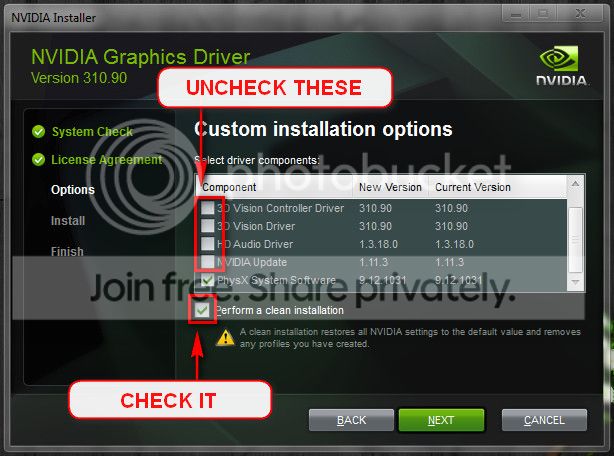
Let us know the results.
 

My Computer

Computer type
PC/Desktop
Computer Manufacturer/Model Number
Self Assembled
OS
Microsoft Windows 10 Pro Insider Preview 64-bit
CPU
Intel(R) Core(TM) i3-4130 CPU @ 3.40GHz
Motherboard
Gigabyte Technology Co., Ltd. B85M-D3H
Memory
Corsair Vengence 4GB x2 (8.00GB Dual-Channel DDR3 @ 798MHz)
Graphics Card(s)
2047MB GeForce GTS 450 (ZOTAC International)
Sound Card
Onboard (Realtek High Definition Audio)
Monitor(s) Displays
LG Flatron E2040T
Screen Resolution
1600x900
Hard Drives
Western Digital 1 TB
Seagate 500 GB
PSU
Corsair VS550
Case
Cooler Master K380
Cooling
Cooler Master Seidon 120V Plus
Keyboard
Logitech MK260r
Mouse
Logitech MK260r
Internet Speed
PMPL Broadband
Antivirus
Windows Defender + MBAM
Browser
Firefox
Other Info
Dell Studio 15" Laptop
Removed old driver, swept driver, downloaded and installed 314.22 driver. Tested memory, removed bad stick. Used computer for about 10 minutes. Computer crashed: Bad pool header. Windows will not start. Get screen telling me to use start up disks to repair computer. Use disk, try to repair start up, but not working, basicly says I have an installation with 0 data.

Error: 0xc000000f
 
Last edited:

My Computer

Computer type
PC/Desktop
Computer Manufacturer/Model Number
custom build
OS
Windows 7 Home Premium 64bit
CPU
AMD Phenom II 940 Quad Core
Motherboard
biostar 790gx 128m
Memory
2x OCZ 1 gb & 2x Corsair 2Gb DDR2
Graphics Card(s)
Asus Nvidia 660 GTX
Hard Drives
WD Blue 700 GB
Antivirus
Avast free version
Browser
mozilla firefox
Did Clean install. :( Will post results
 

My Computer

Computer type
PC/Desktop
Computer Manufacturer/Model Number
custom build
OS
Windows 7 Home Premium 64bit
CPU
AMD Phenom II 940 Quad Core
Motherboard
biostar 790gx 128m
Memory
2x OCZ 1 gb & 2x Corsair 2Gb DDR2
Graphics Card(s)
Asus Nvidia 660 GTX
Hard Drives
WD Blue 700 GB
Antivirus
Avast free version
Browser
mozilla firefox
Removed old driver, swept driver, downloaded and installed 314.22 driver. Tested memory, removed bad stick. Used computer for about 10 minutes. Computer crashed: Bad pool header. Windows will not start. Get screen telling me to use start up disks to repair computer. Use disk, try to repair start up, but not working, basicly says I have an installation with 0 data.

Error: 0xc000000f
You got bad RAM stick? In that situation you should have tried the Option Three of How to Test and Diagnose RAM Issues with Memtest86+

First run it with all the existing/installed RAM modules. If it comes with no error, all is good.

But if it starts showing errors, Stop testing. Errors/red lines means one or more RAM is faulty. But the fault may occur due to a faulty DIMM slot, too, which is a motherboard component. Using memtest86+, you can discriminate between a faulty RAM and a faulty motherboard.

How? Say you have two RAM sticks and two DIMM slots. You obtained errors at the test with all RAM sticks installed. Now, remove all the sticks but one. Test it in all the available slots, one by one. Continue the same procedure for all the available sticks.
How to make the inference that is it a RAM issue or it is a motherboard issue? Suppose you have got the result like that:
test|Slot1|Slot2
RAM1| Error | Error
RAM2|Good|Good
It is a RAM, a bad RAM.

But if you have got a result like that:
test|Slot1|Slot2
RAM1| Error |Good
RAM2| Error |Good
It is a motherboard issue. The particular slot is bad.

But now it is to make the system accessible at first. Make it sure that everything you plugged properly after replacing RAM stick, specially the DIMM slot's clips. It is most important.

Then follow it:
Troubleshooting Windows 7 Failure to Start

Let us know the results.
 

My Computer

Computer type
PC/Desktop
Computer Manufacturer/Model Number
Self Assembled
OS
Microsoft Windows 10 Pro Insider Preview 64-bit
CPU
Intel(R) Core(TM) i3-4130 CPU @ 3.40GHz
Motherboard
Gigabyte Technology Co., Ltd. B85M-D3H
Memory
Corsair Vengence 4GB x2 (8.00GB Dual-Channel DDR3 @ 798MHz)
Graphics Card(s)
2047MB GeForce GTS 450 (ZOTAC International)
Sound Card
Onboard (Realtek High Definition Audio)
Monitor(s) Displays
LG Flatron E2040T
Screen Resolution
1600x900
Hard Drives
Western Digital 1 TB
Seagate 500 GB
PSU
Corsair VS550
Case
Cooler Master K380
Cooling
Cooler Master Seidon 120V Plus
Keyboard
Logitech MK260r
Mouse
Logitech MK260r
Internet Speed
PMPL Broadband
Antivirus
Windows Defender + MBAM
Browser
Firefox
Other Info
Dell Studio 15" Laptop
Am doing memtest now. Will post results. Thanks again!

All of these sticks are less than a month old
!
 

My Computer

Computer type
PC/Desktop
Computer Manufacturer/Model Number
custom build
OS
Windows 7 Home Premium 64bit
CPU
AMD Phenom II 940 Quad Core
Motherboard
biostar 790gx 128m
Memory
2x OCZ 1 gb & 2x Corsair 2Gb DDR2
Graphics Card(s)
Asus Nvidia 660 GTX
Hard Drives
WD Blue 700 GB
Antivirus
Avast free version
Browser
mozilla firefox
Put stick #1 in slot 1: Seven passes no errors. Slot 2 10 passes 13 errors: Slot 3: 7 passes no errors. Slot 4: 7 passes no errors. Put stick 2 in slot #1: Seven passes no errors. Put sticks in slots 3 and 4. Computer crashed on start up. Restart: computer crashed one other time in about six hours of use. Computer crashing often on second day of use. Attached are the results.
 

My Computer

Computer type
PC/Desktop
Computer Manufacturer/Model Number
custom build
OS
Windows 7 Home Premium 64bit
CPU
AMD Phenom II 940 Quad Core
Motherboard
biostar 790gx 128m
Memory
2x OCZ 1 gb & 2x Corsair 2Gb DDR2
Graphics Card(s)
Asus Nvidia 660 GTX
Hard Drives
WD Blue 700 GB
Antivirus
Avast free version
Browser
mozilla firefox
Your computer failed to record the minidumps. But last four BSODs are

  • 0x0000001e
  • 0x00000050
  • 0x0000000a
  • 0x000000c5
So the suspects are RAM, BIOS and motherboard.

No BIOS update is available in TA790GXE 128M :: Motherboard :: BIOSTAR that one you have installed is the latest.

If a single RAM stick runs free from errors in one slot and fails in another, it is an indication that the slot is causing the failure. RAM 1 passes in all slots other than slot 2.

Now test RAM 2 in Slot 2. See how it goes.
 

My Computer

Computer type
PC/Desktop
Computer Manufacturer/Model Number
Self Assembled
OS
Microsoft Windows 10 Pro Insider Preview 64-bit
CPU
Intel(R) Core(TM) i3-4130 CPU @ 3.40GHz
Motherboard
Gigabyte Technology Co., Ltd. B85M-D3H
Memory
Corsair Vengence 4GB x2 (8.00GB Dual-Channel DDR3 @ 798MHz)
Graphics Card(s)
2047MB GeForce GTS 450 (ZOTAC International)
Sound Card
Onboard (Realtek High Definition Audio)
Monitor(s) Displays
LG Flatron E2040T
Screen Resolution
1600x900
Hard Drives
Western Digital 1 TB
Seagate 500 GB
PSU
Corsair VS550
Case
Cooler Master K380
Cooling
Cooler Master Seidon 120V Plus
Keyboard
Logitech MK260r
Mouse
Logitech MK260r
Internet Speed
PMPL Broadband
Antivirus
Windows Defender + MBAM
Browser
Firefox
Other Info
Dell Studio 15" Laptop
Will do. And will make sure comp is catching mini dumps.
 

My Computer

Computer type
PC/Desktop
Computer Manufacturer/Model Number
custom build
OS
Windows 7 Home Premium 64bit
CPU
AMD Phenom II 940 Quad Core
Motherboard
biostar 790gx 128m
Memory
2x OCZ 1 gb & 2x Corsair 2Gb DDR2
Graphics Card(s)
Asus Nvidia 660 GTX
Hard Drives
WD Blue 700 GB
Antivirus
Avast free version
Browser
mozilla firefox
Have one stick in slot A1 and one stick in slot B1. Have not had a BSOD in two weeks!
 

My Computer

Computer type
PC/Desktop
Computer Manufacturer/Model Number
custom build
OS
Windows 7 Home Premium 64bit
CPU
AMD Phenom II 940 Quad Core
Motherboard
biostar 790gx 128m
Memory
2x OCZ 1 gb & 2x Corsair 2Gb DDR2
Graphics Card(s)
Asus Nvidia 660 GTX
Hard Drives
WD Blue 700 GB
Antivirus
Avast free version
Browser
mozilla firefox
Have one stick in slot A1 and one stick in slot B1. Have not had a BSOD in two weeks!
Very nice to know :)
If there is any further issue, let us know :)
 

My Computer

Computer type
PC/Desktop
Computer Manufacturer/Model Number
Self Assembled
OS
Microsoft Windows 10 Pro Insider Preview 64-bit
CPU
Intel(R) Core(TM) i3-4130 CPU @ 3.40GHz
Motherboard
Gigabyte Technology Co., Ltd. B85M-D3H
Memory
Corsair Vengence 4GB x2 (8.00GB Dual-Channel DDR3 @ 798MHz)
Graphics Card(s)
2047MB GeForce GTS 450 (ZOTAC International)
Sound Card
Onboard (Realtek High Definition Audio)
Monitor(s) Displays
LG Flatron E2040T
Screen Resolution
1600x900
Hard Drives
Western Digital 1 TB
Seagate 500 GB
PSU
Corsair VS550
Case
Cooler Master K380
Cooling
Cooler Master Seidon 120V Plus
Keyboard
Logitech MK260r
Mouse
Logitech MK260r
Internet Speed
PMPL Broadband
Antivirus
Windows Defender + MBAM
Browser
Firefox
Other Info
Dell Studio 15" Laptop
Back
Top