Random BSOD

Spikers

New member
Local time
8:17 AM
Messages
5
I got the BSOD just now as I went to put my computer into sleep mode..
 

My Computer

Computer type
PC/Desktop
Computer Manufacturer/Model Number
HP
OS
Michigan
CPU
Intel Core i7 2600
Motherboard
PEGATRON CORPORATION 2AC2 (CPU 1)
Memory
8.00GB Dual-Channel DDR3 @ 665MHz (9-9-9-24)
Graphics Card(s)
MSI GTX 960 4GB
Hard Drives
931GB Seagate ST31000524AS (SATA)
Antivirus
Malwarebytes, Webroot
Browser
Google Chrome

My Computer

Computer type
PC/Desktop
Computer Manufacturer/Model Number
Lenovo
OS
Windows 7 Home Premium 64-Bit SP1
CPU
Intel Core i7 2600
Motherboard
Lenovo
Memory
8.00 GB Dual-Channel DDR3
Graphics Card(s)
1024MB GeForce GT 420
Sound Card
Intergrated Realtex ALC888S
Monitor(s) Displays
LG W40 series Widescreen
Screen Resolution
1920 by 1080 widescreen
Hard Drives
932GB Hitachi HDS TB
External drive 640 GB also
PSU
300W
Case
Tower
Cooling
yes came installed
Keyboard
Lenovo
Mouse
Laser wirless 5000
Antivirus
MBAM / Superantispyware pro paid for.
Browser
Google /
Other Info
PLDS DVD-RW DH16ABSH
Here is is.
 

My Computer

Computer type
PC/Desktop
Computer Manufacturer/Model Number
HP
OS
Michigan
CPU
Intel Core i7 2600
Motherboard
PEGATRON CORPORATION 2AC2 (CPU 1)
Memory
8.00GB Dual-Channel DDR3 @ 665MHz (9-9-9-24)
Graphics Card(s)
MSI GTX 960 4GB
Hard Drives
931GB Seagate ST31000524AS (SATA)
Antivirus
Malwarebytes, Webroot
Browser
Google Chrome
Hello, Spikers. as stated before, Please upload the BSOD Posting Instructions http://www.sevenforums.com/bsod-help-support/96879-blue-screen-death-bsod-posting-instructions.html. Upload the files here, this will tell you how. http://www.sevenforums.com/tutorials/9733-screenshots-files-upload-post-seven-forums.html

You have been getting BSODs since July of 2014 on a fairly regular basis.


Code:
Use !analyze -v to get detailed debugging information.
BugCheck C2, {7, 109b, 0, fffffa800c0e8c20}
*** WARNING: Unable to verify timestamp for TsLwWfF.sys
*** ERROR: Module load completed but symbols could not be loaded for TsLwWfF.sys
GetPointerFromAddress: unable to read from fffff80002f17100
GetUlongFromAddress: unable to read from fffff80002f171c0
[COLOR=red]Probably caused by : TsLwWfF.sys[/COLOR] ( TsLwWfF+1817 )

That is your CommView WiFi Capture Driver. your current driver is Y

Code:
TsLwWfF
start             end                 module name
fffff880`02e16000 fffff880`02e21000   TsLwWfF  T (no symbols)           
    Loaded symbol image file: TsLwWfF.sys
    Image path: TsLwWfF.sys
    Image name: TsLwWfF.sys
    [COLOR=red]Timestamp:        Wed May 11 17:25:43 2011[/COLOR] (4DCB0CE7)
    CheckSum:         000120AC
    ImageSize:        0000B000
    Translations:     0000.04b0 0000.04e4 0409.04b0 0409.04e4

Code:
fffff880`0d53aad8  fffff880`0d620042Unable to load image bcmwlhigh664.sys, Win32 error 0n2
*** WARNING: Unable to verify timestamp for bcmwlhigh664.sys
*** [COLOR=red]ERROR: Module load completed but symbols could not be loaded for bcmwlhigh664.sys
[/COLOR] bcmwlhigh664+0x20042

Which is your Broadcom 802.11 USB Network Adapter Driver. Your current version is

Code:
 bcmwlhigh664
start             end                 module name
fffff880`0d600000 fffff880`0d737000   bcmwlhigh664 T (no symbols)           
    Loaded symbol image file: bcmwlhigh664.sys
    Image path: bcmwlhigh664.sys
    Image name: bcmwlhigh664.sys
    Timestamp:        Mon Mar 02 02:48:58 2015 (54F423FA)
    CheckSum:         001358D9
    ImageSize:        00137000
    Translations:     0000.04b0 0000.04e4 0409.04b0 0409.04
[COLOR=red]Unloaded modules:
fffff880`0d600000 fffff880`0d737000   bcmwlhigh664
    Timestamp: unavailable (00000000)
    Checksum:  00000000
    ImageSize:  00137000
fffff880`0d600000 fffff880`0d737000   bcmwlhigh664
    Timestamp: unavailable (00000000)
    Checksum:  00000000
    ImageSize:  00137000
fffff880`0d646000 fffff880`0d77d000   bcmwlhigh664
    Timestamp: unavailable (00000000)
    Checksum:  00000000
    ImageSize:  00137000[/COLOR]

That marked in red is unusual.

Code:
Use !analyze -v to get detailed debugging information.
BugCheck A, {0, 2, 1, fffff80002c9a2bc}
*** WARNING: Unable to verify timestamp for scmndisp.sys
[COLOR=red]*** ERROR: Module load completed but symbols could not be loaded for scmndisp.sys[/COLOR]
Probably caused by : scmndisp.sys ( scmndisp+16d1 )

Which is your Netgear Neutral Wireless Solution and was shown in several dumps. The version you have installed is

Code:
 scmndisp
start             end                 module name
fffff880`019c2000 fffff880`019cc000   scmndisp T (no symbols)           
    Loaded symbol image file: scmndisp.sys
    Image path: scmndisp.sys
    Image name: scmndisp.sys
    [COLOR=red]Timestamp:        Fri May 27 05:30:22 2011[/COLOR] (4DDF7D3E)
    CheckSum:         00009C0C
    ImageSize:        0000A000
    Translations:     0000.04b0 0000.04e4 0409.04b0 0409.04e4

What do you use the Tamos Wireless analyzer for?

Please open an elevated command prompt ( click start, type cmd in the search box, right click on the cmd entry and select run as administrator) in the black box that opens, copy/paste sfc /scannow. If you decide to type it, notice the space between the sfc and the /. It is a system file checker which will scan your system files and attempt to correct any missing or corrupt files. What we want are the results to say windows found no integrity violations. If it says files were found but could not be repaired, close the box, reboot and run it again, after opening the administrative command prompt. You may have to reboot and run it three times for it to repair all system files. If it can't repair them after 3 reboots, let us know.

Please update these drivers and upload the requested files so we may be of more help.

 

My Computers

System One System Two

  • Computer type
    PC/Desktop
    Computer Manufacturer/Model Number
    ALWAYS UNDER CONSTRUCTION
    OS
    Windows 11 Pro
    CPU
    Ryzen 9 5900X
    Motherboard
    Asus X570 Crosshair Viii Hero
    Memory
    32GB G Skill DDR4-3600
    Graphics Card(s)
    EVGA RTX 3080 FTW 3 Ultra
    Sound Card
    On Board/Sennheiser PC37X Headset
    Monitor(s) Displays
    3 X Asus 27"
    Screen Resolution
    2560x1440
    Hard Drives
    2 X 1 TB NVME drives
    PSU
    EVGA 850
    Case
    Phanteks Eclipse P400A
    Cooling
    EVGA 280 AIO
    Keyboard
    Logitech G510s/ Logitech G13
    Mouse
    Logitech G502
    Internet Speed
    24/1
    Antivirus
    ESET/MBAM Pro/SAS Pro
    Browser
    Chrome/ Firefox/ Edge
  • Computer type
    Laptop
    System Manufacturer/Model Number
    Dell 16 Plus
    OS
    Windows 11 Pro
    CPU
    Intel Ultra 9 288V
    Memory
    32 GB LPDDR5X 8533
    Monitor(s) Displays
    16" Mini-LED HDR600 Touch 90 Hz
    Screen Resolution
    2560X1600
    Hard Drives
    1 TB NVME
Hello, Spikers. as stated before, Please upload the BSOD Posting Instructions http://www.sevenforums.com/bsod-help-support/96879-blue-screen-death-bsod-posting-instructions.html. Upload the files here, this will tell you how. http://www.sevenforums.com/tutorials/9733-screenshots-files-upload-post-seven-forums.html

You have been getting BSODs since July of 2014 on a fairly regular basis.


Code:
Use !analyze -v to get detailed debugging information.
BugCheck C2, {7, 109b, 0, fffffa800c0e8c20}
*** WARNING: Unable to verify timestamp for TsLwWfF.sys
*** ERROR: Module load completed but symbols could not be loaded for TsLwWfF.sys
GetPointerFromAddress: unable to read from fffff80002f17100
GetUlongFromAddress: unable to read from fffff80002f171c0
[COLOR=red]Probably caused by : TsLwWfF.sys[/COLOR] ( TsLwWfF+1817 )

That is your CommView WiFi Capture Driver. your current driver is Y

Code:
TsLwWfF
start             end                 module name
fffff880`02e16000 fffff880`02e21000   TsLwWfF  T (no symbols)           
    Loaded symbol image file: TsLwWfF.sys
    Image path: TsLwWfF.sys
    Image name: TsLwWfF.sys
    [COLOR=red]Timestamp:        Wed May 11 17:25:43 2011[/COLOR] (4DCB0CE7)
    CheckSum:         000120AC
    ImageSize:        0000B000
    Translations:     0000.04b0 0000.04e4 0409.04b0 0409.04e4

Code:
fffff880`0d53aad8  fffff880`0d620042Unable to load image bcmwlhigh664.sys, Win32 error 0n2
*** WARNING: Unable to verify timestamp for bcmwlhigh664.sys
*** [COLOR=red]ERROR: Module load completed but symbols could not be loaded for bcmwlhigh664.sys
[/COLOR] bcmwlhigh664+0x20042

Which is your Broadcom 802.11 USB Network Adapter Driver. Your current version is

Code:
 bcmwlhigh664
start             end                 module name
fffff880`0d600000 fffff880`0d737000   bcmwlhigh664 T (no symbols)           
    Loaded symbol image file: bcmwlhigh664.sys
    Image path: bcmwlhigh664.sys
    Image name: bcmwlhigh664.sys
    Timestamp:        Mon Mar 02 02:48:58 2015 (54F423FA)
    CheckSum:         001358D9
    ImageSize:        00137000
    Translations:     0000.04b0 0000.04e4 0409.04b0 0409.04
[COLOR=red]Unloaded modules:
fffff880`0d600000 fffff880`0d737000   bcmwlhigh664
    Timestamp: unavailable (00000000)
    Checksum:  00000000
    ImageSize:  00137000
fffff880`0d600000 fffff880`0d737000   bcmwlhigh664
    Timestamp: unavailable (00000000)
    Checksum:  00000000
    ImageSize:  00137000
fffff880`0d646000 fffff880`0d77d000   bcmwlhigh664
    Timestamp: unavailable (00000000)
    Checksum:  00000000
    ImageSize:  00137000[/COLOR]

That marked in red is unusual.

Code:
Use !analyze -v to get detailed debugging information.
BugCheck A, {0, 2, 1, fffff80002c9a2bc}
*** WARNING: Unable to verify timestamp for scmndisp.sys
[COLOR=red]*** ERROR: Module load completed but symbols could not be loaded for scmndisp.sys[/COLOR]
Probably caused by : scmndisp.sys ( scmndisp+16d1 )

Which is your Netgear Neutral Wireless Solution and was shown in several dumps. The version you have installed is

Code:
 scmndisp
start             end                 module name
fffff880`019c2000 fffff880`019cc000   scmndisp T (no symbols)           
    Loaded symbol image file: scmndisp.sys
    Image path: scmndisp.sys
    Image name: scmndisp.sys
    [COLOR=red]Timestamp:        Fri May 27 05:30:22 2011[/COLOR] (4DDF7D3E)
    CheckSum:         00009C0C
    ImageSize:        0000A000
    Translations:     0000.04b0 0000.04e4 0409.04b0 0409.04e4

What do you use the Tamos Wireless analyzer for?

Please open an elevated command prompt ( click start, type cmd in the search box, right click on the cmd entry and select run as administrator) in the black box that opens, copy/paste sfc /scannow. If you decide to type it, notice the space between the sfc and the /. It is a system file checker which will scan your system files and attempt to correct any missing or corrupt files. What we want are the results to say windows found no integrity violations. If it says files were found but could not be repaired, close the box, reboot and run it again, after opening the administrative command prompt. You may have to reboot and run it three times for it to repair all system files. If it can't repair them after 3 reboots, let us know.

Please update these drivers and upload the requested files so we may be of more help.

I haven't used the Tamos Wireless analyzer in a long time. Would you happen to know the cause/why I am getting these BSOD's?
 

My Computer

Computer type
PC/Desktop
Computer Manufacturer/Model Number
HP
OS
Michigan
CPU
Intel Core i7 2600
Motherboard
PEGATRON CORPORATION 2AC2 (CPU 1)
Memory
8.00GB Dual-Channel DDR3 @ 665MHz (9-9-9-24)
Graphics Card(s)
MSI GTX 960 4GB
Hard Drives
931GB Seagate ST31000524AS (SATA)
Antivirus
Malwarebytes, Webroot
Browser
Google Chrome

My Computers

System One System Two

  • Computer type
    PC/Desktop
    Computer Manufacturer/Model Number
    ALWAYS UNDER CONSTRUCTION
    OS
    Windows 11 Pro
    CPU
    Ryzen 9 5900X
    Motherboard
    Asus X570 Crosshair Viii Hero
    Memory
    32GB G Skill DDR4-3600
    Graphics Card(s)
    EVGA RTX 3080 FTW 3 Ultra
    Sound Card
    On Board/Sennheiser PC37X Headset
    Monitor(s) Displays
    3 X Asus 27"
    Screen Resolution
    2560x1440
    Hard Drives
    2 X 1 TB NVME drives
    PSU
    EVGA 850
    Case
    Phanteks Eclipse P400A
    Cooling
    EVGA 280 AIO
    Keyboard
    Logitech G510s/ Logitech G13
    Mouse
    Logitech G502
    Internet Speed
    24/1
    Antivirus
    ESET/MBAM Pro/SAS Pro
    Browser
    Chrome/ Firefox/ Edge
  • Computer type
    Laptop
    System Manufacturer/Model Number
    Dell 16 Plus
    OS
    Windows 11 Pro
    CPU
    Intel Ultra 9 288V
    Memory
    32 GB LPDDR5X 8533
    Monitor(s) Displays
    16" Mini-LED HDR600 Touch 90 Hz
    Screen Resolution
    2560X1600
    Hard Drives
    1 TB NVME
Please upload the BSOD Posting Instructions http://www.sevenforums.com/bsod-help-support/96879-blue-screen-death-bsod-posting-instructions.html. Upload the files here, this will tell you how. http://www.sevenforums.com/tutorials/9733-screenshots-files-upload-post-seven-forums.html

Once we get those files, we can help you more.

I have uploaded the file in the previous post above but here it is again.

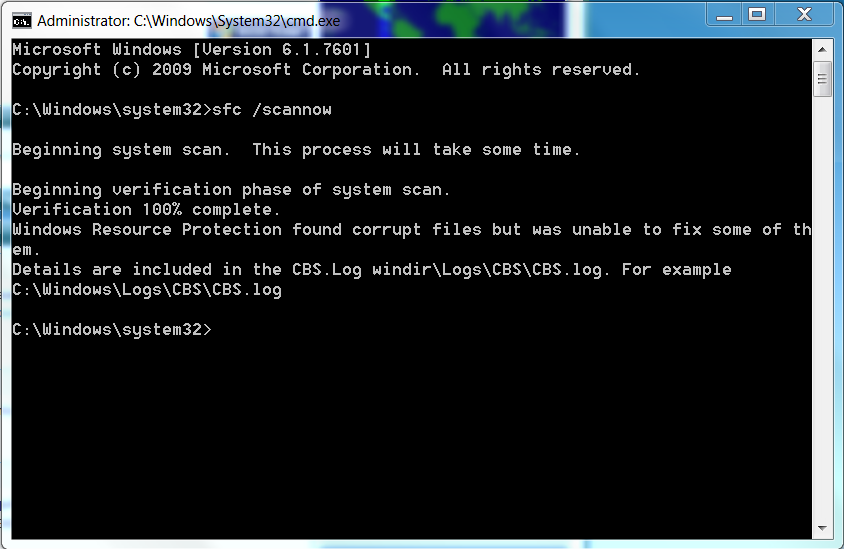
And also I did that CMD scan.
2abbc42a14be5e00d96fb15e4d296f59.png
 

My Computer

Computer type
PC/Desktop
Computer Manufacturer/Model Number
HP
OS
Michigan
CPU
Intel Core i7 2600
Motherboard
PEGATRON CORPORATION 2AC2 (CPU 1)
Memory
8.00GB Dual-Channel DDR3 @ 665MHz (9-9-9-24)
Graphics Card(s)
MSI GTX 960 4GB
Hard Drives
931GB Seagate ST31000524AS (SATA)
Antivirus
Malwarebytes, Webroot
Browser
Google Chrome

My Computers

System One System Two

  • Computer type
    PC/Desktop
    Computer Manufacturer/Model Number
    ALWAYS UNDER CONSTRUCTION
    OS
    Windows 11 Pro
    CPU
    Ryzen 9 5900X
    Motherboard
    Asus X570 Crosshair Viii Hero
    Memory
    32GB G Skill DDR4-3600
    Graphics Card(s)
    EVGA RTX 3080 FTW 3 Ultra
    Sound Card
    On Board/Sennheiser PC37X Headset
    Monitor(s) Displays
    3 X Asus 27"
    Screen Resolution
    2560x1440
    Hard Drives
    2 X 1 TB NVME drives
    PSU
    EVGA 850
    Case
    Phanteks Eclipse P400A
    Cooling
    EVGA 280 AIO
    Keyboard
    Logitech G510s/ Logitech G13
    Mouse
    Logitech G502
    Internet Speed
    24/1
    Antivirus
    ESET/MBAM Pro/SAS Pro
    Browser
    Chrome/ Firefox/ Edge
  • Computer type
    Laptop
    System Manufacturer/Model Number
    Dell 16 Plus
    OS
    Windows 11 Pro
    CPU
    Intel Ultra 9 288V
    Memory
    32 GB LPDDR5X 8533
    Monitor(s) Displays
    16" Mini-LED HDR600 Touch 90 Hz
    Screen Resolution
    2560X1600
    Hard Drives
    1 TB NVME
Spikers, the sfc scan you ran, did you run it 3 times with restarts in between each time you ran it?

The file you uploaded is the same file you uploaded the first time, nothing but dump files. Please click this link and upload the results in it's entirety. Do not edit or remove anything. Give it time to complete. http://www.sevenforums.com/bsod-help-support/96879-blue-screen-death-bsod-posting-instructions.html

Yep I ran it 3 times between restarts and it says the same thing over and over.
 

My Computer

Computer type
PC/Desktop
Computer Manufacturer/Model Number
HP
OS
Michigan
CPU
Intel Core i7 2600
Motherboard
PEGATRON CORPORATION 2AC2 (CPU 1)
Memory
8.00GB Dual-Channel DDR3 @ 665MHz (9-9-9-24)
Graphics Card(s)
MSI GTX 960 4GB
Hard Drives
931GB Seagate ST31000524AS (SATA)
Antivirus
Malwarebytes, Webroot
Browser
Google Chrome
Spikers, from what I can see right now, it appears you are having problems with your network adaptors. If you will notice above, every driver named in the past 5 or 6 dump files are related to your network/ wireless adapters. I would recommend you uninstall your Tamos Wireless analyzer, especially since you are not using it. I would then find updates for all of the drivers listed from HP's web site. They are part of your motherboard drivers. I notice your last install was in July of 2014. That is the exact time your BSODs started. My guess would be that you did not install the current motherboard drivers from HP's web site.

I also noticed a lot of errors from GTA5. The game gives a lot of people problems. Most of them relate to ram usage. The game uses a tremendous amount of ram. Please monitor your GPU and CPU temps constantly during gaming.

Please go to C:/Windows/Logs/CBS/CBS.log and copy the log aand paste it on the desktop. Right click the folder, select send to then select compressed zip folder and upload it with your next post. I will get someone to look at it tomorrow.
 

My Computers

System One System Two

  • Computer type
    PC/Desktop
    Computer Manufacturer/Model Number
    ALWAYS UNDER CONSTRUCTION
    OS
    Windows 11 Pro
    CPU
    Ryzen 9 5900X
    Motherboard
    Asus X570 Crosshair Viii Hero
    Memory
    32GB G Skill DDR4-3600
    Graphics Card(s)
    EVGA RTX 3080 FTW 3 Ultra
    Sound Card
    On Board/Sennheiser PC37X Headset
    Monitor(s) Displays
    3 X Asus 27"
    Screen Resolution
    2560x1440
    Hard Drives
    2 X 1 TB NVME drives
    PSU
    EVGA 850
    Case
    Phanteks Eclipse P400A
    Cooling
    EVGA 280 AIO
    Keyboard
    Logitech G510s/ Logitech G13
    Mouse
    Logitech G502
    Internet Speed
    24/1
    Antivirus
    ESET/MBAM Pro/SAS Pro
    Browser
    Chrome/ Firefox/ Edge
  • Computer type
    Laptop
    System Manufacturer/Model Number
    Dell 16 Plus
    OS
    Windows 11 Pro
    CPU
    Intel Ultra 9 288V
    Memory
    32 GB LPDDR5X 8533
    Monitor(s) Displays
    16" Mini-LED HDR600 Touch 90 Hz
    Screen Resolution
    2560X1600
    Hard Drives
    1 TB NVME
Back
Top