Hello, Spikers. as stated before, Please upload the BSOD Posting Instructions
http://www.sevenforums.com/bsod-help-support/96879-blue-screen-death-bsod-posting-instructions.html. Upload the files here, this will tell you how.
http://www.sevenforums.com/tutorials/9733-screenshots-files-upload-post-seven-forums.html
You have been getting BSODs since July of 2014 on a fairly regular basis.
Code:
Use !analyze -v to get detailed debugging information.
BugCheck C2, {7, 109b, 0, fffffa800c0e8c20}
*** WARNING: Unable to verify timestamp for TsLwWfF.sys
*** ERROR: Module load completed but symbols could not be loaded for TsLwWfF.sys
GetPointerFromAddress: unable to read from fffff80002f17100
GetUlongFromAddress: unable to read from fffff80002f171c0
[COLOR=red]Probably caused by : TsLwWfF.sys[/COLOR] ( TsLwWfF+1817 )
That is your CommView WiFi Capture Driver. your current driver is Y
Code:
TsLwWfF
start             end                 module name
fffff880`02e16000 fffff880`02e21000   TsLwWfF  T (no symbols)
    Loaded symbol image file: TsLwWfF.sys
    Image path: TsLwWfF.sys
    Image name: TsLwWfF.sys
    [COLOR=red]Timestamp:        Wed May 11 17:25:43 2011[/COLOR] (4DCB0CE7)
    CheckSum:         000120AC
    ImageSize:        0000B000
    Translations:     0000.04b0 0000.04e4 0409.04b0 0409.04e4
Code:
fffff880`0d53aad8  fffff880`0d620042Unable to load image bcmwlhigh664.sys, Win32 error 0n2
*** WARNING: Unable to verify timestamp for bcmwlhigh664.sys
*** [COLOR=red]ERROR: Module load completed but symbols could not be loaded for bcmwlhigh664.sys
[/COLOR] bcmwlhigh664+0x20042
Which is your Broadcom 802.11 USB Network Adapter Driver. Your current version is
Code:
 bcmwlhigh664
start             end                 module name
fffff880`0d600000 fffff880`0d737000   bcmwlhigh664 T (no symbols)
    Loaded symbol image file: bcmwlhigh664.sys
    Image path: bcmwlhigh664.sys
    Image name: bcmwlhigh664.sys
    Timestamp:        Mon Mar 02 02:48:58 2015 (54F423FA)
    CheckSum:         001358D9
    ImageSize:        00137000
    Translations:     0000.04b0 0000.04e4 0409.04b0 0409.04
[COLOR=red]Unloaded modules:
fffff880`0d600000 fffff880`0d737000   bcmwlhigh664
    Timestamp: unavailable (00000000)
    Checksum:  00000000
    ImageSize:  00137000
fffff880`0d600000 fffff880`0d737000   bcmwlhigh664
    Timestamp: unavailable (00000000)
    Checksum:  00000000
    ImageSize:  00137000
fffff880`0d646000 fffff880`0d77d000   bcmwlhigh664
    Timestamp: unavailable (00000000)
    Checksum:  00000000
    ImageSize:  00137000[/COLOR]
That marked in red is unusual.
Code:
Use !analyze -v to get detailed debugging information.
BugCheck A, {0, 2, 1, fffff80002c9a2bc}
*** WARNING: Unable to verify timestamp for scmndisp.sys
[COLOR=red]*** ERROR: Module load completed but symbols could not be loaded for scmndisp.sys[/COLOR]
Probably caused by : scmndisp.sys ( scmndisp+16d1 )
Which is your Netgear Neutral Wireless Solution and was shown in several dumps. The version you have installed is
Code:
 scmndisp
start             end                 module name
fffff880`019c2000 fffff880`019cc000   scmndisp T (no symbols)
    Loaded symbol image file: scmndisp.sys
    Image path: scmndisp.sys
    Image name: scmndisp.sys
    [COLOR=red]Timestamp:        Fri May 27 05:30:22 2011[/COLOR] (4DDF7D3E)
    CheckSum:         00009C0C
    ImageSize:        0000A000
    Translations:     0000.04b0 0000.04e4 0409.04b0 0409.04e4
What do you use the Tamos Wireless analyzer for?
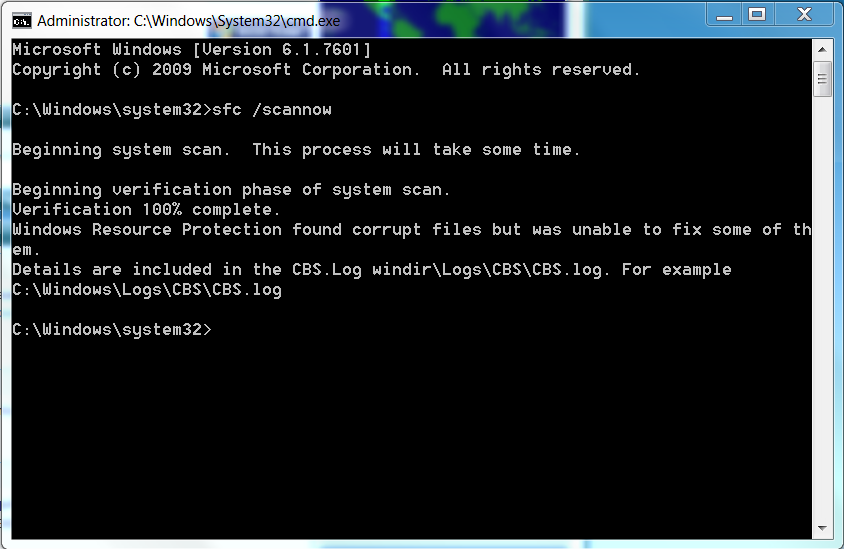
Please open an elevated command prompt ( click start, type
cmd in the search box,
right click on the cmd entry and select run as administrator) in the black box that opens, copy/paste
sfc /scannow. If you decide to type it, notice the space between the sfc and the /. It is a system file checker which will scan your system files and attempt to correct any missing or corrupt files. What we want are the results to say windows found no integrity violations. If it says files were found but could not be repaired, close the box, reboot and run it again, after opening the administrative command prompt. You may have to reboot and run it three times for it to repair all system files. If it can't repair them after 3 reboots, let us know.
Please update these drivers and upload the requested files so we may be of more help.