Random freezing for a few seconds, intermittent

keyboardface

New member
Member
Local time
6:51 PM
Messages
75
The past couple of days I've had this problem. Everything freezes for a few seconds, can't move the mouse or do anything. The fans in my computer have been noisy recently, I don't know if it's the GPU or the CPU though. I assume that's something to do with the hot weather here at the moment?

I don't know where to begin really.
 

My Computer My Computer

Computer type
PC/Desktop
OS
Windows 7 Ultimate x64
CPU
AMD FX 8120 Eight-Core 3.10 GHz
Memory
8GB DDR3
Graphics Card(s)
GeForce GTX 550 Ti
Sound Card
SoundBlaster Live! 24-Bit
That is an apt name for the hot weather mate.
First try reseating the RAM and card.

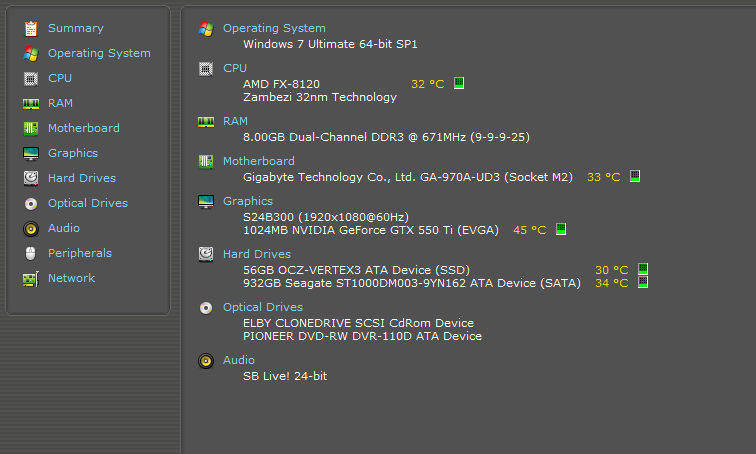
Now if you can run Speccy and let us know what the temps are Speccy - Download
 

My Computer My Computer

Computer type
PC/Desktop
Computer Manufacturer/Model Number
Own build (new) Desk1 / Asus ROG Win 7 / Desk2 1st build
OS
Desk1 7 Home Prem / Desk2 10 Pro / Main lap Asus ROG 10 Pro 2 laptop Toshiba 7 Pro Asus P2520 7 & 10
CPU
Desk1 i5 3750K / Laptop i7 GTX 860M / Desk2 i5 2500
Motherboard
Desk1 Asus P877-V / Desk2 Gigabyte H67 UD3H / Laptop ?
Memory
Desk1 8GB (1866) / Desk2 16GB (1333) / Laptop 8Gb DDR3
Graphics Card(s)
Desk 1& 2NVidia GTX 650 & Laptops on board Intel
Sound Card
Desk 1 & 2 -XONAR DG Realtek High Def audio Laptop
Monitor(s) Displays
Desk 1 Benq HD 2450 / Desk2 Philips 24" / Laptop 17.5"
Screen Resolution
1920x1080 D1 & D2 & Laptop 1
Hard Drives
Desk1 Samsung 120GB 830 SSD
Asus ROG 256GB 850 Pro SSD
Desk2 Samsung 840 256 SSD
Toshiba 120GB EVO
PSU
Desk 1 Corsair HX 1050/ Laptop ? / Desk 2 Corsair HX 650
Case
Desk 1 Cooler HAF XM ? Toshiba laptop / Desk2 Coolermaster
Cooling
Fans on all Desk1 -2 Desk2 - all Coolermasters 5 Laptop ?
Keyboard
Desk 1 MS Sidewinder X6 Desk 2 MS Sidewinder X 4
Mouse
Desk 1&2 - Gigabyte MS 900 gamer - laptop - Logitec wireless
Internet Speed
ADSL2+
Other Info
One other Desktop (tester) and spare Toshba laptop both with SSD's
Running Kaspersky 2016 ISS on all machines config'd identically
Logitec audio stereo systems on each machine (x3)
Canon MG5250MFC
Router/modem TP-Link running WPA2SK
I ran Malwarebytes Anti-Malware and it found two instances of something called Adware.Agent.

I also turned Windows Search off via Windows Features because it was pissing me off.

I haven't had any freezing since.

For now... resolved.
 

My Computer My Computer

Computer type
PC/Desktop
OS
Windows 7 Ultimate x64
CPU
AMD FX 8120 Eight-Core 3.10 GHz
Memory
8GB DDR3
Graphics Card(s)
GeForce GTX 550 Ti
Sound Card
SoundBlaster Live! 24-Bit
Good stuff mate try these too as I was next going to suggest them anyway and MBAM was one so leave it out.
http://www.bleepingcomputer.com/download/adwcleaner/ download from bleeping computer
http://www.superantispyware.com/
http://www.malwarebytes.org/products/malwarebytes_free/ when/ if you install untick the trial box
http://www.kaspersky.com/downloads/free-antivirus-tools go to the TDSS Killer ref .exe
the last ref you can if you like it is worth keeping for late and the MBAM you have run already run but keep these in a small doc for reference.
 

My Computer My Computer

Computer type
PC/Desktop
Computer Manufacturer/Model Number
Own build (new) Desk1 / Asus ROG Win 7 / Desk2 1st build
OS
Desk1 7 Home Prem / Desk2 10 Pro / Main lap Asus ROG 10 Pro 2 laptop Toshiba 7 Pro Asus P2520 7 & 10
CPU
Desk1 i5 3750K / Laptop i7 GTX 860M / Desk2 i5 2500
Motherboard
Desk1 Asus P877-V / Desk2 Gigabyte H67 UD3H / Laptop ?
Memory
Desk1 8GB (1866) / Desk2 16GB (1333) / Laptop 8Gb DDR3
Graphics Card(s)
Desk 1& 2NVidia GTX 650 & Laptops on board Intel
Sound Card
Desk 1 & 2 -XONAR DG Realtek High Def audio Laptop
Monitor(s) Displays
Desk 1 Benq HD 2450 / Desk2 Philips 24" / Laptop 17.5"
Screen Resolution
1920x1080 D1 & D2 & Laptop 1
Hard Drives
Desk1 Samsung 120GB 830 SSD
Asus ROG 256GB 850 Pro SSD
Desk2 Samsung 840 256 SSD
Toshiba 120GB EVO
PSU
Desk 1 Corsair HX 1050/ Laptop ? / Desk 2 Corsair HX 650
Case
Desk 1 Cooler HAF XM ? Toshiba laptop / Desk2 Coolermaster
Cooling
Fans on all Desk1 -2 Desk2 - all Coolermasters 5 Laptop ?
Keyboard
Desk 1 MS Sidewinder X6 Desk 2 MS Sidewinder X 4
Mouse
Desk 1&2 - Gigabyte MS 900 gamer - laptop - Logitec wireless
Internet Speed
ADSL2+
Other Info
One other Desktop (tester) and spare Toshba laptop both with SSD's
Running Kaspersky 2016 ISS on all machines config'd identically
Logitec audio stereo systems on each machine (x3)
Canon MG5250MFC
Router/modem TP-Link running WPA2SK
It just happened again but didn't even unfreeze. Had to reset my comp.

I might be mistaken but it only seems to happen when I'm in Firefox?

I'll run those things you suggested.
 

My Computer My Computer

Computer type
PC/Desktop
OS
Windows 7 Ultimate x64
CPU
AMD FX 8120 Eight-Core 3.10 GHz
Memory
8GB DDR3
Graphics Card(s)
GeForce GTX 550 Ti
Sound Card
SoundBlaster Live! 24-Bit
I don't think it's a temperature issue at all as I can play games and nothing ever happens.

b6dQnuQ.png
 

My Computer My Computer

Computer type
PC/Desktop
OS
Windows 7 Ultimate x64
CPU
AMD FX 8120 Eight-Core 3.10 GHz
Memory
8GB DDR3
Graphics Card(s)
GeForce GTX 550 Ti
Sound Card
SoundBlaster Live! 24-Bit
Okay I've ran all of those you suggested and nothing was found except for a few tracking cookies in SUPERAntiSpyware.
 

My Computer My Computer

Computer type
PC/Desktop
OS
Windows 7 Ultimate x64
CPU
AMD FX 8120 Eight-Core 3.10 GHz
Memory
8GB DDR3
Graphics Card(s)
GeForce GTX 550 Ti
Sound Card
SoundBlaster Live! 24-Bit
Well Roasty I think maybe mate for the time being perhaps it might be better to use something else rather than FireFox.

Your temps are well within normal limits too.
 

My Computer My Computer

Computer type
PC/Desktop
Computer Manufacturer/Model Number
Own build (new) Desk1 / Asus ROG Win 7 / Desk2 1st build
OS
Desk1 7 Home Prem / Desk2 10 Pro / Main lap Asus ROG 10 Pro 2 laptop Toshiba 7 Pro Asus P2520 7 & 10
CPU
Desk1 i5 3750K / Laptop i7 GTX 860M / Desk2 i5 2500
Motherboard
Desk1 Asus P877-V / Desk2 Gigabyte H67 UD3H / Laptop ?
Memory
Desk1 8GB (1866) / Desk2 16GB (1333) / Laptop 8Gb DDR3
Graphics Card(s)
Desk 1& 2NVidia GTX 650 & Laptops on board Intel
Sound Card
Desk 1 & 2 -XONAR DG Realtek High Def audio Laptop
Monitor(s) Displays
Desk 1 Benq HD 2450 / Desk2 Philips 24" / Laptop 17.5"
Screen Resolution
1920x1080 D1 & D2 & Laptop 1
Hard Drives
Desk1 Samsung 120GB 830 SSD
Asus ROG 256GB 850 Pro SSD
Desk2 Samsung 840 256 SSD
Toshiba 120GB EVO
PSU
Desk 1 Corsair HX 1050/ Laptop ? / Desk 2 Corsair HX 650
Case
Desk 1 Cooler HAF XM ? Toshiba laptop / Desk2 Coolermaster
Cooling
Fans on all Desk1 -2 Desk2 - all Coolermasters 5 Laptop ?
Keyboard
Desk 1 MS Sidewinder X6 Desk 2 MS Sidewinder X 4
Mouse
Desk 1&2 - Gigabyte MS 900 gamer - laptop - Logitec wireless
Internet Speed
ADSL2+
Other Info
One other Desktop (tester) and spare Toshba laptop both with SSD's
Running Kaspersky 2016 ISS on all machines config'd identically
Logitec audio stereo systems on each machine (x3)
Canon MG5250MFC
Router/modem TP-Link running WPA2SK
Some Options

Try disabling "Use hardware when available" in Firefox.
If you are using the default orange button:
Options > Options > Advanced tab > General tab > "Use hardware when available".
Try running FF in "Safe Mode".
Sometimes add-ons can misbehave.
The following tutorial describes how to run FF in "Safe Mode":
http://www.sevenforums.com/tutorials/210670-firefox-start-firefox-safe-mode.html

Another thing you could try is creating a new FF profile.
Corrupt files in the FF profile can cause weird problems.
The following tutorial describes how to create new profiles:
http://www.sevenforums.com/tutorials/208070-firefox-create-run-multiple-profiles.html

If the new profile fixes the problem you can copy the important files from your old profile to the new one (if you want).
Transferring data to a new profile - Firefox - MozillaZine Knowledge Base
 

My Computer My Computer

Computer type
PC/Desktop
Computer Manufacturer/Model Number
n/a
OS
W7 Ultimate SP1, LM19.2 MATE, W10 Home 1703, W10 Pro 1703 VM, #All 64 bit
CPU
AMD Phenom II x6 1100T, 3.3 GHz
Motherboard
ASUS M4A88T-M/USB3 (AM3)
Memory
12GB DDR3 1333 G-Skill (4GB x 2), G-Skill (2GB x 2)
Graphics Card(s)
NVIDIA GeForce GTX 660
Sound Card
Realtek?
Monitor(s) Displays
Samsung S23B350
Screen Resolution
1920x1080
Hard Drives
WD Green 2TB (SATA), WD Green 3TB (SATA), WD Blue 4TB (SATA), WD Blue 6TB (SATA)
PSU
Cooler Master
Case
Antec GX300 Tower
Cooling
3x Antec TRICOOL 120mm Fans
Mouse
Wired Optical
Internet Speed
DSL
Antivirus
Avast
Browser
Pale Moon (64 bit)
Other Info
2018-12-27 Upgraded HDDs
2015-12-10 Upgraded case, graphics card, storage
2015-08-15 Upgraded motherboard & RAM
2015-07-15 Upgraded LM17.1 to LM17.2
Still happens sometimes in Firefox even with all add-ons disabled.

**** off.
 
Last edited:

My Computer My Computer

Computer type
PC/Desktop
OS
Windows 7 Ultimate x64
CPU
AMD FX 8120 Eight-Core 3.10 GHz
Memory
8GB DDR3
Graphics Card(s)
GeForce GTX 550 Ti
Sound Card
SoundBlaster Live! 24-Bit
****ing annoying.
 

My Computer My Computer

Computer type
PC/Desktop
OS
Windows 7 Ultimate x64
CPU
AMD FX 8120 Eight-Core 3.10 GHz
Memory
8GB DDR3
Graphics Card(s)
GeForce GTX 550 Ti
Sound Card
SoundBlaster Live! 24-Bit
Back
Top