Solved Random Shutdown No BSOD Strange HWMonitor temperatures

BBall

New member
Member
Local time
9:54 AM
Messages
27
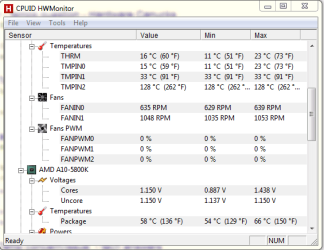
Need Opinions and some assistance. I"ve been having shutdowns for quite some time and I decided to take a different route with my troubles. I'm uploading a screen shot of the HWMonitor information. As you can see Things are quite peculiar in my world. Before I RMA anything else I would like to see if it's Possible to fix my troubles here at home without having to worry about the hardware itself. I already know I need a new CPU/heatsink fan as it's running 300 RPM below the advertised speed, it's been a while so I can't RMA it.
 

Attachments
  • Capture.PNG
    Capture.PNG
    15.5 KB · Views: 20

My Computer My Computer

Computer type
PC/Desktop
Computer Manufacturer/Model Number
Custom Build
OS
Microsoft Windows 7 Home Premium 64-bit
CPU
AMD A10-5800K APU with Radeon(tm) HD Graphics
Motherboard
BIOSTAR Group Hi-Fi A85S3
Memory
8.00 GB
Graphics Card(s)
NVIDIA GeForce GTX 650 Ti
Sound Card
(1) NVIDIA High Definition Audio (2) Realtek High Definiti
Monitor(s) Displays
ASUS
Screen Resolution
1600x900
Hard Drives
ST1500DL003-9VT16L ATA Device
ST3200822AS ATA Device
WDC WD800JD-00MSA1 ATA Device
PSU
750w XFXForce pro series
Case
Roswell challenger
Cooling
4 fans including the one for the CPU
Keyboard
Logitech G10
Mouse
Razer Naga hex
Antivirus
Panda
Browser
Firefox
Those are high package temps. Is that screen shot with the computer at idle? Or are you running something CPU intensive in the background?

A couple of questions:

1. Is your CPU fan/heatsink clean and free of dust?
2. Have you checked your BIOS to make sure that the CPU fan speed isn't set to "Silent" mode, or some other low speed mode? My mobo BIOS defaults to a low speed for the CPU fan and I have to set it to run at a higher speed if I want any kind of temperature control.
3. What kind of airflow is in your case? Do you have any intake/exhaust fans. Are they working and clean? FANIN1 is not running very fast either. Mine typically run at 1200 - 1500 RPM. I have to set those in the BIOS as well.
4. What is the typical room temperature in the room where your computer is?
5. What is the model of your CPU cooler?
 

My Computer My Computer

Computer type
PC/Desktop
Computer Manufacturer/Model Number
Mellon Labs (custom build)
OS
Win 7 Pro x64/Win 10 Pro x64 dual boot
CPU
AMD FX 8350 Vishera @ 4200
Motherboard
ASUS M5A97 R2.0
Memory
16 GB Mushkin Blackline DDR3-2400 @ 1866 (9-10-10-10-31)
Graphics Card(s)
XFX Radeon R9 280 Double D Black Edition
Sound Card
Realtek HD Audio on MB. Sounds great.
Monitor(s) Displays
Acer 24", Acer 22"
Screen Resolution
3840 x 1080
Hard Drives
1 x Mushkin Chronos 120 GB SSD (Win 10)
1 x Samsung 850 EVO 250 GB SSD (Win 7)
1 x WD 1TB SATA Blue
1 x WD 1TB SATA Green
PSU
Corsair TX-750
Case
CoolerMaster HAF 912+
Cooling
Coolermaster Seidon 240M Liquid AIO. 6 case fans
Keyboard
Logitech G710+
Mouse
Logitech G500s
Internet Speed
Much better since I got fiber, but still way overpriced.
Antivirus
MSE, Malware Bytes for scanning
Browser
Firefox
Other Info
Corsair VOID USB headphones.

A Mellon Labs X-1 - LCD Smartie driven system status display.

Brought to you by the letter E
The PC is running at Idle.with the Case side off. I just re Applied the Acrtic Clean and I even Went as far as purchasing the artic clean kit with the Prepping solution as well to make extra sure. I know it probaly wasn't needed but I things are getting a little crazy. The heatsink/Fan Combo is the Gemini II M4 the larger Older Model. I know the fan is suppose to be running up to 1900 on it but the fan will only reach about 1700 RPMS and I have the cooling in the BIOS set to aggressive.

I'm thinking I need a better cooling system a better fan or to re apply the grease again. I had see some people who spread the grease themselves with a credit card. But I'm afraid it woudl cause the grease to leak everywhere. (doesn't help that today my air conditioner is kaput. )

The case is a Roswell challenger from Newegg.
 

My Computer My Computer

Computer type
PC/Desktop
Computer Manufacturer/Model Number
Custom Build
OS
Microsoft Windows 7 Home Premium 64-bit
CPU
AMD A10-5800K APU with Radeon(tm) HD Graphics
Motherboard
BIOSTAR Group Hi-Fi A85S3
Memory
8.00 GB
Graphics Card(s)
NVIDIA GeForce GTX 650 Ti
Sound Card
(1) NVIDIA High Definition Audio (2) Realtek High Definiti
Monitor(s) Displays
ASUS
Screen Resolution
1600x900
Hard Drives
ST1500DL003-9VT16L ATA Device
ST3200822AS ATA Device
WDC WD800JD-00MSA1 ATA Device
PSU
750w XFXForce pro series
Case
Roswell challenger
Cooling
4 fans including the one for the CPU
Keyboard
Logitech G10
Mouse
Razer Naga hex
Antivirus
Panda
Browser
Firefox
The case is fine, but I think you need a better cooler. Maybe something like this:

Cooler Master Hyper 212 EVO - CPU Cooler with 120 mm PWM Fan - Newegg.ca

or this:

Cooler Master Seidon 120V ? Compact All-In-One CPU Liquid Water Cooling System with 120mm Radiator and Fan - Newegg.ca

if you want to get a little more exotic.


It looks like your CPU is running so hot that almost any stress is sending it over the edge. I don't know if you need to reapply the thermal paste, unless there was a problem with the application, but here's a quick tutorial on how to do it, if that's any help to you:

How-To: Properly Apply Thermal Paste and Install a CPU | Maximum PC

Those A series chips can get warm. I don't recommend doing too much with that PC until you get a better cooling solution and can get those temps under control.
 

My Computer My Computer

Computer type
PC/Desktop
Computer Manufacturer/Model Number
Mellon Labs (custom build)
OS
Win 7 Pro x64/Win 10 Pro x64 dual boot
CPU
AMD FX 8350 Vishera @ 4200
Motherboard
ASUS M5A97 R2.0
Memory
16 GB Mushkin Blackline DDR3-2400 @ 1866 (9-10-10-10-31)
Graphics Card(s)
XFX Radeon R9 280 Double D Black Edition
Sound Card
Realtek HD Audio on MB. Sounds great.
Monitor(s) Displays
Acer 24", Acer 22"
Screen Resolution
3840 x 1080
Hard Drives
1 x Mushkin Chronos 120 GB SSD (Win 10)
1 x Samsung 850 EVO 250 GB SSD (Win 7)
1 x WD 1TB SATA Blue
1 x WD 1TB SATA Green
PSU
Corsair TX-750
Case
CoolerMaster HAF 912+
Cooling
Coolermaster Seidon 240M Liquid AIO. 6 case fans
Keyboard
Logitech G710+
Mouse
Logitech G500s
Internet Speed
Much better since I got fiber, but still way overpriced.
Antivirus
MSE, Malware Bytes for scanning
Browser
Firefox
Other Info
Corsair VOID USB headphones.

A Mellon Labs X-1 - LCD Smartie driven system status display.

Brought to you by the letter E
Well I know the Gemini II was recommended over liquid coolers from Tom's Hardware. I ordered a better fan for it, I also turned off Power!NOW on the Motherboard Applied Grease using a card making sure the whole of the top was covered of the processor was covered with a thin film of grease. I have found the Gemeni to be a Big pain to Install, Where the screws push through the Motherboard and you have to screw it in from the Back which causes a bit of wiggle when installing. From what I understand about AMDs these days. They don't use a actual Temp measure anymore but some messed up mathematical equation at least that Is what I've heard from reading the Tom's Hardware Forums. Additionally looking at the 2. The only real difference is it's Built differently Both has 4 aluminum Pipes. So a Really Good fan Could Push the Gemini up to the Point of that Hyper212

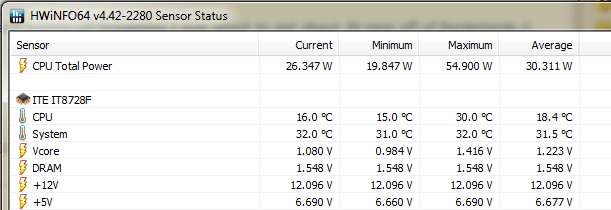
I have also uploaded 2 HWINFO64 readings. So you can really see the baffling confusion. At this point I think it's a Trial and error movement.

Since applying the Grease and turning off Power!now I was about to get about 30 mins off of Borderlands 2 without it crashing and it didn't crash I simply stopped the game. So it could have been turning off PowerNOW! on the Motherboard or could have been applying the grease better to give a better heat transfer. The application of the Grease I was able to drop the package temp about 3 degrees while idling. Once the New fan gets here in a few days I will have to see.

And I have to apologize. the actual Cooler I have. http://www.coolermaster.com/cooling/cpu-air-cooler/geminii-s524/
 

Attachments

  • Capture2.PNG
    Capture2.PNG
    6.8 KB · Views: 18
  • Capture3.PNG
    Capture3.PNG
    8.9 KB · Views: 18
Last edited:

My Computer My Computer

Computer type
PC/Desktop
Computer Manufacturer/Model Number
Custom Build
OS
Microsoft Windows 7 Home Premium 64-bit
CPU
AMD A10-5800K APU with Radeon(tm) HD Graphics
Motherboard
BIOSTAR Group Hi-Fi A85S3
Memory
8.00 GB
Graphics Card(s)
NVIDIA GeForce GTX 650 Ti
Sound Card
(1) NVIDIA High Definition Audio (2) Realtek High Definiti
Monitor(s) Displays
ASUS
Screen Resolution
1600x900
Hard Drives
ST1500DL003-9VT16L ATA Device
ST3200822AS ATA Device
WDC WD800JD-00MSA1 ATA Device
PSU
750w XFXForce pro series
Case
Roswell challenger
Cooling
4 fans including the one for the CPU
Keyboard
Logitech G10
Mouse
Razer Naga hex
Antivirus
Panda
Browser
Firefox
I see what you mean by baffling. The CPU temp reads one thing and the package temp is much much higher. Maybe we just have an out of whack sensor.

While we wait for your new fan, have you tested the RAM with something like Memtest86+? It's probably a good idea. At least it never hurts to test RAM now and again, and it might shed some light on the crashes.

Memtest86+ - Advanced Memory Diagnostic Tool

Let it run overnight and see if any errors pop up.
 

My Computer My Computer

Computer type
PC/Desktop
Computer Manufacturer/Model Number
Mellon Labs (custom build)
OS
Win 7 Pro x64/Win 10 Pro x64 dual boot
CPU
AMD FX 8350 Vishera @ 4200
Motherboard
ASUS M5A97 R2.0
Memory
16 GB Mushkin Blackline DDR3-2400 @ 1866 (9-10-10-10-31)
Graphics Card(s)
XFX Radeon R9 280 Double D Black Edition
Sound Card
Realtek HD Audio on MB. Sounds great.
Monitor(s) Displays
Acer 24", Acer 22"
Screen Resolution
3840 x 1080
Hard Drives
1 x Mushkin Chronos 120 GB SSD (Win 10)
1 x Samsung 850 EVO 250 GB SSD (Win 7)
1 x WD 1TB SATA Blue
1 x WD 1TB SATA Green
PSU
Corsair TX-750
Case
CoolerMaster HAF 912+
Cooling
Coolermaster Seidon 240M Liquid AIO. 6 case fans
Keyboard
Logitech G710+
Mouse
Logitech G500s
Internet Speed
Much better since I got fiber, but still way overpriced.
Antivirus
MSE, Malware Bytes for scanning
Browser
Firefox
Other Info
Corsair VOID USB headphones.

A Mellon Labs X-1 - LCD Smartie driven system status display.

Brought to you by the letter E
Could you post a complete picture of HWmonitor?
 

My Computer My Computer

Computer type
PC/Desktop
Computer Manufacturer/Model Number
Home made Desktop
OS
Windows 10 Pro. 64/ version 1709 Windows 7 Pro/64
CPU
Intel i7-6800K @ 4.3
Motherboard
ASUS X-99 Deluxe II
Memory
Corsair Platinum 16 gig @2400
Graphics Card(s)
EVGA GTX 1070 OC
Monitor(s) Displays
Asus 27" LED LCD/VE278Q
Screen Resolution
1920-1080 or 1280-720 HDMI
Hard Drives
INTEL SSD 730-240 Gb Sata 3.0/
PSU
EVGA Platium 1200W
Case
Phanteks Luxe Tempered Glass 8 fans/ one radiator
Cooling
XSPC/ Water Cooled CPU
Keyboard
Das 4 Professional
Mouse
Logitech M705/MX Anywhere 2-S
Internet Speed
100 mbits
Antivirus
Microsoft Security Essentials/ Malwarebytes Premium 3.0/ SAS
Browser
I.E. 11 default/Firefox/ ISP Time Warner Cable/Spectrum
Other Info
LG BluRay Burner/
Sound system-KLipsch-THX/
Icy Dock ssd Hot Swap bays.
I see what you mean by baffling. The CPU temp reads one thing and the package temp is much much higher. Maybe we just have an out of whack sensor.

While we wait for your new fan, have you tested the RAM with something like Memtest86+? It's probably a good idea. At least it never hurts to test RAM now and again, and it might shed some light on the crashes.

Memtest86+ - Advanced Memory Diagnostic Tool

Let it run overnight and see if any errors pop up.

:) done it already. I Know it's not the ram. Let it run for 24 hours and nothing. Initially, I thought it was the Video card because the my GTX250 wouldn't cause a crash where as the GTX650 would. Recently after I was able to get it RMA'd the problems persisted..though the screen particles and artifacts went away. So that is when it hit me. The 650 uses more power then the 250 and may be causing more heat in the system which was pushing the system over, that with a Poor fan on the cooler, and a maybe needed better greasing.

Additionally, I've Learned there is such a different in the temps because AMD uses a mathmatical equation now instead of a actaul physical temp gauge. Kind of stupid I agree.

(argus monitor)" 1. the temperature sensor does not read real physical CPU temperature, so that there can be a rather large temperature difference between the measured and real CPU temperature -- especially if the CPU is idle. "

Also when it comes to AMD CPU's what is PowerrNOW! I was afraid of messing with it in the Bios, But seeing as there's no option for cool&Quiet in there. Powernow seems to have something to do with Processor based Power events. Afraid to put it under a full load with it off if it has something to do with processor heat. Though I never had my machine set to shut off when it overheats (recently set that in my bios) sooo Maybe it wasn't a heat issue? So confusing!

I will screenshot a larger HWMonitor when I get home from the ballpark in a few hours.
 

My Computer My Computer

Computer type
PC/Desktop
Computer Manufacturer/Model Number
Custom Build
OS
Microsoft Windows 7 Home Premium 64-bit
CPU
AMD A10-5800K APU with Radeon(tm) HD Graphics
Motherboard
BIOSTAR Group Hi-Fi A85S3
Memory
8.00 GB
Graphics Card(s)
NVIDIA GeForce GTX 650 Ti
Sound Card
(1) NVIDIA High Definition Audio (2) Realtek High Definiti
Monitor(s) Displays
ASUS
Screen Resolution
1600x900
Hard Drives
ST1500DL003-9VT16L ATA Device
ST3200822AS ATA Device
WDC WD800JD-00MSA1 ATA Device
PSU
750w XFXForce pro series
Case
Roswell challenger
Cooling
4 fans including the one for the CPU
Keyboard
Logitech G10
Mouse
Razer Naga hex
Antivirus
Panda
Browser
Firefox
I see what you mean by baffling. The CPU temp reads one thing and the package temp is much much higher. Maybe we just have an out of whack sensor.

While we wait for your new fan, have you tested the RAM with something like Memtest86+? It's probably a good idea. At least it never hurts to test RAM now and again, and it might shed some light on the crashes.

Memtest86+ - Advanced Memory Diagnostic Tool

Let it run overnight and see if any errors pop up.

:) done it already. I Know it's not the ram. Let it run for 24 hours and nothing. Initially, I thought it was the Video card because the my GTX250 wouldn't cause a crash where as the GTX650 would. Recently after I was able to get it RMA'd the problems persisted..though the screen particles and artifacts went away. So that is when it hit me. The 650 uses more power then the 250 and may be causing more heat in the system which was pushing the system over, that with a Poor fan on the cooler, and a maybe needed better greasing.
Additionally, I've Learned there is such a different in the temps because AMD uses a mathmatical equation now instead of a actaul physical temp gauge. Kind of stupid I agree.

(argus monitor)" 1. the temperature sensor does not read real physical CPU temperature, so that there can be a rather large temperature difference between the measured and real CPU temperature -- especially if the CPU is idle. "

Also when it comes to AMD CPU's what is PowerrNOW! I was afraid of messing with it in the Bios, But seeing as there's no option for cool&Quiet in there. Powernow seems to have something to do with Processor based Power events. Afraid to put it under a full load with it off if it has something to do with processor heat. Though I never had my machine set to shut off when it overheats (recently set that in my bios) sooo Maybe it wasn't a heat issue? So confusing!

I will screenshot a larger HWMonitor when I get home from the ballpark in a few hours.


Keep in mind; just because you let memtest run for 24 hours doesnt necessiairly mean there arent any issues. There could still be issues with one or more ram sticks as it can take several passes sometimes for memtest to detect any issues with the ram; Also; if you have not already done so; i would take the time to dust/clean out the inside of your case. And one more thing that comes to my mind is the thermal paste for the fan heatsinks can degrade over time; which is a issue i ended up having not too long ago; so its a good idea to make sure to check that every now and then as well. Just my .02 here.
 

My Computer My Computer

Computer type
PC/Desktop
Computer Manufacturer/Model Number
custom built
OS
Windows 7 ultimate 64-bit
CPU
Intel I7 2600K 3.4ghz
Motherboard
Asus Evo P8P67
Memory
Corsair 16gb ddr3 1600mhz
Graphics Card(s)
Nvidia Geforce gt 430
Sound Card
Sound Blaster Titanium x-fi pci express
Monitor(s) Displays
Dell E198WFP
Hard Drives
1 western digital 2TB drive.
PSU
Antec 1200 watt
Case
Inwin Dragon Rider
Cooling
6 case supplied cooling fans
Keyboard
logitech mk700
Mouse
logitech m705
Internet Speed
25-50mbps download; 10mbps upload(i think)
Antivirus
avg free 2014
Browser
mozilla firefox
Other Info
Also have a pretty bad speaker setup which is a klipsch promedia 5.1 surround speaker setup with huge subwoofer and lg blu ray player/writer. Also a hp officejet pro 8600 plus wireless all in one and a logitech s7500 webcam.
The OP has just installed new thermal paste so I don't think it's a degradation thing.
 

My Computer My Computer

Computer type
PC/Desktop
Computer Manufacturer/Model Number
Mellon Labs (custom build)
OS
Win 7 Pro x64/Win 10 Pro x64 dual boot
CPU
AMD FX 8350 Vishera @ 4200
Motherboard
ASUS M5A97 R2.0
Memory
16 GB Mushkin Blackline DDR3-2400 @ 1866 (9-10-10-10-31)
Graphics Card(s)
XFX Radeon R9 280 Double D Black Edition
Sound Card
Realtek HD Audio on MB. Sounds great.
Monitor(s) Displays
Acer 24", Acer 22"
Screen Resolution
3840 x 1080
Hard Drives
1 x Mushkin Chronos 120 GB SSD (Win 10)
1 x Samsung 850 EVO 250 GB SSD (Win 7)
1 x WD 1TB SATA Blue
1 x WD 1TB SATA Green
PSU
Corsair TX-750
Case
CoolerMaster HAF 912+
Cooling
Coolermaster Seidon 240M Liquid AIO. 6 case fans
Keyboard
Logitech G710+
Mouse
Logitech G500s
Internet Speed
Much better since I got fiber, but still way overpriced.
Antivirus
MSE, Malware Bytes for scanning
Browser
Firefox
Other Info
Corsair VOID USB headphones.

A Mellon Labs X-1 - LCD Smartie driven system status display.

Brought to you by the letter E
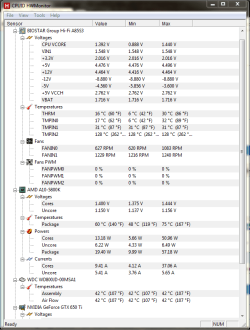
my HWmonitor is pretty large due to having 3 HDD in there. Anyways I could go ahead and attempt a full run of a game for a few hours with PowerNow! on the system turned off. I tried it for 30 mins but I wasn't sure if that would cause a difference. and somewhat fearing of damaging the machine if PowerNow was shutting the system off due to heat. But I guess I do have the Internal Bios set to shut my system down once it goes over a certain temp. So I should be safe.
 

Attachments

  • Capture3.PNG
    Capture3.PNG
    29 KB · Views: 0

My Computer My Computer

Computer type
PC/Desktop
Computer Manufacturer/Model Number
Custom Build
OS
Microsoft Windows 7 Home Premium 64-bit
CPU
AMD A10-5800K APU with Radeon(tm) HD Graphics
Motherboard
BIOSTAR Group Hi-Fi A85S3
Memory
8.00 GB
Graphics Card(s)
NVIDIA GeForce GTX 650 Ti
Sound Card
(1) NVIDIA High Definition Audio (2) Realtek High Definiti
Monitor(s) Displays
ASUS
Screen Resolution
1600x900
Hard Drives
ST1500DL003-9VT16L ATA Device
ST3200822AS ATA Device
WDC WD800JD-00MSA1 ATA Device
PSU
750w XFXForce pro series
Case
Roswell challenger
Cooling
4 fans including the one for the CPU
Keyboard
Logitech G10
Mouse
Razer Naga hex
Antivirus
Panda
Browser
Firefox
I do believe one of the problems is HWMonitor is giving false readings.

Look at your 12v+ (4.464v). It wouldn't even boot if the voltage reading was correct.
 

My Computer My Computer

Computer type
PC/Desktop
Computer Manufacturer/Model Number
Home made Desktop
OS
Windows 10 Pro. 64/ version 1709 Windows 7 Pro/64
CPU
Intel i7-6800K @ 4.3
Motherboard
ASUS X-99 Deluxe II
Memory
Corsair Platinum 16 gig @2400
Graphics Card(s)
EVGA GTX 1070 OC
Monitor(s) Displays
Asus 27" LED LCD/VE278Q
Screen Resolution
1920-1080 or 1280-720 HDMI
Hard Drives
INTEL SSD 730-240 Gb Sata 3.0/
PSU
EVGA Platium 1200W
Case
Phanteks Luxe Tempered Glass 8 fans/ one radiator
Cooling
XSPC/ Water Cooled CPU
Keyboard
Das 4 Professional
Mouse
Logitech M705/MX Anywhere 2-S
Internet Speed
100 mbits
Antivirus
Microsoft Security Essentials/ Malwarebytes Premium 3.0/ SAS
Browser
I.E. 11 default/Firefox/ ISP Time Warner Cable/Spectrum
Other Info
LG BluRay Burner/
Sound system-KLipsch-THX/
Icy Dock ssd Hot Swap bays.

My Computer My Computer

Computer type
PC/Desktop
Computer Manufacturer/Model Number
Mellon Labs (custom build)
OS
Win 7 Pro x64/Win 10 Pro x64 dual boot
CPU
AMD FX 8350 Vishera @ 4200
Motherboard
ASUS M5A97 R2.0
Memory
16 GB Mushkin Blackline DDR3-2400 @ 1866 (9-10-10-10-31)
Graphics Card(s)
XFX Radeon R9 280 Double D Black Edition
Sound Card
Realtek HD Audio on MB. Sounds great.
Monitor(s) Displays
Acer 24", Acer 22"
Screen Resolution
3840 x 1080
Hard Drives
1 x Mushkin Chronos 120 GB SSD (Win 10)
1 x Samsung 850 EVO 250 GB SSD (Win 7)
1 x WD 1TB SATA Blue
1 x WD 1TB SATA Green
PSU
Corsair TX-750
Case
CoolerMaster HAF 912+
Cooling
Coolermaster Seidon 240M Liquid AIO. 6 case fans
Keyboard
Logitech G710+
Mouse
Logitech G500s
Internet Speed
Much better since I got fiber, but still way overpriced.
Antivirus
MSE, Malware Bytes for scanning
Browser
Firefox
Other Info
Corsair VOID USB headphones.

A Mellon Labs X-1 - LCD Smartie driven system status display.

Brought to you by the letter E
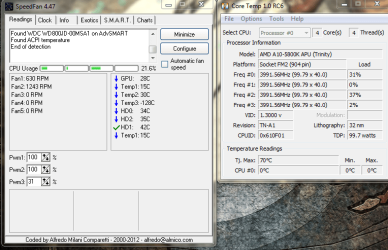
I never Noticed that. Thank you very much for catching that. Anyways as I remove the Malware that came with speedfan Here's the Coretemp and speedfan readings.
 

Attachments

  • Capture4.PNG
    Capture4.PNG
    63.7 KB · Views: 0

My Computer My Computer

Computer type
PC/Desktop
Computer Manufacturer/Model Number
Custom Build
OS
Microsoft Windows 7 Home Premium 64-bit
CPU
AMD A10-5800K APU with Radeon(tm) HD Graphics
Motherboard
BIOSTAR Group Hi-Fi A85S3
Memory
8.00 GB
Graphics Card(s)
NVIDIA GeForce GTX 650 Ti
Sound Card
(1) NVIDIA High Definition Audio (2) Realtek High Definiti
Monitor(s) Displays
ASUS
Screen Resolution
1600x900
Hard Drives
ST1500DL003-9VT16L ATA Device
ST3200822AS ATA Device
WDC WD800JD-00MSA1 ATA Device
PSU
750w XFXForce pro series
Case
Roswell challenger
Cooling
4 fans including the one for the CPU
Keyboard
Logitech G10
Mouse
Razer Naga hex
Antivirus
Panda
Browser
Firefox
I believe if you have the core unlocker active in the bios this will disable the temperature readings of Core Temp. I am sure the setting is Advanced Clock Calibration. Set that to disabled then core temp will read higher than 0C which is false.
In my bios that setting is in the advanced CPU configuration.
 

My Computer My Computer

Computer type
PC/Desktop
Computer Manufacturer/Model Number
Bluethunder II
OS
Windows 7 x64 Ultimate and numerous virtual machines
CPU
AMD FX-8350 Vishera 32nm Technology @ 4.2 GHz default
Motherboard
ASUSTeK COMPUTER INC. SABERTOOTH 990FX R2.0 (Socket 942)
Memory
G Skill 32.0GB Dual-Channel DDR3 @ 1204MHz (11-13-13-31)
Graphics Card(s)
EVGA GeForce GTX 960 4GB Super SC ACX 2.0+ with Back Plate
Sound Card
Creative X-Fi Titanium HD Audiophile PCIe
Monitor(s) Displays
LG L227WTG x 3
Screen Resolution
1680 x 1050 16:10
Hard Drives
238GB Samsung850 PRO SATA Disk Device (SSD)
1863GB Seagate ST2000DM 001-1CH164 (SATA)
1397GB Seagate ST1500DL 003-9VT16L(SATA)
466GB Western Digital WDC WD50 03AZEX-00K1GA0 (SATA) x 2
932GB Seagate ST310005 28AS SATA Disk Device (SATA)
PSU
Enermax Revolution87+ 1000 Watts Gold Certified Power Supply
Case
Rocketfish Full Tower
Cooling
Cooler Master Hyper 212 EVO Push Pull 120mm Fans
Keyboard
Logitech K740
Mouse
Logitech G100S Laser LED + Logitech Gamepad F310
Internet Speed
500 mbs down and 30mbs up
Antivirus
Malwarebytes Pro & Avast and MSE on certain Virtual Machines
Browser
Firefox (Main) Chrome, Internet Explorer (Back Up)
Other Info
Logitech X 230 2.1 Stereo System and 5.1 Yamaha RX V2090
B&W DM6 Monitor Speakers + Center and Surround Speakers
Using Mouse Without Borders (Google it)
I never Noticed that. Thank you very much for catching that. Anyways as I remove the Malware that came with speedfan Here's the Coretemp and speedfan readings.
You got malware from Speedfan? That's good to know, I'll avoid recommending it in future. I've never had a problem with it. Sorry about that.

I noticed that the version that you're using is 4.47. The current version is 4.49. I wonder if you got a bogus download link from the page?

Anyway, Speedfan isn't reading your temps right either. "Temp1" should be a lot higher than it is, since that's usually your socket temperature.
 

My Computer My Computer

Computer type
PC/Desktop
Computer Manufacturer/Model Number
Mellon Labs (custom build)
OS
Win 7 Pro x64/Win 10 Pro x64 dual boot
CPU
AMD FX 8350 Vishera @ 4200
Motherboard
ASUS M5A97 R2.0
Memory
16 GB Mushkin Blackline DDR3-2400 @ 1866 (9-10-10-10-31)
Graphics Card(s)
XFX Radeon R9 280 Double D Black Edition
Sound Card
Realtek HD Audio on MB. Sounds great.
Monitor(s) Displays
Acer 24", Acer 22"
Screen Resolution
3840 x 1080
Hard Drives
1 x Mushkin Chronos 120 GB SSD (Win 10)
1 x Samsung 850 EVO 250 GB SSD (Win 7)
1 x WD 1TB SATA Blue
1 x WD 1TB SATA Green
PSU
Corsair TX-750
Case
CoolerMaster HAF 912+
Cooling
Coolermaster Seidon 240M Liquid AIO. 6 case fans
Keyboard
Logitech G710+
Mouse
Logitech G500s
Internet Speed
Much better since I got fiber, but still way overpriced.
Antivirus
MSE, Malware Bytes for scanning
Browser
Firefox
Other Info
Corsair VOID USB headphones.

A Mellon Labs X-1 - LCD Smartie driven system status display.

Brought to you by the letter E
well it was the link you shot to me, Anyways, I'll make sure to go through Major Geeks next time :) I'm really wondering if It's the sensors but that would mean that would be 2 motherboards from Biostar I've gotten that have read the wrong temps.

Another thing .. PowerNow. What is it. I see it in the Bios of the the Motherboard and after reading about it, It's mainly for Laptops? I have it turned off right now and it talks about ACPI type events off the processor.
 

My Computer My Computer

Computer type
PC/Desktop
Computer Manufacturer/Model Number
Custom Build
OS
Microsoft Windows 7 Home Premium 64-bit
CPU
AMD A10-5800K APU with Radeon(tm) HD Graphics
Motherboard
BIOSTAR Group Hi-Fi A85S3
Memory
8.00 GB
Graphics Card(s)
NVIDIA GeForce GTX 650 Ti
Sound Card
(1) NVIDIA High Definition Audio (2) Realtek High Definiti
Monitor(s) Displays
ASUS
Screen Resolution
1600x900
Hard Drives
ST1500DL003-9VT16L ATA Device
ST3200822AS ATA Device
WDC WD800JD-00MSA1 ATA Device
PSU
750w XFXForce pro series
Case
Roswell challenger
Cooling
4 fans including the one for the CPU
Keyboard
Logitech G10
Mouse
Razer Naga hex
Antivirus
Panda
Browser
Firefox
As such I believe the issue was that Powernow Option in the Bios being Labeled. Since I turned it off , I haven't had trouble. the new fan is in. WHen I get home here in a bit I am going to switch the power now option back on after installing the new Fan on the CPU cooler. afterwards I'll Record my findings and Mark solved if it happens agains :) after turning the PowerNow Option on.
 

My Computer My Computer

Computer type
PC/Desktop
Computer Manufacturer/Model Number
Custom Build
OS
Microsoft Windows 7 Home Premium 64-bit
CPU
AMD A10-5800K APU with Radeon(tm) HD Graphics
Motherboard
BIOSTAR Group Hi-Fi A85S3
Memory
8.00 GB
Graphics Card(s)
NVIDIA GeForce GTX 650 Ti
Sound Card
(1) NVIDIA High Definition Audio (2) Realtek High Definiti
Monitor(s) Displays
ASUS
Screen Resolution
1600x900
Hard Drives
ST1500DL003-9VT16L ATA Device
ST3200822AS ATA Device
WDC WD800JD-00MSA1 ATA Device
PSU
750w XFXForce pro series
Case
Roswell challenger
Cooling
4 fans including the one for the CPU
Keyboard
Logitech G10
Mouse
Razer Naga hex
Antivirus
Panda
Browser
Firefox
Back
Top