Random shutdowns. No warning. No BSOD. Passes all tests.

Not the original driver CD, but the NVIDIA DRIVERS 314.22WHQL.

Driver is available, but as you are saying that the device is very old .... usually the life span of a GPU is not much more than more or less 3 years and after that it is expected to fail upto some extent.

hsxi.jpg

Lol yeah, its got one blown cap and artifacts like a mother under load. But its still usable and still passes burnin test and benchmarks. Which is why I only have this card for really quick tests and dont keep it inside as a physx card.
 

My Computer My Computer

Computer type
PC/Desktop
Computer Manufacturer/Model Number
Custom
OS
Windows 7
CPU
i7 2600k
Motherboard
MSI MCII
Memory
Muskin 4GB x2
Graphics Card(s)
XFX 6950 x2
Hard Drives
1TB WD x2
64GB SSD
250GB Maxtor x4
Oh sorry it took so long for me to update but I have been trying a lot of different things, and I wanted to put everything into one thread.

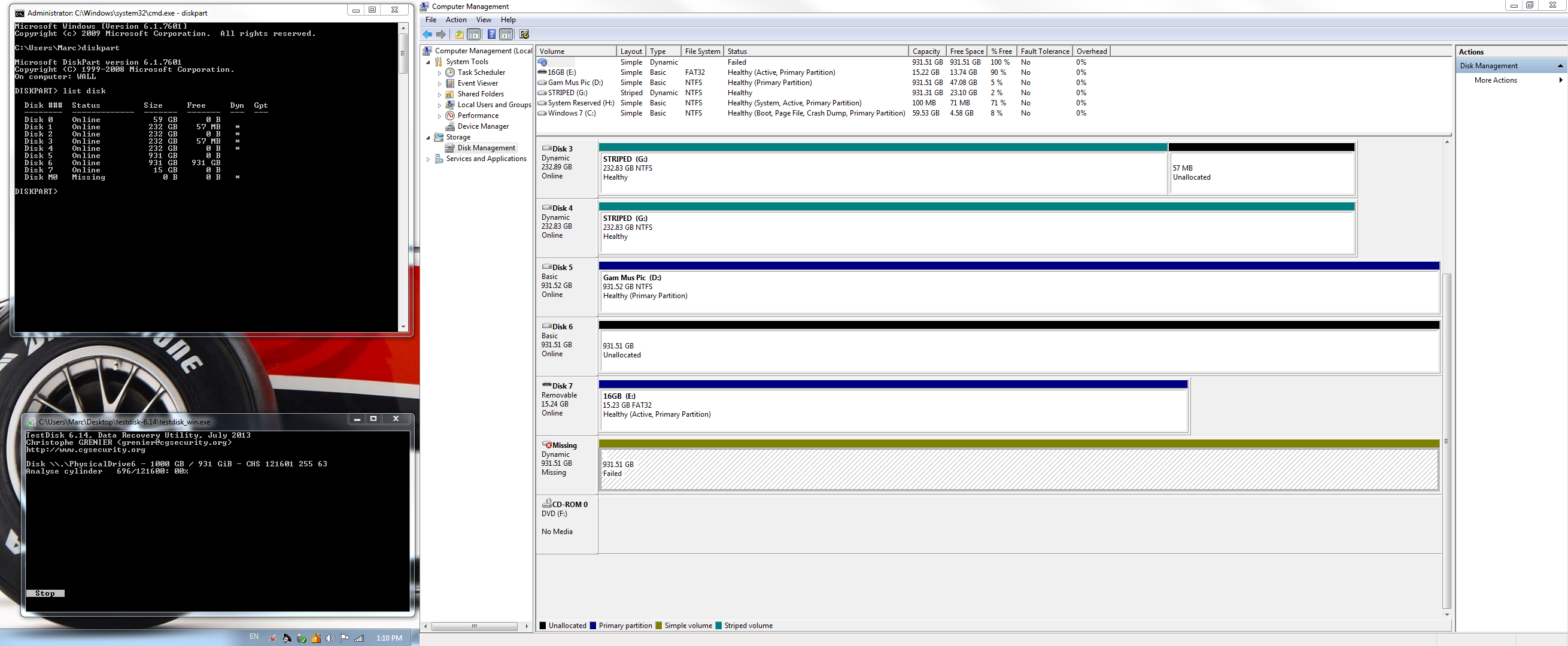
First here is my SC of disk management:
IUPn9XO.png


On the drive I ran EASEUS data recovery and I was able to recover all of my data with no problem, It just took about a day for the whole process of scanning a 1TB drive, and then recovering 1TB worth of data. (Which is why my stripped drive is now full).


Second, I tried both of my Graphics cards:

The one I am using now GPU#1 works in PCIe slot 1 and PCIe slot 2 but will not run WEI or fur mark.
GPU#2 works in PCIe slot 2 mostly. When I put it in slot 1 the computer turns on but doesn't go to POST.

I also tried an old 5870(?) I had that I know doesn't work fully, but should of still booted, and it was the same issue as GPU#2 in both PCIe slots. No POST.

I also tried my "For testing purposes only" GeGorce 8600gtx, and that was the same thing as the 5870. No POST in either slot.

I really don't think that every single graphics card I own is not working. So I have MSI's customer service number, and I will call them up tomorrow during their hours, and see if I can RMA my board.

If a new board doesn't work then I will call up XFX and RMA my graphics cards.
 

My Computer My Computer

Computer type
PC/Desktop
Computer Manufacturer/Model Number
Custom
OS
Windows 7
CPU
i7 2600k
Motherboard
MSI MCII
Memory
Muskin 4GB x2
Graphics Card(s)
XFX 6950 x2
Hard Drives
1TB WD x2
64GB SSD
250GB Maxtor x4
I said something in this line earlier in post #55.
Even if that one is not working, you need to search the reason in the PCIe slots, not to the drivers.
 

My Computer My Computer

Computer type
PC/Desktop
Computer Manufacturer/Model Number
Self Assembled
OS
Microsoft Windows 10 Pro Insider Preview 64-bit
CPU
Intel(R) Core(TM) i3-4130 CPU @ 3.40GHz
Motherboard
Gigabyte Technology Co., Ltd. B85M-D3H
Memory
Corsair Vengence 4GB x2 (8.00GB Dual-Channel DDR3 @ 798MHz)
Graphics Card(s)
2047MB GeForce GTS 450 (ZOTAC International)
Sound Card
Onboard (Realtek High Definition Audio)
Monitor(s) Displays
LG Flatron E2040T
Screen Resolution
1600x900
Hard Drives
Western Digital 1 TB
Seagate 500 GB
PSU
Corsair VS550
Case
Cooler Master K380
Cooling
Cooler Master Seidon 120V Plus
Keyboard
Logitech MK260r
Mouse
Logitech MK260r
Internet Speed
PMPL Broadband
Antivirus
Windows Defender + MBAM
Browser
Firefox
Other Info
Dell Studio 15" Laptop
I said something in this line earlier in post #55.
Even if that one is not working, you need to search the reason in the PCIe slots, not to the drivers.

YUP! and you may be right!

Is there any way to test PCIe Slots directly?
 

My Computer My Computer

Computer type
PC/Desktop
Computer Manufacturer/Model Number
Custom
OS
Windows 7
CPU
i7 2600k
Motherboard
MSI MCII
Memory
Muskin 4GB x2
Graphics Card(s)
XFX 6950 x2
Hard Drives
1TB WD x2
64GB SSD
250GB Maxtor x4
Is far as I know, we cannot test the motherboard components.
 

My Computer My Computer

Computer type
PC/Desktop
Computer Manufacturer/Model Number
Self Assembled
OS
Microsoft Windows 10 Pro Insider Preview 64-bit
CPU
Intel(R) Core(TM) i3-4130 CPU @ 3.40GHz
Motherboard
Gigabyte Technology Co., Ltd. B85M-D3H
Memory
Corsair Vengence 4GB x2 (8.00GB Dual-Channel DDR3 @ 798MHz)
Graphics Card(s)
2047MB GeForce GTS 450 (ZOTAC International)
Sound Card
Onboard (Realtek High Definition Audio)
Monitor(s) Displays
LG Flatron E2040T
Screen Resolution
1600x900
Hard Drives
Western Digital 1 TB
Seagate 500 GB
PSU
Corsair VS550
Case
Cooler Master K380
Cooling
Cooler Master Seidon 120V Plus
Keyboard
Logitech MK260r
Mouse
Logitech MK260r
Internet Speed
PMPL Broadband
Antivirus
Windows Defender + MBAM
Browser
Firefox
Other Info
Dell Studio 15" Laptop
Is far as I know, we cannot test the motherboard components.

Ok, well then after I RMA, I will either update this thread or create a new one referring to this thread, letting everyone know whether or not that solved the problem.
 

My Computer My Computer

Computer type
PC/Desktop
Computer Manufacturer/Model Number
Custom
OS
Windows 7
CPU
i7 2600k
Motherboard
MSI MCII
Memory
Muskin 4GB x2
Graphics Card(s)
XFX 6950 x2
Hard Drives
1TB WD x2
64GB SSD
250GB Maxtor x4
Please continue a single issue in a single thread. If you have any other issue, then open another thread with that issue :)
 

My Computer My Computer

Computer type
PC/Desktop
Computer Manufacturer/Model Number
Self Assembled
OS
Microsoft Windows 10 Pro Insider Preview 64-bit
CPU
Intel(R) Core(TM) i3-4130 CPU @ 3.40GHz
Motherboard
Gigabyte Technology Co., Ltd. B85M-D3H
Memory
Corsair Vengence 4GB x2 (8.00GB Dual-Channel DDR3 @ 798MHz)
Graphics Card(s)
2047MB GeForce GTS 450 (ZOTAC International)
Sound Card
Onboard (Realtek High Definition Audio)
Monitor(s) Displays
LG Flatron E2040T
Screen Resolution
1600x900
Hard Drives
Western Digital 1 TB
Seagate 500 GB
PSU
Corsair VS550
Case
Cooler Master K380
Cooling
Cooler Master Seidon 120V Plus
Keyboard
Logitech MK260r
Mouse
Logitech MK260r
Internet Speed
PMPL Broadband
Antivirus
Windows Defender + MBAM
Browser
Firefox
Other Info
Dell Studio 15" Laptop
Back
Top