Solved Random Shutdowns while browsing with c00002e3 stop

Cratecruncher

New member
Local time
3:16 PM
Messages
4
I started having random shutdowns about three weeks ago (first one was 8/29). The only way I can restart is if I go through the automated startup repair sequence and reboot. I tried analyzing my minidumps with WinDbg but I just don't know enough about debugging operating systems to understand much. I built the system four years ago and it's been rock-solid until now. See attached file and THANK YOU for any help or advice!
 

My Computer

Computer type
PC/Desktop
Computer Manufacturer/Model Number
custom build
OS
Windows 7 Home Premium 64bit.
CPU
AMD Phenom II 6 core 1055T
Motherboard
Asus M5A88-V EVO
Memory
8 Gb (4x2Gb) DDR3 @1600Mhz
Graphics Card(s)
ATI HD 5770 1Gb PCI Express
Hard Drives
WD8088AADS (808.8Gb)
Antivirus
Webroot
Browser
Internet Explorer 11.0
Hi Cratecruncher.

This is a very rare bugcheck code. I never encountered with such a code earlier.
Code:
[COLOR=Red]BugCheck C00002E3[/COLOR], {fffff8a00116c090, ffffffffc0000189, 0, 0}

Probably caused by : ntkrnlmp.exe ( nt!ExpSystemErrorHandler2+5e1 )

Followup: MachineOwner
---------
The crash dumps are very much clueless, too.
Code:
*******************************************************************************
*                                                                             *
*                        Bugcheck Analysis                                    *
*                                                                             *
*******************************************************************************

[COLOR=Red]Unknown bugcheck code (c00002e3)
Unknown bugcheck description[/COLOR]
Arguments:
Arg1: fffff8a00116c090
Arg2: ffffffffc0000189
Arg3: 0000000000000000
Arg4: 0000000000000000

Debugging Details:
------------------
So in this case It will not be very possible to pinpoint the exact cause of the BSOD. The other files might have helped, but the zip you uploaded is incomplete, a lot of necessary files are missing there.

Let us try some conventional approach to find some issue out.

Test your RAM modules for possible errors.
Run memtest86+ for at least 8 consecutive passes.

If it start showing errors/red lines, stop testing. A single error is enough to determine that something is going bad there.

If it does not show any error, enable Driver Verifier to monitor the drivers.
Run Driver Verifier for 24 hours or the occurrence of the next crash, whichever is earlier.

   Information
Why Driver Verifier:
It puts a stress on the drivers, ans so it makes the unstable drivers crash. Hopefully the driver that crashes is recorded in the memory dump.

How Can we know that DV is enabled:
It will make the system bit of slow, laggy.

   Warning
Before enabling DV, make it sure that you have earlier System restore points made in your computer. You can check it easily by using CCleaner looking at Tools > System Restore.

If there is no points, make a System Restore Point manually before enabling DV.

   Tip


Let us know the results, with the subsequent crash dumps, if any.

While uploading the data for the next time, follow both the methods of the Blue Screen of Death (BSOD) Posting Instructions. Let us expect that either of them will give us the exhaustive set of data.

 

My Computer

Computer type
PC/Desktop
Computer Manufacturer/Model Number
Self Assembled
OS
Microsoft Windows 10 Pro Insider Preview 64-bit
CPU
Intel(R) Core(TM) i3-4130 CPU @ 3.40GHz
Motherboard
Gigabyte Technology Co., Ltd. B85M-D3H
Memory
Corsair Vengence 4GB x2 (8.00GB Dual-Channel DDR3 @ 798MHz)
Graphics Card(s)
2047MB GeForce GTS 450 (ZOTAC International)
Sound Card
Onboard (Realtek High Definition Audio)
Monitor(s) Displays
LG Flatron E2040T
Screen Resolution
1600x900
Hard Drives
Western Digital 1 TB
Seagate 500 GB
PSU
Corsair VS550
Case
Cooler Master K380
Cooling
Cooler Master Seidon 120V Plus
Keyboard
Logitech MK260r
Mouse
Logitech MK260r
Internet Speed
PMPL Broadband
Antivirus
Windows Defender + MBAM
Browser
Firefox
Other Info
Dell Studio 15" Laptop
Hi Cratecruncher :) .
I asked Arc if I could join in as my curiosity is high when it comes to cases such as these.

Please export and upload your system event log.

  1. :orb: Start → type eventvwr → hit Enter.
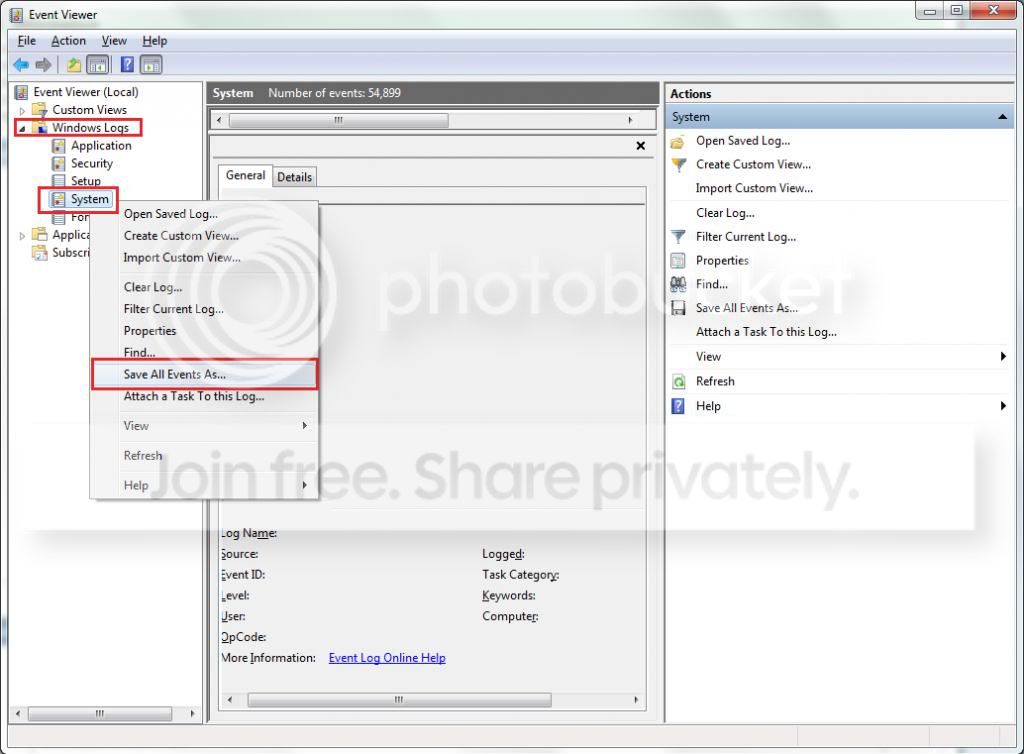
  2. Toggle open the triangle to the left of Windows Logs, right-click on System and choose Save All Events As...
  3. syseventvwrlog1_zps5b0a5395.jpg
  4. A dialogue box will pop up asking you to name the file and select the save directory, name the file the same as your Seven Forums user-name and save it to the desktop.
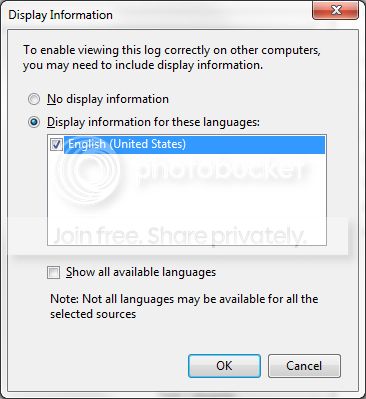
  5. A second dialogue box will appear asking you to select the Display Information, select Display information for these languages and check the box next to English (if you don't have English automatically offered check the box at the bottom to display additional languages - Show all available languages and check English).
  6. syseventvwrlog2_zpsdafa4dba.jpg
  7. Wait a few moments until the cursor returns to normal. The file will now be on your desktop (given it's the directory it was saved to) UserName.evtx, next to it there will be a folder called LocaleMetaData select both the .evtx file as well as the folder and compress them using Winrar / 7zip and attach it in your next post.
 

My Computer

Computer type
PC/Desktop
OS
Windows 10
CPU
Intel Core i5 3570K
Motherboard
Asus P8Z77V-PRO
Memory
16GB 1600Mhz G.Skill
Graphics Card(s)
Gigabyte GTX 970 G1-Gaming
PSU
Seasonic 1000W Platinum
Case
Fractal Design Define R4
Cooling
Noctua NH-D14
THANK YOU for helping me! This thing is just nasty. I found an old thread here with the same bug code that was resolved after the user updated his BIOS. Since my BIOS was way out of date I updated it successfully. Unfortunately Win7 would no longer successfully start repair after that so I had to do a fresh Win7 install from an old CD. Now I'm reinstalling just the bare minimum in the hope I can isolate it.

I had one c00002e3 crash after I installed the motherboard drivers from the Asus CD. The Win7 start repair fixed the OS so it could boot but deleted all the Asus drivers while doing it. So I installed just the LAN driver from the Asus CD in order to connect to the internet and reply here.

I will try the things you guys suggested and appreciate any insight you can share!
 

My Computer

Computer type
PC/Desktop
Computer Manufacturer/Model Number
custom build
OS
Windows 7 Home Premium 64bit.
CPU
AMD Phenom II 6 core 1055T
Motherboard
Asus M5A88-V EVO
Memory
8 Gb (4x2Gb) DDR3 @1600Mhz
Graphics Card(s)
ATI HD 5770 1Gb PCI Express
Hard Drives
WD8088AADS (808.8Gb)
Antivirus
Webroot
Browser
Internet Explorer 11.0
On Arc's hunch that perhaps I might have some RAM going bad I pulled out 3 of my 4 sticks of DDR and the machine booted up beautifully with the one stick! I tried each stick individually and in all 4 slots and couldn't get the thing to crash anymore. So I reinstalled all 4 sticks and all is still running well. Not sure what I did but Win7 is stable and boots are uneventful, at least for now. Maybe the mobo has a dodgy slot that's working again after installing/uninstalling the memory sticks?

I've set up a Memory86+ test to run tonight to see if I find some errors. I'll update the thread with the results.
 
Last edited:

My Computer

Computer type
PC/Desktop
Computer Manufacturer/Model Number
custom build
OS
Windows 7 Home Premium 64bit.
CPU
AMD Phenom II 6 core 1055T
Motherboard
Asus M5A88-V EVO
Memory
8 Gb (4x2Gb) DDR3 @1600Mhz
Graphics Card(s)
ATI HD 5770 1Gb PCI Express
Hard Drives
WD8088AADS (808.8Gb)
Antivirus
Webroot
Browser
Internet Explorer 11.0
I had one c00002e3 crash after I installed the motherboard drivers from the Asus CD. The Win7 start repair fixed the OS so it could boot but deleted all the Asus drivers while doing it.
Your drivers as per Motherboards - M5A88-V EVO - ASUS

  • Chipset: Chipset
  • Audio Realtek
  • Display: Download Drivers
  • LAN: Realtek
  • USB3: Sorry for it; I dont know the official source of getting ASmedia USB3 drivers. But I will ask Maxie for it.
Get the drivers from the official sources, dont need to use the CD bundled with the motherboard.
 

My Computer

Computer type
PC/Desktop
Computer Manufacturer/Model Number
Self Assembled
OS
Microsoft Windows 10 Pro Insider Preview 64-bit
CPU
Intel(R) Core(TM) i3-4130 CPU @ 3.40GHz
Motherboard
Gigabyte Technology Co., Ltd. B85M-D3H
Memory
Corsair Vengence 4GB x2 (8.00GB Dual-Channel DDR3 @ 798MHz)
Graphics Card(s)
2047MB GeForce GTS 450 (ZOTAC International)
Sound Card
Onboard (Realtek High Definition Audio)
Monitor(s) Displays
LG Flatron E2040T
Screen Resolution
1600x900
Hard Drives
Western Digital 1 TB
Seagate 500 GB
PSU
Corsair VS550
Case
Cooler Master K380
Cooling
Cooler Master Seidon 120V Plus
Keyboard
Logitech MK260r
Mouse
Logitech MK260r
Internet Speed
PMPL Broadband
Antivirus
Windows Defender + MBAM
Browser
Firefox
Other Info
Dell Studio 15" Laptop
USB3: maxie suggested me to use MSI 970A-G46 USB 3.0 Driver 1.16.12 Driver - TechSpot

He checked for virus etc too, before linking it to me.

So you get those drivers as suggested. No need to use the drivers from the motherboard's CD.

Let us know how if there is any more BSOD after installing these drivers.
 

My Computer

Computer type
PC/Desktop
Computer Manufacturer/Model Number
Self Assembled
OS
Microsoft Windows 10 Pro Insider Preview 64-bit
CPU
Intel(R) Core(TM) i3-4130 CPU @ 3.40GHz
Motherboard
Gigabyte Technology Co., Ltd. B85M-D3H
Memory
Corsair Vengence 4GB x2 (8.00GB Dual-Channel DDR3 @ 798MHz)
Graphics Card(s)
2047MB GeForce GTS 450 (ZOTAC International)
Sound Card
Onboard (Realtek High Definition Audio)
Monitor(s) Displays
LG Flatron E2040T
Screen Resolution
1600x900
Hard Drives
Western Digital 1 TB
Seagate 500 GB
PSU
Corsair VS550
Case
Cooler Master K380
Cooling
Cooler Master Seidon 120V Plus
Keyboard
Logitech MK260r
Mouse
Logitech MK260r
Internet Speed
PMPL Broadband
Antivirus
Windows Defender + MBAM
Browser
Firefox
Other Info
Dell Studio 15" Laptop
Thanks Arc and Team for the driver links and suggestions for solving this. After pulling my RAM and reinstalling I've had no issues. It's been 72 hours and I've been updating, installing, rebooting like mad during that time.

If someone is reading this that's having similar problems, take a moment to pull all then reinstall just one RAM module in a different slot. It's quick and may solve your issue. To reiterate, mine is a four year old machine that has run smooth up until about three weeks ago. There was no sign of oxidation on the tabs or slots and both RAM and slots checked out fine with Memory86+.
 

My Computer

Computer type
PC/Desktop
Computer Manufacturer/Model Number
custom build
OS
Windows 7 Home Premium 64bit.
CPU
AMD Phenom II 6 core 1055T
Motherboard
Asus M5A88-V EVO
Memory
8 Gb (4x2Gb) DDR3 @1600Mhz
Graphics Card(s)
ATI HD 5770 1Gb PCI Express
Hard Drives
WD8088AADS (808.8Gb)
Antivirus
Webroot
Browser
Internet Explorer 11.0
Good news!

Let us know for any further issue.
 

My Computer

Computer type
PC/Desktop
Computer Manufacturer/Model Number
Self Assembled
OS
Microsoft Windows 10 Pro Insider Preview 64-bit
CPU
Intel(R) Core(TM) i3-4130 CPU @ 3.40GHz
Motherboard
Gigabyte Technology Co., Ltd. B85M-D3H
Memory
Corsair Vengence 4GB x2 (8.00GB Dual-Channel DDR3 @ 798MHz)
Graphics Card(s)
2047MB GeForce GTS 450 (ZOTAC International)
Sound Card
Onboard (Realtek High Definition Audio)
Monitor(s) Displays
LG Flatron E2040T
Screen Resolution
1600x900
Hard Drives
Western Digital 1 TB
Seagate 500 GB
PSU
Corsair VS550
Case
Cooler Master K380
Cooling
Cooler Master Seidon 120V Plus
Keyboard
Logitech MK260r
Mouse
Logitech MK260r
Internet Speed
PMPL Broadband
Antivirus
Windows Defender + MBAM
Browser
Firefox
Other Info
Dell Studio 15" Laptop
Back
Top