Solved Randomly loses networked PCs

  • Thread starter Thread starter SevenUser09
  • Start date Start date
S

SevenUser09

Guest
I have another PC networked to my Windows 7 Pro build 7600 computer however randomly 7 will not detect the other PC. It will show on my full network map but I cannot in any way access it. And sometimes even the other PC will throw up a network locaton unavailable message when trying to access the 7 PC. I even rebooted both PCs and it did not work. It allowed the XP system to connect but 7 could still NOT see XP. I even had a share open only a few minutes prior moving some files. But this time it disappeared when I closed the windows explorer window. Other times is all random. Any idea what could be the issue? I will still have an active internet connection and all of that will be uninterrupted but I just cannot see or access the other location.
 
I have another PC networked to my Windows 7 Pro build 7600 computer however randomly 7 will not detect the other PC. It will show on my full network map but I cannot in any way access it. And sometimes even the other PC will throw up a network locaton unavailable message when trying to access the 7 PC. I even rebooted both PCs and it did not work. It allowed the XP system to connect but 7 could still NOT see XP. I even had a share open only a few minutes prior moving some files. But this time it disappeared when I closed the windows explorer window. Other times is all random. Any idea what could be the issue?

SU

Sounds like IP-6 is enabled in network and sharing. In adapter>advanced>uncheck

You could also tell us abit more abt your network setup

Ken
 

My Computer

Computer Manufacturer/Model Number
HP Pavillion dv-7 1005 Tx
OS
Win 8 Release candidate 8400
CPU
[email protected]
Memory
4 gigs
Graphics Card(s)
Nvidia 9600M
Sound Card
HD built-in
Monitor(s) Displays
17" Wxga
Screen Resolution
1440x900
Cooling
none
Internet Speed
45Mb down 5Mb up
I have a switch connected to a router and both PCs connected to the switch. Very simple network. IPv6 was checked in the network adapter properties. I just unchecked it. Though a minute before I did that the other PC appeared. Will it stay there consistantly with IPv2 turned off? Is there any reason to use v6?
 
I have a switch connected to a router and both PCs connected to the switch. Very simple network. IPv6 was checked in the network adapter properties. I just unchecked it. Though a minute before I did that the other PC appeared. Will it stay there consistantly with IPv2 turned off? Is there any reason to use v6?

Not much use for IP-6 yet. when we are forced to implement it you will be glad its there. The internet is running out of addresses. IP-2 I never heard or typo?

Ken
 

My Computer

Computer Manufacturer/Model Number
HP Pavillion dv-7 1005 Tx
OS
Win 8 Release candidate 8400
CPU
[email protected]
Memory
4 gigs
Graphics Card(s)
Nvidia 9600M
Sound Card
HD built-in
Monitor(s) Displays
17" Wxga
Screen Resolution
1440x900
Cooling
none
Internet Speed
45Mb down 5Mb up
Not much use for IP-6 yet. when we are forced to implement it you will be glad its there. The internet is running out of addresses. IP-2 I never heard or typo?

Ken

Was a typo. Since I turned off IPv6 I should no longer have any issues?
 
Dont think that was your only problem but random drop out is often the major problem of IP-6
 

My Computer

Computer Manufacturer/Model Number
HP Pavillion dv-7 1005 Tx
OS
Win 8 Release candidate 8400
CPU
[email protected]
Memory
4 gigs
Graphics Card(s)
Nvidia 9600M
Sound Card
HD built-in
Monitor(s) Displays
17" Wxga
Screen Resolution
1440x900
Cooling
none
Internet Speed
45Mb down 5Mb up
Both firewalls are set to allow connections from the other PC so I don't think that was the issue. What else could it have been?
 
It looks like this has happened again with IPv6 off.
 
I am still having the issue where my Windows XP machine keeps disappearing from the network. It shows on the full network map but doesn't allow a connection to it.
 
I am still having the issue where my Windows XP machine keeps disappearing from the network. It shows on the full network map but doesn't allow a connection to it.


How did you set up your network with the win7 machine ?

As a HomeGroup or as a work network ?

HomeGroup does not play well with win7 computers & Xp computers :(

" Doc "
 

My Computer

Computer type
PC/Desktop
Computer Manufacturer/Model Number
Built them myself, Science Experiments !
OS
Win7 Enterprise, Win7 x86 (Ult 7600), Win7 x64 Ult 7600, TechNet RTM on AMD x64 (2.8Ghz)
CPU
AMD fx8350 4ghz, AMD-32 2400mhz, AMD-64 3200mhz, AMDx64 2.8G
Motherboard
SIS 755, ECS-K8M890M-M (Ult 7600), GigaByte & others
Memory
2gb, 4gb on the Ult 7600, 4gb on Technet RTM, 32gb on FX8350
Graphics Card(s)
Draw my own Graphics, several nVidia cards
Sound Card
on motherboard
Monitor(s) Displays
19" flat scr, 28" I-Inc widescr,22" Emprex Widescr, 23" Acer
Screen Resolution
1280 x 1024, 1440 x 900, 1920 x 1080
Hard Drives
6 pata Ide HD's & 2 Sata HD's
added 80gb external on Ult 7600 computer,
numerous extra 1tb, 2TB, 3Tb SATA HD's
A collection of ext HD Docks w/ HDs
PSU
430w, 550w, 600w, 700, 800, etc
Case
All Generic Full Towers
Cooling
Open Air & a few fans, some w/ colored LEDs
Keyboard
Compaq & Dell recycled from GoodWill
Mouse
Made in China Optical Wired Mouse
Internet Speed
Fast Cable InterNet
Antivirus
AVG Free on 24 different Desktops, NO Problems!
Browser
IE 8 is preferred, but use FireFox sometimes
Other Info
Linksys Routers, switches, & Hubs
Too Many USB Flash Drives to count, Biggest is 64GB !
Eight computers in my home network.
Sixteen computers at my business network.
Linked via TeamViewer !
Lots of old used spare computer parts everywhere!
I did not use a homegroup. I just go to network. I disabled homegroups actually.
 
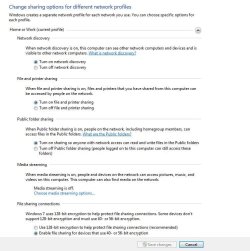
Do you have Discovery ON ?
 

Attachments

  • network_options.JPG
    network_options.JPG
    73.4 KB · Views: 33

My Computer

Computer type
PC/Desktop
Computer Manufacturer/Model Number
Built them myself, Science Experiments !
OS
Win7 Enterprise, Win7 x86 (Ult 7600), Win7 x64 Ult 7600, TechNet RTM on AMD x64 (2.8Ghz)
CPU
AMD fx8350 4ghz, AMD-32 2400mhz, AMD-64 3200mhz, AMDx64 2.8G
Motherboard
SIS 755, ECS-K8M890M-M (Ult 7600), GigaByte & others
Memory
2gb, 4gb on the Ult 7600, 4gb on Technet RTM, 32gb on FX8350
Graphics Card(s)
Draw my own Graphics, several nVidia cards
Sound Card
on motherboard
Monitor(s) Displays
19" flat scr, 28" I-Inc widescr,22" Emprex Widescr, 23" Acer
Screen Resolution
1280 x 1024, 1440 x 900, 1920 x 1080
Hard Drives
6 pata Ide HD's & 2 Sata HD's
added 80gb external on Ult 7600 computer,
numerous extra 1tb, 2TB, 3Tb SATA HD's
A collection of ext HD Docks w/ HDs
PSU
430w, 550w, 600w, 700, 800, etc
Case
All Generic Full Towers
Cooling
Open Air & a few fans, some w/ colored LEDs
Keyboard
Compaq & Dell recycled from GoodWill
Mouse
Made in China Optical Wired Mouse
Internet Speed
Fast Cable InterNet
Antivirus
AVG Free on 24 different Desktops, NO Problems!
Browser
IE 8 is preferred, but use FireFox sometimes
Other Info
Linksys Routers, switches, & Hubs
Too Many USB Flash Drives to count, Biggest is 64GB !
Eight computers in my home network.
Sixteen computers at my business network.
Linked via TeamViewer !
Lots of old used spare computer parts everywhere!
You do need to enable sharing on the XP machine also. I've been sharing between the two OP systems since Jan. works perfectly. You may need to hit the refresh button on the Win7 machine a few times before the XP machine shows up.
 

My Computer

Computer type
PC/Desktop
Computer Manufacturer/Model Number
Home built
OS
Windows 7 Ult, Windows 8.1 Pro,
CPU
Q9650-4.275GHz, E8600 4.5GHz, E6750-3.8GHz
Motherboard
Evga 780i FTW
Memory
G.Skill PC2 9600 1200Mhz 5 5 5 15 2T
Graphics Card(s)
GTX480
Sound Card
Asus Xonar D2
Monitor(s) Displays
HannsG
Screen Resolution
1680X1050
Hard Drives
GSkill Phoenix Pro 120GB SSD
PSU
ThermalTake Toughpower 1000Watt modular
Case
ThermalTake XaserV
Cooling
Xigmatek S1283
Keyboard
Logitech G15
Mouse
Logitech G9
Internet Speed
T1
Sharing is enabled on both. A couple of times I refreshed the list about 5 times with no luck until I rebooted the Win7 PC.
 
Sharing is enabled on both. A couple of times I refreshed the list about 5 times with no luck until I rebooted the Win7 PC.

Despite your remark that the firewalls are set to accept, I am almost certain they are not set right.
The symptoms you describe sound like a firewall issue.

This is what you need to do:

Disable all the firewalls. See what happens.

If this works ok, you will have to examine the firewall rules more closely.

Enable only one firewall at a time when experimenting with the rules.

When you have one setup right, go to the next etc..

Good luck
 

My Computer

OS
Win7 Build 7600 x86
CPU
Pentium II 300MHz
Motherboard
Asus
Memory
32mb EDO RAM
Graphics Card(s)
Diamond Viper
Sound Card
Soundblaster 16
Monitor(s) Displays
14" AOC CRT 16K color
Screen Resolution
800x600
Hard Drives
300mb Quantum fireball
PSU
110 Watts
Cooling
Passive
Keyboard
Trust Ergonomic
Mouse
Generic
Internet Speed
256K u 128K d
Well I use COMODO firewall and used it when my laptop was Vista. all I did was import/export the settings so they are the same.
 
Squonksc has presented a valid test. An easy test. A test that you should administer.
 
Well I use COMODO firewall and used it when my laptop was Vista. all I did was import/export the settings so they are the same.

Not long before your initial post, another guy with COMODO firewall had exactely the same issue.

He had tried everything, or so he thought.

Turning the firewalls made the problem go away instantly.

After that, he set the firewalls less restrictive and he's ok now.

Here is his conclusion, maybe you can PM him to ask which settings he changed.

http://www.sevenforums.com/network-sharing/23580-missing-network-devices-computers-2.html#post254653

good luck
 

My Computer

OS
Win7 Build 7600 x86
CPU
Pentium II 300MHz
Motherboard
Asus
Memory
32mb EDO RAM
Graphics Card(s)
Diamond Viper
Sound Card
Soundblaster 16
Monitor(s) Displays
14" AOC CRT 16K color
Screen Resolution
800x600
Hard Drives
300mb Quantum fireball
PSU
110 Watts
Cooling
Passive
Keyboard
Trust Ergonomic
Mouse
Generic
Internet Speed
256K u 128K d
Well I use COMODO firewall and used it when my laptop was Vista. all I did was import/export the settings so they are the same.


You can lead a horse to water, but that doesnt make him a duck!!
 

My Computer

Computer type
PC/Desktop
Computer Manufacturer/Model Number
LENOVO K450 @3.0GHZ
OS
64-bit Windows 8.1 Pro
CPU
Core(TM) i5 CPU 4330 Haswell @ 3.20GHz
Motherboard
LENOVO
Memory
12.00 GB
Graphics Card(s)
Intel(R) HD Graphics
Sound Card
Intel HD integtrated
Monitor(s) Displays
HP 25' ISP Monitor
Screen Resolution
1900/1020
Hard Drives
(1) ST1000DM003-1CH162 (2) Generic STORAGE DEVICE USB Device (3) Generic STORAGE DEVICE USB Device
Internet Speed
100mb down/10mb up
Back
Top