Solved Re enabling certain Windows features

CONNERthe

New member
Local time
10:39 PM
Messages
23
Hi all, I once ran into an article on here where it listed things to do for a drive that is getting dangerously full. It has LOTS of steps and was very detailed. Some that I remember: Disabling Aero, disabling the windows splash screen. I know there were a lot more, too. I need to find that article again because I would like to re enable at least Aero and the splash screen, in particular. If I remember correctly, there were a lot of things changed in my Services. I tried to re enable Aero myself but the "typical" way of doing it doesn't work and it errors. So I'm assuming however it was that I did it was done at a deeper level. Can anyone help me find this article so I can go and redo some of the things I did.
 

My Computer My Computer

Computer type
PC/Desktop
Computer Manufacturer/Model Number
Custom
OS
Windows 7 Pro x64
CPU
Intel Core i5 2500k
Motherboard
Gigabyte
Memory
8GB
Graphics Card(s)
AMD Radeon 7850 2GB
Monitor(s) Displays
24" BenQ RL2450
Hard Drives
60GB SSD
500GB HDD
Mouse
Razer Naga
Antivirus
AVG
Browser
Mozilla
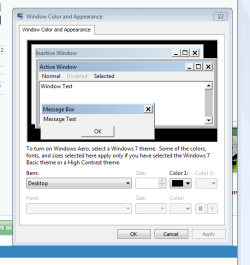
Actaully, no. I found that page earlier. I overlooked it because it wasn't the same page. However, I've found it useful in retrieving my splash screen (forgot it was in msconfig - duh). Anyway, I still can't get Aero back. I followed every step here: http://www.sevenforums.com/tutorials/283-transparency-enable-disable.html The problem is when I click on Window Color in Personalization, I do not get the screen they are showing. Instead I get this. What should I do?
 

Attachments

  • appearance.PNG
    appearance.PNG
    15.9 KB · Views: 16

My Computer My Computer

Computer type
PC/Desktop
Computer Manufacturer/Model Number
Custom
OS
Windows 7 Pro x64
CPU
Intel Core i5 2500k
Motherboard
Gigabyte
Memory
8GB
Graphics Card(s)
AMD Radeon 7850 2GB
Monitor(s) Displays
24" BenQ RL2450
Hard Drives
60GB SSD
500GB HDD
Mouse
Razer Naga
Antivirus
AVG
Browser
Mozilla
Hi there ... Open the Control Panel and then click on Troubleshooting ... Click on Display Aero Desktop Effects ... Follow the wizard by clicking on next .... Let me know how that goes ..
 

My Computer My Computer

Computer Manufacturer/Model Number
W530-3630QM1
OS
windows 7 home 64bit
CPU
INTEL-CORE I7
Memory
16GB
Hard Drives
750GB
Browser
Chrome
Hi there ... Open the Control Panel and then click on Troubleshooting ... Click on Display Aero Desktop Effects ... Follow the wizard by clicking on next .... Let me know how that goes ..

Troubleshoot Couldn't Identify the Problem...

Found this: http://support.microsoft.com/mats/aero_effects_not_working

And apparently my video card doesn't support aero... I have a 2GB Radeon 7850. This makes no sense. I check my drivers and everything is current
 

My Computer My Computer

Computer type
PC/Desktop
Computer Manufacturer/Model Number
Custom
OS
Windows 7 Pro x64
CPU
Intel Core i5 2500k
Motherboard
Gigabyte
Memory
8GB
Graphics Card(s)
AMD Radeon 7850 2GB
Monitor(s) Displays
24" BenQ RL2450
Hard Drives
60GB SSD
500GB HDD
Mouse
Razer Naga
Antivirus
AVG
Browser
Mozilla
I agree it should work fine ... Read the Link below it might be the only way to get this issue sorted .. I would be very careful though .. When working with the Registry ...

How to enable Windows 7 Aero theme?
 

My Computer My Computer

Computer Manufacturer/Model Number
W530-3630QM1
OS
windows 7 home 64bit
CPU
INTEL-CORE I7
Memory
16GB
Hard Drives
750GB
Browser
Chrome
Thanks. I am guessing the service “Desktop Window Manager Session Manager” was one that I disabled during the tutorial I mentioned in my original post. I started it and all is well now.
 

My Computer My Computer

Computer type
PC/Desktop
Computer Manufacturer/Model Number
Custom
OS
Windows 7 Pro x64
CPU
Intel Core i5 2500k
Motherboard
Gigabyte
Memory
8GB
Graphics Card(s)
AMD Radeon 7850 2GB
Monitor(s) Displays
24" BenQ RL2450
Hard Drives
60GB SSD
500GB HDD
Mouse
Razer Naga
Antivirus
AVG
Browser
Mozilla
Great news really glad you got it sorted
 

My Computer My Computer

Computer Manufacturer/Model Number
W530-3630QM1
OS
windows 7 home 64bit
CPU
INTEL-CORE I7
Memory
16GB
Hard Drives
750GB
Browser
Chrome

My Computer My Computer

Computer type
PC/Desktop
Computer Manufacturer/Model Number
Custom assembled by me :}
OS
Win-7-Pro64bit 7-H-Prem-64bit
CPU
i7-5930K 2nd i9-9940x both water blocked VRM's too
Motherboard
ASUS SABERTOOTH X99 2nd ASUS x299 Apex
Memory
Trident-z 3200C14 2nd Trident-z 3600C16
Graphics Card(s)
EVGA 1080ti ftw3 2nd Titan Xp both water blocked
Sound Card
Built-in Realtek
Monitor(s) Displays
1-AOC G2460PG 24"G-Sync 144Hz/ 2nd 1-ASUS VG248QE 24" 144Hz
Screen Resolution
1920 x 1080 144Hz
Hard Drives
2-Samsung M.2 Evo & Evo Plus
2-Samsung 850 EVO 500GB SSD's/ 3-2.5 W.D. Black 1tb-&3-1tb/3-3.5 WD Black 1tb hdd's
PSU
EVGA SuperNOVA 1000-P2 2nd 1200-P2
Case
2-Corsair Obsidian Series 450D Black ATX Mid Tower
Cooling
Custom water loops
Keyboard
Logitech G710+/ 2nd Logitech G910
Mouse
2-RedDragon M901 Perdition 16400 dpi Gaming mouse = wired
Internet Speed
Comcast Ping 19ms 89.31mbps download speed 6.12mbps upload
Antivirus
Malwarebytes Pro/ Superantispyware Pro
Browser
FireFox & Pale moon
Other Info
2nd ASUS X299 Apex/Intel i9-9940x with Custom water loop/7H-Prem-x64/Corsair 450D case/Ram Trident-z 3600C16 4x8gb / Samsung970Evo plus 500gb SSD/Dual ssd EZ swap evo/PSU EVGA SuperNova 1200w-P2 80+Platinum/GPU Titan Xp /8-ML-140 on push-pull on 2-280GTX rads
Back
Top