
Re-Installed Windows 7, Recovery Drive is now almost full

halpplz

New member
Local time
3:54 PM
Messages
10
Hello! For a long time I have been unable to use my webcam, itunes, or other programs without having to click through a message saying "Bad Image: odbc32.dll was either not designed to run on windows or..." like 30 times!

I did an sfc /scannow and it found corrupt files on my CBS log, but was unable to fix it. I could not find answers online, so I gave up and re-installed Windows 7 with my disk. NOW I can't download anything, because my Recovery Drive has almost no space... and my computer is alerting me that the space is low.

I had no knowledge of drives or anything prior to this! I did a disk cleanup to remove unnecessary files, but I only have 2 programs on my comp now! I cannot find the thing that is taking up so much space on my E: drive! Can someone please help me? I found other threads where people had a similar problem, but the answers didn't help... Thanks so much! TT_TT
 

My Computer My Computer

At a glance

Windows 7 32bit
OS
Windows 7 32bit
Welcome to Windows Seven Forums.

It sounds very much as though you installed Windows to your computer's recovery partition when in fact you should have installed it to the Windows partition.

The recovery partition is typically around 15GB and should only be used to recover your system to it's out-of-box factory state.

Who manufactured your computer?

Did you create a set of recovery discs?

Can you please upload a screenshot of your fully-expanded disk management layout?

http://www.sevenforums.com/tutorials/9733-screenshots-files-upload-post-seven-forums.html

If your system is truly messed up you can carry out a clean install using your COA product key to activate the system, as this tutorial explains.

http://www.sevenforums.com/tutorials/174907-clean-install-factory-coa-activation-key.html
 

My Computer My Computer

At a glance

Windows 7 Ultimate SP1 64-BitIntel Core i7 870 @ 2.93GHz8Gb Dual-Channel DDR3 @ 664MHznVidia GeForce GTX 460 1024MB dedicated RAM
Computer Manufacturer/Model Number
HP Pavilion Elite 495UK
OS
Windows 7 Ultimate SP1 64-Bit
CPU
Intel Core i7 870 @ 2.93GHz
Motherboard
MSI 2A9C (CPU1)
Memory
8Gb Dual-Channel DDR3 @ 664MHz
Graphics Card(s)
nVidia GeForce GTX 460 1024MB dedicated RAM
Sound Card
Realtek HD Audio
Monitor(s) Displays
HP2310i
Screen Resolution
1920 x 1080
Hard Drives
1x1954GB Hitachi HDS22020ALA 330 (RAID), 1x1954GB Hitachi External for backup and storage
PSU
460W
Case
HP Elite
Cooling
Air cooled
Keyboard
Logitech K750 solar-powered keyboard
Mouse
Logitech Wireless M180 mouse
Internet Speed
2Mb
Other Info
Pure Avanti Flow Internet Radio with iPod Dock, 64Gb iPod, HP USB Speakers, Sony MDR-V500 Headphones, Sony Vaio F-Series Laptop
Thanks, seavixen. My computer is a Dell Inspiron laptop. I don't know how to make recovery disks... does one come with my computer?

Paint refuses to save my screenshot. I ran paint as the administrator and tried saving it in the C: drive... but it says "Save was interrupted"
 

My Computer My Computer

At a glance

Windows 7 32bit
OS
Windows 7 32bit

My Computer My Computer

At a glance

Windows 7 Ultimate SP1 64-BitIntel Core i7 870 @ 2.93GHz8Gb Dual-Channel DDR3 @ 664MHznVidia GeForce GTX 460 1024MB dedicated RAM
Computer Manufacturer/Model Number
HP Pavilion Elite 495UK
OS
Windows 7 Ultimate SP1 64-Bit
CPU
Intel Core i7 870 @ 2.93GHz
Motherboard
MSI 2A9C (CPU1)
Memory
8Gb Dual-Channel DDR3 @ 664MHz
Graphics Card(s)
nVidia GeForce GTX 460 1024MB dedicated RAM
Sound Card
Realtek HD Audio
Monitor(s) Displays
HP2310i
Screen Resolution
1920 x 1080
Hard Drives
1x1954GB Hitachi HDS22020ALA 330 (RAID), 1x1954GB Hitachi External for backup and storage
PSU
460W
Case
HP Elite
Cooling
Air cooled
Keyboard
Logitech K750 solar-powered keyboard
Mouse
Logitech Wireless M180 mouse
Internet Speed
2Mb
Other Info
Pure Avanti Flow Internet Radio with iPod Dock, 64Gb iPod, HP USB Speakers, Sony MDR-V500 Headphones, Sony Vaio F-Series Laptop
Yes I read it, I tried the snipping tool, but the image won't save right. I was able to save it once, but I can't upload it on here or anywhere; the file size says "0 bytes" :c
 

My Computer My Computer

At a glance

Windows 7 32bit
OS
Windows 7 32bit
Please don't take this the wrong way, but I think in view of your uncertainty and the state of your system, I think your best course of action is to contact Dell Support and ask them to send you a set of recovery discs.

The support technicians are normally very helpful and you may not even get charged for the discs.

http://support.dell.com/support/topics/global.aspx/support/dellcare/en/backupcd_form

The link is for the USA so you may need to choose another region if you live elsewhere.
 

My Computer My Computer

At a glance

Windows 7 Ultimate SP1 64-BitIntel Core i7 870 @ 2.93GHz8Gb Dual-Channel DDR3 @ 664MHznVidia GeForce GTX 460 1024MB dedicated RAM
Computer Manufacturer/Model Number
HP Pavilion Elite 495UK
OS
Windows 7 Ultimate SP1 64-Bit
CPU
Intel Core i7 870 @ 2.93GHz
Motherboard
MSI 2A9C (CPU1)
Memory
8Gb Dual-Channel DDR3 @ 664MHz
Graphics Card(s)
nVidia GeForce GTX 460 1024MB dedicated RAM
Sound Card
Realtek HD Audio
Monitor(s) Displays
HP2310i
Screen Resolution
1920 x 1080
Hard Drives
1x1954GB Hitachi HDS22020ALA 330 (RAID), 1x1954GB Hitachi External for backup and storage
PSU
460W
Case
HP Elite
Cooling
Air cooled
Keyboard
Logitech K750 solar-powered keyboard
Mouse
Logitech Wireless M180 mouse
Internet Speed
2Mb
Other Info
Pure Avanti Flow Internet Radio with iPod Dock, 64Gb iPod, HP USB Speakers, Sony MDR-V500 Headphones, Sony Vaio F-Series Laptop
Okay, I will try it. Thank you again!
 

My Computer My Computer

At a glance

Windows 7 32bit
OS
Windows 7 32bit
You're very welcome.

Please post back to let us know how you get on.
 

My Computer My Computer

At a glance

Windows 7 Ultimate SP1 64-BitIntel Core i7 870 @ 2.93GHz8Gb Dual-Channel DDR3 @ 664MHznVidia GeForce GTX 460 1024MB dedicated RAM
Computer Manufacturer/Model Number
HP Pavilion Elite 495UK
OS
Windows 7 Ultimate SP1 64-Bit
CPU
Intel Core i7 870 @ 2.93GHz
Motherboard
MSI 2A9C (CPU1)
Memory
8Gb Dual-Channel DDR3 @ 664MHz
Graphics Card(s)
nVidia GeForce GTX 460 1024MB dedicated RAM
Sound Card
Realtek HD Audio
Monitor(s) Displays
HP2310i
Screen Resolution
1920 x 1080
Hard Drives
1x1954GB Hitachi HDS22020ALA 330 (RAID), 1x1954GB Hitachi External for backup and storage
PSU
460W
Case
HP Elite
Cooling
Air cooled
Keyboard
Logitech K750 solar-powered keyboard
Mouse
Logitech Wireless M180 mouse
Internet Speed
2Mb
Other Info
Pure Avanti Flow Internet Radio with iPod Dock, 64Gb iPod, HP USB Speakers, Sony MDR-V500 Headphones, Sony Vaio F-Series Laptop
You fell into a 'Dell trap'. Dell marks the recovery partition as the active partition (which is a bit strange) and since you apparently did not direct the installer to reinstall into the C partition, it installed into the recovery partition. But that partition is far too small for the OS.

The way out is to extend the C partition. But that will require that we know how your dsik looks in Disk Management.

Since you are unable to make any snips, I suggest you open Disk Management and describe for us exactly haow the layout of the disk is. Like this:

1. partition - name = yyy, status = (what's in the parenthesis), capacity= xxx, free=xxx
2. partition - same
3. partition - same

When we have this information, we may be able to fix it.
 

My Computer My Computer

At a glance

Vista, Windows7, Mint Mate, Zorin, Windows 8from 1.6GHz Duo to i7
Computer Manufacturer/Model Number
HP, Dell, Gateway, Toshiba - 4 laptops and 2 desktops
OS
Vista, Windows7, Mint Mate, Zorin, Windows 8
CPU
from 1.6GHz Duo to i7
Monitor(s) Displays
2x HP w2207
Hard Drives
5x HDD, 7x SSD, 12x Externals
Keyboard
with trackball - no mices
Mouse
Trackball mice
Internet Speed
DSL 6000
Thanks for the input Wolfgang, I never even gave your suggestion a thought, which offers the OP a way out of his dilemma.
 

My Computer My Computer

At a glance

Windows 7 Ultimate SP1 64-BitIntel Core i7 870 @ 2.93GHz8Gb Dual-Channel DDR3 @ 664MHznVidia GeForce GTX 460 1024MB dedicated RAM
Computer Manufacturer/Model Number
HP Pavilion Elite 495UK
OS
Windows 7 Ultimate SP1 64-Bit
CPU
Intel Core i7 870 @ 2.93GHz
Motherboard
MSI 2A9C (CPU1)
Memory
8Gb Dual-Channel DDR3 @ 664MHz
Graphics Card(s)
nVidia GeForce GTX 460 1024MB dedicated RAM
Sound Card
Realtek HD Audio
Monitor(s) Displays
HP2310i
Screen Resolution
1920 x 1080
Hard Drives
1x1954GB Hitachi HDS22020ALA 330 (RAID), 1x1954GB Hitachi External for backup and storage
PSU
460W
Case
HP Elite
Cooling
Air cooled
Keyboard
Logitech K750 solar-powered keyboard
Mouse
Logitech Wireless M180 mouse
Internet Speed
2Mb
Other Info
Pure Avanti Flow Internet Radio with iPod Dock, 64Gb iPod, HP USB Speakers, Sony MDR-V500 Headphones, Sony Vaio F-Series Laptop
oh, ok... here it is

1. (name is blank) Layout=simple Type=Basic File System= (blank) Status= Healthy Capacity= 39MB Free Space= 39MB %Free= 100% Fault Tolerance= No Overhead=0%

2. OS (C:) Layout=simple Type=Basic File System= NTFS Status= Healthy Capacity= 218.20GB Free Space= 121.19GB %Free= 56% Fault Tolerance= No Overhead=0%
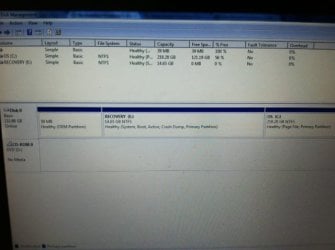
3. Recovery (E:) Layout=simple Type=Basic File System= NTFS Status= Healthy Capacity= 14.65GB Free Space= 0MB %Free= 0% Fault Tolerance= No Overhead=0%
 

My Computer My Computer

At a glance

Windows 7 32bit
OS
Windows 7 32bit
Andrew, the question is whether the partition can be easily extended. Something may have to give way. Let's see what the OP says.
 

My Computer My Computer

At a glance

Vista, Windows7, Mint Mate, Zorin, Windows 8from 1.6GHz Duo to i7
Computer Manufacturer/Model Number
HP, Dell, Gateway, Toshiba - 4 laptops and 2 desktops
OS
Vista, Windows7, Mint Mate, Zorin, Windows 8
CPU
from 1.6GHz Duo to i7
Monitor(s) Displays
2x HP w2207
Hard Drives
5x HDD, 7x SSD, 12x Externals
Keyboard
with trackball - no mices
Mouse
Trackball mice
Internet Speed
DSL 6000
Oh, um... I just posted above you ^^;;
 

My Computer My Computer

At a glance

Windows 7 32bit
OS
Windows 7 32bit
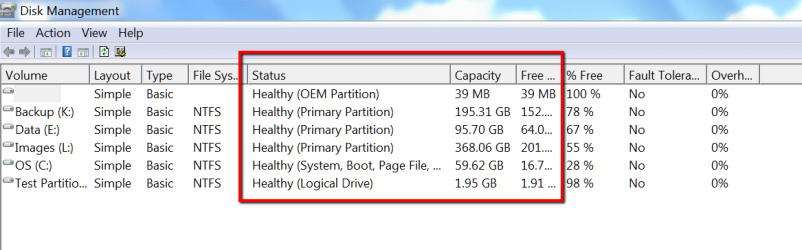
I see that now. But that is not the info from Disk Management I was looking for. For C and E I would need the info that is in the red box - especiall which one is the 'active' partition. And is there no D partition?
 

Attachments

  • 2012-03-13_2141.png
    2012-03-13_2141.png
    21.5 KB · Views: 25

My Computer My Computer

At a glance

Vista, Windows7, Mint Mate, Zorin, Windows 8from 1.6GHz Duo to i7
Computer Manufacturer/Model Number
HP, Dell, Gateway, Toshiba - 4 laptops and 2 desktops
OS
Vista, Windows7, Mint Mate, Zorin, Windows 8
CPU
from 1.6GHz Duo to i7
Monitor(s) Displays
2x HP w2207
Hard Drives
5x HDD, 7x SSD, 12x Externals
Keyboard
with trackball - no mices
Mouse
Trackball mice
Internet Speed
DSL 6000
Ok, I took a picture of the screen w/ my phone and I am uploading this on a different computer...
 

Attachments

  • diskmgmt.jpg
    diskmgmt.jpg
    31.4 KB · Views: 35

My Computer My Computer

At a glance

Windows 7 32bit
OS
Windows 7 32bit
This is a lot better. Fixing it is possible but will be finagly. Let me ask you first:

1. Do you have an external disk or a 16GB USB stick
2. Do you have access to another PC that can get to the internet.
3. Are you ready for an adventure
 

My Computer My Computer

At a glance

Vista, Windows7, Mint Mate, Zorin, Windows 8from 1.6GHz Duo to i7
Computer Manufacturer/Model Number
HP, Dell, Gateway, Toshiba - 4 laptops and 2 desktops
OS
Vista, Windows7, Mint Mate, Zorin, Windows 8
CPU
from 1.6GHz Duo to i7
Monitor(s) Displays
2x HP w2207
Hard Drives
5x HDD, 7x SSD, 12x Externals
Keyboard
with trackball - no mices
Mouse
Trackball mice
Internet Speed
DSL 6000
1. I think I only have two 4GB USB sticks... but I could make a trip to radio shack tomorrow if I don't have a disk either!
2. Yes!
3. If it will fix this piece of crap computer, YES! :D
 

My Computer My Computer

At a glance

Windows 7 32bit
OS
Windows 7 32bit
Since you ran the installer from C instead of booting it, the Win7 you installed to Recovery is on the drive letter E. It's OK to have an OS on E, however most people want Win7 on C. Do you?

If so then follow these steps to get a perfect clean reinstall to C: Clean Reinstall Windows 7 Factory OEM.

Boot into the installer, choose Custom Install, then when you get to the page where you choose the partition to install upon, select Drive Options, delete all partitions, then click Next and the installer will create/format one large install partition for you and begin the install.


If you want to keep Win7 which you installed to E you'll first have to turn off the Paging File as shown in Step 13 here, highlighting C to turn it off: Virtual Memory Paging File - Change

You can then delete C in Disk Management, extend E all the way to right to take up the space.
Partition or Volume - Delete
Partition or Volume - Extend
 
Last edited:
What Greg suggests is a fast option. I was wondering though what you have on C. If there is nothing you care to keep, then deleting that volume and partition and extending E would be the fastest fix.

If, however you have stuff on C that you care to save, we would have to do that first.

PS: I order to get a bit of space asap, go to Start > All Programs Accessories. Right click on Command Prompt and 'Run as admin". Into the black window type powercfg -h off (note the spaces in front of - and after h). Then press Enter. That will give you a few GBs. It deletes the hiberfile that you probably never use.
 

My Computer My Computer

At a glance

Vista, Windows7, Mint Mate, Zorin, Windows 8from 1.6GHz Duo to i7
Computer Manufacturer/Model Number
HP, Dell, Gateway, Toshiba - 4 laptops and 2 desktops
OS
Vista, Windows7, Mint Mate, Zorin, Windows 8
CPU
from 1.6GHz Duo to i7
Monitor(s) Displays
2x HP w2207
Hard Drives
5x HDD, 7x SSD, 12x Externals
Keyboard
with trackball - no mices
Mouse
Trackball mice
Internet Speed
DSL 6000
Well, I don't have any really important files I need to keep... My files seem to be gone already, I don't see them in the folders...so I guess I could just do it the fast way.... I thought I heard extending E: was a bad idea though, idk maybe I'm wrong. Edit: I also want to make sure I am still able to do system restore when this is fixed
 

My Computer My Computer

At a glance

Windows 7 32bit
OS
Windows 7 32bit
Back
Top