Re-installing HP laser jet MFP M277dw

rocks911

New member
Member
VIP
Local time
3:18 PM
Messages
100
For whatever reason I have been having issues with my HP printer. So I uninstalled the software that came with the printer and now want to install the printer, preferably without all the HP bloatware.

I have a USB cord that came with the printer and I also have an ethernet cable to connect it. Which is preferred? Im looking for the most trouble-free option. I dont know why suddenly I started having problems, but I will say that having the printer installed through an ethernet cable to my router seems to cause me more problems than just connecting to a USB
I am a total novice about installing printers. How do I go about it?
 

My Computer My Computer

At a glance

Windows 7 home premium 64 bitAMD Phenom IIx6 1065T 2.90 GHz8 GBATI Radeon HD 5570
Computer Manufacturer/Model Number
HP model HPE-519C
OS
Windows 7 home premium 64 bit
CPU
AMD Phenom IIx6 1065T 2.90 GHz
Motherboard
Foxconn H-RS880-UATX (ALOE)
Memory
8 GB
Graphics Card(s)
ATI Radeon HD 5570
Personally, I prefer ethernet connections for printers so that any computer on your network (desktops, laptops, tablets, smartphones) can use the printer and/or scanner. If that's not an issue and your computer is the one and only device that will ever use the MFP, then a USB connection is arguably a little more trouble-free.

FWIW, IME most issues with ethernet connections are caused by the DHCP-generated IP address changing periodically. That can be remedied by setting a static IP address for the MFP in either the printer's control panel or in your router's DHCP settings.

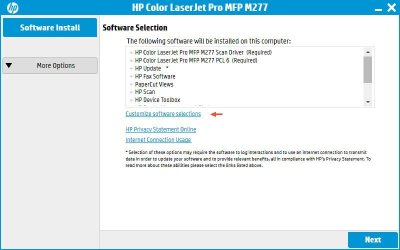
To avoid bloatware when installing the driver, make sure you choose "Customize software selections" and then untick the bloatware. You'll want to install "HP Scan" and maybe the OCR software (if you use that). Some people like adding the "Device Toolbox", but I've never actually found it useful. The rest is useless bloatware. Note you do not need the "HP Fax Software" unless you intend to fax documents *directly from your computer*. If the only faxing you do is by walking over to the MFP and using it like a standalone fax machine, you don't need software installed on the computer to do that.

To install, leave the printer disconnected from the computer until you are told to connect it. Launch the installer program, deselect the bloatware, and choose your connection type. If you choose USB, the setup routine will prompt you to connect the USB cable and will auto-detect it. If you're using ethernet, make sure the printer is connected to your router and "online", then in the setup routine choose "Connect through a network" and let the routine "Automatically find my product on the network".

I don't normally recommend setting up the printer as a wireless printer. Note wireless devices (laptops and cellphones) can still print wirelessly as long as they can connect to the router. They don't need to connect wirelessly to the printer, they instead connect wirelessly to the network and can print as long as the printer is also on the network, so it doesn't matter how the printer is connected (wireless or ethernet) to the network.

I note you said you already uninstalled the printer software, but beware that sometimes stuff gets left behind. See here for the official procedure. Revo Uninstaller can also do a fairly good job searching out and cleaning up the dregs the HP uninstaller leaves behind. I mention this just to keep in mind; if the reinstall doesn't seem to work right, you might need to follow the reinstall with the more thorough uninstall procedure, then try the reinstall again.
 

Attachments

  • m277-setup-1.jpg
    m277-setup-1.jpg
    37.8 KB · Views: 1
  • m277-setup-2.jpg
    m277-setup-2.jpg
    47 KB · Views: 1

My Computer My Computer

At a glance

Windows 7/8.1/10 multibootIntel Core i7-770048GB (2x16GB Crucial DDR4-3200 + 2x8GB Hynix ...Intel HD630 + AMD Radeon R7 450 PCIe
Computer type
PC/Desktop
Computer Manufacturer/Model Number
Dell Optiplex 7050
OS
Windows 7/8.1/10 multiboot
CPU
Intel Core i7-7700
Motherboard
Dell, Intel Q270 chipset
Memory
48GB (2x16GB Crucial DDR4-3200 + 2x8GB Hynix DDR4-2400)
Graphics Card(s)
Intel HD630 + AMD Radeon R7 450 PCIe
Monitor(s) Displays
Asus VC279 (27")
Screen Resolution
1920x1080
Hard Drives
Toshiba M.2 NVMe (256GB),
Samsung 960 Evo (500GB),
WD Red Plus 80EFBX (8TB)
Back
Top