HP color laser jet driver bull

marathon man

New member
Local time
2:53 AM
Messages
21
My printer driver works but installing windows 7 killed its ability to print in color.

I have done a rather quick search for this issue here but did not find this one so here goes...my story is long but hopefully useful to someone, as it fully describes my entire printer issue to date:

I have a 2 year old HP color laser jet 2605dn printer. When I had XP on my Dell C521 desktop PC, it worked fine and I got nice color and black/white prints without issue.

In the spring I installed Win7 Ultimate. In fact I had to first completely reformat the computer --with Dell on the phone, and then I took my new, properly registered copy of Win7 Ultimate, purchased from MS and started from scratch. Everything works fine... except the driver from that laser printer would not load from the original disk as it wont work for anything above XP. I downloaded a driver but it failed. The message was a yellow triangle with an exclamation mark in it and it wanted me to do some troubleshooting. For more help I was prompted to contact HP. I restarted my machine and, well, my bad driver was still in my printers control panel but a new one was now present with a green check mark next to it, clearly indicating that it worked. And it did. I then removed my bad one and forgot about the problem for a while.

The new one was apparently installed automatically via Windows7 and it did so because the printer is hooked up with its USB cable. My bad one was, I thought, not the right driver or something like that.

I later learned, however, that the new one worked just great except for one thing: no color. No option to even print color! And no settings to change to make such an option exist. I could print, but not in color. I had not needed to until recently but now that I do I kinda want my printer to fully operate as planned. Besides, the 3 color ink cartridges are at least 1/2 full and they run a pretty penny. Other than using this thing to print, it has not moved since the day I bought it. It should still be working, right?

I found a number to contact HP the other day (877-517-4578) and you do actually get right through to someone (even though his name will be something like Rashad and it's hard to understand his fast talk).

I asked him about my problem and expected to be directed to the right driver. I assumed I merely downloaded the wrong one or there was some new update to know of or something. I had gone through HP's windows to download this file:

HP Universal Print Driver PCL6 v5.1.0.1

I opened it and it unpacked itself to a folder in my C drive. Installing it created the errored 'troubleshoot needed' driver on several occasions, all of which prompted me to remove the bad driver and start over. I still retained the one that Windows must have made, for it works, but I would disable it and let the install make its new attempt from HPs site and its use of Windows Update online. But in every case, I was unable to print. In at least one case I could see the color selection I desired, but I could not use it. In most other cases, the print dialogs wouldn't even open or didn't even exist so as to let me see squat. All i knew is that this driver looked right but maybe it was not right. I hoped the bloke from HP could help.

At first he seemed to be able to. he strung me along, however, because I soon found myself in a quagmire of service and tech babble that led to one thing and one thing only: I gotta pay to see. And, it's not just a little pocket change... no, HP would require you to sign up for a 1 year service plan that, while it would claim to solve all kinds of issues that MUST be wrong with MY system (thereby causing the driver to fail, according to him) was going to cost me like $169!

He then claimed that the driver is fine but my system needs troubleshooting because it's a 4 year old computer and that's a 2 year old printer. Maybe so, I said, but I also just tried this same procedure on my 4 month old Asus Eee PC 1005HAB laptop and the same thing happened. It's got nothing to do with age. It's got nothing to do with conflicts between new drivers and older systems, and it aint my computer because I use the latest of everything and it's been optimized and cleaned and this and that by people who probably have more tech skills than he does. I still think it's the driver--that is, if I even have the right one! (He refused to tell me what the driver name actually is) and I think the driver should work and that HP should make a product that adheres to peoples computers, not the other way around.

Feeling hijacked I hung up and decided that unless I could fix it myself I should, on principle above all else, consider a new printer from some other maker.

That said, anyone here have any experience with HP or any ideas on how to fix this issue? Otherwise I guess it's soon to be shopping time.

Thank you,

MM
 

My Computer My Computer

At a glance

win 7 ultimate3.5 gigs ram
Computer Manufacturer/Model Number
dell c521 desktop
OS
win 7 ultimate
Memory
3.5 gigs ram
Hard Drives
HD has 80gigs free space

My Computers My Computers

  • At a glance

    Windows 11 Pro x64 [Latest Release and Releas...Ryzen 9 5950X, 3.8 - 5.2 MHz64GB [2 x 32GB] DDR4 3200MHz4GB NVIDIA GEFORCE GTX 1650 Ti
    Computer type
    PC/Desktop
    Computer Manufacturer/Model Number
    ChillBlast - Custom to my design
    OS
    Windows 11 Pro x64 [Latest Release and Release Preview]
    CPU
    Ryzen 9 5950X, 3.8 - 5.2 MHz
    Motherboard
    Asus Prime X570-Pro
    Memory
    64GB [2 x 32GB] DDR4 3200MHz
    Graphics Card(s)
    4GB NVIDIA GEFORCE GTX 1650 Ti
    Sound Card
    On-board SPDIF to 5.1 System + HDMI [5.1 system]
    Monitor(s) Displays
    32" UHD 32 Bit HDR Monitor + 43" UHD 4K 32Bit HDR TV
    Screen Resolution
    2 x 3840 x 2160 @60Hz
    Hard Drives
    1TB M2 SSD OS, 500GB Fast Access SSD, 2 x 8TB Data + Various Externals from 1TB to 4TB, 10TB NAS
    PSU
    NZXT C750 80 PLUS Gold 750W Modular PSU
    Case
    Workstation Case [Matt Black]
    Cooling
    NZXT Kraken X63 280mm CPU Cooler +2x Quiet Case fans
    Keyboard
    Logitech Wireless MX Keys & K400 + others
    Mouse
    Logitech Wireless MX Master 3S
    Internet Speed
    920 MB Down 50 MB Up
    Antivirus
    BitDefender Total Security Pro
    Browser
    Chrome (always run latest Non-Beta)
    Other Info
    Also run ...
    Laptop - Quad 8GB - Windows 10 Pro x64
    Nexus 7 Android tablet x2
    Samsung 10.2" tablet
    Blackview TAB 8 4G Android Tablet c/w Keyboard
    Wacom Intuos Pro Medium Pen Pad
    Wacom Intuos Pro Small Pen Pad
    Wacom Expresskeys Remote
    Loopdeck+ Graphics Controller
    Shuttle Pro v2 Control
  • At a glance

    Windows 11 Pro x64 Latest RPIntel I7 10750H 5.0GHz32GB [2x16GB] DDR4 2933 MHznVidia GTX1650Ti 4 GB GDDR6
    Computer type
    Laptop
    System Manufacturer/Model Number
    Dell XPS 17 10750H
    OS
    Windows 11 Pro x64 Latest RP
    CPU
    Intel I7 10750H 5.0GHz
    Motherboard
    Dell XPS
    Memory
    32GB [2x16GB] DDR4 2933 MHz
    Graphics Card(s)
    nVidia GTX1650Ti 4 GB GDDR6
    Sound Card
    Stock [Realtek] 4 Speaker
    Monitor(s) Displays
    17" IPS UHD+ Infinity Edge Touchscreen
    Screen Resolution
    3840 x 2400
    Hard Drives
    2TB M2 NVMe, 4TB External + various 500GB & 1TB External NVMe (also have access to spinner HDD from
    PSU
    Stock
    Case
    Stock XPS Aluminium & Carbon Fibre
    Cooling
    Stock - Active Fan Control
    Keyboard
    Backlit + Various Logitech
    Mouse
    Stock Track Pad + Logitech MX Trackball
    Internet Speed
    72 MB Down 18MB Up
    Browser
    Chrome
    Other Info
    Also run ...
    Laptop - Quad 8GB - Windows 10 Pro x64
    Nexus 7 Android tablet x2
    10.2" tablet
    Sony Z3 Android Smartphone
    Wacom Intuos Pro Medium Pen Pad
    Wacom Intuos Pro Small Pen Pad
    Wacom Expresskeys Remote
    Loopdeck+ Graphics Controller
    Shuttle Pro v2 Control Pad
    10TB NAS
What about trying the XP or Vista driver to see if it worked? According to HP, both of those drivers are actual drivers (not the UFD driver) and should print color and B/W, and the Vista driver at the very least should work if you extract and add it manually.
 

My Computer My Computer

At a glance

Windows 10 Pro x64Intel Core i7 4790K @ 4.5GHz32GB DDR3Nvidia GeForce GTX970
Computer type
PC/Desktop
Computer Manufacturer/Model Number
Custom
OS
Windows 10 Pro x64
CPU
Intel Core i7 4790K @ 4.5GHz
Motherboard
Asus Maximus Hero VII
Memory
32GB DDR3
Graphics Card(s)
Nvidia GeForce GTX970
Sound Card
Realtek HD Audio
Screen Resolution
1920x1200
Hard Drives
1x Samsung 250GB SSD
4x WD RE 2TB (RAIDZ)
PSU
Corsair AX760i
Case
Fractal Design Define R4
Cooling
Noctua NH-D15

My Computer My Computer

At a glance

Systems 1 and 2: Windows 7 Enterprise x64, Wi...System 1: i7 [email protected], System 2: AMD FX-41...System 1: 8GB System 2: 8GBSystem 1: ATI FirePro V4800 System 2: Radeon ...
Computer Manufacturer/Model Number
Dell and Custom
OS
Systems 1 and 2: Windows 7 Enterprise x64, Win 8 Developer
CPU
System 1: i7 [email protected], System 2: AMD FX-4100 Zambezi 3.6G
Motherboard
System 1:Dell 06NWYK System 2: ASUS M5A97 AM3+
Memory
System 1: 8GB System 2: 8GB
Graphics Card(s)
System 1: ATI FirePro V4800 System 2: Radeon HD 6850
Sound Card
System 1: onboard System 2: onboard
Monitor(s) Displays
System1: Viewsonic HDMI 24"
Screen Resolution
System 1: 1920x1080 System 2: 1920x1080
Hard Drives
System 1: Mirrored .5B drives System 2: Seagate Barracuda ST1000DM003 1TB 7200 RPM 64MB Cache SATA 6.0Gb/s
Case
System 1: Dell System 2: Cooler Master
Internet Speed
10 MBPS
If i can just add be sure you have the printer usb cable unplugged when you install the driver and software, then plug it in and add a printer in control panel or it will recognize new hardware
 

My Computer My Computer

At a glance

Windows 7 Home Premium 64 bitIntel Core 2 quad Extreme Q9770 @ 3.2 GHz4x2 GB Muskin 1600 MHz ramNVidia GTX 250
Computer Manufacturer/Model Number
Dell XPS 730
OS
Windows 7 Home Premium 64 bit
CPU
Intel Core 2 quad Extreme Q9770 @ 3.2 GHz
Memory
4x2 GB Muskin 1600 MHz ram
Graphics Card(s)
NVidia GTX 250
Sound Card
Soundblaster X-Fi Fatality Champion
Monitor(s) Displays
2 Dell 2007WFP Ultrascans
Screen Resolution
3360 x 1050
Hard Drives
WD Black 1TB sata, 2-WD Black 500 sata, 2-Seagate 500 Go external
PSU
1000 Watt
Cooling
air
Keyboard
MS Natrual Keyboard Pro
Mouse
Logitech Wireless Trackball
Internet Speed
DSL Elite
Thank you all so far for your assistance in finding things and offering up ideas. I appreciate that!

However, I did neglect to mention the following:

I had originally found the driver I thought I needed in the HP support center (business--even though I am just an individual) and I did download from the HP site--the same site many posts here direct me to visit. Thus, links that have been provided lead me the very place I got my driver I have now.

When preparing to download, one is presented with information about the driver and also the postscript option, which wont work for me.

On the screen about the driver download, an option/selection called:

HP Universal Print Driver for Windows PCL6

reveals the downloadable driver that is offered, and it gives me:

upd-5101-pcl6_winxp-vista

which unpacks to the driver folder in my C drive I already have named in my above story.

It simply does not work--on my new or old PC, no matter how many times I have tried it so far. It installs, it shows up in my printer control panel, and it has the color option, but the driver has errors marked by the yellow triangle symbol. It is this that makes my HP techie rub his hands together knowing he can try to extract money from me.

If there is indeed some troubleshooting to be done, I would have to either pay these HP scammers to get something that should work anyway, or get lucky and figure out what could be conflicting with it. But nothing else conflicts with any driver I use in Win 7--believe me I have fixed them all or gotten much easier support from software companies than HP is willing to provide. But since Windows 7 Compatability page even directs people to the HP site and no where else, I am possibly running into a serious blocker here. HP has, in fact, found a rather ingenious way to both churn a profit and convince people the problem was all theirs and not HP's. Why then, I ask, do so many people have this same issue? (the guy told me he gets 20+ calls about this exact thing every day) Maybe there's something wrong with the driver and/or there's an easy setting that can be applied that serves as an acceptable workaround! (PS: I already found that the method for plugging in the printer and letting windows recognize new software works, but does not give me the driver that works for color printing.)

Further thoughts and ideas would be appreciated.

Thank you,

MM :)
 

My Computer My Computer

At a glance

win 7 ultimate3.5 gigs ram
Computer Manufacturer/Model Number
dell c521 desktop
OS
win 7 ultimate
Memory
3.5 gigs ram
Hard Drives
HD has 80gigs free space
Did you put the driver in, in compatibitility mode useing the option Vista compatibility. When Windows 7 came out HP had a year to get ready and didn't, i've got a $300 hp printer 4 years old and no drivers, you just have to be com and find workarounds.
 

My Computer My Computer

At a glance

Windows 7 Home Premium 64 bitIntel Core 2 quad Extreme Q9770 @ 3.2 GHz4x2 GB Muskin 1600 MHz ramNVidia GTX 250
Computer Manufacturer/Model Number
Dell XPS 730
OS
Windows 7 Home Premium 64 bit
CPU
Intel Core 2 quad Extreme Q9770 @ 3.2 GHz
Memory
4x2 GB Muskin 1600 MHz ram
Graphics Card(s)
NVidia GTX 250
Sound Card
Soundblaster X-Fi Fatality Champion
Monitor(s) Displays
2 Dell 2007WFP Ultrascans
Screen Resolution
3360 x 1050
Hard Drives
WD Black 1TB sata, 2-WD Black 500 sata, 2-Seagate 500 Go external
PSU
1000 Watt
Cooling
air
Keyboard
MS Natrual Keyboard Pro
Mouse
Logitech Wireless Trackball
Internet Speed
DSL Elite

My Computers My Computers

  • At a glance

    Windows 11 Pro x64 [Latest Release and Releas...Ryzen 9 5950X, 3.8 - 5.2 MHz64GB [2 x 32GB] DDR4 3200MHz4GB NVIDIA GEFORCE GTX 1650 Ti
    Computer type
    PC/Desktop
    Computer Manufacturer/Model Number
    ChillBlast - Custom to my design
    OS
    Windows 11 Pro x64 [Latest Release and Release Preview]
    CPU
    Ryzen 9 5950X, 3.8 - 5.2 MHz
    Motherboard
    Asus Prime X570-Pro
    Memory
    64GB [2 x 32GB] DDR4 3200MHz
    Graphics Card(s)
    4GB NVIDIA GEFORCE GTX 1650 Ti
    Sound Card
    On-board SPDIF to 5.1 System + HDMI [5.1 system]
    Monitor(s) Displays
    32" UHD 32 Bit HDR Monitor + 43" UHD 4K 32Bit HDR TV
    Screen Resolution
    2 x 3840 x 2160 @60Hz
    Hard Drives
    1TB M2 SSD OS, 500GB Fast Access SSD, 2 x 8TB Data + Various Externals from 1TB to 4TB, 10TB NAS
    PSU
    NZXT C750 80 PLUS Gold 750W Modular PSU
    Case
    Workstation Case [Matt Black]
    Cooling
    NZXT Kraken X63 280mm CPU Cooler +2x Quiet Case fans
    Keyboard
    Logitech Wireless MX Keys & K400 + others
    Mouse
    Logitech Wireless MX Master 3S
    Internet Speed
    920 MB Down 50 MB Up
    Antivirus
    BitDefender Total Security Pro
    Browser
    Chrome (always run latest Non-Beta)
    Other Info
    Also run ...
    Laptop - Quad 8GB - Windows 10 Pro x64
    Nexus 7 Android tablet x2
    Samsung 10.2" tablet
    Blackview TAB 8 4G Android Tablet c/w Keyboard
    Wacom Intuos Pro Medium Pen Pad
    Wacom Intuos Pro Small Pen Pad
    Wacom Expresskeys Remote
    Loopdeck+ Graphics Controller
    Shuttle Pro v2 Control
  • At a glance

    Windows 11 Pro x64 Latest RPIntel I7 10750H 5.0GHz32GB [2x16GB] DDR4 2933 MHznVidia GTX1650Ti 4 GB GDDR6
    Computer type
    Laptop
    System Manufacturer/Model Number
    Dell XPS 17 10750H
    OS
    Windows 11 Pro x64 Latest RP
    CPU
    Intel I7 10750H 5.0GHz
    Motherboard
    Dell XPS
    Memory
    32GB [2x16GB] DDR4 2933 MHz
    Graphics Card(s)
    nVidia GTX1650Ti 4 GB GDDR6
    Sound Card
    Stock [Realtek] 4 Speaker
    Monitor(s) Displays
    17" IPS UHD+ Infinity Edge Touchscreen
    Screen Resolution
    3840 x 2400
    Hard Drives
    2TB M2 NVMe, 4TB External + various 500GB & 1TB External NVMe (also have access to spinner HDD from
    PSU
    Stock
    Case
    Stock XPS Aluminium & Carbon Fibre
    Cooling
    Stock - Active Fan Control
    Keyboard
    Backlit + Various Logitech
    Mouse
    Stock Track Pad + Logitech MX Trackball
    Internet Speed
    72 MB Down 18MB Up
    Browser
    Chrome
    Other Info
    Also run ...
    Laptop - Quad 8GB - Windows 10 Pro x64
    Nexus 7 Android tablet x2
    10.2" tablet
    Sony Z3 Android Smartphone
    Wacom Intuos Pro Medium Pen Pad
    Wacom Intuos Pro Small Pen Pad
    Wacom Expresskeys Remote
    Loopdeck+ Graphics Controller
    Shuttle Pro v2 Control Pad
    10TB NAS
Did you put the driver in, in compatibility mode using the option Vista compatibility. When Windows 7 came out HP had a year to get ready and didn't, i've got a $300 hp printer 4 years old and no drivers, you just have to be com and find workarounds.

Yeah HP did not get ready but they do not care.
My printer came with a drivers and install disk but it only works for win XP, as I stated earlier. The Win 7 driver I have been trying to install is for 3 2600 printers, which I find strange, but it does look like it is the right one. Nevertheless, it doesn't work and they are not taking responsibility for that at all. I find that to be rather rude.

I will continue to seek out workarounds (why I am on this forum) but what's a "com?"

thank you
 

My Computer My Computer

At a glance

win 7 ultimate3.5 gigs ram
Computer Manufacturer/Model Number
dell c521 desktop
OS
win 7 ultimate
Memory
3.5 gigs ram
Hard Drives
HD has 80gigs free space

My Computer My Computer

At a glance

Windows 10 Pro x64Intel Core i5 7400 @ 3.00GHz8GB 2133Mhz DDR4 (OEM supplied)Gygabyte Windforce GTX 1050Ti (Factory Overcl...
Computer type
PC/Desktop
Computer Manufacturer/Model Number
Medion Erazer (note to self: insert model number) - with custom additions
OS
Windows 10 Pro x64
CPU
Intel Core i5 7400 @ 3.00GHz
Motherboard
OEM supllied with PC
Memory
8GB 2133Mhz DDR4 (OEM supplied)
Graphics Card(s)
Gygabyte Windforce GTX 1050Ti (Factory Overclocked)
Sound Card
Realtek
Monitor(s) Displays
Acer Al1980 + HKC
Screen Resolution
1360*768(HKC) / 1280*1024(Acer)
Hard Drives
1TB Toshiba
1TB WD Caviar Green
120GB Samsung Evo 840
PSU
OEM supplied (no power rating on case)
Case
OEM Supplied
Cooling
Stock
Keyboard
Logitech Wireless
Mouse
Logitect Wireless
Internet Speed
40Mb/s Down 10Mb/s Up
Antivirus
Defender
Browser
Firefox
Hey, this appeared in another sevenforums post:

I had trouble installing a Windows 7 64-bit driver for my HP 2605dn printer, and couldn't easily find a solution googling it. Here is what I finally did to get it working.

After selecting add a new printer, then selecting the 2605dn, I didn't see this model in the HP printer list. But if I clicked the Windows update button then it showed up and installed fine.

However, to get duplex printing to work I had to right click the printer and select Printer Properties, then Device settings and installable options, then select duplex unit installed.
 

My Computer My Computer

At a glance

Systems 1 and 2: Windows 7 Enterprise x64, Wi...System 1: i7 [email protected], System 2: AMD FX-41...System 1: 8GB System 2: 8GBSystem 1: ATI FirePro V4800 System 2: Radeon ...
Computer Manufacturer/Model Number
Dell and Custom
OS
Systems 1 and 2: Windows 7 Enterprise x64, Win 8 Developer
CPU
System 1: i7 [email protected], System 2: AMD FX-4100 Zambezi 3.6G
Motherboard
System 1:Dell 06NWYK System 2: ASUS M5A97 AM3+
Memory
System 1: 8GB System 2: 8GB
Graphics Card(s)
System 1: ATI FirePro V4800 System 2: Radeon HD 6850
Sound Card
System 1: onboard System 2: onboard
Monitor(s) Displays
System1: Viewsonic HDMI 24"
Screen Resolution
System 1: 1920x1080 System 2: 1920x1080
Hard Drives
System 1: Mirrored .5B drives System 2: Seagate Barracuda ST1000DM003 1TB 7200 RPM 64MB Cache SATA 6.0Gb/s
Case
System 1: Dell System 2: Cooler Master
Internet Speed
10 MBPS
Com as in stay com, stay cool help is comeing:)
 

My Computer My Computer

At a glance

Windows 7 Home Premium 64 bitIntel Core 2 quad Extreme Q9770 @ 3.2 GHz4x2 GB Muskin 1600 MHz ramNVidia GTX 250
Computer Manufacturer/Model Number
Dell XPS 730
OS
Windows 7 Home Premium 64 bit
CPU
Intel Core 2 quad Extreme Q9770 @ 3.2 GHz
Memory
4x2 GB Muskin 1600 MHz ram
Graphics Card(s)
NVidia GTX 250
Sound Card
Soundblaster X-Fi Fatality Champion
Monitor(s) Displays
2 Dell 2007WFP Ultrascans
Screen Resolution
3360 x 1050
Hard Drives
WD Black 1TB sata, 2-WD Black 500 sata, 2-Seagate 500 Go external
PSU
1000 Watt
Cooling
air
Keyboard
MS Natrual Keyboard Pro
Mouse
Logitech Wireless Trackball
Internet Speed
DSL Elite
I have tried with no success to install several iterations of drivers with or without compat. mode in play. Thank you for things like the Vista driver site and the steps on how to do compat. mode. I tried those things but the results I seek still allude me. I am COM though. hehehe

For that, I am beginning to believe the following is possible and there's little we can do about it until word gets out that they are screwing a lot of people and things need to change/update:


Hp gives out the driver they have, which, while it is supposed to work for Win 7, actually has 'vista' in its filename: upd-5101-pcl6_winxp-vista. They tell us this is the right driver and we install it. This is all that's available for the 2605 series for windows7--or as far as I could find.

It does not work -- it gives errors.

We contact HP and are told that they and only they can link to our computers and do some extensive online troubleshooting and fixes that will make the computer see the printer... that the computer we own is the problem and only their fix done in their way will solve everything. They offer a service to do this but it lasts for a year. This helps them justify the cost to sign up.

Since every computer probably does have errors here and there in areas many of us never really concern ourselves with, they direct us to see these with them online with us, and that makes us believe the story.

I fear the suckers are the same people who would never even find a forum like this anyway.

***

My opinion is that they just didn't get their driver set up right and now it needs fixing. The things they will do with you online linked up to them is to add some patch or workaround to make it work right. They don't want to let it out that this is the case and so they came up with this scheme to make money in a down economy where no one is buying their printers. From one standpoint it's rather good business but from every standpoint I can think of it's really bad.

I am at a loss and I think the only thing I can do is just continue to NOT be able to print in color, for my driver--the one that successfully installs itself when I plug in the unit and print--will only print in B/W.

Thank you,

:)MM
 

My Computer My Computer

At a glance

win 7 ultimate3.5 gigs ram
Computer Manufacturer/Model Number
dell c521 desktop
OS
win 7 ultimate
Memory
3.5 gigs ram
Hard Drives
HD has 80gigs free space
Hey, this appeared in another sevenforums post:

I had trouble installing a Windows 7 64-bit driver for my HP 2605dn printer, and couldn't easily find a solution googling it. Here is what I finally did to get it working.

After selecting add a new printer, then selecting the 2605dn, I didn't see this model in the HP printer list. But if I clicked the Windows update button then it showed up and installed fine.

However, to get duplex printing to work I had to right click the printer and select Printer Properties, then Device settings and installable options, then select duplex unit installed.


Thanks for this but things may have changed since it was written. I may be wrong but I am guessing this was posted before HP released their latest drivers.

Anyway, I had gotten prompted by the HP installer to use disk or call upon Windows Update as well. Since my disk is not working with windows 7, I clicked on the Windows Update button and I did see the printer there. It lists itself as a driver that works for 3 different 2605's with the 2605dn being one of them, and I tried it. That's the one I have been trying the most, and in several different ways.

Thank you,

:)MM
 

My Computer My Computer

At a glance

win 7 ultimate3.5 gigs ram
Computer Manufacturer/Model Number
dell c521 desktop
OS
win 7 ultimate
Memory
3.5 gigs ram
Hard Drives
HD has 80gigs free space
A new plan

This afternoon, without warning, my black ink was out. While most printers tell you it's nearing time to change, this one does not and boom, there it was.

I did try to switch a color one for a black one but it would not let me so I was unable to use it. Since new ones cost anything from $60-$80+ and I am having this issue with the driver not allowing for color printing anyway, I think it's a sign that I should move on.

I listed it on Craigslist.org for a short sale saying it runs great on XP and I have the disk, and I said I have no black ink but that it works fine.

I am going to buy a Canon.

Thanks for reading,

:)MM
 

My Computer My Computer

At a glance

win 7 ultimate3.5 gigs ram
Computer Manufacturer/Model Number
dell c521 desktop
OS
win 7 ultimate
Memory
3.5 gigs ram
Hard Drives
HD has 80gigs free space
new developments

We were cleaning a storage room in our basement and there was unopened HP ink for this printer. I put it in and it still works, in only black and white, but I didn't have to spend money to get the ink. A cartridge lasts nearly a year for our needs.

At the same time, me wife was kinda against us going out and spending $300+ on a new printer, so I am still battling with this one.

I appreciate all the ideas posted thus far but nothing has worked. It wont let me do a Vista driver in compatibility mode, it wont let me use the one from the HP site that accesses Windows Update, and I have been unable to find further fixes or tweaks for the computer. I WAS, however, actually able to get my printer to print in color when hooked up to my Asus EeePC 1005HAB model laptop. It had not in two previous attempts. This tells me that (A) the printer does work as I knew it had and (B) the driver works on newer PCs... BUT it is important to note that the driver that worked was the one that was auto-installed by the printer upon plugging it in! It was NOT the one you can download from HP or elsewhere. Those drivers all fail on the new laptop and my older Dell desktop.

With this in mind, unless I tinker with this for many moons, I would like to know if there are any techies out there who can help find the thing in my Dell PC that might conflict with my printer. Something is blocking something and while HP says they could fix it for a pretty penny, I am sure there are other ways. I just don't know them... yet.

Thanks for reading,

:)MM
 

My Computer My Computer

At a glance

win 7 ultimate3.5 gigs ram
Computer Manufacturer/Model Number
dell c521 desktop
OS
win 7 ultimate
Memory
3.5 gigs ram
Hard Drives
HD has 80gigs free space
Hi, I have had the same problem & tried everything including a detailed email from HP, and then I found out about Windows 7 XP Mode, problem solved ! Download Windows XP Mode
 

My Computer My Computer

At a glance

Windows 7 Ultimate 32bitIntel Dual Core 2.2GHz2.0GHzNVIDIA
Computer Manufacturer/Model Number
HP Pavilion DV9667
OS
Windows 7 Ultimate 32bit
CPU
Intel Dual Core 2.2GHz
Memory
2.0GHz
Graphics Card(s)
NVIDIA
Sound Card
Realtek
Screen Resolution
1400 x 900
Hard Drives
2 x 150GB
Similar Problem My Solution Worked For Me

I recently purchased and HP Color Laser Jet CP2025dn printer. I installed this printer on my home network which has a variety of computers that connect to it depending on who is at home (3 sons have left the nest but return occassionally). The printer prints in color and duplexes from a Gateway laptop over 3 years old that is running Windows XP. When trying to print in color and duplex from my recently purchased Toshiba laptop all I got was a black and white print that was duplexed. My google search brought me to this chain of postings. I downloaded a new driver from HP described here:
1 - HP Universal Print Driver for Windows PCL6 x64 version 5.2.6 dated 18 Feb 2011
Over an hour for the download to completed on a broadband connnection. I installed the driver and my Toshiba running WIndows 7 Ultimate 64 bit printed in color and duplexed just as it should. Of particuar to interest to me the same laptop still also prints in color and duplexes to another HP color laser jet 2605dn model printer I purchased a few years ago. Hope this helps. The web link for the driver I downloaded above is HP Color LaserJet CP2025 Printer series -  1 - HP Universal Print Driver for Windows PCL6 x64 - HP Business Support Center
Cheers,
rbnavy
 

My Computer My Computer

At a glance

Windows 7 Ultimate 64 bit
OS
Windows 7 Ultimate 64 bit
Result for HP2600n Printer Driver for Windows 7

Many thanks for your suggestions but even the HP universal driver would not work, after trying different drivers from HP I found that the 2600n driver for Vista worked, the only thing that I could not do was alter the default color settings which is no big deal !
 

My Computer My Computer

At a glance

Windows 7 Ultimate 32bitIntel Dual Core 2.2GHz2.0GHzNVIDIA
Computer Manufacturer/Model Number
HP Pavilion DV9667
OS
Windows 7 Ultimate 32bit
CPU
Intel Dual Core 2.2GHz
Memory
2.0GHz
Graphics Card(s)
NVIDIA
Sound Card
Realtek
Screen Resolution
1400 x 900
Hard Drives
2 x 150GB
If I understand your problem description, you're getting only black from your color laserjet 2605dn.

I have faced this problem in the past (for my own 2605dn), both on WinXP and also Win7. Mostly, it was only for the PCL6 driver but interestingly I've also seen it on the PS600 driver.

Anyway, the problem is clearly a bug in the HP driver, but it can easily be overcome.


The proper drivers for the 2605dn for ALL environments can be obtained starting from this page.

(1) Win7 64-bit Universal Printer drivers (PCL6, PS600 and PCL5) can be obtained from this page.

(2) Win7 32-bit Universal Printer drivers (PCL6, PS600) can be obtained from this page.

(3) WinXP 32-bit Universal Printer drivers (PCL6, PS600) can be obtained from this page.

To install additional 32-bit support (for 32-bit client machines, like 32-bit WinXP or 32-bit Win7) for a "shared" 2605dn printer locally USB-attached on a 64-bit Win7 system (for which primary local 64-bit 2605dn printer support has already been installed by running the self-expanding 64-bit Win7 Universal Printer driver file from above) download the 32-bit Win7 Universal Printer driver but do not run it. Instead just unpack it (e.g. using WinRAR) into its expanded directory. Then use the "Additional Drivers" dialog for the already-installed 64-bit printer object for the 2605dn (from the Printer Properties dialog, Sharing tab), to navigate to the expanded directory for the Win7 32-bit Universal Printer driver and select the "hpcu112c.inf" driver file there. The rest is automatic.


Have the 2605dn powered on.

I am going to assume you have installed the very latest "Universal Printing" drivers from the HP site. These are the version 5.2 (build 9321) driver installation files (for example, upd-PCL6-X64-5_2_6_9321.exe is the self-expanding installer for 64-bit PCL6 driver file). If you don't have these "Universal Printing" drivers installed, then uninstall whatever you do have installed and download/run these. They are what you want, be it for PCL6 or PS600 (or even PCL5 which is available for Win7).

Note that there are 4 different Universal Printer self-installing driver files total for Win7 to download from the Win7 HP page for the 2605dn: 32-bit and 64-bit versions each, for both PCL6 and PS600. And there are similarly multiple versions on the WinXP Universal Printer driver download page for the 2605dn. But it is definitely these self-expanding, self-installing Universal Printer driver files that you want.


The self-expanded directory that results from these has an INSTALL.EXE inside of it, if you ever need to install those drivers again or in another reinstall of Win7. But this INSTALL.EXE will self-run from the self-expanding driver EXE file after doing the un-zip.

Just follow the Wizard that results from the INSTALL.EXE, and your drivers will get installed. Follow the "local printer" dialog path, and select the USB001 port. The rest is automatic and non-eventful. The printer object will then appear in Win7's list of printers.


Ok... as to your color vs. black problem.

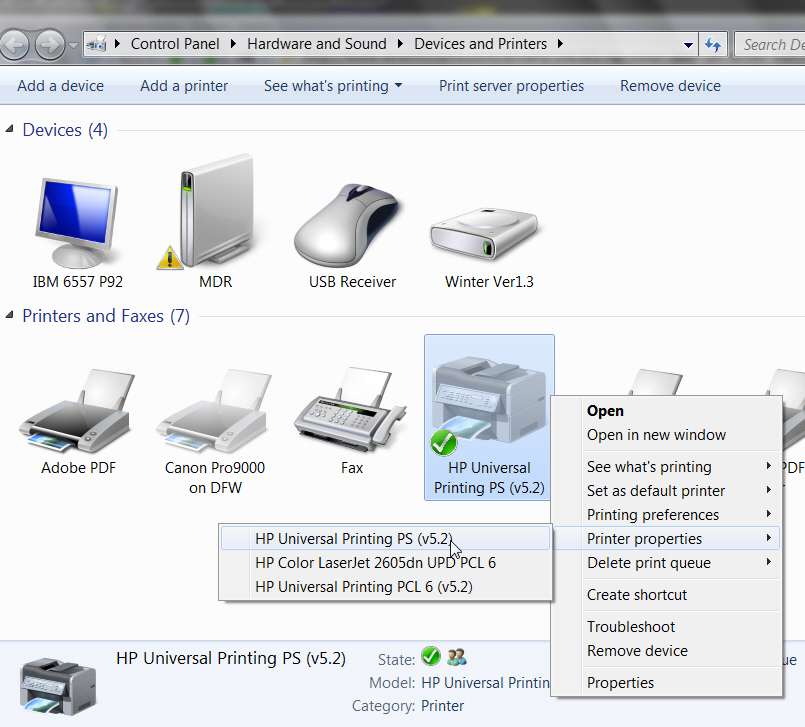
Start -> Devices and Printers -> right-click on the newly installed printer object for the 2605dn. Then select the Printer Properties item from the popup menu.

If you have multiple drivers installed (e.g. both PCL6 and PS600) then the Printer Properties and Printer Preferences dialogs will provide a secondary selector, to choose which driver you're wanting to configure.

Note that right after installing these drivers, when you go to Devices and Printers it looks like you have separate printer objects for both PCL6 and PS600 (one of which you've selected as your default). But if you close down Devices and Printers, maybe a little later (or certainly after a re-boot) if you repeat that process Win7 has now consolidated the two different drivers into a single printer object.

That means when you now Start -> Devices and Printers -> right-click, you will now see that secondary sub-selector choice I mentioned above for both Printer Preferences and Printer Properties, where you'll have to select which of the two drivers you want to get into and configure.

hp2605dnprinters.jpg


Ok... select Printer Properties for the printer driver (you may need to do this for both PCL6 and PS600, separately of course). This will trigger the "HP Universal Printing PS (5.2) Properties" dialog (for example).

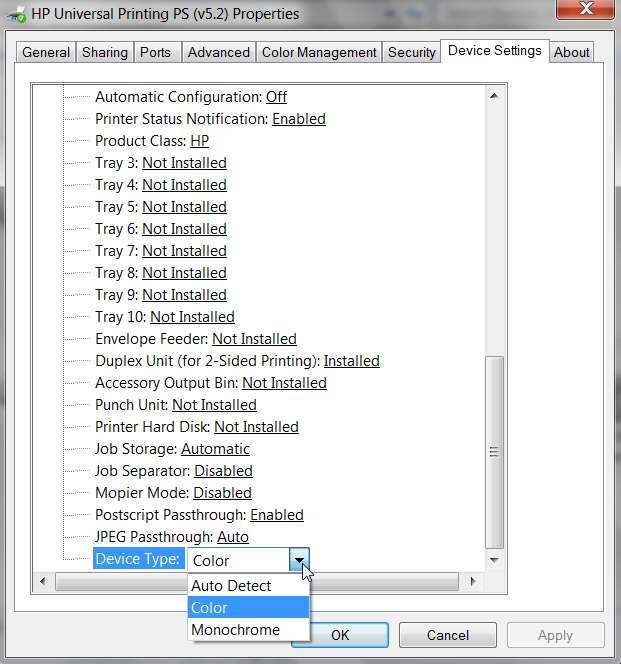
Select the Device Settings tab. Scroll down to the very last item in the list of device settings... "Device Type". It will no doubt say "auto detect" which is its default value after a driver install. THIS IS THE PROBLEM!!!

It's an HP driver bug (if you ask me), but the "auto detect" setting actually results in "monochrome" functionality (i.e. black and white only, as if the "MONOCHROME" value had been selected). This is why you're seeing black and white and no color... because the default "auto detect" results in "monochrome" (black and white) functional results.

However you can easily overcome this problem by clicking on the dropdown arrow for "device type" and instead selecting "COLOR". Click on OK, and that's all there is to it.

You now have a color-enabled 2605dn printer.

You should do this for ALL of the drivers you install for the 2605dn. They ALL have "auto detect" as their default "device type" value (in Printer Properties -> Device Settings tab, scrolled down to the very last item). All the drivers should be manually set to "COLOR" for their "device type".

hp2605dndevice.jpg


One more issue... in the "Printing Preferences" dialog for these printers, you'll see that ALL of the tabs which present a small image of a printed page show the page either in black-and-white or in color, corresponding to that "device type" setting over in Printer Properties I just discussed. You should now see a color version of that printed page, not black and white. That's proof positive that the printer is now a color printer.

However, you may also see a "water mark" with the word "NONE" diagonally splashed on that little image of the printed page (both color and black-and-white versions, you'll see the water mark of "NONE").

This is yet another defect, in my opinion, in the default settings for these HP drivers as first installed. It's crazy to see that, but that's what is delivered.

The solution here is to select the Effects tab on Printing Preferences dialog (again, after right-clicking on the 2605dn printer object you'll need to sub-select the right driver you want if you have multiple drivers installed for the 2605dn).

The Effects tab includes what gets used as that "water mark", and when you first look at this you'll see that by default it shows "[none]". However if you click on the dropdown arrow, you'll see that this particular "[none]" is actually at the bottom of a list of five built-in choices for a driver-inserted watermark. It actually is TEXT spelled out "none".

But up at the top of the list, in the first position, is ANOTHER item also shown as "[none]". Could this be more confusing to the user?

Anyway, the first item in the watermark list actually means "NONE... I don't want any watermark". So select that first item (which of course, will still appear as "[none]" when you OK, so you really can't tell the difference).

Now, notice that the "NONE" watermark has indeed instantly disappeared from the small page image. And now you will no longer get the big word "NONE" printed diagonally on all of your printed output.

Again, repeat this "[none]" correction on the Effects tab of the other printer driver you've installed for the 2605dn, if you've installed both PCL6 and PS600.

hp2605dneffects.jpg


Hope this solves your problem.

Incidentally, I have also successfully installed the 32-bit versions of each of the PCL6 and PS600 drivers on my Win7 system (i.e. both 32-bit and 64-bit drivers are installed in the two printer driver groups, for PCL6 and PS600).

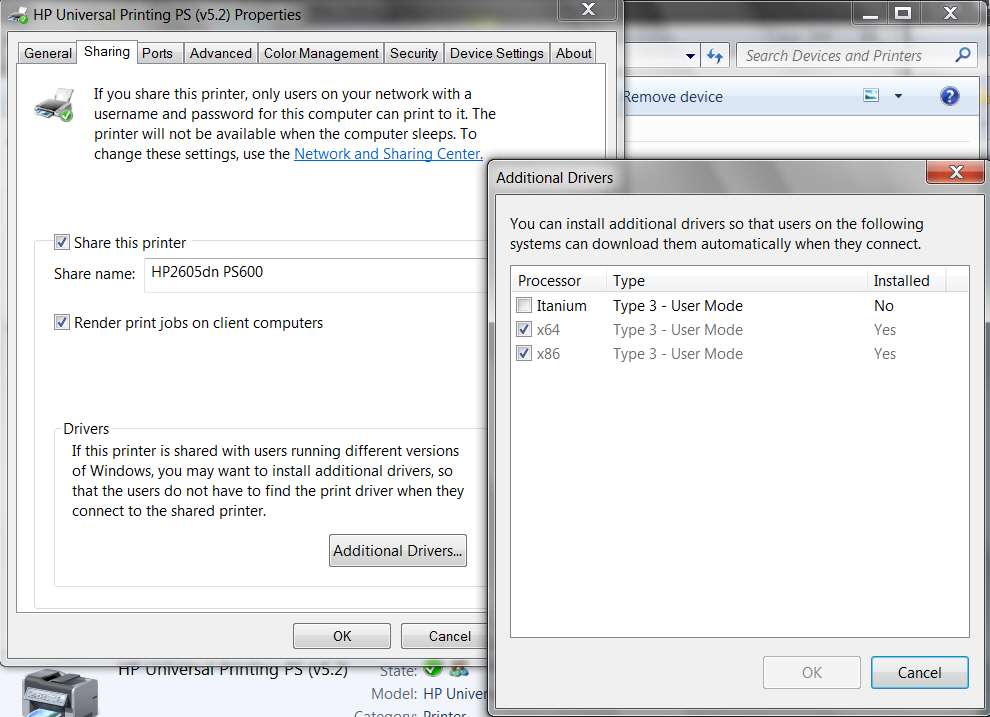
This is done using the "Additional Drivers" dialog on the "Sharing" tab of "Printer Properties"... when you have both 32-bit (e.g. WinXP) and 64-bit (e.g. Win7) systems on your home network and want to "share" the printer hosted by the Win7 machine with other machines on the network. They will print to the 2605dn through the Win7 host for the 2605dn, to which it is locally USB-connected, by virtue of selecting "share this printer" in the Win7 setup for the printer.

Then, on the network client machines (e.g. my WinXP machines) you use Network to view the shareable devices on the other network machines, and because "share" was specified for the 2605dn on the local host Win7 system it shows up as a network object to the WinXP machine (just like hard drives that you can share and provide access to other systems on the network).

On the WinXP machine you right-click on that shared 2605dn printer object in the Network view, and then select "connect" from the popup menu. WinXP will communicate with Win7, to set up this printing connection. Win7 will ship down the 32-bit driver (which I'd previously installed on Win7 as the second driver, using "Additional Drivers") to WinXP, and WinXP will now complete the creation of the printer object.

So you have a printer object on WinXP that represents the "shared" 2605dn on the Win7 machine. Win7 has its own 64-bit version of the printer driver for its own local 64-bit use, and WinXP has been shipped a copy of the previously installed [second] 32-bit version of the driver... for 32-bit client use.

Magic. Works perfectly! You have to do essentially nothing on the WinXP client machine to make this work, other than to "connect".

But you do need to install the 32-bit driver for the 2605dn using the "Additional Drivers" dialog on the Win7 system. And this is the 32-bit version of the Win7 Universal Printer driver package that you downloaded, but did not actually INSTALL... meaning you didn't actually run it. Instead, you simply use WINZIP or WINRAR or whatever, to expand that self-extracting EXE for the driver file from HP... into the a folder of the same directory name that it would have self-expanded into if you'd RUN it.

The reason for this is that the "Additional Drivers" dialog of Win7 requires that the additional driver (e.g. x86 in this case) to be installed be provided in INF form, not some self-installing INSTALL.EXE form. This is fine, however, as the expanded directory just produced by using WINRAR on the self-extracting EXE driver file from the HP Win7 site for the 2605dn actually DOES also store the needed INF file where "Additional Drivers" can use it from.

This INF file for the 2605dn is named hpcu112c.inf (located in the same directory in which the INSTALL.EXE is also found, if you really wanted to install that driver as a PRIMARY driver for Win7) and is what you point to in the "Additional Drivers" dialog as the secondary driver to be installed.

In other words, hpcu112c.inf in the expanded directory resulting from the 32-bit version of the Universal Printer driver, is the very "additional driver" you want to point to using the "Additional Drivers" dialog specified to add "x86" support to the printer for which you already have RUN the 64-bit version of the same HP-provided driver to get your first primary 64-bit (x64) driver installed.

If you do this correctly you will now see both x64 and x86 shown as "yes" for that printer, on the Printer Properties dialog for the printer, after pushing the "Additional Drivers" dialog. Originally x64 was shown as "yes" and x86" was shown as "no", after running the 64-bit version of the driver installer file. And then after expanding the 32-bit driver file, and using "Additional Drivers" to check the x86 item and then navigate to the expanded directory for the 32-bit driver and selecting hpcu112c.inf as the driver in that directory, you will then be installing the 32-bit driver as a second driver for that printer. You now have both 64-bit and 32-bit drivers available for client machines to be shipped, when they "connect" to make use of the "shared" 2605dn on the host Win7 machine.

hp2605sharing.jpg
 
Last edited:

My Computer My Computer

At a glance

Windows 7 Pro x64 (1), Win7 Pro X64 (2)i5-3350p 3.1Ghz/6MB-cache (1); E8400 3.0Ghz/6...8GB PC3-12800 DDR3 (1); 4GB PC3-10600 DDR3 (2)ATI HD7750 (1), (see TV cards); ATI R7 250 (2)
Computer type
PC/Desktop
Computer Manufacturer/Model Number
Home-built, two systems (1) and (2)
OS
Windows 7 Pro x64 (1), Win7 Pro X64 (2)
CPU
i5-3350p 3.1Ghz/6MB-cache (1); E8400 3.0Ghz/6MB-cache (2)
Motherboard
ASUS P8Z77-V Pro (1); ASUS P5Q3 (2)
Memory
8GB PC3-12800 DDR3 (1); 4GB PC3-10600 DDR3 (2)
Graphics Card(s)
ATI HD7750 (1), (see TV cards); ATI R7 250 (2)
Sound Card
Realtek ALC892 HD Audio (1); Realtek ALC1200 HD Audio (2)
Monitor(s) Displays
Eizo HD2441W LCD, Eizo S2433W (1); Eizo 24" S2433W (2)
Screen Resolution
1920x1200, 1920x1200 (1); 1920x1200 (2)
Hard Drives
(1) 1TB SATA-II (7200RPM), 2x2TB SATA-III (7200RPM), 250GB SATA-III (10000RPM) for OS; 2x2TB external USB 3.0

(2) 320GB SATA-II (7200RPM), 750GB SATA-II (7200RPM), 150GB SATA-II (10000RPM) for OS; 2TB external USB 3.0
PSU
Nesteq ECS-6001 600W (1); Nesteq ECS-5001 500W (2)
Case
Acousti-Case 360 (1) and (2)
Cooling
Noctua NH-U12P SE2 for CPU, 2x120mm case fans (1) and (2)
Keyboard
IBM PS/2 (1) and (2)
Mouse
Logitech MX Revolution wireless (1); Microsoft wired (2)
Internet Speed
100mbps down / 10mbps up
Antivirus
Microsoft Security Essentials; Malwarebyte Anti-Malware Pro
Browser
Firefox
Other Info
Ceton InfiniTV 4-tuner cablecard-enabled TV card as well as Hauppauge HVR-2250 OTA/ATSC 2-tuner TV card in (1), running under Win7 WMC
Back
Top