Read only mode of the files stored in my 2TB hard drive,

Jamal NUMAN

New member
Member
VIP
Local time
12:31 AM
Messages
144
Read only mode of the files stored in my 2TB hard drive,

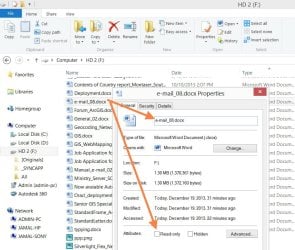
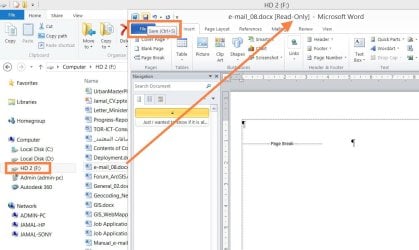
Suddenly, all files stored in hard drive are switched to read-only mode and in case I open any of them it and click “save” it goes to “save as”! The properties of these files don’t show that they are “read-only” (attached).

· I’m using windows 8 with no anti-virus installed
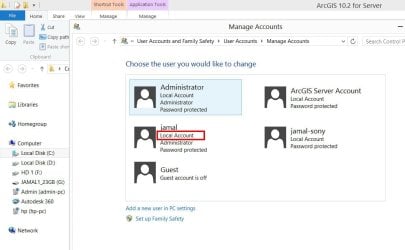
· The current user has administrator privileges (attached)

What is weird here is that if I access the same files from the default “administrator” user, then the files are not found in read-only mode

What might be the issue here?

Thank you

Best

Jamal
 

Attachments
  • Clip_596.jpg
    Clip_596.jpg
    89.6 KB · Views: 1
  • Clip_597.jpg
    Clip_597.jpg
    106.2 KB · Views: 1
  • Clip_2.jpg
    Clip_2.jpg
    62.7 KB · Views: 1

My Computer My Computer

At a glance

Windows 7 Ultimate x64
OS
Windows 7 Ultimate x64

My Computer My Computer

At a glance

Windows 7 x64 Ultimate and numerous virtual m...AMD FX-8350 Vishera 32nm Technology @ 4.2 GHz...G Skill 32.0GB Dual-Channel DDR3 @ 1204MHz (1...EVGA GeForce GTX 960 4GB Super SC ACX 2.0+ wi...
Computer type
PC/Desktop
Computer Manufacturer/Model Number
Bluethunder II
OS
Windows 7 x64 Ultimate and numerous virtual machines
CPU
AMD FX-8350 Vishera 32nm Technology @ 4.2 GHz default
Motherboard
ASUSTeK COMPUTER INC. SABERTOOTH 990FX R2.0 (Socket 942)
Memory
G Skill 32.0GB Dual-Channel DDR3 @ 1204MHz (11-13-13-31)
Graphics Card(s)
EVGA GeForce GTX 960 4GB Super SC ACX 2.0+ with Back Plate
Sound Card
Creative X-Fi Titanium HD Audiophile PCIe
Monitor(s) Displays
LG L227WTG x 3
Screen Resolution
1680 x 1050 16:10
Hard Drives
238GB Samsung850 PRO SATA Disk Device (SSD)
1863GB Seagate ST2000DM 001-1CH164 (SATA)
1397GB Seagate ST1500DL 003-9VT16L(SATA)
466GB Western Digital WDC WD50 03AZEX-00K1GA0 (SATA) x 2
932GB Seagate ST310005 28AS SATA Disk Device (SATA)
PSU
Enermax Revolution87+ 1000 Watts Gold Certified Power Supply
Case
Rocketfish Full Tower
Cooling
Cooler Master Hyper 212 EVO Push Pull 120mm Fans
Keyboard
Logitech K740
Mouse
Logitech G100S Laser LED + Logitech Gamepad F310
Internet Speed
500 mbs down and 30mbs up
Antivirus
Malwarebytes Pro & Avast and MSE on certain Virtual Machines
Browser
Firefox (Main) Chrome, Internet Explorer (Back Up)
Other Info
Logitech X 230 2.1 Stereo System and 5.1 Yamaha RX V2090
B&W DM6 Monitor Speakers + Center and Surround Speakers
Using Mouse Without Borders (Google it)
Is the drive an external HDD?

One of my external HDDs has a weird issue where it claims to be "Read-only" (I wish I could make it do that at a time of my choosing).
It also refuses to be error checked the first couple of times I run Disk Check on it (it drops out at ~80% of the way through the first pass).

On the third attempt (usually) Disk Check runs correctly and the report always states that no errors were found.
Once Disk Check succeeds the HDD behaves normally. :confused:
 

My Computer My Computer

At a glance

W7 Ultimate SP1, LM19.2 MATE, W10 Home 1703, ...AMD Phenom II x6 1100T, 3.3 GHz12GB DDR3 1333 G-Skill (4GB x 2), G-Skill (2G...NVIDIA GeForce GTX 660
Computer type
PC/Desktop
Computer Manufacturer/Model Number
n/a
OS
W7 Ultimate SP1, LM19.2 MATE, W10 Home 1703, W10 Pro 1703 VM, #All 64 bit
CPU
AMD Phenom II x6 1100T, 3.3 GHz
Motherboard
ASUS M4A88T-M/USB3 (AM3)
Memory
12GB DDR3 1333 G-Skill (4GB x 2), G-Skill (2GB x 2)
Graphics Card(s)
NVIDIA GeForce GTX 660
Sound Card
Realtek?
Monitor(s) Displays
Samsung S23B350
Screen Resolution
1920x1080
Hard Drives
WD Green 2TB (SATA), WD Green 3TB (SATA), WD Blue 4TB (SATA), WD Blue 6TB (SATA)
PSU
Cooler Master
Case
Antec GX300 Tower
Cooling
3x Antec TRICOOL 120mm Fans
Mouse
Wired Optical
Internet Speed
DSL
Antivirus
Avast
Browser
Pale Moon (64 bit)
Other Info
2018-12-27 Upgraded HDDs
2015-12-10 Upgraded case, graphics card, storage
2015-08-15 Upgraded motherboard & RAM
2015-07-15 Upgraded LM17.1 to LM17.2
Is the drive an external HDD?

One of my external HDDs has a weird issue where it claims to be "Read-only" (I wish I could make it do that at a time of my choosing).
It also refuses to be error checked the first couple of times I run Disk Check on it (it drops out at ~80% of the way through the first pass).

On the third attempt (usually) Disk Check runs correctly and the report always states that no errors were found.
Once Disk Check succeeds the HDD behaves normally. :confused:

Many thanks Indianatone and lehnerus2000 for the help,

It appears that the controls are granted at the level of groups but not per user. Granting the “jamal” user full controls solves the issue of “read-only” mode.

Best

Jamal
 

Attachments

  • Clip_606.jpg
    Clip_606.jpg
    122.4 KB · Views: 1

My Computer My Computer

At a glance

Windows 7 Ultimate x64
OS
Windows 7 Ultimate x64
Back
Top