Readyboost not working with Patriot XT 8gb USB 2.0

MrPickles

New member
Local time
8:54 PM
Messages
7
I looked for a post about this topic here but i did not see one so if this is a repeat i apologize

I have a Patriot XT 8gb USB 2.0 Thumbdrive that i specifically bought to use Readyboost with but seemingly no matter what i do, Windows 7 says
'This device cannot be used for Readyboost'

I dont understand why though. The drive is sold as Readyboost compatible.
I have tried formatting the drive in both NTFS, Fat32 and exFat with no luck.
I checked that all of my USB ports are 2.0 and they are.

I am completely flumaxed with this issue so any help with this would be great.
 

My Computer My Computer

At a glance

Windows 7 Home Premium 64 bitAMD Athlon 64 X2 Dual Core Processor 4600+4 GBEVGA GTX 285
OS
Windows 7 Home Premium 64 bit
CPU
AMD Athlon 64 X2 Dual Core Processor 4600+
Motherboard
ASUS MVP A8R32 MVP Deluxe
Memory
4 GB
Graphics Card(s)
EVGA GTX 285
Hard Drives
WD Caviar Green 2.0 TB HDD SATA/64mb Cache
PSU
Corsair TX750

My Computer My Computer

At a glance

win 7 ( 64 bit)Intel Core i7-870 Lynnfield 2.93GHz 8MB L3 Ca...G.SKILL Sniper Series 16GB (4 x 4GB) 240-Pin ...ATI Radeon HD6800 Series
Computer Manufacturer/Model Number
home build
OS
win 7 ( 64 bit)
CPU
Intel Core i7-870 Lynnfield 2.93GHz 8MB L3 Cache LGA 1156 95
Motherboard
ASUS P7P55 LX LGA 1156
Memory
G.SKILL Sniper Series 16GB (4 x 4GB) 240-Pin DDR3 SDRAM
Graphics Card(s)
ATI Radeon HD6800 Series
Sound Card
hdmi
Monitor(s) Displays
42" lg 3d tv
Screen Resolution
1920 x 1080
Hard Drives
1 ssd pci-e revodrive
4 seagate 1.5 tb
PSU
Rosewill BRONZE Series RBR1000-M 1000W Continuous@40°C, 80Pl
Case
CoolMaster 922
Cooling
CORSAIR CWCH60 Hydro Series H60 High Performance Liquid CPU
Keyboard
logtech
Mouse
logitect
Internet Speed
5 mbit
I have already looked at that. I get as far as step 2 and when i say Speed up my System is when i get the error message.
 

My Computer My Computer

At a glance

Windows 7 Home Premium 64 bitAMD Athlon 64 X2 Dual Core Processor 4600+4 GBEVGA GTX 285
OS
Windows 7 Home Premium 64 bit
CPU
AMD Athlon 64 X2 Dual Core Processor 4600+
Motherboard
ASUS MVP A8R32 MVP Deluxe
Memory
4 GB
Graphics Card(s)
EVGA GTX 285
Hard Drives
WD Caviar Green 2.0 TB HDD SATA/64mb Cache
PSU
Corsair TX750
found this in that same post .

Hey folks. I didn't see anyone talking about it, but ya know Windows 7 now supports an 8GB RB drive. I am using superfast 8GB sticks on my desktops and an 8GB SDHC in my notebook's multi-drive permanently.

The trick is, they have to be formatted in exFAT to be used. If you use the little popup "Speed up my computer" wizard, you can't do it immediately or on the fly.\

First you have to say no to the prompt, then go to disk management and format the sucker in exFAT.

exFAT is pretty new, so not a lot about it out there, but essentially it is like FAT on steroids, but not NTFS.

Anyway, once formatted, pop it out and back in and take the wizard and enjoy your newfound resources.!
biggrin.gif


(I have a 4GB desktop and a notebook with 8GB RB and an 8GB desktop with 8GB RB. You can definitely feel the difference.)

scrooge
 

My Computer My Computer

At a glance

win 7 ( 64 bit)Intel Core i7-870 Lynnfield 2.93GHz 8MB L3 Ca...G.SKILL Sniper Series 16GB (4 x 4GB) 240-Pin ...ATI Radeon HD6800 Series
Computer Manufacturer/Model Number
home build
OS
win 7 ( 64 bit)
CPU
Intel Core i7-870 Lynnfield 2.93GHz 8MB L3 Cache LGA 1156 95
Motherboard
ASUS P7P55 LX LGA 1156
Memory
G.SKILL Sniper Series 16GB (4 x 4GB) 240-Pin DDR3 SDRAM
Graphics Card(s)
ATI Radeon HD6800 Series
Sound Card
hdmi
Monitor(s) Displays
42" lg 3d tv
Screen Resolution
1920 x 1080
Hard Drives
1 ssd pci-e revodrive
4 seagate 1.5 tb
PSU
Rosewill BRONZE Series RBR1000-M 1000W Continuous@40°C, 80Pl
Case
CoolMaster 922
Cooling
CORSAIR CWCH60 Hydro Series H60 High Performance Liquid CPU
Keyboard
logtech
Mouse
logitect
Internet Speed
5 mbit
If you're still having problems getting Windows to use this USB stick with ReadyBoost, you might try using diskpart from a command prompt to completely wipe the stick, then create a new primary partition and format it.

It doesn't actually matter which filesystem you format it with, both exFAT and NTFS will work well. FAT32 will be too limiting as it allows files of at most 4GB in size.

USB sticks, and for that matter any kind of flash memory, can be slowed down by misaligned partitions or formats done with too small a cluster size. Judging from my personal experience, 16KB or 32KB clusters would be ideal.

If you need a step-by-step guide on how to use diskpart to create an aligned partition, let me know and I'll post the steps here (too tired atm). :)
 

My Computer My Computer

At a glance

Windows 7 Professional SP1 32-bitIntel Core 2 Duo E6600 2.4GHz4GB DDR2-667 (4x1GB in dual-channel config)nVidia GeForce 9800 GT
Computer type
PC/Desktop
Computer Manufacturer/Model Number
Custom-built
OS
Windows 7 Professional SP1 32-bit
CPU
Intel Core 2 Duo E6600 2.4GHz
Motherboard
Asus PL5D2
Memory
4GB DDR2-667 (4x1GB in dual-channel config)
Graphics Card(s)
nVidia GeForce 9800 GT
Sound Card
Creative X-Fi XtremeMusic
Monitor(s) Displays
Acer P236H
Screen Resolution
1920x1200 (DVI)
Hard Drives
OCZ SSD Vertex Plus 60GB SATA (Firmware 3.55), 64MB cache
Hitachi HD321KJ SATA, 320GB, 7200rpm, 16MB cache
PSU
Antec TruePower 2.0
Case
Cooler Master Centurion
Cooling
Too many fans
Keyboard
Standard
Mouse
Microsoft wireless optical mouse
Internet Speed
AT&T U-verse (18mbit/sec)
Antivirus
Microsoft Security Essentials
Browser
Firefox
Other Info
Other devices:
Compaq CQ-60 laptop
Google Nexus 7 (2012) tablet
Nvidia SHIELD tablet (US/LTE)
Hardkernel ODROID-XU single-board computer (Samsung Exynos 5420)
Note that when you plug in a removable flash device and try to use it with ReadyBoost, Windows does a few tests on it to see if it will work. Specifically, the device must be formatted FAT32, exFAT, or NTFS, be at least 256MB in size, be on a USB 2.0 (or higher) bus, and be good for at least 2.5 MB/sec throughout for 4 KB random reads, and 1.75 MB/sec throughout for 512 KB random writes. If ANY of those things fail, Windows will refuse to use the device for ReadyBoost. You can always test the device a second time, and sometimes this actually fixes things. If it doesn't, however, you can open eventvwr and browse to Applications and Services Logs > Microsoft > Windows > Readyboost and see what happened.
 

My Computer My Computer

At a glance

Windows 10 Pro x64Intel Core i7 4790K @ 4.5GHz32GB DDR3Nvidia GeForce GTX970
Computer type
PC/Desktop
Computer Manufacturer/Model Number
Custom
OS
Windows 10 Pro x64
CPU
Intel Core i7 4790K @ 4.5GHz
Motherboard
Asus Maximus Hero VII
Memory
32GB DDR3
Graphics Card(s)
Nvidia GeForce GTX970
Sound Card
Realtek HD Audio
Screen Resolution
1920x1200
Hard Drives
1x Samsung 250GB SSD
4x WD RE 2TB (RAIDZ)
PSU
Corsair AX760i
Case
Fractal Design Define R4
Cooling
Noctua NH-D15
thanks for the tips.
I will try these out and get back to you guys.
For the the formating to NTFS or exFAT, should I do a regular format or a quick format?
 

My Computer My Computer

At a glance

Windows 7 Home Premium 64 bitAMD Athlon 64 X2 Dual Core Processor 4600+4 GBEVGA GTX 285
OS
Windows 7 Home Premium 64 bit
CPU
AMD Athlon 64 X2 Dual Core Processor 4600+
Motherboard
ASUS MVP A8R32 MVP Deluxe
Memory
4 GB
Graphics Card(s)
EVGA GTX 285
Hard Drives
WD Caviar Green 2.0 TB HDD SATA/64mb Cache
PSU
Corsair TX750
Depends - if the device came formatted from the vendor, it might be worth doing a complete format.
 

My Computer My Computer

At a glance

Windows 10 Pro x64Intel Core i7 4790K @ 4.5GHz32GB DDR3Nvidia GeForce GTX970
Computer type
PC/Desktop
Computer Manufacturer/Model Number
Custom
OS
Windows 10 Pro x64
CPU
Intel Core i7 4790K @ 4.5GHz
Motherboard
Asus Maximus Hero VII
Memory
32GB DDR3
Graphics Card(s)
Nvidia GeForce GTX970
Sound Card
Realtek HD Audio
Screen Resolution
1920x1200
Hard Drives
1x Samsung 250GB SSD
4x WD RE 2TB (RAIDZ)
PSU
Corsair AX760i
Case
Fractal Design Define R4
Cooling
Noctua NH-D15

My Computer My Computer

At a glance

windows 7 ultimate 64 bitamd athlon 64 X2 5000+4 gigs pc2 5300Nvidia GeForce 8600 GTS
OS
windows 7 ultimate 64 bit
CPU
amd athlon 64 X2 5000+
Motherboard
asus A8M2N-LA
Memory
4 gigs pc2 5300
Graphics Card(s)
Nvidia GeForce 8600 GTS
Sound Card
Realtek alc888 high def 8 channel
Monitor(s) Displays
17"samsung syncMaster and 32" LCD panasonic viera tv
Hard Drives
300 gb Hitachi sata 7200rpm
1T seagate Barracuda sata 7200rpm
150 gb WD PATA
250gb WD my passport USB 2.0
PSU
Antec
Other Info
Altec lansing ATP3 3 pc speaker system(these things rock!)
You do indeed have to be careful when using ReadyBoost - it is basically an additional cache for Superfetch, and also can double as disk cache when the hard disk cache starts to get full under load. If that USB or CF device is markedly slower than main system RAM, it can indeed slow the system down when used. It would still be faster than what would happen if it wasn't added (in most cases....), but yes, it can appear to slow the system down. In general, it is better to simply add RAM than to add a ReadyBoost USB or CF device, although I am aware that on fixed platforms (like laptops and tablets), this isn't always an option.
 

My Computer My Computer

At a glance

Windows 10 Pro x64Intel Core i7 4790K @ 4.5GHz32GB DDR3Nvidia GeForce GTX970
Computer type
PC/Desktop
Computer Manufacturer/Model Number
Custom
OS
Windows 10 Pro x64
CPU
Intel Core i7 4790K @ 4.5GHz
Motherboard
Asus Maximus Hero VII
Memory
32GB DDR3
Graphics Card(s)
Nvidia GeForce GTX970
Sound Card
Realtek HD Audio
Screen Resolution
1920x1200
Hard Drives
1x Samsung 250GB SSD
4x WD RE 2TB (RAIDZ)
PSU
Corsair AX760i
Case
Fractal Design Define R4
Cooling
Noctua NH-D15
Ok so i reformatted the drive to exFAT and tried installing Readyboost with no luck.
Then i decided to trying it on another computer and poof! Readyboost works fine on the drive. But when i try to take it back to my system, it doesn't work. It just treats it like a regular thumbdrive (doesnt even ask if i want to speed up the system)

So im guessing its my computer that's the problem, just not sure what part.
Any ideas?
 

My Computer My Computer

At a glance

Windows 7 Home Premium 64 bitAMD Athlon 64 X2 Dual Core Processor 4600+4 GBEVGA GTX 285
OS
Windows 7 Home Premium 64 bit
CPU
AMD Athlon 64 X2 Dual Core Processor 4600+
Motherboard
ASUS MVP A8R32 MVP Deluxe
Memory
4 GB
Graphics Card(s)
EVGA GTX 285
Hard Drives
WD Caviar Green 2.0 TB HDD SATA/64mb Cache
PSU
Corsair TX750
Did you check the event logs?
 

My Computer My Computer

At a glance

Windows 10 Pro x64Intel Core i7 4790K @ 4.5GHz32GB DDR3Nvidia GeForce GTX970
Computer type
PC/Desktop
Computer Manufacturer/Model Number
Custom
OS
Windows 10 Pro x64
CPU
Intel Core i7 4790K @ 4.5GHz
Motherboard
Asus Maximus Hero VII
Memory
32GB DDR3
Graphics Card(s)
Nvidia GeForce GTX970
Sound Card
Realtek HD Audio
Screen Resolution
1920x1200
Hard Drives
1x Samsung 250GB SSD
4x WD RE 2TB (RAIDZ)
PSU
Corsair AX760i
Case
Fractal Design Define R4
Cooling
Noctua NH-D15
it says 'The device (Patriot Memory) will not be used for a ReadyBoost cache because it has insufficient read performance: 1439 KB/sec

ran a couple more tests on it and it hovers around 1430 kb/sec read speeds on this computer. so why would it not read fast enough on this machine but read fine on another?
 

My Computer My Computer

At a glance

Windows 7 Home Premium 64 bitAMD Athlon 64 X2 Dual Core Processor 4600+4 GBEVGA GTX 285
OS
Windows 7 Home Premium 64 bit
CPU
AMD Athlon 64 X2 Dual Core Processor 4600+
Motherboard
ASUS MVP A8R32 MVP Deluxe
Memory
4 GB
Graphics Card(s)
EVGA GTX 285
Hard Drives
WD Caviar Green 2.0 TB HDD SATA/64mb Cache
PSU
Corsair TX750
I had a WEI of 5.8 before adding Readyboost. After adding a 16GB of SDHC card as readyboost, the WEI increased to 5.9. Not much increase of speed.

By the way I have formatted the SDHC card with NTFS file system.
 

My Computer My Computer

At a glance

MS Windows 7 Ultimate 64-bit SP1i5-2410M 2.3GHz (2.9GHz Turbo-Boost) Sandy Br...4GB+4GB Samsung DDR3 PC3-10700 (1333 MHz)Video Intel(R) HD Graphics Family, 1696MB ava...
Computer Manufacturer/Model Number
Toshiba Satellite P775-S7232
OS
MS Windows 7 Ultimate 64-bit SP1
CPU
i5-2410M 2.3GHz (2.9GHz Turbo-Boost) Sandy Bridge 32nm
Motherboard
Toshiba PHRAA ver. PSBY1U-00F003
Memory
4GB+4GB Samsung DDR3 PC3-10700 (1333 MHz)
Graphics Card(s)
Video Intel(R) HD Graphics Family, 1696MB available memory
Sound Card
Realtek High Definition Audio version=6.0.1.6323
Monitor(s) Displays
17.3 " Trubrite TFT LCD, LED Backlit
Screen Resolution
1600x900 32 bit, Native support for 720P content
Hard Drives
TOSHIBA MK6476GSXN
580.614 [GB] partitioned C: 80GB and D: 500GB with hidden recovery partitons.

Spare bay for 2nd HDD but no SATA connector :-(
PSU
Toshiba AC/DC Adapter
Case
Notebook
Cooling
Built-in Fan
Keyboard
Premium Raised Tile keyboard
Mouse
Logitech M215 wireless mouse
Internet Speed
Not fast enough
Other Info
Built-in Harman Kardon speakers with Dolby Advanced Audio, Waves MaxxAudio® 3. HDMI, 1xUSB3+3xUSB2 ports, WebCam, Battery life 4hrs 11mins, 4GB Readyboost SDHC card, WD My Book Essential Ext HDDs 2 TB, 2x1TB, My Passport SE 1TB and WDTV 1st Gen for Multimedia playing on a Sony Wega 32" LCD.
Recent addition to my toys are Asus Transformer Pad TF300T with 32GB onboard sd card + 32GB microsd card.
it says 'The device (Patriot Memory) will not be used for a ReadyBoost cache because it has insufficient read performance: 1439 KB/sec

ran a couple more tests on it and it hovers around 1430 kb/sec read speeds on this computer. so why would it not read fast enough on this machine but read fine on another?

That sounds suspiciously like your USB port (the one where the stick is plugged in) is running in USB1.1 mode instead of USB2.0. That would limit the speed to 12Mbit/sec which is roughly in line with the 1430KB/sec read speed you're seeing.

It's clearly not the stick itself that's the issue. Either the USB drivers in Windows are wrong or outdated, or USB2.0 mode (also known as EHCI) is somehow disabled in your BIOS.
 

My Computer My Computer

At a glance

Windows 7 Professional SP1 32-bitIntel Core 2 Duo E6600 2.4GHz4GB DDR2-667 (4x1GB in dual-channel config)nVidia GeForce 9800 GT
Computer type
PC/Desktop
Computer Manufacturer/Model Number
Custom-built
OS
Windows 7 Professional SP1 32-bit
CPU
Intel Core 2 Duo E6600 2.4GHz
Motherboard
Asus PL5D2
Memory
4GB DDR2-667 (4x1GB in dual-channel config)
Graphics Card(s)
nVidia GeForce 9800 GT
Sound Card
Creative X-Fi XtremeMusic
Monitor(s) Displays
Acer P236H
Screen Resolution
1920x1200 (DVI)
Hard Drives
OCZ SSD Vertex Plus 60GB SATA (Firmware 3.55), 64MB cache
Hitachi HD321KJ SATA, 320GB, 7200rpm, 16MB cache
PSU
Antec TruePower 2.0
Case
Cooler Master Centurion
Cooling
Too many fans
Keyboard
Standard
Mouse
Microsoft wireless optical mouse
Internet Speed
AT&T U-verse (18mbit/sec)
Antivirus
Microsoft Security Essentials
Browser
Firefox
Other Info
Other devices:
Compaq CQ-60 laptop
Google Nexus 7 (2012) tablet
Nvidia SHIELD tablet (US/LTE)
Hardkernel ODROID-XU single-board computer (Samsung Exynos 5420)
That sounds suspiciously like your USB port (the one where the stick is plugged in) is running in USB1.1 mode instead of USB2.0. That would limit the speed to 12Mbit/sec which is roughly in line with the 1430KB/sec read speed you're seeing.

It's clearly not the stick itself that's the issue. Either the USB drivers in Windows are wrong or outdated, or USB2.0 mode (also known as EHCI) is somehow disabled in your BIOS.
I went into my BIOS and looked at all the USB Configuration information and this is what it said:

Module Version: 2.24.0-10.4
USB Devices Detected: 1 Keyboard, 1 Mouse, 1 Drive
USB Controller : [USB1.1+2.0]
Legacy USB Support [Auto]
USB 2.0 Controller Mode [HiSpeed]
BIOS EHCI Hand-Off [enabled]

Mass Storage Device configuration
Mass Storage Reset Delay [20 sec]
Device #1: Patriot Memory
Emulation Type [Auto]

It looks like the BIOS is right to me so maybe its the USB ports themselves? The manual says all of them are USB 2.0 though.
 

My Computer My Computer

At a glance

Windows 7 Home Premium 64 bitAMD Athlon 64 X2 Dual Core Processor 4600+4 GBEVGA GTX 285
OS
Windows 7 Home Premium 64 bit
CPU
AMD Athlon 64 X2 Dual Core Processor 4600+
Motherboard
ASUS MVP A8R32 MVP Deluxe
Memory
4 GB
Graphics Card(s)
EVGA GTX 285
Hard Drives
WD Caviar Green 2.0 TB HDD SATA/64mb Cache
PSU
Corsair TX750
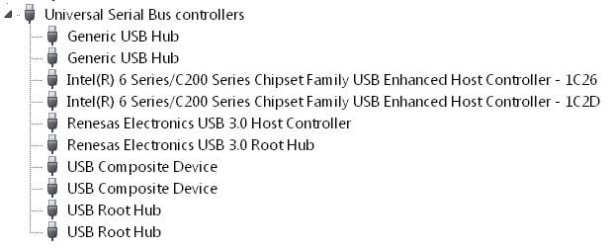
You can check your USB controller modes in Device Manager.
 

Attachments

  • USB Controllers.jpg
    USB Controllers.jpg
    21.5 KB · Views: 10

My Computer My Computer

At a glance

MS Windows 7 Ultimate 64-bit SP1i5-2410M 2.3GHz (2.9GHz Turbo-Boost) Sandy Br...4GB+4GB Samsung DDR3 PC3-10700 (1333 MHz)Video Intel(R) HD Graphics Family, 1696MB ava...
Computer Manufacturer/Model Number
Toshiba Satellite P775-S7232
OS
MS Windows 7 Ultimate 64-bit SP1
CPU
i5-2410M 2.3GHz (2.9GHz Turbo-Boost) Sandy Bridge 32nm
Motherboard
Toshiba PHRAA ver. PSBY1U-00F003
Memory
4GB+4GB Samsung DDR3 PC3-10700 (1333 MHz)
Graphics Card(s)
Video Intel(R) HD Graphics Family, 1696MB available memory
Sound Card
Realtek High Definition Audio version=6.0.1.6323
Monitor(s) Displays
17.3 " Trubrite TFT LCD, LED Backlit
Screen Resolution
1600x900 32 bit, Native support for 720P content
Hard Drives
TOSHIBA MK6476GSXN
580.614 [GB] partitioned C: 80GB and D: 500GB with hidden recovery partitons.

Spare bay for 2nd HDD but no SATA connector :-(
PSU
Toshiba AC/DC Adapter
Case
Notebook
Cooling
Built-in Fan
Keyboard
Premium Raised Tile keyboard
Mouse
Logitech M215 wireless mouse
Internet Speed
Not fast enough
Other Info
Built-in Harman Kardon speakers with Dolby Advanced Audio, Waves MaxxAudio® 3. HDMI, 1xUSB3+3xUSB2 ports, WebCam, Battery life 4hrs 11mins, 4GB Readyboost SDHC card, WD My Book Essential Ext HDDs 2 TB, 2x1TB, My Passport SE 1TB and WDTV 1st Gen for Multimedia playing on a Sony Wega 32" LCD.
Recent addition to my toys are Asus Transformer Pad TF300T with 32GB onboard sd card + 32GB microsd card.
You can check your USB controller modes in Device Manager.

In the Device Manager i have:

3 listings for 'ULi PCI to USB Open Host Controller'
1 listing for 'ULi USB 2.0 Enhanced Host Controller'
3 listings for 'USB Composite Device'
and 4 listings for 'USB Root Hub'

I tell windows to update their drivers but it tells me they are already up to date.
Is there anything i should be particularly looking for?
I imagine the ULi USB 2.0 Enhanced Host Controller is important here.
 

My Computer My Computer

At a glance

Windows 7 Home Premium 64 bitAMD Athlon 64 X2 Dual Core Processor 4600+4 GBEVGA GTX 285
OS
Windows 7 Home Premium 64 bit
CPU
AMD Athlon 64 X2 Dual Core Processor 4600+
Motherboard
ASUS MVP A8R32 MVP Deluxe
Memory
4 GB
Graphics Card(s)
EVGA GTX 285
Hard Drives
WD Caviar Green 2.0 TB HDD SATA/64mb Cache
PSU
Corsair TX750
I notice it said the controller was "1.1+2.0", and also you have an OHCI controller and an EHCI controller - OHCI controllers support USB 1.1 only, which would indicate that not all ports are operating as USB 2.0 ports. It might be worth reviewing the specs and config for your motherboard to see how to force all 8 ports to run USB 2.0 only.
 

My Computer My Computer

At a glance

Windows 10 Pro x64Intel Core i7 4790K @ 4.5GHz32GB DDR3Nvidia GeForce GTX970
Computer type
PC/Desktop
Computer Manufacturer/Model Number
Custom
OS
Windows 10 Pro x64
CPU
Intel Core i7 4790K @ 4.5GHz
Motherboard
Asus Maximus Hero VII
Memory
32GB DDR3
Graphics Card(s)
Nvidia GeForce GTX970
Sound Card
Realtek HD Audio
Screen Resolution
1920x1200
Hard Drives
1x Samsung 250GB SSD
4x WD RE 2TB (RAIDZ)
PSU
Corsair AX760i
Case
Fractal Design Define R4
Cooling
Noctua NH-D15
Back
Top