ReadyBoost - Setup and Use

How to Setup and Use ReadyBoost in Windows 7


   Information
Windows 7 supports Windows ReadyBoost. This feature uses external USB flash drives as a hard disk cache to improve disk read performance. Supported external storage types include USB thumb drives, SD cards, and CF cards. Since ReadyBoost will not provide a perfor¬mance gain when the primary disk is an SSD, Windows 7 disables ReadyBoost when reading from an SSD drive.

This will show you how to setup and use ReadyBoost in Windows 7 with USB flash drives and flash memory cards to help speed up your computer.

However, you most likely will not notice any increase in performance if your computer meets or exceeds the minimum system requirements of 1 GB RAM (4 GB recommended) for 32-bit Windows 7 OR 2 GB RAM (8 GB recommended) for 64-bit Windows 7 installed.

   Note
External storage must meet the following requirements:
  • Capacity of at least 256 MB, with at least 64 kilobytes (KB) of free space.The 4-GB limit of Windows Vista has been removed. For ReadyBoost to effectively speed up your computer, the flash drive or memory card should have at least 1 GB of free available space.
  • At least a 2.5 MB/sec throughput for 4-KB random reads
  • At least a 1.75 MB/sec throughput for 1-MB random writes
  • You can enable or disable ReadyBoost for a specific flash drive or other removable storage device (ex: memory card).
  • Windows 7 shows you how much space it recommends that you allow it to reserve and use on the flash drive or memory card for optimal performance at the bottom of the properties window. (See screenshot below step 4B below)
  • If your flash drive or card doesn't have enough available space for ReadyBoost, you'll see a message telling you to free some space on it.
  • For best results, use a flash drive or flash memory card with at least double the amount of available space as the amount of memory (RAM) in your computer.
  • There's a limit of 8 flash devices (EX: USB flash drive or memory card) that could be used at once for ReadyBoost with a max of 32GB of ReadyBoost space per device for a max total of 256GB per machine.
  • Should you have the USB flash drive formarted as FAT32 or NTFS:
    • The FAT32 file system has size limitations. While you cannot have a FAT32 partition greater than 32 GB (32728 MB), you also cannot save/store a file larger than 4 GB on a FAT32 partition. This limits you to only being able to use up to 4 GB for ReadyBoost on a USB flash drive formatted with FAT32.
    • To be able to use more than 4 GB for ReadyBoost on the USB flash drive, you would need to have the USB flash drive formated with NTFS instead.
For more information about ReadyBoost in Windows 7, see:
   Warning

  • If your Windows 7 is installed on a solid-state drive (SSD), you may not see an option to speed up your computer with ReadyBoost when you plug in a USB flash drive or flash memory card. This is because SSD drives are faster and they're very unlikely to benefit from using ReadyBoost.
  • In some situations, you might not be able to use all of the memory on your device to speed up your computer. For example, some flash memory devices contain both slow and fast flash memory, but ReadyBoost can only use fast flash memory to speed up your computer.
  • ReadyBoost cannot beat the performance gain by just adding more RAM in your computer instead.
  • ReadyBoost uses the Superfetch service that needs to be enabled and set to be "Started" and "Automatic".


Here's How:
1. Plug a USB flash drive or flash memory card that you want to use ReadyBoost with into your computer.

2. If AutoPlay pops-up, click on Speed up my system. (See screenshot below)
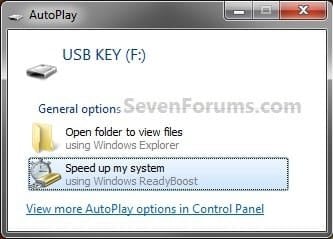
Step1.jpg
A) Go to step 4.
OR

3. If AutoPlay does not pop-up, then open the Start Menu and click on Computer. In Computer, right click on the USB flash drive or flash memory card, and click on Properties. (See screenshot below)
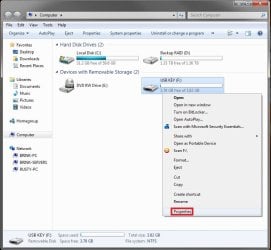
Step1B.jpg
4. To Turn On ReadyBoost

A) To use all of the flash drive or memory card free space for ReadyBoost
  • Select (dot) Dedicate this device to ReadyBoost. (See screenshot below)
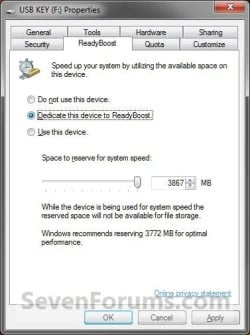
Step2.jpg

B) To specify how much free space on the flash drive or memory to use for ReadyBoost
  • Select (dot) Use this device. (See screenshot below)
  • Either slide the slider or enter the amount of free space you want to reserve to ReadyBoost.
    NOTE: See the note box at the top of the tutorial for details about how much free space to use.
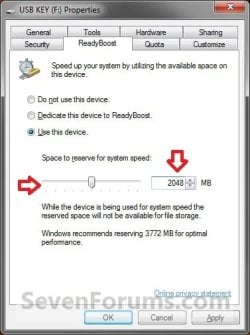
Step3.jpg

5. To Turn Off ReadyBoost
  • Select (dot) Do not use this device. (See screenshots above)
6. Click on OK.

7. You will see this for a brief moment while Windows 7 configures the ReadyBoost cache on your flash drive or memory card. (See screenshot below)

Step4.jpg
   Tip
To Temporarily Remove the ReadyBoost Device
NOTE: If you wanted to temporarily remove the USB flash drive or memory card that ReadyBoost is currently using, then this will show you how to safely remove it.
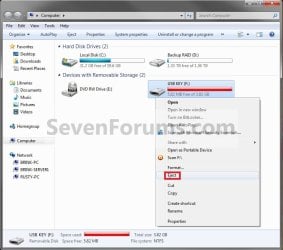
1. Open the Start Menu and click on Computer, then right click on the USB flash drive or flash memory card being used by ReadyBoost, and click on Eject. (See screenshots below)
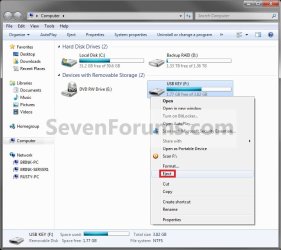
Eject1.jpgEject2.jpg
A) Click on Continue. (See screenshot below)
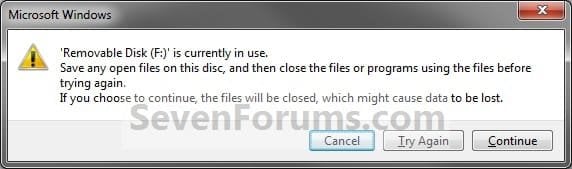
EjectB.jpg
B) Go to step 3.
OR

2. Click on the Safely Remove Hardware icon in the notification area on the right side of the taskbar, then click on the USB flash drive or flash memory card being used by ReadyBoost to eject it. (See screenshot below)
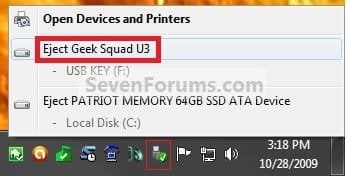
Eject3.jpg
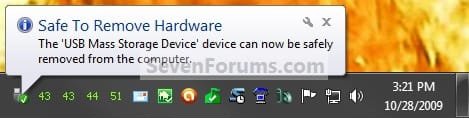
3. When you see this, it is now safe to remove the USB flash drive or flash memory card. (See screenshot below)
Eject3B.jpg
4. When ready, you can just plug the USB flash drive or flash memory card back in to have ReadyBoost automatically start using it again.

That's it,
Shawn


Last edited:
Is there a way on 7 to make the readyboost your primary (possibly only) cache?

Hello 24x24,

Since you will have to have RAM installed in your computer for it to run, then no. If you have very little RAM, say 512MB, then it would use ReadyBoost a lot more. However, using ReadyBoost instead of having more RAM would decrease your computer's performance. RAM is always faster.

Hope this helps,
Shawn

My laptop has 1G (1000 megs!) and yet ReadyBoost clearly makes it more snappy and responsive. But not nearly as much as running Linux on the same hardware.
Linux is far more responsive on 1G than Win7 with or without ReadyBoost. Personally I am fine with running Linux only, but I have some responsibilities that involve running Windows, so anything to speed that up is nice.
 

My Computer

OS
Windows 7 Pro 32 bit
Hello Freedomdoc,

Yes, with 1GB of RAM installed ReadyBoost will help your performance, but not as much as adding more RAM instead. That's all I was saying mate. :)

You might also check the items in this tutorial to see if they may be able to help performance some more as well.

http://www.sevenforums.com/tutorials/11728-optimize-windows-7-a.html

Hope this helps,
Shawn
 

My Computer

Computer type
PC/Desktop
Computer Manufacturer/Model Number
Self built custom
OS
64-bit Windows 11 Pro for Workstations
CPU
Intel i7-8700K OC'd to 5 GHz
Motherboard
ASUS ROG Maximus XI Formula Z390
Memory
64 GB (4x16GB) G.SKILL TridentZ RGB DDR4 3600 MHz
Graphics Card(s)
ASUS ROG-STRIX-GTX1080TI-O11G-GAMING
Sound Card
Integrated
Monitor(s) Displays
2 x Samsung Odyssey G7 27"
Screen Resolution
2560x1440
Hard Drives
1TB Samsung 990 PRO M.2,
4TB Samsung 990 PRO PRO M.2,
TerraMaster F8 SSD Plus NAS
PSU
Seasonic Prime Titanium 850W
Case
Thermaltake Core P3
Cooling
Corsair Hydro H115i
Keyboard
Logitech wireless K800
Mouse
Logitech MX Master 4
Internet Speed
2 Gb/s Download and 100 Mb/s Upload
Antivirus
Malwarebyte Anti-Malware Premium
Browser
Google Chrome
Other Info
Logitech Z625 speaker system,
Logitech BRIO 4K Pro webcam,
HP Color LaserJet Pro MFP M477fdn,
APC SMART-UPS RT 1000 XL - SURT1000XLI,
Galaxy S23 Plus phone
I have a 8 GB Flash Drive but I also have 2-3 gigs of files in it. Btw, I can't put more than 2 GB in my inspiron and I alread have 2gb RAM in it so if I use ready boost, let's say I use two gigs from my flash drive. Would it work? Can I still store files on my flash drive.
 

My Computer

Computer Manufacturer/Model Number
Dell Inspiron E 1505
OS
Windows 7 Professional 32 Bit
CPU
Genuine Intel(R) CPU T2080 @ 1.73GHz 1.73 GHz
Motherboard
DELL
Memory
2GB
Graphics Card(s)
ATI Mobility Radeon X1400
Sound Card
High Definition Audio Device
Screen Resolution
1280 by 800
Hard Drives
136 GB
Recovery 10 GB
Hello Pragnesh,

Yes, you will be able to have your 8GB USB flash drive to be used with ReadyBoost, and still be able to store files on it.

However, you may not notice any difference in performance though since you do have 2 GB of RAM. ReadyBoost is mostly meant for systems that do not meet the required amount of RAM installed.

Hope this helps,
Shawn
 

My Computer

Computer type
PC/Desktop
Computer Manufacturer/Model Number
Self built custom
OS
64-bit Windows 11 Pro for Workstations
CPU
Intel i7-8700K OC'd to 5 GHz
Motherboard
ASUS ROG Maximus XI Formula Z390
Memory
64 GB (4x16GB) G.SKILL TridentZ RGB DDR4 3600 MHz
Graphics Card(s)
ASUS ROG-STRIX-GTX1080TI-O11G-GAMING
Sound Card
Integrated
Monitor(s) Displays
2 x Samsung Odyssey G7 27"
Screen Resolution
2560x1440
Hard Drives
1TB Samsung 990 PRO M.2,
4TB Samsung 990 PRO PRO M.2,
TerraMaster F8 SSD Plus NAS
PSU
Seasonic Prime Titanium 850W
Case
Thermaltake Core P3
Cooling
Corsair Hydro H115i
Keyboard
Logitech wireless K800
Mouse
Logitech MX Master 4
Internet Speed
2 Gb/s Download and 100 Mb/s Upload
Antivirus
Malwarebyte Anti-Malware Premium
Browser
Google Chrome
Other Info
Logitech Z625 speaker system,
Logitech BRIO 4K Pro webcam,
HP Color LaserJet Pro MFP M477fdn,
APC SMART-UPS RT 1000 XL - SURT1000XLI,
Galaxy S23 Plus phone
Ok. Some people, including on this forum, have been able to install more RAM on Inspiron E1505, so well it doesnt hurt to try.
 

My Computer

Computer Manufacturer/Model Number
Dell Inspiron E 1505
OS
Windows 7 Professional 32 Bit
CPU
Genuine Intel(R) CPU T2080 @ 1.73GHz 1.73 GHz
Motherboard
DELL
Memory
2GB
Graphics Card(s)
ATI Mobility Radeon X1400
Sound Card
High Definition Audio Device
Screen Resolution
1280 by 800
Hard Drives
136 GB
Recovery 10 GB
It certainly won't hurt anything and is worth a try. Please let us know how it went. :)
 

My Computer

Computer type
PC/Desktop
Computer Manufacturer/Model Number
Self built custom
OS
64-bit Windows 11 Pro for Workstations
CPU
Intel i7-8700K OC'd to 5 GHz
Motherboard
ASUS ROG Maximus XI Formula Z390
Memory
64 GB (4x16GB) G.SKILL TridentZ RGB DDR4 3600 MHz
Graphics Card(s)
ASUS ROG-STRIX-GTX1080TI-O11G-GAMING
Sound Card
Integrated
Monitor(s) Displays
2 x Samsung Odyssey G7 27"
Screen Resolution
2560x1440
Hard Drives
1TB Samsung 990 PRO M.2,
4TB Samsung 990 PRO PRO M.2,
TerraMaster F8 SSD Plus NAS
PSU
Seasonic Prime Titanium 850W
Case
Thermaltake Core P3
Cooling
Corsair Hydro H115i
Keyboard
Logitech wireless K800
Mouse
Logitech MX Master 4
Internet Speed
2 Gb/s Download and 100 Mb/s Upload
Antivirus
Malwarebyte Anti-Malware Premium
Browser
Google Chrome
Other Info
Logitech Z625 speaker system,
Logitech BRIO 4K Pro webcam,
HP Color LaserJet Pro MFP M477fdn,
APC SMART-UPS RT 1000 XL - SURT1000XLI,
Galaxy S23 Plus phone
Um, noticed a bit of a difference but not that much though.
 

My Computer

Computer Manufacturer/Model Number
Dell Inspiron E 1505
OS
Windows 7 Professional 32 Bit
CPU
Genuine Intel(R) CPU T2080 @ 1.73GHz 1.73 GHz
Motherboard
DELL
Memory
2GB
Graphics Card(s)
ATI Mobility Radeon X1400
Sound Card
High Definition Audio Device
Screen Resolution
1280 by 800
Hard Drives
136 GB
Recovery 10 GB
Well, at least you got a bit of a gain though. :party:
 

My Computer

Computer type
PC/Desktop
Computer Manufacturer/Model Number
Self built custom
OS
64-bit Windows 11 Pro for Workstations
CPU
Intel i7-8700K OC'd to 5 GHz
Motherboard
ASUS ROG Maximus XI Formula Z390
Memory
64 GB (4x16GB) G.SKILL TridentZ RGB DDR4 3600 MHz
Graphics Card(s)
ASUS ROG-STRIX-GTX1080TI-O11G-GAMING
Sound Card
Integrated
Monitor(s) Displays
2 x Samsung Odyssey G7 27"
Screen Resolution
2560x1440
Hard Drives
1TB Samsung 990 PRO M.2,
4TB Samsung 990 PRO PRO M.2,
TerraMaster F8 SSD Plus NAS
PSU
Seasonic Prime Titanium 850W
Case
Thermaltake Core P3
Cooling
Corsair Hydro H115i
Keyboard
Logitech wireless K800
Mouse
Logitech MX Master 4
Internet Speed
2 Gb/s Download and 100 Mb/s Upload
Antivirus
Malwarebyte Anti-Malware Premium
Browser
Google Chrome
Other Info
Logitech Z625 speaker system,
Logitech BRIO 4K Pro webcam,
HP Color LaserJet Pro MFP M477fdn,
APC SMART-UPS RT 1000 XL - SURT1000XLI,
Galaxy S23 Plus phone
Please if you like add some more information about this. I recently used a 16GB memory stick and I only 4GB where available for readyboost.... And that because I had to change file system:

From fat32 to Ntfs (or maybe exfat) to use more or all available memory
 

My Computer

Computer Manufacturer/Model Number
Sony Vaio
OS
Windows 7 Home premium x64
CPU
Intel i5 520m at 2.4GHz(plus turbo mode at 2.9GHz)
Memory
4GB ddr3 1067
Graphics Card(s)
Nvidia 330m
Thank you Stsaerox. Note added to help. :)
 

My Computer

Computer type
PC/Desktop
Computer Manufacturer/Model Number
Self built custom
OS
64-bit Windows 11 Pro for Workstations
CPU
Intel i7-8700K OC'd to 5 GHz
Motherboard
ASUS ROG Maximus XI Formula Z390
Memory
64 GB (4x16GB) G.SKILL TridentZ RGB DDR4 3600 MHz
Graphics Card(s)
ASUS ROG-STRIX-GTX1080TI-O11G-GAMING
Sound Card
Integrated
Monitor(s) Displays
2 x Samsung Odyssey G7 27"
Screen Resolution
2560x1440
Hard Drives
1TB Samsung 990 PRO M.2,
4TB Samsung 990 PRO PRO M.2,
TerraMaster F8 SSD Plus NAS
PSU
Seasonic Prime Titanium 850W
Case
Thermaltake Core P3
Cooling
Corsair Hydro H115i
Keyboard
Logitech wireless K800
Mouse
Logitech MX Master 4
Internet Speed
2 Gb/s Download and 100 Mb/s Upload
Antivirus
Malwarebyte Anti-Malware Premium
Browser
Google Chrome
Other Info
Logitech Z625 speaker system,
Logitech BRIO 4K Pro webcam,
HP Color LaserJet Pro MFP M477fdn,
APC SMART-UPS RT 1000 XL - SURT1000XLI,
Galaxy S23 Plus phone
Thank you Brink for sharing your knowledge.
 

My Computer

Computer Manufacturer/Model Number
Sony Vaio
OS
Windows 7 Home premium x64
CPU
Intel i5 520m at 2.4GHz(plus turbo mode at 2.9GHz)
Memory
4GB ddr3 1067
Graphics Card(s)
Nvidia 330m
Hello Shawn trouble again mate I have tried setting a stick for Readyboost using the tut - have formatted the stick to NTFS and changed the Sysmain to automatic as per a Google from Microsoft but it still will not let me use the stick as Readyboost.

I have a new laptop and it only has 2GB and I wanted to use Readyboost beforre shelling out a heap to a tech to install an extra 2GB. Is there something I am doing wrong. The rest of the tut stuff works brilliantly.:confused:
 

My Computer

Computer type
PC/Desktop
Computer Manufacturer/Model Number
Own build (new) Desk1 / Asus ROG Win 7 / Desk2 1st build
OS
Desk1 7 Home Prem / Desk2 10 Pro / Main lap Asus ROG 10 Pro 2 laptop Toshiba 7 Pro Asus P2520 7 & 10
CPU
Desk1 i5 3750K / Laptop i7 GTX 860M / Desk2 i5 2500
Motherboard
Desk1 Asus P877-V / Desk2 Gigabyte H67 UD3H / Laptop ?
Memory
Desk1 8GB (1866) / Desk2 16GB (1333) / Laptop 8Gb DDR3
Graphics Card(s)
Desk 1& 2NVidia GTX 650 & Laptops on board Intel
Sound Card
Desk 1 & 2 -XONAR DG Realtek High Def audio Laptop
Monitor(s) Displays
Desk 1 Benq HD 2450 / Desk2 Philips 24" / Laptop 17.5"
Screen Resolution
1920x1080 D1 & D2 & Laptop 1
Hard Drives
Desk1 Samsung 120GB 830 SSD
Asus ROG 256GB 850 Pro SSD
Desk2 Samsung 840 256 SSD
Toshiba 120GB EVO
PSU
Desk 1 Corsair HX 1050/ Laptop ? / Desk 2 Corsair HX 650
Case
Desk 1 Cooler HAF XM ? Toshiba laptop / Desk2 Coolermaster
Cooling
Fans on all Desk1 -2 Desk2 - all Coolermasters 5 Laptop ?
Keyboard
Desk 1 MS Sidewinder X6 Desk 2 MS Sidewinder X 4
Mouse
Desk 1&2 - Gigabyte MS 900 gamer - laptop - Logitec wireless
Internet Speed
ADSL2+
Other Info
One other Desktop (tester) and spare Toshba laptop both with SSD's
Running Kaspersky 2016 ISS on all machines config'd identically
Logitec audio stereo systems on each machine (x3)
Canon MG5250MFC
Router/modem TP-Link running WPA2SK
John,

Is the USB flash drive a USB 2.0 type. If so, you might see how it works formatted as FAT32.
 

My Computer

Computer type
PC/Desktop
Computer Manufacturer/Model Number
Self built custom
OS
64-bit Windows 11 Pro for Workstations
CPU
Intel i7-8700K OC'd to 5 GHz
Motherboard
ASUS ROG Maximus XI Formula Z390
Memory
64 GB (4x16GB) G.SKILL TridentZ RGB DDR4 3600 MHz
Graphics Card(s)
ASUS ROG-STRIX-GTX1080TI-O11G-GAMING
Sound Card
Integrated
Monitor(s) Displays
2 x Samsung Odyssey G7 27"
Screen Resolution
2560x1440
Hard Drives
1TB Samsung 990 PRO M.2,
4TB Samsung 990 PRO PRO M.2,
TerraMaster F8 SSD Plus NAS
PSU
Seasonic Prime Titanium 850W
Case
Thermaltake Core P3
Cooling
Corsair Hydro H115i
Keyboard
Logitech wireless K800
Mouse
Logitech MX Master 4
Internet Speed
2 Gb/s Download and 100 Mb/s Upload
Antivirus
Malwarebyte Anti-Malware Premium
Browser
Google Chrome
Other Info
Logitech Z625 speaker system,
Logitech BRIO 4K Pro webcam,
HP Color LaserJet Pro MFP M477fdn,
APC SMART-UPS RT 1000 XL - SURT1000XLI,
Galaxy S23 Plus phone
John,

Is the USB flash drive a USB 2.0 type. If so, you might see how it works formatted as FAT32.
Yes Shawn it is 2.0 and I have rest it to FAT and if it's not my imagination the machine is running faster - thanks for another great tut:D

John

I meant to ask do I leave the Sysmain at where I put it?
 
Last edited:

My Computer

Computer type
PC/Desktop
Computer Manufacturer/Model Number
Own build (new) Desk1 / Asus ROG Win 7 / Desk2 1st build
OS
Desk1 7 Home Prem / Desk2 10 Pro / Main lap Asus ROG 10 Pro 2 laptop Toshiba 7 Pro Asus P2520 7 & 10
CPU
Desk1 i5 3750K / Laptop i7 GTX 860M / Desk2 i5 2500
Motherboard
Desk1 Asus P877-V / Desk2 Gigabyte H67 UD3H / Laptop ?
Memory
Desk1 8GB (1866) / Desk2 16GB (1333) / Laptop 8Gb DDR3
Graphics Card(s)
Desk 1& 2NVidia GTX 650 & Laptops on board Intel
Sound Card
Desk 1 & 2 -XONAR DG Realtek High Def audio Laptop
Monitor(s) Displays
Desk 1 Benq HD 2450 / Desk2 Philips 24" / Laptop 17.5"
Screen Resolution
1920x1080 D1 & D2 & Laptop 1
Hard Drives
Desk1 Samsung 120GB 830 SSD
Asus ROG 256GB 850 Pro SSD
Desk2 Samsung 840 256 SSD
Toshiba 120GB EVO
PSU
Desk 1 Corsair HX 1050/ Laptop ? / Desk 2 Corsair HX 650
Case
Desk 1 Cooler HAF XM ? Toshiba laptop / Desk2 Coolermaster
Cooling
Fans on all Desk1 -2 Desk2 - all Coolermasters 5 Laptop ?
Keyboard
Desk 1 MS Sidewinder X6 Desk 2 MS Sidewinder X 4
Mouse
Desk 1&2 - Gigabyte MS 900 gamer - laptop - Logitec wireless
Internet Speed
ADSL2+
Other Info
One other Desktop (tester) and spare Toshba laptop both with SSD's
Running Kaspersky 2016 ISS on all machines config'd identically
Logitec audio stereo systems on each machine (x3)
Canon MG5250MFC
Router/modem TP-Link running WPA2SK
That's great news John.

As long as the Superfetch (SysMain) service is not disable, it doesn't matter. :)
 

My Computer

Computer type
PC/Desktop
Computer Manufacturer/Model Number
Self built custom
OS
64-bit Windows 11 Pro for Workstations
CPU
Intel i7-8700K OC'd to 5 GHz
Motherboard
ASUS ROG Maximus XI Formula Z390
Memory
64 GB (4x16GB) G.SKILL TridentZ RGB DDR4 3600 MHz
Graphics Card(s)
ASUS ROG-STRIX-GTX1080TI-O11G-GAMING
Sound Card
Integrated
Monitor(s) Displays
2 x Samsung Odyssey G7 27"
Screen Resolution
2560x1440
Hard Drives
1TB Samsung 990 PRO M.2,
4TB Samsung 990 PRO PRO M.2,
TerraMaster F8 SSD Plus NAS
PSU
Seasonic Prime Titanium 850W
Case
Thermaltake Core P3
Cooling
Corsair Hydro H115i
Keyboard
Logitech wireless K800
Mouse
Logitech MX Master 4
Internet Speed
2 Gb/s Download and 100 Mb/s Upload
Antivirus
Malwarebyte Anti-Malware Premium
Browser
Google Chrome
Other Info
Logitech Z625 speaker system,
Logitech BRIO 4K Pro webcam,
HP Color LaserJet Pro MFP M477fdn,
APC SMART-UPS RT 1000 XL - SURT1000XLI,
Galaxy S23 Plus phone

My Computer

Computer Manufacturer/Model Number
HP, Dell, Gateway, Toshiba - 4 laptops and 2 desktops
OS
Vista, Windows7, Mint Mate, Zorin, Windows 8
CPU
from 1.6GHz Duo to i7
Monitor(s) Displays
2x HP w2207
Hard Drives
5x HDD, 7x SSD, 12x Externals
Keyboard
with trackball - no mices
Mouse
Trackball mice
Internet Speed
DSL 6000
:ditto:

Yep, usually it's just a small panel on the bottom of the laptop that you unscrew and remove to add or replace RAM at. It's really simple to do once you know what type of RAM is compatible with your system. :)
 

My Computer

Computer type
PC/Desktop
Computer Manufacturer/Model Number
Self built custom
OS
64-bit Windows 11 Pro for Workstations
CPU
Intel i7-8700K OC'd to 5 GHz
Motherboard
ASUS ROG Maximus XI Formula Z390
Memory
64 GB (4x16GB) G.SKILL TridentZ RGB DDR4 3600 MHz
Graphics Card(s)
ASUS ROG-STRIX-GTX1080TI-O11G-GAMING
Sound Card
Integrated
Monitor(s) Displays
2 x Samsung Odyssey G7 27"
Screen Resolution
2560x1440
Hard Drives
1TB Samsung 990 PRO M.2,
4TB Samsung 990 PRO PRO M.2,
TerraMaster F8 SSD Plus NAS
PSU
Seasonic Prime Titanium 850W
Case
Thermaltake Core P3
Cooling
Corsair Hydro H115i
Keyboard
Logitech wireless K800
Mouse
Logitech MX Master 4
Internet Speed
2 Gb/s Download and 100 Mb/s Upload
Antivirus
Malwarebyte Anti-Malware Premium
Browser
Google Chrome
Other Info
Logitech Z625 speaker system,
Logitech BRIO 4K Pro webcam,
HP Color LaserJet Pro MFP M477fdn,
APC SMART-UPS RT 1000 XL - SURT1000XLI,
Galaxy S23 Plus phone
Yeah thanks Shawn and Wolfgang I have changed these on oldies but I don't want to mess up the warranty if they find me doing it as I bought an extra 2 years worth.

Having said that I suppose it's only a $350 knockabout one that I can take to friends places or work.

The other thing is the old Compaq I am doing for the young bloke has the second under the keyboard and they would be onto me in a flash (nice pun?) wouldn't they?

But I'll check out that Superfetch.

I must say Shawn using your tuts I am getting quite comfortable with using the regedit - thanks:cool:
 

My Computer

Computer type
PC/Desktop
Computer Manufacturer/Model Number
Own build (new) Desk1 / Asus ROG Win 7 / Desk2 1st build
OS
Desk1 7 Home Prem / Desk2 10 Pro / Main lap Asus ROG 10 Pro 2 laptop Toshiba 7 Pro Asus P2520 7 & 10
CPU
Desk1 i5 3750K / Laptop i7 GTX 860M / Desk2 i5 2500
Motherboard
Desk1 Asus P877-V / Desk2 Gigabyte H67 UD3H / Laptop ?
Memory
Desk1 8GB (1866) / Desk2 16GB (1333) / Laptop 8Gb DDR3
Graphics Card(s)
Desk 1& 2NVidia GTX 650 & Laptops on board Intel
Sound Card
Desk 1 & 2 -XONAR DG Realtek High Def audio Laptop
Monitor(s) Displays
Desk 1 Benq HD 2450 / Desk2 Philips 24" / Laptop 17.5"
Screen Resolution
1920x1080 D1 & D2 & Laptop 1
Hard Drives
Desk1 Samsung 120GB 830 SSD
Asus ROG 256GB 850 Pro SSD
Desk2 Samsung 840 256 SSD
Toshiba 120GB EVO
PSU
Desk 1 Corsair HX 1050/ Laptop ? / Desk 2 Corsair HX 650
Case
Desk 1 Cooler HAF XM ? Toshiba laptop / Desk2 Coolermaster
Cooling
Fans on all Desk1 -2 Desk2 - all Coolermasters 5 Laptop ?
Keyboard
Desk 1 MS Sidewinder X6 Desk 2 MS Sidewinder X 4
Mouse
Desk 1&2 - Gigabyte MS 900 gamer - laptop - Logitec wireless
Internet Speed
ADSL2+
Other Info
One other Desktop (tester) and spare Toshba laptop both with SSD's
Running Kaspersky 2016 ISS on all machines config'd identically
Logitec audio stereo systems on each machine (x3)
Canon MG5250MFC
Router/modem TP-Link running WPA2SK
However, you may not notice any increase in performance if your computer meets or exceeds the minimum system requirements of 1 GB RAM for 32-bit Windows 7 OR 2 GB RAM for 64-bit Windows 7 installed.
I'm using Windows 7 on my netbook. It has 1 GB of RAM. Does that statement above mean I won't be able to get any performance increase from readyboost? Not a native speaker, so it confused me a bit.
 

My Computer

OS
Windows 7 Ultimate 32bit
Hello Eilhart,

It just means that you may not see any performance gain. You can give it a try to see though since you are on the low end of system requirements. It may help some. Please let us know how it does for you. :)
 

My Computer

Computer type
PC/Desktop
Computer Manufacturer/Model Number
Self built custom
OS
64-bit Windows 11 Pro for Workstations
CPU
Intel i7-8700K OC'd to 5 GHz
Motherboard
ASUS ROG Maximus XI Formula Z390
Memory
64 GB (4x16GB) G.SKILL TridentZ RGB DDR4 3600 MHz
Graphics Card(s)
ASUS ROG-STRIX-GTX1080TI-O11G-GAMING
Sound Card
Integrated
Monitor(s) Displays
2 x Samsung Odyssey G7 27"
Screen Resolution
2560x1440
Hard Drives
1TB Samsung 990 PRO M.2,
4TB Samsung 990 PRO PRO M.2,
TerraMaster F8 SSD Plus NAS
PSU
Seasonic Prime Titanium 850W
Case
Thermaltake Core P3
Cooling
Corsair Hydro H115i
Keyboard
Logitech wireless K800
Mouse
Logitech MX Master 4
Internet Speed
2 Gb/s Download and 100 Mb/s Upload
Antivirus
Malwarebyte Anti-Malware Premium
Browser
Google Chrome
Other Info
Logitech Z625 speaker system,
Logitech BRIO 4K Pro webcam,
HP Color LaserJet Pro MFP M477fdn,
APC SMART-UPS RT 1000 XL - SURT1000XLI,
Galaxy S23 Plus phone
Back
Top