ReadyBoost - Setup and Use

How to Setup and Use ReadyBoost in Windows 7


   Information
Windows 7 supports Windows ReadyBoost. This feature uses external USB flash drives as a hard disk cache to improve disk read performance. Supported external storage types include USB thumb drives, SD cards, and CF cards. Since ReadyBoost will not provide a perfor¬mance gain when the primary disk is an SSD, Windows 7 disables ReadyBoost when reading from an SSD drive.

This will show you how to setup and use ReadyBoost in Windows 7 with USB flash drives and flash memory cards to help speed up your computer.

However, you most likely will not notice any increase in performance if your computer meets or exceeds the minimum system requirements of 1 GB RAM (4 GB recommended) for 32-bit Windows 7 OR 2 GB RAM (8 GB recommended) for 64-bit Windows 7 installed.

   Note
External storage must meet the following requirements:
  • Capacity of at least 256 MB, with at least 64 kilobytes (KB) of free space.The 4-GB limit of Windows Vista has been removed. For ReadyBoost to effectively speed up your computer, the flash drive or memory card should have at least 1 GB of free available space.
  • At least a 2.5 MB/sec throughput for 4-KB random reads
  • At least a 1.75 MB/sec throughput for 1-MB random writes
  • You can enable or disable ReadyBoost for a specific flash drive or other removable storage device (ex: memory card).
  • Windows 7 shows you how much space it recommends that you allow it to reserve and use on the flash drive or memory card for optimal performance at the bottom of the properties window. (See screenshot below step 4B below)
  • If your flash drive or card doesn't have enough available space for ReadyBoost, you'll see a message telling you to free some space on it.
  • For best results, use a flash drive or flash memory card with at least double the amount of available space as the amount of memory (RAM) in your computer.
  • There's a limit of 8 flash devices (EX: USB flash drive or memory card) that could be used at once for ReadyBoost with a max of 32GB of ReadyBoost space per device for a max total of 256GB per machine.
  • Should you have the USB flash drive formarted as FAT32 or NTFS:
    • The FAT32 file system has size limitations. While you cannot have a FAT32 partition greater than 32 GB (32728 MB), you also cannot save/store a file larger than 4 GB on a FAT32 partition. This limits you to only being able to use up to 4 GB for ReadyBoost on a USB flash drive formatted with FAT32.
    • To be able to use more than 4 GB for ReadyBoost on the USB flash drive, you would need to have the USB flash drive formated with NTFS instead.
For more information about ReadyBoost in Windows 7, see:
   Warning

  • If your Windows 7 is installed on a solid-state drive (SSD), you may not see an option to speed up your computer with ReadyBoost when you plug in a USB flash drive or flash memory card. This is because SSD drives are faster and they're very unlikely to benefit from using ReadyBoost.
  • In some situations, you might not be able to use all of the memory on your device to speed up your computer. For example, some flash memory devices contain both slow and fast flash memory, but ReadyBoost can only use fast flash memory to speed up your computer.
  • ReadyBoost cannot beat the performance gain by just adding more RAM in your computer instead.
  • ReadyBoost uses the Superfetch service that needs to be enabled and set to be "Started" and "Automatic".


Here's How:
1. Plug a USB flash drive or flash memory card that you want to use ReadyBoost with into your computer.

2. If AutoPlay pops-up, click on Speed up my system. (See screenshot below)
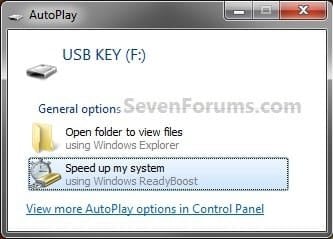
Step1.jpg
A) Go to step 4.
OR

3. If AutoPlay does not pop-up, then open the Start Menu and click on Computer. In Computer, right click on the USB flash drive or flash memory card, and click on Properties. (See screenshot below)
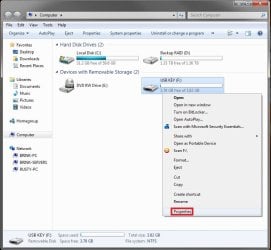
Step1B.jpg
4. To Turn On ReadyBoost

A) To use all of the flash drive or memory card free space for ReadyBoost
  • Select (dot) Dedicate this device to ReadyBoost. (See screenshot below)
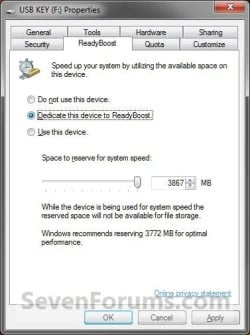
Step2.jpg

B) To specify how much free space on the flash drive or memory to use for ReadyBoost
  • Select (dot) Use this device. (See screenshot below)
  • Either slide the slider or enter the amount of free space you want to reserve to ReadyBoost.
    NOTE: See the note box at the top of the tutorial for details about how much free space to use.
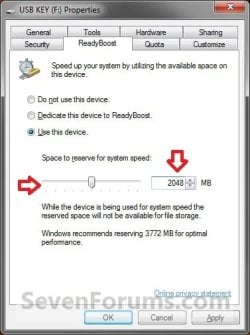
Step3.jpg

5. To Turn Off ReadyBoost
  • Select (dot) Do not use this device. (See screenshots above)
6. Click on OK.

7. You will see this for a brief moment while Windows 7 configures the ReadyBoost cache on your flash drive or memory card. (See screenshot below)
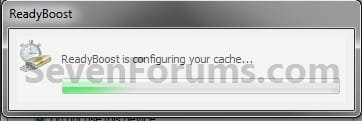
Step4.jpg
   Tip
To Temporarily Remove the ReadyBoost Device
NOTE: If you wanted to temporarily remove the USB flash drive or memory card that ReadyBoost is currently using, then this will show you how to safely remove it.
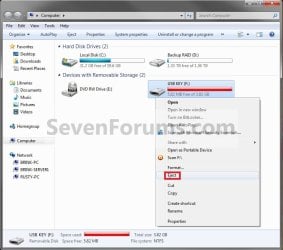
1. Open the Start Menu and click on Computer, then right click on the USB flash drive or flash memory card being used by ReadyBoost, and click on Eject. (See screenshots below)
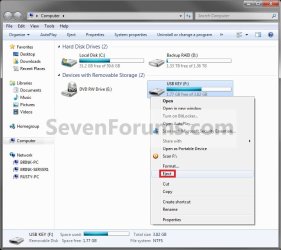
Eject1.jpgEject2.jpg
A) Click on Continue. (See screenshot below)
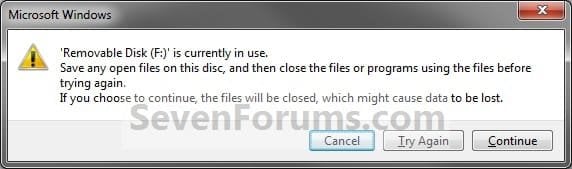
EjectB.jpg
B) Go to step 3.
OR

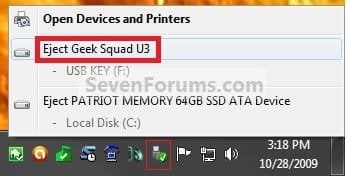
2. Click on the Safely Remove Hardware icon in the notification area on the right side of the taskbar, then click on the USB flash drive or flash memory card being used by ReadyBoost to eject it. (See screenshot below)
Eject3.jpg
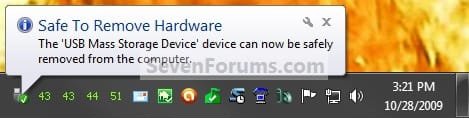
3. When you see this, it is now safe to remove the USB flash drive or flash memory card. (See screenshot below)
Eject3B.jpg
4. When ready, you can just plug the USB flash drive or flash memory card back in to have ReadyBoost automatically start using it again.

That's it,
Shawn


Last edited:
Ok, thank you. I'll try when I get home and report back. I'm having choppiness with a particular flash-like game. I think it will show if any performance is gained.

Obviously, it's not Ultimate (under join date) on my netbook. It's Home Premium. Ultimate is on my destop pc.
 

My Computer

OS
Windows 7 Ultimate 32bit
However, you may not notice any increase in performance if your computer meets or exceeds the minimum system requirements of 1 GB RAM for 32-bit Windows 7 OR 2 GB RAM for 64-bit Windows 7 installed.
I'm using Windows 7 on my netbook. It has 1 GB of RAM. Does that statement above mean I won't be able to get any performance increase from readyboost? Not a native speaker, so it confused me a bit.
It will completely depend on the amount of paging activity you have (e.g. when browsing the web RB cannot help) and on the speed of your USB stick. Test is with HD Tune. If the access time is around 1ms, then you can use it. If it is a lot slower, it may be counterproductive.
 

My Computer

Computer Manufacturer/Model Number
HP, Dell, Gateway, Toshiba - 4 laptops and 2 desktops
OS
Vista, Windows7, Mint Mate, Zorin, Windows 8
CPU
from 1.6GHz Duo to i7
Monitor(s) Displays
2x HP w2207
Hard Drives
5x HDD, 7x SSD, 12x Externals
Keyboard
with trackball - no mices
Mouse
Trackball mice
Internet Speed
DSL 6000
It didn't help with the game performance I was talking about (Monster Dash on Chrome browser). However, I noticed overall performance improvement as in unzipping files, moving files, starting applications etc. It felt faster responding than usual. I spared 2048 MB on my Toshiba 4 GB usb disc to use with Readyboost.

P.S. I tested usb disc with HD Tune. It gave 0.6 ms of access time.

I will test more today as well. I'm not sure why that game is so choppy. Maybe it requires a better CPU or better system overall.
 

My Computer

OS
Windows 7 Ultimate 32bit
I am sure your game needs a faster CPU and especially a better graphics. And 0.6ms is a very good access time.
 

My Computer

Computer Manufacturer/Model Number
HP, Dell, Gateway, Toshiba - 4 laptops and 2 desktops
OS
Vista, Windows7, Mint Mate, Zorin, Windows 8
CPU
from 1.6GHz Duo to i7
Monitor(s) Displays
2x HP w2207
Hard Drives
5x HDD, 7x SSD, 12x Externals
Keyboard
with trackball - no mices
Mouse
Trackball mice
Internet Speed
DSL 6000
Ah, yeah I forgot about the graphics. GMABooster may help. I think it's Intel GMA 950. CPU is Intel Atom N270 (1.6 Ghz). Thanks for the help you guys.

I cannot give you any rep. It says to give someone else before giving you again. I think last time you helped me again. Was a long time before though.
 

My Computer

OS
Windows 7 Ultimate 32bit
Eilhart,

I'm happy to hear that your performance has improved. Thank you for posting back with your results. :)
 

My Computer

Computer type
PC/Desktop
Computer Manufacturer/Model Number
Self built custom
OS
64-bit Windows 11 Pro for Workstations
CPU
Intel i7-8700K OC'd to 5 GHz
Motherboard
ASUS ROG Maximus XI Formula Z390
Memory
64 GB (4x16GB) G.SKILL TridentZ RGB DDR4 3600 MHz
Graphics Card(s)
ASUS ROG-STRIX-GTX1080TI-O11G-GAMING
Sound Card
Integrated
Monitor(s) Displays
2 x Samsung Odyssey G7 27"
Screen Resolution
2560x1440
Hard Drives
1TB Samsung 990 PRO M.2,
4TB Samsung 990 PRO PRO M.2,
TerraMaster F8 SSD Plus NAS
PSU
Seasonic Prime Titanium 850W
Case
Thermaltake Core P3
Cooling
Corsair Hydro H115i
Keyboard
Logitech wireless K800
Mouse
Logitech MX Master 4
Internet Speed
2 Gb/s Download and 100 Mb/s Upload
Antivirus
Malwarebyte Anti-Malware Premium
Browser
Google Chrome
Other Info
Logitech Z625 speaker system,
Logitech BRIO 4K Pro webcam,
HP Color LaserJet Pro MFP M477fdn,
APC SMART-UPS RT 1000 XL - SURT1000XLI,
Galaxy S23 Plus phone
hi im using ready boost and the memory wont seem to show up or be usable can u help me with this problem? thanks in advannce.

~Shine602~​
 

My Computer

OS
Windows 7 32-bit
Hello Shine, and welcome to Seven Forums.

Please post back with some screenshots of your USB key's "ReadyBoost" tab like under step 4, and of your Task Manager "Performance" tab before and after using ReadyBoost. :)
 

My Computer

Computer type
PC/Desktop
Computer Manufacturer/Model Number
Self built custom
OS
64-bit Windows 11 Pro for Workstations
CPU
Intel i7-8700K OC'd to 5 GHz
Motherboard
ASUS ROG Maximus XI Formula Z390
Memory
64 GB (4x16GB) G.SKILL TridentZ RGB DDR4 3600 MHz
Graphics Card(s)
ASUS ROG-STRIX-GTX1080TI-O11G-GAMING
Sound Card
Integrated
Monitor(s) Displays
2 x Samsung Odyssey G7 27"
Screen Resolution
2560x1440
Hard Drives
1TB Samsung 990 PRO M.2,
4TB Samsung 990 PRO PRO M.2,
TerraMaster F8 SSD Plus NAS
PSU
Seasonic Prime Titanium 850W
Case
Thermaltake Core P3
Cooling
Corsair Hydro H115i
Keyboard
Logitech wireless K800
Mouse
Logitech MX Master 4
Internet Speed
2 Gb/s Download and 100 Mb/s Upload
Antivirus
Malwarebyte Anti-Malware Premium
Browser
Google Chrome
Other Info
Logitech Z625 speaker system,
Logitech BRIO 4K Pro webcam,
HP Color LaserJet Pro MFP M477fdn,
APC SMART-UPS RT 1000 XL - SURT1000XLI,
Galaxy S23 Plus phone
hi im using ready boost and the memory wont seem to show up or be usable can u help me with this problem? thanks in advannce.


~Shine602~​
If you expect the ready boost storage to show up as RAM, then that is not so. The ready boost storage will only be used for an additional pagefile.
 

My Computer

Computer Manufacturer/Model Number
HP, Dell, Gateway, Toshiba - 4 laptops and 2 desktops
OS
Vista, Windows7, Mint Mate, Zorin, Windows 8
CPU
from 1.6GHz Duo to i7
Monitor(s) Displays
2x HP w2207
Hard Drives
5x HDD, 7x SSD, 12x Externals
Keyboard
with trackball - no mices
Mouse
Trackball mice
Internet Speed
DSL 6000
Need Ready Boost Soft.,

unable to download readybosst... could anyone please send me that software to this mail ADDRESS REMOVED :confused::confused::confused::confused:
 
Last edited by a moderator:

My Computer

OS
Windows 7 Home professional 64bit.
You don't need to download anything. ReadyBoost is a feature that is provided for by the Windows Memory Manager, and it comes into effect when you insert a USB memory stick that meets the requirements (available space and speed). See the main Tutorial for details.
 

My Computer

Computer type
PC/Desktop
Computer Manufacturer/Model Number
Dwarf Dwf/11/2012 r09/2013
OS
Windows 8.1 Pro RTM x64
CPU
Intel Core-i5-3570K 4-core @ 3.4GHz (Ivy Bridge) (OC 4.4GHz)
Motherboard
ASRock Z77 Extreme4-M
Memory
4 x 4GB DDR3-1600 Corsair Vengeance CMZ8GX3M2A1600C9B (16GB)
Graphics Card(s)
MSI GeForce GTX770 Gaming OC 2GB
Sound Card
Realtek High Definition on board solution (ALC 898)
Monitor(s) Displays
ViewSonic VA1912w Widescreen (VGA)
Screen Resolution
1440x900
Hard Drives
OCZ Agility 3 SSD 120GB SATA III x2 (RAID 0)
Samsung HD501LJ 500GB SATA II x2
Hitachi HDS721010CLA332 1TB SATA II
Iomega 1.5TB Ext USB 2.0
WD 2.0TB Ext USB 3.0
PSU
XFX Pro Series 850W Semi-Modular
Case
Gigabyte IF233
Cooling
1 x 120mm Front Inlet 1 x 120mm Rear Exhaust
Keyboard
Microsoft Comfort Curve Keyboard 3000 (USB)
Mouse
Microsoft Comfort Mouse 3000 for Business (USB)
Internet Speed
NetGear DG834Gv3 ADSL Modem/Router (Ethernet) ~4.0 Mb/s (O2)
Antivirus
Avast! 8.0.1497
Browser
IE 11
Other Info
Optical Drive: HL-DT-ST BD-RE BH10LS30 SATA Bluray
Lexmark S305 Printer/Scanner/Copier (USB)
WEI Score: 8.1/8.1/8.5/8.5/8.25
Asus Eee PC 1011PX Netbook (Windows 7 x86 Starter)
Hello Naiduklr, and welcome to Seven Forums. :)

:ditto:

ReadyBoost is already included in Windows 7, so there is nothing to download or install.

Are you not able to use ReadyBoost as described in the tutorial on the first page of this thread?

If not, please give more details about this.
 

My Computer

Computer type
PC/Desktop
Computer Manufacturer/Model Number
Self built custom
OS
64-bit Windows 11 Pro for Workstations
CPU
Intel i7-8700K OC'd to 5 GHz
Motherboard
ASUS ROG Maximus XI Formula Z390
Memory
64 GB (4x16GB) G.SKILL TridentZ RGB DDR4 3600 MHz
Graphics Card(s)
ASUS ROG-STRIX-GTX1080TI-O11G-GAMING
Sound Card
Integrated
Monitor(s) Displays
2 x Samsung Odyssey G7 27"
Screen Resolution
2560x1440
Hard Drives
1TB Samsung 990 PRO M.2,
4TB Samsung 990 PRO PRO M.2,
TerraMaster F8 SSD Plus NAS
PSU
Seasonic Prime Titanium 850W
Case
Thermaltake Core P3
Cooling
Corsair Hydro H115i
Keyboard
Logitech wireless K800
Mouse
Logitech MX Master 4
Internet Speed
2 Gb/s Download and 100 Mb/s Upload
Antivirus
Malwarebyte Anti-Malware Premium
Browser
Google Chrome
Other Info
Logitech Z625 speaker system,
Logitech BRIO 4K Pro webcam,
HP Color LaserJet Pro MFP M477fdn,
APC SMART-UPS RT 1000 XL - SURT1000XLI,
Galaxy S23 Plus phone
Hello to all what is the best way to set readyboost ..the option (A) To use all of the flash drive or memory card free space for ReadyBoost ? or (B) To specify how much free space on the flash drive or memory to use for ReadyBoost .. because im new with the readyboost I would like to know... thanks :D
 

My Computer

Computer type
PC/Desktop
Computer Manufacturer/Model Number
Albatron K8SLI-AM2
OS
Windows 7 professional 32bit.
CPU
AMD Athlon(tm) 64 X2 Dual Core Processor 4000+ x2 ~2100MHz
Motherboard
Albatron K8SLI-AM2
Memory
3072
Graphics Card(s)
ATI Radeon HD 2600 Pro
Sound Card
Realtek AC'97 Audio
Screen Resolution
1280x1024
Hard Drives
1 - WDC WD10EARS-00MVWB0 ATA Device(Western Digital)

2 - WDC WD10EZEX-08RKKA0 ATA Device(Western Digital)

3 - Seagate Desktop USB Device 931.51 GB

4 - WD 3200BMV External USB Device(Western Digital)
Antivirus
microsoft security essentials
Browser
Mozilla Firefox
Hello Jerry,

There's really no best option, but just what you would prefer to use based on your needs instead.

Hope this helps. :)
 

My Computer

Computer type
PC/Desktop
Computer Manufacturer/Model Number
Self built custom
OS
64-bit Windows 11 Pro for Workstations
CPU
Intel i7-8700K OC'd to 5 GHz
Motherboard
ASUS ROG Maximus XI Formula Z390
Memory
64 GB (4x16GB) G.SKILL TridentZ RGB DDR4 3600 MHz
Graphics Card(s)
ASUS ROG-STRIX-GTX1080TI-O11G-GAMING
Sound Card
Integrated
Monitor(s) Displays
2 x Samsung Odyssey G7 27"
Screen Resolution
2560x1440
Hard Drives
1TB Samsung 990 PRO M.2,
4TB Samsung 990 PRO PRO M.2,
TerraMaster F8 SSD Plus NAS
PSU
Seasonic Prime Titanium 850W
Case
Thermaltake Core P3
Cooling
Corsair Hydro H115i
Keyboard
Logitech wireless K800
Mouse
Logitech MX Master 4
Internet Speed
2 Gb/s Download and 100 Mb/s Upload
Antivirus
Malwarebyte Anti-Malware Premium
Browser
Google Chrome
Other Info
Logitech Z625 speaker system,
Logitech BRIO 4K Pro webcam,
HP Color LaserJet Pro MFP M477fdn,
APC SMART-UPS RT 1000 XL - SURT1000XLI,
Galaxy S23 Plus phone
Hello to all what is the best way to set readyboost ..the option (A) To use all of the flash drive or memory card free space for ReadyBoost ? or (B) To specify how much free space on the flash drive or memory to use for ReadyBoost .. because im new with the readyboost I would like to know... thanks :D
As Shawn says, there is no 'best' option. But if you assign 4GB, you should be OK.

You should know that the Ready Boost will only buy you something if you have a really fast stick - and even then you should not expect wonders. Test the speed of your stick - e.g. with HD Tune - and see whether the access time is within +/- 1ms. Anything much bigger will not yield any advantage because there is a certain overhead with Ready Boost for which you need some compensation.

Note: You have to let HD Tune run to the end in order to get the access time.
 

My Computer

Computer Manufacturer/Model Number
HP, Dell, Gateway, Toshiba - 4 laptops and 2 desktops
OS
Vista, Windows7, Mint Mate, Zorin, Windows 8
CPU
from 1.6GHz Duo to i7
Monitor(s) Displays
2x HP w2207
Hard Drives
5x HDD, 7x SSD, 12x Externals
Keyboard
with trackball - no mices
Mouse
Trackball mice
Internet Speed
DSL 6000
readyboost problem

i hav done all the steps u seen above for making ur ram increase with ur usb device....i did but now when i plugged in again my usb..then nither thr is any space available nor the ram prosess for the ready boost..so in this case..i just want to know tht how can i my usb take back in original position ..

my usb is of scandisk 8 gb..and i did readyboost with 7.5gb for ram process..not nothing is done wheni tried many times..for getting back the size or readyboost..so please help me how could i solve this problem..as soon as possible..reaply plz.
 

My Computer

Computer type
PC/Desktop
Computer Manufacturer/Model Number
lenovo
OS
window 7 ultimate 32 bit OS
Motherboard
intel
Memory
2 gb
Hard Drives
32o gb
Antivirus
avira
Browser
mozilla
Hello tpsingh, and welcome to Seven Forums.

While you have the USB drive connected, were you able to use step 5 in the tutorial?

If not, then please post some screenshots showing what you are seeing instead of what's in the tutorial. :)
 

My Computer

Computer type
PC/Desktop
Computer Manufacturer/Model Number
Self built custom
OS
64-bit Windows 11 Pro for Workstations
CPU
Intel i7-8700K OC'd to 5 GHz
Motherboard
ASUS ROG Maximus XI Formula Z390
Memory
64 GB (4x16GB) G.SKILL TridentZ RGB DDR4 3600 MHz
Graphics Card(s)
ASUS ROG-STRIX-GTX1080TI-O11G-GAMING
Sound Card
Integrated
Monitor(s) Displays
2 x Samsung Odyssey G7 27"
Screen Resolution
2560x1440
Hard Drives
1TB Samsung 990 PRO M.2,
4TB Samsung 990 PRO PRO M.2,
TerraMaster F8 SSD Plus NAS
PSU
Seasonic Prime Titanium 850W
Case
Thermaltake Core P3
Cooling
Corsair Hydro H115i
Keyboard
Logitech wireless K800
Mouse
Logitech MX Master 4
Internet Speed
2 Gb/s Download and 100 Mb/s Upload
Antivirus
Malwarebyte Anti-Malware Premium
Browser
Google Chrome
Other Info
Logitech Z625 speaker system,
Logitech BRIO 4K Pro webcam,
HP Color LaserJet Pro MFP M477fdn,
APC SMART-UPS RT 1000 XL - SURT1000XLI,
Galaxy S23 Plus phone
Good Information

Good information.
 

My Computer

Computer type
Laptop
Computer Manufacturer/Model Number
HP G6
OS
Windows 7 Ultimate.
Antivirus
Norton Security
Browser
IE 11/Chrome/Msn Explorer/Firefox
Readyboost Myths

I have an SSD so my Readyboost option is disabled. I would like to enable it anyway. Can someone help me with that?
That is not possible and would not buy you anything (apart from additional overhead). The reason is simple, the SSD is minimum 10 times faster in access time than any stick.

When Readyboost is used it offloads some of the already processed memory to another bus so the processor has faster access to it without having to use the allready data channel of the HDD and its Cash memory.

I have a laptop that has a ExpressCard slot that i just use for Readyboost (Bcache in Linux) that I run 2 VMs at a time with no problem. as a matter of fact the expresscard bus is faster then the native SATA2 bus for my HDD0 =/
 

My Computer

Computer type
Laptop
Computer Manufacturer/Model Number
IBM Lenovo
OS
Linux Mint 64 (boot), Windows 7 Professional 64 (Vm)
CPU
Intel Core 2 Duo mobile processor P8800 (2.66 GHz) 1066 MHz
Motherboard
IBM
Memory
8 gigs Dual Channel DDR4 10600 (2 4 gig Modules)
Graphics Card(s)
Intel Integrated Graphics 4500MHD
Hard Drives
1.WD BLACK SERIES WD7500BPKX 750GB 7200 RPM 16MB Cache SATA 6.0Gb/s (storage) 2.Intel DC S3700 Series Taylorsville SSDSC2BA200G301 2.5" 200GB SATA III MLC Internal Solid State Drive (SSD) (Boot) 3. Delkin 32GB ExpressCard 34 Pro Solid State Drive (re
Antivirus
L0L its linux, i dont need one
Browser
Chrome 64
I commented on the RB usage with a SSD - you comment on a HDD. Two completely different scenarios.
 

My Computer

Computer Manufacturer/Model Number
HP, Dell, Gateway, Toshiba - 4 laptops and 2 desktops
OS
Vista, Windows7, Mint Mate, Zorin, Windows 8
CPU
from 1.6GHz Duo to i7
Monitor(s) Displays
2x HP w2207
Hard Drives
5x HDD, 7x SSD, 12x Externals
Keyboard
with trackball - no mices
Mouse
Trackball mice
Internet Speed
DSL 6000
Back
Top