ReadyBoost - Setup and Use

How to Setup and Use ReadyBoost in Windows 7


   Information
Windows 7 supports Windows ReadyBoost. This feature uses external USB flash drives as a hard disk cache to improve disk read performance. Supported external storage types include USB thumb drives, SD cards, and CF cards. Since ReadyBoost will not provide a perfor¬mance gain when the primary disk is an SSD, Windows 7 disables ReadyBoost when reading from an SSD drive.

This will show you how to setup and use ReadyBoost in Windows 7 with USB flash drives and flash memory cards to help speed up your computer.

However, you most likely will not notice any increase in performance if your computer meets or exceeds the minimum system requirements of 1 GB RAM (4 GB recommended) for 32-bit Windows 7 OR 2 GB RAM (8 GB recommended) for 64-bit Windows 7 installed.

   Note
External storage must meet the following requirements:
  • Capacity of at least 256 MB, with at least 64 kilobytes (KB) of free space.The 4-GB limit of Windows Vista has been removed. For ReadyBoost to effectively speed up your computer, the flash drive or memory card should have at least 1 GB of free available space.
  • At least a 2.5 MB/sec throughput for 4-KB random reads
  • At least a 1.75 MB/sec throughput for 1-MB random writes
  • You can enable or disable ReadyBoost for a specific flash drive or other removable storage device (ex: memory card).
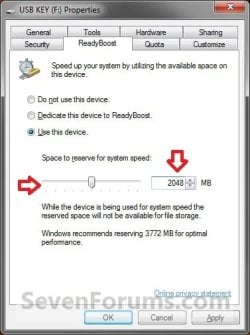
  • Windows 7 shows you how much space it recommends that you allow it to reserve and use on the flash drive or memory card for optimal performance at the bottom of the properties window. (See screenshot below step 4B below)
  • If your flash drive or card doesn't have enough available space for ReadyBoost, you'll see a message telling you to free some space on it.
  • For best results, use a flash drive or flash memory card with at least double the amount of available space as the amount of memory (RAM) in your computer.
  • There's a limit of 8 flash devices (EX: USB flash drive or memory card) that could be used at once for ReadyBoost with a max of 32GB of ReadyBoost space per device for a max total of 256GB per machine.
  • Should you have the USB flash drive formarted as FAT32 or NTFS:
    • The FAT32 file system has size limitations. While you cannot have a FAT32 partition greater than 32 GB (32728 MB), you also cannot save/store a file larger than 4 GB on a FAT32 partition. This limits you to only being able to use up to 4 GB for ReadyBoost on a USB flash drive formatted with FAT32.
    • To be able to use more than 4 GB for ReadyBoost on the USB flash drive, you would need to have the USB flash drive formated with NTFS instead.
For more information about ReadyBoost in Windows 7, see:
   Warning

  • If your Windows 7 is installed on a solid-state drive (SSD), you may not see an option to speed up your computer with ReadyBoost when you plug in a USB flash drive or flash memory card. This is because SSD drives are faster and they're very unlikely to benefit from using ReadyBoost.
  • In some situations, you might not be able to use all of the memory on your device to speed up your computer. For example, some flash memory devices contain both slow and fast flash memory, but ReadyBoost can only use fast flash memory to speed up your computer.
  • ReadyBoost cannot beat the performance gain by just adding more RAM in your computer instead.
  • ReadyBoost uses the Superfetch service that needs to be enabled and set to be "Started" and "Automatic".


Here's How:
1. Plug a USB flash drive or flash memory card that you want to use ReadyBoost with into your computer.

2. If AutoPlay pops-up, click on Speed up my system. (See screenshot below)
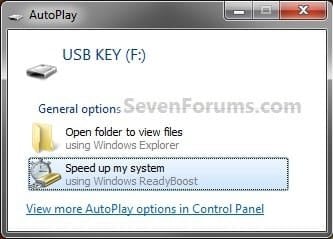
Step1.jpg
A) Go to step 4.
OR

3. If AutoPlay does not pop-up, then open the Start Menu and click on Computer. In Computer, right click on the USB flash drive or flash memory card, and click on Properties. (See screenshot below)
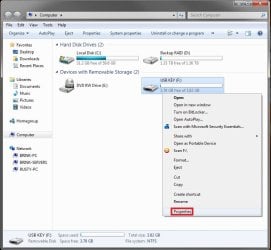
Step1B.jpg
4. To Turn On ReadyBoost

A) To use all of the flash drive or memory card free space for ReadyBoost
  • Select (dot) Dedicate this device to ReadyBoost. (See screenshot below)
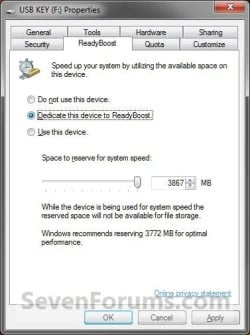
Step2.jpg

B) To specify how much free space on the flash drive or memory to use for ReadyBoost
  • Select (dot) Use this device. (See screenshot below)
  • Either slide the slider or enter the amount of free space you want to reserve to ReadyBoost.
    NOTE: See the note box at the top of the tutorial for details about how much free space to use.
Step3.jpg

5. To Turn Off ReadyBoost
  • Select (dot) Do not use this device. (See screenshots above)
6. Click on OK.

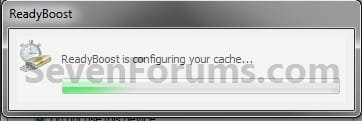
7. You will see this for a brief moment while Windows 7 configures the ReadyBoost cache on your flash drive or memory card. (See screenshot below)
Step4.jpg
   Tip
To Temporarily Remove the ReadyBoost Device
NOTE: If you wanted to temporarily remove the USB flash drive or memory card that ReadyBoost is currently using, then this will show you how to safely remove it.
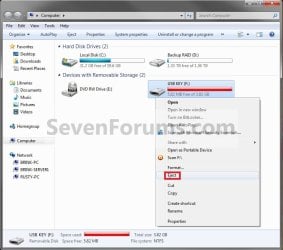
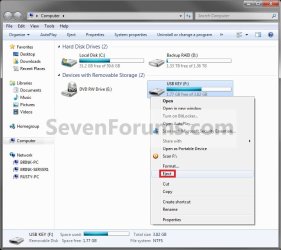
1. Open the Start Menu and click on Computer, then right click on the USB flash drive or flash memory card being used by ReadyBoost, and click on Eject. (See screenshots below)
Eject1.jpgEject2.jpg
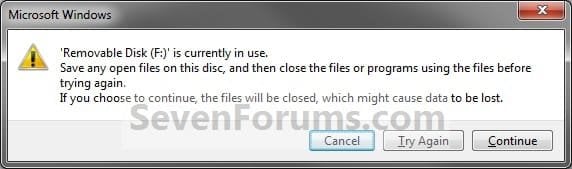
A) Click on Continue. (See screenshot below)
EjectB.jpg
B) Go to step 3.
OR

2. Click on the Safely Remove Hardware icon in the notification area on the right side of the taskbar, then click on the USB flash drive or flash memory card being used by ReadyBoost to eject it. (See screenshot below)
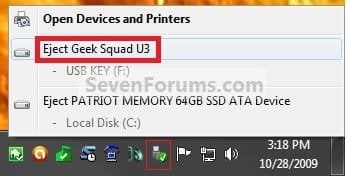
Eject3.jpg
3. When you see this, it is now safe to remove the USB flash drive or flash memory card. (See screenshot below)
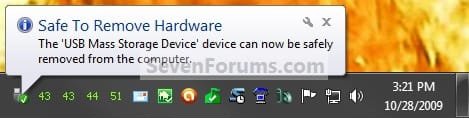
Eject3B.jpg
4. When ready, you can just plug the USB flash drive or flash memory card back in to have ReadyBoost automatically start using it again.

That's it,
Shawn


Last edited:
Thanks for the tutorial.

How can I see by how much my memory is boosted? The LED on my flash drive is blinking, so I figure ReadBoost is properly enabled, but in Control Panel->System, I see only my laptop's internal memory.
 

My Computer

Computer Manufacturer/Model Number
Dell Dimension 3100, iMac G3, Custom built
OS
7 Ultimate, Debian Squeeze, #! Statler
CPU
AMD 4450e 2.4GHz, Intel P4 3.0GHz, PowerPC 400MHz
Not sure if this is where i should post...

Hi, im new here at win7forums, i am currently using readyboost on 2 1GB flash drives plugged into the front of my pc. however whenever i start my computer, i cant get past POST while there plugged in. i belive this is a BIOS issue, most likely my board is trying to boot from the drives... i dont have the model for my board so i cant update my bios... is this the issue? is there some way to disable them till i log on?
 

My Computer

Computer Manufacturer/Model Number
Sony VAIO/ PCV-RS720G
OS
Windows 7 Ultimate
CPU
Pentium 4 Single Core 3.0 GHz w/Hyperthreading
Motherboard
Asus ????
Memory
1GB DDR PC-3200
Graphics Card(s)
NVIDIA GeForce 9400 GT 1GB 128-bit DDR2 PCI Express 2.0 x16
Sound Card
Onboard Sound
Monitor(s) Displays
VIZIO HDTV 32"
Hard Drives
200GB Hard Drive...
PSU
????
Case
Standard, Factory Case/ Came with PC
Cooling
Stock Fans.
Other Info
http://www.docs.sony.com/release/specs/PCVRS720G_mksp.pdf
Hello CR4CK2RWOLF, and welcome to Seven Forums.

You might boot into you BIOS (should see what key to press to enter BIOS at boot briefly) and double check the setting to make sure that you do not have a "USB device" option listed in the boot order.

Does this happen if you only have one of them connected?
 

My Computer

Computer type
PC/Desktop
Computer Manufacturer/Model Number
Self built custom
OS
64-bit Windows 11 Pro for Workstations
CPU
Intel i7-8700K OC'd to 5 GHz
Motherboard
ASUS ROG Maximus XI Formula Z390
Memory
64 GB (4x16GB) G.SKILL TridentZ RGB DDR4 3600 MHz
Graphics Card(s)
ASUS ROG-STRIX-GTX1080TI-O11G-GAMING
Sound Card
Integrated
Monitor(s) Displays
2 x Samsung Odyssey G7 27"
Screen Resolution
2560x1440
Hard Drives
1TB Samsung 990 PRO M.2,
4TB Samsung 990 PRO PRO M.2,
TerraMaster F8 SSD Plus NAS
PSU
Seasonic Prime Titanium 850W
Case
Thermaltake Core P3
Cooling
Corsair Hydro H115i
Keyboard
Logitech wireless K800
Mouse
Logitech MX Master 4
Internet Speed
2 Gb/s Download and 100 Mb/s Upload
Antivirus
Malwarebyte Anti-Malware Premium
Browser
Google Chrome
Other Info
Logitech Z625 speaker system,
Logitech BRIO 4K Pro webcam,
HP Color LaserJet Pro MFP M477fdn,
APC SMART-UPS RT 1000 XL - SURT1000XLI,
Galaxy S23 Plus phone
Hello CR4CK2RWOLF, and welcome to Seven Forums.

You might boot into you BIOS (should see what key to press to enter BIOS at boot briefly) and double check the setting to make sure that you do not have a "USB device" option listed in the boot order.

Does this happen if you only have one of them connected?


Last time i checked.. i had the boot order set to HDD.. you could be right though. i tried to get my 4GB to boot DSL (D*mn small linux), i might have left the boot order that way, ill give it a try. Thanks for the relpy!
 

My Computer

Computer Manufacturer/Model Number
Sony VAIO/ PCV-RS720G
OS
Windows 7 Ultimate
CPU
Pentium 4 Single Core 3.0 GHz w/Hyperthreading
Motherboard
Asus ????
Memory
1GB DDR PC-3200
Graphics Card(s)
NVIDIA GeForce 9400 GT 1GB 128-bit DDR2 PCI Express 2.0 x16
Sound Card
Onboard Sound
Monitor(s) Displays
VIZIO HDTV 32"
Hard Drives
200GB Hard Drive...
PSU
????
Case
Standard, Factory Case/ Came with PC
Cooling
Stock Fans.
Other Info
http://www.docs.sony.com/release/specs/PCVRS720G_mksp.pdf
Is there a way on 7 to make the readyboost your primary (possibly only) cache?
 

My Computer

Computer Manufacturer/Model Number
HP DV2-1030
OS
Vista/7
CPU
AMD Athlon Neo 64
Memory
4 gig
Graphics Card(s)
ATI Radeon premium 3000
Monitor(s) Displays
LED
Hard Drives
320 gig
Is there a way on 7 to make the readyboost your primary (possibly only) cache?

You could have like, 256 mB of internal RAM, or some small amount, so that ReadyBoost is used all the time. I don't know if your computer would be able to boot with any internal RAM.

Also, why do you want to do this?
 

My Computer

Computer Manufacturer/Model Number
Dell Dimension 3100, iMac G3, Custom built
OS
7 Ultimate, Debian Squeeze, #! Statler
CPU
AMD 4450e 2.4GHz, Intel P4 3.0GHz, PowerPC 400MHz
Hello CR4CK2RWOLF, and welcome to Seven Forums.

You might boot into you BIOS (should see what key to press to enter BIOS at boot briefly) and double check the setting to make sure that you do not have a "USB device" option listed in the boot order.

Does this happen if you only have one of them connected?


Last time i checked.. i had the boot order set to HDD.. you could be right though. i tried to get my 4GB to boot DSL (D*mn small linux), i might have left the boot order that way, ill give it a try. Thanks for the relpy!

You're welcome. :)
 

My Computer

Computer type
PC/Desktop
Computer Manufacturer/Model Number
Self built custom
OS
64-bit Windows 11 Pro for Workstations
CPU
Intel i7-8700K OC'd to 5 GHz
Motherboard
ASUS ROG Maximus XI Formula Z390
Memory
64 GB (4x16GB) G.SKILL TridentZ RGB DDR4 3600 MHz
Graphics Card(s)
ASUS ROG-STRIX-GTX1080TI-O11G-GAMING
Sound Card
Integrated
Monitor(s) Displays
2 x Samsung Odyssey G7 27"
Screen Resolution
2560x1440
Hard Drives
1TB Samsung 990 PRO M.2,
4TB Samsung 990 PRO PRO M.2,
TerraMaster F8 SSD Plus NAS
PSU
Seasonic Prime Titanium 850W
Case
Thermaltake Core P3
Cooling
Corsair Hydro H115i
Keyboard
Logitech wireless K800
Mouse
Logitech MX Master 4
Internet Speed
2 Gb/s Download and 100 Mb/s Upload
Antivirus
Malwarebyte Anti-Malware Premium
Browser
Google Chrome
Other Info
Logitech Z625 speaker system,
Logitech BRIO 4K Pro webcam,
HP Color LaserJet Pro MFP M477fdn,
APC SMART-UPS RT 1000 XL - SURT1000XLI,
Galaxy S23 Plus phone
Is there a way on 7 to make the readyboost your primary (possibly only) cache?

Hello 24x24,

Since you will have to have RAM installed in your computer for it to run, then no. If you have very little RAM, say 512MB, then it would use ReadyBoost a lot more. However, using ReadyBoost instead of having more RAM would decrease your computer's performance. RAM is always faster.

Hope this helps,
Shawn
 

My Computer

Computer type
PC/Desktop
Computer Manufacturer/Model Number
Self built custom
OS
64-bit Windows 11 Pro for Workstations
CPU
Intel i7-8700K OC'd to 5 GHz
Motherboard
ASUS ROG Maximus XI Formula Z390
Memory
64 GB (4x16GB) G.SKILL TridentZ RGB DDR4 3600 MHz
Graphics Card(s)
ASUS ROG-STRIX-GTX1080TI-O11G-GAMING
Sound Card
Integrated
Monitor(s) Displays
2 x Samsung Odyssey G7 27"
Screen Resolution
2560x1440
Hard Drives
1TB Samsung 990 PRO M.2,
4TB Samsung 990 PRO PRO M.2,
TerraMaster F8 SSD Plus NAS
PSU
Seasonic Prime Titanium 850W
Case
Thermaltake Core P3
Cooling
Corsair Hydro H115i
Keyboard
Logitech wireless K800
Mouse
Logitech MX Master 4
Internet Speed
2 Gb/s Download and 100 Mb/s Upload
Antivirus
Malwarebyte Anti-Malware Premium
Browser
Google Chrome
Other Info
Logitech Z625 speaker system,
Logitech BRIO 4K Pro webcam,
HP Color LaserJet Pro MFP M477fdn,
APC SMART-UPS RT 1000 XL - SURT1000XLI,
Galaxy S23 Plus phone
Brink since you seem to understand readyboost better then I, is there an amount of RAM say 4GB that after you reach that amount readyboost no longer helps?
 

My Computer

Computer Manufacturer/Model Number
Alienware M17x R3
OS
Windows 7 Ultimate x64
CPU
Intel Core i7 2670QM 2.2GHz 3.3GHz Turbo Mode
Memory
12GB Dual Channel DDR3 at 1333MHz
Graphics Card(s)
2GB GDDR5 AMD Radeon 6990M
Sound Card
Audio Powered by Klipsch
Monitor(s) Displays
17.3-inch WideFHD 1920 x 1080 60Hz WLED
Screen Resolution
1920x1080
Hard Drives
120GB SSD slot 1
1TB HDD slot 2
Case
alienware laptop case
Cooling
Dual heatsink and fans
Keyboard
Alienware multi color keyboard
Mouse
logitech G300 gaming mouse
Other Info
Intel® Centrino Advanced-N 6230 2x2 agn+ Bluetooth

finally got it!!!
The ReadyBoostMonitor is not working for me (Win7 Ultimate x64)... Gives me an Error:
Can't initialize Counters!
Check if ReadyBoost is active!
Vista OS required!
I also tried to start it in Vista-Combatibility...
 

My Computer

Computer Manufacturer/Model Number
Acer Aspire 8930
OS
Windows 7 Ultimate 64Bit, Arch Linux 64Bit
CPU
Mobile DualCore Intel Core 2 Duo P8400, 2266 MHz (8.5 x 267)
Motherboard
Acer Aspire 8930
Memory
2x 2GB DDR3-1066 DDR3 SDRAM
Graphics Card(s)
NVIDIA GeForce 9600M GT (Prerelease - WDDM 1.1) (1024 MB)
Sound Card
Realtek ALC889 @ Intel 82801IB ICH9 - High Definition Audio
Monitor(s) Displays
18.4" Laptop Monitor, Samsung SyncMaster 901b
Screen Resolution
1680x945, 1280x1024
Hard Drives
2x ST9500325AS (500 GB, 5400 RPM, SATA-II)
PSU
70W
Case
Laptop
Cooling
Fan
Keyboard
Microsoft Wireless Laser Keyboard 6000 v2.0
Mouse
Microsoft Wireless Laser Mouse 6000
Internet Speed
16000kbit/s
Brink since you seem to understand readyboost better then I, is there an amount of RAM say 4GB that after you reach that amount readyboost no longer helps?

It really depends on how much you have running, but I'm sure that Windows will make some use out of ReadyBoost if used. I would suspect that your average user with 4GB of RAM installed will not see much if any gain from ReadyBoost though. Everyone's milage will vary of course.
 

My Computer

Computer type
PC/Desktop
Computer Manufacturer/Model Number
Self built custom
OS
64-bit Windows 11 Pro for Workstations
CPU
Intel i7-8700K OC'd to 5 GHz
Motherboard
ASUS ROG Maximus XI Formula Z390
Memory
64 GB (4x16GB) G.SKILL TridentZ RGB DDR4 3600 MHz
Graphics Card(s)
ASUS ROG-STRIX-GTX1080TI-O11G-GAMING
Sound Card
Integrated
Monitor(s) Displays
2 x Samsung Odyssey G7 27"
Screen Resolution
2560x1440
Hard Drives
1TB Samsung 990 PRO M.2,
4TB Samsung 990 PRO PRO M.2,
TerraMaster F8 SSD Plus NAS
PSU
Seasonic Prime Titanium 850W
Case
Thermaltake Core P3
Cooling
Corsair Hydro H115i
Keyboard
Logitech wireless K800
Mouse
Logitech MX Master 4
Internet Speed
2 Gb/s Download and 100 Mb/s Upload
Antivirus
Malwarebyte Anti-Malware Premium
Browser
Google Chrome
Other Info
Logitech Z625 speaker system,
Logitech BRIO 4K Pro webcam,
HP Color LaserJet Pro MFP M477fdn,
APC SMART-UPS RT 1000 XL - SURT1000XLI,
Galaxy S23 Plus phone
The ReadyBoostMonitor is not working for me (Win7 Ultimate x64)... Gives me an Error:
Can't initialize Counters!
Check if ReadyBoost is active!
Vista OS required!
I also tried to start it in Vista-Combatibility...

Hello Bluemond,

Sorry, it was recommended to me for this, but after further testing it will just not run in Windows 7, only Vista. :(
 

My Computer

Computer type
PC/Desktop
Computer Manufacturer/Model Number
Self built custom
OS
64-bit Windows 11 Pro for Workstations
CPU
Intel i7-8700K OC'd to 5 GHz
Motherboard
ASUS ROG Maximus XI Formula Z390
Memory
64 GB (4x16GB) G.SKILL TridentZ RGB DDR4 3600 MHz
Graphics Card(s)
ASUS ROG-STRIX-GTX1080TI-O11G-GAMING
Sound Card
Integrated
Monitor(s) Displays
2 x Samsung Odyssey G7 27"
Screen Resolution
2560x1440
Hard Drives
1TB Samsung 990 PRO M.2,
4TB Samsung 990 PRO PRO M.2,
TerraMaster F8 SSD Plus NAS
PSU
Seasonic Prime Titanium 850W
Case
Thermaltake Core P3
Cooling
Corsair Hydro H115i
Keyboard
Logitech wireless K800
Mouse
Logitech MX Master 4
Internet Speed
2 Gb/s Download and 100 Mb/s Upload
Antivirus
Malwarebyte Anti-Malware Premium
Browser
Google Chrome
Other Info
Logitech Z625 speaker system,
Logitech BRIO 4K Pro webcam,
HP Color LaserJet Pro MFP M477fdn,
APC SMART-UPS RT 1000 XL - SURT1000XLI,
Galaxy S23 Plus phone
Thanks, trying to find ways to keep the HDD from being used during online gaming with my laptop. I have 4GB's and a few 2GB SD cards and thought about using them to keep the disk thrash down which will also keep the HDD temp down.
 

My Computer

Computer Manufacturer/Model Number
Alienware M17x R3
OS
Windows 7 Ultimate x64
CPU
Intel Core i7 2670QM 2.2GHz 3.3GHz Turbo Mode
Memory
12GB Dual Channel DDR3 at 1333MHz
Graphics Card(s)
2GB GDDR5 AMD Radeon 6990M
Sound Card
Audio Powered by Klipsch
Monitor(s) Displays
17.3-inch WideFHD 1920 x 1080 60Hz WLED
Screen Resolution
1920x1080
Hard Drives
120GB SSD slot 1
1TB HDD slot 2
Case
alienware laptop case
Cooling
Dual heatsink and fans
Keyboard
Alienware multi color keyboard
Mouse
logitech G300 gaming mouse
Other Info
Intel® Centrino Advanced-N 6230 2x2 agn+ Bluetooth

finally got it!!!
Macgyver,

It may help reduce disc usage some, so it'll be worth a try to see if it may.
 

My Computer

Computer type
PC/Desktop
Computer Manufacturer/Model Number
Self built custom
OS
64-bit Windows 11 Pro for Workstations
CPU
Intel i7-8700K OC'd to 5 GHz
Motherboard
ASUS ROG Maximus XI Formula Z390
Memory
64 GB (4x16GB) G.SKILL TridentZ RGB DDR4 3600 MHz
Graphics Card(s)
ASUS ROG-STRIX-GTX1080TI-O11G-GAMING
Sound Card
Integrated
Monitor(s) Displays
2 x Samsung Odyssey G7 27"
Screen Resolution
2560x1440
Hard Drives
1TB Samsung 990 PRO M.2,
4TB Samsung 990 PRO PRO M.2,
TerraMaster F8 SSD Plus NAS
PSU
Seasonic Prime Titanium 850W
Case
Thermaltake Core P3
Cooling
Corsair Hydro H115i
Keyboard
Logitech wireless K800
Mouse
Logitech MX Master 4
Internet Speed
2 Gb/s Download and 100 Mb/s Upload
Antivirus
Malwarebyte Anti-Malware Premium
Browser
Google Chrome
Other Info
Logitech Z625 speaker system,
Logitech BRIO 4K Pro webcam,
HP Color LaserJet Pro MFP M477fdn,
APC SMART-UPS RT 1000 XL - SURT1000XLI,
Galaxy S23 Plus phone
ReadyBoost will use 8GB in W7!

Hey folks. I didn't see anyone talking about it, but ya know W7 now supports an 8GB RB drive. I am using superfast 8GB sticks on my desktops and an 8GB SDHC in my notebook's multi-drive permanently.

The trick is, they have to be formatted in exFAT to be used. If you use the little popup "Speed up my computer" wizard, you can't do it immediately or on the fly.\

First you have to say no to the prompt, then go to disk management and format the sucker in exFAT.

exFAT is pretty new, so not a lot about it out there, but essentially it is like FAT on steroids, but not NTFS.

Anyway, once formatted, pop it out and back in and take the wizard and enjoy your newfound resources.!:D

(I have a 4GB desktop and a notebook with 8GB RB and an 8GB desktop with 8GB RB. You can definitely feel the difference.)
 

My Computer

OS
Windows 7
I've used a Flash drive to make it so that it is dedicated to ReadyBoost but how do I use it and what exactly is its use for..?

I have 8 GB of RAM installed on my PC but am not 100% sure why I would want to use it. Any info or help would be greatly appreciated.

Thanks
 
Last edited:

My Computer

Computer Manufacturer/Model Number
HP Pavilion Case
OS
Windows 7 Pro x64
CPU
AMD Athlon 64 x2 Dual Core Processor 5000+ 2.60 GHz
Motherboard
Pegatron - Violet 3.02
Memory
8 Gig
Graphics Card(s)
GeForce GT 240
Sound Card
Realtek HD
Monitor(s) Displays
26 Inch and 19 Inch Dual Monitor
Screen Resolution
1920 X 1200 -- 1440 X 900
Hard Drives
Internal 500 GB Sata Drive and 1TB Hatachi External HD & 1TB Western Digital Network Drive
PSU
550 Watts
Case
HP Pavilion
Cooling
4" and 5" Fans
Keyboard
Logitech Solar K750
Mouse
Microsoft Wireless 3500
Internet Speed
50 Meg Fibre Optic Cable Broadband
Other Info
Samsung DP-U350 - 23" Touch Screen PC
Hello Wrams,

With 8 GB of RAM, you would probably not notice any difference in performance using ReadyBoost. ReadyBoost is basically a cheaper alternative than adding more RAM, and to help reduce reading and writing to the page file on the hard drive. It's slower than using RAM, but could be faster than the hard drive if you are low on RAM as well in some situations.

Hope this helps,
Shawn
 

My Computer

Computer type
PC/Desktop
Computer Manufacturer/Model Number
Self built custom
OS
64-bit Windows 11 Pro for Workstations
CPU
Intel i7-8700K OC'd to 5 GHz
Motherboard
ASUS ROG Maximus XI Formula Z390
Memory
64 GB (4x16GB) G.SKILL TridentZ RGB DDR4 3600 MHz
Graphics Card(s)
ASUS ROG-STRIX-GTX1080TI-O11G-GAMING
Sound Card
Integrated
Monitor(s) Displays
2 x Samsung Odyssey G7 27"
Screen Resolution
2560x1440
Hard Drives
1TB Samsung 990 PRO M.2,
4TB Samsung 990 PRO PRO M.2,
TerraMaster F8 SSD Plus NAS
PSU
Seasonic Prime Titanium 850W
Case
Thermaltake Core P3
Cooling
Corsair Hydro H115i
Keyboard
Logitech wireless K800
Mouse
Logitech MX Master 4
Internet Speed
2 Gb/s Download and 100 Mb/s Upload
Antivirus
Malwarebyte Anti-Malware Premium
Browser
Google Chrome
Other Info
Logitech Z625 speaker system,
Logitech BRIO 4K Pro webcam,
HP Color LaserJet Pro MFP M477fdn,
APC SMART-UPS RT 1000 XL - SURT1000XLI,
Galaxy S23 Plus phone
Thanks Shawn for your help. Atleast I don't have to use it now. I can undo the changes to the flash drive now and use it for other things...;)
 

My Computer

Computer Manufacturer/Model Number
HP Pavilion Case
OS
Windows 7 Pro x64
CPU
AMD Athlon 64 x2 Dual Core Processor 5000+ 2.60 GHz
Motherboard
Pegatron - Violet 3.02
Memory
8 Gig
Graphics Card(s)
GeForce GT 240
Sound Card
Realtek HD
Monitor(s) Displays
26 Inch and 19 Inch Dual Monitor
Screen Resolution
1920 X 1200 -- 1440 X 900
Hard Drives
Internal 500 GB Sata Drive and 1TB Hatachi External HD & 1TB Western Digital Network Drive
PSU
550 Watts
Case
HP Pavilion
Cooling
4" and 5" Fans
Keyboard
Logitech Solar K750
Mouse
Microsoft Wireless 3500
Internet Speed
50 Meg Fibre Optic Cable Broadband
Other Info
Samsung DP-U350 - 23" Touch Screen PC
You're welcome Wrams. :)
 

My Computer

Computer type
PC/Desktop
Computer Manufacturer/Model Number
Self built custom
OS
64-bit Windows 11 Pro for Workstations
CPU
Intel i7-8700K OC'd to 5 GHz
Motherboard
ASUS ROG Maximus XI Formula Z390
Memory
64 GB (4x16GB) G.SKILL TridentZ RGB DDR4 3600 MHz
Graphics Card(s)
ASUS ROG-STRIX-GTX1080TI-O11G-GAMING
Sound Card
Integrated
Monitor(s) Displays
2 x Samsung Odyssey G7 27"
Screen Resolution
2560x1440
Hard Drives
1TB Samsung 990 PRO M.2,
4TB Samsung 990 PRO PRO M.2,
TerraMaster F8 SSD Plus NAS
PSU
Seasonic Prime Titanium 850W
Case
Thermaltake Core P3
Cooling
Corsair Hydro H115i
Keyboard
Logitech wireless K800
Mouse
Logitech MX Master 4
Internet Speed
2 Gb/s Download and 100 Mb/s Upload
Antivirus
Malwarebyte Anti-Malware Premium
Browser
Google Chrome
Other Info
Logitech Z625 speaker system,
Logitech BRIO 4K Pro webcam,
HP Color LaserJet Pro MFP M477fdn,
APC SMART-UPS RT 1000 XL - SURT1000XLI,
Galaxy S23 Plus phone
Back
Top