ReadyBoost - Setup and Use

How to Setup and Use ReadyBoost in Windows 7


   Information
Windows 7 supports Windows ReadyBoost. This feature uses external USB flash drives as a hard disk cache to improve disk read performance. Supported external storage types include USB thumb drives, SD cards, and CF cards. Since ReadyBoost will not provide a perfor¬mance gain when the primary disk is an SSD, Windows 7 disables ReadyBoost when reading from an SSD drive.

This will show you how to setup and use ReadyBoost in Windows 7 with USB flash drives and flash memory cards to help speed up your computer.

However, you most likely will not notice any increase in performance if your computer meets or exceeds the minimum system requirements of 1 GB RAM (4 GB recommended) for 32-bit Windows 7 OR 2 GB RAM (8 GB recommended) for 64-bit Windows 7 installed.

   Note
External storage must meet the following requirements:
  • Capacity of at least 256 MB, with at least 64 kilobytes (KB) of free space.The 4-GB limit of Windows Vista has been removed. For ReadyBoost to effectively speed up your computer, the flash drive or memory card should have at least 1 GB of free available space.
  • At least a 2.5 MB/sec throughput for 4-KB random reads
  • At least a 1.75 MB/sec throughput for 1-MB random writes
  • You can enable or disable ReadyBoost for a specific flash drive or other removable storage device (ex: memory card).
  • Windows 7 shows you how much space it recommends that you allow it to reserve and use on the flash drive or memory card for optimal performance at the bottom of the properties window. (See screenshot below step 4B below)
  • If your flash drive or card doesn't have enough available space for ReadyBoost, you'll see a message telling you to free some space on it.
  • For best results, use a flash drive or flash memory card with at least double the amount of available space as the amount of memory (RAM) in your computer.
  • There's a limit of 8 flash devices (EX: USB flash drive or memory card) that could be used at once for ReadyBoost with a max of 32GB of ReadyBoost space per device for a max total of 256GB per machine.
  • Should you have the USB flash drive formarted as FAT32 or NTFS:
    • The FAT32 file system has size limitations. While you cannot have a FAT32 partition greater than 32 GB (32728 MB), you also cannot save/store a file larger than 4 GB on a FAT32 partition. This limits you to only being able to use up to 4 GB for ReadyBoost on a USB flash drive formatted with FAT32.
    • To be able to use more than 4 GB for ReadyBoost on the USB flash drive, you would need to have the USB flash drive formated with NTFS instead.
For more information about ReadyBoost in Windows 7, see:
   Warning

  • If your Windows 7 is installed on a solid-state drive (SSD), you may not see an option to speed up your computer with ReadyBoost when you plug in a USB flash drive or flash memory card. This is because SSD drives are faster and they're very unlikely to benefit from using ReadyBoost.
  • In some situations, you might not be able to use all of the memory on your device to speed up your computer. For example, some flash memory devices contain both slow and fast flash memory, but ReadyBoost can only use fast flash memory to speed up your computer.
  • ReadyBoost cannot beat the performance gain by just adding more RAM in your computer instead.
  • ReadyBoost uses the Superfetch service that needs to be enabled and set to be "Started" and "Automatic".


Here's How:
1. Plug a USB flash drive or flash memory card that you want to use ReadyBoost with into your computer.

2. If AutoPlay pops-up, click on Speed up my system. (See screenshot below)
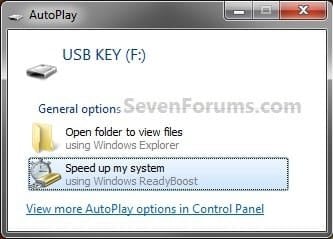
Step1.jpg
A) Go to step 4.
OR

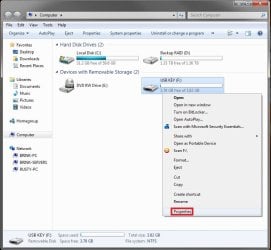
3. If AutoPlay does not pop-up, then open the Start Menu and click on Computer. In Computer, right click on the USB flash drive or flash memory card, and click on Properties. (See screenshot below)
Step1B.jpg
4. To Turn On ReadyBoost

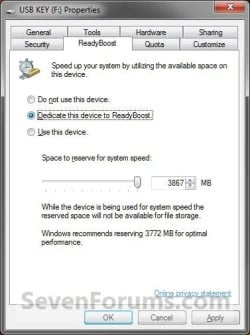
A) To use all of the flash drive or memory card free space for ReadyBoost
  • Select (dot) Dedicate this device to ReadyBoost. (See screenshot below)
Step2.jpg

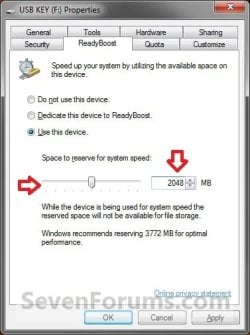
B) To specify how much free space on the flash drive or memory to use for ReadyBoost
  • Select (dot) Use this device. (See screenshot below)
  • Either slide the slider or enter the amount of free space you want to reserve to ReadyBoost.
    NOTE: See the note box at the top of the tutorial for details about how much free space to use.
Step3.jpg

5. To Turn Off ReadyBoost
  • Select (dot) Do not use this device. (See screenshots above)
6. Click on OK.

7. You will see this for a brief moment while Windows 7 configures the ReadyBoost cache on your flash drive or memory card. (See screenshot below)

Step4.jpg
   Tip
To Temporarily Remove the ReadyBoost Device
NOTE: If you wanted to temporarily remove the USB flash drive or memory card that ReadyBoost is currently using, then this will show you how to safely remove it.
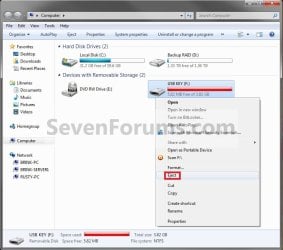
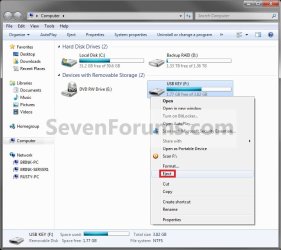
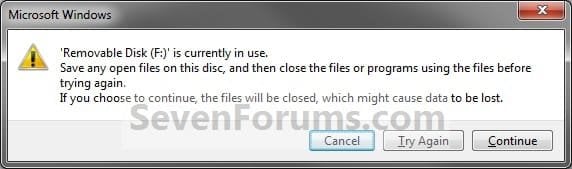
1. Open the Start Menu and click on Computer, then right click on the USB flash drive or flash memory card being used by ReadyBoost, and click on Eject. (See screenshots below)
Eject1.jpgEject2.jpg
A) Click on Continue. (See screenshot below)
EjectB.jpg
B) Go to step 3.
OR

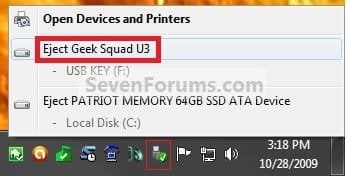
2. Click on the Safely Remove Hardware icon in the notification area on the right side of the taskbar, then click on the USB flash drive or flash memory card being used by ReadyBoost to eject it. (See screenshot below)
Eject3.jpg
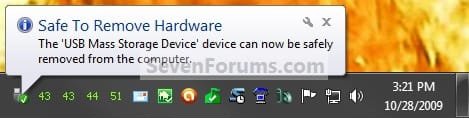
3. When you see this, it is now safe to remove the USB flash drive or flash memory card. (See screenshot below)
Eject3B.jpg
4. When ready, you can just plug the USB flash drive or flash memory card back in to have ReadyBoost automatically start using it again.

That's it,
Shawn


Last edited:
"But what are you guys trying to accomplish."

I am interested in how not why


Maybe I did not get it. But what are you guys trying to accomplish. Ready Boost was intended to overcome the (access) speed limitations of the rotating disks by moving the page file from the disk to a fast USB stick. I stress fast meaning sticks that have access times of less than 1ms or alike (rotating disks typically have 15 to 17ms).
If you replace an area of your disk to perform that service, you really only buy the Ready Boost overhead and do not gain an iota. In the case of the SSD you only have to keep the page file on the SSD (against the advice of many "experts") and you have the optimal setup.
Note also that there is really nothing to be gained with Ready Boost with RAM sizes 2GB and larger. E.g. a system with 4GB of RAM will hardly ever produce a page fault under normal use. Exceptional applications such as CAD may differ.
 

My Computer

Computer type
PC/Desktop
OS
Windows 7 Professional x64
CPU
Intel i7 4930X
Motherboard
Asus P9X79
Memory
Crucial Ballistix Tactical 32 GB, DDR3
Graphics Card(s)
GTX 1650 Super
Monitor(s) Displays
Dell 32" LED
Hard Drives
Intel 760p NVMe Boot Drive
PSU
Silverstone 750w
Cooling
Cooler Master MasterLiquid
"But what are you guys trying to accomplish."

I am interested in how not why


Maybe I did not get it. But what are you guys trying to accomplish. Ready Boost was intended to overcome the (access) speed limitations of the rotating disks by moving the page file from the disk to a fast USB stick. I stress fast meaning sticks that have access times of less than 1ms or alike (rotating disks typically have 15 to 17ms).
If you replace an area of your disk to perform that service, you really only buy the Ready Boost overhead and do not gain an iota. In the case of the SSD you only have to keep the page file on the SSD (against the advice of many "experts") and you have the optimal setup.
Note also that there is really nothing to be gained with Ready Boost with RAM sizes 2GB and larger. E.g. a system with 4GB of RAM will hardly ever produce a page fault under normal use. Exceptional applications such as CAD may differ.
Interested in what?
 

My Computer

Computer Manufacturer/Model Number
HP, Dell, Gateway, Toshiba - 4 laptops and 2 desktops
OS
Vista, Windows7, Mint Mate, Zorin, Windows 8
CPU
from 1.6GHz Duo to i7
Monitor(s) Displays
2x HP w2207
Hard Drives
5x HDD, 7x SSD, 12x Externals
Keyboard
with trackball - no mices
Mouse
Trackball mice
Internet Speed
DSL 6000
"But what are you guys trying to accomplish."

I am interested in how not why


Maybe I did not get it. But what are you guys trying to accomplish. Ready Boost was intended to overcome the (access) speed limitations of the rotating disks by moving the page file from the disk to a fast USB stick. I stress fast meaning sticks that have access times of less than 1ms or alike (rotating disks typically have 15 to 17ms).
If you replace an area of your disk to perform that service, you really only buy the Ready Boost overhead and do not gain an iota. In the case of the SSD you only have to keep the page file on the SSD (against the advice of many "experts") and you have the optimal setup.
Note also that there is really nothing to be gained with Ready Boost with RAM sizes 2GB and larger. E.g. a system with 4GB of RAM will hardly ever produce a page fault under normal use. Exceptional applications such as CAD may differ.
Interested in what?

To enable Readyboost on a Win7 OS when it was disabled because of and SSD install. I what to do some benchmarks with it enabled. If you start a thead about the advantages and disadvantages I will be happy to post there. I just would like to know the information on my first post on the subject. If no one knows, that is fine. But there maybe someone who can help me install the service. That seems to be the only component missing. Can we stay on topic?
 

My Computer

Computer type
PC/Desktop
OS
Windows 7 Professional x64
CPU
Intel i7 4930X
Motherboard
Asus P9X79
Memory
Crucial Ballistix Tactical 32 GB, DDR3
Graphics Card(s)
GTX 1650 Super
Monitor(s) Displays
Dell 32" LED
Hard Drives
Intel 760p NVMe Boot Drive
PSU
Silverstone 750w
Cooling
Cooler Master MasterLiquid
Can we stay on topic?
Once you climbed down from your tree, I'll give you the answer. It is simple, and if you put your grey cells into action, you may even figure it out yourself.
 

My Computer

Computer Manufacturer/Model Number
HP, Dell, Gateway, Toshiba - 4 laptops and 2 desktops
OS
Vista, Windows7, Mint Mate, Zorin, Windows 8
CPU
from 1.6GHz Duo to i7
Monitor(s) Displays
2x HP w2207
Hard Drives
5x HDD, 7x SSD, 12x Externals
Keyboard
with trackball - no mices
Mouse
Trackball mice
Internet Speed
DSL 6000
Can we stay on topic?
Once you climbed down from your tree, I'll give you the answer. It is simple, and if you put your grey cells into action, you may even figure it out yourself.

I attempted this regedit and could not boot. I never install a Service before. I think that must be what I need to do.


HKEY_LOCAL_MACHINE\SYSTEM\CurrentControlSet\services\rdyboost
Start from 0 to 3
 

My Computer

Computer type
PC/Desktop
OS
Windows 7 Professional x64
CPU
Intel i7 4930X
Motherboard
Asus P9X79
Memory
Crucial Ballistix Tactical 32 GB, DDR3
Graphics Card(s)
GTX 1650 Super
Monitor(s) Displays
Dell 32" LED
Hard Drives
Intel 760p NVMe Boot Drive
PSU
Silverstone 750w
Cooling
Cooler Master MasterLiquid
Mm, thanks anyways. I differ though, I have three gigs of ram and readyboost speeds me up enormously.

~Joshua~
 

My Computer

OS
Windows 7
Mm, thanks anyways. I differ though, I have three gigs of ram and readyboost speeds me up enormously.

~Joshua~
Josh, are you sure of that? It is against all logic and experience. You must run very special applications that produce a lot of page faults. What is your average Hard Fault count in the Resource Monitor > Memory tab?
I encounter hard faults only in very special situations - e.g. scanning with SuperAnti Spyware. MSE also produces the odd page fault. In both cases 60% of the memory is unused which makes that very odd.
But if you have none or few page faults, then the page file is not being used and the Ready Boost cannot provide any benefit.
 

My Computer

Computer Manufacturer/Model Number
HP, Dell, Gateway, Toshiba - 4 laptops and 2 desktops
OS
Vista, Windows7, Mint Mate, Zorin, Windows 8
CPU
from 1.6GHz Duo to i7
Monitor(s) Displays
2x HP w2207
Hard Drives
5x HDD, 7x SSD, 12x Externals
Keyboard
with trackball - no mices
Mouse
Trackball mice
Internet Speed
DSL 6000
I know this makes my previous post look stupid (at least I think it does), but apparently as I count up all the Hard Count thingys from all the services/processes, I have two?

~Joshua~
 

My Computer

OS
Windows 7
I know this makes my previous post look stupid (at least I think it does), but apparently as I count up all the Hard Count thingys from all the services/processes, I have two?

~Joshua~
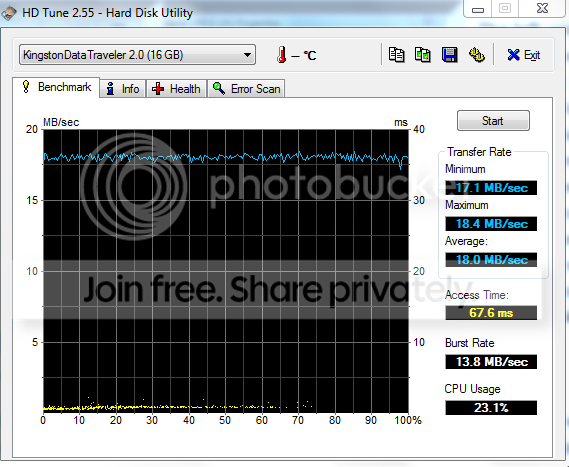
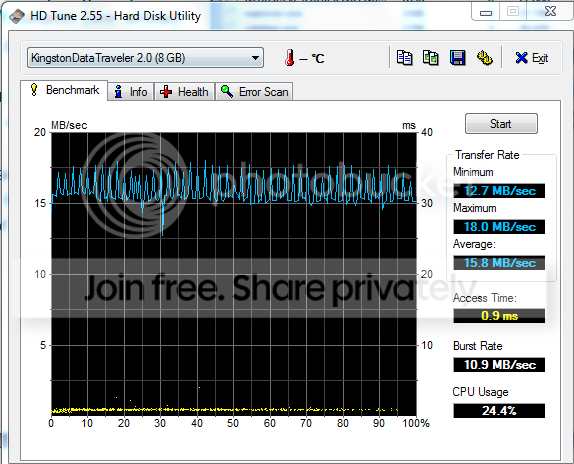
That was my point. A file that is not being used (in this case the page file) cannot gain in performance with a faster device - if the device is indeed faster. To make that point, I have compiled some data of two USB sticks as compared to a HDD:

One of my HDDs as base case

HDDperformance.png


One Kingston Date Traveller - note the access time

2usb.png


Another Kingston Datas traveller - and compare to this access time

3usb.png
 

My Computer

Computer Manufacturer/Model Number
HP, Dell, Gateway, Toshiba - 4 laptops and 2 desktops
OS
Vista, Windows7, Mint Mate, Zorin, Windows 8
CPU
from 1.6GHz Duo to i7
Monitor(s) Displays
2x HP w2207
Hard Drives
5x HDD, 7x SSD, 12x Externals
Keyboard
with trackball - no mices
Mouse
Trackball mice
Internet Speed
DSL 6000
What about a SSD drive with USB 3.0?

101209IntelX25-M.PNG
 

My Computer

Computer type
PC/Desktop
OS
Windows 7 Professional x64
CPU
Intel i7 4930X
Motherboard
Asus P9X79
Memory
Crucial Ballistix Tactical 32 GB, DDR3
Graphics Card(s)
GTX 1650 Super
Monitor(s) Displays
Dell 32" LED
Hard Drives
Intel 760p NVMe Boot Drive
PSU
Silverstone 750w
Cooling
Cooler Master MasterLiquid
About the same as a SSD with USB 2.0. But that was not the point of discussion. The point I wanted to make is that now every USB stick lends itself for Ready Boost. One has to compare the access time of the stick to the access time of the HDD.
 

My Computer

Computer Manufacturer/Model Number
HP, Dell, Gateway, Toshiba - 4 laptops and 2 desktops
OS
Vista, Windows7, Mint Mate, Zorin, Windows 8
CPU
from 1.6GHz Duo to i7
Monitor(s) Displays
2x HP w2207
Hard Drives
5x HDD, 7x SSD, 12x Externals
Keyboard
with trackball - no mices
Mouse
Trackball mice
Internet Speed
DSL 6000

My Computer

Computer Manufacturer/Model Number
packard bell IXTREME M5722
OS
Operating System : Windows 7 Home Premium Edition 6.01.7600 SP1 (x64)
CPU
Processor : Intel Core 2 Quad Q8300 @ 2500 MHz
Motherboard
Mainboard : Packard Bell (Acer EG43M )
Memory
Physical Memory :8GB Corsair4x 2GB 800MHz C5 DDR2
Graphics Card(s)
Video Card : XFX 6700 AMD
Monitor(s) Displays
Maestro 234DL - BenQ V2220 - BenQ VW2420H
Screen Resolution
Current Display :1920x1080p pixels at 60 Hz in HD LED
Hard Drives
Hard Disks : WDC (1000 GB)
Drive C: (Hard Disk) : 428 GB available on 491 GB
Drive D: (Hard Disk) : 426 GB available on 492 GB
SAMSUNG spinpoint HD103SJ 1000.2 GB
(X 2) KINGSTON SSD NOW V 30GB
PSU
XFX ProSeries 550W PSU
Case
PACKARD BELL IXTREME
Cooling
System Blower Current: 150mA Air Flow16CFM ;Akasa 90mm rear
Keyboard
Gigabyte Aivia K8100
Mouse
TRUST-Wireless Laser Mouse - Carbon edition MI-7770C
Internet Speed
TP-LINK > TL-WN951N / AV500 Gigabit Powerline Adapters
Browser
chrome dev
Other Info
EXTRA COOLING>(FAN CONTROLLER) PC Bay Cooler 3 x 40mm fans; Akasa AK-HD-BL Blue hard drive cooler 2 x 40 mm fan 4500 rpm 29.7 dBA
Bios> American Megatrends Inc.
Version : P01-A1
Date : 08/31/2009
Is there a way on 7 to make the readyboost your primary (possibly only) cache?

Hello 24x24,

Since you will have to have RAM installed in your computer for it to run, then no. If you have very little RAM, say 512MB, then it would use ReadyBoost a lot more. However, using ReadyBoost instead of having more RAM would decrease your computer's performance. RAM is always faster.

Hope this helps,
Shawn

i thought it was all to do with the paging file that normally runs on c drive by default what readyboost helps with not ram??
 

My Computer

Computer Manufacturer/Model Number
packard bell IXTREME M5722
OS
Operating System : Windows 7 Home Premium Edition 6.01.7600 SP1 (x64)
CPU
Processor : Intel Core 2 Quad Q8300 @ 2500 MHz
Motherboard
Mainboard : Packard Bell (Acer EG43M )
Memory
Physical Memory :8GB Corsair4x 2GB 800MHz C5 DDR2
Graphics Card(s)
Video Card : XFX 6700 AMD
Monitor(s) Displays
Maestro 234DL - BenQ V2220 - BenQ VW2420H
Screen Resolution
Current Display :1920x1080p pixels at 60 Hz in HD LED
Hard Drives
Hard Disks : WDC (1000 GB)
Drive C: (Hard Disk) : 428 GB available on 491 GB
Drive D: (Hard Disk) : 426 GB available on 492 GB
SAMSUNG spinpoint HD103SJ 1000.2 GB
(X 2) KINGSTON SSD NOW V 30GB
PSU
XFX ProSeries 550W PSU
Case
PACKARD BELL IXTREME
Cooling
System Blower Current: 150mA Air Flow16CFM ;Akasa 90mm rear
Keyboard
Gigabyte Aivia K8100
Mouse
TRUST-Wireless Laser Mouse - Carbon edition MI-7770C
Internet Speed
TP-LINK > TL-WN951N / AV500 Gigabit Powerline Adapters
Browser
chrome dev
Other Info
EXTRA COOLING>(FAN CONTROLLER) PC Bay Cooler 3 x 40mm fans; Akasa AK-HD-BL Blue hard drive cooler 2 x 40 mm fan 4500 rpm 29.7 dBA
Bios> American Megatrends Inc.
Version : P01-A1
Date : 08/31/2009
does the memory size of the usb drive affecting the effectiveness of ready boost? just asking :)
 

My Computer

OS
window's 7
CPU
core 2 quad
Motherboard
gigabyte
Memory
2gb corsair
Graphics Card(s)
ati hd4850
Monitor(s) Displays
lg
Screen Resolution
1600 X 900
Case
power logic
Other Info
none of the spec above is accurate
Is there a way on 7 to make the readyboost your primary (possibly only) cache?

Hello 24x24,

Since you will have to have RAM installed in your computer for it to run, then no. If you have very little RAM, say 512MB, then it would use ReadyBoost a lot more. However, using ReadyBoost instead of having more RAM would decrease your computer's performance. RAM is always faster.

Hope this helps,
Shawn

i thought it was all to do with the paging file that normally runs on c drive by default what readyboost helps with not ram??

Hello Brian,

It's a combination of both. If you have low RAM, then you will be using the paging file more. If you add ReadyBoost, then it will use it in combination with RAM and the paging file to help improve performance if the USB drive is faster than the HDD. Unfortunately, most HDDs these days are faster than a USB 2.0 drive. I don't think that they will be until USB 3.0 flash drives are out and plugged into a USB 3.0 supporting motherboard.
 

My Computer

Computer type
PC/Desktop
Computer Manufacturer/Model Number
Self built custom
OS
64-bit Windows 11 Pro for Workstations
CPU
Intel i7-8700K OC'd to 5 GHz
Motherboard
ASUS ROG Maximus XI Formula Z390
Memory
64 GB (4x16GB) G.SKILL TridentZ RGB DDR4 3600 MHz
Graphics Card(s)
ASUS ROG-STRIX-GTX1080TI-O11G-GAMING
Sound Card
Integrated
Monitor(s) Displays
2 x Samsung Odyssey G7 27"
Screen Resolution
2560x1440
Hard Drives
1TB Samsung 990 PRO M.2,
4TB Samsung 990 PRO PRO M.2,
TerraMaster F8 SSD Plus NAS
PSU
Seasonic Prime Titanium 850W
Case
Thermaltake Core P3
Cooling
Corsair Hydro H115i
Keyboard
Logitech wireless K800
Mouse
Logitech MX Master 4
Internet Speed
2 Gb/s Download and 100 Mb/s Upload
Antivirus
Malwarebyte Anti-Malware Premium
Browser
Google Chrome
Other Info
Logitech Z625 speaker system,
Logitech BRIO 4K Pro webcam,
HP Color LaserJet Pro MFP M477fdn,
APC SMART-UPS RT 1000 XL - SURT1000XLI,
Galaxy S23 Plus phone
does the memory size of the usb drive affecting the effectiveness of ready boost? just asking :)

Hello Kucing,

Usually it will only matter if the USB flash drive is faster (most likely not) than your Windows 7 HDD where the paging file is on will it help improve performance. Having more memory on the USB drive just means that there is more than can be allocated for ReadyBoost to use.

When USB 3.0 flash drives are out with supporting USB 3.0 motherboards, then ReadyBoost might be useful again to help performance if you are low on RAM with a slow HDD.
 

My Computer

Computer type
PC/Desktop
Computer Manufacturer/Model Number
Self built custom
OS
64-bit Windows 11 Pro for Workstations
CPU
Intel i7-8700K OC'd to 5 GHz
Motherboard
ASUS ROG Maximus XI Formula Z390
Memory
64 GB (4x16GB) G.SKILL TridentZ RGB DDR4 3600 MHz
Graphics Card(s)
ASUS ROG-STRIX-GTX1080TI-O11G-GAMING
Sound Card
Integrated
Monitor(s) Displays
2 x Samsung Odyssey G7 27"
Screen Resolution
2560x1440
Hard Drives
1TB Samsung 990 PRO M.2,
4TB Samsung 990 PRO PRO M.2,
TerraMaster F8 SSD Plus NAS
PSU
Seasonic Prime Titanium 850W
Case
Thermaltake Core P3
Cooling
Corsair Hydro H115i
Keyboard
Logitech wireless K800
Mouse
Logitech MX Master 4
Internet Speed
2 Gb/s Download and 100 Mb/s Upload
Antivirus
Malwarebyte Anti-Malware Premium
Browser
Google Chrome
Other Info
Logitech Z625 speaker system,
Logitech BRIO 4K Pro webcam,
HP Color LaserJet Pro MFP M477fdn,
APC SMART-UPS RT 1000 XL - SURT1000XLI,
Galaxy S23 Plus phone
does the memory size of the usb drive affecting the effectiveness of ready boost? just asking :)

Hello Kucing,

Usually it will only matter if the USB flash drive is faster (most likely not) than your Windows 7 HDD where the paging file is on will it help improve performance. Having more memory on the USB drive just means that there is more than can be allocated for ReadyBoost to use.

When USB 3.0 flash drives are out with supporting USB 3.0 motherboards, then ReadyBoost might be useful again to help performance if you are low on RAM with a slow HDD.

thanks Shawn, your tutorial always helping . :)
 

My Computer

OS
window's 7
CPU
core 2 quad
Motherboard
gigabyte
Memory
2gb corsair
Graphics Card(s)
ati hd4850
Monitor(s) Displays
lg
Screen Resolution
1600 X 900
Case
power logic
Other Info
none of the spec above is accurate
You're welcome. :)
 

My Computer

Computer type
PC/Desktop
Computer Manufacturer/Model Number
Self built custom
OS
64-bit Windows 11 Pro for Workstations
CPU
Intel i7-8700K OC'd to 5 GHz
Motherboard
ASUS ROG Maximus XI Formula Z390
Memory
64 GB (4x16GB) G.SKILL TridentZ RGB DDR4 3600 MHz
Graphics Card(s)
ASUS ROG-STRIX-GTX1080TI-O11G-GAMING
Sound Card
Integrated
Monitor(s) Displays
2 x Samsung Odyssey G7 27"
Screen Resolution
2560x1440
Hard Drives
1TB Samsung 990 PRO M.2,
4TB Samsung 990 PRO PRO M.2,
TerraMaster F8 SSD Plus NAS
PSU
Seasonic Prime Titanium 850W
Case
Thermaltake Core P3
Cooling
Corsair Hydro H115i
Keyboard
Logitech wireless K800
Mouse
Logitech MX Master 4
Internet Speed
2 Gb/s Download and 100 Mb/s Upload
Antivirus
Malwarebyte Anti-Malware Premium
Browser
Google Chrome
Other Info
Logitech Z625 speaker system,
Logitech BRIO 4K Pro webcam,
HP Color LaserJet Pro MFP M477fdn,
APC SMART-UPS RT 1000 XL - SURT1000XLI,
Galaxy S23 Plus phone
As Shawn pointed out, many USB sticks are slower than the HDDs. There are, however, some that are very fast in access times - some are below 1ms. Those are useful for Ready Boost even if the data transfer times do not match the HDD values.

I therefore recommend to test the devices with HDTune to determine the data and decide on the basis of that. Below you find an example of an average HDD as compared to 2 sticks - both are the same make and model but watch the difference in access times.

In my estimation, the data transfer rate is of a lesser importance since a page activity transfers relatively small amounts of data.


HDDperformance.png

2usb.png

3usb.png
 

My Computer

Computer Manufacturer/Model Number
HP, Dell, Gateway, Toshiba - 4 laptops and 2 desktops
OS
Vista, Windows7, Mint Mate, Zorin, Windows 8
CPU
from 1.6GHz Duo to i7
Monitor(s) Displays
2x HP w2207
Hard Drives
5x HDD, 7x SSD, 12x Externals
Keyboard
with trackball - no mices
Mouse
Trackball mice
Internet Speed
DSL 6000
That's a very good point WHS. :)
 

My Computer

Computer type
PC/Desktop
Computer Manufacturer/Model Number
Self built custom
OS
64-bit Windows 11 Pro for Workstations
CPU
Intel i7-8700K OC'd to 5 GHz
Motherboard
ASUS ROG Maximus XI Formula Z390
Memory
64 GB (4x16GB) G.SKILL TridentZ RGB DDR4 3600 MHz
Graphics Card(s)
ASUS ROG-STRIX-GTX1080TI-O11G-GAMING
Sound Card
Integrated
Monitor(s) Displays
2 x Samsung Odyssey G7 27"
Screen Resolution
2560x1440
Hard Drives
1TB Samsung 990 PRO M.2,
4TB Samsung 990 PRO PRO M.2,
TerraMaster F8 SSD Plus NAS
PSU
Seasonic Prime Titanium 850W
Case
Thermaltake Core P3
Cooling
Corsair Hydro H115i
Keyboard
Logitech wireless K800
Mouse
Logitech MX Master 4
Internet Speed
2 Gb/s Download and 100 Mb/s Upload
Antivirus
Malwarebyte Anti-Malware Premium
Browser
Google Chrome
Other Info
Logitech Z625 speaker system,
Logitech BRIO 4K Pro webcam,
HP Color LaserJet Pro MFP M477fdn,
APC SMART-UPS RT 1000 XL - SURT1000XLI,
Galaxy S23 Plus phone
Back
Top