Realtek AC '97 - sound wont work on win7 ultimate

Sinobiah

New member
Local time
6:44 PM
Messages
33
Location
Johannesburg South Africa
Hello there all,

I re-formated my pc to windows 7 ultimate. My sound refuses to work. It worked fine on xp, but on windows 7 it doesnt? In device manager, the sound device displays normally without a question mark because the driver is installed.

Its realtek AC '97 drivers, and its for my motherbords on board sound. I have tried for the past 3 days to figure out why it isnt working, but with no luck at all. Its really irritating not being able to listen to any music on my pc. :cry:

Notes:

1) The sound is not muted
2) the driver was installed
3) device manager doesnt display a question mark
4) the sound appears to play in media players eg. winamp, wmp, wmpc etc etc
5) i have audio codecs installed... didnt help at all.
6) even though the sound plays i hear nothing
7) the speakers ARE on and ARE working - tried other speakers too
8) volume is up on media players
9) speakers are plugged into the right jacks

So that should about cover the list of expected questions from the answers list i hope...

If anyone could give me a solution to this, i would be most greatful!!

Thanks in advance!
 

My Computer My Computer

At a glance

Windows 7 Ultimate 32 bit 6.1.7600 build 76003.0 Ghz Dual Core CPU2Gb RamNvidia 7300 GS 256mb
Computer Manufacturer/Model Number
Microsoft Corporation
OS
Windows 7 Ultimate 32 bit 6.1.7600 build 7600
CPU
3.0 Ghz Dual Core CPU
Memory
2Gb Ram
Graphics Card(s)
Nvidia 7300 GS 256mb
Sound Card
onboard... soon upgrading
Monitor(s) Displays
Samsung 23" lcd flat screen
Screen Resolution
1024 x 786
Hard Drives
5: 250gb, 80, 80, 160, 160
Keyboard
USB Okion - white - lights up in the dark
Internet Speed
21.6 MB/s
Hello there all,

I re-formated my pc to windows 7 ultimate. My sound refuses to work. It worked fine on xp, but on windows 7 it doesnt? In device manager, the sound device displays normally without a question mark because the driver is installed.

Its realtek AC '97 drivers, and its for my motherbords on board sound. I have tried for the past 3 days to figure out why it isnt working, but with no luck at all. Its really irritating not being able to listen to any music on my pc. :cry:

Notes:

1) The sound is not muted
2) the driver was installed
3) device manager doesnt display a question mark
4) the sound appears to play in media players eg. winamp, wmp, wmpc etc etc
5) i have audio codecs installed... didnt help at all.
6) even though the sound plays i hear nothing
7) the speakers ARE on and ARE working - tried other speakers too
8) volume is up on media players
9) speakers are plugged into the right jacks

So that should about cover the list of expected questions from the answers list i hope...

If anyone could give me a solution to this, i would be most greatful!!

Thanks in advance!

There are a couple of other things to try...

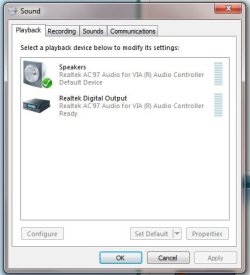
Right click the Microsoft speaker icon in the task bar, select "Playback Devices".

"Speakers" should be the default output device, (green check mark)

Select speakers with a single left click... to buttons should become active.

Configure and Properties. Under Configure make sure you're set to stereo.

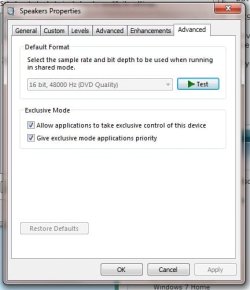
After that click on the Properties button..you should see a config window with several several tabs. If you have the Enhancements tab selct it, check immdiate mode then "Disable All Sound Effects". Then click the advanced tab and select 16-bit - 44.1kHz (CD Quality).

Might want to reboot after all this.

Ap
 

My Computer My Computer

At a glance

Windows 7 Home PremiumIntel Core 2 Duo @ 3.00gHz4 GBATI Radeon HD 2600 XT
Computer Manufacturer/Model Number
Assembled in my workshop
OS
Windows 7 Home Premium
CPU
Intel Core 2 Duo @ 3.00gHz
Motherboard
Gigabyte GA-P35-S3G
Memory
4 GB
Graphics Card(s)
ATI Radeon HD 2600 XT
Sound Card
RME 24/96 Card, Realtek Internal Audio PreSonus FireStudio
Monitor(s) Displays
Acer 1917 (x2)
Screen Resolution
1280 x 1024 on both monitors
Hard Drives
Three 250GB Seagate SATA Barracuda 7200rpm
PSU
Rosewill 500-watt
Case
Rosewill mid-tower
Cooling
Noctua NH-U9B (CPU), PwrSupply fan + single large case Fan
Keyboard
Macally w/2/USB ports.
Mouse
Trackman Wheel
Other Info
Event 20/20 bas studio monitors, Yamaha sub.
Rackmount Korg/Roland/Yamaha synthesizers,
Cubase MIDI/audio recording. Sony Soundforge audio/mastering software. CD Architect Mastering. RME & Presonus audio interfaces.
There are a couple of other things to try...

Right click the Microsoft speaker icon in the task bar, select "Playback Devices".

"Speakers" should be the default output device, (green check mark)

Select speakers with a single left click... to buttons should become active.

Configure and Properties. Under Configure make sure you're set to stereo.

After that click on the Properties button..you should see a config window with several several tabs. If you have the Enhancements tab selct it, check immdiate mode then "Disable All Sound Effects". Then click the advanced tab and select 16-bit - 44.1kHz (CD Quality).

Might want to reboot after all this.

Ap


Hey there,

Thank you for the kind response! was watching and waiting for someone to reply.. Im really desperate here!

I did what you said under the tabs, but when i go to the advanced tab it doesnt let me select anything from the dropdown list. It stays on 16 bit, 48000 Hz, (DVD quality).

So because of this i cant change the quality setting :(
 

My Computer My Computer

At a glance

Windows 7 Ultimate 32 bit 6.1.7600 build 76003.0 Ghz Dual Core CPU2Gb RamNvidia 7300 GS 256mb
Computer Manufacturer/Model Number
Microsoft Corporation
OS
Windows 7 Ultimate 32 bit 6.1.7600 build 7600
CPU
3.0 Ghz Dual Core CPU
Memory
2Gb Ram
Graphics Card(s)
Nvidia 7300 GS 256mb
Sound Card
onboard... soon upgrading
Monitor(s) Displays
Samsung 23" lcd flat screen
Screen Resolution
1024 x 786
Hard Drives
5: 250gb, 80, 80, 160, 160
Keyboard
USB Okion - white - lights up in the dark
Internet Speed
21.6 MB/s
Any other suggestions? I really want my sound to work. And i also need to hear sounds when i create flash websites, because i dont want it to sound all moggy n stuff! So its very frustrating to me because of this. I tried to see what could cause the dropdown to stay greyed out but i cant figure out what it is.
 

My Computer My Computer

At a glance

Windows 7 Ultimate 32 bit 6.1.7600 build 76003.0 Ghz Dual Core CPU2Gb RamNvidia 7300 GS 256mb
Computer Manufacturer/Model Number
Microsoft Corporation
OS
Windows 7 Ultimate 32 bit 6.1.7600 build 7600
CPU
3.0 Ghz Dual Core CPU
Memory
2Gb Ram
Graphics Card(s)
Nvidia 7300 GS 256mb
Sound Card
onboard... soon upgrading
Monitor(s) Displays
Samsung 23" lcd flat screen
Screen Resolution
1024 x 786
Hard Drives
5: 250gb, 80, 80, 160, 160
Keyboard
USB Okion - white - lights up in the dark
Internet Speed
21.6 MB/s
Any other suggestions? I really want my sound to work. And i also need to hear sounds when i create flash websites, because i dont want it to sound all moggy n stuff! So its very frustrating to me because of this. I tried to see what could cause the dropdown to stay greyed out but i cant figure out what it is.

What dropdown?

Have you tried to update the drivers from the Device Manager?

In device manager dbl click on AC97 (or realtek) audio then select the drivers tab, click the Update Drivers button.

AC97 is an older format, how old is your computer?

Have you looked at the conputer's BIOS options and see if there's selections for audio type? You might see something like AC97, Azalia audio or High Definition audio. Of you might just see enable or disable.

If you have high definition or azalia audio select that.

Ap
 

My Computer My Computer

At a glance

Windows 7 Home PremiumIntel Core 2 Duo @ 3.00gHz4 GBATI Radeon HD 2600 XT
Computer Manufacturer/Model Number
Assembled in my workshop
OS
Windows 7 Home Premium
CPU
Intel Core 2 Duo @ 3.00gHz
Motherboard
Gigabyte GA-P35-S3G
Memory
4 GB
Graphics Card(s)
ATI Radeon HD 2600 XT
Sound Card
RME 24/96 Card, Realtek Internal Audio PreSonus FireStudio
Monitor(s) Displays
Acer 1917 (x2)
Screen Resolution
1280 x 1024 on both monitors
Hard Drives
Three 250GB Seagate SATA Barracuda 7200rpm
PSU
Rosewill 500-watt
Case
Rosewill mid-tower
Cooling
Noctua NH-U9B (CPU), PwrSupply fan + single large case Fan
Keyboard
Macally w/2/USB ports.
Mouse
Trackman Wheel
Other Info
Event 20/20 bas studio monitors, Yamaha sub.
Rackmount Korg/Roland/Yamaha synthesizers,
Cubase MIDI/audio recording. Sony Soundforge audio/mastering software. CD Architect Mastering. RME & Presonus audio interfaces.
Also, can you post a pic of the window that shows Playback Devices.

Ap
 

My Computer My Computer

At a glance

Windows 7 Home PremiumIntel Core 2 Duo @ 3.00gHz4 GBATI Radeon HD 2600 XT
Computer Manufacturer/Model Number
Assembled in my workshop
OS
Windows 7 Home Premium
CPU
Intel Core 2 Duo @ 3.00gHz
Motherboard
Gigabyte GA-P35-S3G
Memory
4 GB
Graphics Card(s)
ATI Radeon HD 2600 XT
Sound Card
RME 24/96 Card, Realtek Internal Audio PreSonus FireStudio
Monitor(s) Displays
Acer 1917 (x2)
Screen Resolution
1280 x 1024 on both monitors
Hard Drives
Three 250GB Seagate SATA Barracuda 7200rpm
PSU
Rosewill 500-watt
Case
Rosewill mid-tower
Cooling
Noctua NH-U9B (CPU), PwrSupply fan + single large case Fan
Keyboard
Macally w/2/USB ports.
Mouse
Trackman Wheel
Other Info
Event 20/20 bas studio monitors, Yamaha sub.
Rackmount Korg/Roland/Yamaha synthesizers,
Cubase MIDI/audio recording. Sony Soundforge audio/mastering software. CD Architect Mastering. RME & Presonus audio interfaces.
Any other suggestions? I really want my sound to work. And i also need to hear sounds when i create flash websites, because i dont want it to sound all moggy n stuff! So its very frustrating to me because of this. I tried to see what could cause the dropdown to stay greyed out but i cant figure out what it is.

What dropdown?

Have you tried to update the drivers from the Device Manager?

In device manager dbl click on AC97 (or realtek) audio then select the drivers tab, click the Update Drivers button.

AC97 is an older format, how old is your computer?

Have you looked at the conputer's BIOS options and see if there's selections for audio type? You might see something like AC97, Azalia audio or High Definition audio. Of you might just see enable or disable.

If you have high definition or azalia audio select that.

Ap

Im not sure howold my pc is. Its a P4. I have re-installed the latest Realtek drivers, and still nothing happens. I have also updated the drivers but it says there are no better drivers etc. And i have manually installed drivers too..
 

Attachments

  • sc1.jpg
    sc1.jpg
    23.4 KB · Views: 224
  • sc2.jpg
    sc2.jpg
    27.4 KB · Views: 216

My Computer My Computer

At a glance

Windows 7 Ultimate 32 bit 6.1.7600 build 76003.0 Ghz Dual Core CPU2Gb RamNvidia 7300 GS 256mb
Computer Manufacturer/Model Number
Microsoft Corporation
OS
Windows 7 Ultimate 32 bit 6.1.7600 build 7600
CPU
3.0 Ghz Dual Core CPU
Memory
2Gb Ram
Graphics Card(s)
Nvidia 7300 GS 256mb
Sound Card
onboard... soon upgrading
Monitor(s) Displays
Samsung 23" lcd flat screen
Screen Resolution
1024 x 786
Hard Drives
5: 250gb, 80, 80, 160, 160
Keyboard
USB Okion - white - lights up in the dark
Internet Speed
21.6 MB/s
Everything looks good.. 16-bit 48,000 hz is standard for AC97 audio so I wouldn't worry about other selection not being available. I would de-select the two Exclusive Mode selections. I don't know how well AC97 reacts to those.

Here's a few other things, but I'm just guessing... I don't think Win-7 actually supports AC97.

Under the communications tab, select Do Nothing.
Under the Levels tab scroll down and make sure all levels are at least at 50%
You should've "disabled all audio effects" under the Enhancements tab.

Someone posted that a different output jack was working while the standard one was not.

What is under the Custom tab?

Hopefully someone with a similar setup has some ideas.

Do you have the make/model number of your PC, you should post it and any other info you might have.

Ap
 

My Computer My Computer

At a glance

Windows 7 Home PremiumIntel Core 2 Duo @ 3.00gHz4 GBATI Radeon HD 2600 XT
Computer Manufacturer/Model Number
Assembled in my workshop
OS
Windows 7 Home Premium
CPU
Intel Core 2 Duo @ 3.00gHz
Motherboard
Gigabyte GA-P35-S3G
Memory
4 GB
Graphics Card(s)
ATI Radeon HD 2600 XT
Sound Card
RME 24/96 Card, Realtek Internal Audio PreSonus FireStudio
Monitor(s) Displays
Acer 1917 (x2)
Screen Resolution
1280 x 1024 on both monitors
Hard Drives
Three 250GB Seagate SATA Barracuda 7200rpm
PSU
Rosewill 500-watt
Case
Rosewill mid-tower
Cooling
Noctua NH-U9B (CPU), PwrSupply fan + single large case Fan
Keyboard
Macally w/2/USB ports.
Mouse
Trackman Wheel
Other Info
Event 20/20 bas studio monitors, Yamaha sub.
Rackmount Korg/Roland/Yamaha synthesizers,
Cubase MIDI/audio recording. Sony Soundforge audio/mastering software. CD Architect Mastering. RME & Presonus audio interfaces.
thanks Ap. Turns out my soundcard was blown.. thanks for the great advice anyway!
 

My Computer My Computer

At a glance

Windows 7 Ultimate 32 bit 6.1.7600 build 76003.0 Ghz Dual Core CPU2Gb RamNvidia 7300 GS 256mb
Computer Manufacturer/Model Number
Microsoft Corporation
OS
Windows 7 Ultimate 32 bit 6.1.7600 build 7600
CPU
3.0 Ghz Dual Core CPU
Memory
2Gb Ram
Graphics Card(s)
Nvidia 7300 GS 256mb
Sound Card
onboard... soon upgrading
Monitor(s) Displays
Samsung 23" lcd flat screen
Screen Resolution
1024 x 786
Hard Drives
5: 250gb, 80, 80, 160, 160
Keyboard
USB Okion - white - lights up in the dark
Internet Speed
21.6 MB/s
I figured it was blown when i plugged the jack into the front plugs... and it worked. And sound never worked when it i plugged the speakers into the back. The front plugs werent connected, so i connected it and voila.. then realised my rear onboard sound was blown.. :(
 

My Computer My Computer

At a glance

Windows 7 Ultimate 32 bit 6.1.7600 build 76003.0 Ghz Dual Core CPU2Gb RamNvidia 7300 GS 256mb
Computer Manufacturer/Model Number
Microsoft Corporation
OS
Windows 7 Ultimate 32 bit 6.1.7600 build 7600
CPU
3.0 Ghz Dual Core CPU
Memory
2Gb Ram
Graphics Card(s)
Nvidia 7300 GS 256mb
Sound Card
onboard... soon upgrading
Monitor(s) Displays
Samsung 23" lcd flat screen
Screen Resolution
1024 x 786
Hard Drives
5: 250gb, 80, 80, 160, 160
Keyboard
USB Okion - white - lights up in the dark
Internet Speed
21.6 MB/s
Back
Top