
xxflyingpigxx
New member
- Local time
- 7:49 PM
- Messages
- 1
Hi, I'm new to these forums and I've been searching everywhere for help with my Problem but nothimg seems to work.
I'll start with my setup:
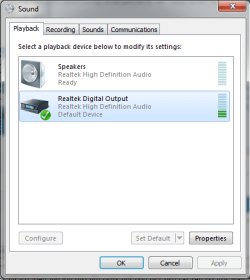
I have Realtek HD Audio Manager Installed. Whenever I go to Control Panel>Sound>Manage Audio Devices, Realtek has the Green bar moving up and down to indicate sound however the speakers have nothing. Note that I do have iTunes running and playing Music. Here is a screenshot of the Realtek and Speakers thing. Let me also add that I'm not very Tech Savvy. If needed I can provide more screenshots of whatever you may need and thank you to anyone who can help
I'll start with my setup:
- VGA to VGA for my Display
- 3.5mm Aux cord from my PC Audio Out to my TV's PC Audio Line In
I have Realtek HD Audio Manager Installed. Whenever I go to Control Panel>Sound>Manage Audio Devices, Realtek has the Green bar moving up and down to indicate sound however the speakers have nothing. Note that I do have iTunes running and playing Music. Here is a screenshot of the Realtek and Speakers thing. Let me also add that I'm not very Tech Savvy. If needed I can provide more screenshots of whatever you may need and thank you to anyone who can help
Attachments
My Computer
At a glance
Windows 7 Professional x64AMD
- Computer type
- PC/Desktop
- Computer Manufacturer/Model Number
- Custom Build
- OS
- Windows 7 Professional x64
- CPU
- AMD
- Motherboard
- Asus

