sound stopped working completely, headphones and speakers

Cannonball333

New member
Local time
8:33 PM
Messages
3
Ok guys this problem happened last march/april ish and I tried a number of things at the time to fix the issue but with no luck. I just got done working out of state for the summer and did not have my pc with me so I'm trying to have another go at fixing the problem. Summary of the issue- no problems ever with sound until one day it just stopped working. Both headphones and speakers wouldn't work even if they were plugged in. I wasn't getting any "no audio devices detected" kinds of errors or anything like that. So I tried reinstalling the realtek HD audio drivers (i was just using onboard sound at the time) and no luck. I also tried doing a few system restores to before the issue and that didn't do anything either. Finally I bought a pci-e sound card, a sounblaster cause thats all the local best buy had, installed that and still no luck with either speakers or headphones. Today I tried removing the sound card and using on board audio and still no luck. Audio device manager will recognize that I plug in my headphones into either the front speaker jack or the one on the back but just doesn't produce sound. I even opened up the pc and looked at the connections on the mobo to make sure the ones for audio hadn't come lose and that doesn't seem to be the issue either. Please any help would be greatly appreciated!! Thanks in advance
 

My Computer My Computer

At a glance

Windows 7 64 bitintel quad coreballistix sport 16gb (2x8)nvidia gforce gtx770
Computer type
PC/Desktop
OS
Windows 7 64 bit
CPU
intel quad core
Motherboard
Gigabyte ultra durable
Memory
ballistix sport 16gb (2x8)
Graphics Card(s)
nvidia gforce gtx770
Hard Drives
seagate 1tb
Antivirus
Bitdefender
Browser
chrome
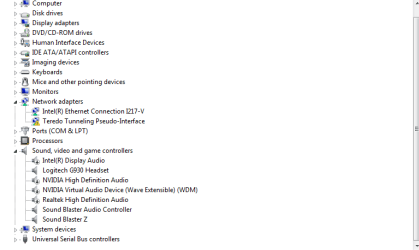
Post a screenshot of the Device Manager, Sound section, for starters. I'll try to help you.

http://www.sevenforums.com/tutorials/9733-screenshots-files-upload-post-seven-forums.html

When you had the SoundBlaster installed, you need to disable the integrated (Realtek) audio so there are no conflicts. Also, you would need to disconnect the front panel headset/mic connection to the motherboard and connect it to the SoundBlaster to have the front panel jacks work. The SoundBlaster would have needed to be set as the default playback device, instead of Realtek if it was still enabled.
 

My Computer My Computer

At a glance

Windows 10 64 bitIntel i7 6700K16GB Corsair DominatorIntel CPU Graphics
Computer type
PC/Desktop
Computer Manufacturer/Model Number
My Own Build
OS
Windows 10 64 bit
CPU
Intel i7 6700K
Motherboard
ASUS ROG Maximus VIII Hero
Memory
16GB Corsair Dominator
Graphics Card(s)
Intel CPU Graphics
Sound Card
RealTek
Monitor(s) Displays
27" Dell S2719dgf
Screen Resolution
2560X1440
Hard Drives
1 TB Samsung 850 EVO SSD for Win 10 Pro
500GB Samsung 850 EVO SSD for Win 10 Insider
2 TB drive for backup
PSU
EVGA Supernova 750G2
Case
BeQuiet Silent Base 600
Cooling
Deepcool Captain 120EX
Keyboard
Microsoft Wireless 2000
Mouse
Microsoft wireless
Internet Speed
100 MB/sec (Cable)
Antivirus
Microsoft Defender and Malwarebytes
Browser
Edge/Firefox
Other Info
Cakewalk (Sonar) by BandLab and Studio One 4.1 Pro recording studio software. MOTU 896Mk3 Hybrid recording interface, Frontier Tranzport wireless control unit, Behringer X-Touch Control Surface.
Five USB connected optical drives for CD Audio production using Nero BurningROM
Tried disabling all the realtek playback options and i'm plugging directly into the sound card, still no luck.
 

My Computer My Computer

At a glance

Windows 7 64 bitintel quad coreballistix sport 16gb (2x8)nvidia gforce gtx770
Computer type
PC/Desktop
OS
Windows 7 64 bit
CPU
intel quad core
Motherboard
Gigabyte ultra durable
Memory
ballistix sport 16gb (2x8)
Graphics Card(s)
nvidia gforce gtx770
Hard Drives
seagate 1tb
Antivirus
Bitdefender
Browser
chrome
here's a screenshot of my device manager after disabling everything except the sound blaster options
 

Attachments

  • device manager.PNG
    device manager.PNG
    12 KB · Views: 2

My Computer My Computer

At a glance

Windows 7 64 bitintel quad coreballistix sport 16gb (2x8)nvidia gforce gtx770
Computer type
PC/Desktop
OS
Windows 7 64 bit
CPU
intel quad core
Motherboard
Gigabyte ultra durable
Memory
ballistix sport 16gb (2x8)
Graphics Card(s)
nvidia gforce gtx770
Hard Drives
seagate 1tb
Antivirus
Bitdefender
Browser
chrome
The Logitech G930, that I find, is a wireless headset. Thus that has nothing to do with the regular sound not working (unless it disables it when connected). Remove that headset from the PC so there is no possibility of interfering with the sound.
 

My Computer My Computer

At a glance

Windows 10 64 bitIntel i7 6700K16GB Corsair DominatorIntel CPU Graphics
Computer type
PC/Desktop
Computer Manufacturer/Model Number
My Own Build
OS
Windows 10 64 bit
CPU
Intel i7 6700K
Motherboard
ASUS ROG Maximus VIII Hero
Memory
16GB Corsair Dominator
Graphics Card(s)
Intel CPU Graphics
Sound Card
RealTek
Monitor(s) Displays
27" Dell S2719dgf
Screen Resolution
2560X1440
Hard Drives
1 TB Samsung 850 EVO SSD for Win 10 Pro
500GB Samsung 850 EVO SSD for Win 10 Insider
2 TB drive for backup
PSU
EVGA Supernova 750G2
Case
BeQuiet Silent Base 600
Cooling
Deepcool Captain 120EX
Keyboard
Microsoft Wireless 2000
Mouse
Microsoft wireless
Internet Speed
100 MB/sec (Cable)
Antivirus
Microsoft Defender and Malwarebytes
Browser
Edge/Firefox
Other Info
Cakewalk (Sonar) by BandLab and Studio One 4.1 Pro recording studio software. MOTU 896Mk3 Hybrid recording interface, Frontier Tranzport wireless control unit, Behringer X-Touch Control Surface.
Five USB connected optical drives for CD Audio production using Nero BurningROM
Back
Top