Solved realtek audio just stopped working

sledgehkg

New member
Local time
11:22 AM
Messages
12
hi all.
For some reason my realtek audio has stopped working on my windows7 64bit system.
I just turned it on this morning. No sound.
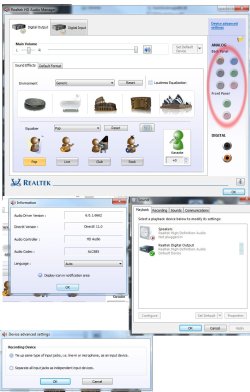
I checked in playback devices and noted that under 'speakers' it tells me "Realtek high definition audio not plugged in"
Under that there is 'Realtek Digital Output' and this says "Realtek High Definition Audio Default Device"

The speakers are plugged in an I have tested them on another system to check they are working.
I have opened the Realtek HD Audio Manager and noticed that all analog back and front panel jack inputs are grayed out.
I have uninstalled all Realtek drivers and software. I have rebooted and let windows find the audio devices again and install drivers.
This made no difference at all.
I have cleaned the registry of anything relating to Realtek.
I have downloaded the latest driver software from the Realtek web site and installed that. This makes no difference either.
I have set the bios back to default. This has made no difference.
In the bios I have set the HD AUDIO option to both 'auto' and 'off'. still no sound.
All connections are in the correct jack sockets.

Could you please help me to get audio back on my system?
I have pretty much run out of things to try.

Thank You.
 

My Computer My Computer

OS
7 ult 64bit

My Computer My Computer

Computer type
PC/Desktop
Computer Manufacturer/Model Number
Own build (new) Desk1 / Asus ROG Win 7 / Desk2 1st build
OS
Desk1 7 Home Prem / Desk2 10 Pro / Main lap Asus ROG 10 Pro 2 laptop Toshiba 7 Pro Asus P2520 7 & 10
CPU
Desk1 i5 3750K / Laptop i7 GTX 860M / Desk2 i5 2500
Motherboard
Desk1 Asus P877-V / Desk2 Gigabyte H67 UD3H / Laptop ?
Memory
Desk1 8GB (1866) / Desk2 16GB (1333) / Laptop 8Gb DDR3
Graphics Card(s)
Desk 1& 2NVidia GTX 650 & Laptops on board Intel
Sound Card
Desk 1 & 2 -XONAR DG Realtek High Def audio Laptop
Monitor(s) Displays
Desk 1 Benq HD 2450 / Desk2 Philips 24" / Laptop 17.5"
Screen Resolution
1920x1080 D1 & D2 & Laptop 1
Hard Drives
Desk1 Samsung 120GB 830 SSD
Asus ROG 256GB 850 Pro SSD
Desk2 Samsung 840 256 SSD
Toshiba 120GB EVO
PSU
Desk 1 Corsair HX 1050/ Laptop ? / Desk 2 Corsair HX 650
Case
Desk 1 Cooler HAF XM ? Toshiba laptop / Desk2 Coolermaster
Cooling
Fans on all Desk1 -2 Desk2 - all Coolermasters 5 Laptop ?
Keyboard
Desk 1 MS Sidewinder X6 Desk 2 MS Sidewinder X 4
Mouse
Desk 1&2 - Gigabyte MS 900 gamer - laptop - Logitec wireless
Internet Speed
ADSL2+
Other Info
One other Desktop (tester) and spare Toshba laptop both with SSD's
Running Kaspersky 2016 ISS on all machines config'd identically
Logitec audio stereo systems on each machine (x3)
Canon MG5250MFC
Router/modem TP-Link running WPA2SK
Hi sledgehkg,

You may try 'System Restore' to see if that works for you. Please ensure that you create a 'System Restore Point' for future reference if needed: http://www.sevenforums.com/tutorials/697-system-restore-point-create.html

If the issue persists, please share make/model of the 'speakers' that you are using. Also share the 'speaker configuration options' that you've selected in 'Realtek Audio Manager' utility. Also share if you're using a 'desktop' or a 'laptop'.

Hope this helps. Do reply with the findings.


My Computer My Computer

OS
Windows 7 64bit
thanks for reply
The computer is a desktop.
make/model of speakers are just a generic 2.1 from computer shop.
tried system restore and keep getting an 'unknown error' when trying.
did a sfc /scannow and windows did not find any errors.
here is a jpg of audio set up info:
If I click on the audio icon in the task bar, the green bar is going up and down, so windows thinks it is playing sound.
Oh, sent an email off to realtek two days ago. Guess what? NO REPLY.
 

Attachments

  • audio.jpg
    audio.jpg
    127.9 KB · Views: 21
Last edited:

My Computer My Computer

OS
7 ult 64bit
Just a suggestion sledge cos I know how really annoying these things are mate - but I have my machines set up with Asus Xonar DG cards in them and they are not expensive and the Xonar control centre is just the ducks eyeballs.

I don't know where you are but out here and things tend to be a little more expensive and are $29 and hooked up to a Logitec Z 506 system (5:1 and about $90) and it rocks the neighbouthood - ell at least the house LOL!!

This way mate it is going to save a lot of grief and like I said you can tailor the sound to what you want I am over on board audio:sarc:

ASUS - - ASUS Xonar DG the next card up is $35 (DGX) but this will not disappoint for that sort of money. The front panel will or should still work if hooked intot the USB sockets on the board which I don't unfortunately know is.

Tip: Just add the sytem specs to your progile and then it is easy for us to check stuff like the board for example.
 

My Computer My Computer

Computer type
PC/Desktop
Computer Manufacturer/Model Number
Own build (new) Desk1 / Asus ROG Win 7 / Desk2 1st build
OS
Desk1 7 Home Prem / Desk2 10 Pro / Main lap Asus ROG 10 Pro 2 laptop Toshiba 7 Pro Asus P2520 7 & 10
CPU
Desk1 i5 3750K / Laptop i7 GTX 860M / Desk2 i5 2500
Motherboard
Desk1 Asus P877-V / Desk2 Gigabyte H67 UD3H / Laptop ?
Memory
Desk1 8GB (1866) / Desk2 16GB (1333) / Laptop 8Gb DDR3
Graphics Card(s)
Desk 1& 2NVidia GTX 650 & Laptops on board Intel
Sound Card
Desk 1 & 2 -XONAR DG Realtek High Def audio Laptop
Monitor(s) Displays
Desk 1 Benq HD 2450 / Desk2 Philips 24" / Laptop 17.5"
Screen Resolution
1920x1080 D1 & D2 & Laptop 1
Hard Drives
Desk1 Samsung 120GB 830 SSD
Asus ROG 256GB 850 Pro SSD
Desk2 Samsung 840 256 SSD
Toshiba 120GB EVO
PSU
Desk 1 Corsair HX 1050/ Laptop ? / Desk 2 Corsair HX 650
Case
Desk 1 Cooler HAF XM ? Toshiba laptop / Desk2 Coolermaster
Cooling
Fans on all Desk1 -2 Desk2 - all Coolermasters 5 Laptop ?
Keyboard
Desk 1 MS Sidewinder X6 Desk 2 MS Sidewinder X 4
Mouse
Desk 1&2 - Gigabyte MS 900 gamer - laptop - Logitec wireless
Internet Speed
ADSL2+
Other Info
One other Desktop (tester) and spare Toshba laptop both with SSD's
Running Kaspersky 2016 ISS on all machines config'd identically
Logitec audio stereo systems on each machine (x3)
Canon MG5250MFC
Router/modem TP-Link running WPA2SK
Hi sledgehkg,

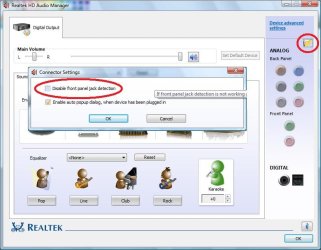
Since you've tried re-installing audio drivers, the issue does not appear to be related to 'drivers'. Would like to know if you get a 'pop-up' on the display, when the speaker cables are plugged in. Please ensure that you enable the 'auto pop-up dialogue box' feature (Refer to the image below)

1.JPG

If 'System Restore' is not working, you may try a 'clean Windows Reinstall' before going for another 'audio card'.

Hope this helps.
 

My Computer My Computer

OS
Windows 7 64bit
Thanks for all your help.
may have to go for the sound card option.
A fresh install of windows is not really viable.

Again, thanks to all.
 

My Computer My Computer

OS
7 ult 64bit
Yep mate and you will not be disappointed with the Xonar either.:)
 

My Computer My Computer

Computer type
PC/Desktop
Computer Manufacturer/Model Number
Own build (new) Desk1 / Asus ROG Win 7 / Desk2 1st build
OS
Desk1 7 Home Prem / Desk2 10 Pro / Main lap Asus ROG 10 Pro 2 laptop Toshiba 7 Pro Asus P2520 7 & 10
CPU
Desk1 i5 3750K / Laptop i7 GTX 860M / Desk2 i5 2500
Motherboard
Desk1 Asus P877-V / Desk2 Gigabyte H67 UD3H / Laptop ?
Memory
Desk1 8GB (1866) / Desk2 16GB (1333) / Laptop 8Gb DDR3
Graphics Card(s)
Desk 1& 2NVidia GTX 650 & Laptops on board Intel
Sound Card
Desk 1 & 2 -XONAR DG Realtek High Def audio Laptop
Monitor(s) Displays
Desk 1 Benq HD 2450 / Desk2 Philips 24" / Laptop 17.5"
Screen Resolution
1920x1080 D1 & D2 & Laptop 1
Hard Drives
Desk1 Samsung 120GB 830 SSD
Asus ROG 256GB 850 Pro SSD
Desk2 Samsung 840 256 SSD
Toshiba 120GB EVO
PSU
Desk 1 Corsair HX 1050/ Laptop ? / Desk 2 Corsair HX 650
Case
Desk 1 Cooler HAF XM ? Toshiba laptop / Desk2 Coolermaster
Cooling
Fans on all Desk1 -2 Desk2 - all Coolermasters 5 Laptop ?
Keyboard
Desk 1 MS Sidewinder X6 Desk 2 MS Sidewinder X 4
Mouse
Desk 1&2 - Gigabyte MS 900 gamer - laptop - Logitec wireless
Internet Speed
ADSL2+
Other Info
One other Desktop (tester) and spare Toshba laptop both with SSD's
Running Kaspersky 2016 ISS on all machines config'd identically
Logitec audio stereo systems on each machine (x3)
Canon MG5250MFC
Router/modem TP-Link running WPA2SK
Hi sledgehkg,

If 'Windows re-install' is not viable, a good-known 'Sound Card' is likely to fix the issue.
Good luck.
 

My Computer My Computer

OS
Windows 7 64bit
Hi sledgehkg,

If 'Windows re-install' is not viable, a good-known 'Sound Card' is likely to fix the issue.
Good luck.
Yep I agree with you Saurabh and the one I quoted is not expensive and the power requirements from memory are really minimal.
 

My Computer My Computer

Computer type
PC/Desktop
Computer Manufacturer/Model Number
Own build (new) Desk1 / Asus ROG Win 7 / Desk2 1st build
OS
Desk1 7 Home Prem / Desk2 10 Pro / Main lap Asus ROG 10 Pro 2 laptop Toshiba 7 Pro Asus P2520 7 & 10
CPU
Desk1 i5 3750K / Laptop i7 GTX 860M / Desk2 i5 2500
Motherboard
Desk1 Asus P877-V / Desk2 Gigabyte H67 UD3H / Laptop ?
Memory
Desk1 8GB (1866) / Desk2 16GB (1333) / Laptop 8Gb DDR3
Graphics Card(s)
Desk 1& 2NVidia GTX 650 & Laptops on board Intel
Sound Card
Desk 1 & 2 -XONAR DG Realtek High Def audio Laptop
Monitor(s) Displays
Desk 1 Benq HD 2450 / Desk2 Philips 24" / Laptop 17.5"
Screen Resolution
1920x1080 D1 & D2 & Laptop 1
Hard Drives
Desk1 Samsung 120GB 830 SSD
Asus ROG 256GB 850 Pro SSD
Desk2 Samsung 840 256 SSD
Toshiba 120GB EVO
PSU
Desk 1 Corsair HX 1050/ Laptop ? / Desk 2 Corsair HX 650
Case
Desk 1 Cooler HAF XM ? Toshiba laptop / Desk2 Coolermaster
Cooling
Fans on all Desk1 -2 Desk2 - all Coolermasters 5 Laptop ?
Keyboard
Desk 1 MS Sidewinder X6 Desk 2 MS Sidewinder X 4
Mouse
Desk 1&2 - Gigabyte MS 900 gamer - laptop - Logitec wireless
Internet Speed
ADSL2+
Other Info
One other Desktop (tester) and spare Toshba laptop both with SSD's
Running Kaspersky 2016 ISS on all machines config'd identically
Logitec audio stereo systems on each machine (x3)
Canon MG5250MFC
Router/modem TP-Link running WPA2SK
Thank you for the valuable input 'ICit2lol'; appreciate it.


My Computer My Computer

OS
Windows 7 64bit
Thank you for the valuable input 'ICit2lol'; appreciate it.


Well thanks as coming from you Saurabh I take that as a real compliment:)
 

My Computer My Computer

Computer type
PC/Desktop
Computer Manufacturer/Model Number
Own build (new) Desk1 / Asus ROG Win 7 / Desk2 1st build
OS
Desk1 7 Home Prem / Desk2 10 Pro / Main lap Asus ROG 10 Pro 2 laptop Toshiba 7 Pro Asus P2520 7 & 10
CPU
Desk1 i5 3750K / Laptop i7 GTX 860M / Desk2 i5 2500
Motherboard
Desk1 Asus P877-V / Desk2 Gigabyte H67 UD3H / Laptop ?
Memory
Desk1 8GB (1866) / Desk2 16GB (1333) / Laptop 8Gb DDR3
Graphics Card(s)
Desk 1& 2NVidia GTX 650 & Laptops on board Intel
Sound Card
Desk 1 & 2 -XONAR DG Realtek High Def audio Laptop
Monitor(s) Displays
Desk 1 Benq HD 2450 / Desk2 Philips 24" / Laptop 17.5"
Screen Resolution
1920x1080 D1 & D2 & Laptop 1
Hard Drives
Desk1 Samsung 120GB 830 SSD
Asus ROG 256GB 850 Pro SSD
Desk2 Samsung 840 256 SSD
Toshiba 120GB EVO
PSU
Desk 1 Corsair HX 1050/ Laptop ? / Desk 2 Corsair HX 650
Case
Desk 1 Cooler HAF XM ? Toshiba laptop / Desk2 Coolermaster
Cooling
Fans on all Desk1 -2 Desk2 - all Coolermasters 5 Laptop ?
Keyboard
Desk 1 MS Sidewinder X6 Desk 2 MS Sidewinder X 4
Mouse
Desk 1&2 - Gigabyte MS 900 gamer - laptop - Logitec wireless
Internet Speed
ADSL2+
Other Info
One other Desktop (tester) and spare Toshba laptop both with SSD's
Running Kaspersky 2016 ISS on all machines config'd identically
Logitec audio stereo systems on each machine (x3)
Canon MG5250MFC
Router/modem TP-Link running WPA2SK
hi all.
For some reason my realtek audio has stopped working on my windows7 64bit system.
I just turned it on this morning. No sound.
I checked in playback devices and noted that under 'speakers' it tells me "Realtek high definition audio not plugged in"
Under that there is 'Realtek Digital Output' and this says "Realtek High Definition Audio Default Device"

The speakers are plugged in an I have tested them on another system to check they are working.
I have opened the Realtek HD Audio Manager and noticed that all analog back and front panel jack inputs are grayed out.
I have uninstalled all Realtek drivers and software. I have rebooted and let windows find the audio devices again and install drivers.
This made no difference at all.
I have cleaned the registry of anything relating to Realtek.
I have downloaded the latest driver software from the Realtek web site and installed that. This makes no difference either.
I have set the bios back to default. This has made no difference.
In the bios I have set the HD AUDIO option to both 'auto' and 'off'. still no sound.
All connections are in the correct jack sockets.

Could you please help me to get audio back on my system?
I have pretty much run out of things to try.

Thank You.

click your start button
open the run command and type "services.msc"
when in the services group scroll down till you see 2 windows audio services.
windows audio and windows audio endpoint.
right click the first one and restart the service. in the 1st one click the recovery tab and change all to restart the service.
do the exact same thing to the next audio service right below the first one.
 

My Computer My Computer

Computer Manufacturer/Model Number
asus k53e bbr23 laptop
OS
windows 7 x64 pro sp1
CPU
intel i5 2540m
Motherboard
asus
Memory
8 gig ddr3 12800
Graphics Card(s)
intel hd 3000
Sound Card
realtek hd audio
Screen Resolution
1366*768 hd
Hard Drives
(1) ST3250312AS ATA Device (2) TOSHIBA External USB 3.0 USB Device
Mouse
lenovo usb mouse
Internet Speed
20Mbps/1Mbps
Resolve Sound and Audio Issue.

Hey Guys,

Before 2 months. I faced out such problem in my Laptop. For the same i paid Rs. 300 because i didn't have idea How to resolve. One my Friend suggested my to Re-Store the Laptop first even it will not work then guest download Audio software and re-install it . I did and I got my Laptop working.. so i would like to suggest you to go with these above give TWO points Even it will not work then let me know. Again i have give below these Point which you need to follow First.

1. Re-Store the PC or Laptop.
2. Re-Install the Audio software.
 

My Computer My Computer

OS
windows 7
Back
Top