
PosslPussl
New member
- Local time
- 7:00 PM
- Messages
- 20
Hello all,
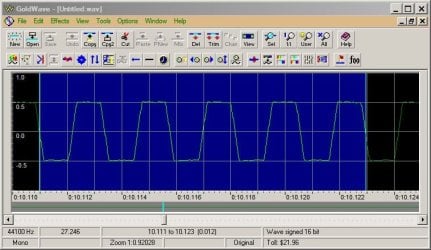
the Realtek HD audio on my Hp desktop, win7 64bit Pro, has never handled input signals properly, any line in or Mic in signal gets clipped at half level. So if I want to record input - I usually use Goldwave or Total recorder - then the output file is clipped at half max.
I've attached a screenshot - I recorded a pure sine wave 400Hz line-in input from a signal generator using Goldwave, and you can see what's happened to it. It doesn't look like a pure sine wave any more, and it doesn't sound like it either.
I could have recorded the same signal with Total Recorder, then displayed the output file in Goldwave, it would have looked the same - so I assume it's the Realtek audio that's doing the clipping, before the signal ever gets to the recording software.
I tried a driver update - R 2.82 Device Manager: 6.0.1.8186, hasn't made any difference.The only sound I can input that doesn't have this problem is the USB mic from my external webcam. That leads me to think that I could get line in to record properly by using an external USB line in device, but I'd still like to know what's going on with Realtek.
Thanks, PosslPussl
the Realtek HD audio on my Hp desktop, win7 64bit Pro, has never handled input signals properly, any line in or Mic in signal gets clipped at half level. So if I want to record input - I usually use Goldwave or Total recorder - then the output file is clipped at half max.
I've attached a screenshot - I recorded a pure sine wave 400Hz line-in input from a signal generator using Goldwave, and you can see what's happened to it. It doesn't look like a pure sine wave any more, and it doesn't sound like it either.
I could have recorded the same signal with Total Recorder, then displayed the output file in Goldwave, it would have looked the same - so I assume it's the Realtek audio that's doing the clipping, before the signal ever gets to the recording software.
I tried a driver update - R 2.82 Device Manager: 6.0.1.8186, hasn't made any difference.The only sound I can input that doesn't have this problem is the USB mic from my external webcam. That leads me to think that I could get line in to record properly by using an external USB line in device, but I'd still like to know what's going on with Realtek.
Thanks, PosslPussl
Attachments
My Computer
At a glance
Windows 7 Professional 64bit with SP1Intel(R) Core(TM)2 Duo CPU4G
- Computer type
- PC/Desktop
- Computer Manufacturer/Model Number
- HP
- OS
- Windows 7 Professional 64bit with SP1
- CPU
- Intel(R) Core(TM)2 Duo CPU
- Memory
- 4G
- Sound Card
- realtek HD Audio
- Antivirus
- Microsoft Security Essentials
- Browser
- firefox, chrome