Solved Realtek HD Audio Manager Equalizer not working

GoUwSiE69

New member
Local time
10:17 AM
Messages
10
Hello,

I just bought a MSI Z77-G43 motherboard and I did a clean installation of Windows 7 Ultimate 64bit and when it started up the audio was already working which is normal. Then I installed the basic drivers (chipset,lan,audio).(Ok just so you know the situation)

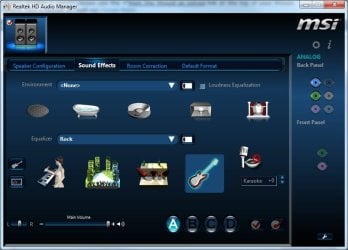
Now the volume changes on the new Realtek software are working, but the EQ presets, Graphic EQ, Environment settings, Voice Cancellation and Karaoke settings are not working. So basically the whole "Sound Effects" tab is not doing anything to the sound when being adjusted.

What could the problem be here ?
 

Attachments

  • Realtek HD Audio Manager.jpg
    Realtek HD Audio Manager.jpg
    44.9 KB · Views: 139

My Computer My Computer

At a glance

Windows 8 Pro 64bitIntel Core i5 3550 3.3GHz8GB Corsair XMS DDR3 1600MHzGalaxy GeForce 9800GT
OS
Windows 8 Pro 64bit
CPU
Intel Core i5 3550 3.3GHz
Motherboard
MSI Z77-G43
Memory
8GB Corsair XMS DDR3 1600MHz
Graphics Card(s)
Galaxy GeForce 9800GT
Sound Card
Realtek HD (onboard)
Monitor(s) Displays
DELL ST2310 LCD 23"
Screen Resolution
1920x1080
Hard Drives
Seagate 160GB (Primary)
Seagate 1TB (Secondary)
PSU
Huntkey 550W
Case
CoolerMaster Elite Nvidia Edition
Cooling
Stock
Keyboard
Logitech Multimedia Keyboard
Mouse
Logitech LS1
Internet Speed
HSPA+
Hi and welcome to Seven Forums.

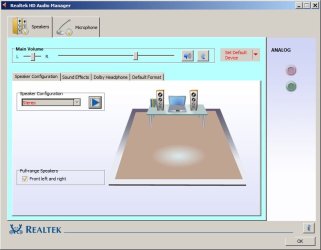
Have you the correct version of Realtek HDA ? this is how mine looks.

Untitled.jpg
 

My Computer My Computer

At a glance

Win7 H.Prem. 32bit+SP1
Computer Manufacturer/Model Number
Look in my Signature.
OS
Win7 H.Prem. 32bit+SP1
Yes I have to correct version it is the latest from Realtek and it came with my motherboard CD
 

My Computer My Computer

At a glance

Windows 8 Pro 64bitIntel Core i5 3550 3.3GHz8GB Corsair XMS DDR3 1600MHzGalaxy GeForce 9800GT
OS
Windows 8 Pro 64bit
CPU
Intel Core i5 3550 3.3GHz
Motherboard
MSI Z77-G43
Memory
8GB Corsair XMS DDR3 1600MHz
Graphics Card(s)
Galaxy GeForce 9800GT
Sound Card
Realtek HD (onboard)
Monitor(s) Displays
DELL ST2310 LCD 23"
Screen Resolution
1920x1080
Hard Drives
Seagate 160GB (Primary)
Seagate 1TB (Secondary)
PSU
Huntkey 550W
Case
CoolerMaster Elite Nvidia Edition
Cooling
Stock
Keyboard
Logitech Multimedia Keyboard
Mouse
Logitech LS1
Internet Speed
HSPA+
The latest Realtek HDA drivers are version R2.70. It could be because your OS is 64bit, mine is 32bit.
 

My Computer My Computer

At a glance

Win7 H.Prem. 32bit+SP1
Computer Manufacturer/Model Number
Look in my Signature.
OS
Win7 H.Prem. 32bit+SP1
I need someone that has had this problem to help me. It is more specific to the MSI motherboard, not windows
 

My Computer My Computer

At a glance

Windows 8 Pro 64bitIntel Core i5 3550 3.3GHz8GB Corsair XMS DDR3 1600MHzGalaxy GeForce 9800GT
OS
Windows 8 Pro 64bit
CPU
Intel Core i5 3550 3.3GHz
Motherboard
MSI Z77-G43
Memory
8GB Corsair XMS DDR3 1600MHz
Graphics Card(s)
Galaxy GeForce 9800GT
Sound Card
Realtek HD (onboard)
Monitor(s) Displays
DELL ST2310 LCD 23"
Screen Resolution
1920x1080
Hard Drives
Seagate 160GB (Primary)
Seagate 1TB (Secondary)
PSU
Huntkey 550W
Case
CoolerMaster Elite Nvidia Edition
Cooling
Stock
Keyboard
Logitech Multimedia Keyboard
Mouse
Logitech LS1
Internet Speed
HSPA+
try right clicking the volume icon in the systems tray and select playback devices, make sure realtek is selected as default, if it is not showing right click in the playback devices window and select show hidden/disabled devices, then set it as default.
 

My Computer My Computer

At a glance

Microsoft Windows 7 Home Premium 64-bit 7600IIx4 amd athelon 635 processor2x2gbati radeon HD 5450
Computer Manufacturer/Model Number
Hewlett packard/p6512uk
OS
Microsoft Windows 7 Home Premium 64-bit 7600
CPU
IIx4 amd athelon 635 processor
Motherboard
FOXCONN 2AA9
Memory
2x2gb
Graphics Card(s)
ati radeon HD 5450
Sound Card
(1) Realtek High Definition Audio (2) AMD High Definition
Monitor(s) Displays
samsung lcd tv 32"
Screen Resolution
1360x 768
Hard Drives
(1) WDC WD10 01FAES-60Z2A0 SATA Disk Device (2) Maxtor OneTouch USB Device (3) ST310003 33AS USB Device (4) WD My Book 1111 USB Device
PSU
?
Cooling
air!
Keyboard
wireless hp
Mouse
wireless Hp,optical
Internet Speed
1.10mb/s
Antivirus
MSE
Browser
Firefox
I don't have an MSI Z77 board. But I do have an ASUS P8Z77-V Pro board (same chipset?), which uses the Realtek ALC892 chip for sound.

And when I installed Win7 and grabbed the latest Realtek 2.70 driver I was quite startled to see the new "skin" which appeared. I have a second machine with an ASUS P5Q3 board, which has a Realtek ALC1200 chip for sound, and the same 2.70 driver installed on that machine still presents the old familar "skin".

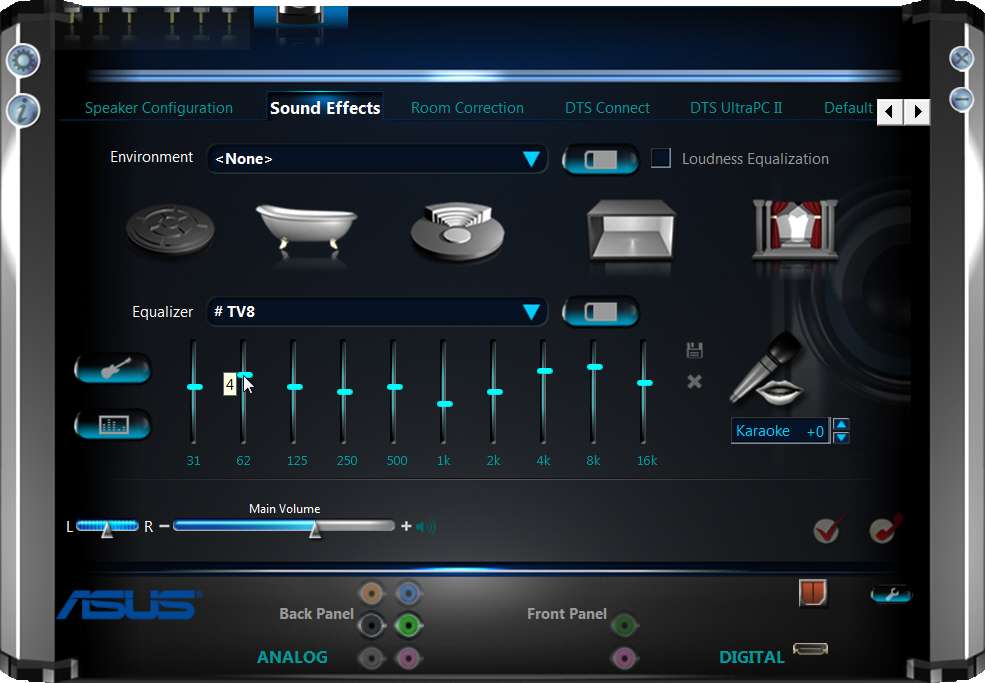
Anyway, with my P8Z77-V Pro board and ALC892 chip, the Realtek HD Audio Manager looks like this when I push the EQ button:

asusp8z77alc892realtek2.jpg


So, do the EQ button on your interface even work? Or is it grayed-out and cannot be pushed at all?

What is the Realtek chip on that MSI board?
 

My Computer My Computer

At a glance

Windows 7 Pro x64 (1), Win7 Pro X64 (2)i5-3350p 3.1Ghz/6MB-cache (1); E8400 3.0Ghz/6...8GB PC3-12800 DDR3 (1); 4GB PC3-10600 DDR3 (2)ATI HD7750 (1), (see TV cards); ATI R7 250 (2)
Computer type
PC/Desktop
Computer Manufacturer/Model Number
Home-built, two systems (1) and (2)
OS
Windows 7 Pro x64 (1), Win7 Pro X64 (2)
CPU
i5-3350p 3.1Ghz/6MB-cache (1); E8400 3.0Ghz/6MB-cache (2)
Motherboard
ASUS P8Z77-V Pro (1); ASUS P5Q3 (2)
Memory
8GB PC3-12800 DDR3 (1); 4GB PC3-10600 DDR3 (2)
Graphics Card(s)
ATI HD7750 (1), (see TV cards); ATI R7 250 (2)
Sound Card
Realtek ALC892 HD Audio (1); Realtek ALC1200 HD Audio (2)
Monitor(s) Displays
Eizo HD2441W LCD, Eizo S2433W (1); Eizo 24" S2433W (2)
Screen Resolution
1920x1200, 1920x1200 (1); 1920x1200 (2)
Hard Drives
(1) 1TB SATA-II (7200RPM), 2x2TB SATA-III (7200RPM), 250GB SATA-III (10000RPM) for OS; 2x2TB external USB 3.0

(2) 320GB SATA-II (7200RPM), 750GB SATA-II (7200RPM), 150GB SATA-II (10000RPM) for OS; 2TB external USB 3.0
PSU
Nesteq ECS-6001 600W (1); Nesteq ECS-5001 500W (2)
Case
Acousti-Case 360 (1) and (2)
Cooling
Noctua NH-U12P SE2 for CPU, 2x120mm case fans (1) and (2)
Keyboard
IBM PS/2 (1) and (2)
Mouse
Logitech MX Revolution wireless (1); Microsoft wired (2)
Internet Speed
100mbps down / 10mbps up
Antivirus
Microsoft Security Essentials; Malwarebyte Anti-Malware Pro
Browser
Firefox
Other Info
Ceton InfiniTV 4-tuner cablecard-enabled TV card as well as Hauppauge HVR-2250 OTA/ATSC 2-tuner TV card in (1), running under Win7 WMC
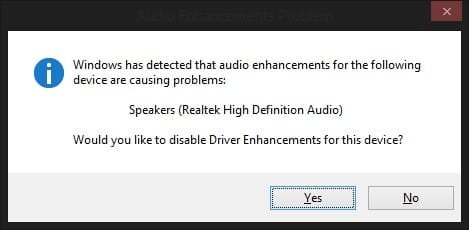
I can change the graphic EQ just like you are doing in that picture it is not grayed out. But changing the EQ does not have any effect on the sound at all. And I right clicked on the volume icon lower left corner, and when I click on Playback Devices this message comes up (Screenshot) but Realtek is set to default yes. And not sure how to check the chip but i think it is ALC892...
 

Attachments

  • Realtek.jpg
    Realtek.jpg
    12.6 KB · Views: 51

My Computer My Computer

At a glance

Windows 8 Pro 64bitIntel Core i5 3550 3.3GHz8GB Corsair XMS DDR3 1600MHzGalaxy GeForce 9800GT
OS
Windows 8 Pro 64bit
CPU
Intel Core i5 3550 3.3GHz
Motherboard
MSI Z77-G43
Memory
8GB Corsair XMS DDR3 1600MHz
Graphics Card(s)
Galaxy GeForce 9800GT
Sound Card
Realtek HD (onboard)
Monitor(s) Displays
DELL ST2310 LCD 23"
Screen Resolution
1920x1080
Hard Drives
Seagate 160GB (Primary)
Seagate 1TB (Secondary)
PSU
Huntkey 550W
Case
CoolerMaster Elite Nvidia Edition
Cooling
Stock
Keyboard
Logitech Multimedia Keyboard
Mouse
Logitech LS1
Internet Speed
HSPA+
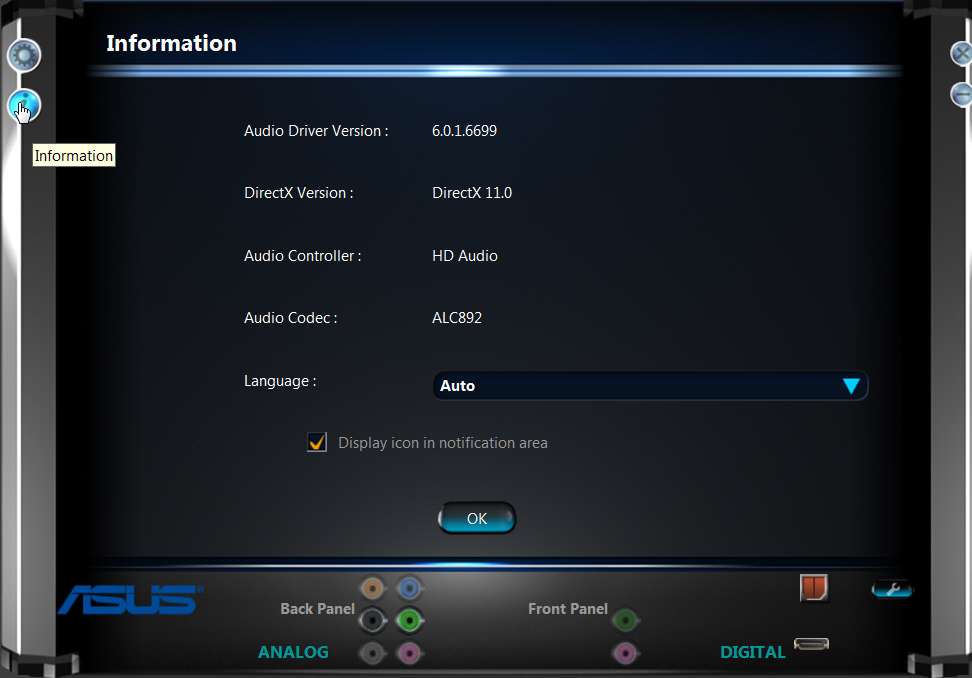
In the new skin there is an "I" (information) button in the upper-left of the display. If you click on it a new output appears, with the chip name toward the bottom.

But I actually looked at the specs for your MSI board, and it does indeed have an ALC892.

realtekeq4.jpg


You're sure you've got your speakers connected to that lime-green connector on the back (assuming you have 2-channel stereo sound)?

Or do you have a multi-channel multi-speaker sound setup? Do you have digital output (optical or HDMI) for sound, or are you using analog speakers?
 

My Computer My Computer

At a glance

Windows 7 Pro x64 (1), Win7 Pro X64 (2)i5-3350p 3.1Ghz/6MB-cache (1); E8400 3.0Ghz/6...8GB PC3-12800 DDR3 (1); 4GB PC3-10600 DDR3 (2)ATI HD7750 (1), (see TV cards); ATI R7 250 (2)
Computer type
PC/Desktop
Computer Manufacturer/Model Number
Home-built, two systems (1) and (2)
OS
Windows 7 Pro x64 (1), Win7 Pro X64 (2)
CPU
i5-3350p 3.1Ghz/6MB-cache (1); E8400 3.0Ghz/6MB-cache (2)
Motherboard
ASUS P8Z77-V Pro (1); ASUS P5Q3 (2)
Memory
8GB PC3-12800 DDR3 (1); 4GB PC3-10600 DDR3 (2)
Graphics Card(s)
ATI HD7750 (1), (see TV cards); ATI R7 250 (2)
Sound Card
Realtek ALC892 HD Audio (1); Realtek ALC1200 HD Audio (2)
Monitor(s) Displays
Eizo HD2441W LCD, Eizo S2433W (1); Eizo 24" S2433W (2)
Screen Resolution
1920x1200, 1920x1200 (1); 1920x1200 (2)
Hard Drives
(1) 1TB SATA-II (7200RPM), 2x2TB SATA-III (7200RPM), 250GB SATA-III (10000RPM) for OS; 2x2TB external USB 3.0

(2) 320GB SATA-II (7200RPM), 750GB SATA-II (7200RPM), 150GB SATA-II (10000RPM) for OS; 2TB external USB 3.0
PSU
Nesteq ECS-6001 600W (1); Nesteq ECS-5001 500W (2)
Case
Acousti-Case 360 (1) and (2)
Cooling
Noctua NH-U12P SE2 for CPU, 2x120mm case fans (1) and (2)
Keyboard
IBM PS/2 (1) and (2)
Mouse
Logitech MX Revolution wireless (1); Microsoft wired (2)
Internet Speed
100mbps down / 10mbps up
Antivirus
Microsoft Security Essentials; Malwarebyte Anti-Malware Pro
Browser
Firefox
Other Info
Ceton InfiniTV 4-tuner cablecard-enabled TV card as well as Hauppauge HVR-2250 OTA/ATSC 2-tuner TV card in (1), running under Win7 WMC
Just using normal Logitech 2.1 speakers plugged into the lime green jack... Stereo yes. I noticed your driver version is later than mine, latest one I could download from MSI website is 6.0.1.6738 wonder if that would help.. Will try it and let you know if my problem is solved.
 

Attachments

  • Realtek Info.jpg
    Realtek Info.jpg
    21.3 KB · Views: 28
Last edited:

My Computer My Computer

At a glance

Windows 8 Pro 64bitIntel Core i5 3550 3.3GHz8GB Corsair XMS DDR3 1600MHzGalaxy GeForce 9800GT
OS
Windows 8 Pro 64bit
CPU
Intel Core i5 3550 3.3GHz
Motherboard
MSI Z77-G43
Memory
8GB Corsair XMS DDR3 1600MHz
Graphics Card(s)
Galaxy GeForce 9800GT
Sound Card
Realtek HD (onboard)
Monitor(s) Displays
DELL ST2310 LCD 23"
Screen Resolution
1920x1080
Hard Drives
Seagate 160GB (Primary)
Seagate 1TB (Secondary)
PSU
Huntkey 550W
Case
CoolerMaster Elite Nvidia Edition
Cooling
Stock
Keyboard
Logitech Multimedia Keyboard
Mouse
Logitech LS1
Internet Speed
HSPA+
In the new skin there is an "I" (information) button in the upper-left of the display. If you click on it a new output appears, with the chip name toward the bottom.

But I actually looked at the specs for your MSI board, and it does indeed have an ALC892.

realtekeq4.jpg


You're sure you've got your speakers connected to that lime-green connector on the back (assuming you have 2-channel stereo sound)?

Or do you have a multi-channel multi-speaker sound setup? Do you have digital output (optical or HDMI) for sound, or are you using analog speakers?

How do you get your screenshot showing so big in your post, I go to attachment and attach photo. Is that how you do it?
 

My Computer My Computer

At a glance

Windows 8 Pro 64bitIntel Core i5 3550 3.3GHz8GB Corsair XMS DDR3 1600MHzGalaxy GeForce 9800GT
OS
Windows 8 Pro 64bit
CPU
Intel Core i5 3550 3.3GHz
Motherboard
MSI Z77-G43
Memory
8GB Corsair XMS DDR3 1600MHz
Graphics Card(s)
Galaxy GeForce 9800GT
Sound Card
Realtek HD (onboard)
Monitor(s) Displays
DELL ST2310 LCD 23"
Screen Resolution
1920x1080
Hard Drives
Seagate 160GB (Primary)
Seagate 1TB (Secondary)
PSU
Huntkey 550W
Case
CoolerMaster Elite Nvidia Edition
Cooling
Stock
Keyboard
Logitech Multimedia Keyboard
Mouse
Logitech LS1
Internet Speed
HSPA+
First, the screenshot itself was taken "true size" on my monitor (with Fullshot, which is the software I use... instead of "snipping tool" or SNAGIT or something else), where my 24" monitor is already high-resolution 1920x1200 so the thing I'm capturing is already large (in pixels).

Then, I store my images online, at ImageShack. Free for the first 1000, but if you want to go beyond that you have to sign up for "Pro" at $2/month. Seems reasonable.

Then, when you post pictures there, you can get them automatically resized (downward, to save space on their server), which I do NOT do. But you can specify for what target display screen your image is theoretically intended for, and they will automatically resize appropriately. This is a compromise, and generally I DO have my uploads done specifying "1280x1024, 19" screen". For most screenshots this really is fine and doesn't actually result in any resizing. There is also "1600x1200, 21" screen".

They also have (a) "optimize without resize", which I assume means "recompress to somewhat lower quality JPG but leave original dimensions", and (b) "do not resize" if you want the true original.

If an image retrieved will not display completely in your browser window, any good browser and web site forum software will display something like "click on this bar to display in true, original size". So the browser displays a miniature, like a thumbnail, and if you click on the bar above the image you'll get the true image presented.

Then, to "imbed" that image in my posts, I do NOT use the "attachments" dialog (of this forum's software). Instead, I use the generalized "imbed image" method which virtually all forum software understands. You simply bound your remote hosting site URL for the image (from ImageShack, it's called "direct link" when you post something there) with a "start image" delimiter and an "end image" delimiter. This is simply "-[-i-m-g-]" and "-[-/-i-m-g-]" at either end of the URL (which you've COPY'd from ImageShack's direct link, and then PASTE'd into this manual image insertion), without the quotes and without those dashes.

So, for example, here is one of my "gems". It is a "FULL SIZE, i.e. no resize" image which shows the component interconnects for my bedroom sound system. I produced it with Photoshop, and it's very large (4196x3096) in its true size (which you will be able to see here if you click to get it to present in true size)... but also extremely detailed.

Note that you'll have to click on the image, which will still not give you the true size (depending on your browser). But the cursor will change to now provide a "+". And if you click on the image a second time when that "+" is showing, it will now blow up again to its true size (and the cursor will change to a "-" for shrinking down if you click again).

(NOTE: depending on your browser, and the width of your browser window, and the resolution of your monitor, you may or may not get that bar displayed over the thumbnail image presented by the forum software to "click here to display image in original size". You may simply have this "thumbnail" displayed quite large, but if you move the mouse over it the cursor will change to a hand indicating that it's actually a "URL link", but for an image rather than just a URL link to some web page. Now you can just click on the image itself to go to the first stage of true-size presentation enlargement, which is really ImageShack delivering that image via the "direct link" URL itself.)
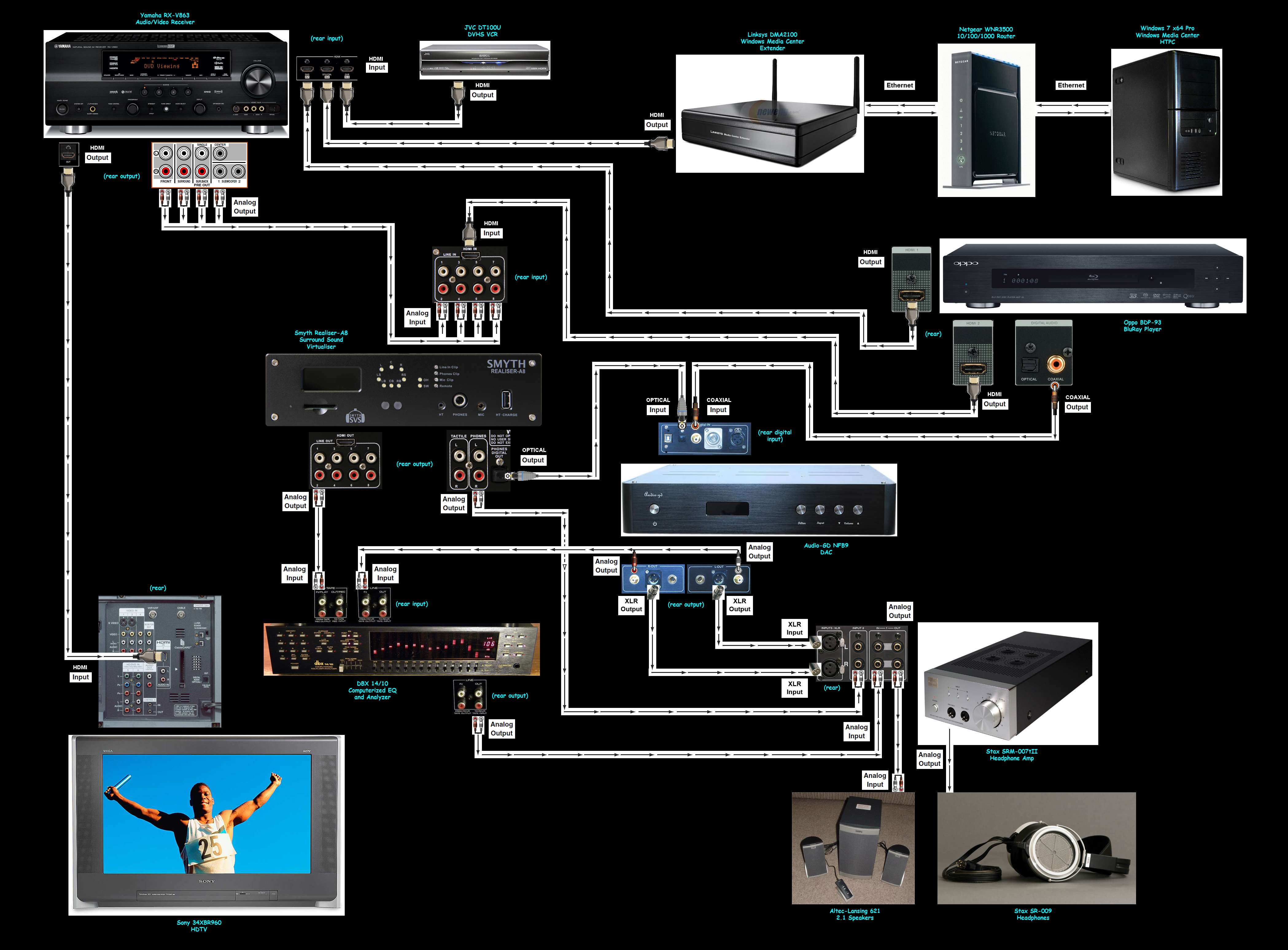

downstairs.jpg


The advantage of this "startimage, URL, endimage" approach is that it's very easy to insert any image you want directly inline in a post, anywhere you want... kind of just like the text itself. That's really why I use ImageShack, as my 3rd-party web-based image hosting site, to be able to conveniently insert images instream in my posts.

 
Last edited:

My Computer My Computer

At a glance

Windows 7 Pro x64 (1), Win7 Pro X64 (2)i5-3350p 3.1Ghz/6MB-cache (1); E8400 3.0Ghz/6...8GB PC3-12800 DDR3 (1); 4GB PC3-10600 DDR3 (2)ATI HD7750 (1), (see TV cards); ATI R7 250 (2)
Computer type
PC/Desktop
Computer Manufacturer/Model Number
Home-built, two systems (1) and (2)
OS
Windows 7 Pro x64 (1), Win7 Pro X64 (2)
CPU
i5-3350p 3.1Ghz/6MB-cache (1); E8400 3.0Ghz/6MB-cache (2)
Motherboard
ASUS P8Z77-V Pro (1); ASUS P5Q3 (2)
Memory
8GB PC3-12800 DDR3 (1); 4GB PC3-10600 DDR3 (2)
Graphics Card(s)
ATI HD7750 (1), (see TV cards); ATI R7 250 (2)
Sound Card
Realtek ALC892 HD Audio (1); Realtek ALC1200 HD Audio (2)
Monitor(s) Displays
Eizo HD2441W LCD, Eizo S2433W (1); Eizo 24" S2433W (2)
Screen Resolution
1920x1200, 1920x1200 (1); 1920x1200 (2)
Hard Drives
(1) 1TB SATA-II (7200RPM), 2x2TB SATA-III (7200RPM), 250GB SATA-III (10000RPM) for OS; 2x2TB external USB 3.0

(2) 320GB SATA-II (7200RPM), 750GB SATA-II (7200RPM), 150GB SATA-II (10000RPM) for OS; 2TB external USB 3.0
PSU
Nesteq ECS-6001 600W (1); Nesteq ECS-5001 500W (2)
Case
Acousti-Case 360 (1) and (2)
Cooling
Noctua NH-U12P SE2 for CPU, 2x120mm case fans (1) and (2)
Keyboard
IBM PS/2 (1) and (2)
Mouse
Logitech MX Revolution wireless (1); Microsoft wired (2)
Internet Speed
100mbps down / 10mbps up
Antivirus
Microsoft Security Essentials; Malwarebyte Anti-Malware Pro
Browser
Firefox
Other Info
Ceton InfiniTV 4-tuner cablecard-enabled TV card as well as Hauppauge HVR-2250 OTA/ATSC 2-tuner TV card in (1), running under Win7 WMC
Problem Solved, latest driver from the MSI website for my motherboard worked, sounds horrible though but at least it's working.
 

My Computer My Computer

At a glance

Windows 8 Pro 64bitIntel Core i5 3550 3.3GHz8GB Corsair XMS DDR3 1600MHzGalaxy GeForce 9800GT
OS
Windows 8 Pro 64bit
CPU
Intel Core i5 3550 3.3GHz
Motherboard
MSI Z77-G43
Memory
8GB Corsair XMS DDR3 1600MHz
Graphics Card(s)
Galaxy GeForce 9800GT
Sound Card
Realtek HD (onboard)
Monitor(s) Displays
DELL ST2310 LCD 23"
Screen Resolution
1920x1080
Hard Drives
Seagate 160GB (Primary)
Seagate 1TB (Secondary)
PSU
Huntkey 550W
Case
CoolerMaster Elite Nvidia Edition
Cooling
Stock
Keyboard
Logitech Multimedia Keyboard
Mouse
Logitech LS1
Internet Speed
HSPA+
When you click on the speaker icon and the mixer comes up, you can select your output sound, and click on the speaker above it, this opens up the speaker properties, did you check if the enhancements in the enhancement tabs were activated? One of this actually allows realteck to use it's EQ and make the changes detected by windows and your audio output.
 

My Computer My Computer

At a glance

Windows 7 professional X64AMD A10-5800K OC@ 4.4Ghz.8GB Kingston HyperX Blu 1333mhzXFX HD7870 2GB Core Edition
Computer type
PC/Desktop
OS
Windows 7 professional X64
CPU
AMD A10-5800K OC@ 4.4Ghz.
Motherboard
Gigabyte F2A85X-UP4
Memory
8GB Kingston HyperX Blu 1333mhz
Graphics Card(s)
XFX HD7870 2GB Core Edition
Monitor(s) Displays
Acer AL2216W
Screen Resolution
1680x1050
Hard Drives
Seagate Barracuda 500gb 7200rpm
Seagate Barracuda 1.5TB 7200rpm
PSU
Cooler Master Silent Pro M 850W
Case
Thermaltake Commander MS-I
Cooling
Cooler Master N520
Mouse
Logitech M504
Internet Speed
10Mbps
Hi all,

My first post on sevenforums!! :)

I know this is an old thread but I also agree that these onboard sound chips are crap and the graphic equaliser doesn't really do anything.
I run my PC downstairs on my stereo and I find it impossible to turn the low low bass down if not at all. You can move all the EQ sliders up and down, and all it does is dip in and out of some pathetic frequency range and the bass just comes back. If you adjust some of the mid and higher frequencies they work a little better, still lame. Bass just doesn't go lower than a certain point.

With my old Sound blaster Audigy 2 the bass was manageable with a simple bass slider and totally gone once turned to minimum. Unfortunately the microphone doesn't work with 8gb of ram with that sound card, so using onboard sound for now and hate it lol :)

Would anybody be able to recommend a decent sound card with correct bass adjustment like my old Audigy 2?

Nice forum here!

Thanks very much :)

Plugz
 

My Computer My Computer

At a glance

64 bit Windows 7
OS
64 bit Windows 7
Would anybody be able to recommend a decent sound card with correct bass adjustment like my old Audigy 2?
When I upgraded from WinXP to Win7 and got a new motherboard, I could no longer use my Audigy 2. There was an onboard Realtek chip for sound, but I kind of wanted my old trusty Audigy 2... although I couldn't have it.

So instead I went with their X-Fi Titanium card (PCIe), which was very much like their Audigy 2 but more capable (e.g. it had S/PDIF optical input/output). Its software also had the simple bass/treble sliders rather than an EQ.

I subsequently took it out of my machine and reverted to the Realtek onboard chip for sound, but I still have my little-used X-Fi in a box (if you're interested in acquiring it).
 

My Computer My Computer

At a glance

Windows 7 Pro x64 (1), Win7 Pro X64 (2)i5-3350p 3.1Ghz/6MB-cache (1); E8400 3.0Ghz/6...8GB PC3-12800 DDR3 (1); 4GB PC3-10600 DDR3 (2)ATI HD7750 (1), (see TV cards); ATI R7 250 (2)
Computer type
PC/Desktop
Computer Manufacturer/Model Number
Home-built, two systems (1) and (2)
OS
Windows 7 Pro x64 (1), Win7 Pro X64 (2)
CPU
i5-3350p 3.1Ghz/6MB-cache (1); E8400 3.0Ghz/6MB-cache (2)
Motherboard
ASUS P8Z77-V Pro (1); ASUS P5Q3 (2)
Memory
8GB PC3-12800 DDR3 (1); 4GB PC3-10600 DDR3 (2)
Graphics Card(s)
ATI HD7750 (1), (see TV cards); ATI R7 250 (2)
Sound Card
Realtek ALC892 HD Audio (1); Realtek ALC1200 HD Audio (2)
Monitor(s) Displays
Eizo HD2441W LCD, Eizo S2433W (1); Eizo 24" S2433W (2)
Screen Resolution
1920x1200, 1920x1200 (1); 1920x1200 (2)
Hard Drives
(1) 1TB SATA-II (7200RPM), 2x2TB SATA-III (7200RPM), 250GB SATA-III (10000RPM) for OS; 2x2TB external USB 3.0

(2) 320GB SATA-II (7200RPM), 750GB SATA-II (7200RPM), 150GB SATA-II (10000RPM) for OS; 2TB external USB 3.0
PSU
Nesteq ECS-6001 600W (1); Nesteq ECS-5001 500W (2)
Case
Acousti-Case 360 (1) and (2)
Cooling
Noctua NH-U12P SE2 for CPU, 2x120mm case fans (1) and (2)
Keyboard
IBM PS/2 (1) and (2)
Mouse
Logitech MX Revolution wireless (1); Microsoft wired (2)
Internet Speed
100mbps down / 10mbps up
Antivirus
Microsoft Security Essentials; Malwarebyte Anti-Malware Pro
Browser
Firefox
Other Info
Ceton InfiniTV 4-tuner cablecard-enabled TV card as well as Hauppauge HVR-2250 OTA/ATSC 2-tuner TV card in (1), running under Win7 WMC
Thanks for the info dsperber,

I'll have a look out for an X fi card. My new board doesn't have the old PCI slots and only the new small PCI e slots so buying new seems my best option.
Lets hope I can get one reasonably priced!

Thanx m8

Plugz
 

My Computer My Computer

At a glance

64 bit Windows 7
OS
64 bit Windows 7
Hi, i am new here. There is a problem with "Realtek Equalizer Custom Preset". I am using ASUS X550DP Based Laptop. When i reopening player, the equalizer must be reselection again for changes. Any sugestion?
 

My Computer My Computer

At a glance

Windows 7 Ultimate x64AMD A10-5750M APU with Radeon(tm) HD 8650G Gr...SAMSUNG M471B5173QH0-YK0 4GB PC1600 Single Ch...AMD Radeon HD 8650G + 8670M Dual-Graphics
Computer type
Laptop
Computer Manufacturer/Model Number
ASUS X550DP
OS
Windows 7 Ultimate x64
CPU
AMD A10-5750M APU with Radeon(tm) HD 8650G Graphics
Motherboard
ASUSTek COMPUTER INC. X550DP 1.0
Memory
SAMSUNG M471B5173QH0-YK0 4GB PC1600 Single Channel
Graphics Card(s)
AMD Radeon HD 8650G + 8670M Dual-Graphics
Hard Drives
WDC WD10 JPVX-80JC3T0 1 TB
Antivirus
Microsoft Security Essentials
Browser
Mozilla Firefox Beta, Spark Browser
Hello,

Did you create a new profile?
 

My Computer My Computer

At a glance

64 bit Windows 7
OS
64 bit Windows 7
Back
Top