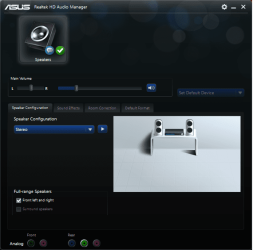
As the title says
When going to the settings of my Asus Realtek HD Audio Manager , i am not able to set different audio to come to different ports, such as one audio to Spekers and different audio to headphones.
https://gyazo.com/d8588aedd0d7af8b330ce3d00b1cd69c
I need this option to play one sound on speakers and the other sound separeted from the speakers to play on headphones but of course both being connected to my PC. I tried a few reinstals but nothing seemed to work and i usually just made it more difficult.
Both devices CAN transmit the same sound if i click on AC97 Front Panel but i have yet to figure out how to play different sounds . . .
Any information regarding this?
Note... i had to install asus realtek manager because anything from their official website made my audio manager ( that window in the screen ) not open up ( more details here : Realtek hd audio manager does not open Solved - Windows 7 Help Forums )
So my question is , can i set up 1 sound to play through the speakers and another sound to play through the headphones. Both devices are connected and labeled as speakers , they are both counted as ONE.
EDIT: I now listen to myself while on microphone. . . So somehow i messed up even more, i have a microphone set up and when talking in it or tapping or whatever i hear it on my speakers. The worst part is, when i disable the microphone in the playback devices it STILL PICKS UP SIGNAL..... the only solution is to disconnect it. Help :|
The last thing i did before having this issue is activate stereo mix, make it as default and click on it to listen to stuff but nothing worked so i turned it off and disabled it back again. Now i hear my microphone EVEN if i disable it or mute it in playback devices.... if i click to listen to it i hear a higher pitched version of me and the lower quiet version of the same voice... basically i hear myself twice ( almost un noticeable since its the same input device.. )
No i dont have another mic set up or internal microphones.
When going to the settings of my Asus Realtek HD Audio Manager , i am not able to set different audio to come to different ports, such as one audio to Spekers and different audio to headphones.
https://gyazo.com/d8588aedd0d7af8b330ce3d00b1cd69c
I need this option to play one sound on speakers and the other sound separeted from the speakers to play on headphones but of course both being connected to my PC. I tried a few reinstals but nothing seemed to work and i usually just made it more difficult.
Both devices CAN transmit the same sound if i click on AC97 Front Panel but i have yet to figure out how to play different sounds . . .
Any information regarding this?
Note... i had to install asus realtek manager because anything from their official website made my audio manager ( that window in the screen ) not open up ( more details here : Realtek hd audio manager does not open Solved - Windows 7 Help Forums )
So my question is , can i set up 1 sound to play through the speakers and another sound to play through the headphones. Both devices are connected and labeled as speakers , they are both counted as ONE.
EDIT: I now listen to myself while on microphone. . . So somehow i messed up even more, i have a microphone set up and when talking in it or tapping or whatever i hear it on my speakers. The worst part is, when i disable the microphone in the playback devices it STILL PICKS UP SIGNAL..... the only solution is to disconnect it. Help :|
The last thing i did before having this issue is activate stereo mix, make it as default and click on it to listen to stuff but nothing worked so i turned it off and disabled it back again. Now i hear my microphone EVEN if i disable it or mute it in playback devices.... if i click to listen to it i hear a higher pitched version of me and the lower quiet version of the same voice... basically i hear myself twice ( almost un noticeable since its the same input device.. )
No i dont have another mic set up or internal microphones.
Last edited:
My Computer
- Computer type
- PC/Desktop
- OS
- Windows 7 64bit
- CPU
- i5 6600 3.3 GHz
- Motherboard
- ASUS B150M-A
- Memory
- 16gb HyperX Fury 2x8gb
- Graphics Card(s)
- Gigabyte G1 Gaming 1060
- Monitor(s) Displays
- Samsung SyncMaster B2330HD
- Screen Resolution
- 1920 x 1080
- Hard Drives
- 1tb Toshiba
- PSU
- Corsair builder VS550
- Case
- SAMA Assasin
- Cooling
- Stock
- Keyboard
- A4Tech KB-28G
- Mouse
- X7 X-710BK
- Internet Speed
- 99 Mbps
- Antivirus
- Malwarebytes
- Browser
- Chrome
- Other Info
- Nothing at the moment