
You are using an out of date browser. It may not display this or other websites correctly.
You should upgrade or use an alternative browser.
You should upgrade or use an alternative browser.
Realtek HD Changing Jack output reassignments ( FIX )
- Thread starter Neilsouth
- Start date

petrossa
New member
a. do you run it as admin or as user?
b. are you sure you have the driver for Realtek HD 2.22 installed?
b. are you sure you have the driver for Realtek HD 2.22 installed?
My Computer
At a glance
vista x64/ win 7 x64phenom 9950 BE8 gbnvidia gts 250
- Computer Manufacturer/Model Number
- me and myself
- OS
- vista x64/ win 7 x64
- CPU
- phenom 9950 BE
- Motherboard
- ASUS M2A-VM HDMI
- Memory
- 8 gb
- Graphics Card(s)
- nvidia gts 250
- Sound Card
- realtek HD onboard
- Monitor(s) Displays
- dual hd 19" tft
- Screen Resolution
- 1440x900
- Hard Drives
- 2 x 500 gb WDC
1 x 500 gb Seagate
1 x 1000 gb Seagate
1 80 gb raptor
1 usb 160 gb
- Cooling
- standard issue
- Keyboard
- logitech g11
- Mouse
- usb wireless MS laser 6000
- Internet Speed
- 18 mb (according to my provider :)
i tried tht software no good
im using da lastest driver
my one is alc888
im using da lastest driver
my one is alc888
My Computer
At a glance
Windows 7 Professional x64Intel E4600 2.40 GhzKingston (2+1)GB DDR2 667MHzXFX ATI 4840 HD 512MB
- OS
- Windows 7 Professional x64
- CPU
- Intel E4600 2.40 Ghz
- Motherboard
- Intel DG33FB
- Memory
- Kingston (2+1)GB DDR2 667MHz
- Graphics Card(s)
- XFX ATI 4840 HD 512MB
- Sound Card
- Realtek Onboard
- Monitor(s) Displays
- HP w17e 17 nich Wide Screen LCD
- Screen Resolution
- 1400x900
- Hard Drives
- 500GB Seagate Barracuda 7200.11 Sata II
- PSU
- Amacrox 500W True Power AX 500-S
- Cooling
- CM Hyper TX3
- Keyboard
- A4Tech Basic Keyboard
- Mouse
- A4Tech G7 Wireless
- Internet Speed
- 512/128
petrossa
New member
i've had more helpful feedback then 'something is wrong'. It helps if you just tell me what's wrong according to the software, that would help me greatly to find out what the problem is.:sarc: It's amazingly the reason why the window pops up, to tell you what goes wrong.
My Computer
At a glance
vista x64/ win 7 x64phenom 9950 BE8 gbnvidia gts 250
- Computer Manufacturer/Model Number
- me and myself
- OS
- vista x64/ win 7 x64
- CPU
- phenom 9950 BE
- Motherboard
- ASUS M2A-VM HDMI
- Memory
- 8 gb
- Graphics Card(s)
- nvidia gts 250
- Sound Card
- realtek HD onboard
- Monitor(s) Displays
- dual hd 19" tft
- Screen Resolution
- 1440x900
- Hard Drives
- 2 x 500 gb WDC
1 x 500 gb Seagate
1 x 1000 gb Seagate
1 80 gb raptor
1 usb 160 gb
- Cooling
- standard issue
- Keyboard
- logitech g11
- Mouse
- usb wireless MS laser 6000
- Internet Speed
- 18 mb (according to my provider :)
Here is the error:

Details

Details
See the end of this message for details on invoking
just-in-time (JIT) debugging instead of this dialog box.
************** Exception Text **************
System.InvalidOperationException: Enumeration already finished.
at System.Array.SZArrayEnumerator.get_Current()
at AudioConfigManager.Form1.lvEndpoints_Click(Object sender, EventArgs e)
at System.Windows.Forms.Control.OnClick(EventArgs e)
at System.Windows.Forms.ListView.WmReflectNotify(Message& m)
at System.Windows.Forms.ListView.WndProc(Message& m)
at System.Windows.Forms.Control.ControlNativeWindow.OnMessage(Message& m)
at System.Windows.Forms.Control.ControlNativeWindow.WndProc(Message& m)
at System.Windows.Forms.NativeWindow.Callback(IntPtr hWnd, Int32 msg, IntPtr wparam, IntPtr lparam)
************** Loaded Assemblies **************
mscorlib
Assembly Version: 2.0.0.0
Win32 Version: 2.0.50727.4918 (NetFXspW7.050727-4900)
CodeBase: file:///C:/Windows/Microsoft.NET/Framework/v2.0.50727/mscorlib.dll
----------------------------------------
AudioConfigManager
Assembly Version: 1.0.3411.33848
Win32 Version:
CodeBase: file:///C:/Users/Hoang%20Bui/Documents/Downloads/Compressed/SetRealtek.exe
----------------------------------------
msvcm90
Assembly Version: 9.0.30729.4918
My Computer
At a glance
Windows 7
- OS
- Windows 7
petrossa
New member
My Computer
At a glance
vista x64/ win 7 x64phenom 9950 BE8 gbnvidia gts 250
- Computer Manufacturer/Model Number
- me and myself
- OS
- vista x64/ win 7 x64
- CPU
- phenom 9950 BE
- Motherboard
- ASUS M2A-VM HDMI
- Memory
- 8 gb
- Graphics Card(s)
- nvidia gts 250
- Sound Card
- realtek HD onboard
- Monitor(s) Displays
- dual hd 19" tft
- Screen Resolution
- 1440x900
- Hard Drives
- 2 x 500 gb WDC
1 x 500 gb Seagate
1 x 1000 gb Seagate
1 80 gb raptor
1 usb 160 gb
- Cooling
- standard issue
- Keyboard
- logitech g11
- Mouse
- usb wireless MS laser 6000
- Internet Speed
- 18 mb (according to my provider :)

petrossa
New member
tnx for your assistance. My soundapplet only contains 2 outputs and was hardcoded for that. I'll make the app selfaware of the number of outputs...
Watch this place for an update if you want to have it
Watch this place for an update if you want to have it
My Computer
At a glance
vista x64/ win 7 x64phenom 9950 BE8 gbnvidia gts 250
- Computer Manufacturer/Model Number
- me and myself
- OS
- vista x64/ win 7 x64
- CPU
- phenom 9950 BE
- Motherboard
- ASUS M2A-VM HDMI
- Memory
- 8 gb
- Graphics Card(s)
- nvidia gts 250
- Sound Card
- realtek HD onboard
- Monitor(s) Displays
- dual hd 19" tft
- Screen Resolution
- 1440x900
- Hard Drives
- 2 x 500 gb WDC
1 x 500 gb Seagate
1 x 1000 gb Seagate
1 80 gb raptor
1 usb 160 gb
- Cooling
- standard issue
- Keyboard
- logitech g11
- Mouse
- usb wireless MS laser 6000
- Internet Speed
- 18 mb (according to my provider :)
Is there a way to do this with AC'97 drivers?
I know its the problem because whenever I test the speakers the "Front two" make no noise then the "Rear two" makes the noises and I can't use surround sound so I hear no noise at all unless I'm able to flip them. Please help.
I know its the problem because whenever I test the speakers the "Front two" make no noise then the "Rear two" makes the noises and I can't use surround sound so I hear no noise at all unless I'm able to flip them. Please help.
My Computer
At a glance
Win7
- OS
- Win7
petrossa
New member
I'm at the moment implementing User defined settings. Ordinarily it should work with any HD card, but it's up to the user to define the settings correctly as it's way to much work to preset all cards.
It'll be a case of editing a text file, which shouldn't be to complicated.
It'll be a case of editing a text file, which shouldn't be to complicated.
My Computer
At a glance
vista x64/ win 7 x64phenom 9950 BE8 gbnvidia gts 250
- Computer Manufacturer/Model Number
- me and myself
- OS
- vista x64/ win 7 x64
- CPU
- phenom 9950 BE
- Motherboard
- ASUS M2A-VM HDMI
- Memory
- 8 gb
- Graphics Card(s)
- nvidia gts 250
- Sound Card
- realtek HD onboard
- Monitor(s) Displays
- dual hd 19" tft
- Screen Resolution
- 1440x900
- Hard Drives
- 2 x 500 gb WDC
1 x 500 gb Seagate
1 x 1000 gb Seagate
1 80 gb raptor
1 usb 160 gb
- Cooling
- standard issue
- Keyboard
- logitech g11
- Mouse
- usb wireless MS laser 6000
- Internet Speed
- 18 mb (according to my provider :)
petrossa
New member
My Computer
At a glance
vista x64/ win 7 x64phenom 9950 BE8 gbnvidia gts 250
- Computer Manufacturer/Model Number
- me and myself
- OS
- vista x64/ win 7 x64
- CPU
- phenom 9950 BE
- Motherboard
- ASUS M2A-VM HDMI
- Memory
- 8 gb
- Graphics Card(s)
- nvidia gts 250
- Sound Card
- realtek HD onboard
- Monitor(s) Displays
- dual hd 19" tft
- Screen Resolution
- 1440x900
- Hard Drives
- 2 x 500 gb WDC
1 x 500 gb Seagate
1 x 1000 gb Seagate
1 80 gb raptor
1 usb 160 gb
- Cooling
- standard issue
- Keyboard
- logitech g11
- Mouse
- usb wireless MS laser 6000
- Internet Speed
- 18 mb (according to my provider :)
the link you posted is dead
My Computer
At a glance
windows 7intel t2060 1.60 Ghz dual core2 GB DDR2
- Computer Manufacturer/Model Number
- LG kd226de
- OS
- windows 7
- CPU
- intel t2060 1.60 Ghz dual core
- Motherboard
- MSI MS-15231
- Memory
- 2 GB DDR2
- Internet Speed
- ultra high speed university LAN

The link works here, Although Im lucky enough not to need it. Just thought I'd test it after reading your post.. 
My Computer
At a glance
XP Pro SP3 x86/Vista SP2 x64/Win7 x64 Triple-...AMD64 X2 AM2 5000+Corsair TWX 2Gb (2x1Gb) DDR2 800MhzPCI-X 2.0 Inno3D (NVidia) 9500GT 1Gb DDR2
- Computer Manufacturer/Model Number
- Self Built
- OS
- XP Pro SP3 x86/Vista SP2 x64/Win7 x64 Triple-boot
- CPU
- AMD64 X2 AM2 5000+
- Motherboard
- Asus MSN-X Plus
- Memory
- Corsair TWX 2Gb (2x1Gb) DDR2 800Mhz
- Graphics Card(s)
- PCI-X 2.0 Inno3D (NVidia) 9500GT 1Gb DDR2
- Sound Card
- Onboard Realtec ALC662-GR
- Monitor(s) Displays
- Relisys 17' CRT (model unknown)
- Screen Resolution
- 1024x768
- Hard Drives
- 750Gb Samsung 7200-3Gb/s 32Mb Cache SATA
- PSU
- 500W
- Cooling
- Standard AMD CPU Fan, One side, front and rear case fan.
- Keyboard
- Microsoft Multimedia Keyboard
- Mouse
- Samsung Optical
- Internet Speed
- 10M
the link works but it is corrupt (you cant extract anything from it)
My Computer
At a glance
windows 7intel t2060 1.60 Ghz dual core2 GB DDR2
- Computer Manufacturer/Model Number
- LG kd226de
- OS
- windows 7
- CPU
- intel t2060 1.60 Ghz dual core
- Motherboard
- MSI MS-15231
- Memory
- 2 GB DDR2
- Internet Speed
- ultra high speed university LAN
Oh yeah I see, same problem here....
My Computer
At a glance
XP Pro SP3 x86/Vista SP2 x64/Win7 x64 Triple-...AMD64 X2 AM2 5000+Corsair TWX 2Gb (2x1Gb) DDR2 800MhzPCI-X 2.0 Inno3D (NVidia) 9500GT 1Gb DDR2
- Computer Manufacturer/Model Number
- Self Built
- OS
- XP Pro SP3 x86/Vista SP2 x64/Win7 x64 Triple-boot
- CPU
- AMD64 X2 AM2 5000+
- Motherboard
- Asus MSN-X Plus
- Memory
- Corsair TWX 2Gb (2x1Gb) DDR2 800Mhz
- Graphics Card(s)
- PCI-X 2.0 Inno3D (NVidia) 9500GT 1Gb DDR2
- Sound Card
- Onboard Realtec ALC662-GR
- Monitor(s) Displays
- Relisys 17' CRT (model unknown)
- Screen Resolution
- 1024x768
- Hard Drives
- 750Gb Samsung 7200-3Gb/s 32Mb Cache SATA
- PSU
- 500W
- Cooling
- Standard AMD CPU Fan, One side, front and rear case fan.
- Keyboard
- Microsoft Multimedia Keyboard
- Mouse
- Samsung Optical
- Internet Speed
- 10M
petrossa
New member
sorry guys, zipped it in Winzip 12, i rezipped it in legacy mode
My Computer
At a glance
vista x64/ win 7 x64phenom 9950 BE8 gbnvidia gts 250
- Computer Manufacturer/Model Number
- me and myself
- OS
- vista x64/ win 7 x64
- CPU
- phenom 9950 BE
- Motherboard
- ASUS M2A-VM HDMI
- Memory
- 8 gb
- Graphics Card(s)
- nvidia gts 250
- Sound Card
- realtek HD onboard
- Monitor(s) Displays
- dual hd 19" tft
- Screen Resolution
- 1440x900
- Hard Drives
- 2 x 500 gb WDC
1 x 500 gb Seagate
1 x 1000 gb Seagate
1 80 gb raptor
1 usb 160 gb
- Cooling
- standard issue
- Keyboard
- logitech g11
- Mouse
- usb wireless MS laser 6000
- Internet Speed
- 18 mb (according to my provider :)
seventyfive
New member
- Local time
- 5:11 AM
- Messages
- 1
THANK YOU SO MUCH!!!!!!!!!!!!!!! YOU ARE THE FREAKIN MAN!!!!! I registered on this forum just to say thanks and that you are smart as hell!!! +1 rep if i am allowed to do such a thing!!
THANK YOU!!!
THANK YOU!!!
My Computer
At a glance
seriously? -.- I'm running OS2/Warp, duh.
- OS
- seriously? -.- I'm running OS2/Warp, duh.
petrossa
New member
 more please more. I bask in the glory. But i lay more claim to persistance then smartness. Took me a month trying everyway from friday to do this in principe small thing. Finally i gave up, MS just don't want us to change the audio endpoints systemwide programmatically so i resolved it this way.
Go figure.
My Computer
At a glance
vista x64/ win 7 x64phenom 9950 BE8 gbnvidia gts 250
- Computer Manufacturer/Model Number
- me and myself
- OS
- vista x64/ win 7 x64
- CPU
- phenom 9950 BE
- Motherboard
- ASUS M2A-VM HDMI
- Memory
- 8 gb
- Graphics Card(s)
- nvidia gts 250
- Sound Card
- realtek HD onboard
- Monitor(s) Displays
- dual hd 19" tft
- Screen Resolution
- 1440x900
- Hard Drives
- 2 x 500 gb WDC
1 x 500 gb Seagate
1 x 1000 gb Seagate
1 80 gb raptor
1 usb 160 gb
- Cooling
- standard issue
- Keyboard
- logitech g11
- Mouse
- usb wireless MS laser 6000
- Internet Speed
- 18 mb (according to my provider :)
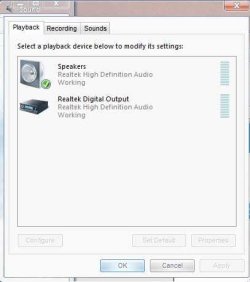
Hi, I downloaded the latest drivers and installed them, the Realtek manager finds my Speakers and Headset/Mic plugged in, but Windows 7 doesn't.
I have all the pins plugged in and the registry trick didn't work for me. I can't get sound through my Headset, only my speakers, also my Mic works fine.
Anyone able to add a device to Windows 7 like headset so it will recognize my headset.
Thanks.
I have all the pins plugged in and the registry trick didn't work for me. I can't get sound through my Headset, only my speakers, also my Mic works fine.
Anyone able to add a device to Windows 7 like headset so it will recognize my headset.
Thanks.
My Computer
At a glance
Windows 7
- OS
- Windows 7
Similar threads
- Replies
- 3
- Views
- 23K
