
djscottallen
New member
- Local time
- 10:35 PM
- Messages
- 5
I've seen other threads on this, but they show a different layout than my laptop does. I don't have the 5.1 orange, black, green, etc rear outputs... my probelm should be super simple, i just have 2 jacks: pink for mic and green for headphones front jacks.
I don't have that automatic Realtek pop up audio jack reassignment for some reason like my desktop does. If I did, I would just say that I'm plugging in headphones to the mic input. But for some reason, this new laptop doesn't do that.
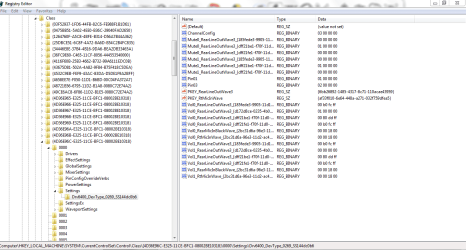
Basically, I just want to change the pink mic jack to be another audio OUTPUT, so that the mic in now shows in "playback devices" instead of under "recording devices" I have found the place where the registry keys are for reassigning the audio jacks, the problem is, when I change the registry key that points to the mic (pink front jack)... realtek changes it back to it's previous state after restart.
Other threads say "Pin19" = Front Mic-In (front pink)
This does not seem to be true in my case. They are different, possibly because I only have the 2 jacks. My front pink mic in seems to be "pin01". I can change "pin01" to whatever binary value i want, and then when I restart, Realtek changes it back to binary value "01 00 00 00". What am I doing wrong? Do I have to uninstall the realtek driver, update the binary values and then reinstall the realtek drivers? What am I missing?
I have attatched an image of my registry key setup for this laptop. I'm almost positive that pin01 is the mic jack and pin03 is the headphone jack. My Realtek driver version is 6.0.1.6400 for Windows 7 - 64 bit. I'm using this laptop for djing in 5 days in Lake Powell, so obviously I need some quick help. I need 2 audio outputs, 1 for my headphones and one for the attached speakers. The speakers are working fine, but I cannot connect headphones!! That's a problem for a dj!! All of you computer gurus out there, please help!! I'm out of time here. Thanks Scott
I don't have that automatic Realtek pop up audio jack reassignment for some reason like my desktop does. If I did, I would just say that I'm plugging in headphones to the mic input. But for some reason, this new laptop doesn't do that.
Basically, I just want to change the pink mic jack to be another audio OUTPUT, so that the mic in now shows in "playback devices" instead of under "recording devices" I have found the place where the registry keys are for reassigning the audio jacks, the problem is, when I change the registry key that points to the mic (pink front jack)... realtek changes it back to it's previous state after restart.
Other threads say "Pin19" = Front Mic-In (front pink)
This does not seem to be true in my case. They are different, possibly because I only have the 2 jacks. My front pink mic in seems to be "pin01". I can change "pin01" to whatever binary value i want, and then when I restart, Realtek changes it back to binary value "01 00 00 00". What am I doing wrong? Do I have to uninstall the realtek driver, update the binary values and then reinstall the realtek drivers? What am I missing?
I have attatched an image of my registry key setup for this laptop. I'm almost positive that pin01 is the mic jack and pin03 is the headphone jack. My Realtek driver version is 6.0.1.6400 for Windows 7 - 64 bit. I'm using this laptop for djing in 5 days in Lake Powell, so obviously I need some quick help. I need 2 audio outputs, 1 for my headphones and one for the attached speakers. The speakers are working fine, but I cannot connect headphones!! That's a problem for a dj!! All of you computer gurus out there, please help!! I'm out of time here. Thanks Scott
Attachments
My Computer
At a glance
Windows 7 32 bit SP1Intel Core i5 Quad-Core Desktop ProcessorMushkin Enhanced Silverline 8GB (2 x 4GB) 240...SAPPHIRE 100292DDR3L Radeon HD 5450 1GB 64-bi...
- Computer Manufacturer/Model Number
- Custom Built
- OS
- Windows 7 32 bit SP1
- CPU
- Intel Core i5 Quad-Core Desktop Processor
- Motherboard
- GIGABYTE GA-H55M-S2V LGA 1156 Intel H55 Micro ATX Intel
- Memory
- Mushkin Enhanced Silverline 8GB (2 x 4GB) 240-Pin DDR3 SDRAM
- Graphics Card(s)
- SAPPHIRE 100292DDR3L Radeon HD 5450 1GB 64-bit DDR3 PCI Expr
- Sound Card
- Auzentech AZT-XFHTHD X-Fi HomeTheater HD Sound Card
- Monitor(s) Displays
- ViewSonic VX2450 w/wm LED | Dynex 32" Class / 720p / 60Hz
- Screen Resolution
- 1360 x 768 - 1080P - 60Hz
- Hard Drives
- Western Digital Caviar Black WD1001FALS 1TB 7200 RPM SATA 3.0Gb/s 3.5" Internal Hard Drive -Bare Drive |
- PSU
- CORSAIR Enthusiast Series CMPSU-550VX 550W ATX12V V2.2 SLI R
- Case
- RAIDMAX SMILODON ATX-612WB Black/Silver 1.0mm SECC Steel ATX


