Realtek HD Changing Jack output reassignments ( FIX )

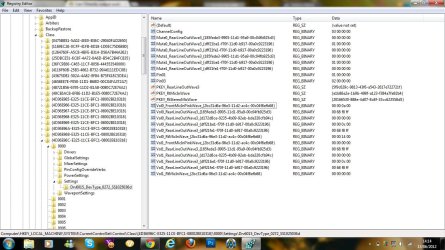
For what it's worth my DevType Key is 'Drv6141_DevType_0887_SS102804aa' and the Pin assignments are there just like Neilsouth said. This might come in real handy if I upgrade my 2-speaker system that came with my new PC. Thanks!
 

My Computer My Computer

At a glance

Windows 7 Home Premium 64-bit SP1Intel Core i7-2600 @3.4GHz 4 Cores, 8 Threads...16 GB Dual-Channel DDR3 SDRAM @ 665.3 MHznVidia GeForce GT420 (1GB cache)
Computer Manufacturer/Model Number
Dell XPS 8300 (July 2011)
OS
Windows 7 Home Premium 64-bit SP1
CPU
Intel Core i7-2600 @3.4GHz 4 Cores, 8 Threads (8MB cache)
Motherboard
Dell 0Y2MRG (CPU 1)
Memory
16 GB Dual-Channel DDR3 SDRAM @ 665.3 MHz
Graphics Card(s)
nVidia GeForce GT420 (1GB cache)
Sound Card
nVidia/Realtek High Definition Audio
Monitor(s) Displays
Dell 24" ST2420L (1920x1080) & Dell E172FP (1280x1040)
Hard Drives
Seagate SATA-II (1.5 TB)
WD SATA-II (1TB)
Seagate FA GoFlex Desk USB Device (2TB)
Keyboard
Logitech HID-compliant Wireless
Mouse
Logitech HID-compliant Wireless
Internet Speed
Comcast Cable "Performance"
Other Info
I am the one and only user and the desktop is in a secure location. All this multi-user stuff and the security drives me absolutely crazy.
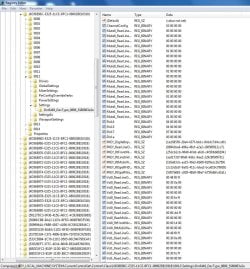
I just updated my drivers today and it appears the numeric pin values have been changed.

Driver Date: 08/30/2011
Driver Version: 6.0.1.6449

I use both the black and green outputs for front speaker assignment. The old pin assignements made more sense, but alas, they're different. :-/ Thanks Neilsouth for the OP.

Pin00 is now Pin14 (green port)
Pin01 is now Pin15 (black port)

Pin17 looks like it is assigned the side speakers so must be the grey port. Not sure what the new Pin1a is. Heres my new reg file I keep on my server for backup:

Windows Registry Editor Version 5.00
[HKEY_LOCAL_MACHINE\SYSTEM\CurrentControlSet\Control\Class\{4D36E96C-E325-11CE-BFC1-08002BE10318}\0012\Settings\Drv6449_DevType_0889_SS80863a3e]
"Pin14"=hex:04,00,00,00
"Pin15"=hex:04,00,00,00
 

Attachments

  • reg.JPG
    reg.JPG
    197.8 KB · Views: 1,364
Last edited:

My Computer My Computer

At a glance

Win7 Pro x64Intel i7 920 @ 2.67 GHzOCZ Platinum 6GB (3 x 2GB) 240-Pin DDR3 SDRAM...2 8800 GTX in SLI
Computer Manufacturer/Model Number
Mine
OS
Win7 Pro x64
CPU
Intel i7 920 @ 2.67 GHz
Motherboard
EVGA E758-TR 3-Way SLI
Memory
OCZ Platinum 6GB (3 x 2GB) 240-Pin DDR3 SDRAM DDR3 1600
Graphics Card(s)
2 8800 GTX in SLI
Sound Card
OnBoard
Monitor(s) Displays
Acer 21" and Phillips 19"
Hard Drives
WD 500g 7200rpm
PSU
CORSAIR CMPSU-850TX (SingleRail)
Case
Antec 902
Cooling
Air w/V8
Hi I just wanted to bump this because it worked for me.

Basically I made this post in another forum:
I have a Dell XPS LS01X. It has 3 audio slots:
1) Audio-out/headphone connector
2) Headphone/digital S/PSIF combo connector
3) Audio-in/microphone connector

My 5.1 system requires 3 slots - it has a black, pink and green wire. My Dell manual says for the audio-in slot: "NOTE: You can get up 5.1 channel speakers by using the three audio connectors (1, 2 and 3) or by using the S/PDIF connector (2)".

With Realtek Audio Manager (system controls for audio) I can change what the jacks are used for.

1) Can be used for;
-Headphone
-Front Speaker Out

2)
-Headphone
-Front Speaker Out
-Rear Speaker Out
-Center/Subwoofer Speaker Out
-S/PDIF-Out

3) (Audio slot)
-Line In
-Mic In
-Rear Speaker Out

I have a Logitech X-530. It recommends I put green in 1), pink in 2) and black in 3). The problem is that 3) doesn't work even if I change the setting to "Rear Speaker Out".

Other information:
---ANY SPEAKERS work with 1) and 2) as long as the jack is for HEADPHONE or FRONT SPEAKER OUT (i.e. even the center speaker out option doesn't let my speakers work)
---REAR SPEAKER OUT doesn't work with anything
My Realtek Audio Manager (as well as general sound settings) allow me to set sound to Stereo, Quadraphonic or 5.1 so I think 5.1 should work...
_________________________________

In the registry, I found PIN01 PIN03 PIN04 - I think reinstalled the Realtek HD audio and the numbers changed to like PIN19 PIN1a PIN1b. Anyway, I had all 3 jacks plugged and changed the values to 04 00 00 00. Then I restarted and wullah! It worked!

-Do not remove the replug the things into the jacks or it will reset the values and you need to change again
-Restarting is ESSENTIAL: someone else said something about disabling the speakers and enabling = restart in another forum but it didn't work for me...

Thanks! :)
 

My Computer My Computer

At a glance

Windows 7 x64
OS
Windows 7 x64
Hello, everybody. I've been reading this thread because I have a similar issue, but haven't found an answer of my specific case: I want to use the mic input jack of my laptop as an output so that I can use both jacks (the only one that my laptop has) as surround system.
Specifications:
Laptop Toshiba Satellite L455D
Realtek High Definition audio
OS: Windows 7 Home premium x64
I'm a total noob with these kind of registry programming topics, so I'll be very thankful if you could help me.:rolleyes:
 

My Computer My Computer

At a glance

Windows 7 Home Premium x64
OS
Windows 7 Home Premium x64
I guess if anyone knows how to access those options behind the "device advanced settings" link on the top right corner of the Realtek Audio Manager, because mine doesn't show it - by the way, the machine I'm using is WinXP and the Audio Manager is the green one. Are there specific keys that handle those options, especially the "Separate all input jacks as independent input devices" thing? Would someone please check and unchek that option and see what key changes are made to the registry? Thanks in advance!
 

My Computer My Computer

At a glance

Windows XP SP3
OS
Windows XP SP3
What should I do here to use my pink jack as a green jack as my existing green one is broken! :confused:
 

Attachments

  • hmm.jpg
    hmm.jpg
    176 KB · Views: 295

My Computer My Computer

At a glance

Windows Home Premium 64bit
OS
Windows Home Premium 64bit
If its still the same pin assignment as the earlier drivers it would be:

Pin04 = 04 00 00 00
or possibly
Pin18 = 04 00 00 00

If not just keep incrementing the Pin number beginning with Pin16. The value of 04 00 00 00 should still be the right for front speakers. May have to reboot after each change... :shock:

Your headphone jack still work up front? If not then your soundcard isnt fried :D
 

My Computer My Computer

At a glance

Win7 Pro x64Intel i7 920 @ 2.67 GHzOCZ Platinum 6GB (3 x 2GB) 240-Pin DDR3 SDRAM...2 8800 GTX in SLI
Computer Manufacturer/Model Number
Mine
OS
Win7 Pro x64
CPU
Intel i7 920 @ 2.67 GHz
Motherboard
EVGA E758-TR 3-Way SLI
Memory
OCZ Platinum 6GB (3 x 2GB) 240-Pin DDR3 SDRAM DDR3 1600
Graphics Card(s)
2 8800 GTX in SLI
Sound Card
OnBoard
Monitor(s) Displays
Acer 21" and Phillips 19"
Hard Drives
WD 500g 7200rpm
PSU
CORSAIR CMPSU-850TX (SingleRail)
Case
Antec 902
Cooling
Air w/V8
I did Pin04 and 18 on 04 00 00 00 but it still doesnt work my thing is the DrvType and not DevType does that make a difference?
 

My Computer My Computer

At a glance

Windows Home Premium 64bit
OS
Windows Home Premium 64bit
This is an extremely annoying problem. Took me about 8 hours to fix, but luckily i was able to find a workaround that doesn't involve registry editing. I haven't got time to post it right now, but i can do it later if any of you want it.
 

My Computer My Computer

At a glance

Windows 7 Ultimate x64 SP1i7-3820 @4.6Ghz4x4GB Kingston HyperX 1600mhzSapphire 7970 OC dualX
OS
Windows 7 Ultimate x64 SP1
CPU
i7-3820 @4.6Ghz
Motherboard
Asrock x79 Extreme4-M
Memory
4x4GB Kingston HyperX 1600mhz
Graphics Card(s)
Sapphire 7970 OC dualX
PSU
ATX 850W CorsairTX2
Case
Gigabyte Poseidon 310i
Cooling
NH-D14 2011 socket
Please post Wezdor. Beating my head against a wall with this one.
 

My Computer My Computer

At a glance

Windows 7 Home Premium 64 bitAMD Phenom II x6 1090T Black Edition Tuban HD...Corsair Vengeance 16GB 4 x 4GB CMZ16GX3M4A1600C9Zotac 560 ZT-50701-10M
Computer Manufacturer/Model Number
Custom Built
OS
Windows 7 Home Premium 64 bit
CPU
AMD Phenom II x6 1090T Black Edition Tuban HDT90ZFBGRBOX
Motherboard
Gigabyte AM3+ GA-990XA-UD
Memory
Corsair Vengeance 16GB 4 x 4GB CMZ16GX3M4A1600C9
Graphics Card(s)
Zotac 560 ZT-50701-10M
Sound Card
NA
Monitor(s) Displays
NEC PA241W-BK-SV
Hard Drives
Qty 2- Samsung 1TB Spinpoint F3 HD103SJ
Qty 1 -Hitachi Deskstar 1TB OF 10383
Qty 1 - SSD: Kingston 96Gb KR-S1296-3H
Qty 1 - Hitachi Deskstar 2TB 0S02861
PSU
Antec 620W NEO ECO 620C
Case
Antec Three Hundred Illusion
Cooling
CoolerMaster Hyper 212 Plus
Keyboard
Microsoft Wireless Comfort 5000
Mouse
Microsoft Wireless Comfort 5000
Truly sorry it took me this long to post, but i am on vacation and internet acces is not always at hand.

As for the fix, i'll just copy my post from OCN and readd the pictures.


Wezdor said:
Wezdor
I have managed a find a fix for the remapping issue, if anyone is interested.

What i did was, i went to the MSI page and downloaded their version of the Realtek HD manager. I specifically downloaded this driver from this page, as i have an Asrock x79 Extreme4-m motherboard; you want to download the drivers closest to your motherboard, or try with these, I only had one mobo to test this on.

Then, after downloading them and installing them, i opened up the .zip, went into the WDM folder and searched for RTHDCPL.exe or RTLCPL.exe and ran that. This opened up a second Realtek UI, alongside the usual one, which looked like old XP UI, as seen here:
Quote: Originally Posted by Sonorous

-snip-

-snip-


Now that you have that open, you want to click on the little wrench key next to "Analog" and tick the box next to "Enable auto popup dialog, when device has been plugged in".

With that done, you can just plug the device you want to remap out and back into the jack, and a popup should come up asking you what you want it to be.

Let me know if it worked for you!

If you have any questions or it does not work for you, don't hesitate to ask. I will try to help you to my best ability.

Also, i don't think it's even necessary to install those drivers, simply running the aplication will probably work.
 

My Computer My Computer

At a glance

Windows 7 Ultimate x64 SP1i7-3820 @4.6Ghz4x4GB Kingston HyperX 1600mhzSapphire 7970 OC dualX
OS
Windows 7 Ultimate x64 SP1
CPU
i7-3820 @4.6Ghz
Motherboard
Asrock x79 Extreme4-M
Memory
4x4GB Kingston HyperX 1600mhz
Graphics Card(s)
Sapphire 7970 OC dualX
PSU
ATX 850W CorsairTX2
Case
Gigabyte Poseidon 310i
Cooling
NH-D14 2011 socket
I have a laptop,and my headphone jack is broken,i need to edit mine to make the mic work as a headphone jack,any help?
 

My Computer My Computer

At a glance

windows 7 64-bit Home PremiumPentium(R) Dual-Core CPU T4200 @ 2.00GHz 2.00GHz6GBIntel HD Graphics
Computer Manufacturer/Model Number
Acer Aspire 7741
OS
windows 7 64-bit Home Premium
CPU
Pentium(R) Dual-Core CPU T4200 @ 2.00GHz 2.00GHz
Motherboard
stock
Memory
6GB
Graphics Card(s)
Intel HD Graphics
Sound Card
Realtek HD audio
Monitor(s) Displays
laptop
Screen Resolution
1600x900
Hard Drives
120gb Toshiba Sata drive
PSU
stock
Case
laptop
Cooling
stock
Keyboard
laptop
Mouse
laptop touchpad
Internet Speed
10-20 MBs
Just wanted to say thanks! I've been looking for a soloution to this for a long time! <3

A small tip to something that threw me off: (for people with an AW9d motherboard at least)

If you can't see "Pin01" etc. You will have to re-plug it and then refresh the window.

example; if you want to switch rear black into rear green.

Plug the cable into the green socket and press f5, then the pin will appear, then plug it in to the black socket and hit "f5" again and that pin will appear aswell.

Then just change the valuable of the last "PinXX" to the first "PinXX", Restart your computer, and you're golden :)

I just had to register to thank you. (also thanks for the OP)

I've been looking for answer to this problem literally for years. And today I happened to find this thread, of course my registry didn't show those "pin01" etc. But that unplugging and then checking registry again worked.

Mine was:
Pin14 04 00 00 00 Front
Pin15 05 00 00 00 Rear
Pin16 06 00 00 00 Center
Pin17 07 00 00 00 Side

Latest Realtek drivers. Win 8 Pro.
Kills the "true" 5.1/7.1 audio, but I couldn't set up my speakers like they should be anyway and don't have anything with real surround audio except games.

Yeah I'm few years late to this party. Weird that Realtek hasn't still fixed that speaker fill.
 

My Computer My Computer

At a glance

windows 8 pro
OS
windows 8 pro
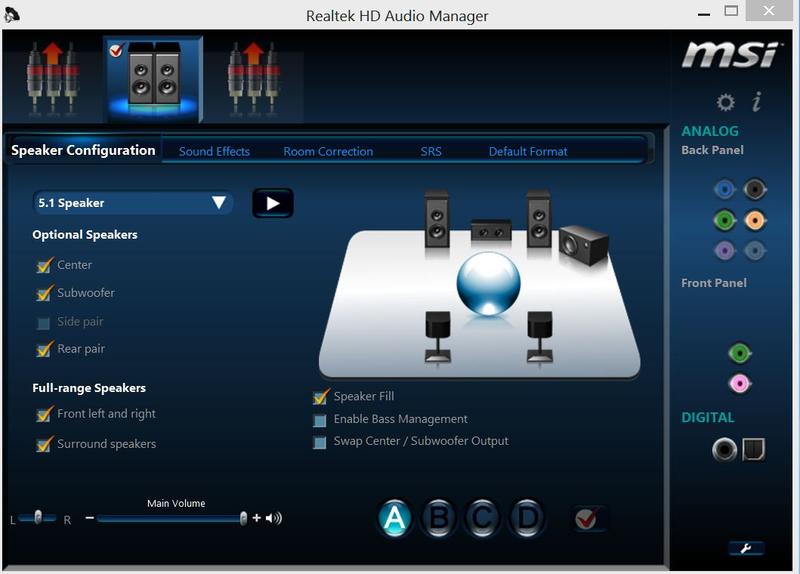
My first time posting here. Been trying to figure my issue out. I wonder if it has issues with the front panel being active even though I plugged it into the rear jacks.

These are my specs:
- MSI P67A-GD65 w/ Realtek ALC892
- Yamaha RX-V457 with 5.1 setup
- Speaker Fill is active

My Front L and R works fine. Center too.

However during tests, the subwoofer doesn't seem to be responding. If I off and on my sub, the sub test responded fine. But in movies or games, the sub is silent. The rear speakers have sound but I hear sounds coming from both rear L and R when I only tested the rear L or R respectively. If you see my image below, my front panel lights up even though nothing is connected.

I have connector retasking, but doesn't let me do much. MSi defaults green-front, orange-center/sub and grey-rear. I tried the registry edit, but can't seem to find the related stuff. I also tried the WDM folder for RTHDCPL.exe or RTLCPL.exe. I ran it, but nothing happened.

Can anyone help?

9vOlR.jpg
 

My Computer My Computer

At a glance

Windows 8 Pro 64biti5 2500K8GB DDR3MSI GTX 460 SLI
OS
Windows 8 Pro 64bit
CPU
i5 2500K
Motherboard
MSI P67A-GD65
Memory
8GB DDR3
Graphics Card(s)
MSI GTX 460 SLI
Sound Card
Realtek ALC892
Monitor(s) Displays
Sony BX400 LCD TV
Screen Resolution
40"
PSU
Corsair 750W
Case
Coolermaster
Other Info
Yamaha AV RX-V457
5.1 Speakers setup
If you're not trying to alter what the analog input/outputs are supposed to be then I highly recommend switching to digital. The TOSlink cables dont cost that much anymore and you will only need that one cable going to your receiver. I recently picked up a 25ft TOSlink at newegg for about 10 bucks. Not sure why I didn't switch to digital earlier.

If you are trying to alter the analog input/outputs on Win8 I'll repost if I have the same issue. I'm just waiting on a power supply for a new HTPC that I built and I'll be altering (hopefully) what the ports are assigned to.
 

My Computer My Computer

At a glance

Win7 Pro x64Intel i7 920 @ 2.67 GHzOCZ Platinum 6GB (3 x 2GB) 240-Pin DDR3 SDRAM...2 8800 GTX in SLI
Computer Manufacturer/Model Number
Mine
OS
Win7 Pro x64
CPU
Intel i7 920 @ 2.67 GHz
Motherboard
EVGA E758-TR 3-Way SLI
Memory
OCZ Platinum 6GB (3 x 2GB) 240-Pin DDR3 SDRAM DDR3 1600
Graphics Card(s)
2 8800 GTX in SLI
Sound Card
OnBoard
Monitor(s) Displays
Acer 21" and Phillips 19"
Hard Drives
WD 500g 7200rpm
PSU
CORSAIR CMPSU-850TX (SingleRail)
Case
Antec 902
Cooling
Air w/V8
I am currently using toslink. It works great for movie w/ dolby dts passthrough. But for pc gaming, I cannot get my 5.1 unless I go analog. ALC892 does not support dolby digital live, so I am lucked out. My brief moment testing the analog setup that gaming defn sounds better. But still not sub or mixed rear
 

My Computer My Computer

At a glance

Windows 8 Pro 64biti5 2500K8GB DDR3MSI GTX 460 SLI
OS
Windows 8 Pro 64bit
CPU
i5 2500K
Motherboard
MSI P67A-GD65
Memory
8GB DDR3
Graphics Card(s)
MSI GTX 460 SLI
Sound Card
Realtek ALC892
Monitor(s) Displays
Sony BX400 LCD TV
Screen Resolution
40"
PSU
Corsair 750W
Case
Coolermaster
Other Info
Yamaha AV RX-V457
5.1 Speakers setup
does the pin adjustment still work ? weird I can't find pin01 or any pin reference in the registry .


please help me with more info . thanks
 

My Computer My Computer

At a glance

Windows 10 Pro - 64 bitIntel i7 2600K8 Gig ddr3 1600 mhz - viper extreme (Patriot)EVGA 980 TI
Computer type
PC/Desktop
Computer Manufacturer/Model Number
Custom Build
OS
Windows 10 Pro - 64 bit
CPU
Intel i7 2600K
Motherboard
Asus P8P67
Memory
8 Gig ddr3 1600 mhz - viper extreme (Patriot)
Graphics Card(s)
EVGA 980 TI
Monitor(s) Displays
2 - Lg 21" LED , sony 48 " bravia LED
Hard Drives
one - samsung 840 series 465.76 GB SSD
two - wd 2 tB black
one - wd 1.5 tb black
one - wb 1 tb black
PSU
1000 Watt Coolmaster : Silent Pro Gold
Case
antec 1200
Cooling
watercooled
Mouse
logitech wireless
Antivirus
Norton Security 2015
Other Info
powerware 3.1 KVA FERRUPS with 4 - 1000 Amp Deep cycle batteries ...
does the pin adjustment still work ? weird I can't find pin01 or any pin reference in the registry .


please help me with more info . thanks


figure it out - used regedit to get to the area in the first post , then searched for "mute" , no pin01 found so I added them . rebooted - working as expected ..
 

My Computer My Computer

At a glance

Windows 10 Pro - 64 bitIntel i7 2600K8 Gig ddr3 1600 mhz - viper extreme (Patriot)EVGA 980 TI
Computer type
PC/Desktop
Computer Manufacturer/Model Number
Custom Build
OS
Windows 10 Pro - 64 bit
CPU
Intel i7 2600K
Motherboard
Asus P8P67
Memory
8 Gig ddr3 1600 mhz - viper extreme (Patriot)
Graphics Card(s)
EVGA 980 TI
Monitor(s) Displays
2 - Lg 21" LED , sony 48 " bravia LED
Hard Drives
one - samsung 840 series 465.76 GB SSD
two - wd 2 tB black
one - wd 1.5 tb black
one - wb 1 tb black
PSU
1000 Watt Coolmaster : Silent Pro Gold
Case
antec 1200
Cooling
watercooled
Mouse
logitech wireless
Antivirus
Norton Security 2015
Other Info
powerware 3.1 KVA FERRUPS with 4 - 1000 Amp Deep cycle batteries ...
Hello Good people : does anyone know what the pin # is for the optical out . thanks people
 

My Computer My Computer

At a glance

Windows 10 Pro - 64 bitIntel i7 2600K8 Gig ddr3 1600 mhz - viper extreme (Patriot)EVGA 980 TI
Computer type
PC/Desktop
Computer Manufacturer/Model Number
Custom Build
OS
Windows 10 Pro - 64 bit
CPU
Intel i7 2600K
Motherboard
Asus P8P67
Memory
8 Gig ddr3 1600 mhz - viper extreme (Patriot)
Graphics Card(s)
EVGA 980 TI
Monitor(s) Displays
2 - Lg 21" LED , sony 48 " bravia LED
Hard Drives
one - samsung 840 series 465.76 GB SSD
two - wd 2 tB black
one - wd 1.5 tb black
one - wb 1 tb black
PSU
1000 Watt Coolmaster : Silent Pro Gold
Case
antec 1200
Cooling
watercooled
Mouse
logitech wireless
Antivirus
Norton Security 2015
Other Info
powerware 3.1 KVA FERRUPS with 4 - 1000 Amp Deep cycle batteries ...
Hello Good people : does anyone know what the pin # is for the optical out . thanks people

That may vary, as every physical layout is different. The Binary code is 00 00 00 00 though...

I am still struggling with this remapping for my Clevo P170EM myself.
I have 4 jacks:

nr 1 = Pin 1b = Front speakers
nr 2 = Pin 18 = Mic / Centre/sub
nr 3 = Pin 17 = Side Speakers
nr 4 = Pin 1a = Line In / rear speakers

I want them to be:

nr 1 = Pin 1b = Front-speakers
nr 2 = Pin 18 = Mic
nr 3 = Pin 17 = Centre/sub
nr 4 = Pin 1a = Rear speakers

Should not be too hard at the first glance, but no success till now... :banghead:

So what I did::picnic:


  • Plug in your Headphones/ speakers /Mic. at desired jacks. Keep em plugged in all the time!
  • Remove all THX and Realtek software.
  • REBOOT
  • Install the latest Realtek software (In my case: R271)
  • REBOOT
  • Press Windows+R, type Regedit.
  • Open the following Location: "HKEY_LOCAL_MACHINE\SYSTEM\CurrentControlSet\Control\Class\{4D36E96C-E325-11CE-BFC1-08002BE10318}\0000\GlobalSettings\
  • Locate the key: ResetAudioFgOnStart
  • Change the value to 00 00 00 00
  • Open the following Location: "HKEY_LOCAL_MACHINE\SYSTEM\CurrentControlSet\Control\Class\{4D36E96C-E325-11CE-BFC1-08002BE10318}\0000\Settings\DevType_XXXX_SSXXXXXXXX and find your pins
  • Change the binary values according to my schemes above or add a pin with a value!
  • REBOOT
  • ENJOY!:party::party::party:


Notes: The X's may differ, the first 4 are your Realtek make (e.g. mine is 0892 for ALC892)
 
Last edited:

My Computer My Computer

At a glance

Windows 7 Ultimate x64i7-3610QM2x4GB Crucial DDR3-1600AMD 7970M
Computer type
Laptop
Computer Manufacturer/Model Number
Clevo P170em
OS
Windows 7 Ultimate x64
CPU
i7-3610QM
Motherboard
Clevo thinghy
Memory
2x4GB Crucial DDR3-1600
Graphics Card(s)
AMD 7970M
Hard Drives
Crucial M4-CT256M4SSD3 ATA Device (256 GB, SATA-III)
SAMSUNG HM641JI (640 GB, 5400 RPM, SATA-II)
WDC WD7500BPVT (750 GB, 5400 RPM, SATA-II)
Antivirus
Microsoft Security Essentials
Browser
Firefox
Back
Top