Reassigned Drive letters and System Reserve

...I am highly displeased that it was done in the first place and there is no apparently easy way to undo it...
When adding a drive to a computer it is common for drive letters to get moved around. This is easily corrected but would be the last step in the process since subsequent changes might make you have to do it all over again. What is mysterious to me is how you ever got a drive letter assigned to a "System reserved" partition to begin with - they are supposed to be hidden. :confused:

Can you post a current screenshot of your Windows Disk Management screen along with a brief description of what is located on each drive and another of how you want things to be setup?

Examples:

(Current)
C: - Windows
D: - Data
E: - Partition I want to delete

(Desired)
C: - Windows
D: - Data
E: - Deleted and space added to D:

NOTE: I'm not suggesting anything in particular, I just want to be clear on what you want to end up with before I start kibitzing. :geek:
 

My Computer My Computer

At a glance

Main - Windows 7 Pro SP1 64-Bit; 2nd - Window...Main - Core i7 2600K; 2nd - Core i7 920Main - 16GB Corsair Vengeance; 2nd - 12GB Cor...Main - XFX Radeon 6870 1GB; 2nd - XFX Radeon ...
Computer Manufacturer/Model Number
Self
OS
Main - Windows 7 Pro SP1 64-Bit; 2nd - Windows Server 2008 R2
CPU
Main - Core i7 2600K; 2nd - Core i7 920
Motherboard
Main - Asus P8Z68-V Pro/Gen3; 2nd - Gigabyte GA-EX58-UDR3
Memory
Main - 16GB Corsair Vengeance; 2nd - 12GB Corsair Vengeance
Graphics Card(s)
Main - XFX Radeon 6870 1GB; 2nd - XFX Radeon 4870 1GB
Sound Card
Both: Onboard Realtek Azalia
Monitor(s) Displays
Main - Hann 25" + I-INC 25" + Acer 23"; 2nd - Upgrading Soon
Screen Resolution
Main - 1920x1080 (All Three Monitors); 2nd - Upgrading Soon
Hard Drives
Main - (1) Crucial M4 128GB (Boot)
Main - (1) Seagate 2TB 64MB Cache (Data)
Main - (1) Seagate 2TB 64MB Cache (Data Backup)
2nd - (1) Intel X25-M SSD 80GB (Boot)
2nd - (3) Seagate 1TB 32MB Cache (Data Backup)
2nd - (1) Seagate 320GB (Because)
PSU
Main - OCZ 600W Modular; 2nd - OCZ 600W
Case
Main - Thermaltake Element G; 2nd - NZXT something or other
Cooling
Main - Corsair H80; 2nd - Prolimatech Megahalems
Keyboard
Main - Razer Reclusa; 2nd - Old MS Keyboard
Mouse
Main - Logitech MX Revolution; 2nd - Old MS Mouse
Internet Speed
20Mbps Time-Warner Cable
Hello theog,
I understand your concept but in this case both drives were brand new out of the box. Never seen it before. I mean Windows 7 is great and quite comfortable and pleasing with the appropriate CPU and memory. I just keep running into little problems that while each may be relatively minor, the amount is daunting. Just my luck. How many people would install 2 major firewalls that caused it to drop connection with the net, or wouldn't allow the scanner, usb or hard drives come up. Add to that a antivirus that one option caused my manage button to quit working and the backup button and thus the operation to stop? I mean why are the drives labeled wrong. I still have a few more problems after the one's currently up. It's easily worth the effort especially now that I've found this site with many intelligent and thoughtful members willing to help.
glennc
 

My Computer My Computer

At a glance

Windows 7 UltimateAMD Phenom-II X4 9658192 MB DDR2-SDRAMATI Radeon HD 4200
Computer type
PC/Desktop
Computer Manufacturer/Model Number
Self-Built
OS
Windows 7 Ultimate
CPU
AMD Phenom-II X4 965
Motherboard
Gigabyte GA-MA785GM-US2H
Memory
8192 MB DDR2-SDRAM
Graphics Card(s)
ATI Radeon HD 4200
Sound Card
ATI Radeon HD 4200 High Definition Audo
Monitor(s) Displays
LG Electronics W1943
Screen Resolution
1360 X 768
Hard Drives
C: 500 GB Caviar Black SATA
E: 500 GB Caviar Black SATA
PSU
Ultra LSP 750
Case
Ultra XBlaster
Cooling
2 Fans, CPU Fan, PS Fan
Keyboard
Acer
Mouse
Logitech
Internet Speed
6 MB
Hi glennc

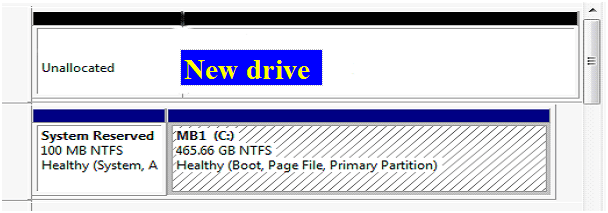
All new HD's come with full Unallocate Space.
 

My Computer My Computer

At a glance

ME/XP/Vista/Win7
OS
ME/XP/Vista/Win7
Hello profdlp,
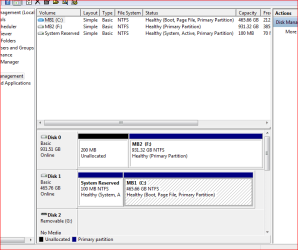
Thank your for your offer of assistance. Below is the current Disk Manager view.

Capture.PNG

C: (MB1)
Disk 0
100 MB System Reserved Partition
Remaining all NTFS for OS and programs and data

F: (MB2)
Disk 1
Total NTFS for programs, data and backup

This is how it is physically attached and how it was installed. Please advise of a way to accomplish this or why or how it shouldn't be done. Depending on what program you believe "Partition Wizard Home Edition v5.0" installed also shows a 1.00 MB Unallocated Logical Partition or space before the NTFS Partition and 1.02MB Unallocated Logical Partition after the NTFS Partition. I appreciate your time.

Hey theog,
Please pardon me but I'm out of the know far enough that I don't understand the reference. I am just wondering how I got from setting up the want list and getting the Disk Manager View system. Thanks for all your help and insight. Thanks
glennc
 

My Computer My Computer

At a glance

Windows 7 UltimateAMD Phenom-II X4 9658192 MB DDR2-SDRAMATI Radeon HD 4200
Computer type
PC/Desktop
Computer Manufacturer/Model Number
Self-Built
OS
Windows 7 Ultimate
CPU
AMD Phenom-II X4 965
Motherboard
Gigabyte GA-MA785GM-US2H
Memory
8192 MB DDR2-SDRAM
Graphics Card(s)
ATI Radeon HD 4200
Sound Card
ATI Radeon HD 4200 High Definition Audo
Monitor(s) Displays
LG Electronics W1943
Screen Resolution
1360 X 768
Hard Drives
C: 500 GB Caviar Black SATA
E: 500 GB Caviar Black SATA
PSU
Ultra LSP 750
Case
Ultra XBlaster
Cooling
2 Fans, CPU Fan, PS Fan
Keyboard
Acer
Mouse
Logitech
Internet Speed
6 MB
Glen - I have never heard of that memory error with PW. We have helped a couple hundred users make critical changes or Resize with it and hasn't failed yet. But if it is going to balk like this, then it isn't really worth recovering 200mb back into a 1tb HD partition.

You may decide that you want multiple partitions to break up the 1tb HD which can safely be created in Disk Management by shrinking F, then Creating new partition(s) in the shrunken space. Once you have done this over time, you can go back to try Partition Wizard CD on the smaller F partition to see if it will Resize to the left into the 200mb without taxing your memory so much. http://www.sevenforums.com/tutorials/2672-partition-volume-shrink.html
http://www.sevenforums.com/tutorials/2674-partition-volume-create-new.html

Your Disk Management screenshot looks fine. It corresponds to the booted PW screenshot. In the PW installed version, the 1mb showing at the beginning and end of your Win7 HD and it's changed DISK number is not worth being concerned about, likely an error which is why we rely on PW boot CD for perfect accuracy and cross check it with Disk Mgmt.

Most of us around here recommend Microsoft Security Essentials and the WIndows Firewall to protect your computer without impacting your system at all.
 
Hi glennc

All new HD's come with full Unallocate Space.

A brand new HD, would look like this in Disk management:

Capturelook3.PNG
 

My Computer My Computer

At a glance

ME/XP/Vista/Win7
OS
ME/XP/Vista/Win7
Hey gregrocker,
I told it was my luck. I've been trying to change it and have learned a lot even though it is still not perfect. I may just leave it like that or just format the drive and reinstall the programs that I've backed up to my MB1. Luckily there is enough space.
If I might, can I ask you if when you set up a new 2nd drive, if the OS is putting the System Reserve area on it. Or was that a mistake or freak of nature. As I will probably just reformat it I'd like to know ahead of time. Is there a tutorial page or reformatting a second drive? I thank you multiple times as well as some of the other members that have contributed to this project. It has been generous of you all. Oh, my 1st real new computer had CPM and two 5 1/2" floppy drives so I didn't have to take the program disk out and put the data disk in anymore. I couldn't afford the expense of the upgrade to a gigantic 10 MB hard drive. If you come up with any ideas in the next couple days give a holler. Take care!!

Hey theog,
I also dense, I am still missing the point?!?!!??? Have a good night or day where ever you are.
glennc
 

My Computer My Computer

At a glance

Windows 7 UltimateAMD Phenom-II X4 9658192 MB DDR2-SDRAMATI Radeon HD 4200
Computer type
PC/Desktop
Computer Manufacturer/Model Number
Self-Built
OS
Windows 7 Ultimate
CPU
AMD Phenom-II X4 965
Motherboard
Gigabyte GA-MA785GM-US2H
Memory
8192 MB DDR2-SDRAM
Graphics Card(s)
ATI Radeon HD 4200
Sound Card
ATI Radeon HD 4200 High Definition Audo
Monitor(s) Displays
LG Electronics W1943
Screen Resolution
1360 X 768
Hard Drives
C: 500 GB Caviar Black SATA
E: 500 GB Caviar Black SATA
PSU
Ultra LSP 750
Case
Ultra XBlaster
Cooling
2 Fans, CPU Fan, PS Fan
Keyboard
Acer
Mouse
Logitech
Internet Speed
6 MB
I have no idea how a 200mb SysReserved partition landed on your new 1tb HD, since the 200mb is over a year old from beta days of Win7.

I am not sure what you are concerned about now. We determined it is a dead partition and removed it, so it poses no problem whatsoever. Your data is fine and speedily accessible on F partition, correct?

You keep referring to Programs you installed on F. This is possibly problematic if you indeed installed Programs to a separate HD. They are best kept on the Win7 partition itself.

If you want to move your User folders out of Win7 partition and put on a second HD to get faster read speeds (from a second laser) then we can help you do that. Watch this video http://www.sevenforums.com/tutorials/72427-data-partition.html and read this: http://www.sevenforums.com/tutorials/18629-user-folders-change-default-location.html

I see no reason yet to reformat the HD unless you think its performance is lacking. If you decide to do it, though, copy your data to external or C, then use free Partition Wizard CD to 1) Wipe the HD from Disk tab, 2) Create and format NTFS 2-3 new Logical partitions. Logical partitions can't be marked Active to interfere with WIn7 boot.
 
gregrocker,
You know I need basic slow answers:D What I meant was if I install a second new hard drive to a system with one with the installed OS on it and format the second new drive for use, will Windows 7 put any kind of partitions on it, like a system reserved area?
Or will it leave it a full healthy total sized unused primary NTFS for the entire drive?
Oh BTW it just annoys me that I can't install a new drive and get what I just described.
Great idea of partitioning the 1 TB drive into smaller partitions, trying to see if PW will be able to assimilate the 200.32 MB unallocated space.
A question about PW, why does the CD version and the installed version show different allocations, if you know. Just curious.
Tanks a lot.
glennc
 

My Computer My Computer

At a glance

Windows 7 UltimateAMD Phenom-II X4 9658192 MB DDR2-SDRAMATI Radeon HD 4200
Computer type
PC/Desktop
Computer Manufacturer/Model Number
Self-Built
OS
Windows 7 Ultimate
CPU
AMD Phenom-II X4 965
Motherboard
Gigabyte GA-MA785GM-US2H
Memory
8192 MB DDR2-SDRAM
Graphics Card(s)
ATI Radeon HD 4200
Sound Card
ATI Radeon HD 4200 High Definition Audo
Monitor(s) Displays
LG Electronics W1943
Screen Resolution
1360 X 768
Hard Drives
C: 500 GB Caviar Black SATA
E: 500 GB Caviar Black SATA
PSU
Ultra LSP 750
Case
Ultra XBlaster
Cooling
2 Fans, CPU Fan, PS Fan
Keyboard
Acer
Mouse
Logitech
Internet Speed
6 MB
No, Win7 won't put anything on a new HD except formatting and you have to do that yourself.

PW when installed to windows can show slight variations in drives caused by reading a running OS, which is why we always suggest using the CD. We only installed it to Win7 so you could post screenshots of trouble you were having.

If you would feel better about wiping and repartioning the HD and have enough space to copy your files over temporaily, we can help you do that when you're ready.

Since no data would be at risk, we could use PW from WIndows - so I would be glad to connect using TeamViewer to do it for you. Just decide how you want it set up.
 
Good Morning gregrocker,
Thanks for the explanation of the PW differences. Makes sense. I'm still having fun with what is a great OS. I mean I'm multi-tasking comparatively, to beat the band. I have a five year old Acer with XP and I liked it and was afraid of Vista, with all the news I was hearing so I was content. XP did everything I wanted but I began bogging down in the last couple months, taking too long. So I built a system with good upgrade capabilities and having heard good stuff, chose to install W7. Well with the speed of the new system even with the load of the OS, I can't stand to log on to the Acer. So as all good Chauvinists do I set it up for my wife. May take the computer from before the Acer and hook it up with Ubuntu. Thanks for the offer to help and I will get back with you, but I just want to enjoy Windows 7 for a few days.
Arriva Derci (Italian for bye)
glennc
 

My Computer My Computer

At a glance

Windows 7 UltimateAMD Phenom-II X4 9658192 MB DDR2-SDRAMATI Radeon HD 4200
Computer type
PC/Desktop
Computer Manufacturer/Model Number
Self-Built
OS
Windows 7 Ultimate
CPU
AMD Phenom-II X4 965
Motherboard
Gigabyte GA-MA785GM-US2H
Memory
8192 MB DDR2-SDRAM
Graphics Card(s)
ATI Radeon HD 4200
Sound Card
ATI Radeon HD 4200 High Definition Audo
Monitor(s) Displays
LG Electronics W1943
Screen Resolution
1360 X 768
Hard Drives
C: 500 GB Caviar Black SATA
E: 500 GB Caviar Black SATA
PSU
Ultra LSP 750
Case
Ultra XBlaster
Cooling
2 Fans, CPU Fan, PS Fan
Keyboard
Acer
Mouse
Logitech
Internet Speed
6 MB
Hello again gregrocker,
I wanted to get some info on the firewall and Microsoft Security Essentials. I've looked at the firewall and I don't have the knowledge or experience to set all those options to lock it down tight. I'm used to free Zonealarm and Comodo, except they disable my computer with W7. So I purchased McAfee and find it seemingly quite adequate and easy to use. I can't personally see any benefits at this time unless you have more reasons than I've mentioned. I appreciate the learned advice.
You also mentioned partitioning the 1 TB into several partitions. You've figured out my knowledge level by now, so I'll ask what benefits would I gain. Would it access faster or what. If the drive goes I loose all the partitions just the same as if I didn't partition it and just kept things in folders. Any explanation is appreciated.
glennc
 

My Computer My Computer

At a glance

Windows 7 UltimateAMD Phenom-II X4 9658192 MB DDR2-SDRAMATI Radeon HD 4200
Computer type
PC/Desktop
Computer Manufacturer/Model Number
Self-Built
OS
Windows 7 Ultimate
CPU
AMD Phenom-II X4 965
Motherboard
Gigabyte GA-MA785GM-US2H
Memory
8192 MB DDR2-SDRAM
Graphics Card(s)
ATI Radeon HD 4200
Sound Card
ATI Radeon HD 4200 High Definition Audo
Monitor(s) Displays
LG Electronics W1943
Screen Resolution
1360 X 768
Hard Drives
C: 500 GB Caviar Black SATA
E: 500 GB Caviar Black SATA
PSU
Ultra LSP 750
Case
Ultra XBlaster
Cooling
2 Fans, CPU Fan, PS Fan
Keyboard
Acer
Mouse
Logitech
Internet Speed
6 MB
If you can get your money back (within 30 day period, I've heard) for MucAfee then I certainly would do that. It is one of the worst bloatware infections out there and will slow your system.

If you had problems with your system bogging previously as reported, then this would be the #1 suspect. The paid AV's and firewalls tend to be bloatware that slow your System down. There is no reason to pay to bloat your system when Win7 has a perfect built-in Firewall and MS has a perfect free AV.

This is why I suggested using free Microsoft Security Essentials, which works seamlessly with the Windows 7 Firewall and Windows Update to protect you better than any paid AV, but has no discernable impact on performance at all. It installs in 30 seconds, updates itself and runs a Quick Scan, then becomes pretty much invisible.

If you have installed McAfee it needs to be Uninstalled using free Revo Uninstaller in Advanced Mode as it is a huge bloatware program which will otherwise leave behind hundreds of Reg keys and hidden files.
 
Hello gregrocker,
Over the years I have always used freeware with only on virus attack which got caught. Somebody got my Aunt's email account info and emailed me and like an idiot I hit the link. It was stopped dead in its tracks. I believe rightly or wrongly that the most targeted system will have the most attacks against it security systems. I was there when they bought a version of Norton Defrag and put in the OS as MS's first defragmenter. So I'm leary about using their software. I am quite comfortably locked down. I going to run secunia whatever its called that tests all your installed software for holes, like one in Firefox and Two in OE8 and surprisingly none in Opera. Then I'll be sure. MS baseline security analyzer glitch on my need to finish a download and I didn't change my password in 4 weeks, otherwise it says I'm locked tight. I just came from a celeron with 2MB Ram and a 2X dvd running XP Pro, so I'm running so fast that I can't believe it. Even with all the overhead of 7 Ultimate left on. It's great, so I'm not worried about bloating or slowing my system down. But thanks, as I have come to trust your judgement, that is a reason to consider going against my normal routine. Thanks for all the insight and help. Sorry you came so close to fixing it. The finish line's shadow was on you. Take it easy Bud. I believe I read somewhere that you can install a Vista program that will put a GUI on 7's firewall settings. Is that true?
glennc
 

My Computer My Computer

At a glance

Windows 7 UltimateAMD Phenom-II X4 9658192 MB DDR2-SDRAMATI Radeon HD 4200
Computer type
PC/Desktop
Computer Manufacturer/Model Number
Self-Built
OS
Windows 7 Ultimate
CPU
AMD Phenom-II X4 965
Motherboard
Gigabyte GA-MA785GM-US2H
Memory
8192 MB DDR2-SDRAM
Graphics Card(s)
ATI Radeon HD 4200
Sound Card
ATI Radeon HD 4200 High Definition Audo
Monitor(s) Displays
LG Electronics W1943
Screen Resolution
1360 X 768
Hard Drives
C: 500 GB Caviar Black SATA
E: 500 GB Caviar Black SATA
PSU
Ultra LSP 750
Case
Ultra XBlaster
Cooling
2 Fans, CPU Fan, PS Fan
Keyboard
Acer
Mouse
Logitech
Internet Speed
6 MB
Hello gregrocker,
Sorry you came so close to fixing it.glennc

Fixing what? You continue to refer to fixing something but it is not clear what you want fixed or what the problem is that still needs "Fixing".

You had a mystery 200mb SysReserved partition on your new 1tb HD which you removed successfully days ago. Your drive is too big for PW to resize the full 1tb partition into that 200mb space without breaking it up into smaller partitions - this is insignificant, no problem at all and can be perfectly left as is.

There are new tools to choose for Win7 which work better than the older OS solutions. Win7 firewall is perfectly optimized to work seamlessly with a lightweight free AV like MSE or Avast 5 to get as good or better protection than paid bloatware.

Have I missed a problem here which you still need help fixing?
 
Howdy gregrocker,
I bow to your superior knowledge and experience in the matter. I obviously misstated what I should have said. We came close to making it the way my limited knowledge thought it should be. Looking back at it now I can see my mistake and wish to retract that statement. I'm really am rocking with my system now. Like I said, my previous system was too me getting a little slower. When I began running this box, I seem to have instantly lost the patience and ability to deal with the slowness and lack of so many new and neat features on the old one. It is molasses in -20 degree weather. Thanks again for your and the other members efforts.
Secunia PSI which I don't know how well it is considered in the industry, but my son-in-law says it is very intensive on securing all the programs on the computer, continually. I got 100% Safety rating. Rockin and if I may say it, Rollin!!
glennc
 

My Computer My Computer

At a glance

Windows 7 UltimateAMD Phenom-II X4 9658192 MB DDR2-SDRAMATI Radeon HD 4200
Computer type
PC/Desktop
Computer Manufacturer/Model Number
Self-Built
OS
Windows 7 Ultimate
CPU
AMD Phenom-II X4 965
Motherboard
Gigabyte GA-MA785GM-US2H
Memory
8192 MB DDR2-SDRAM
Graphics Card(s)
ATI Radeon HD 4200
Sound Card
ATI Radeon HD 4200 High Definition Audo
Monitor(s) Displays
LG Electronics W1943
Screen Resolution
1360 X 768
Hard Drives
C: 500 GB Caviar Black SATA
E: 500 GB Caviar Black SATA
PSU
Ultra LSP 750
Case
Ultra XBlaster
Cooling
2 Fans, CPU Fan, PS Fan
Keyboard
Acer
Mouse
Logitech
Internet Speed
6 MB
No reason at all to apologize. I just had to keep going back to re-read the whole thread to see what problem we hadn't dealt with, and I couldn't find it.

Really glad to hear it's working beyond your expectations, Glen.

Enjoy Win7 and let us know if there is anything else we can help you with.

:thumbsup:

Greg
 
This place is a treasure trove for us the unwashed masses yearning to know what to do with their computer. It is only possible because of it members who are the heart and brains that drive the machine. Thanks to you and all the other members.
Needed your help and really appreciate it. < applause >
glennc
 

My Computer My Computer

At a glance

Windows 7 UltimateAMD Phenom-II X4 9658192 MB DDR2-SDRAMATI Radeon HD 4200
Computer type
PC/Desktop
Computer Manufacturer/Model Number
Self-Built
OS
Windows 7 Ultimate
CPU
AMD Phenom-II X4 965
Motherboard
Gigabyte GA-MA785GM-US2H
Memory
8192 MB DDR2-SDRAM
Graphics Card(s)
ATI Radeon HD 4200
Sound Card
ATI Radeon HD 4200 High Definition Audo
Monitor(s) Displays
LG Electronics W1943
Screen Resolution
1360 X 768
Hard Drives
C: 500 GB Caviar Black SATA
E: 500 GB Caviar Black SATA
PSU
Ultra LSP 750
Case
Ultra XBlaster
Cooling
2 Fans, CPU Fan, PS Fan
Keyboard
Acer
Mouse
Logitech
Internet Speed
6 MB
Can always take to car wash:D
 

My Computer My Computer

At a glance

ME/XP/Vista/Win7
OS
ME/XP/Vista/Win7
Back
Top