Reboot and Select errors on Windows 7 custom built PC

Hi Zangor17,

I ran the SFC scan when i got home and it returned with no errors (no integrity malfunctions or something is what it said) far as I can tell it didn't generate a report since it found no errors and therefore didn't attempt to fix anything.

That's good!

The CBS.log can be found in C:\Windows\Logs\CBS\CBS.log.

This tutorial [Published by Brink] will show you how to upload the file => Screenshots and Files - Upload and Post in SevenForums.

Download and run Malwarebytes [FREE] from here => Malwarebytes.

You could also try running the Bootrec.exe Tool from here => Bootrec.exe Tool - How to Use in the Windows Recovery Environment.

I hope this helps!
 

My Computer

Computer type
Laptop
Computer Manufacturer/Model Number
Fujitsu LIFEBOOK
OS
Win 7 HP SP1 64-bit Vista HB SP2 32-bit Linux Mint 18.3
CPU
Intel(R) Pentium(R) CPU P6200 @ 2.13GHz
Motherboard
FUJITSU FJNBB06
Memory
4.00 GB
Graphics Card(s)
Intel(R) Graphics Media Accelerator HD
Sound Card
[1] Realtek High Definition Audio [2] Intel(R) Display Audio
Screen Resolution
1366 x 768 x 32 bits (4294967296 colors) @ 59 Hz
Hard Drives
TOSHIBA MK5076GSX
Antivirus
AVG FREE
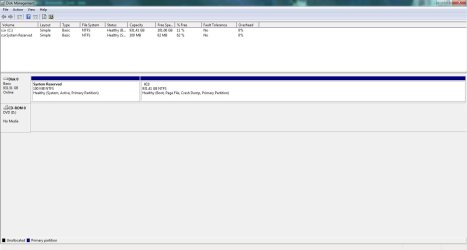
Open disk manager (C:\Windows\System32\diskmgmt.msc), expand the window and columns so we can read them and with the snipping tool take a snapshot of the whole window.
Post the image here as an attachment.
 

My Computers

System One System Two

  • Computer type
    PC/Desktop
    Computer Manufacturer/Model Number
    custom build
    OS
    Windows 7 HP 64
    CPU
    i5 6600K - 800MHz to 4200MHz
    Motherboard
    GA-Z170-HD3P
    Memory
    4+4G GSkill DDR4 3000
    Graphics Card(s)
    IG - Intel 530
    Monitor(s) Displays
    Samsung 226BW
    Screen Resolution
    1680x1050
    Hard Drives
    (1) -1 SM951 – 128GB M.2 AHCI PCIe SSD drive for Windows 7 and Lubuntu
    (2) -1 WD SATA 3 - 1T for Data
    (3) -1 WD SATA 3 - 1T for backup
    PSU
    Thermaltake 450W TR2 gold
    Keyboard
    Old and good Chicony mechanical keyboard
    Mouse
    Logitech mX performance - 9 buttons (had to disable some)
    Internet Speed
    500Mb/s
    Browser
    Firefox 64
    Other Info
    TinyWall firewall
  • Computer type
    Laptop
    System Manufacturer/Model Number
    Asus Q550LF
    OS
    Windows 7 Pro
    CPU
    i7-4500U 800MHz to 3.0GHz
    Motherboard
    Asus Q550LF
    Memory
    (4+4)G DDR3 1600
    Graphics Card(s)
    IG intel 4400 + NVIDIA GeForce GT 745M
    Sound Card
    Realtek
    Monitor(s) Displays
    LG Display LP156WF4-SPH1
    Screen Resolution
    1920 x 1080
    Hard Drives
    BX500 120G SSD for Windows and programs +
    1T HDD for data
    Internet Speed
    500 Mb/s
    Browser
    Firefox
    Other Info
    TinyWall firewall
Here's the Disk Manager window. If I need to adjust something let me know. I opened it and took a screenshot of the whole window.


Planning to run the Bootrec.exe tonight before I go to bed, I got the BCD read error again today so doing that might help.


Also I cant find a log file in the CBS folder in windows. I included a picture of the contents of that folder so if its there I might be missing it because i'm looking for a file with the log extension.
 

Attachments

  • DiskManagment.jpg
    DiskManagment.jpg
    305.5 KB · Views: 4

My Computer

Computer type
PC/Desktop
Computer Manufacturer/Model Number
custom
OS
Windows 7 Home Premium 64 bit
CPU
AMD Phenom II X4 965 Processor 3.40 GHz
Motherboard
ASUS M5A97
Memory
8 GB DDR3 RAM
Graphics Card(s)
NVIDIA GeForce GTX 750 Ti
Hard Drives
WDC WD10EZRX-00A8LB0
Hi Zangor,

do you use sleep or hibernation??
more importantly is Hibernation enabled

im asking because you only have 11% disk space left, really need 20% on that 1tb drive.
and from the event log

While canceling job "{AC76BA86-7AD7-1033-7B44-AC0F074E4100}", BITS was unable to remove some temporary files. To recover disk space, delete the files listed below. The job ID was {69B5BBD7-7DFE-449F-B4E1-F9E81E1BD03D}. C:\ProgramData\Adobe\ARM\Reader_18.009.20050\Zangor\BIT51B6.tmp

the above appears numerous times

Its time for
1) run disk cleanup (if it finds lots of data it will remove on shutdown AND on your next boot)
2) move some data to an external back-up
3) restore points, change size or delete
4) delete browser history

Hard Disk Space - Free Up and Recover

Roy
 

My Computer

Computer type
PC/Desktop
Computer Manufacturer/Model Number
medionl/Aspire 6930G/acer x55a
OS
W7 home premium 32bit/W7HP 64bit/w10 tp insider ring
CPU
E5300 dual core
Motherboard
medion MS7366
Memory
3gb
Graphics Card(s)
Nvidia Geforce 7100 Nforce 630i
Monitor(s) Displays
avixc
Internet Speed
n (isp resticted to 72)
Antivirus
mse/pands
Browser
palemoon
Other Info
Belkin Fd7050 n USB using Railink RT2870 drivers, more upto date
No I don't use hibernation or sleep mode. At most sometimes my screen times out for a bit if im away but if I am planning on not using it I usually just power it down.


I'll go ahead and run a disk cleanup. Also gonna go ahead and remove some large folders i don't need (World of Warcraft beta is a massive folder and I probably don't need that anymore)


I'm not sure that would be causing the boot errors but I'm sure weirder stuff has caused problems with computers.
 

My Computer

Computer type
PC/Desktop
Computer Manufacturer/Model Number
custom
OS
Windows 7 Home Premium 64 bit
CPU
AMD Phenom II X4 965 Processor 3.40 GHz
Motherboard
ASUS M5A97
Memory
8 GB DDR3 RAM
Graphics Card(s)
NVIDIA GeForce GTX 750 Ti
Hard Drives
WDC WD10EZRX-00A8LB0
Hi Zangor17,

I'll go ahead and run a disk cleanup. Also gonna go ahead and remove some large folders i don't need (World of Warcraft beta is a massive folder and I probably don't need that anymore).

Just as a follow up to torchwood's post, you can do the following.

[1] To find out where the most HDD is being used, download and run TreeSize Free => TreeSize Free.

[2] Run Disk Cleanup : Extended => Disk Cleanup : Extended [as well as the ordinary Disk Cleanup].

I hope this helps!
 

My Computer

Computer type
Laptop
Computer Manufacturer/Model Number
Fujitsu LIFEBOOK
OS
Win 7 HP SP1 64-bit Vista HB SP2 32-bit Linux Mint 18.3
CPU
Intel(R) Pentium(R) CPU P6200 @ 2.13GHz
Motherboard
FUJITSU FJNBB06
Memory
4.00 GB
Graphics Card(s)
Intel(R) Graphics Media Accelerator HD
Sound Card
[1] Realtek High Definition Audio [2] Intel(R) Display Audio
Screen Resolution
1366 x 768 x 32 bits (4294967296 colors) @ 59 Hz
Hard Drives
TOSHIBA MK5076GSX
Antivirus
AVG FREE
I will look into it, Thanks.
I did the bootrec commands in the recovery environment and so far I have not seen any errors pertaining to the BCD again. Still getting the reboot and select error however so I'm gonna keep at these suggestions to see if any of them can help resolve it.


Once again thanks for the support.
 

My Computer

Computer type
PC/Desktop
Computer Manufacturer/Model Number
custom
OS
Windows 7 Home Premium 64 bit
CPU
AMD Phenom II X4 965 Processor 3.40 GHz
Motherboard
ASUS M5A97
Memory
8 GB DDR3 RAM
Graphics Card(s)
NVIDIA GeForce GTX 750 Ti
Hard Drives
WDC WD10EZRX-00A8LB0
Hi Zangor17,

I will look into it, Thanks.
I did the bootrec commands in the recovery environment and so far I have not seen any errors pertaining to the BCD again. Still getting the reboot and select error however so I'm gonna keep at these suggestions to see if any of them can help resolve it.

Once again thanks for the support.

You are welcome :thumbsup:.
 

My Computer

Computer type
Laptop
Computer Manufacturer/Model Number
Fujitsu LIFEBOOK
OS
Win 7 HP SP1 64-bit Vista HB SP2 32-bit Linux Mint 18.3
CPU
Intel(R) Pentium(R) CPU P6200 @ 2.13GHz
Motherboard
FUJITSU FJNBB06
Memory
4.00 GB
Graphics Card(s)
Intel(R) Graphics Media Accelerator HD
Sound Card
[1] Realtek High Definition Audio [2] Intel(R) Display Audio
Screen Resolution
1366 x 768 x 32 bits (4294967296 colors) @ 59 Hz
Hard Drives
TOSHIBA MK5076GSX
Antivirus
AVG FREE
Hi Zangor,

W7 automatically performs certain tasks on shutdown, the errors i posted show a failure and therefor possible corruption, which then can affect the next boot

in your case i would turn off sleep and hibernation in your power options
Power Plan Settings - Change

and also
Hibernate - Enable or Disable

hibysis is a very big user of space.

Roy
 

My Computer

Computer type
PC/Desktop
Computer Manufacturer/Model Number
medionl/Aspire 6930G/acer x55a
OS
W7 home premium 32bit/W7HP 64bit/w10 tp insider ring
CPU
E5300 dual core
Motherboard
medion MS7366
Memory
3gb
Graphics Card(s)
Nvidia Geforce 7100 Nforce 630i
Monitor(s) Displays
avixc
Internet Speed
n (isp resticted to 72)
Antivirus
mse/pands
Browser
palemoon
Other Info
Belkin Fd7050 n USB using Railink RT2870 drivers, more upto date
Ran disk cleanup. getting ready to do an extended one. Also working on adjusting those system settings. looks like my some of those are already disabled on my current power settings but I'll go ahead and look into them.
 

My Computer

Computer type
PC/Desktop
Computer Manufacturer/Model Number
custom
OS
Windows 7 Home Premium 64 bit
CPU
AMD Phenom II X4 965 Processor 3.40 GHz
Motherboard
ASUS M5A97
Memory
8 GB DDR3 RAM
Graphics Card(s)
NVIDIA GeForce GTX 750 Ti
Hard Drives
WDC WD10EZRX-00A8LB0
Hi Zangor17,

Ran disk cleanup. getting ready to do an extended one. Also working on adjusting those system settings. looks like my some of those are already disabled on my current power settings but I'll go ahead and look into them.

OK, let us know how you get on!
 

My Computer

Computer type
Laptop
Computer Manufacturer/Model Number
Fujitsu LIFEBOOK
OS
Win 7 HP SP1 64-bit Vista HB SP2 32-bit Linux Mint 18.3
CPU
Intel(R) Pentium(R) CPU P6200 @ 2.13GHz
Motherboard
FUJITSU FJNBB06
Memory
4.00 GB
Graphics Card(s)
Intel(R) Graphics Media Accelerator HD
Sound Card
[1] Realtek High Definition Audio [2] Intel(R) Display Audio
Screen Resolution
1366 x 768 x 32 bits (4294967296 colors) @ 59 Hz
Hard Drives
TOSHIBA MK5076GSX
Antivirus
AVG FREE
sorry its been awhile because of Holidays i have been busy. So far the issue hasn't been resolved by trying any of the things here. I got an external drive over the holidays (as a gift) so at the very least I have a backup of my data.


The computer still runs fine despite the booting errors. sometimes when starting if it makes it past the blinking cursor the computer will hang at the starting windows screen and a restart is required where it will boot properly.


I'll check in again after I have disabled some of the sleep and hibernation things (I havent had the time yet) And if any other ideas come to mind I don't mind trying them.
 

My Computer

Computer type
PC/Desktop
Computer Manufacturer/Model Number
custom
OS
Windows 7 Home Premium 64 bit
CPU
AMD Phenom II X4 965 Processor 3.40 GHz
Motherboard
ASUS M5A97
Memory
8 GB DDR3 RAM
Graphics Card(s)
NVIDIA GeForce GTX 750 Ti
Hard Drives
WDC WD10EZRX-00A8LB0
Back
Top