"Reboot and Select Proper Boot Device," etc. Error - Just Sometimes

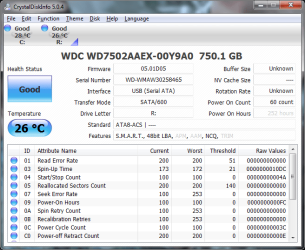
Here's a screenshot from CrystalDisk of the hard drive in question.
 

Attachments

  • 750 GB - CrystalDisk.png
    750 GB - CrystalDisk.png
    34.7 KB · Views: 11

My Computer My Computer

Computer type
PC/Desktop
Computer Manufacturer/Model Number
Dell XPS8700
OS
Windows 7 Professional x64
CPU
Intel Core i7-4790 CPU @ 3.60GHz (Haswell)
Motherboard
Dell Lynx Point Z87 Chipset motherboard
Memory
16 GB
Graphics Card(s)
NVIDIA GeForce GTX 745 4GB DDR 3
Sound Card
NVIDIA High Definition Audio
Monitor(s) Displays
HP Pavilion 27bw 27"
Screen Resolution
1920 x 1080 @ 60 Hz
Hard Drives
Seagate ST2000DM001 2 TB
Internet Speed
150 mb/s
Antivirus
Microsoft Security Essentials
Browser
Google Chrome
Did you wipe the HD before install with Diskpart Clean Command? This solves many issues where old boot code interferes.

You should also be using the latest official installer ISO from Clean Reinstall - Factory OEM Windows 7 which has SP1 to save hours of updating.

Is the flash stick formatted to be bootable? If so it could interfere so to use only for storage I'd move the data off and wipe it also with Clean command.
 
Did you wipe the HD before install with Diskpart Clean Command? This solves many issues where old boot code interferes.

No, I didn't. I've got the drive hooked up as USB now, and I am running diskpart clean all on it now.

You should also be using the latest official installer ISO from Clean Reinstall - Factory OEM Windows 7 which has SP1 to save hours of updating.

I went ahead and burned a DVD of the latest official installer ISO of Windows 7 Home Premium X64, which I'll use with the product key on my tower.

Is the flash stick formatted to be bootable? If so it could interfere so to use only for storage I'd move the data off and wipe it also with Clean command.

Yes, it is. Do you recommend I use clean or clean all? Also, I also updated my BIOS earlier. On the HP page for my PC model, there was a BIOS update, so I installed it.
 

My Computer My Computer

Computer type
PC/Desktop
Computer Manufacturer/Model Number
Dell XPS8700
OS
Windows 7 Professional x64
CPU
Intel Core i7-4790 CPU @ 3.60GHz (Haswell)
Motherboard
Dell Lynx Point Z87 Chipset motherboard
Memory
16 GB
Graphics Card(s)
NVIDIA GeForce GTX 745 4GB DDR 3
Sound Card
NVIDIA High Definition Audio
Monitor(s) Displays
HP Pavilion 27bw 27"
Screen Resolution
1920 x 1080 @ 60 Hz
Hard Drives
Seagate ST2000DM001 2 TB
Internet Speed
150 mb/s
Antivirus
Microsoft Security Essentials
Browser
Google Chrome
Sounds good so far. If you don't need the flash stick to boot then I'd wipe with Clean command which overwrites the boot sector that might be a problem here.

Watch the BIOS Boot order closely that HD remains set to boot first via F10, then boot the DVD using one time BIOS Boot Menu key which on most HP's is ESC or F9.
 
Thanks. I'll do more on the weekend, and report my experiences.
 

My Computer My Computer

Computer type
PC/Desktop
Computer Manufacturer/Model Number
Dell XPS8700
OS
Windows 7 Professional x64
CPU
Intel Core i7-4790 CPU @ 3.60GHz (Haswell)
Motherboard
Dell Lynx Point Z87 Chipset motherboard
Memory
16 GB
Graphics Card(s)
NVIDIA GeForce GTX 745 4GB DDR 3
Sound Card
NVIDIA High Definition Audio
Monitor(s) Displays
HP Pavilion 27bw 27"
Screen Resolution
1920 x 1080 @ 60 Hz
Hard Drives
Seagate ST2000DM001 2 TB
Internet Speed
150 mb/s
Antivirus
Microsoft Security Essentials
Browser
Google Chrome
I've just finished doing two separate clean Windows 7 installations from the instructions listed here. One to the 750 GB Caviar Black drive I've had the error message with, and another one to a WD15EARS Caviar Green 1.5 TB drive. Both were done with the drives set to AHCI mode. Again, the 750 GB drive showed the "select boot device" error message on a couple of reboots, and the WD15EARS didn't show any at all, so I made a system image of the WD15EARS Windows 7 installation. On another forum, I read some other people have had the same trouble with WD Caviar Black drives and Intel series 3 chipsets, so I guess I'll chalk it up to incapability between this drive and my motherboard. I'm going to give the Caviar Black to a friend of mine who already has two Blacks in his PC, and continue using my WD15EARS and WD20EARS drives.
 

My Computer My Computer

Computer type
PC/Desktop
Computer Manufacturer/Model Number
Dell XPS8700
OS
Windows 7 Professional x64
CPU
Intel Core i7-4790 CPU @ 3.60GHz (Haswell)
Motherboard
Dell Lynx Point Z87 Chipset motherboard
Memory
16 GB
Graphics Card(s)
NVIDIA GeForce GTX 745 4GB DDR 3
Sound Card
NVIDIA High Definition Audio
Monitor(s) Displays
HP Pavilion 27bw 27"
Screen Resolution
1920 x 1080 @ 60 Hz
Hard Drives
Seagate ST2000DM001 2 TB
Internet Speed
150 mb/s
Antivirus
Microsoft Security Essentials
Browser
Google Chrome
Your reply doesn't make clear if you were able to either install or reimage onto either HD.

If not did you try any of the troubleshooting steps before deciding this is the fault of the mobo?

We have a 100% install rate here if there is close cooperation and feedback. From what I can tell you tried nothing except booting the installer and doing the same thing again. There are many other steps you can try if you really want to get it installed.
 
As I said, I did clean installations of Windows 7 to both drives. The 750 GB still had the error message during some reboots, and the 1.5 TB didn't have any error messages. I followed the Windows 7 clean reinstall instructions to the letter. Both drives were wiped with the clean command. I've done everything requested of me in this thread.
 

My Computer My Computer

Computer type
PC/Desktop
Computer Manufacturer/Model Number
Dell XPS8700
OS
Windows 7 Professional x64
CPU
Intel Core i7-4790 CPU @ 3.60GHz (Haswell)
Motherboard
Dell Lynx Point Z87 Chipset motherboard
Memory
16 GB
Graphics Card(s)
NVIDIA GeForce GTX 745 4GB DDR 3
Sound Card
NVIDIA High Definition Audio
Monitor(s) Displays
HP Pavilion 27bw 27"
Screen Resolution
1920 x 1080 @ 60 Hz
Hard Drives
Seagate ST2000DM001 2 TB
Internet Speed
150 mb/s
Antivirus
Microsoft Security Essentials
Browser
Google Chrome
Then it was a lack of feedback that made me unsure. We do not know what you've done unless you give feedback in real time.

I would test the 750 HD with the maker's diagnostics followed by Disk Check run from installer's Command Line on a full disk partition, using the tests in the note at the beginning of Troubleshooting Windows 7 Failure to Boot
 
We're going in circles here. As specified earlier, I have already run WD diagnostics on the 750. It passed. I've run Check Disk already, as I've stated. Both come back as no problems.
 

My Computer My Computer

Computer type
PC/Desktop
Computer Manufacturer/Model Number
Dell XPS8700
OS
Windows 7 Professional x64
CPU
Intel Core i7-4790 CPU @ 3.60GHz (Haswell)
Motherboard
Dell Lynx Point Z87 Chipset motherboard
Memory
16 GB
Graphics Card(s)
NVIDIA GeForce GTX 745 4GB DDR 3
Sound Card
NVIDIA High Definition Audio
Monitor(s) Displays
HP Pavilion 27bw 27"
Screen Resolution
1920 x 1080 @ 60 Hz
Hard Drives
Seagate ST2000DM001 2 TB
Internet Speed
150 mb/s
Antivirus
Microsoft Security Essentials
Browser
Google Chrome
Yes but afterwards it failed the HP disk diagnostics, so there is apparently something wrong with the drive, not the mobo. The HD fails HP diagnostics and isn't detected by the Win7 installer. So what makes you think it's the mobo?

You can test this by installing HD in another PC, booting installer to see if it's detected.
 
Yes but afterwards it failed the HP disk diagnostics, so there is apparently something wrong with the drive, not the mobo. The HD fails HP diagnostics and isn't detected by the Win7 installer. So what makes you think it's the mobo?

You can test this by installing HD in another PC, booting installer to see if it's detected.

You must've missed what I wrote earlier. After I switched to AHCI a few days ago and back to RAID, it passed HP's diagnostics. It has passed HP's diagnostics since then. It's weird.
 

My Computer My Computer

Computer type
PC/Desktop
Computer Manufacturer/Model Number
Dell XPS8700
OS
Windows 7 Professional x64
CPU
Intel Core i7-4790 CPU @ 3.60GHz (Haswell)
Motherboard
Dell Lynx Point Z87 Chipset motherboard
Memory
16 GB
Graphics Card(s)
NVIDIA GeForce GTX 745 4GB DDR 3
Sound Card
NVIDIA High Definition Audio
Monitor(s) Displays
HP Pavilion 27bw 27"
Screen Resolution
1920 x 1080 @ 60 Hz
Hard Drives
Seagate ST2000DM001 2 TB
Internet Speed
150 mb/s
Antivirus
Microsoft Security Essentials
Browser
Google Chrome
I'm sorry that I've had a hard time parsing some of your replies. For example you described reinstalling to both HD's but one gave an error so you made an image of the second. This doesn't tell me whether you ever installed to either, or what you even did with the image.

However reading between the lines I understand why you've come to view the WD the way you have.

I wish I could help you more. Maybe with another issue.
 
I'm sorry that I've had a hard time parsing some of your replies. For example you described reinstalling to both HD's but one gave an error so you made an image of the second. This doesn't tell me whether you ever installed to either, or what you even did with the image.

Here is what I said earlier. I've just finished doing two separate clean Windows 7 installations from the instructions listed here. One to the 750 GB Caviar Black drive I've had the error message with, and another one to a WD15EARS Caviar Green 1.5 TB drive. Both were done with the drives set to AHCI mode. Again, the 750 GB drive showed the "select boot device" error message on a couple of reboots, and the WD15EARS didn't show any at all, so I made a system image of the WD15EARS Windows 7 installation.

Maybe I'm not being clear. I started out early this morning running the clean command on the problematic 750 GB drive, and reinstalled all of my programs and got Windows 7 running how I like it, as per the instructions you've posted in the tutorial for clean installing Windows 7. I changed to AHCI in the BIOS beforehand. Everything was fine, except the "select boot device" message appeared a couple of times during some of the reboots, not all.

After I was finished with the 750, I removed the 750 from my PC, installed the WD15EARS (1.5 TB), ran the clean command, followed your clean install of Windows 7 instructions, and reinstalled Windows 7 and all my programs. I did everything exactly how I did it with the 750. The only difference was, with the WD15EARS, I got no "select boot device" error messages during the various reboots after the installation of updates. Zero. I really wanted to try and reproduce the error on the WD15EARS, so I rebooted about ten times in a row. No error messages at all. Once I was satisfied that the install on the WD15EARS was error message-free, I took a system image with EaseUS Todo Backup 3.5, which is stored on a Hitachi external 1 TB drive. I didn't take a system image on the first drive, the 750, because of the continuing problem with the error message.

So, in summary, I installed Windows to both drives this morning using your instructions for clean install. It was error message-free on the 1.5 TB and with the error message on the 750.

The problem I had with the 750 not passing HP's diagnostics was solved a few days ago after I switched to AHCI after Windows 7 was already installed where you change the registry entry. I then ran the diagnostics and it passed, and I switched to back to RAID, and it passed. During this morning's re-installation to both drives, where the BIOS was set to AHCI, the 750 passed HP's diagnostics again. Every single diagnostic utility I have run said the disk is fine. CrystalDisk, Chkdsk, WD Diagnostics, HP Diagnostics, and HD Tune all say the disk is fine.

Again, the reason I think it is motherboard-related is someone from another forum said he had a 500 GB Caviar Black 6.0 gbps drive in an HP dc7800 with a Q35 chipset that you could install Windows 7 to, but, like mine, it would return the "select boot device" message. He took that drive and put it in another computer, and it worked fine. So, what are the similarities here? My drive is also a Caviar Black, but a 750 GB, but it is also 6.0 gbps, and a similar chipset (in the 3 series). I wish I had another desktop to try it in. I don't want to give up. I want to keep at this until I get it working.


My Computer My Computer

Computer type
PC/Desktop
Computer Manufacturer/Model Number
Dell XPS8700
OS
Windows 7 Professional x64
CPU
Intel Core i7-4790 CPU @ 3.60GHz (Haswell)
Motherboard
Dell Lynx Point Z87 Chipset motherboard
Memory
16 GB
Graphics Card(s)
NVIDIA GeForce GTX 745 4GB DDR 3
Sound Card
NVIDIA High Definition Audio
Monitor(s) Displays
HP Pavilion 27bw 27"
Screen Resolution
1920 x 1080 @ 60 Hz
Hard Drives
Seagate ST2000DM001 2 TB
Internet Speed
150 mb/s
Antivirus
Microsoft Security Essentials
Browser
Google Chrome
Okay, Greg. I'll give that a try.
 

My Computer My Computer

Computer type
PC/Desktop
Computer Manufacturer/Model Number
Dell XPS8700
OS
Windows 7 Professional x64
CPU
Intel Core i7-4790 CPU @ 3.60GHz (Haswell)
Motherboard
Dell Lynx Point Z87 Chipset motherboard
Memory
16 GB
Graphics Card(s)
NVIDIA GeForce GTX 745 4GB DDR 3
Sound Card
NVIDIA High Definition Audio
Monitor(s) Displays
HP Pavilion 27bw 27"
Screen Resolution
1920 x 1080 @ 60 Hz
Hard Drives
Seagate ST2000DM001 2 TB
Internet Speed
150 mb/s
Antivirus
Microsoft Security Essentials
Browser
Google Chrome
If you're successful with completing Greg's last suggestion (clean all) but then continue experiencing the same behavior as you've described, then I think you've run across a drive that has intermittent problems of it's own. You've stated that cables and connections were good, other drives (connected to same mobo port???) work fine.

I guess it could be a chipset problem, but would it be intermittent as you've observed? I'd like to see that forum thread you had found.

If issues continue then you're probably to the point where you're going to have to connect it to another machine to verify. If it turns out to be the drive itself, and you've got no data on it that you need, it's not worth trying to repair.
 

My Computer My Computer

OS
Windows 7 Ultimate x64

My Computer My Computer

Computer type
PC/Desktop
Computer Manufacturer/Model Number
Dell XPS8700
OS
Windows 7 Professional x64
CPU
Intel Core i7-4790 CPU @ 3.60GHz (Haswell)
Motherboard
Dell Lynx Point Z87 Chipset motherboard
Memory
16 GB
Graphics Card(s)
NVIDIA GeForce GTX 745 4GB DDR 3
Sound Card
NVIDIA High Definition Audio
Monitor(s) Displays
HP Pavilion 27bw 27"
Screen Resolution
1920 x 1080 @ 60 Hz
Hard Drives
Seagate ST2000DM001 2 TB
Internet Speed
150 mb/s
Antivirus
Microsoft Security Essentials
Browser
Google Chrome
Is it AMD's RAIDXpert that your machine's equipped with?

What's the model number of the troublesome drive? Does it work flawlessly when connected as a non-booting drive?

CrystalDisk (as long as it's running) will scan and record the SMART attributes for all connected drives on a routine basis (I think the default is every 30 minutes). Check the SMART attributes that it's recorded for that drive to see if any have changed in an unexpected way. You can use either Crystal's built in graph function or locate/open the text files it creates (easier to spot odd changes using the graphs).

The poster replying in that thread you posted stated the problem, but didn't state whether it's intermittent. He also stated the drive works perfectly in another machine. It's a thread that's only 5 days old; it may be worthwhile for you to join the forum and ask whether his issue was intermittent as well...
 

My Computer My Computer

OS
Windows 7 Ultimate x64
No. My motherboard is Intel. The model number of the drive is WD7502AAEX. If I connect the drive as a USB external drive, I have no issues with it.
 

My Computer My Computer

Computer type
PC/Desktop
Computer Manufacturer/Model Number
Dell XPS8700
OS
Windows 7 Professional x64
CPU
Intel Core i7-4790 CPU @ 3.60GHz (Haswell)
Motherboard
Dell Lynx Point Z87 Chipset motherboard
Memory
16 GB
Graphics Card(s)
NVIDIA GeForce GTX 745 4GB DDR 3
Sound Card
NVIDIA High Definition Audio
Monitor(s) Displays
HP Pavilion 27bw 27"
Screen Resolution
1920 x 1080 @ 60 Hz
Hard Drives
Seagate ST2000DM001 2 TB
Internet Speed
150 mb/s
Antivirus
Microsoft Security Essentials
Browser
Google Chrome
Back
Top