Solved Reboot and select proper Boot Device?? Help!

stuckstuck

New member
Member
VIP
Local time
3:01 AM
Messages
168
Windows works fine and no hardware problems. What is this?!
So confused right now.
BIOS is set so HD boots first.
I have no idea.
Anybody know what I'm doing wrong or what is wrong whatever it may be?:S
 

My Computer

Computer type
PC/Desktop
Computer Manufacturer/Model Number
Custom
OS
Microsoft Windows 7 Professional 64-bit
CPU
5960X @ 4.4GHz
Motherboard
X99 SABERTOOTH
Memory
16.0 GB
Graphics Card(s)
NVIDIA GeForce GTX 980 Ti
Hard Drives
(1) OCZ-VERT EX460 SCSI Disk Device
(2) WDC WD1002FAEX-00Z3A SCSI Disk Device
(3) WDC WD1003FZEX-00MK2 SCSI Disk Device
Internet Speed
God Speed.
Antivirus
Glock 9
Windows works fine and no hardware problems. What is this?!
So confused right now.
BIOS is set so HD boots first.
I have no idea.
Anybody know what I'm doing wrong or what is wrong whatever it may be?:S
Make sure you unplug any external hard drives or USB flash drives in case they are causing confusion in the boot order and try again. If no good and you have double checked connections on Hard drive insert your Windows DVD, boot from it and try a boot repair at least three times.
 

My Computer

Computer type
PC/Desktop
Computer Manufacturer/Model Number
Bluethunder II
OS
Windows 7 x64 Ultimate and numerous virtual machines
CPU
AMD FX-8350 Vishera 32nm Technology @ 4.2 GHz default
Motherboard
ASUSTeK COMPUTER INC. SABERTOOTH 990FX R2.0 (Socket 942)
Memory
G Skill 32.0GB Dual-Channel DDR3 @ 1204MHz (11-13-13-31)
Graphics Card(s)
EVGA GeForce GTX 960 4GB Super SC ACX 2.0+ with Back Plate
Sound Card
Creative X-Fi Titanium HD Audiophile PCIe
Monitor(s) Displays
LG L227WTG x 3
Screen Resolution
1680 x 1050 16:10
Hard Drives
238GB Samsung850 PRO SATA Disk Device (SSD)
1863GB Seagate ST2000DM 001-1CH164 (SATA)
1397GB Seagate ST1500DL 003-9VT16L(SATA)
466GB Western Digital WDC WD50 03AZEX-00K1GA0 (SATA) x 2
932GB Seagate ST310005 28AS SATA Disk Device (SATA)
PSU
Enermax Revolution87+ 1000 Watts Gold Certified Power Supply
Case
Rocketfish Full Tower
Cooling
Cooler Master Hyper 212 EVO Push Pull 120mm Fans
Keyboard
Logitech K740
Mouse
Logitech G100S Laser LED + Logitech Gamepad F310
Internet Speed
500 mbs down and 30mbs up
Antivirus
Malwarebytes Pro & Avast and MSE on certain Virtual Machines
Browser
Firefox (Main) Chrome, Internet Explorer (Back Up)
Other Info
Logitech X 230 2.1 Stereo System and 5.1 Yamaha RX V2090
B&W DM6 Monitor Speakers + Center and Surround Speakers
Using Mouse Without Borders (Google it)
Windows works fine and no hardware problems. What is this?!
So confused right now.
BIOS is set so HD boots first.
I have no idea.
Anybody know what I'm doing wrong or what is wrong whatever it may be?:S
Make sure you unplug any external hard drives or USB flash drives in case they are causing confusion in the boot order and try again. If no good and you have double checked connections on Hard drive insert your Windows DVD, boot from it and try a boot repair at least three times.

I'm way ahead of you. 've tried already. Both of your suggestions.
 

My Computer

Computer type
PC/Desktop
Computer Manufacturer/Model Number
Custom
OS
Microsoft Windows 7 Professional 64-bit
CPU
5960X @ 4.4GHz
Motherboard
X99 SABERTOOTH
Memory
16.0 GB
Graphics Card(s)
NVIDIA GeForce GTX 980 Ti
Hard Drives
(1) OCZ-VERT EX460 SCSI Disk Device
(2) WDC WD1002FAEX-00Z3A SCSI Disk Device
(3) WDC WD1003FZEX-00MK2 SCSI Disk Device
Internet Speed
God Speed.
Antivirus
Glock 9
"CD-ROM Boot priority ..No Medium"
I can assure you and I'll check again that my boot priority is set to my HD!!
I've never had this problem before what gives??
By the way indianatone the startup repair reports everything to be fine as i expected.
What is this?? it's killing me!!
 

My Computer

Computer type
PC/Desktop
Computer Manufacturer/Model Number
Custom
OS
Microsoft Windows 7 Professional 64-bit
CPU
5960X @ 4.4GHz
Motherboard
X99 SABERTOOTH
Memory
16.0 GB
Graphics Card(s)
NVIDIA GeForce GTX 980 Ti
Hard Drives
(1) OCZ-VERT EX460 SCSI Disk Device
(2) WDC WD1002FAEX-00Z3A SCSI Disk Device
(3) WDC WD1003FZEX-00MK2 SCSI Disk Device
Internet Speed
God Speed.
Antivirus
Glock 9
Windows works fine and no hardware problems. What is this?!
So confused right now.
BIOS is set so HD boots first.
I have no idea.
Anybody know what I'm doing wrong or what is wrong whatever it may be?:S
Make sure you unplug any external hard drives or USB flash drives in case they are causing confusion in the boot order and try again. If no good and you have double checked connections on Hard drive insert your Windows DVD, boot from it and try a boot repair at least three times.

I'm way ahead of you. 've tried already. Both of your suggestions.
Well to save some time you could have said this in your first post. Have you got more than one hard drive? Do you have the correct hard drive set to boot from? Hard Drives (1) WD Black (2) WD Blue You are most likely attempting to boot from the wrong hard drive, check the settings in your bios.
 

My Computer

Computer type
PC/Desktop
Computer Manufacturer/Model Number
Bluethunder II
OS
Windows 7 x64 Ultimate and numerous virtual machines
CPU
AMD FX-8350 Vishera 32nm Technology @ 4.2 GHz default
Motherboard
ASUSTeK COMPUTER INC. SABERTOOTH 990FX R2.0 (Socket 942)
Memory
G Skill 32.0GB Dual-Channel DDR3 @ 1204MHz (11-13-13-31)
Graphics Card(s)
EVGA GeForce GTX 960 4GB Super SC ACX 2.0+ with Back Plate
Sound Card
Creative X-Fi Titanium HD Audiophile PCIe
Monitor(s) Displays
LG L227WTG x 3
Screen Resolution
1680 x 1050 16:10
Hard Drives
238GB Samsung850 PRO SATA Disk Device (SSD)
1863GB Seagate ST2000DM 001-1CH164 (SATA)
1397GB Seagate ST1500DL 003-9VT16L(SATA)
466GB Western Digital WDC WD50 03AZEX-00K1GA0 (SATA) x 2
932GB Seagate ST310005 28AS SATA Disk Device (SATA)
PSU
Enermax Revolution87+ 1000 Watts Gold Certified Power Supply
Case
Rocketfish Full Tower
Cooling
Cooler Master Hyper 212 EVO Push Pull 120mm Fans
Keyboard
Logitech K740
Mouse
Logitech G100S Laser LED + Logitech Gamepad F310
Internet Speed
500 mbs down and 30mbs up
Antivirus
Malwarebytes Pro & Avast and MSE on certain Virtual Machines
Browser
Firefox (Main) Chrome, Internet Explorer (Back Up)
Other Info
Logitech X 230 2.1 Stereo System and 5.1 Yamaha RX V2090
B&W DM6 Monitor Speakers + Center and Surround Speakers
Using Mouse Without Borders (Google it)
How does Windows work fine if you're being asked to select proper boot device?
 

My Computer

Computer type
PC/Desktop
Computer Manufacturer/Model Number
Home Built Desktop By DataTech
OS
Windows 7 Ultimate X64 SP1
CPU
Intel i5-2550K, Differing ~4.4-4.8GHz No built in GPU
Motherboard
ASUS P8Z68-V PRO/GEN3
Memory
16GB G.Skill Sniper 1866MHz @ 2133MHz 2x8GB
Graphics Card(s)
ASUS GTX650TIB-DC2OC-2GD5, (650TI Boost)
Sound Card
Onboard Realtek 5-1
Monitor(s) Displays
Samsung P2570HD
Screen Resolution
1920x1080
Hard Drives
Samsung 840 Pro 256GB SSD for OS, 500GB Seagate Constellation (Enterprise drive) for Data
PSU
Corsair HX650W
Case
Inwin Dragon Rider
Cooling
Hyper 212 EVO w/two Noctua fans, push-pull, @1300 RPM
Keyboard
E-Z Eyes, bright yellow keys with large characters
Mouse
steelseries SENSEI Laser Pro Gaming
Internet Speed
48-51Mbs Mbs down, 11 Mbs up Xfinity Cable
Antivirus
Norton Internet Security 2013
Browser
IE 10, Opera, Pale Moon if needed
Other Info
4 case fans, LG BluRay-RE, ASUS DVD-RW, Mr. Fusion power supply, 1.21 gigawatts.
Make sure you unplug any external hard drives or USB flash drives in case they are causing confusion in the boot order and try again. If no good and you have double checked connections on Hard drive insert your Windows DVD, boot from it and try a boot repair at least three times.

I'm way ahead of you. 've tried already. Both of your suggestions.
Well to save some time you could have said this in your first post. Have you got more than one hard drive? Do you have the correct hard drive set to boot from? Hard Drives (1) WD Black (2) WD Blue You are most likely attempting to boot from the wrong hard drive, check the settings in your bios.

I also should've said that my BIOS settings have been triple checked and yes I have made sure that the boot priorities are in check with which HD I was attempting to boot first.
I also should've said that the secondary HD mentioned is a slave drive. and yes I know what the difference is and yes I've made sure that the HD with the OS installed is the one being booted from.


How does Windows work fine if you're being asked to select proper boot device?

I have no idea.
Right now after messing around in the BIOS I have miraculously managed to enter the OS.
I still have no idea what I had done.
This problem first occurred when I had done a fresh install into a new HD that I had received from WD due to HD failure with the previous one. (Warranty)
Once the install was finished and my computer was up and running again I had restarted the computer after installing several programs as you do.
But then once the restart had initiated that's when I ran into this problem.
Right now I'm on my computer after a long attempt of 'fixing' this.
I still would like to know what the problem was.
Maybe if the 'problem' could be identified I would have a piece of mind and actually solve this issue properly without having the fear of turning off my computer.
and having the problem happen again.
 

My Computer

Computer type
PC/Desktop
Computer Manufacturer/Model Number
Custom
OS
Microsoft Windows 7 Professional 64-bit
CPU
5960X @ 4.4GHz
Motherboard
X99 SABERTOOTH
Memory
16.0 GB
Graphics Card(s)
NVIDIA GeForce GTX 980 Ti
Hard Drives
(1) OCZ-VERT EX460 SCSI Disk Device
(2) WDC WD1002FAEX-00Z3A SCSI Disk Device
(3) WDC WD1003FZEX-00MK2 SCSI Disk Device
Internet Speed
God Speed.
Antivirus
Glock 9
You are most likely attempting to boot from the wrong hard drive, check the settings in your bios.
 

My Computer

Computer type
PC/Desktop
Computer Manufacturer/Model Number
Bluethunder II
OS
Windows 7 x64 Ultimate and numerous virtual machines
CPU
AMD FX-8350 Vishera 32nm Technology @ 4.2 GHz default
Motherboard
ASUSTeK COMPUTER INC. SABERTOOTH 990FX R2.0 (Socket 942)
Memory
G Skill 32.0GB Dual-Channel DDR3 @ 1204MHz (11-13-13-31)
Graphics Card(s)
EVGA GeForce GTX 960 4GB Super SC ACX 2.0+ with Back Plate
Sound Card
Creative X-Fi Titanium HD Audiophile PCIe
Monitor(s) Displays
LG L227WTG x 3
Screen Resolution
1680 x 1050 16:10
Hard Drives
238GB Samsung850 PRO SATA Disk Device (SSD)
1863GB Seagate ST2000DM 001-1CH164 (SATA)
1397GB Seagate ST1500DL 003-9VT16L(SATA)
466GB Western Digital WDC WD50 03AZEX-00K1GA0 (SATA) x 2
932GB Seagate ST310005 28AS SATA Disk Device (SATA)
PSU
Enermax Revolution87+ 1000 Watts Gold Certified Power Supply
Case
Rocketfish Full Tower
Cooling
Cooler Master Hyper 212 EVO Push Pull 120mm Fans
Keyboard
Logitech K740
Mouse
Logitech G100S Laser LED + Logitech Gamepad F310
Internet Speed
500 mbs down and 30mbs up
Antivirus
Malwarebytes Pro & Avast and MSE on certain Virtual Machines
Browser
Firefox (Main) Chrome, Internet Explorer (Back Up)
Other Info
Logitech X 230 2.1 Stereo System and 5.1 Yamaha RX V2090
B&W DM6 Monitor Speakers + Center and Surround Speakers
Using Mouse Without Borders (Google it)
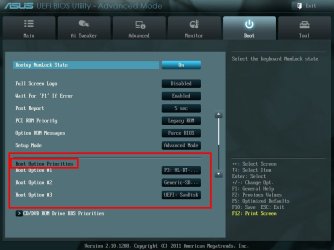
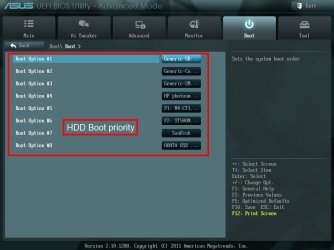
My BIOS has a Boot priority AND a HDD boot priority. When I changed the boot drive I had to change the HDD priority to get a boot.

Ex, Boot Priority"
Boot Pri.jpg

HDD drive priority.

HDD Boot.jpg

This is a UEFI BIOS, your may look different.
 

My Computer

Computer type
PC/Desktop
Computer Manufacturer/Model Number
Home Built Desktop By DataTech
OS
Windows 7 Ultimate X64 SP1
CPU
Intel i5-2550K, Differing ~4.4-4.8GHz No built in GPU
Motherboard
ASUS P8Z68-V PRO/GEN3
Memory
16GB G.Skill Sniper 1866MHz @ 2133MHz 2x8GB
Graphics Card(s)
ASUS GTX650TIB-DC2OC-2GD5, (650TI Boost)
Sound Card
Onboard Realtek 5-1
Monitor(s) Displays
Samsung P2570HD
Screen Resolution
1920x1080
Hard Drives
Samsung 840 Pro 256GB SSD for OS, 500GB Seagate Constellation (Enterprise drive) for Data
PSU
Corsair HX650W
Case
Inwin Dragon Rider
Cooling
Hyper 212 EVO w/two Noctua fans, push-pull, @1300 RPM
Keyboard
E-Z Eyes, bright yellow keys with large characters
Mouse
steelseries SENSEI Laser Pro Gaming
Internet Speed
48-51Mbs Mbs down, 11 Mbs up Xfinity Cable
Antivirus
Norton Internet Security 2013
Browser
IE 10, Opera, Pale Moon if needed
Other Info
4 case fans, LG BluRay-RE, ASUS DVD-RW, Mr. Fusion power supply, 1.21 gigawatts.
bs.png
 

My Computer

Computer type
PC/Desktop
Computer Manufacturer/Model Number
Custom
OS
Microsoft Windows 7 Professional 64-bit
CPU
5960X @ 4.4GHz
Motherboard
X99 SABERTOOTH
Memory
16.0 GB
Graphics Card(s)
NVIDIA GeForce GTX 980 Ti
Hard Drives
(1) OCZ-VERT EX460 SCSI Disk Device
(2) WDC WD1002FAEX-00Z3A SCSI Disk Device
(3) WDC WD1003FZEX-00MK2 SCSI Disk Device
Internet Speed
God Speed.
Antivirus
Glock 9
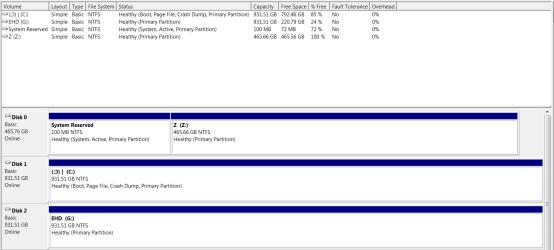
Win7 is being booted by the System Reserved partition on the other HD which is way wrong and could be causing the problem. This is why all other HD's should always be unplugged during install, and why the Win7 HD should be plugged into the first SATA port to be Disk0, since otherwise any preceding Active partition will steal its boot during reinstall or Startup Repair.

To correct this Mark Partition C Active, power down to unplug Disk0 and swap its cable to the Win7 HD so it becomes Disk0. Unplug Disk2.

Now boot into Win7 installer or System Repair Disk to run Startup Repair - Run up to 3 Separate Times until Win7 starts and holds the System flag.

You can now power down to plug back in the old Disk0 into DIsk1 port. Since it has no content I'd wipe it with Diskpart Clean Command to remove old boot code so it can't interfere, then repartition in Disk Mgmt as desired.

After making sure the problem is resolved, plug back in Disk2 again.
 
Win7 is being booted by the System Reserved partition on the other HD which is way wrong and could be causing the problem. This is why all other HD's should always be unplugged during install, and why the Win7 HD should be plugged into the first SATA port to be Disk0, since otherwise any preceding Active partition will steal its boot during reinstall or Startup Repair.

To correct this Mark Partition C Active, power down to unplug Disk0 and swap its cable to the Win7 HD so it becomes Disk0. Unplug Disk2.

Now boot into Win7 installer or System Repair Disk to run Startup Repair - Run up to 3 Separate Times until Win7 starts and holds the System flag.

You can now power down to plug back in the old Disk0 into DIsk1 port. Since it has no content I'd wipe it with Diskpart Clean Command to remove old boot code so it can't interfere, then repartition in Disk Mgmt as desired.

After making sure the problem is resolved, plug back in Disk2 again.

Thankyouthankyouthankyou! I'll try that now.
 

My Computer

Computer type
PC/Desktop
Computer Manufacturer/Model Number
Custom
OS
Microsoft Windows 7 Professional 64-bit
CPU
5960X @ 4.4GHz
Motherboard
X99 SABERTOOTH
Memory
16.0 GB
Graphics Card(s)
NVIDIA GeForce GTX 980 Ti
Hard Drives
(1) OCZ-VERT EX460 SCSI Disk Device
(2) WDC WD1002FAEX-00Z3A SCSI Disk Device
(3) WDC WD1003FZEX-00MK2 SCSI Disk Device
Internet Speed
God Speed.
Antivirus
Glock 9
Okay so I've disconnected the slave drive to do the deed.
and now that I'm trying to load up the windows disc it's coming up with a "BOOTMGR is missing"
...
...
Such a hassle. any ideas?
 

My Computer

Computer type
PC/Desktop
Computer Manufacturer/Model Number
Custom
OS
Microsoft Windows 7 Professional 64-bit
CPU
5960X @ 4.4GHz
Motherboard
X99 SABERTOOTH
Memory
16.0 GB
Graphics Card(s)
NVIDIA GeForce GTX 980 Ti
Hard Drives
(1) OCZ-VERT EX460 SCSI Disk Device
(2) WDC WD1002FAEX-00Z3A SCSI Disk Device
(3) WDC WD1003FZEX-00MK2 SCSI Disk Device
Internet Speed
God Speed.
Antivirus
Glock 9
That means its not booting the disk but trying to start the HD.

How to Boot A Computer from CD or DVD - YouTube

Are you getting prompt to Press any key to boot disk? If not then burn another Disk at 4x speed using ImgBurn, or write to flash stick using UltraISO Software To Create Bootable USB Flash Drive.

If that fails download another ISO for your licensed version from Clean Reinstall - Factory OEM Windows 7

Yeah but that's the thing.
I've set the boot priority to my CD Drive first AND used F8 to manually select the CDD.
No luck.
I've been searching for ways to fix this and I've come across this 'mirror' method?
I tried this and received a message saying "No extents were found for the plex"??
I think as soon as I figure out how I can mirror the 'system reserved' partition on my slave drive to my actual OS drive then my problem will be solved,
seeing as the 'system reserved' file is the thing responsible for booting my OS etc.
 

My Computer

Computer type
PC/Desktop
Computer Manufacturer/Model Number
Custom
OS
Microsoft Windows 7 Professional 64-bit
CPU
5960X @ 4.4GHz
Motherboard
X99 SABERTOOTH
Memory
16.0 GB
Graphics Card(s)
NVIDIA GeForce GTX 980 Ti
Hard Drives
(1) OCZ-VERT EX460 SCSI Disk Device
(2) WDC WD1002FAEX-00Z3A SCSI Disk Device
(3) WDC WD1003FZEX-00MK2 SCSI Disk Device
Internet Speed
God Speed.
Antivirus
Glock 9
You need to be able to boot a disk, the most fundamental thing we do around here. Then you can do the steps I gave you to correct this problem which we've helped correct thousands of times before and do not involve mirroring anything.

Win7 is on a DVD, not a CD. So you;d need a DVD drive or to write the installer ISO to flash stick. If necessary start with a fresh ISO and use the tool in Steps 1 and 2 of Clean Reinstall - Factory OEM Windows 7.
 
You need to be able to boot a disk, the most fundamental thing we do around here. Then you can do the steps I gave you to correct this problem which we've helped correct thousands of times before and do not involve mirroring anything.

Win7 is on a DVD, not a CD. So you;d need a DVD drive or to write the installer ISO to flash stick. If necessary start with a fresh ISO and use the tool in Steps 1 and 2 of Clean Reinstall - Factory OEM Windows 7.

Apologies for using the wrong term in my last post.
I have a DVD windows installation disk yes.
& would also like to note that it didn't work as I said previously.
I'm actually quite suprised something as little as 100mb,
is preventing me from accessing my entire library of files and whatevers, it's amazing.
 

My Computer

Computer type
PC/Desktop
Computer Manufacturer/Model Number
Custom
OS
Microsoft Windows 7 Professional 64-bit
CPU
5960X @ 4.4GHz
Motherboard
X99 SABERTOOTH
Memory
16.0 GB
Graphics Card(s)
NVIDIA GeForce GTX 980 Ti
Hard Drives
(1) OCZ-VERT EX460 SCSI Disk Device
(2) WDC WD1002FAEX-00Z3A SCSI Disk Device
(3) WDC WD1003FZEX-00MK2 SCSI Disk Device
Internet Speed
God Speed.
Antivirus
Glock 9
The little 100MB partition is what does the heavy lifting, it handles booting w7, but has to be on the same drive as the OS.
Running the Startup Repair as Greg outlined will get it back where it belongs.
 

My Computer

Computer type
PC/Desktop
Computer Manufacturer/Model Number
Home Built Desktop By DataTech
OS
Windows 7 Ultimate X64 SP1
CPU
Intel i5-2550K, Differing ~4.4-4.8GHz No built in GPU
Motherboard
ASUS P8Z68-V PRO/GEN3
Memory
16GB G.Skill Sniper 1866MHz @ 2133MHz 2x8GB
Graphics Card(s)
ASUS GTX650TIB-DC2OC-2GD5, (650TI Boost)
Sound Card
Onboard Realtek 5-1
Monitor(s) Displays
Samsung P2570HD
Screen Resolution
1920x1080
Hard Drives
Samsung 840 Pro 256GB SSD for OS, 500GB Seagate Constellation (Enterprise drive) for Data
PSU
Corsair HX650W
Case
Inwin Dragon Rider
Cooling
Hyper 212 EVO w/two Noctua fans, push-pull, @1300 RPM
Keyboard
E-Z Eyes, bright yellow keys with large characters
Mouse
steelseries SENSEI Laser Pro Gaming
Internet Speed
48-51Mbs Mbs down, 11 Mbs up Xfinity Cable
Antivirus
Norton Internet Security 2013
Browser
IE 10, Opera, Pale Moon if needed
Other Info
4 case fans, LG BluRay-RE, ASUS DVD-RW, Mr. Fusion power supply, 1.21 gigawatts.
What do you mean exactly when you say the DVD didn't work? I gave you a link to download a new installer and tool to burn to DVD or write to bootable flash stick if you need it to get the disk to boot or work correctly.

Did you mark C Active, unplug all other HD's, swap the disk cable to WIn7, then boot into the DVD to run Startup Repair - Run up to 3 Separate Times ? This is how this is repaired.

I gave you very specfic steps in my first post that are known to work. If you can't perform them then we need to know at exactly what step do they fail? Saying "it didn't work" doesn't help.
 
Back
Top