Solved Reboot and select proper Boot Device?? Help!

What do you mean exactly when you say the DVD didn't work? I gave you a link to download a new installer and tool to burn to DVD or write to bootable flash stick if you need it to get the disk to boot or work correctly.

Did you mark C Active, unplug all other HD's, swap the disk cable to WIn7, then boot into the DVD to run Startup Repair - Run up to 3 Separate Times ? This is how this is repaired.

I gave you very specfic steps in my first post that are known to work. If you can't perform them then we need to know at exactly what step do they fail? Saying "it didn't work" doesn't help.

That's exactly what I mean, the startup repair didn't detect anything wrong, that's it.
No over-thinking involved.
Nothing went wrong in the process of following your instructions.
The results from the startup repair was simply nothing, 'perfect'. (Which obviously it isn't)

Ohh, and a little update.
I've been trying to get this fixed and in the process have changed things slightly.
Not sure if I did any good to solving this problem.

But...

- I have converted both my HDs to 'Dynamic' which I wish I could change back.
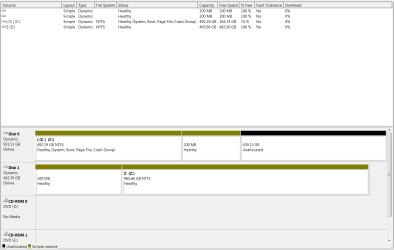
bs.png

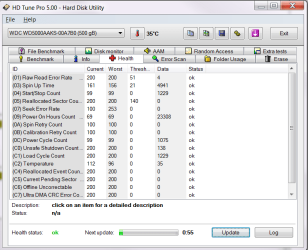
-Minitool seems to be telling me that my hard drives aren't in good health.
although windows computer management & HD Tune Pro is telling my otherwise.
So I'm getting mixed signals.
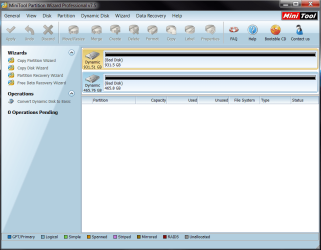
MT.png
HD.png

-I'm making this worse & digging a hole deeper for myself.
 

My Computer

Computer type
PC/Desktop
Computer Manufacturer/Model Number
Custom
OS
Microsoft Windows 7 Professional 64-bit
CPU
5960X @ 4.4GHz
Motherboard
X99 SABERTOOTH
Memory
16.0 GB
Graphics Card(s)
NVIDIA GeForce GTX 980 Ti
Hard Drives
(1) OCZ-VERT EX460 SCSI Disk Device
(2) WDC WD1002FAEX-00Z3A SCSI Disk Device
(3) WDC WD1003FZEX-00MK2 SCSI Disk Device
Internet Speed
God Speed.
Antivirus
Glock 9
Why couldn't you work with me through the proven steps I gave you to avoid the catastrophe you've created?

When it says run Startup Repair - Run up to 3 Separate Times - provided in a tutorial that explains why this is necessary - it means run Startup Repair 3 Separate times with reboots between each not once and then give up. These repairs are to be run regardless of what is reported in the results. The repair utility must be given the chance to see that it needs to write boot files. In the rare case it won't write them I would have helped you unhide them on System Reserved and copy to C to complete the repairs.

Instead you report back cryptic "doesn't work" and then without further explanation destroy your Win7 without working with us here where we've successfully dealt with tens of thousands of these.

The problem is now that you converted your HD to Dynamic which is only meant to be used to span a partition across multiple HD's. Apparently you didn't see the warning message.

The solution to solve this non-destructively is to boot free Partition Wizard CD version 4.2 which is the last one which offers this as a free feature: pw422.zip ISO - Windows Live. You can also install Easeus Partition which offers this feature free but it's best to have the disk for rescue purposes since Win7 may not boot until reconverted and any needed repairs.

Download the ISO, rightclick to burn it to CD using Windows Image Burner, or use ImgBurn.

Boot CD. You will need to delete the extra partition(s) you created which tipped it to convert to Dynamic before it will convert back to Basic.

Then follow these video steps: How to convert dynamic disk to basic disk with Partition Wizard?

If Win7 will not start and you confirm it's been converted successfully, then confirm that the 100mb System Reserved partition (preferred if you have it) or C is Set Active partition - Partition Wizard Video Help, then run Startup Repair - Run up to 3 Separate Times.

After conversion if you want help adding a partition post back a screenshot of your maximized Disk Mgmt drive map with listings, using the Snipping Tool in Start Menu, attached using paper clip in Reply Box.
 
I've set my HDs back to basic.

I have a question.
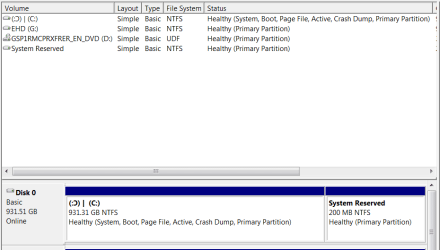
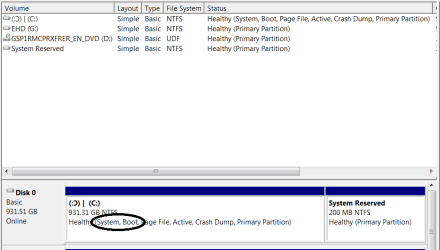
My main HD now says that it has (System,Boot,Page File,Active,Crash Dump, Primary Partition)
Am I missing something?
If my main HD has everything it needs in that same partition, then is there even a need for a 'System Reserved' partition?
I've just disconnected my slave HD and booted from my main HD alone successfully.
bs.png

Your input would be helpful cause I'm just confused.

**EDIT**

Did I just accidentally fix my problem? xD
 

My Computer

Computer type
PC/Desktop
Computer Manufacturer/Model Number
Custom
OS
Microsoft Windows 7 Professional 64-bit
CPU
5960X @ 4.4GHz
Motherboard
X99 SABERTOOTH
Memory
16.0 GB
Graphics Card(s)
NVIDIA GeForce GTX 980 Ti
Hard Drives
(1) OCZ-VERT EX460 SCSI Disk Device
(2) WDC WD1002FAEX-00Z3A SCSI Disk Device
(3) WDC WD1003FZEX-00MK2 SCSI Disk Device
Internet Speed
God Speed.
Antivirus
Glock 9
Are you reading? System reserved is what does the booting of w7.
 

My Computer

Computer type
PC/Desktop
Computer Manufacturer/Model Number
Home Built Desktop By DataTech
OS
Windows 7 Ultimate X64 SP1
CPU
Intel i5-2550K, Differing ~4.4-4.8GHz No built in GPU
Motherboard
ASUS P8Z68-V PRO/GEN3
Memory
16GB G.Skill Sniper 1866MHz @ 2133MHz 2x8GB
Graphics Card(s)
ASUS GTX650TIB-DC2OC-2GD5, (650TI Boost)
Sound Card
Onboard Realtek 5-1
Monitor(s) Displays
Samsung P2570HD
Screen Resolution
1920x1080
Hard Drives
Samsung 840 Pro 256GB SSD for OS, 500GB Seagate Constellation (Enterprise drive) for Data
PSU
Corsair HX650W
Case
Inwin Dragon Rider
Cooling
Hyper 212 EVO w/two Noctua fans, push-pull, @1300 RPM
Keyboard
E-Z Eyes, bright yellow keys with large characters
Mouse
steelseries SENSEI Laser Pro Gaming
Internet Speed
48-51Mbs Mbs down, 11 Mbs up Xfinity Cable
Antivirus
Norton Internet Security 2013
Browser
IE 10, Opera, Pale Moon if needed
Other Info
4 case fans, LG BluRay-RE, ASUS DVD-RW, Mr. Fusion power supply, 1.21 gigawatts.
System Active flags mean Win7 is booting from its own C partition. The System Reserved mirroring nonsense you did only wasted time and nearly ruined your Win7. It was brought back from the grave.

You can delete System Reserved and extend C into the space now. It is not booting Win7 or even slightly involved. If it were it would have the System label which proves that it is booting the OS.

The operation was about writing the System Boot files to C to cut out the SysReserved boot partition on the other HD, using the most comprehensive method (Startup Repair x3) which tests repeatedly all parameters before applying repairs.
 
Are you reading? System reserved is what does the booting of w7.

Yes, but if I remember correctly, the 'System Reserved' Partition will contain the (System) Files in order for the OS to boot right?
But the partition my OS and everything else is installed in actually includes the (System) files.

Are you looking?:rolleyes:

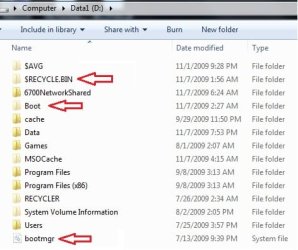
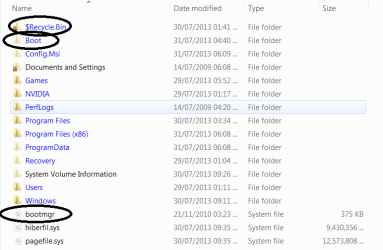
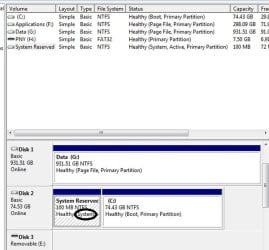
The pictures with the red arrows were examples from the internet to demonstrate my point.
The pictures with the black circles is mine.

bootfiles.jpg
bootfiless.png


(From the internet)>>>sys.jpeg

(Mine)>>>bs.png

The C: seems to have it's own boot files.
The same exact files found in the 'System Reserved' partition.
I'm just saying.
 

My Computer

Computer type
PC/Desktop
Computer Manufacturer/Model Number
Custom
OS
Microsoft Windows 7 Professional 64-bit
CPU
5960X @ 4.4GHz
Motherboard
X99 SABERTOOTH
Memory
16.0 GB
Graphics Card(s)
NVIDIA GeForce GTX 980 Ti
Hard Drives
(1) OCZ-VERT EX460 SCSI Disk Device
(2) WDC WD1002FAEX-00Z3A SCSI Disk Device
(3) WDC WD1003FZEX-00MK2 SCSI Disk Device
Internet Speed
God Speed.
Antivirus
Glock 9
yes, I've been looking for many posts, have a good one. :confused:
 

My Computer

Computer type
PC/Desktop
Computer Manufacturer/Model Number
Home Built Desktop By DataTech
OS
Windows 7 Ultimate X64 SP1
CPU
Intel i5-2550K, Differing ~4.4-4.8GHz No built in GPU
Motherboard
ASUS P8Z68-V PRO/GEN3
Memory
16GB G.Skill Sniper 1866MHz @ 2133MHz 2x8GB
Graphics Card(s)
ASUS GTX650TIB-DC2OC-2GD5, (650TI Boost)
Sound Card
Onboard Realtek 5-1
Monitor(s) Displays
Samsung P2570HD
Screen Resolution
1920x1080
Hard Drives
Samsung 840 Pro 256GB SSD for OS, 500GB Seagate Constellation (Enterprise drive) for Data
PSU
Corsair HX650W
Case
Inwin Dragon Rider
Cooling
Hyper 212 EVO w/two Noctua fans, push-pull, @1300 RPM
Keyboard
E-Z Eyes, bright yellow keys with large characters
Mouse
steelseries SENSEI Laser Pro Gaming
Internet Speed
48-51Mbs Mbs down, 11 Mbs up Xfinity Cable
Antivirus
Norton Internet Security 2013
Browser
IE 10, Opera, Pale Moon if needed
Other Info
4 case fans, LG BluRay-RE, ASUS DVD-RW, Mr. Fusion power supply, 1.21 gigawatts.

My Computer

Computer type
PC/Desktop
Computer Manufacturer/Model Number
Custom
OS
Microsoft Windows 7 Professional 64-bit
CPU
5960X @ 4.4GHz
Motherboard
X99 SABERTOOTH
Memory
16.0 GB
Graphics Card(s)
NVIDIA GeForce GTX 980 Ti
Hard Drives
(1) OCZ-VERT EX460 SCSI Disk Device
(2) WDC WD1002FAEX-00Z3A SCSI Disk Device
(3) WDC WD1003FZEX-00MK2 SCSI Disk Device
Internet Speed
God Speed.
Antivirus
Glock 9
Back
Top