ReBoot Time

Status
Not open for further replies.
Your new PSU had a lot more cables than the stock unit. I had that problem too. Cables everywhere.
 

My Computer My Computer

Computer Manufacturer/Model Number
HP, Dell, Gateway, Toshiba - 4 laptops and 2 desktops
OS
Vista, Windows7, Mint Mate, Zorin, Windows 8
CPU
from 1.6GHz Duo to i7
Monitor(s) Displays
2x HP w2207
Hard Drives
5x HDD, 7x SSD, 12x Externals
Keyboard
with trackball - no mices
Mouse
Trackball mice
Internet Speed
DSL 6000
Your new PSU had a lot more cables than the stock unit. I had that problem too. Cables everywhere.
I crammed a bunch of them into the second dvd drive bay, lol.
 

My Computer My Computer

Computer type
PC/Desktop
Computer Manufacturer/Model Number
HP Pavilion P7-1010
OS
Windows 7 Professional x64 Service Pack 1
CPU
AMD Athlon X4 645
Motherboard
Foxxcon N-Alvorix RS880
Memory
6GB DDR3 1066
Graphics Card(s)
Sapphire Radeon HD 5670 512MB GDDR5
Sound Card
Realtek Integrated Audio
Monitor(s) Displays
HP 2011x
Screen Resolution
1600x900
Hard Drives
1. Crucial M4 128GB SSD
2. 1TB Seagate Barracuda 7200.12 RPM
3. 1TB Western Digital Caviar Green 5400RPM
PSU
Seasonic S12 II Bronze 380 Watt
Case
HP OEM
Cooling
Coolermaster Heatsink, AVC Case Fan
Keyboard
HP OEM- Made by Chicony
Mouse
HP OEM- Made by Logitech
Internet Speed
20MBit Down/4 Up
Antivirus
Microsoft Security Essentials
Browser
Internet Explorer 10
Trimmed another 10 seconds off by trimming the BIOS boot options. Now the only option is the EFI Boot manager.

Now the slowest thing is the Marvell adapter.
 

Attachments

  • Untitled.jpg
    Untitled.jpg
    8.4 KB · Views: 21

My Computer My Computer

Computer Manufacturer/Model Number
Custom Build
OS
Windows 7 Professional 64 Bit Service Pack 1
CPU
Intel i7-2600K OC to 3.8Ghz
Motherboard
Asus TUF Sabertooth P67
Memory
Corsair Vengence 16GB (X4 4GB)
Graphics Card(s)
X2 EVGA GTX570 SLI
Sound Card
Creative Soundblaster X-FI TI
Monitor(s) Displays
Dual HP 2311 LED Displays
Screen Resolution
1920X1080 single / 3840X1080 desktop
Hard Drives
Crucial Force 3 SSD 120GB 6Gb/s ( OS Drive )
WD Caviar Black 2 TB 6 Gb/s (Data drive)
PSU
Kingwin Mach 1 1000w Modular 80+ Bronze
Case
AZZA solano 1000
Cooling
Zalmen 700 LED CPU, X2 240mm case fans , X3 120mm case fans
Keyboard
Razer Black Widow Mechanical
Mouse
Razer Mamba
Internet Speed
26.7 mb/s Down / 7.39 Up
Trimmed another 10 seconds off by trimming the BIOS boot options. Now the only option is the EFI Boot manager.

Now the slowest thing is the Marvell adapter.
Have you tried using the Microsoft ahci driver instead of using the marvell?
 

My Computer My Computer

Computer type
PC/Desktop
Computer Manufacturer/Model Number
HP Pavilion P7-1010
OS
Windows 7 Professional x64 Service Pack 1
CPU
AMD Athlon X4 645
Motherboard
Foxxcon N-Alvorix RS880
Memory
6GB DDR3 1066
Graphics Card(s)
Sapphire Radeon HD 5670 512MB GDDR5
Sound Card
Realtek Integrated Audio
Monitor(s) Displays
HP 2011x
Screen Resolution
1600x900
Hard Drives
1. Crucial M4 128GB SSD
2. 1TB Seagate Barracuda 7200.12 RPM
3. 1TB Western Digital Caviar Green 5400RPM
PSU
Seasonic S12 II Bronze 380 Watt
Case
HP OEM
Cooling
Coolermaster Heatsink, AVC Case Fan
Keyboard
HP OEM- Made by Chicony
Mouse
HP OEM- Made by Logitech
Internet Speed
20MBit Down/4 Up
Antivirus
Microsoft Security Essentials
Browser
Internet Explorer 10
Hi,

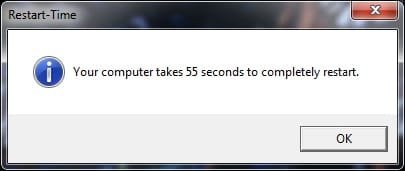
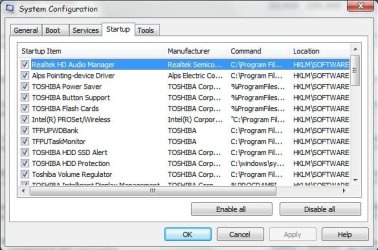
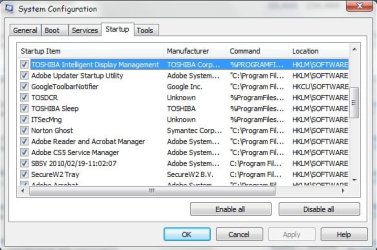
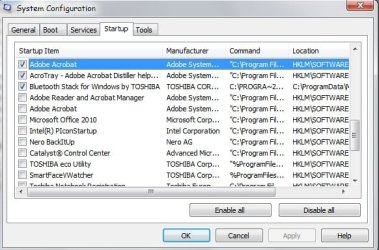
Here the result for my Tecra R840-16J laptop (I7-2640M @ 2.8 GHz + 8 GB RAM + 500 GB 7200 rpm HDD) with 25 items at the startup and a crzy number of services! Any aadvice to improve this number?
 

Attachments

  • boot.jpg
    boot.jpg
    17 KB · Views: 18
  • S-1.jpg
    S-1.jpg
    49.9 KB · Views: 4
  • S-2.jpg
    S-2.jpg
    47.9 KB · Views: 5
  • S-3.jpg
    S-3.jpg
    48.8 KB · Views: 3

My Computer My Computer

Computer Manufacturer/Model Number
Toshiba Tecra R840
OS
Windows 7 Professional 64 bit
CPU
I7 2640M
Memory
8 GB
Graphics Card(s)
AMD Radeo HD 6450M
Monitor(s) Displays
HD+ 14 inch
Hard Drives
HDD 500GB 7200 rpm
Hold down the windows key ( the one with the flag) while holding it down press R. In the dialog box type msconfig, then select the boot tab. All of the items there with a check mark are in the start up programs. Uncheck everything you do not want in startup and save the results. Reboot and they will be taken out. After a couple of reboots, do the same thing again to see if any have written themselves back into startup.
 

My Computers My Computers

System One System Two

  • Computer type
    PC/Desktop
    Computer Manufacturer/Model Number
    ALWAYS UNDER CONSTRUCTION
    OS
    Windows 11 Pro
    CPU
    Ryzen 9 5900X
    Motherboard
    Asus X570 Crosshair Viii Hero
    Memory
    32GB G Skill DDR4-3600
    Graphics Card(s)
    EVGA RTX 3080 FTW 3 Ultra
    Sound Card
    On Board/Sennheiser PC37X Headset
    Monitor(s) Displays
    3 X Asus 27"
    Screen Resolution
    2560x1440
    Hard Drives
    2 X 1 TB NVME drives
    PSU
    EVGA 850
    Case
    Phanteks Eclipse P400A
    Cooling
    EVGA 280 AIO
    Keyboard
    Logitech G510s/ Logitech G13
    Mouse
    Logitech G502
    Internet Speed
    24/1
    Antivirus
    ESET/MBAM Pro/SAS Pro
    Browser
    Chrome/ Firefox/ Edge
  • Computer type
    Laptop
    System Manufacturer/Model Number
    Dell 16 Plus
    OS
    Windows 11 Pro
    CPU
    Intel Ultra 9 288V
    Memory
    32 GB LPDDR5X 8533
    Monitor(s) Displays
    16" Mini-LED HDR600 Touch 90 Hz
    Screen Resolution
    2560X1600
    Hard Drives
    1 TB NVME
Hi essenbe,

Well, that was what I did (msconfig) to obtain those jpegs! My problem is...what to uncheck from the startup without hurting the performance?

paulo
 

My Computer My Computer

Computer Manufacturer/Model Number
Toshiba Tecra R840
OS
Windows 7 Professional 64 bit
CPU
I7 2640M
Memory
8 GB
Graphics Card(s)
AMD Radeo HD 6450M
Monitor(s) Displays
HD+ 14 inch
Hard Drives
HDD 500GB 7200 rpm
Hold down the windows key ( the one with the flag) while holding it down press R. In the dialog box type msconfig, then select the startup tab. All of the items there with a check mark are in the start up programs. Uncheck everything you do not want in startup and save the results. Reboot and they will be taken out. After a couple of reboots, do the same thing again to see if any have written themselves back into startup.

Just for the record, not trying to be mean or picky or anything, but you want to do that with the startup tab, not the boot up tab. If you are not careful when changing things in the boot tab, all sorts of things can happen!

Oh and by the way, the myth that going to msconfig, the boot tab then advanced options and changing the number of processors to improve boot time doesn't work. It is only for diagnostic purposes. Windows will use all available cores at boot up by default.
 

My Computer My Computer

Computer Manufacturer/Model Number
Dell XPS 15 L502x
OS
Windows 7 Home Premium 64bit (O.E.M)
CPU
Intel Core i7 2630QM @2.00GHz
Memory
6GB DDR3
Graphics Card(s)
Intel Intergrated Graphics 3000, nVidia GT525M (1GB)
Screen Resolution
1366x768
Hard Drives
750GB Seagate 7200rpm
Keyboard
Backlit Dell XPS 15 L502x Keyboard
Mouse
Microsoft Wireless Mobile Mouse 4000
Internet Speed
2.5 Mb/s down, 0.36 up

My Computer My Computer

Computer Manufacturer/Model Number
Dell XPS 15 L502x
OS
Windows 7 Home Premium 64bit (O.E.M)
CPU
Intel Core i7 2630QM @2.00GHz
Memory
6GB DDR3
Graphics Card(s)
Intel Intergrated Graphics 3000, nVidia GT525M (1GB)
Screen Resolution
1366x768
Hard Drives
750GB Seagate 7200rpm
Keyboard
Backlit Dell XPS 15 L502x Keyboard
Mouse
Microsoft Wireless Mobile Mouse 4000
Internet Speed
2.5 Mb/s down, 0.36 up
Thanks Tekno for the input :-).

paulo
 

My Computer My Computer

Computer Manufacturer/Model Number
Toshiba Tecra R840
OS
Windows 7 Professional 64 bit
CPU
I7 2640M
Memory
8 GB
Graphics Card(s)
AMD Radeo HD 6450M
Monitor(s) Displays
HD+ 14 inch
Hard Drives
HDD 500GB 7200 rpm
Nothing happens when you disable everything because the services are always started when needed. The exception is the AV program because you want to have that active immediately. But some AV programs do not even show up in the startups. They have their own scheme for starting with boot.
 

My Computer My Computer

Computer Manufacturer/Model Number
HP, Dell, Gateway, Toshiba - 4 laptops and 2 desktops
OS
Vista, Windows7, Mint Mate, Zorin, Windows 8
CPU
from 1.6GHz Duo to i7
Monitor(s) Displays
2x HP w2207
Hard Drives
5x HDD, 7x SSD, 12x Externals
Keyboard
with trackball - no mices
Mouse
Trackball mice
Internet Speed
DSL 6000
Thanks whs :-) Yes my Norton do not shows at startup!
About Norton 360 v6...we can configure the startup programs from there (on, off or delayed) and also see if a particular startup program have a big, medium or low impact in the resources usage! It seems intersting to me but I do not know much abou informatics.. And Norton Utilities apparently made a good job in defragmentation and cleaning the registry! I'm not selling Norton (even if I have a subscription from 2008..and since I've never had a problem with virus I keep it) but it seems not very appreciated here (?)! Someting I need to know? :-).

Even if there should be lot of stuff in my new laptop that I will never use if that do not mess with the comp performace (do not startup without a request for it) I will be fine (since I ve plenty of disk space).

Maybe the best way to see a realy boost in performace is to swap the HDD for a reliable SSD !!!

Well, I'm here to learn but as you say keeping it simple :-)

regards,
paulo
 

My Computer My Computer

Computer Manufacturer/Model Number
Toshiba Tecra R840
OS
Windows 7 Professional 64 bit
CPU
I7 2640M
Memory
8 GB
Graphics Card(s)
AMD Radeo HD 6450M
Monitor(s) Displays
HD+ 14 inch
Hard Drives
HDD 500GB 7200 rpm
And Norton Utilities apparently made a good job in defragmentation and cleaning the registry! I'm not selling Norton (even if I have a subscription from 2008..and since I've never had a problem with virus I keep it) but it seems not very appreciated here (?)! Someting I need to know? :-).


Maybe the best way to see a realy boost in performace is to swap the HDD for a reliable SSD !!!

Good idea on the SSD.

The main thing to know about Norton is to avoid the registry cleaner if you have any self-control at all.

The chances of it helping are very very small.

The chances of it hurting, if you continue to use it, are not very very small. Why take a chance?
 

My Computer My Computer

Computer type
PC/Desktop
Computer Manufacturer/Model Number
Ignatz Special; 4 speed manual gearbox; factory air conditioning; one of one
OS
Windows 7 Home Premium SP1, 64-bit
CPU
Intel Skylake i5-6600K, not overclocked
Motherboard
AsRock Z170M Extreme 4, micro ATX
Memory
8 GB HyperX DDR4-2666 (2 x 4 GB)
Graphics Card(s)
none; graphics are integrated on CPU
Sound Card
onboard: Realtek ALC1150; external: USB Behringer UF0-202
Monitor(s) Displays
Dell S2340M 23 inch IPS
Screen Resolution
1600 x 900
Hard Drives
System: Crucial MX100 series SSD, 128 GB;
Data: Samsung Spinpoint 103SJ, 1 TB;
Backup: WD Caviar Green WD30EZRX-00D8PB0, 3 TB
PSU
Rosewill SilentNight 500 watt fanless, semi-modular
Case
Antec Solo II
Cooling
Noctua NH-U12S; Noctua F12 intake, Noctua S12A exhaust
Keyboard
Microsoft 200 6JH-00001 USB
Mouse
Dell or Microsoft optical wired; USB
Antivirus
Microsoft Security Essentials and Malwarebytes Premium
Browser
Pale Moon
Other Info
All fans PWM; speeds at idle: CPU circa 500 rpm; intake circa 600 rpm; exhaust circa 600 rpm; CPU temps 27 idle and 47 C load in a warm room (27 C/81 F) when running Intel Extreme Tuning Utility stress test.
Thanks ignatzatsonic :-). Nice to know about the registry cleaner! I've used it :-(

Regards,
paulo
 

My Computer My Computer

Computer Manufacturer/Model Number
Toshiba Tecra R840
OS
Windows 7 Professional 64 bit
CPU
I7 2640M
Memory
8 GB
Graphics Card(s)
AMD Radeo HD 6450M
Monitor(s) Displays
HD+ 14 inch
Hard Drives
HDD 500GB 7200 rpm
paulo, I think Ignatz is right. Registry cleaners should be avoided in any shape, fashion or form. But on Norton in general I am with you. I use it since years too and never had a problem. And the recent editions are so nimble and unobstructive that they really do not impact the system at all.

And SSDs are great. I have them on all my systems now. If you want to inform yourself on how to go about swapping the HDD for a SSD, have a look at this: http://www.sevenforums.com/tutorials/149969-ssd-install-transfer-operating-system.html
 

My Computer My Computer

Computer Manufacturer/Model Number
HP, Dell, Gateway, Toshiba - 4 laptops and 2 desktops
OS
Vista, Windows7, Mint Mate, Zorin, Windows 8
CPU
from 1.6GHz Duo to i7
Monitor(s) Displays
2x HP w2207
Hard Drives
5x HDD, 7x SSD, 12x Externals
Keyboard
with trackball - no mices
Mouse
Trackball mice
Internet Speed
DSL 6000
To be honest, 65 seconds for a HDD is not that bad. A Guy
 

My Computer My Computer

Computer type
PC/Desktop
OS
Windows 10 Home x64
CPU
INTEL Core i5-750 Quad-Core 3.37GHz
Motherboard
ASUS P7P55D
Memory
HyperX Fury Black Series 8GB (2 x 4GB) 1866Mhz
Graphics Card(s)
EVGA GeForce GTX 750 Superclocked 1GB 128-Bit GDDR5
Monitor(s) Displays
LG 32MA68HY 32" IPS
Screen Resolution
1920 x 1080
Hard Drives
Samsung 840 Evo 120GB, SEAGATE 500GB Barracuda® 7200.12, SATA 3 Gb/s, 7200 RPM, 16MB cache
PSU
ANTEC TruePower New TP-550, 80 PLUS, 550W
Case
ANTEC Three Hundred Illusion
Cooling
COOLER MASTER Hyper 212 Plus, 4 x 120mm 1 x 140mm Noctua's
Internet Speed
85 + Mbps
Antivirus
Avast
Browser
Vivaldi
Thanks for the comments whs and A Guy.
Yes, in this last version on Norton 360 and with my laptop I find it too very, very unobstructive!
So you do not recommend any registry cleaning (cleaner)? One thing I did yestarday after posting here it was to disable registry cleaning at log on because it was right, sometimes Utilities started a registry cleaning after a reboot!

Appart from defragmentation do you recommend what more, to keep a computer in good shape ?

Thanks a lot for all the advice,

paulo
 

My Computer My Computer

Computer Manufacturer/Model Number
Toshiba Tecra R840
OS
Windows 7 Professional 64 bit
CPU
I7 2640M
Memory
8 GB
Graphics Card(s)
AMD Radeo HD 6450M
Monitor(s) Displays
HD+ 14 inch
Hard Drives
HDD 500GB 7200 rpm
To be honest, 65 seconds for a HDD is not that bad. A Guy
Because this value refers from the time you press "ok" to start the test to the time the window with the result appears!
In fact (I used a cronograph) I measured the time from when my laptop HDD restarts until the window appears and the result is 41.90 sec only! (my laptop completely "die" for a long time to completely discharge the electronics and only the restarts...a safety measure?).

So, not that bad!
Any app to measure the boot time?

paulo
 

My Computer My Computer

Computer Manufacturer/Model Number
Toshiba Tecra R840
OS
Windows 7 Professional 64 bit
CPU
I7 2640M
Memory
8 GB
Graphics Card(s)
AMD Radeo HD 6450M
Monitor(s) Displays
HD+ 14 inch
Hard Drives
HDD 500GB 7200 rpm

My Computer My Computer

Computer type
PC/Desktop
Computer Manufacturer/Model Number
Ignatz Special; 4 speed manual gearbox; factory air conditioning; one of one
OS
Windows 7 Home Premium SP1, 64-bit
CPU
Intel Skylake i5-6600K, not overclocked
Motherboard
AsRock Z170M Extreme 4, micro ATX
Memory
8 GB HyperX DDR4-2666 (2 x 4 GB)
Graphics Card(s)
none; graphics are integrated on CPU
Sound Card
onboard: Realtek ALC1150; external: USB Behringer UF0-202
Monitor(s) Displays
Dell S2340M 23 inch IPS
Screen Resolution
1600 x 900
Hard Drives
System: Crucial MX100 series SSD, 128 GB;
Data: Samsung Spinpoint 103SJ, 1 TB;
Backup: WD Caviar Green WD30EZRX-00D8PB0, 3 TB
PSU
Rosewill SilentNight 500 watt fanless, semi-modular
Case
Antec Solo II
Cooling
Noctua NH-U12S; Noctua F12 intake, Noctua S12A exhaust
Keyboard
Microsoft 200 6JH-00001 USB
Mouse
Dell or Microsoft optical wired; USB
Antivirus
Microsoft Security Essentials and Malwarebytes Premium
Browser
Pale Moon
Other Info
All fans PWM; speeds at idle: CPU circa 500 rpm; intake circa 600 rpm; exhaust circa 600 rpm; CPU temps 27 idle and 47 C load in a warm room (27 C/81 F) when running Intel Extreme Tuning Utility stress test.
Any app to measure the boot time?

Yes.

http://www.sevenforums.com/tutorials/720-restart-time.html

Many of the posts in this thread are from people who used that app.

This is the one I used too! But it starts counting from the time you press ok (and in my laptop that includes the time it takes to "shut down" + 10 sec lag for discharging the electronics + booting). Well this a reboot :-) anyway but for example in my desktop at work I've no lag for dicharging the electronics...

Anyway this is just for curiosity! The most important, for me, it is a functional computer that performs at is best without any crash!

By the way, I use Norton utilities to defragment my disk! In my XP laptop I allways used the defrag from windows! Is it better to use windows defrag utilitie (now I'm in Win 7) or it is the same?

Regards,
paulo
 

My Computer My Computer

Computer Manufacturer/Model Number
Toshiba Tecra R840
OS
Windows 7 Professional 64 bit
CPU
I7 2640M
Memory
8 GB
Graphics Card(s)
AMD Radeo HD 6450M
Monitor(s) Displays
HD+ 14 inch
Hard Drives
HDD 500GB 7200 rpm
Status
Not open for further replies.
Back
Top