Rebooting causes the default gateway to go blank

EarlZ

New member
Member
VIP
Local time
7:42 AM
Messages
146
Im using static IP config and when I reboot my PC it always blanks out the default gateway thus loosing internet access on a reboot, this started to happen about 2 weeks ago and I've never found a solution, anyone know whats causing this?

Win7 64bit.
 

My Computer My Computer

At a glance

Windows 7 Ultimate X64 RTMQ6600 @ 3.4Ghz8GB DDR2-800GTX285 1GB
OS
Windows 7 Ultimate X64 RTM
CPU
Q6600 @ 3.4Ghz
Motherboard
Abit IP35-E
Memory
8GB DDR2-800
Graphics Card(s)
GTX285 1GB
Sound Card
Creative X-Fi Extreme Music
Monitor(s) Displays
Samsung T220
Hard Drives
Samsung F1 Spinpoint 1TB
PSU
Silverstone Zues 750ZF
Case
Lian Li PC-P80
Cooling
Thermalright Ultra 120-Extreme
I'm amazed no one else knows the answer to this given that it's a known windows bug dating back to Vista SP2.

Do either this or this.
 

My Computer My Computer

At a glance

Win7Ultimate x64 + x32, Win7Pro x64, XP x32, ...
OS
Win7Ultimate x64 + x32, Win7Pro x64, XP x32, Win 2003, Ubuntu and OpenIndiana
I'm amazed no one else knows the answer to this given that it's a known windows bug dating back to Vista SP2.

Do either this or this.

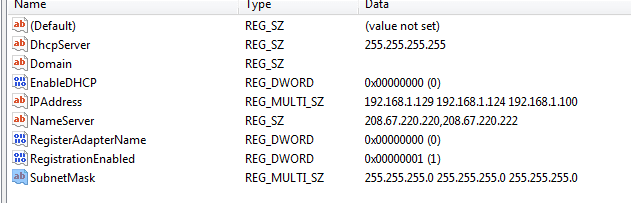
I tried both solutions above, the first one says to do something in command prompt and I dont see any extra 0.0.0.0 the second solution mentions looking the default gateway entry on that specific path but I dont have any?
 

Attachments

  • Capture.PNG
    Capture.PNG
    5.9 KB · Views: 35

My Computer My Computer

At a glance

Windows 7 Ultimate X64 RTMQ6600 @ 3.4Ghz8GB DDR2-800GTX285 1GB
OS
Windows 7 Ultimate X64 RTM
CPU
Q6600 @ 3.4Ghz
Motherboard
Abit IP35-E
Memory
8GB DDR2-800
Graphics Card(s)
GTX285 1GB
Sound Card
Creative X-Fi Extreme Music
Monitor(s) Displays
Samsung T220
Hard Drives
Samsung F1 Spinpoint 1TB
PSU
Silverstone Zues 750ZF
Case
Lian Li PC-P80
Cooling
Thermalright Ultra 120-Extreme
Given that "doing something in command prompt" is Microsoft's semi-official fix, I'm pretty sure you'll have to "do something in command prompt" if you want to move forward with this. If you delete the default route to 0.0.0.0 and sill have problems, post back.
 

My Computer My Computer

At a glance

Win7Ultimate x64 + x32, Win7Pro x64, XP x32, ...
OS
Win7Ultimate x64 + x32, Win7Pro x64, XP x32, Win 2003, Ubuntu and OpenIndiana
Given that "doing something in command prompt" is Microsoft's semi-official fix, I'm pretty sure you'll have to "do something in command prompt" if you want to move forward with this. If you delete the default route to 0.0.0.0 and sill have problems, post back.

Sorry it took me over a month to get back to this thread, been extremely busy and just went back to DHCP but now I have enough time to try a few things to fix this. Whats steps would you recommend I do ?

Right now I've manually keyed in the gateway, lemme know if I need to reboot the PC so it can go back to its broken gateway state and perform the fix from there.
 

My Computer My Computer

At a glance

Windows 7 Ultimate X64 RTMQ6600 @ 3.4Ghz8GB DDR2-800GTX285 1GB
OS
Windows 7 Ultimate X64 RTM
CPU
Q6600 @ 3.4Ghz
Motherboard
Abit IP35-E
Memory
8GB DDR2-800
Graphics Card(s)
GTX285 1GB
Sound Card
Creative X-Fi Extreme Music
Monitor(s) Displays
Samsung T220
Hard Drives
Samsung F1 Spinpoint 1TB
PSU
Silverstone Zues 750ZF
Case
Lian Li PC-P80
Cooling
Thermalright Ultra 120-Extreme
Back
Top