
Kazamieras
New member
- Local time
- 11:56 AM
- Messages
- 3
Losing internet connection "The Default Gateway is not Available"
Hello, I've been lurking for some time now but just made an account to get some help with an issue I've been having.
Some basic info before I start typing
I'm using a wired connection through At&t Uverse, no idea what the router model is, run though ethernet cable through and through. No Anti-Virus software, although I did use Malwarebytes and AlYac in sync for a while, before uninstalling them part-way though the problem.
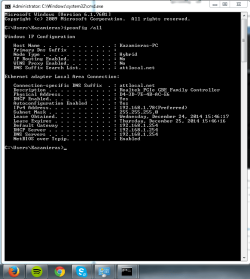
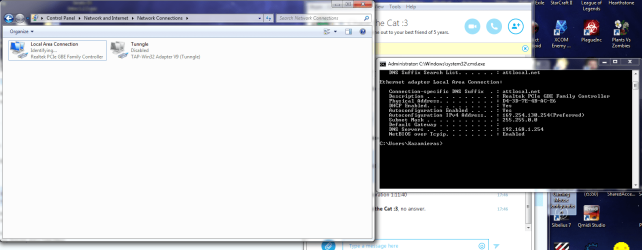
That's my ipconfig /all settings, the skype icon with the resetting symbol is how I know my internet has stopped working at the time
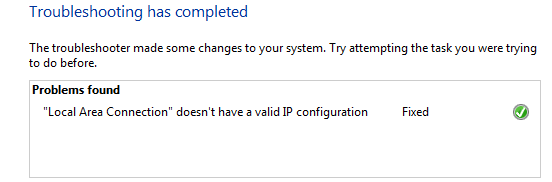
Soon afterwards, I'll right click my Local Area Connections under Network Connection in my control panel and click Diagnose, and this is what ends up happening. And thus my connection is fixed for a period of time.
The time it works seems to be fairly random, from instant disconnects to up to 2 hours of working time, but I've noticed that it seems to happen most often when I'm gaming online, playing Path of Exile or League of Legends. Most of the time, I'll also be skyping with someone on video chat, so that could have an impact on the situation.
This has been happening intermittently before as well, the rig itself is a 2 year old custom rig, AMD FX 8350 cpu, AMD Radeon 7870, and MSI 970A-G46 Motherboard. The earliest occurrence was about a year ago, the same issue sprung up for a week and never came back. This time around it's been doing so for about 2 weeks and nothing I've done seems to have fixed the issue.
It doesn't seem to be a driver issue as I've updated all of the relevant drivers, and it's not an issue with the router as I have another computer connected through wire and two more with wireless connections. Although it I haven't tried replacing the cable, it didn't work the last time this occurred so I doubt it will this time.
Any other information you need can be provided, thanks for your help :3
EDIT: After further use today, I have suspicions it might be due to overuse of data. As the connection mainly drops later at night, and after a day of working it tends to drop more often. After a while it ends up losing identification of the network suddenly showing up like this
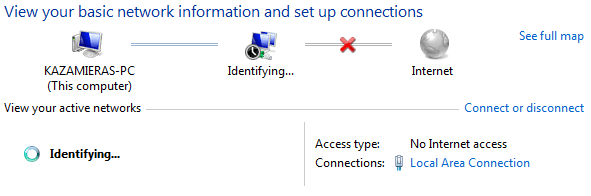
From which I will diagnose as such
Next time this happens I will try and take an ipconfig /all at the current state
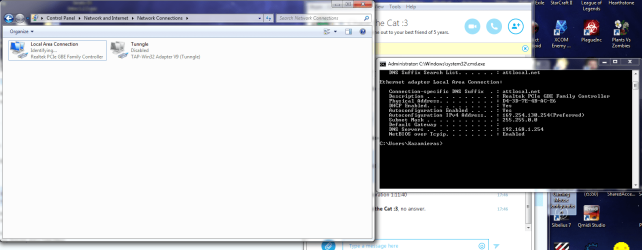
I also seem to be wrong in my assumption about network load and use. It just cut out at 12:07, about 40 minutes after being on.
Hello, I've been lurking for some time now but just made an account to get some help with an issue I've been having.
Some basic info before I start typing
I'm using a wired connection through At&t Uverse, no idea what the router model is, run though ethernet cable through and through. No Anti-Virus software, although I did use Malwarebytes and AlYac in sync for a while, before uninstalling them part-way though the problem.
That's my ipconfig /all settings, the skype icon with the resetting symbol is how I know my internet has stopped working at the time
Soon afterwards, I'll right click my Local Area Connections under Network Connection in my control panel and click Diagnose, and this is what ends up happening. And thus my connection is fixed for a period of time.
The time it works seems to be fairly random, from instant disconnects to up to 2 hours of working time, but I've noticed that it seems to happen most often when I'm gaming online, playing Path of Exile or League of Legends. Most of the time, I'll also be skyping with someone on video chat, so that could have an impact on the situation.
This has been happening intermittently before as well, the rig itself is a 2 year old custom rig, AMD FX 8350 cpu, AMD Radeon 7870, and MSI 970A-G46 Motherboard. The earliest occurrence was about a year ago, the same issue sprung up for a week and never came back. This time around it's been doing so for about 2 weeks and nothing I've done seems to have fixed the issue.
It doesn't seem to be a driver issue as I've updated all of the relevant drivers, and it's not an issue with the router as I have another computer connected through wire and two more with wireless connections. Although it I haven't tried replacing the cable, it didn't work the last time this occurred so I doubt it will this time.
Any other information you need can be provided, thanks for your help :3
EDIT: After further use today, I have suspicions it might be due to overuse of data. As the connection mainly drops later at night, and after a day of working it tends to drop more often. After a while it ends up losing identification of the network suddenly showing up like this
From which I will diagnose as such
Next time this happens I will try and take an ipconfig /all at the current state
I also seem to be wrong in my assumption about network load and use. It just cut out at 12:07, about 40 minutes after being on.
Attachments
Last edited:
My Computer
At a glance
Windows 7 Ultimate x64AMD FX 8350AMD Radeon 7870
- Computer type
- PC/Desktop
- Computer Manufacturer/Model Number
- Custom
- OS
- Windows 7 Ultimate x64
- CPU
- AMD FX 8350
- Motherboard
- MSI 970A-G46
- Graphics Card(s)
- AMD Radeon 7870


