Rebuilding RAID 5

tewas

New member
Local time
3:52 AM
Messages
14
Hi guys,

So i have got this problem today due to my stupid mistake. I don't know where to begin but here it goes:
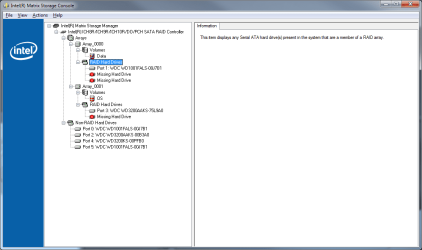
I loaded Bios defaults on restart, which promptly reset my values to default. Usually it's not that big of a deal except my motherboard has RAID controller and i have 2 separate RAIDs running, 5 and 0. Now both of those are broken, and the Intel Matrix Storage manager gladly informs me that i have two disks missing and few "spare" disks that are not in any raid. The disks are fine, they are working and they still have data on it (i boot from separate non-raided disk).

My question is if it is possible to tell the controller that those missing disks are right there? The boot time controller does give me option to create raid, but that will destroy all the data that i have right now, so that option is out of question.
The worst case scenario probably would be to buy data recovery software and extract data from RAID disks and re-create the raid, but that would cost ~$500 for software and extra drive to store the data while i'm playing with RAID configuration.

So if anyone has any ideas, tips of how i could avoid spending that kind of money i would appreciate.

I run Win7-64Ultimate bit with Asus P5B-Deluxe motherboard.

Thanks
 

My Computer My Computer

Computer Manufacturer/Model Number
Custom Build
OS
Windows 7 Enterprise
CPU
Intel Core 2 Q6700
Motherboard
Asus P5B-Deluxe
Memory
5 gb
Graphics Card(s)
nVidia GTX 285
Sound Card
Integrated
Monitor(s) Displays
Dual Samsung SyncMaster 2494
Screen Resolution
1920x1080
Although most motherboards are RAID capable, this option has to be explicitly enabled in the BIOS. By default, the RAID option in the BIOS is set to disabled. You can have RAID enabled on the board, and still be able to boot from a non-RAIDed drive, as it is possible to select which drives should be part of a RAID array and which should not.

Since you reset the BIOS to its defaults, just check the options there and I'm pretty sure you'll find that is what has happened.
 

My Computer My Computer

Computer type
PC/Desktop
Computer Manufacturer/Model Number
Dwarf Dwf/11/2012 r09/2013
OS
Windows 8.1 Pro RTM x64
CPU
Intel Core-i5-3570K 4-core @ 3.4GHz (Ivy Bridge) (OC 4.4GHz)
Motherboard
ASRock Z77 Extreme4-M
Memory
4 x 4GB DDR3-1600 Corsair Vengeance CMZ8GX3M2A1600C9B (16GB)
Graphics Card(s)
MSI GeForce GTX770 Gaming OC 2GB
Sound Card
Realtek High Definition on board solution (ALC 898)
Monitor(s) Displays
ViewSonic VA1912w Widescreen (VGA)
Screen Resolution
1440x900
Hard Drives
OCZ Agility 3 SSD 120GB SATA III x2 (RAID 0)
Samsung HD501LJ 500GB SATA II x2
Hitachi HDS721010CLA332 1TB SATA II
Iomega 1.5TB Ext USB 2.0
WD 2.0TB Ext USB 3.0
PSU
XFX Pro Series 850W Semi-Modular
Case
Gigabyte IF233
Cooling
1 x 120mm Front Inlet 1 x 120mm Rear Exhaust
Keyboard
Microsoft Comfort Curve Keyboard 3000 (USB)
Mouse
Microsoft Comfort Mouse 3000 for Business (USB)
Internet Speed
NetGear DG834Gv3 ADSL Modem/Router (Ethernet) ~4.0 Mb/s (O2)
Antivirus
Avast! 8.0.1497
Browser
IE 11
Other Info
Optical Drive: HL-DT-ST BD-RE BH10LS30 SATA Bluray
Lexmark S305 Printer/Scanner/Copier (USB)
WEI Score: 8.1/8.1/8.5/8.5/8.25
Asus Eee PC 1011PX Netbook (Windows 7 x86 Starter)
That was exactly what happened. The default setting in my motherboard is set to IDE configuration, once i set to RAID, my software RAID controller came back alive but with only 1 disk in each raid. As you all know RAID 5 cannot function with only 1 disk, it needs at least 2 working ones and only 1 can be down. Neither of the disks are down and now i try to find a way to point controller to the two disks and tell it to use for RAID 5. Hell if i could point to one disk, another could be rebuild.
I've attached the Intel Matrix Storage screenshot in case anyone need more info.

WD1001FALS-00J7B1 disks should be in raid 5
WD3200AAKS-XXXXX should be in raid 0
Remaining disk is working and have my OS loaded on.


Thanks
 

Attachments

  • Raid config.png
    Raid config.png
    19.1 KB · Views: 77

My Computer My Computer

Computer Manufacturer/Model Number
Custom Build
OS
Windows 7 Enterprise
CPU
Intel Core 2 Q6700
Motherboard
Asus P5B-Deluxe
Memory
5 gb
Graphics Card(s)
nVidia GTX 285
Sound Card
Integrated
Monitor(s) Displays
Dual Samsung SyncMaster 2494
Screen Resolution
1920x1080
Hi tewas,

Well, that's a start. However, not only have you got to enable RAID in the BIOS, but you have also got to assign the disks to the array.
 

My Computer My Computer

Computer type
PC/Desktop
Computer Manufacturer/Model Number
Dwarf Dwf/11/2012 r09/2013
OS
Windows 8.1 Pro RTM x64
CPU
Intel Core-i5-3570K 4-core @ 3.4GHz (Ivy Bridge) (OC 4.4GHz)
Motherboard
ASRock Z77 Extreme4-M
Memory
4 x 4GB DDR3-1600 Corsair Vengeance CMZ8GX3M2A1600C9B (16GB)
Graphics Card(s)
MSI GeForce GTX770 Gaming OC 2GB
Sound Card
Realtek High Definition on board solution (ALC 898)
Monitor(s) Displays
ViewSonic VA1912w Widescreen (VGA)
Screen Resolution
1440x900
Hard Drives
OCZ Agility 3 SSD 120GB SATA III x2 (RAID 0)
Samsung HD501LJ 500GB SATA II x2
Hitachi HDS721010CLA332 1TB SATA II
Iomega 1.5TB Ext USB 2.0
WD 2.0TB Ext USB 3.0
PSU
XFX Pro Series 850W Semi-Modular
Case
Gigabyte IF233
Cooling
1 x 120mm Front Inlet 1 x 120mm Rear Exhaust
Keyboard
Microsoft Comfort Curve Keyboard 3000 (USB)
Mouse
Microsoft Comfort Mouse 3000 for Business (USB)
Internet Speed
NetGear DG834Gv3 ADSL Modem/Router (Ethernet) ~4.0 Mb/s (O2)
Antivirus
Avast! 8.0.1497
Browser
IE 11
Other Info
Optical Drive: HL-DT-ST BD-RE BH10LS30 SATA Bluray
Lexmark S305 Printer/Scanner/Copier (USB)
WEI Score: 8.1/8.1/8.5/8.5/8.25
Asus Eee PC 1011PX Netbook (Windows 7 x86 Starter)
Assigning disks to the array is where i need help with. The controller (when booting up) gives you and option to create/delete array, but i can't use them, due to data preservation.
I also found a program called Restorer Ultimate that claims to be able to recover from failed RAID5 config. For now i'm just scanning my disks trying to find out what would be the best course of action. If anyone used it, or heard anything about software i would appreciate your input.
 

My Computer My Computer

Computer Manufacturer/Model Number
Custom Build
OS
Windows 7 Enterprise
CPU
Intel Core 2 Q6700
Motherboard
Asus P5B-Deluxe
Memory
5 gb
Graphics Card(s)
nVidia GTX 285
Sound Card
Integrated
Monitor(s) Displays
Dual Samsung SyncMaster 2494
Screen Resolution
1920x1080
Back
Top