Receiving start up message before i can use PC

Buddy1968

New member
Morning.
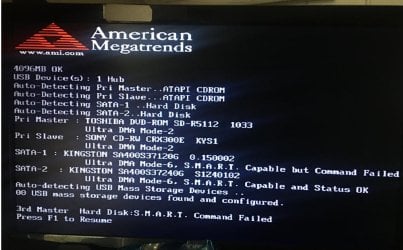
My windows 7 pro Pc has recently started each morning to show the black screen & message as shown.
I press F1 to continue & once loaded im back to using the Pc fine all day.

This has happened say 3 times in the last week.
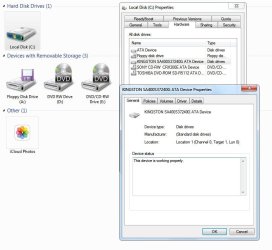
I have also supplied 2 screenshots, They is a hard drive icon missing of which i suppose is part of the issue im having.
Properties show info mention on the black screen which is my C drive.

The drive that is missing i dont use so what would be the way for me to continue without having to press F1 each day.
I dont mind removing the drive in question but need some steps to do so in respect is it registered somewhere of which i need to delete etc before i actually unplug from inside Pc

Thanks & have a nice day
 

Attachments
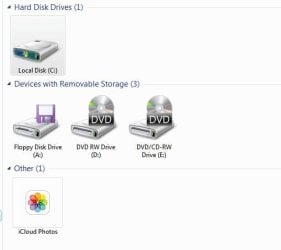
  • a.jpg
    a.jpg
    21 KB · Views: 14
  • b.jpg
    b.jpg
    71 KB · Views: 1
  • EaseUS_2025_02_ 3_11_03_15.jpg
    EaseUS_2025_02_ 3_11_03_15.jpg
    84 KB · Views: 0

My Computers

System One System Two

  • Computer type
    PC/Desktop
    OS
    WINDOWS 7 PRO 32 bit but can also use 64 bit
    CPU
    AMD Athlon 64 X2 4200+ Brisbane 65nm Technology
    Motherboard
    FOXCONN A6VMX (Socket 940)
    Memory
    4 Gb
    Graphics Card(s)
    Generic Non-PnP Monitor (1600x1200@60Hz) 1024MB ATI AMD Rade
    Sound Card
    AMD High Definition Audio Device
    Monitor(s) Displays
    TV but using as pc screen
    Screen Resolution
    1600 x 1200
    Hard Drives
    KINGSTON SA400S37240G ATA Device (SSD)
    Antivirus
    Malwarebytes
    Browser
    Google Chrome
  • Computer type
    PC/Desktop
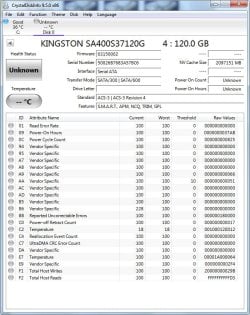
It says Kingston 120gb not responding to smart requests.

Have a look at your disks with something like hard disk sentinel or crystaldisk

If you fill in your system specs people reading your posts know what system they are dealing with.
 

My Computers

System One System Two

  • Computer type
    PC/Desktop
    OS
    7 X64
    CPU
    i5 8400
    Motherboard
    gigabyte b365m ds3h
    Memory
    2x8gb 3200mhz
    Hard Drives
    various
    PSU
    pure power 11 400w cm
    Case
    Coolermaster
    Cooling
    cryorig m9i
  • Computer type
    PC/Desktop
    OS
    7x64
    CPU
    g5400
    Motherboard
    ga b365m ds3h
    Memory
    8gb ddr4 2400
    PSU
    xfx pro 450w
Hi,
Do you know of a page etc where it will pull up my Pc specs
 

My Computers

System One System Two

  • Computer type
    PC/Desktop
    OS
    WINDOWS 7 PRO 32 bit but can also use 64 bit
    CPU
    AMD Athlon 64 X2 4200+ Brisbane 65nm Technology
    Motherboard
    FOXCONN A6VMX (Socket 940)
    Memory
    4 Gb
    Graphics Card(s)
    Generic Non-PnP Monitor (1600x1200@60Hz) 1024MB ATI AMD Rade
    Sound Card
    AMD High Definition Audio Device
    Monitor(s) Displays
    TV but using as pc screen
    Screen Resolution
    1600 x 1200
    Hard Drives
    KINGSTON SA400S37240G ATA Device (SSD)
    Antivirus
    Malwarebytes
    Browser
    Google Chrome
  • Computer type
    PC/Desktop

My Computers

System One System Two

  • Computer type
    PC/Desktop
    OS
    7 X64
    CPU
    i5 8400
    Motherboard
    gigabyte b365m ds3h
    Memory
    2x8gb 3200mhz
    Hard Drives
    various
    PSU
    pure power 11 400w cm
    Case
    Coolermaster
    Cooling
    cryorig m9i
  • Computer type
    PC/Desktop
    OS
    7x64
    CPU
    g5400
    Motherboard
    ga b365m ds3h
    Memory
    8gb ddr4 2400
    PSU
    xfx pro 450w
Specs updated.

Is there any reason why i cant just remove the data from where its registered on Pc then just unplugged it from inside.

- - - Updated - - -

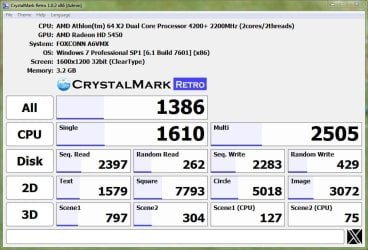
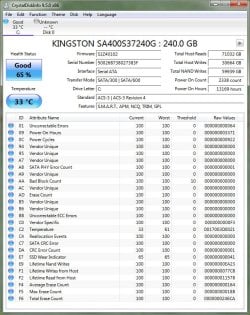
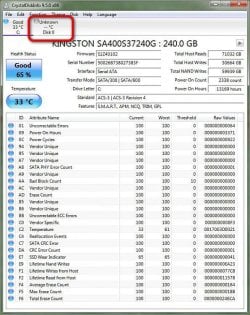
As requested after Crystal now run
 

Attachments

  • EaseUS_2025_02_ 3_13_16_46.jpg
    EaseUS_2025_02_ 3_13_16_46.jpg
    107.2 KB · Views: 0

My Computers

System One System Two

  • Computer type
    PC/Desktop
    OS
    WINDOWS 7 PRO 32 bit but can also use 64 bit
    CPU
    AMD Athlon 64 X2 4200+ Brisbane 65nm Technology
    Motherboard
    FOXCONN A6VMX (Socket 940)
    Memory
    4 Gb
    Graphics Card(s)
    Generic Non-PnP Monitor (1600x1200@60Hz) 1024MB ATI AMD Rade
    Sound Card
    AMD High Definition Audio Device
    Monitor(s) Displays
    TV but using as pc screen
    Screen Resolution
    1600 x 1200
    Hard Drives
    KINGSTON SA400S37240G ATA Device (SSD)
    Antivirus
    Malwarebytes
    Browser
    Google Chrome
  • Computer type
    PC/Desktop
crystaldiskinfo not crystalmark

particularly the kingston 120gb needs looking at
 

My Computers

System One System Two

  • Computer type
    PC/Desktop
    OS
    7 X64
    CPU
    i5 8400
    Motherboard
    gigabyte b365m ds3h
    Memory
    2x8gb 3200mhz
    Hard Drives
    various
    PSU
    pure power 11 400w cm
    Case
    Coolermaster
    Cooling
    cryorig m9i
  • Computer type
    PC/Desktop
    OS
    7x64
    CPU
    g5400
    Motherboard
    ga b365m ds3h
    Memory
    8gb ddr4 2400
    PSU
    xfx pro 450w
Sorry my mistake
This is for the drive thats currently seen.

The other i do not use but i believe it had Windows 10 on it.
Im keen to just unplug it & continue so is there any steps i need to follow as is it registered somewhere & by just unplugging it wont be good enough
 

Attachments

  • EaseUS_2025_02_ 3_16_59_02.jpg
    EaseUS_2025_02_ 3_16_59_02.jpg
    133.6 KB · Views: 2

My Computers

System One System Two

  • Computer type
    PC/Desktop
    OS
    WINDOWS 7 PRO 32 bit but can also use 64 bit
    CPU
    AMD Athlon 64 X2 4200+ Brisbane 65nm Technology
    Motherboard
    FOXCONN A6VMX (Socket 940)
    Memory
    4 Gb
    Graphics Card(s)
    Generic Non-PnP Monitor (1600x1200@60Hz) 1024MB ATI AMD Rade
    Sound Card
    AMD High Definition Audio Device
    Monitor(s) Displays
    TV but using as pc screen
    Screen Resolution
    1600 x 1200
    Hard Drives
    KINGSTON SA400S37240G ATA Device (SSD)
    Antivirus
    Malwarebytes
    Browser
    Google Chrome
  • Computer type
    PC/Desktop
Unfortunately its the other drive causing the problem

Its your bios determining the problem, and as that drive is/has a higher priority drive loading order that whats getting passed through to windows. F1 option then is basically saying use next drive

run the crystal prog on it anyway, just so you know whether its going bad or not

Most Bios give the option to change/move individual drives selection up/down to set the preferred set-up
 

My Computer

Computer type
PC/Desktop
Computer Manufacturer/Model Number
medionl/Aspire 6930G/acer x55a
OS
W7 home premium 32bit/W7HP 64bit/w10 tp insider ring
CPU
E5300 dual core
Motherboard
medion MS7366
Memory
3gb
Graphics Card(s)
Nvidia Geforce 7100 Nforce 630i
Monitor(s) Displays
avixc
Internet Speed
n (isp resticted to 72)
Antivirus
mse/pands
Browser
palemoon
Other Info
Belkin Fd7050 n USB using Railink RT2870 drivers, more upto date
I think we’re getting confused here.

In my pc there are 2 Hard drives.
When I go to my computer I only see the 1 Hard drive icon. This must be the c drive & is the drive I use.

I used to see a 2nd drive icon but it’s now shown.

I believe it’s this not shown drive that is given me the black screen at start up.

So I have run the software tool as advised on the drive that I can see & posted the results.


I am unable to run the tool on the drive I can’t see.

So what I’m saying is, The drive that I can’t see I don’t mind not ever using it.
So need steps to disconnect it etc.

The drive I can see & is my c drive I need to keep.
 

My Computers

System One System Two

  • Computer type
    PC/Desktop
    OS
    WINDOWS 7 PRO 32 bit but can also use 64 bit
    CPU
    AMD Athlon 64 X2 4200+ Brisbane 65nm Technology
    Motherboard
    FOXCONN A6VMX (Socket 940)
    Memory
    4 Gb
    Graphics Card(s)
    Generic Non-PnP Monitor (1600x1200@60Hz) 1024MB ATI AMD Rade
    Sound Card
    AMD High Definition Audio Device
    Monitor(s) Displays
    TV but using as pc screen
    Screen Resolution
    1600 x 1200
    Hard Drives
    KINGSTON SA400S37240G ATA Device (SSD)
    Antivirus
    Malwarebytes
    Browser
    Google Chrome
  • Computer type
    PC/Desktop
Thats because the BIOS is NOT passing it thru....so windows doesn't see it
change the order(but it still won't be shown)

dissable SMART test in Bios to see it AFTER doing the above
 

My Computer

Computer type
PC/Desktop
Computer Manufacturer/Model Number
medionl/Aspire 6930G/acer x55a
OS
W7 home premium 32bit/W7HP 64bit/w10 tp insider ring
CPU
E5300 dual core
Motherboard
medion MS7366
Memory
3gb
Graphics Card(s)
Nvidia Geforce 7100 Nforce 630i
Monitor(s) Displays
avixc
Internet Speed
n (isp resticted to 72)
Antivirus
mse/pands
Browser
palemoon
Other Info
Belkin Fd7050 n USB using Railink RT2870 drivers, more upto date
Sorry but I’m now confused.
Maybe easier if u just ask you.

Which drive is the problem.

The C drive which I’m using or the other drive I can’t see ?
 

My Computers

System One System Two

  • Computer type
    PC/Desktop
    OS
    WINDOWS 7 PRO 32 bit but can also use 64 bit
    CPU
    AMD Athlon 64 X2 4200+ Brisbane 65nm Technology
    Motherboard
    FOXCONN A6VMX (Socket 940)
    Memory
    4 Gb
    Graphics Card(s)
    Generic Non-PnP Monitor (1600x1200@60Hz) 1024MB ATI AMD Rade
    Sound Card
    AMD High Definition Audio Device
    Monitor(s) Displays
    TV but using as pc screen
    Screen Resolution
    1600 x 1200
    Hard Drives
    KINGSTON SA400S37240G ATA Device (SSD)
    Antivirus
    Malwarebytes
    Browser
    Google Chrome
  • Computer type
    PC/Desktop
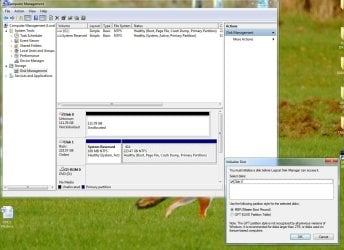
does it show in disk management ?

post a screenshot of disk management window

- - - Updated - - -


In addition crystal diskinfo sees it try clicking on it and see what it says

EaseUS_2025_02_ 3_16_59_02-222.jpg

looks like there is something wrong with the 120gb disk.

unless you post a disk management screenshot we dont know what partition style you are using or where the system partition is.
 

My Computers

System One System Two

  • Computer type
    PC/Desktop
    OS
    7 X64
    CPU
    i5 8400
    Motherboard
    gigabyte b365m ds3h
    Memory
    2x8gb 3200mhz
    Hard Drives
    various
    PSU
    pure power 11 400w cm
    Case
    Coolermaster
    Cooling
    cryorig m9i
  • Computer type
    PC/Desktop
    OS
    7x64
    CPU
    g5400
    Motherboard
    ga b365m ds3h
    Memory
    8gb ddr4 2400
    PSU
    xfx pro 450w
See attached.
Thanks
 

Attachments

  • EaseUS_2025_02_ 3_19_09_39.jpg
    EaseUS_2025_02_ 3_19_09_39.jpg
    152 KB · Views: 1
  • EaseUS_2025_02_ 3_19_11_57.jpg
    EaseUS_2025_02_ 3_19_11_57.jpg
    122.7 KB · Views: 0

My Computers

System One System Two

  • Computer type
    PC/Desktop
    OS
    WINDOWS 7 PRO 32 bit but can also use 64 bit
    CPU
    AMD Athlon 64 X2 4200+ Brisbane 65nm Technology
    Motherboard
    FOXCONN A6VMX (Socket 940)
    Memory
    4 Gb
    Graphics Card(s)
    Generic Non-PnP Monitor (1600x1200@60Hz) 1024MB ATI AMD Rade
    Sound Card
    AMD High Definition Audio Device
    Monitor(s) Displays
    TV but using as pc screen
    Screen Resolution
    1600 x 1200
    Hard Drives
    KINGSTON SA400S37240G ATA Device (SSD)
    Antivirus
    Malwarebytes
    Browser
    Google Chrome
  • Computer type
    PC/Desktop
it looks dead.

try intializing it but I reckon it has turned its toes up. In which case take it out of the machine
 

My Computers

System One System Two

  • Computer type
    PC/Desktop
    OS
    7 X64
    CPU
    i5 8400
    Motherboard
    gigabyte b365m ds3h
    Memory
    2x8gb 3200mhz
    Hard Drives
    various
    PSU
    pure power 11 400w cm
    Case
    Coolermaster
    Cooling
    cryorig m9i
  • Computer type
    PC/Desktop
    OS
    7x64
    CPU
    g5400
    Motherboard
    ga b365m ds3h
    Memory
    8gb ddr4 2400
    PSU
    xfx pro 450w
Ok

I will see if there are any numbers on it so i dont remove wrong item.

Do i need to do anything else ?
I mean is it registered anywhere in the pc & when i switch it on it will pop up another error or when i remove it thats it

Thansk

- - - Updated - - -

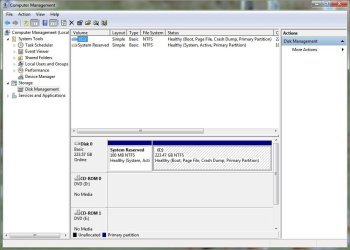
I have now removed the HDD in question.
Pc restarted & screenshots as follows.

I have the internet & all my tabs open lok before

Is that all i need to do.
 

Attachments

  • EaseUS_2025_02_ 3_19_48_34.jpg
    EaseUS_2025_02_ 3_19_48_34.jpg
    91.5 KB · Views: 0
  • EaseUS_2025_02_ 3_19_49_19.jpg
    EaseUS_2025_02_ 3_19_49_19.jpg
    61.9 KB · Views: 0
  • EaseUS_2025_02_ 3_19_49_51.jpg
    EaseUS_2025_02_ 3_19_49_51.jpg
    132.6 KB · Views: 1

My Computers

System One System Two

  • Computer type
    PC/Desktop
    OS
    WINDOWS 7 PRO 32 bit but can also use 64 bit
    CPU
    AMD Athlon 64 X2 4200+ Brisbane 65nm Technology
    Motherboard
    FOXCONN A6VMX (Socket 940)
    Memory
    4 Gb
    Graphics Card(s)
    Generic Non-PnP Monitor (1600x1200@60Hz) 1024MB ATI AMD Rade
    Sound Card
    AMD High Definition Audio Device
    Monitor(s) Displays
    TV but using as pc screen
    Screen Resolution
    1600 x 1200
    Hard Drives
    KINGSTON SA400S37240G ATA Device (SSD)
    Antivirus
    Malwarebytes
    Browser
    Google Chrome
  • Computer type
    PC/Desktop
Back
Top