- Local time
- 5:47 AM
- Messages
- 35,002
Hi Friends ! I am back with a new query.
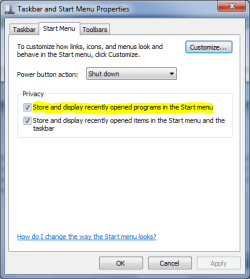
All the video clips I play with VLC or Media Center, all the archives I extract with Winrar,all the web-pages I open with firefox are listed in start menu . whenever I click on start menu and place the pointer on those applications, the fool start menu expands and shows the previously used files as "Recent". I dont want them to be there. It is boring to remove them one by one
 . I know that a little trick in the privacy tab it the WMP keeps the Windows Media Player link in start menu free from "recent"s. Is there any trick to do the same for the applications viz.
1. Firefox
2. VLC Media player
3. Windows Media Center?
Thanks in advance . Archan.
All the video clips I play with VLC or Media Center, all the archives I extract with Winrar,all the web-pages I open with firefox are listed in start menu
. whenever I click on start menu and place the pointer on those applications, the fool start menu expands and shows the previously used files as "Recent". I dont want them to be there. It is boring to remove them one by one. I know that a little trick in the privacy tab it the WMP keeps the Windows Media Player link in start menu free from "recent"s. Is there any trick to do the same for the applications viz. 1. Firefox
2. VLC Media player
3. Windows Media Center?
Thanks in advance
. Archan.My Computer
- Computer type
- PC/Desktop
- Computer Manufacturer/Model Number
- Self Assembled
- OS
- Microsoft Windows 10 Pro Insider Preview 64-bit
- CPU
- Intel(R) Core(TM) i3-4130 CPU @ 3.40GHz
- Motherboard
- Gigabyte Technology Co., Ltd. B85M-D3H
- Memory
- Corsair Vengence 4GB x2 (8.00GB Dual-Channel DDR3 @ 798MHz)
- Graphics Card(s)
- 2047MB GeForce GTS 450 (ZOTAC International)
- Sound Card
- Onboard (Realtek High Definition Audio)
- Monitor(s) Displays
- LG Flatron E2040T
- Screen Resolution
- 1600x900
- Hard Drives
- Western Digital 1 TB
Seagate 500 GB
- PSU
- Corsair VS550
- Case
- Cooler Master K380
- Cooling
- Cooler Master Seidon 120V Plus
- Keyboard
- Logitech MK260r
- Mouse
- Logitech MK260r
- Internet Speed
- PMPL Broadband
- Antivirus
- Windows Defender + MBAM
- Browser
- Firefox
- Other Info
- Dell Studio 15" Laptop