Recently installed Windows 7, random lag spikes

Sans Vans

New member
Member
Local time
6:52 AM
Messages
64
Location
(Hint): The timezone is wrong
Ok, so I recently installed windows 7 on my computer, and randomly, during anything, watching a video, going through files, literally anything, it would lag and it would go to like 15 FPS for like a minute, and it is getting annoying. Any help?
 

My Computer My Computer

Computer type
PC/Desktop
Computer Manufacturer/Model Number
It says "to be filled by O.E.M", same with model number.
OS
Windows 10 Home 20H2 64x, Windows 7 Ultimate x64 (dual booting)
CPU
AMD Ryzen 3 1200 Quad-Core Processor (3.10 GHz)
Motherboard
ASRock A320M-HDV atleast.. I think that's it.
Graphics Card(s)
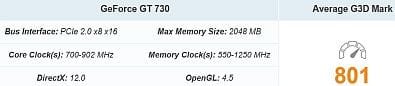
NVIDIA GeForce GT 730
Monitor(s) Displays
2
Screen Resolution
1920x1080 (although I swear its 1920x1024), 1280x1024
Hard Drives
I don't know how to check, all I know is that I don't have an SSD.
Mouse
G502 Hero (Wired)
Antivirus
AVG Antivirus, Malwarebytes
Browser
Chromium based Microsoft Edge, Google Chrome
Please edit your profile with your hardware specs.
Your profile says you have Win 10 and a Rysen 3 CPU.

How did you install the updates? If WU is enabled the lag maybe due to searching and installing the updates.
I recommend Simplix
 

My Computers My Computers

System One System Two

  • Computer type
    PC/Desktop
    Computer Manufacturer/Model Number
    custom build
    OS
    Windows 7 HP 64
    CPU
    i5 6600K - 800MHz to 4200MHz
    Motherboard
    GA-Z170-HD3P
    Memory
    4+4G GSkill DDR4 3000
    Graphics Card(s)
    IG - Intel 530
    Monitor(s) Displays
    Samsung 226BW
    Screen Resolution
    1680x1050
    Hard Drives
    (1) -1 SM951 – 128GB M.2 AHCI PCIe SSD drive for Windows 7 and Lubuntu
    (2) -1 WD SATA 3 - 1T for Data
    (3) -1 WD SATA 3 - 1T for backup
    PSU
    Thermaltake 450W TR2 gold
    Keyboard
    Old and good Chicony mechanical keyboard
    Mouse
    Logitech mX performance - 9 buttons (had to disable some)
    Internet Speed
    500Mb/s
    Browser
    Firefox 64
    Other Info
    TinyWall firewall
  • Computer type
    Laptop
    System Manufacturer/Model Number
    Asus Q550LF
    OS
    Windows 7 Pro
    CPU
    i7-4500U 800MHz to 3.0GHz
    Motherboard
    Asus Q550LF
    Memory
    (4+4)G DDR3 1600
    Graphics Card(s)
    IG intel 4400 + NVIDIA GeForce GT 745M
    Sound Card
    Realtek
    Monitor(s) Displays
    LG Display LP156WF4-SPH1
    Screen Resolution
    1920 x 1080
    Hard Drives
    BX500 120G SSD for Windows and programs +
    1T HDD for data
    Internet Speed
    500 Mb/s
    Browser
    Firefox
    Other Info
    TinyWall firewall
Please edit your profile with your hardware specs.
Your profile says you have Win 10 and a Rysen 3 CPU.

How did you install the updates? If WU is enabled the lag maybe due to searching and installing the updates.
I recommend Simplix

Are you talking about windows update? If so, I was getting lag spikes since the beginning before I installed the bypass unsupported hardware message thing, so I don't think thats the issue. I think it was called like wufuc or something like that, though.

And for the win10 and ryzen stuff, I also have win7 installed on this machine, and the machine does have a ryzen 3. I don't know what else I should add to my profile for system specs.
 

My Computer My Computer

Computer type
PC/Desktop
Computer Manufacturer/Model Number
It says "to be filled by O.E.M", same with model number.
OS
Windows 10 Home 20H2 64x, Windows 7 Ultimate x64 (dual booting)
CPU
AMD Ryzen 3 1200 Quad-Core Processor (3.10 GHz)
Motherboard
ASRock A320M-HDV atleast.. I think that's it.
Graphics Card(s)
NVIDIA GeForce GT 730
Monitor(s) Displays
2
Screen Resolution
1920x1080 (although I swear its 1920x1024), 1280x1024
Hard Drives
I don't know how to check, all I know is that I don't have an SSD.
Mouse
G502 Hero (Wired)
Antivirus
AVG Antivirus, Malwarebytes
Browser
Chromium based Microsoft Edge, Google Chrome
Your system specs don't say how much DDR4 RAM is in your PC's ASRock A320M-HDV motherboard.

You might consider getting a better performing graphics card.
 

Attachments

  • cpu.JPG
    cpu.JPG
    12.2 KB · Views: 22
  • gpu.JPG
    gpu.JPG
    13.9 KB · Views: 21

My Computer My Computer

Computer type
PC/Desktop
Computer Manufacturer/Model Number
Dell OptiPlex 9020
OS
Windows 7 Professional SP1 64-bit
CPU
Intel Core i7-4790 3.60 GHz
Memory
32 GB DDR3-1600 MHz
Graphics Card(s)
Integrated Intel HD Graphics 4600
Monitor(s) Displays
Viewsonic 32" LCD
Hard Drives
Kingston SATA 3 240 GB SSD
Internet Speed
Spectrum Internet 1000 Mbps
Your system specs don't say how much DDR4 RAM is in your PC's ASRock A320M-HDV motherboard.

You might consider getting a better performing graphics card.

Well I probably am not rich enough to afford one :cry:

And to check RAM can I just go into the system info or something like that to check my RAM or is DDR4 like a different type of ram

if there is no difference, then it is 8GB of RAM on my PC. Otherwise, how do I check?
 

My Computer My Computer

Computer type
PC/Desktop
Computer Manufacturer/Model Number
It says "to be filled by O.E.M", same with model number.
OS
Windows 10 Home 20H2 64x, Windows 7 Ultimate x64 (dual booting)
CPU
AMD Ryzen 3 1200 Quad-Core Processor (3.10 GHz)
Motherboard
ASRock A320M-HDV atleast.. I think that's it.
Graphics Card(s)
NVIDIA GeForce GT 730
Monitor(s) Displays
2
Screen Resolution
1920x1080 (although I swear its 1920x1024), 1280x1024
Hard Drives
I don't know how to check, all I know is that I don't have an SSD.
Mouse
G502 Hero (Wired)
Antivirus
AVG Antivirus, Malwarebytes
Browser
Chromium based Microsoft Edge, Google Chrome
Also, on windows 10, the settings app has windows aero in a way on the side. And it doesn't lag, so I don't think it's my graphics card.

Also, I should mention it seems to lag a lot when it switches backgrounds (like a slideshow), another thing I do on windows 10 but doesn't lag on 10. So yeah, I don't think its my graphics card here. But who knows, maybe it is, still?
 

My Computer My Computer

Computer type
PC/Desktop
Computer Manufacturer/Model Number
It says "to be filled by O.E.M", same with model number.
OS
Windows 10 Home 20H2 64x, Windows 7 Ultimate x64 (dual booting)
CPU
AMD Ryzen 3 1200 Quad-Core Processor (3.10 GHz)
Motherboard
ASRock A320M-HDV atleast.. I think that's it.
Graphics Card(s)
NVIDIA GeForce GT 730
Monitor(s) Displays
2
Screen Resolution
1920x1080 (although I swear its 1920x1024), 1280x1024
Hard Drives
I don't know how to check, all I know is that I don't have an SSD.
Mouse
G502 Hero (Wired)
Antivirus
AVG Antivirus, Malwarebytes
Browser
Chromium based Microsoft Edge, Google Chrome
Also, I should mention it seems to lag a lot when it switches backgrounds (like a slideshow), another thing I do on windows 10 but doesn't lag on 10. So yeah, I don't think its my graphics card here. But who knows, maybe it is, still?


Define "it." What is "it?"

What browser are you using? Try portable Firefox once. If the problem is elevated, then in your main browser (I'm thinking you have Chrome, not sure) flush its cache and cookies.

Mozilla Firefox, Portable (browser) | PortableApps.com

Clear cache & cookies - Computer - Google Account Help

Ok, so I recently installed windows 7 on my computer, and randomly, during anything, watching a video, going through files, literally anything, it would lag and it would go to like 15 FPS for like a minute, and it is getting annoying. Any help?

I don't understand this. Going through files with a video playing? Is it just videos on the Internet? Is it just specific to YouTube? The whole computer and Explorer?

Well I probably am not rich enough to afford one :cry:


Certainly not now with the Bitcoin craze. Even if you could find a GPU worthy of investment, and fulfilling your present needs, its price will undoubtedly be two to three times higher than when it was prior to Bitcoin breaking all time highs yet again.

Seems like the last time this happened it was during the Winter as well.
 

My Computer My Computer

Computer type
PC/Desktop
OS
Windows 7 Ultimate x64
If I'm reading this right, it sounds OS specific. First order of business is the standard operating procedure of sfc /scannow. Enter that in an elevated command prompt. Don't know what elevated means? Just enter cmd in the search box under the start orb and right click cmd and run as Admin. Now enter sfc /scannow. Notice the space in between sfc --> /scannow

Go to search and enter dxdiag. Let it check for WHQL signatures. Go to each tab and jot down any problems found.

Now use the 64 bit option in dxdiag and repeat the process.

Did this happen after installing programs? How new is this Win 7 OS install? Or should I say, how old is it? A day, a week, a month? What if any anti-virus software or firewall are you running? How old is the hard drive? Type?

When this happens fire up Task Manager. There are one of two ways to do this. I just right click the task bar below and launch Task Manager from there. The other way is to press control + ALT and hit delete. Go under the Processes tab. Now click the tab for CPU a few times until all process are organized from highest use to lowest. What are the top three CPU hogs shown if any minus the System Idle Process?
 
Last edited:

My Computer My Computer

Computer type
PC/Desktop
OS
Windows 7 Ultimate x64
And to check RAM can I just go into the system info or something like that to check my RAM or is DDR4 like a different type of ram

if there is no difference, then it is 8GB of RAM on my PC. Otherwise, how do I check?

Download and install these three very useful programs for your future needs.

The first is CPU-Z. This will give you lots of inside detail to your computer.
CPU-Z | Softwares | CPUID

The next is GPU-Z. As the name suggests, this will give you lots of detail on your GPU ( Graphics card).
GPU-Z Graphics Card GPU Information Utility

And last but not least, the next one is called SSD-Z. If you have a SSD this program will give you info. on that.
Download SSD-Z - MajorGeeks

And today we are running a special bonus offering. This next handy little utility is called CrystalDiskInfo. This utility will give you a basic low down on hard drive SMART data errors and other useful Info. SSD-Z does that, but this will work for both SSDs and platters.
Download – Crystal Dew World

But wait! There's more! Act now because these utilities are flying off the shelf. The next little useful utility is called CrystalDiskMark. This utility will test your hard drive speed.
CrystalDiskMark – Crystal Dew World

But wait, my producers are saying we have an additional offering. I give you another grand daddy of them all utility for hard drive testing called Hard Disk Sentinel. Yes, it's payware, but if you suspect hard drive shenanigans, this utility may clue you into that.
Hard Disk Sentinel (standard): HDD health and temperature monitoring

Addendum:

Check RAM (memory) with Memtest86. You can burn it to CD or write it to USB. Then you'd boot it like you would when you install an operating system. Most of the default options are fine. Since you indicated you have 8 GB of RAM, then it shouldn't take but 45 minutes to an hour I'm sure.
MemTest86 - Official Site of the x86 Memory Testing Tool


When I ever buy RAM on eBay I always pull this utility out and test my purchased RAM. Just last year I bought some $40 in more laptop RAM for my laptop that sits here on 24/7 connected to my police scanners (radio scanners) and doing other stuff and when I tested my newly purchased RAM errors showed up in about ten minutes. To be absolutely sure it wasn't just the motherboard I tested the RAM that was already in the laptop and that tested fine. So I tested my eBay purchased RAM again and still got errors so I knew they were defective. I opened an eBay return and sent it back.

I've always bought RAM on eBay and this was the first time I had duds.

If you ever notice data errors or general oddity in the OS, it could be a sign of bad RAM. I once inherited a desktop from my Bro. some ten years ago, and when I ran the browser (Firefox) I was getting odd behavior with downloads. I think the downloads kept showing up as corrupt. Ruling out the hard drive I tested the RAM and sure enough Memtest86 showed bad RAM. But then I had to deduce which stick it was so tested one stick at a time and found the one stick that was problematic. Can you believe that? One stick out of four caused corrupt downloads in the browser. After I replaced that one stick all was right again and downloads were not corrupt.

Now this RAM was my Bro's pick of course and was just some cruddy G.Skill RAM that I don't even think was on the motherboard's QVL (Quality Vendor List) list. That's why it's very important that when you buy RAM for a motherboard, you go to the MOBO manufacturer and look at the RAM QVL list and buy what's on that list. I can't tell you how many times I've seen moron after imbecile give one star feedback ratings on RAM listed at Newegg because they bought the wrong RAM for their MOBO.

So it goes to show you reviews need to be taken with a mine cart of salt sometimes since the users themselves may not be very knowledgeable. If you use eBay, Amazon, Yelp and I think a few other places, fakespot.com can give you a ratings grade on whether ratings are bogus or not. Companies WILL pay people to write good or bad reviews for products and they DO pay YouTubers to promote their crap too. It all falls into this schema called AstroTurf where there's no real grass roots. You find one praise after another all over the Internet come to find out it was placed there by money. Same is true for the pharmaceuticals. You read praise after praise and all this crap and each website was in fact owned by the pharmaceutical manufacturer who in fact has the capital to put that massive campaign on. That's why it's always best to talk to at least two doctors. In my non doctor opinion anyway.


Anyway, off on a tangent that's perpendicular to the gift of gab and can be easily plotted on a graph. LOL!

PS: There's also Memtest86+. I wouldn't use that version. I think it's old and not updated with different algorithms and what not. Side effects may include false positives and the overwhelming desire to sniff your carpet. :D "Why, it smells like bee's wax and mustard."

PPS: I should note that from withen Windows 7 (and maybe newer versions) there is a built-in memory testing facility. But I'd rather put my money on a Libre software that's not corporate centric and is more specific to the task at hand with update after update for its sole purpose of testing RAM. To get to it type Windows Memory Diagnostic in search.

 
Last edited:

My Computer My Computer

Computer type
PC/Desktop
OS
Windows 7 Ultimate x64
Define "it." What is "it?"

What browser are you using? Try portable Firefox once. If the problem is elevated, then in your main browser (I'm thinking you have Chrome, not sure) flush its cache and cookies.

Mozilla Firefox, Portable (browser) | PortableApps.com

Clear cache & cookies - Computer - Google Account Help


I don't understand this. Going through files with a video playing? Is it just videos on the Internet? Is it just specific to YouTube? The whole computer and Explorer?


Certainly not now with the Bitcoin craze. Even if you could find a GPU worthy of investment, and fulfilling your present needs, its price will undoubtedly be two to three times higher than when it was prior to Bitcoin breaking all time highs yet again.

Seems like the last time this happened it was during the Winter as well.

To answer your firefox thing, I'll try it. Also, I was using MS Edge.

And no, It's literally anything. Even having nothing opened. Lag.
 

My Computer My Computer

Computer type
PC/Desktop
Computer Manufacturer/Model Number
It says "to be filled by O.E.M", same with model number.
OS
Windows 10 Home 20H2 64x, Windows 7 Ultimate x64 (dual booting)
CPU
AMD Ryzen 3 1200 Quad-Core Processor (3.10 GHz)
Motherboard
ASRock A320M-HDV atleast.. I think that's it.
Graphics Card(s)
NVIDIA GeForce GT 730
Monitor(s) Displays
2
Screen Resolution
1920x1080 (although I swear its 1920x1024), 1280x1024
Hard Drives
I don't know how to check, all I know is that I don't have an SSD.
Mouse
G502 Hero (Wired)
Antivirus
AVG Antivirus, Malwarebytes
Browser
Chromium based Microsoft Edge, Google Chrome
Honestly, I might just give up on 7. I'm not really meant for tinkering with files that could completely destroy my computer. I've also noticed some weird bugs with win10 now, although I've reset my win10 and it was fine again. Plus, activation since the key stopped working, MS won't do anything about it and I just get "OR, you could switch to win10" and even paying 5$ for a key is kind of unfair.

Also, kind of funny with all those utilities. Utility after utility, lol.

Just saying thanks, but win7 will still be the best, just like lucky number 7. ;) :orb:
 

My Computer My Computer

Computer type
PC/Desktop
Computer Manufacturer/Model Number
It says "to be filled by O.E.M", same with model number.
OS
Windows 10 Home 20H2 64x, Windows 7 Ultimate x64 (dual booting)
CPU
AMD Ryzen 3 1200 Quad-Core Processor (3.10 GHz)
Motherboard
ASRock A320M-HDV atleast.. I think that's it.
Graphics Card(s)
NVIDIA GeForce GT 730
Monitor(s) Displays
2
Screen Resolution
1920x1080 (although I swear its 1920x1024), 1280x1024
Hard Drives
I don't know how to check, all I know is that I don't have an SSD.
Mouse
G502 Hero (Wired)
Antivirus
AVG Antivirus, Malwarebytes
Browser
Chromium based Microsoft Edge, Google Chrome
Oh yeah, and MS.

Add back windows aero to windows 10.

Please.:(
 

My Computer My Computer

Computer type
PC/Desktop
Computer Manufacturer/Model Number
It says "to be filled by O.E.M", same with model number.
OS
Windows 10 Home 20H2 64x, Windows 7 Ultimate x64 (dual booting)
CPU
AMD Ryzen 3 1200 Quad-Core Processor (3.10 GHz)
Motherboard
ASRock A320M-HDV atleast.. I think that's it.
Graphics Card(s)
NVIDIA GeForce GT 730
Monitor(s) Displays
2
Screen Resolution
1920x1080 (although I swear its 1920x1024), 1280x1024
Hard Drives
I don't know how to check, all I know is that I don't have an SSD.
Mouse
G502 Hero (Wired)
Antivirus
AVG Antivirus, Malwarebytes
Browser
Chromium based Microsoft Edge, Google Chrome
Back
Top