Recently upgraded to ultimate. Everything works but wireless connectio

polishbeans

New member
Local time
5:20 PM
Messages
5
I just upgraded to window 7 ultimate. Everything, including my wired connection works fine, except for my wireless adapter. Any suggestions. I believe I have downloaded all of the latest drivers.
 

My Computer My Computer

At a glance

Windows 7 Ultimate x64
OS
Windows 7 Ultimate x64
Is it's driver installed in Device manager under Network adapters.

If so go to Network and Sharing Center, click on Network Adapters, disable Ethernet and enable Wireless.

What does it show now in System Tray? Can you connect to a network? Try rightclicking to run the Troubleshooter.
 
I appreciate the quick reply. It says that the best drivers are installed. I can connect to the network. However, it says that there is a problem because "the DNS lookup failed." I have turned on and off the router and modem to no avail. Thanks.
 

My Computer My Computer

At a glance

Windows 7 Ultimate x64
OS
Windows 7 Ultimate x64
Hello polishbeans Welcome to the Seven Forums!

The first question I could ask would be the type of WiFi adapter you have there. usb or other? The second would be on the type of WiFi modem or router in use. Would that be a cable or dsl modem or G or N type router if not seeing a combination modem/WiFi gateway.

A the Network & Sharing Center once you have followed gregrocker advice on disabling the hard wired connection which would be onboard Lan if not having a separate nic card installed since two adapter usually won't work together at the same time unless configured manually to do so.

Once you have that done and if you are using a usb adapter unplug and replug it back in after a good half minute. You should then see a screen appear for selecting the type of network Home, Work, or Public when going into the Control Panel>Network & Sharing Center if it doesn't automatically appear on it's own.
 

My Computers My Computers

  • At a glance

    W7 Ultimate x64/W10 Pro x64/W11 Pro Triple Bo...AMD Phenom II X4 975 Deneb 3.6ghz - 965 2nd r...Kingston Hyper X DDR3 1600 1.5v 16gb - Hyper ...MSI HD Radeon 5750 1gb - MSI HD Radeon 6450 o...
    Computer type
    PC/Desktop
    Computer Manufacturer/Model Number
    Custom builds = 2
    OS
    W7 Ultimate x64/W10 Pro x64/W11 Pro Triple Boot - Main PC W7 Remote PC Micro ATX W7 Pro x64/W11 Pro
    CPU
    AMD Phenom II X4 975 Deneb 3.6ghz - 965 2nd remote pc
    Motherboard
    Gigabyte GA-790XTA-UD4-Gigabyte GA-880GM-D2H remote pc
    Memory
    Kingston Hyper X DDR3 1600 1.5v 16gb - Hyper X Fury 8gb 2nd
    Graphics Card(s)
    MSI HD Radeon 5750 1gb - MSI HD Radeon 6450 on mini tower
    Sound Card
    Creative Labs X-Fi Xtreme Audio P - Realtek onooard 2nd case
    Monitor(s) Displays
    ASUS VW199T-P 19" HP 2082a Main-HP 2082a 20" remote pc
    Screen Resolution
    Asus 1440x900 - HP 1600x900
    Hard Drives
    WD Black 1TB HD per OS W7, W10, and pending W11 presently on 500gb OS Drive - Pending Triple 1TB HDs for Spanned Storage/backup volume
    Single 2TB external USB enclosure, single 1TB System 7 Host/Boot drive, Pending 8TB external HD for system image b
    PSU
    Corsair 750TX - primary / Corsair CX600 - second
    Case
    Antec 900-2 - SSD compatible / NZXT Vulcan mini tower
    Cooling
    Zalman CNPS9900A
    Keyboard
    AZIO L70 Backlit Letters Gaming - ONN Cordless/USB
    Mouse
    MSI DS200 Programmable, Logitech Cordless
    Internet Speed
    30mbps upgrade - primary hard wired - mini tower usb WiFi
    Antivirus
    GFI VIPRE Internet Security 2014 on W7 2016 beta on W10,
    Browser
    Cyberfox, WaterFox 64bit FF variants, FireFox x64, Pale Moon
    Other Info
    Accomdata fan cooled usb 2.0 PIDE/Sata II, III external enclosure.
    Sambient usb/eSata PATA/Sata II, III external enclosure.
  • At a glance

    W7 Pro x64/W11 ProAMD Deneb 3.6ghz - 965Kingston Hyper X Fury 8gbMSI HD Radeon 6450 DVI Output
    Computer type
    PC/Desktop
    System Manufacturer/Model Number
    CUSTOM ASSEMBLY
    OS
    W7 Pro x64/W11 Pro
    CPU
    AMD Deneb 3.6ghz - 965
    Motherboard
    Gigabyte GA-880GM-D2H remote pc
    Memory
    Kingston Hyper X Fury 8gb
    Graphics Card(s)
    MSI HD Radeon 6450 DVI Output
    Sound Card
    Realtek onooard Creative or Other separate PENDING
    Monitor(s) Displays
    VIZIO 32" LCD TV Separate LCD Pending
    Screen Resolution
    1600x1080
    Hard Drives
    WD 500GB OS Host/Boot WD Green 1TB Storage/Backup
    PSU
    Corsair 600W - THERMALTAKE 600W spare case
    Case
    NZXT Vulcan mini tower
    Cooling
    Twin 120mm Top Fans - 240mm Side Cover
    Keyboard
    ONN Cordless/USB Logitech Cordless
    Mouse
    ONN USB/Cordless - Logitech Cordless
    Internet Speed
    DSL 5G
    Browser
    MS Edge, FireFox, WaterFox x64, FireFox Nightly
    Other Info
    OS Testing-Remote Access to Main TeamViewer
This is what the troubleshooter says?

Restart the computer. Try again with connecting and troubleshooter.

Try flushing the DNS:

Copy and paste these lines in Note pad.

@Echo on
pushd\windows\system32\drivers\etc
attrib -h -s -r hosts
echo 127.0.0.1 localhost>HOSTS
attrib +r +h +s hosts
popd
ipconfig /release
ipconfig /renew
ipconfig /flushdns
netsh winsock reset all
netsh int ip reset all
shutdown -r -t 1
del %0


Save as flush.bat to your desktop.
Right click the .bat file and choose to run as Administrator. Your computer will reboot itself.
 
I appreciate the quick reply. It says that the best drivers are installed. I can connect to the network. However, it says that there is a problem because "the DNS lookup failed." I have turned on and off the router and modem to no avail. Thanks.

You may have to contact the ISP directly by phone or if you have a laptop by live chat online at their support page. They would send a refresh signal while you follow the tech's instructions as to when to unplug or plug the modem back in. The "failure to connect to Host DNS server" type error is definitely a call to ISP time.
 

My Computers My Computers

  • At a glance

    W7 Ultimate x64/W10 Pro x64/W11 Pro Triple Bo...AMD Phenom II X4 975 Deneb 3.6ghz - 965 2nd r...Kingston Hyper X DDR3 1600 1.5v 16gb - Hyper ...MSI HD Radeon 5750 1gb - MSI HD Radeon 6450 o...
    Computer type
    PC/Desktop
    Computer Manufacturer/Model Number
    Custom builds = 2
    OS
    W7 Ultimate x64/W10 Pro x64/W11 Pro Triple Boot - Main PC W7 Remote PC Micro ATX W7 Pro x64/W11 Pro
    CPU
    AMD Phenom II X4 975 Deneb 3.6ghz - 965 2nd remote pc
    Motherboard
    Gigabyte GA-790XTA-UD4-Gigabyte GA-880GM-D2H remote pc
    Memory
    Kingston Hyper X DDR3 1600 1.5v 16gb - Hyper X Fury 8gb 2nd
    Graphics Card(s)
    MSI HD Radeon 5750 1gb - MSI HD Radeon 6450 on mini tower
    Sound Card
    Creative Labs X-Fi Xtreme Audio P - Realtek onooard 2nd case
    Monitor(s) Displays
    ASUS VW199T-P 19" HP 2082a Main-HP 2082a 20" remote pc
    Screen Resolution
    Asus 1440x900 - HP 1600x900
    Hard Drives
    WD Black 1TB HD per OS W7, W10, and pending W11 presently on 500gb OS Drive - Pending Triple 1TB HDs for Spanned Storage/backup volume
    Single 2TB external USB enclosure, single 1TB System 7 Host/Boot drive, Pending 8TB external HD for system image b
    PSU
    Corsair 750TX - primary / Corsair CX600 - second
    Case
    Antec 900-2 - SSD compatible / NZXT Vulcan mini tower
    Cooling
    Zalman CNPS9900A
    Keyboard
    AZIO L70 Backlit Letters Gaming - ONN Cordless/USB
    Mouse
    MSI DS200 Programmable, Logitech Cordless
    Internet Speed
    30mbps upgrade - primary hard wired - mini tower usb WiFi
    Antivirus
    GFI VIPRE Internet Security 2014 on W7 2016 beta on W10,
    Browser
    Cyberfox, WaterFox 64bit FF variants, FireFox x64, Pale Moon
    Other Info
    Accomdata fan cooled usb 2.0 PIDE/Sata II, III external enclosure.
    Sambient usb/eSata PATA/Sata II, III external enclosure.
  • At a glance

    W7 Pro x64/W11 ProAMD Deneb 3.6ghz - 965Kingston Hyper X Fury 8gbMSI HD Radeon 6450 DVI Output
    Computer type
    PC/Desktop
    System Manufacturer/Model Number
    CUSTOM ASSEMBLY
    OS
    W7 Pro x64/W11 Pro
    CPU
    AMD Deneb 3.6ghz - 965
    Motherboard
    Gigabyte GA-880GM-D2H remote pc
    Memory
    Kingston Hyper X Fury 8gb
    Graphics Card(s)
    MSI HD Radeon 6450 DVI Output
    Sound Card
    Realtek onooard Creative or Other separate PENDING
    Monitor(s) Displays
    VIZIO 32" LCD TV Separate LCD Pending
    Screen Resolution
    1600x1080
    Hard Drives
    WD 500GB OS Host/Boot WD Green 1TB Storage/Backup
    PSU
    Corsair 600W - THERMALTAKE 600W spare case
    Case
    NZXT Vulcan mini tower
    Cooling
    Twin 120mm Top Fans - 240mm Side Cover
    Keyboard
    ONN Cordless/USB Logitech Cordless
    Mouse
    ONN USB/Cordless - Logitech Cordless
    Internet Speed
    DSL 5G
    Browser
    MS Edge, FireFox, WaterFox x64, FireFox Nightly
    Other Info
    OS Testing-Remote Access to Main TeamViewer
I'm using an internal wireless card. I'm not sure which one of these is it: Intel(R) Centrino(R) Advanced-N 6250 AGN, Intel(R) Centrino(R) WiMAX 6250. There are also two Microsoft Virtual WiFi Miniport Adapters. All of which are update with drivers. The troubleshooting only says that DNS may be the issue. I've restarted several times.
ipconfig/all provided this:
Microsoft Windows [Version 6.1.7601]
Copyright (c) 2009 Microsoft Corporation. All rights reserved.

C:\Users\Jarred>ipconfig/all

Windows IP Configuration

Host Name . . . . . . . . . . . . : Jarred-PC
Primary Dns Suffix . . . . . . . :
Node Type . . . . . . . . . . . . : Hybrid
IP Routing Enabled. . . . . . . . : No
WINS Proxy Enabled. . . . . . . . : No
DNS Suffix Search List. . . . . . : gateway.2wire.net

Wireless LAN adapter Wireless Network Connection:

Connection-specific DNS Suffix . :
Description . . . . . . . . . . . : Intel(R) Centrino(R) Advanced-N 6250 AGN
Physical Address. . . . . . . . . : 00-23-15-2C-EA-0C
DHCP Enabled. . . . . . . . . . . : Yes
Autoconfiguration Enabled . . . . : Yes
Link-local IPv6 Address . . . . . : fe80::3db8:1ee5:7b71:951b%14(Preferred)
IPv4 Address. . . . . . . . . . . : 192.168.1.4(Preferred)
Subnet Mask . . . . . . . . . . . : 255.255.255.0
Lease Obtained. . . . . . . . . . : Friday, August 17, 2012 4:20:16 PM
Lease Expires . . . . . . . . . . : Saturday, August 18, 2012 4:20:15 PM
Default Gateway . . . . . . . . . : 192.168.1.1
DHCP Server . . . . . . . . . . . : 192.168.1.1
DHCPv6 IAID . . . . . . . . . . . : 385884949
DHCPv6 Client DUID. . . . . . . . : 00-01-00-01-17-BF-45-A8-00-26-B9-D1-0D-3A

DNS Servers . . . . . . . . . . . : 192.168.1.1
NetBIOS over Tcpip. . . . . . . . : Enabled

Ethernet adapter Local Area Connection 2:

Media State . . . . . . . . . . . : Media disconnected
Connection-specific DNS Suffix . :
Description . . . . . . . . . . . : Intel(R) Centrino(R) WiMAX 6250
Physical Address. . . . . . . . . : 00-1D-E1-34-5C-B7
DHCP Enabled. . . . . . . . . . . : Yes
Autoconfiguration Enabled . . . . : Yes

Ethernet adapter Local Area Connection:

Connection-specific DNS Suffix . : gateway.2wire.net
Description . . . . . . . . . . . : Realtek PCIe GBE Family Controller
Physical Address. . . . . . . . . : 00-26-B9-D1-0D-3A
DHCP Enabled. . . . . . . . . . . : Yes
Autoconfiguration Enabled . . . . : Yes
Link-local IPv6 Address . . . . . : fe80::f179:cc8a:b457:b204%11(Preferred)
IPv4 Address. . . . . . . . . . . : 192.168.1.70(Preferred)
Subnet Mask . . . . . . . . . . . : 255.255.255.0
Lease Obtained. . . . . . . . . . : Friday, August 17, 2012 4:19:30 PM
Lease Expires . . . . . . . . . . : Saturday, August 18, 2012 4:23:06 PM
Default Gateway . . . . . . . . . : 192.168.1.254
DHCP Server . . . . . . . . . . . : 192.168.1.254
DHCPv6 IAID . . . . . . . . . . . : 234890937
DHCPv6 Client DUID. . . . . . . . : 00-01-00-01-17-BF-45-A8-00-26-B9-D1-0D-3A

DNS Servers . . . . . . . . . . . : 192.168.1.254
NetBIOS over Tcpip. . . . . . . . : Enabled

Tunnel adapter isatap.{0566F018-A620-4C5F-B186-A85F62F210A2}:

Media State . . . . . . . . . . . : Media disconnected
Connection-specific DNS Suffix . :
Description . . . . . . . . . . . : Microsoft ISATAP Adapter
Physical Address. . . . . . . . . : 00-00-00-00-00-00-00-E0
DHCP Enabled. . . . . . . . . . . : No
Autoconfiguration Enabled . . . . : Yes

Tunnel adapter Teredo Tunneling Pseudo-Interface:

Connection-specific DNS Suffix . :
Description . . . . . . . . . . . : Teredo Tunneling Pseudo-Interface
Physical Address. . . . . . . . . : 00-00-00-00-00-00-00-E0
DHCP Enabled. . . . . . . . . . . : No
Autoconfiguration Enabled . . . . : Yes
IPv6 Address. . . . . . . . . . . : 2001:0:4137:9e76:10e5:240c:3f57:feb9(Pref
erred)
Link-local IPv6 Address . . . . . : fe80::10e5:240c:3f57:feb9%12(Preferred)
Default Gateway . . . . . . . . . : ::
NetBIOS over Tcpip. . . . . . . . : Disabled

Tunnel adapter isatap.gateway.2wire.net:

Media State . . . . . . . . . . . : Media disconnected
Connection-specific DNS Suffix . : gateway.2wire.net
Description . . . . . . . . . . . : Microsoft ISATAP Adapter #2
Physical Address. . . . . . . . . : 00-00-00-00-00-00-00-E0
DHCP Enabled. . . . . . . . . . . : No
Autoconfiguration Enabled . . . . : Yes
 

My Computer My Computer

At a glance

Windows 7 Ultimate x64
OS
Windows 7 Ultimate x64
It looks like you have drivers loaded for two devices. Try disabling the one which isn't your exact device model (AGN?) then reboot and try connecting to the network. Then try the other one.
 
Can you post a snipping of the Device Manager>Network adapters section? Virtual network adapter listings are normal especially if you have any VMs on VirtualBox, VM Player, VM Workstation, the XP Mode, etc. where host resources are shared. Those wouldn't block the host from connecting.

Is this on a laptop? The internal WiFi adapter would be typically seen on a laptop not desktop with the go anywhere type adapter to use any WiFi or other source. I agree with gregrocker on the need to disable one adapter when it conflicts with and cancels out the other.

A look at the adapters however would be a help. The other thing once one being the Intel ethernet adapter is or isn't disabled would be a trip into the Network & Sharing Center and go to the bottom of the list of options for the trouble problems link. When opening that up select the Network adapter option there.

At any time you can always click on the red X for troubleshooting the internet connection whlle this will show if the adapters are configured correctly as they are and point out any need to contact the ISP.
 

My Computers My Computers

  • At a glance

    W7 Ultimate x64/W10 Pro x64/W11 Pro Triple Bo...AMD Phenom II X4 975 Deneb 3.6ghz - 965 2nd r...Kingston Hyper X DDR3 1600 1.5v 16gb - Hyper ...MSI HD Radeon 5750 1gb - MSI HD Radeon 6450 o...
    Computer type
    PC/Desktop
    Computer Manufacturer/Model Number
    Custom builds = 2
    OS
    W7 Ultimate x64/W10 Pro x64/W11 Pro Triple Boot - Main PC W7 Remote PC Micro ATX W7 Pro x64/W11 Pro
    CPU
    AMD Phenom II X4 975 Deneb 3.6ghz - 965 2nd remote pc
    Motherboard
    Gigabyte GA-790XTA-UD4-Gigabyte GA-880GM-D2H remote pc
    Memory
    Kingston Hyper X DDR3 1600 1.5v 16gb - Hyper X Fury 8gb 2nd
    Graphics Card(s)
    MSI HD Radeon 5750 1gb - MSI HD Radeon 6450 on mini tower
    Sound Card
    Creative Labs X-Fi Xtreme Audio P - Realtek onooard 2nd case
    Monitor(s) Displays
    ASUS VW199T-P 19" HP 2082a Main-HP 2082a 20" remote pc
    Screen Resolution
    Asus 1440x900 - HP 1600x900
    Hard Drives
    WD Black 1TB HD per OS W7, W10, and pending W11 presently on 500gb OS Drive - Pending Triple 1TB HDs for Spanned Storage/backup volume
    Single 2TB external USB enclosure, single 1TB System 7 Host/Boot drive, Pending 8TB external HD for system image b
    PSU
    Corsair 750TX - primary / Corsair CX600 - second
    Case
    Antec 900-2 - SSD compatible / NZXT Vulcan mini tower
    Cooling
    Zalman CNPS9900A
    Keyboard
    AZIO L70 Backlit Letters Gaming - ONN Cordless/USB
    Mouse
    MSI DS200 Programmable, Logitech Cordless
    Internet Speed
    30mbps upgrade - primary hard wired - mini tower usb WiFi
    Antivirus
    GFI VIPRE Internet Security 2014 on W7 2016 beta on W10,
    Browser
    Cyberfox, WaterFox 64bit FF variants, FireFox x64, Pale Moon
    Other Info
    Accomdata fan cooled usb 2.0 PIDE/Sata II, III external enclosure.
    Sambient usb/eSata PATA/Sata II, III external enclosure.
  • At a glance

    W7 Pro x64/W11 ProAMD Deneb 3.6ghz - 965Kingston Hyper X Fury 8gbMSI HD Radeon 6450 DVI Output
    Computer type
    PC/Desktop
    System Manufacturer/Model Number
    CUSTOM ASSEMBLY
    OS
    W7 Pro x64/W11 Pro
    CPU
    AMD Deneb 3.6ghz - 965
    Motherboard
    Gigabyte GA-880GM-D2H remote pc
    Memory
    Kingston Hyper X Fury 8gb
    Graphics Card(s)
    MSI HD Radeon 6450 DVI Output
    Sound Card
    Realtek onooard Creative or Other separate PENDING
    Monitor(s) Displays
    VIZIO 32" LCD TV Separate LCD Pending
    Screen Resolution
    1600x1080
    Hard Drives
    WD 500GB OS Host/Boot WD Green 1TB Storage/Backup
    PSU
    Corsair 600W - THERMALTAKE 600W spare case
    Case
    NZXT Vulcan mini tower
    Cooling
    Twin 120mm Top Fans - 240mm Side Cover
    Keyboard
    ONN Cordless/USB Logitech Cordless
    Mouse
    ONN USB/Cordless - Logitech Cordless
    Internet Speed
    DSL 5G
    Browser
    MS Edge, FireFox, WaterFox x64, FireFox Nightly
    Other Info
    OS Testing-Remote Access to Main TeamViewer
What is the address of your router?

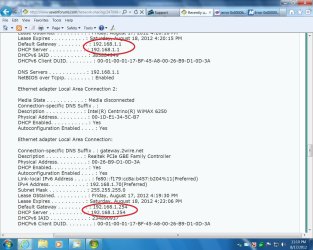
I used to run one of those 2wire routers when I had DSL. It looks like your wireless adapter is looking for the default gateway and DNS at 192.168.1.1

Shouldn't the default gateway be the address of the router? 192.168.1.254
 

Attachments

  • WIRELESS001.jpg
    WIRELESS001.jpg
    144.1 KB · Views: 10

My Computer My Computer

At a glance

MS Windows 7 Ultimate 64-bit SP1AMD Phenom II X4 965 Deneb 45nmCorsair 8.00 GB Dual-Channel DDR2 @ 1705MHz (...AMD Radeon HD 6700 Series (XFX Pine Group)
OS
MS Windows 7 Ultimate 64-bit SP1
CPU
AMD Phenom II X4 965 Deneb 45nm
Motherboard
ASUS M4A78 PRO AM2
Memory
Corsair 8.00 GB Dual-Channel DDR2 @ 1705MHz (5-5-5-18)
Graphics Card(s)
AMD Radeon HD 6700 Series (XFX Pine Group)
Sound Card
VIA1708S onboard, Sony HT-CT150 3D
Monitor(s) Displays
Dell M770 Standard VGA, Samsung UN 32D 5500
Hard Drives
112GB OCZ OCZ-VERTEX3 ATA Device (SSD)
2 TB Seagate ST2000DM001-9YN164 ATA Device (SATA)
3 TB Seagate ST3000DM001-1CH166 ATA Device (SATA)
PSU
Rosewill Hive 650 Watt
Case
Rosewill Blackhawk
Cooling
Antec Kuhler 620
Other Info
Burners=ATAPI iHBS312 BlueRay + ATAPI iHAS424 Cd Dvd,
Modem=Arris TM 722,
Router=Asus RT N56U,
Switch=24 Port - Dell PowerConnect 5324,
Coax Signal Amp=Motorola BDA S4.
Back
Top