Recommend a good free internet security program please

Comodo Internet Security does a good job too

I've used over a dozen iterations of CIS since v3.8 and the most recent v5.0 release is better than ever and even more user friendly with greatly enhanced State of the Art layered default-deny protection.

~Maxx~
.
da59fa57.png
 

My Computer

Computer Manufacturer/Model Number
HP HPE 270f
OS
Windows 7 x64 Home Premium
CPU
Intel Core i7 930 @ 2.8 Ghz Socket 1366 LGA
Motherboard
Pegatron Truckee v1.04E41
Memory
8 GB 1366 Mhz DDR3 (PC3-10700) RAM
Graphics Card(s)
ATI Radeon 5770 1 GB DDR5 RAM
Sound Card
Realtech High Definition
Monitor(s) Displays
32" Sony Bravia
Screen Resolution
1366 X 768
Hard Drives
Intel 25nm 120 GB Series 320 SSD HD Tune- 265 MBps Read/ 130 MBps Write

LaCie 1TB + 1TB RAID 0 eSATA Drive HD Tune- 160 MBps Read/ 90 MBps Write
Keyboard
Logitech Illuminated
Mouse
Logitech MX Revolution
Internet Speed
36.4 Mbps Maximum on a 37 Mbps Motorola SB501 Modem
Actually, I don't think it is as user friendly as was the previous version. I am using it; but I like the older version much better. This version is certainly not intuitive.
 

My Computer

Computer Manufacturer/Model Number
Home built
OS
Windows 7 Ultimate 32 bit
CPU
Intel(R) Pentium(R) 4 CPU 3.00GHz
Motherboard
ASUS P4P800-VM Motherboard Chipset: Intel 865G + ICH5
Memory
2.50 GB RAM
Graphics Card(s)
NVIDIA GeForce 7600 GS
Sound Card
SoundMax Integrated Digital Audio (Chip)
Monitor(s) Displays
ViewSonic VX 1962 wm
Screen Resolution
1680 X 1050
Hard Drives
Seagate Barracuda 7200.10 80 GB
ST380215A ATA Device 18.6 GB
Western Digital "My Book" external hard drive 750 GB
Cooling
Fan based
Keyboard
Microsoft Comfort Curve Keyboard 2000 v10 USB
Mouse
Logitec optic USB
Internet Speed
3.01 Mb/s download 0.64 Mb/s upload

My Computer

Computer Manufacturer/Model Number
HP HPE 270f
OS
Windows 7 x64 Home Premium
CPU
Intel Core i7 930 @ 2.8 Ghz Socket 1366 LGA
Motherboard
Pegatron Truckee v1.04E41
Memory
8 GB 1366 Mhz DDR3 (PC3-10700) RAM
Graphics Card(s)
ATI Radeon 5770 1 GB DDR5 RAM
Sound Card
Realtech High Definition
Monitor(s) Displays
32" Sony Bravia
Screen Resolution
1366 X 768
Hard Drives
Intel 25nm 120 GB Series 320 SSD HD Tune- 265 MBps Read/ 130 MBps Write

LaCie 1TB + 1TB RAID 0 eSATA Drive HD Tune- 160 MBps Read/ 90 MBps Write
Keyboard
Logitech Illuminated
Mouse
Logitech MX Revolution
Internet Speed
36.4 Mbps Maximum on a 37 Mbps Motorola SB501 Modem
I have a very hard time finding my way around in it. It is difficult for me to find the list of programs blocked, allowed, ask. It took two clicks to get there in the previous version. I want easy access to the programs list. I am strongly considering going back to Windows Firewall with the addon for ease of use.
 

My Computer

Computer Manufacturer/Model Number
Home built
OS
Windows 7 Ultimate 32 bit
CPU
Intel(R) Pentium(R) 4 CPU 3.00GHz
Motherboard
ASUS P4P800-VM Motherboard Chipset: Intel 865G + ICH5
Memory
2.50 GB RAM
Graphics Card(s)
NVIDIA GeForce 7600 GS
Sound Card
SoundMax Integrated Digital Audio (Chip)
Monitor(s) Displays
ViewSonic VX 1962 wm
Screen Resolution
1680 X 1050
Hard Drives
Seagate Barracuda 7200.10 80 GB
ST380215A ATA Device 18.6 GB
Western Digital "My Book" external hard drive 750 GB
Cooling
Fan based
Keyboard
Microsoft Comfort Curve Keyboard 2000 v10 USB
Mouse
Logitec optic USB
Internet Speed
3.01 Mb/s download 0.64 Mb/s upload
I have a very hard time finding my way around in it. It is difficult for me to find the list of programs blocked, allowed, ask. It took two clicks to get there in the previous version. I want easy access to the programs list. I am strongly considering going back to Windows Firewall with the addon for ease of use.


Carl,
I use MSE, windows firewall, and MBAM just for the ease to use.
 

My Computer

Computer Manufacturer/Model Number
HP M9077c
OS
Windows 7 Home Premium 64bit
CPU
Intel(R)Core(TM)2 quad [email protected] 2.39GHz
Motherboard
ASUSeK
Memory
6GB DDR2 6400
Graphics Card(s)
GeForce 8500/512MB
Sound Card
Realtek High Def Audio
Monitor(s) Displays
HP w2408 LCD 24" widescreen
Screen Resolution
1920x1200
Cooling
6 pack of Bud
Keyboard
MS wireless Inteli
Mouse
MS wireless Inteli
I have a very hard time finding my way around in it. It is difficult for me to find the list of programs blocked, allowed, ask. It took two clicks to get there in the previous version.

You're right the Comodo GUI has changed. The Firewall Rules you are looking for are called Network Security Policy and is still just 2 clicks away. I know what you mean by
it being hard to find because I also had a difficult time getting used to the new GUI layout myself for the first few weeks I had v5.0 installed.

~Maxx~
.
da59fa57.png
 

My Computer

Computer Manufacturer/Model Number
HP HPE 270f
OS
Windows 7 x64 Home Premium
CPU
Intel Core i7 930 @ 2.8 Ghz Socket 1366 LGA
Motherboard
Pegatron Truckee v1.04E41
Memory
8 GB 1366 Mhz DDR3 (PC3-10700) RAM
Graphics Card(s)
ATI Radeon 5770 1 GB DDR5 RAM
Sound Card
Realtech High Definition
Monitor(s) Displays
32" Sony Bravia
Screen Resolution
1366 X 768
Hard Drives
Intel 25nm 120 GB Series 320 SSD HD Tune- 265 MBps Read/ 130 MBps Write

LaCie 1TB + 1TB RAID 0 eSATA Drive HD Tune- 160 MBps Read/ 90 MBps Write
Keyboard
Logitech Illuminated
Mouse
Logitech MX Revolution
Internet Speed
36.4 Mbps Maximum on a 37 Mbps Motorola SB501 Modem
I use MSE, windows firewall, and MBAM just for the ease to use.

I also use MBAM as an on demand scanner ever since A-Squared Free stopped offering a context menu scanner and although it works very well I found that the Hitman Pro Second Opinion Cloud Scanner many times will find Malware that MBAM misses and a full scan of the 22.5 GB of data on my HDD takes just over 1 minute to complete plus its free.

~Maxx~
.
da59fa57.png
 

My Computer

Computer Manufacturer/Model Number
HP HPE 270f
OS
Windows 7 x64 Home Premium
CPU
Intel Core i7 930 @ 2.8 Ghz Socket 1366 LGA
Motherboard
Pegatron Truckee v1.04E41
Memory
8 GB 1366 Mhz DDR3 (PC3-10700) RAM
Graphics Card(s)
ATI Radeon 5770 1 GB DDR5 RAM
Sound Card
Realtech High Definition
Monitor(s) Displays
32" Sony Bravia
Screen Resolution
1366 X 768
Hard Drives
Intel 25nm 120 GB Series 320 SSD HD Tune- 265 MBps Read/ 130 MBps Write

LaCie 1TB + 1TB RAID 0 eSATA Drive HD Tune- 160 MBps Read/ 90 MBps Write
Keyboard
Logitech Illuminated
Mouse
Logitech MX Revolution
Internet Speed
36.4 Mbps Maximum on a 37 Mbps Motorola SB501 Modem
Just a question has anyone even tried Microsoft Security Essencials? i mean its totally free and it works great iv had it for about 1 year now and i have not had a single problem.
 

My Computer

Computer type
PC/Desktop
Computer Manufacturer/Model Number
Custom Build
OS
Windows 10 Pro x64
CPU
Intel i7 4770
Motherboard
MSI B85-G41
Memory
16GB 1600mhz DDR3
Graphics Card(s)
Nvidia GTX 970 4GB
Monitor(s) Displays
LG 29UM68 Black 29" ultra widescreen, and 27" ViewSonic
Screen Resolution
2560x1080&1920x1080
Hard Drives
500GB Samsung SSD
2TB Seagate 5200 rpm
1TB seagate 7200 rpm
PSU
Raidmax 630 Watt PSU
Case
NZXT Switch 810
Cooling
Hyper 212 Evo Cooler Master Heatsink
Keyboard
Steelseries Apex 350
Mouse
Logitech g700s
Internet Speed
Down: 2.8MB/s Up: 0.400 MB/s
Yes, many of us have tried it and use it. Just read through this thread. In the Crashes and Debugging section, the BSOD team recommends MSE daily.
 

My Computer

Computer Manufacturer/Model Number
Home built
OS
Windows 7 Ultimate 32 bit
CPU
Intel(R) Pentium(R) 4 CPU 3.00GHz
Motherboard
ASUS P4P800-VM Motherboard Chipset: Intel 865G + ICH5
Memory
2.50 GB RAM
Graphics Card(s)
NVIDIA GeForce 7600 GS
Sound Card
SoundMax Integrated Digital Audio (Chip)
Monitor(s) Displays
ViewSonic VX 1962 wm
Screen Resolution
1680 X 1050
Hard Drives
Seagate Barracuda 7200.10 80 GB
ST380215A ATA Device 18.6 GB
Western Digital "My Book" external hard drive 750 GB
Cooling
Fan based
Keyboard
Microsoft Comfort Curve Keyboard 2000 v10 USB
Mouse
Logitec optic USB
Internet Speed
3.01 Mb/s download 0.64 Mb/s upload
Ahh sorry my stupid school computers block the loading of random posts sorry!
 

My Computer

Computer type
PC/Desktop
Computer Manufacturer/Model Number
Custom Build
OS
Windows 10 Pro x64
CPU
Intel i7 4770
Motherboard
MSI B85-G41
Memory
16GB 1600mhz DDR3
Graphics Card(s)
Nvidia GTX 970 4GB
Monitor(s) Displays
LG 29UM68 Black 29" ultra widescreen, and 27" ViewSonic
Screen Resolution
2560x1080&1920x1080
Hard Drives
500GB Samsung SSD
2TB Seagate 5200 rpm
1TB seagate 7200 rpm
PSU
Raidmax 630 Watt PSU
Case
NZXT Switch 810
Cooling
Hyper 212 Evo Cooler Master Heatsink
Keyboard
Steelseries Apex 350
Mouse
Logitech g700s
Internet Speed
Down: 2.8MB/s Up: 0.400 MB/s
I have a very hard time finding my way around in it. It is difficult for me to find the list of programs blocked, allowed, ask. It took two clicks to get there in the previous version.

You're right the Comodo GUI has changed. The Firewall Rules you are looking for are called Network Security Policy and is still just 2 clicks away. I know what you mean by
it being hard to find because I also had a difficult time getting used to the new GUI layout myself for the first few weeks I had v5.0 installed.

~Maxx~
.
da59fa57.png

Even there, it seems to no longer show a complete list of programs as it did before.
 

My Computer

Computer Manufacturer/Model Number
Home built
OS
Windows 7 Ultimate 32 bit
CPU
Intel(R) Pentium(R) 4 CPU 3.00GHz
Motherboard
ASUS P4P800-VM Motherboard Chipset: Intel 865G + ICH5
Memory
2.50 GB RAM
Graphics Card(s)
NVIDIA GeForce 7600 GS
Sound Card
SoundMax Integrated Digital Audio (Chip)
Monitor(s) Displays
ViewSonic VX 1962 wm
Screen Resolution
1680 X 1050
Hard Drives
Seagate Barracuda 7200.10 80 GB
ST380215A ATA Device 18.6 GB
Western Digital "My Book" external hard drive 750 GB
Cooling
Fan based
Keyboard
Microsoft Comfort Curve Keyboard 2000 v10 USB
Mouse
Logitec optic USB
Internet Speed
3.01 Mb/s download 0.64 Mb/s upload
Nick
Although I am really one of "the old folks" I run a similar sevice to yourself. Slightly off topic but I have managed to cut down my home visits by using Team Viewer. It really does do what it say on the tin. I tend to let the person I am helping do the work while I watch and help as we go along. I think that is better than taking control and doing it myself. Just a thought to help ease your commitment but don't give up the visits all together, they are often more important than getting the PC to work properly.
 

My Computer

Computer type
PC/Desktop
OS
Microsoft Windows 7 Home Premium 64-bit 7601 Multiprocessor Free Service Pack 1
CPU
Intel(R) Core(TM) i7-3770 CPU @ 3.40GHz
Motherboard
ASUSTeK COMPUTER INC. P8H77-M
Memory
8.00 GB
Graphics Card(s)
Intel(R) HD Graphics 4000
Sound Card
On Board
Monitor(s) Displays
Dell 24"
Screen Resolution
1920 x 1080
Hard Drives
(1) INTEL SSDSC2CT180A3 ATA Device (2) ST500DM002-1BD142 ATA Device (3) WDC WD3200AAKS-75L9A0 ATA Device (4) Generic- Compact Flash USB Device (5) Generic- MS/MS-Pro USB Device (6) Generic- SD/MMC USB Device (7) Generic- SM/xD-Picture USB
PSU
500w Corsair
Case
Cooler Master
Cooling
3 Fans
Keyboard
Logitech MK300
Mouse
Logitech WOM
Internet Speed
75Mb
Antivirus
Norton 360
Browser
Firefox, Opera, IE
I have a very hard time finding my way around in it. It is difficult for me to find the list of programs blocked, allowed, ask. It took two clicks to get there in the previous version.

You're right the Comodo GUI has changed. The Firewall Rules you are looking for are called Network Security Policy and is still just 2 clicks away. I know what you mean by
it being hard to find because I also had a difficult time getting used to the new GUI layout myself for the first few weeks I had v5.0 installed.

~Maxx~
.
da59fa57.png

Even there, it seems to no longer show a complete list of programs as it did before.
Read the manual.. That's what it's there for.. Hopefully Comodo won't follow in the path of most other software companies by "streamlining the user interface" (moronizing by removing features)
 
Nick
Although I am really one of "the old folks" I run a similar sevice to yourself. Slightly off topic but I have managed to cut down my home visits by using Team Viewer. It really does do what it say on the tin. I tend to let the person I am helping do the work while I watch and help as we go along. I think that is better than taking control and doing it myself. Just a thought to help ease your commitment but don't give up the visits all together, they are often more important than getting the PC to work properly.

John pal

I 2 use "team viewer" and I use it allot and just like my screwdriver I wouldn't be without it, but I enjoy seeing their faces light up when the "The computer man is here... " :)

They, like myself enjoy the 1 on 1 visits and it makes them feel that they are still part of the community and not all together forgotten.
It only takes an hour or two of my time and I have a great laugh. (plus they make a cracking cup of tea) But thanks for the advice. ;)
 

My Computer

Computer type
PC/Desktop
Computer Manufacturer/Model Number
Self Built
OS
Windows 7 Ultimate 64bit
CPU
AMD Phenom Quad core 9950 black edition
Motherboard
Gigabyte
Memory
16Gb
Graphics Card(s)
2x XFX Radeon 5850
Sound Card
PCI Express X-Fi Titanium / Logitech G35
Monitor(s) Displays
2x HP 2410i
Screen Resolution
1920x1080
Hard Drives
2x 500Gb Seagate
1x 300Gb Seagate
1x 1Tb Seagate
2x 1Tb Hitatchi
PSU
Jean Tech Storm 700W
Case
Cooler Master COSMOS S
Cooling
Akasa Evo Blue Pro
Keyboard
Logitech G15
Mouse
Mad Catz M.M.O. 7
Internet Speed
12mb
You're right the Comodo GUI has changed. The Firewall Rules you are looking for are called Network Security Policy and is still just 2 clicks away. I know what you mean by
it being hard to find because I also had a difficult time getting used to the new GUI layout myself for the first few weeks I had v5.0 installed.

~Maxx~
.
da59fa57.png

Even there, it seems to no longer show a complete list of programs as it did before.
Read the manual.. That's what it's there for.. Hopefully Comodo won't follow in the path of most other software companies by "streamlining the user interface" (moronizing by removing features)

And therein lies the problem. The manual is less intuitive than the GUI. I need to read every freaking page to find if what I am looking for is there. And I have not found it yet. The more I work with this version, the less I like it. It may work fine mechanically and it does the job well, but it has lost me along the way.

All I want is nice, simple list of the programs I have that connect to or try to connect to the internet. Comodo used to have such a critter, which is why I started using it in the first place. If it still does, I can't find it. I will probably ditch this version next week.
 

My Computer

Computer Manufacturer/Model Number
Home built
OS
Windows 7 Ultimate 32 bit
CPU
Intel(R) Pentium(R) 4 CPU 3.00GHz
Motherboard
ASUS P4P800-VM Motherboard Chipset: Intel 865G + ICH5
Memory
2.50 GB RAM
Graphics Card(s)
NVIDIA GeForce 7600 GS
Sound Card
SoundMax Integrated Digital Audio (Chip)
Monitor(s) Displays
ViewSonic VX 1962 wm
Screen Resolution
1680 X 1050
Hard Drives
Seagate Barracuda 7200.10 80 GB
ST380215A ATA Device 18.6 GB
Western Digital "My Book" external hard drive 750 GB
Cooling
Fan based
Keyboard
Microsoft Comfort Curve Keyboard 2000 v10 USB
Mouse
Logitec optic USB
Internet Speed
3.01 Mb/s download 0.64 Mb/s upload
All I want is nice, simple list of the programs I have that connect to or try to connect to the internet. Comodo used to have such a critter, which is why I started using it in the first place.

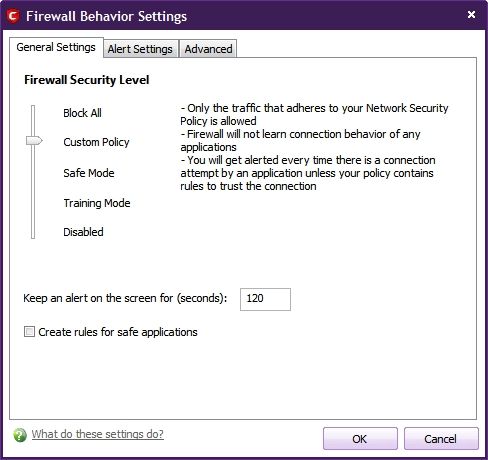
Carl- The Comodo Firewall in default Safe Mode will not make rules for individual programs, but if you set the Firewall to Custom Policy Mode it will ask you how to set the permissions for each program that tries to access the Internet. You also have the option of manually customizing the Firewall rules for any program on your computer for any additional rules that you want to set.

5e4b288c.jpg


~Maxx~
.
da59fa57.png
 

My Computer

Computer Manufacturer/Model Number
HP HPE 270f
OS
Windows 7 x64 Home Premium
CPU
Intel Core i7 930 @ 2.8 Ghz Socket 1366 LGA
Motherboard
Pegatron Truckee v1.04E41
Memory
8 GB 1366 Mhz DDR3 (PC3-10700) RAM
Graphics Card(s)
ATI Radeon 5770 1 GB DDR5 RAM
Sound Card
Realtech High Definition
Monitor(s) Displays
32" Sony Bravia
Screen Resolution
1366 X 768
Hard Drives
Intel 25nm 120 GB Series 320 SSD HD Tune- 265 MBps Read/ 130 MBps Write

LaCie 1TB + 1TB RAID 0 eSATA Drive HD Tune- 160 MBps Read/ 90 MBps Write
Keyboard
Logitech Illuminated
Mouse
Logitech MX Revolution
Internet Speed
36.4 Mbps Maximum on a 37 Mbps Motorola SB501 Modem
Hopefully Comodo won't follow in the path of most other software companies by "streamlining the user interface" (moronizing by removing features)

People sure are interesting. Over on the Comodo Forums there is a group of very vocal Members who contend that the new CIS v5.0 which now includes State of the Art Automatic Sandboxing of unrecognized programs, Cloud Based Malware scanning and Cloud Based Behavior Blocker has way too many features already...go figure!

~Maxx~
.
da59fa57.png
 

My Computer

Computer Manufacturer/Model Number
HP HPE 270f
OS
Windows 7 x64 Home Premium
CPU
Intel Core i7 930 @ 2.8 Ghz Socket 1366 LGA
Motherboard
Pegatron Truckee v1.04E41
Memory
8 GB 1366 Mhz DDR3 (PC3-10700) RAM
Graphics Card(s)
ATI Radeon 5770 1 GB DDR5 RAM
Sound Card
Realtech High Definition
Monitor(s) Displays
32" Sony Bravia
Screen Resolution
1366 X 768
Hard Drives
Intel 25nm 120 GB Series 320 SSD HD Tune- 265 MBps Read/ 130 MBps Write

LaCie 1TB + 1TB RAID 0 eSATA Drive HD Tune- 160 MBps Read/ 90 MBps Write
Keyboard
Logitech Illuminated
Mouse
Logitech MX Revolution
Internet Speed
36.4 Mbps Maximum on a 37 Mbps Motorola SB501 Modem
Just changing anti-virus isn't good enough, in my opinion. No anti-virus is 100%, especially against rogue/fake applications.

You should educate them more on what they should look out for. If you don't have the time, find a good article that you can link them all to/print out. An example regarding fake anti-virus:

Show them what their anti-virus' pop-up should look like. If they get a message claiming an infection, whether or not it looks like it comes from their anti-virus or something else, tell them to close their browser (though, some malicious scripts will prevent it), update their anti-virus and on-demand anti-malware and do a complete/full, successive scan.

I agree showing them what fake anti-virus pop-ups look like is a good idea. Perhaps you may also want to use the MVPS.org Hosts file so that known malicious sites are not even accessible: Blocking Unwanted Parasites with a Hosts File

I've used it for many years and have never had any kind of infection.
 

My Computer

Computer type
Laptop
Computer Manufacturer/Model Number
Toshiba Satellite U845W-S410
OS
Windows 7 Home Premium 64 bit
CPU
Intel ® Core™ i5-3317U Processor
Memory
6GB DDR3 1600MHz
Graphics Card(s)
Mobile Intel ® HD Graphics with 64MB-1696MB dynamically allo
Monitor(s) Displays
All-in-one -- Generic PnP Monitor
Screen Resolution
14.4” diagonal widescreen TruBrite ® TFT display at 1792 x 7
Hard Drives
500GB (5400 RPM, Serial ATA) with dedicated 32GB mSATA SSD disk
cache
Keyboard
Logitech
Mouse
Logitech

My Computer

Computer Manufacturer/Model Number
HP HPE 270f
OS
Windows 7 x64 Home Premium
CPU
Intel Core i7 930 @ 2.8 Ghz Socket 1366 LGA
Motherboard
Pegatron Truckee v1.04E41
Memory
8 GB 1366 Mhz DDR3 (PC3-10700) RAM
Graphics Card(s)
ATI Radeon 5770 1 GB DDR5 RAM
Sound Card
Realtech High Definition
Monitor(s) Displays
32" Sony Bravia
Screen Resolution
1366 X 768
Hard Drives
Intel 25nm 120 GB Series 320 SSD HD Tune- 265 MBps Read/ 130 MBps Write

LaCie 1TB + 1TB RAID 0 eSATA Drive HD Tune- 160 MBps Read/ 90 MBps Write
Keyboard
Logitech Illuminated
Mouse
Logitech MX Revolution
Internet Speed
36.4 Mbps Maximum on a 37 Mbps Motorola SB501 Modem
All I want is nice, simple list of the programs I have that connect to or try to connect to the internet. Comodo used to have such a critter, which is why I started using it in the first place.

Carl- The Comodo Firewall in default Safe Mode will not make rules for individual programs, but if you set the Firewall to Custom Policy Mode it will ask you how to set the permissions for each program that tries to access the Internet. You also have the option of manually customizing the Firewall rules for any program on your computer for any additional rules that you want to set.

5e4b288c.jpg


~Maxx~
.
da59fa57.png

Thanks, Maxx; I will give this a try. But I still want a list of the programs to show in one place - as Comodo used to do.

Hopefully Comodo won't follow in the path of most other software companies by "streamlining the user interface" (moronizing by removing features)

People sure are interesting. Over on the Comodo Forums there is a group of very vocal Members who contend that the new CIS v5.0 which now includes State of the Art Automatic Sandboxing of unrecognized programs, Cloud Based Malware scanning and Cloud Based Behavior Blocker has way too many features already...go figure!

~Maxx~
.
da59fa57.png

I tend to agree. There is nothing wrong with the features; I just want easy, upfront choices as to whether to use those features or not.
 

My Computer

Computer Manufacturer/Model Number
Home built
OS
Windows 7 Ultimate 32 bit
CPU
Intel(R) Pentium(R) 4 CPU 3.00GHz
Motherboard
ASUS P4P800-VM Motherboard Chipset: Intel 865G + ICH5
Memory
2.50 GB RAM
Graphics Card(s)
NVIDIA GeForce 7600 GS
Sound Card
SoundMax Integrated Digital Audio (Chip)
Monitor(s) Displays
ViewSonic VX 1962 wm
Screen Resolution
1680 X 1050
Hard Drives
Seagate Barracuda 7200.10 80 GB
ST380215A ATA Device 18.6 GB
Western Digital "My Book" external hard drive 750 GB
Cooling
Fan based
Keyboard
Microsoft Comfort Curve Keyboard 2000 v10 USB
Mouse
Logitec optic USB
Internet Speed
3.01 Mb/s download 0.64 Mb/s upload
Back
Top