Solved suspect a virus need help removing....please

vid4763

New member
Member
Local time
12:17 AM
Messages
94
Location
Niagara Falls/ Buffalo, NY
thanks for reading and any assistance! I joined the forum 4 days ago. A little over a week ago, I started cleaning up my laptop and wife's desktop to get them running better. I did, but then after reading in your great forums I got inspired learning about event viewer and other tools and started exploring for more windows 7 stuff and online. so inspired, I thought I could try to tweak performance and improve boot times, etc....

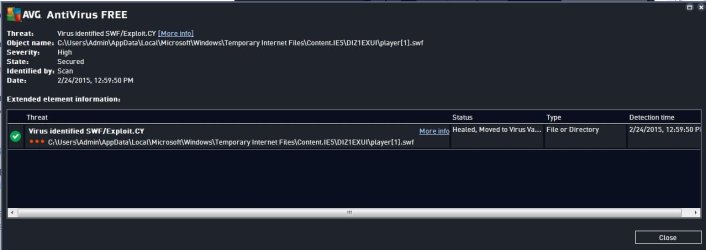
I discovered a couple of driver issues on my laptop, and still haven't been able to address them, as 2 days ago my AVG2015 free said it suspected a threat (while browsing EBay for ram sticks). So I immediately ran a full system scan, found was:

(the original alert)
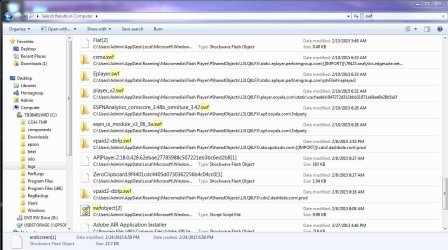
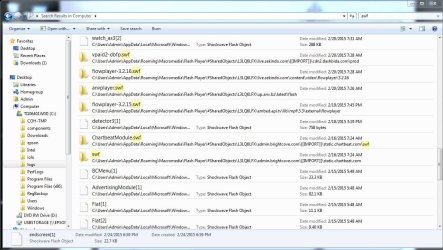
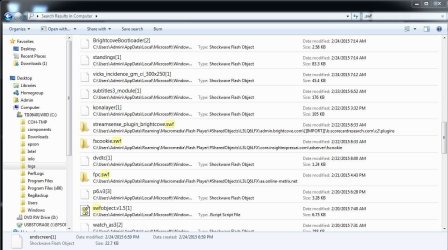
SWF/Exploit.cy - located in c:\Users\Admin\AppData\Local\Microsoft\Windows\Temporary Internet Files\Content.IE5\DIZ1EXUI\player[1].swf

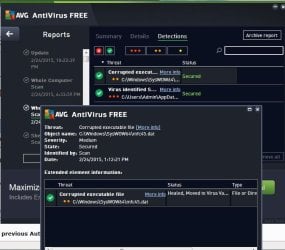
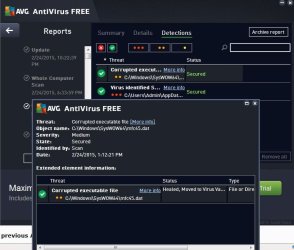
(and)
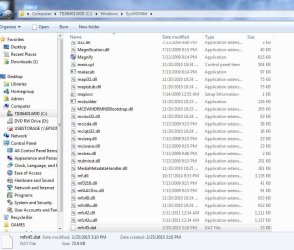
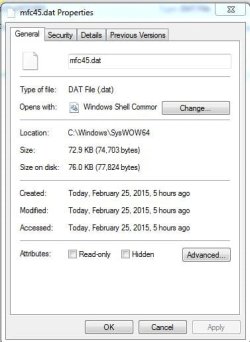
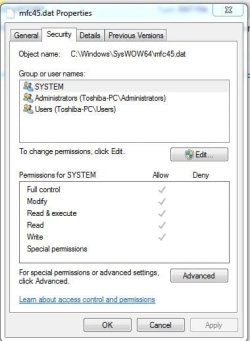
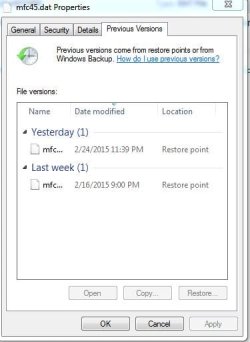
Corrupted executable file- - located in c:\Windows\SysWOW64\mfc45.dat

I followed the AVG recommendations and assumed the files were safely quarantined and wouldn't be a further pest. I also ran Malwarebytes Free which found no threats. Then about an hour later AVG popped up again with the mfc.dat file, but not the original .swf threat. so, I ran another full scan and it quarantined it again......and 3 hours later when it happened again. I checked the file location after AVG found it each time, and it was not there, but would reappear or replicate itself. This is when I started to suspect foul play. (likely because of my lack of adequate protection and recent or very recent downloads, ugh)

So, I gave the Laptop the night off. after waking it up from sleep mode with the Wi-Fi turned off overnight, I ran Malwarebytes free which again found no threats. I ran AVG2015 Free which again found mfc.dat as a threat, quarantined it again. I did some more searching on the web for the 2 types of malware/viruses. I found too many dead ends and close calls. The mfc.dat file kept reappearing and finally yesterday afternoon I got fed up and.....downloaded some more stuff. Bitdefender free, Avast free, Kaspersky TDSSkiller & Virus Removal Tool, and final Rogue Killer from Adlice. I probably should have come here first......

I'm not convinced I got whatever this virus/malware is while surfing EBay, or the tweaking app downloads last week and over the weekend, or if it was there prior and waiting to be triggered. I did update AVG back in early Feb and I think there are a few conspicuous things in my system and program files from around that date, but I don't.


Anyway, I got fed up with AVG and installed Bitdefender Free last night. It was an extra aggravation trying to completely uninstall AVG, but I got it done and Bitdefender is running. Virus Shield has found no threats and deep scan has found no threats. mfc45.dat is back in SysWOW64 folder......hmmm

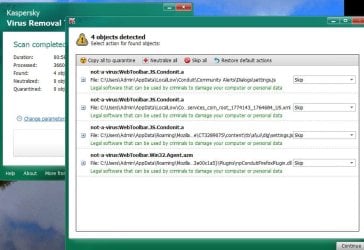
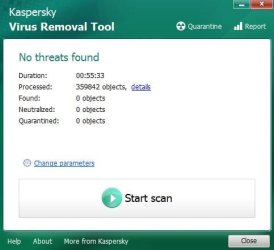
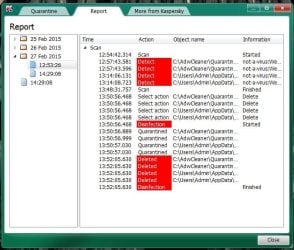
This made me wonder about false positives and such. So I decided to run Kaspersky Virus Removal Tool. Found 4 threats (will attach screen shots). I quarantined these and that was it for the night and I shut Laptop off.

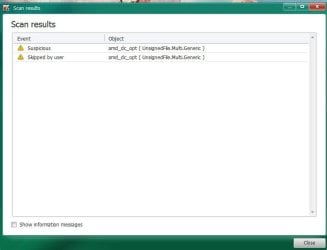
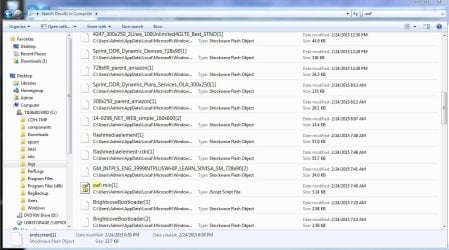
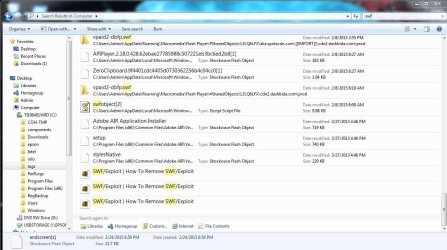
Turned on this morning, Laptop seemed to be stable with the condition it's currently in. Some windows updates configured and I began trying to work on my problem. No alerts from Bitdefender. Ran Kaspersky VRT and it again found the same 4 files and I quarantined again. Concluding this wasn't really getting to the heart of the problem, I installed Kaspersky TDSS killer and ran that as administrator. It found one suspected threat, suggested action was to skip, so I did. I have yet to install Roguekiller. I'm at a point I realize I shouid have come here immediately and sought advice and help. I don't feel like I am making progress on this. I've wasted valuable time looking around my file system and I have seen what look like clues of suspicious programs, folders, and files...... but I'm not sure or savvy enough to conclude anything.

My laptop is running, I'm fairly free to run all aps and surf online, but not to sound paranoid, I am certain there is something lying hidden in my system somewhere and what little clues AVG and Kaspersky have dug up are just red herrings. Malwarebytes and Bitdefender find nothing. I'm sure I have missed some steps and information, hopefully with some expert help I can learn and be a smarter pc user. Advice....please.

Here are some screen shots:
 

Attachments

  • avg threat1A 2242015.JPG
    avg threat1A 2242015.JPG
    48.1 KB · Views: 2
  • avg threat1 2242015.JPG
    avg threat1 2242015.JPG
    61.2 KB · Views: 2
  • avg threat2 2242015.JPG
    avg threat2 2242015.JPG
    58.3 KB · Views: 2
  • kaspersky vrt 2262014 quareteened objects returned fom yesterday.JPG
    kaspersky vrt 2262014 quareteened objects returned fom yesterday.JPG
    85.1 KB · Views: 1
  • kaspersky TDSS 2262015.JPG
    kaspersky TDSS 2262015.JPG
    30.1 KB · Views: 1
  • SWF search 1.JPG
    SWF search 1.JPG
    129.1 KB · Views: 1
  • mfc45 dat     4.JPG
    mfc45 dat 4.JPG
    97.7 KB · Views: 1
  • mfc45 dat     3.JPG
    mfc45 dat 3.JPG
    33.1 KB · Views: 70
  • mfc45 dat     2.JPG
    mfc45 dat 2.JPG
    34.6 KB · Views: 70
  • mfc45 dat     1.JPG
    mfc45 dat 1.JPG
    29.5 KB · Views: 70
  • SWF search 6.JPG
    SWF search 6.JPG
    146.1 KB · Views: 0
  • SWF search 5.JPG
    SWF search 5.JPG
    145.7 KB · Views: 0
  • SWF search 4.JPG
    SWF search 4.JPG
    137.2 KB · Views: 0
  • SWF search 3.JPG
    SWF search 3.JPG
    143.8 KB · Views: 0
  • SWF search 2.JPG
    SWF search 2.JPG
    151.1 KB · Views: 0
  • SWF search 7.JPG
    SWF search 7.JPG
    128 KB · Views: 0
  • TDSS scan 2262015.txt
    TDSS scan 2262015.txt
    199.1 KB · Views: 1

My Computer

Computer type
Laptop
Computer Manufacturer/Model Number
Toshiba Satellite c855-s5214
OS
windows 7 professional 64 bit Version 6.1.7601 Service Pack 1 Build 7601
CPU
Intel(R) Pentium(R) CPU B970 @ 2.30GHz, 2300 Mhz, 2 cores
Motherboard
Toshiba Portable BIOS Insyde Corp Version 1.60 Date 4/20/12
Memory
8Gb
Graphics Card(s)
Intel HD Graphics Driver Vers 9.17.10.3347 Date 10/31/20
Hard Drives
SanDisk Extreme Pro SSD 480 Gb (approx. 381gb free)
Firmware Version X21200RL
Migrated and Installed 4/3/2015
Antivirus
BitDefender AntiVirus Free Edition Version 1.0.21.1099
Browser
Internet Explorer 11 update version 11.0.16
Other Info
Additional Systems:

Samsung NP-QX410 Laptop Windows 7 Home Premium SP1
Samsung 850 EVO 250G 4G ram
Avast! Free 2015

Toshiba A205-S7468 Laptop Windows 7 Ultimate
WD 320G HDD 4G ram
AVG free 2015
Do you have "system mechanic pro"? I believe that program is connected with SysWOW64\mfc45.dat

This is in a temporary file location and we'll get rid of it later--> SWF/Exploit.cy

You do have a lot of adware. Kaspersky picked up on some of it. Check mark what Kaspersky found and quarantine/ delete it.

Next:
Please download AdwCleaner by Xplode and save to your Desktop.
Step 1.
  • Double click on AdwCleaner.exe to run the tool.
    Vista/Windows 7/8 users right-click and select Run As Administrator.
  • Click on the Scan button.
  • AdwCleaner will begin...be patient as the scan may take some time to complete.
  • After the scan has finished, click on the Report button...a logfile (AdwCleaner[R#].txt) will open in Notepad for review (where the largest value of # represents the most recent report).
  • The contents of the log file may be confusing. Unless you see a program name that you know should not be removed, don't worry about it. If you see an entry you want to keep, let me know about it.
  • Copy and paste the contents of that logfile in your next reply.
  • A copy of all logfiles are saved in the C:\AdwCleaner folder which was created when running the tool.

Step 2.
Using AdwCleaner v3: Scan & Clean:
This time click on the Clean button.
Press OK when asked to close all programs and follow the onscreen prompts.
Press OK again to allow AdwCleaner to restart the computer and complete the removal process.
After rebooting, a logfile report (AdwCleaner[S#].txt) will open automatically (where the largest value of # represents the most recent report).
Copy and paste the contents of that logfile in your next reply.
A copy of that logfile will also be saved in the C:\AdwCleaner folder

******Post both .txt logs (you can copy/ paste them) in your next reply.
 

My Computer

Computer type
PC/Desktop
Computer Manufacturer/Model Number
Bruce ... somewhere in his 40's
OS
Windows 7 Ultimate 32bit SP1
CPU
Intel(R) Core(TM)2 Quad CPU @ 2.40GHz, 2400 MHz
Motherboard
INTEL/D975XBX2
Memory
4 GB
Graphics Card(s)
ATI Radeon HD 2600 Pro
Monitor(s) Displays
Samsung SyncMaster 914v
Screen Resolution
1280 x 1024
Hard Drives
2/500GB each ... ST3500630AS ATA Device.
One is not connected
PSU
Rocketfish 700 W
Case
G.Skill Gigabyte Chassis
Keyboard
Standard PS/2 Keyboard
Mouse
Microsoft PS/2 Mouse
Internet Speed
DSL
Antivirus
Avira Internet Security
Browser
IE 11
Other Info
ATI HDMI Audio
thx...will get to work on this now. post back when I have more
 

My Computer

Computer type
Laptop
Computer Manufacturer/Model Number
Toshiba Satellite c855-s5214
OS
windows 7 professional 64 bit Version 6.1.7601 Service Pack 1 Build 7601
CPU
Intel(R) Pentium(R) CPU B970 @ 2.30GHz, 2300 Mhz, 2 cores
Motherboard
Toshiba Portable BIOS Insyde Corp Version 1.60 Date 4/20/12
Memory
8Gb
Graphics Card(s)
Intel HD Graphics Driver Vers 9.17.10.3347 Date 10/31/20
Hard Drives
SanDisk Extreme Pro SSD 480 Gb (approx. 381gb free)
Firmware Version X21200RL
Migrated and Installed 4/3/2015
Antivirus
BitDefender AntiVirus Free Edition Version 1.0.21.1099
Browser
Internet Explorer 11 update version 11.0.16
Other Info
Additional Systems:

Samsung NP-QX410 Laptop Windows 7 Home Premium SP1
Samsung 850 EVO 250G 4G ram
Avast! Free 2015

Toshiba A205-S7468 Laptop Windows 7 Ultimate
WD 320G HDD 4G ram
AVG free 2015
btw, I did install system mechanic free last week (on laptop and my wife's pc......hopefully this isn't an omen for her machine)
 

My Computer

Computer type
Laptop
Computer Manufacturer/Model Number
Toshiba Satellite c855-s5214
OS
windows 7 professional 64 bit Version 6.1.7601 Service Pack 1 Build 7601
CPU
Intel(R) Pentium(R) CPU B970 @ 2.30GHz, 2300 Mhz, 2 cores
Motherboard
Toshiba Portable BIOS Insyde Corp Version 1.60 Date 4/20/12
Memory
8Gb
Graphics Card(s)
Intel HD Graphics Driver Vers 9.17.10.3347 Date 10/31/20
Hard Drives
SanDisk Extreme Pro SSD 480 Gb (approx. 381gb free)
Firmware Version X21200RL
Migrated and Installed 4/3/2015
Antivirus
BitDefender AntiVirus Free Edition Version 1.0.21.1099
Browser
Internet Explorer 11 update version 11.0.16
Other Info
Additional Systems:

Samsung NP-QX410 Laptop Windows 7 Home Premium SP1
Samsung 850 EVO 250G 4G ram
Avast! Free 2015

Toshiba A205-S7468 Laptop Windows 7 Ultimate
WD 320G HDD 4G ram
AVG free 2015
# AdwCleaner v4.111 - Logfile created 26/02/2015 at 15:58:05
# Updated 18/02/2015 by Xplode
# Database : 2015-02-18.3 [Server]
# Operating system : Windows 7 Professional Service Pack 1 (x64)
# Username : Admin - TOSHIBA-PC
# Running from : C:\Users\Admin\Downloads\adwcleaner_4.111.exe
# Option : Scan
***** [ Services ] *****

***** [ Files / Folders ] *****
Folder Found : C:\Program Files (x86)\Conduit
Folder Found : C:\Program Files (x86)\PC Drivers HeadQuarters
Folder Found : C:\Users\Admin\AppData\Local\Conduit
Folder Found : C:\Users\Admin\AppData\LocalLow\Conduit
***** [ Scheduled tasks ] *****

***** [ Shortcuts ] *****

***** [ Registry ] *****
Data Found : HKCU\Software\Microsoft\Windows\CurrentVersion\Internet Settings [ProxyOverride] - *.local
Key Found : HKCU\Software\APN PIP
Key Found : HKCU\Software\AppDataLow\Software\Conduit
Key Found : HKCU\Software\AVG Secure Search
Key Found : HKCU\Software\Conduit
Key Found : HKCU\Software\Microsoft\Internet Explorer\SearchScopes\{B13B6BB7-8B42-4F00-A84A-4CE3FF27D486}
Key Found : HKCU\Software\Microsoft\Windows\CurrentVersion\Ext\Stats\{02478D38-C3F9-4EFB-9B51-7695ECA05670}
Key Found : HKCU\Software\Microsoft\Windows\CurrentVersion\Ext\Stats\{F25AF245-4A81-40DC-92F9-E9021F207706}
Key Found : HKCU\Software\OCS
Key Found : HKCU\Software\usyndication.com
Key Found : [x64] HKCU\Software\APN PIP
Key Found : [x64] HKCU\Software\AVG Secure Search
Key Found : [x64] HKCU\Software\Conduit
Key Found : [x64] HKCU\Software\Microsoft\Internet Explorer\SearchScopes\{B13B6BB7-8B42-4F00-A84A-4CE3FF27D486}
Key Found : [x64] HKCU\Software\OCS
Key Found : [x64] HKCU\Software\usyndication.com
Key Found : HKLM\SOFTWARE\AVG SafeGuard toolbar
Key Found : HKLM\SOFTWARE\AVG Secure Search
Key Found : HKLM\SOFTWARE\Classes\AppID\{BB711CB0-C70B-482E-9852-EC05EBD71DBB}
Key Found : HKLM\SOFTWARE\Classes\AppID\ScriptHelper.EXE
Key Found : HKLM\SOFTWARE\Classes\CLSID\{DE9028D0-5FFA-4E69-94E3-89EE8741F468}
Key Found : HKLM\SOFTWARE\Classes\CLSID\{E7DF6BFF-55A5-4EB7-A673-4ED3E9456D39}
Key Found : HKLM\SOFTWARE\Classes\Interface\{03E2A1F3-4402-4121-8B35-733216D61217}
Key Found : HKLM\SOFTWARE\Classes\Interface\{9E3B11F6-4179-4603-A71B-A55F4BCB0BEC}
Key Found : HKLM\SOFTWARE\Conduit
Key Found : HKLM\SOFTWARE\Microsoft\Windows\CurrentVersion\Explorer\Browser Helper Objects\{02478D38-C3F9-4EFB-9B51-7695ECA05670}
Key Found : HKLM\SOFTWARE\Microsoft\Windows\CurrentVersion\Ext\PreApproved\{02478D38-C3F9-4EFB-9B51-7695ECA05670}
Key Found : HKLM\SOFTWARE\Microsoft\Windows\CurrentVersion\Ext\PreApproved\{EF99BD32-C1FB-11D2-892F-0090271D4F88}
Key Found : [x64] HKLM\SOFTWARE\Classes\Interface\{03E2A1F3-4402-4121-8B35-733216D61217}
Key Found : [x64] HKLM\SOFTWARE\Classes\Interface\{9E3B11F6-4179-4603-A71B-A55F4BCB0BEC}
***** [ Web browsers ] *****
-\\ Internet Explorer v11.0.9600.17631

-\\ Google Chrome v
*************************
AdwCleaner[R0].txt - [2936 bytes] - [26/02/2015 15:58:05]
########## EOF - C:\AdwCleaner\AdwCleaner[R0].txt - [2995 bytes] ##########
 

My Computer

Computer type
Laptop
Computer Manufacturer/Model Number
Toshiba Satellite c855-s5214
OS
windows 7 professional 64 bit Version 6.1.7601 Service Pack 1 Build 7601
CPU
Intel(R) Pentium(R) CPU B970 @ 2.30GHz, 2300 Mhz, 2 cores
Motherboard
Toshiba Portable BIOS Insyde Corp Version 1.60 Date 4/20/12
Memory
8Gb
Graphics Card(s)
Intel HD Graphics Driver Vers 9.17.10.3347 Date 10/31/20
Hard Drives
SanDisk Extreme Pro SSD 480 Gb (approx. 381gb free)
Firmware Version X21200RL
Migrated and Installed 4/3/2015
Antivirus
BitDefender AntiVirus Free Edition Version 1.0.21.1099
Browser
Internet Explorer 11 update version 11.0.16
Other Info
Additional Systems:

Samsung NP-QX410 Laptop Windows 7 Home Premium SP1
Samsung 850 EVO 250G 4G ram
Avast! Free 2015

Toshiba A205-S7468 Laptop Windows 7 Ultimate
WD 320G HDD 4G ram
AVG free 2015
i don't see anything here i SHOULDNT clean. i will wait a minute for a reply if you have one and then i will proceed with step 2 and clean with ADWcleaner
 

My Computer

Computer type
Laptop
Computer Manufacturer/Model Number
Toshiba Satellite c855-s5214
OS
windows 7 professional 64 bit Version 6.1.7601 Service Pack 1 Build 7601
CPU
Intel(R) Pentium(R) CPU B970 @ 2.30GHz, 2300 Mhz, 2 cores
Motherboard
Toshiba Portable BIOS Insyde Corp Version 1.60 Date 4/20/12
Memory
8Gb
Graphics Card(s)
Intel HD Graphics Driver Vers 9.17.10.3347 Date 10/31/20
Hard Drives
SanDisk Extreme Pro SSD 480 Gb (approx. 381gb free)
Firmware Version X21200RL
Migrated and Installed 4/3/2015
Antivirus
BitDefender AntiVirus Free Edition Version 1.0.21.1099
Browser
Internet Explorer 11 update version 11.0.16
Other Info
Additional Systems:

Samsung NP-QX410 Laptop Windows 7 Home Premium SP1
Samsung 850 EVO 250G 4G ram
Avast! Free 2015

Toshiba A205-S7468 Laptop Windows 7 Ultimate
WD 320G HDD 4G ram
AVG free 2015
Here is the log after cleaning and reboot:


# AdwCleaner v4.111 - Logfile created 26/02/2015 at 16:15:15
# Updated 18/02/2015 by Xplode
# Database : 2015-02-18.3 [Server]
# Operating system : Windows 7 Professional Service Pack 1 (x64)
# Username : Admin - TOSHIBA-PC
# Running from : C:\Users\Admin\Downloads\adwcleaner_4.111.exe
# Option : Cleaning
***** [ Services ] *****

***** [ Files / Folders ] *****
Folder Deleted : C:\Program Files (x86)\Conduit
Folder Deleted : C:\Program Files (x86)\PC Drivers HeadQuarters
Folder Deleted : C:\Users\Admin\AppData\Local\Conduit
Folder Deleted : C:\Users\Admin\AppData\LocalLow\Conduit
***** [ Scheduled tasks ] *****

***** [ Shortcuts ] *****

***** [ Registry ] *****
Key Deleted : HKLM\SOFTWARE\Classes\AppID\ScriptHelper.EXE
Key Deleted : HKLM\SOFTWARE\Classes\AppID\{BB711CB0-C70B-482E-9852-EC05EBD71DBB}
Key Deleted : HKLM\SOFTWARE\Classes\CLSID\{DE9028D0-5FFA-4E69-94E3-89EE8741F468}
Key Deleted : HKLM\SOFTWARE\Classes\CLSID\{E7DF6BFF-55A5-4EB7-A673-4ED3E9456D39}
Key Deleted : HKLM\SOFTWARE\Classes\Interface\{03E2A1F3-4402-4121-8B35-733216D61217}
Key Deleted : HKLM\SOFTWARE\Classes\Interface\{9E3B11F6-4179-4603-A71B-A55F4BCB0BEC}
Key Deleted : HKLM\SOFTWARE\Microsoft\Windows\CurrentVersion\Explorer\Browser Helper Objects\{02478D38-C3F9-4EFB-9B51-7695ECA05670}
Key Deleted : HKCU\Software\Microsoft\Windows\CurrentVersion\Ext\Stats\{02478D38-C3F9-4EFB-9B51-7695ECA05670}
Key Deleted : HKCU\Software\Microsoft\Windows\CurrentVersion\Ext\Stats\{F25AF245-4A81-40DC-92F9-E9021F207706}
Key Deleted : HKLM\SOFTWARE\Microsoft\Windows\CurrentVersion\Ext\PreApproved\{02478D38-C3F9-4EFB-9B51-7695ECA05670}
Key Deleted : HKLM\SOFTWARE\Microsoft\Windows\CurrentVersion\Ext\PreApproved\{EF99BD32-C1FB-11D2-892F-0090271D4F88}
Key Deleted : [x64] HKLM\SOFTWARE\Classes\Interface\{03E2A1F3-4402-4121-8B35-733216D61217}
Key Deleted : [x64] HKLM\SOFTWARE\Classes\Interface\{9E3B11F6-4179-4603-A71B-A55F4BCB0BEC}
Key Deleted : HKCU\Software\Microsoft\Internet Explorer\SearchScopes\{B13B6BB7-8B42-4F00-A84A-4CE3FF27D486}
Key Deleted : HKCU\Software\APN PIP
Key Deleted : HKCU\Software\AVG Secure Search
Key Deleted : HKCU\Software\Conduit
Key Deleted : HKCU\Software\OCS
Key Deleted : HKCU\Software\usyndication.com
Key Deleted : HKCU\Software\AppDataLow\Software\Conduit
Key Deleted : HKLM\SOFTWARE\AVG SafeGuard toolbar
Key Deleted : HKLM\SOFTWARE\AVG Secure Search
Key Deleted : HKLM\SOFTWARE\Conduit
Data Deleted : HKCU\Software\Microsoft\Windows\CurrentVersion\Internet Settings [ProxyOverride] - *.local
***** [ Web browsers ] *****
-\\ Internet Explorer v11.0.9600.17631

-\\ Google Chrome v

*************************
AdwCleaner[R0].txt - [3106 bytes] - [26/02/2015 15:58:05]
AdwCleaner[S0].txt - [2748 bytes] - [26/02/2015 16:15:15]
########## EOF - C:\AdwCleaner\AdwCleaner[S0].txt - [2807 bytes] ##########
 

My Computer

Computer type
Laptop
Computer Manufacturer/Model Number
Toshiba Satellite c855-s5214
OS
windows 7 professional 64 bit Version 6.1.7601 Service Pack 1 Build 7601
CPU
Intel(R) Pentium(R) CPU B970 @ 2.30GHz, 2300 Mhz, 2 cores
Motherboard
Toshiba Portable BIOS Insyde Corp Version 1.60 Date 4/20/12
Memory
8Gb
Graphics Card(s)
Intel HD Graphics Driver Vers 9.17.10.3347 Date 10/31/20
Hard Drives
SanDisk Extreme Pro SSD 480 Gb (approx. 381gb free)
Firmware Version X21200RL
Migrated and Installed 4/3/2015
Antivirus
BitDefender AntiVirus Free Edition Version 1.0.21.1099
Browser
Internet Explorer 11 update version 11.0.16
Other Info
Additional Systems:

Samsung NP-QX410 Laptop Windows 7 Home Premium SP1
Samsung 850 EVO 250G 4G ram
Avast! Free 2015

Toshiba A205-S7468 Laptop Windows 7 Ultimate
WD 320G HDD 4G ram
AVG free 2015
Please download TFC by Old Timer TFC - Temp File Cleaner by OldTimer - Geeks to Go Forum and save it to your desktop. Keep this temporary file cleaner and use it!
Save any unsaved work. TFC will close ALL open programs including your browser! This will also eliminate all desktop shortcuts, so just be aware!
Double-click on TFC.exe to run it. If you are using Vista/Windows 7 right-click on the file and choose Run As Administrator.
Click the Start button to begin the cleaning process and let it run uninterrupted to completion.
Important! Manually reboot the machine to ensure a complete clean.

Make sure your Internet settings aren't using a 'Proxy', unless you purposely set it that way.
1) Under “Tools” in the browser tool bar select “Internet Options”.
2) In the “Internet Options” window that pops up, click the “Connections” tab at the top.
3) Click “LAN Settings” near the bottom of the “Connections” section.
4) If the “Proxy server” checkbox is marked with a check, click it to deselect/uncheck it.
5) Click “Ok” to close the “Local Area Network (LAN) Settings” window.
6) Click “Ok” to close the “Internet Options” window.

Now clean the DNS cache and restore MS's Hosts file:
Copy and paste these lines in Note pad.

@Echo on
pushd\windows\system32\drivers\etc
attrib -h -s -r hosts
echo 127.0.0.1 localhost>HOSTS
attrib +r +h +s hosts
popd
ipconfig /release
ipconfig /renew
ipconfig /flushdns
netsh winsock reset all
netsh int ip reset all
shutdown -r -t 1
del %0


Save as flush.bat to your desktop.
Right click on the flush.bat file to run it as Administrator. Your computer will reboot itself.

Make sure "Proxy server" is still disabled under your LAN Settings.
 

My Computer

Computer type
PC/Desktop
Computer Manufacturer/Model Number
Bruce ... somewhere in his 40's
OS
Windows 7 Ultimate 32bit SP1
CPU
Intel(R) Core(TM)2 Quad CPU @ 2.40GHz, 2400 MHz
Motherboard
INTEL/D975XBX2
Memory
4 GB
Graphics Card(s)
ATI Radeon HD 2600 Pro
Monitor(s) Displays
Samsung SyncMaster 914v
Screen Resolution
1280 x 1024
Hard Drives
2/500GB each ... ST3500630AS ATA Device.
One is not connected
PSU
Rocketfish 700 W
Case
G.Skill Gigabyte Chassis
Keyboard
Standard PS/2 Keyboard
Mouse
Microsoft PS/2 Mouse
Internet Speed
DSL
Antivirus
Avira Internet Security
Browser
IE 11
Other Info
ATI HDMI Audio
Windows 7 does not want or need such programs like System Mechanic.

Back to watching.
 

My Computer

Computer type
PC/Desktop
Computer Manufacturer/Model Number
Home made Desktop
OS
Windows 10 Pro. 64/ version 1709 Windows 7 Pro/64
CPU
Intel i7-6800K @ 4.3
Motherboard
ASUS X-99 Deluxe II
Memory
Corsair Platinum 16 gig @2400
Graphics Card(s)
EVGA GTX 1070 OC
Monitor(s) Displays
Asus 27" LED LCD/VE278Q
Screen Resolution
1920-1080 or 1280-720 HDMI
Hard Drives
INTEL SSD 730-240 Gb Sata 3.0/
PSU
EVGA Platium 1200W
Case
Phanteks Luxe Tempered Glass 8 fans/ one radiator
Cooling
XSPC/ Water Cooled CPU
Keyboard
Das 4 Professional
Mouse
Logitech M705/MX Anywhere 2-S
Internet Speed
100 mbits
Antivirus
Microsoft Security Essentials/ Malwarebytes Premium 3.0/ SAS
Browser
I.E. 11 default/Firefox/ ISP Time Warner Cable/Spectrum
Other Info
LG BluRay Burner/
Sound system-KLipsch-THX/
Icy Dock ssd Hot Swap bays.

My Computer

Computer type
Laptop
Computer Manufacturer/Model Number
Toshiba Satellite c855-s5214
OS
windows 7 professional 64 bit Version 6.1.7601 Service Pack 1 Build 7601
CPU
Intel(R) Pentium(R) CPU B970 @ 2.30GHz, 2300 Mhz, 2 cores
Motherboard
Toshiba Portable BIOS Insyde Corp Version 1.60 Date 4/20/12
Memory
8Gb
Graphics Card(s)
Intel HD Graphics Driver Vers 9.17.10.3347 Date 10/31/20
Hard Drives
SanDisk Extreme Pro SSD 480 Gb (approx. 381gb free)
Firmware Version X21200RL
Migrated and Installed 4/3/2015
Antivirus
BitDefender AntiVirus Free Edition Version 1.0.21.1099
Browser
Internet Explorer 11 update version 11.0.16
Other Info
Additional Systems:

Samsung NP-QX410 Laptop Windows 7 Home Premium SP1
Samsung 850 EVO 250G 4G ram
Avast! Free 2015

Toshiba A205-S7468 Laptop Windows 7 Ultimate
WD 320G HDD 4G ram
AVG free 2015
Please download TFC by Old Timer TFC - Temp File Cleaner by OldTimer - Geeks to Go Forum and save it to your desktop. Keep this temporary file cleaner and use it!
Save any unsaved work. TFC will close ALL open programs including your browser! This will also eliminate all desktop shortcuts, so just be aware!
Double-click on TFC.exe to run it. If you are using Vista/Windows 7 right-click on the file and choose Run As Administrator.
Click the Start button to begin the cleaning process and let it run uninterrupted to completion.
Important! Manually reboot the machine to ensure a complete clean.

Make sure your Internet settings aren't using a 'Proxy', unless you purposely set it that way.
1) Under “Tools” in the browser tool bar select “Internet Options”.
2) In the “Internet Options” window that pops up, click the “Connections” tab at the top.
3) Click “LAN Settings” near the bottom of the “Connections” section.
4) If the “Proxy server” checkbox is marked with a check, click it to deselect/uncheck it.
5) Click “Ok” to close the “Local Area Network (LAN) Settings” window.
6) Click “Ok” to close the “Internet Options” window.

Now clean the DNS cache and restore MS's Hosts file:
Copy and paste these lines in Note pad.

@Echo on
pushd\windows\system32\drivers\etc
attrib -h -s -r hosts
echo 127.0.0.1 localhost>HOSTS
attrib +r +h +s hosts
popd
ipconfig /release
ipconfig /renew
ipconfig /flushdns
netsh winsock reset all
netsh int ip reset all
shutdown -r -t 1
del %0

Save as flush.bat to your desktop.
Right click on the flush.bat file to run it as Administrator. Your computer will reboot itself.

Make sure "Proxy server" is still disabled under your LAN Settings.


Jacee,

did everything so far. worked great I believe. so where do we go from here? And is system mechanic on deck?

Thanx for the help so far!!
 

My Computer

Computer type
Laptop
Computer Manufacturer/Model Number
Toshiba Satellite c855-s5214
OS
windows 7 professional 64 bit Version 6.1.7601 Service Pack 1 Build 7601
CPU
Intel(R) Pentium(R) CPU B970 @ 2.30GHz, 2300 Mhz, 2 cores
Motherboard
Toshiba Portable BIOS Insyde Corp Version 1.60 Date 4/20/12
Memory
8Gb
Graphics Card(s)
Intel HD Graphics Driver Vers 9.17.10.3347 Date 10/31/20
Hard Drives
SanDisk Extreme Pro SSD 480 Gb (approx. 381gb free)
Firmware Version X21200RL
Migrated and Installed 4/3/2015
Antivirus
BitDefender AntiVirus Free Edition Version 1.0.21.1099
Browser
Internet Explorer 11 update version 11.0.16
Other Info
Additional Systems:

Samsung NP-QX410 Laptop Windows 7 Home Premium SP1
Samsung 850 EVO 250G 4G ram
Avast! Free 2015

Toshiba A205-S7468 Laptop Windows 7 Ultimate
WD 320G HDD 4G ram
AVG free 2015
I'd like you to scan your machine with ESET OnlineScan
  1. Hold down Control and click on the following link to open ESET OnlineScan in a new window.
    ESET OnlineScan
  2. Click the
    esetOnline.png
    button.
  3. For alternate browsers only: (Microsoft Internet Explorer users can skip these steps)
    1. Click on
      esetSmartInstall.png
      to download the ESET Smart Installer. Save it to your desktop.
    2. Double click on the
      esetSmartInstallDesktopIcon.png
      icon on your desktop.
  4. Check
    esetAcceptTerms.png
  5. Click the
    esetStart.png
    button.
  6. Accept any security warnings from your browser.
  7. Check
    esetScanArchives.png
  8. Push the Start button.
  9. ESET will then download updates for itself, install itself, and begin scanning your computer. Please be patient as this can take some time.
  10. When the scan completes, push
    esetListThreats.png
  11. Push
    esetExport.png
    , and save the file to your desktop using a unique name, such as ESETScan. Include the contents of this report in your next reply.
  12. Push the
    esetBack.png
    button.
  13. Push
    esetFinish.png
 

My Computer

Computer type
PC/Desktop
Computer Manufacturer/Model Number
Bruce ... somewhere in his 40's
OS
Windows 7 Ultimate 32bit SP1
CPU
Intel(R) Core(TM)2 Quad CPU @ 2.40GHz, 2400 MHz
Motherboard
INTEL/D975XBX2
Memory
4 GB
Graphics Card(s)
ATI Radeon HD 2600 Pro
Monitor(s) Displays
Samsung SyncMaster 914v
Screen Resolution
1280 x 1024
Hard Drives
2/500GB each ... ST3500630AS ATA Device.
One is not connected
PSU
Rocketfish 700 W
Case
G.Skill Gigabyte Chassis
Keyboard
Standard PS/2 Keyboard
Mouse
Microsoft PS/2 Mouse
Internet Speed
DSL
Antivirus
Avira Internet Security
Browser
IE 11
Other Info
ATI HDMI Audio
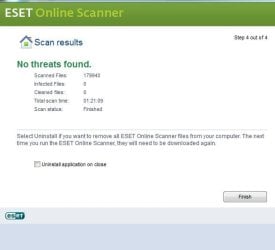
Thanks Jacee for your reply. I kind of figured as volunteers your time was valuable and quite divided with helping others. I do really appreciate it. I ran Eset scan as you instructed. Scan found no threats. At installation it detected my Bitdefender and mentioned it could affect results.....

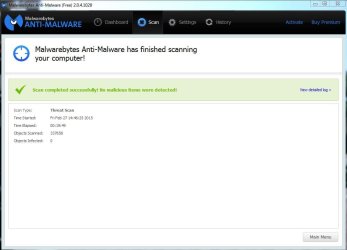
Anyway I've attached screen shot of results. Also screen shots of Kaspersky VRT before and after from Fri 2/27. I cured/deleted 4 files it had found previously, which I had quarantined...previously.

Is it safe to assume my system is clean from infection and malware now?

I mentioned System Mechanic in original post. You had mentioned dealing with it later. Should I uninstall System Mechanic?

I noticed a significant improvement in boot up & shut down performance after your repairs on Thursday.

In my misguided attempt to "tweak" my system, I also had downloaded early last week, Tweaking.com "Windows Repair All-In-One-Tool" and their "Simple System Tweaker". I uninstalled these 2 programs (without getting your advice first) after your help on Thursday at which time I noticed the improved boot up/shutdown performance . After I uninstalled the Tweaking.com apps performance declined and I had some unfamiliar black screen for about 30 seconds, between the "windows is starting" screen and the "welcome" screen(it was not there prior to unstallation, after your repairs there was NO black screen time out between screens). I'm wondering if these programs left something in my boot/shut down process. I can get screen shots of appropriate logs or reports if you direct me to them.

There are 2 other programs/apps I downloaded when I got on the "clean up/tweak" horse. CPZ-U and Autoruns. I got CPU-Z to identify specific specs for my hard drive and ram as I was having some trouble getting specific info. I got Autoruns to get a clearer picture of al my processes, startups, etc...It seems to be ok. WHAT ARE YOUR THOUGHTS REGARDING THESE AS WELL, KEEP EM OR UNINSTALL THEM.

SCREEN SHOTS (I'm including some system shots that might be helpful regarding boot up etc...):
 

Attachments

  • malwarebytes free version scan 2272015 3pm.JPG
    malwarebytes free version scan 2272015 3pm.JPG
    49 KB · Views: 0
  • Kaspersky VRT 2272015 8pm.JPG
    Kaspersky VRT 2272015 8pm.JPG
    27.9 KB · Views: 39
  • Kaspersky VRTreport after cure vdeletion 2272015 152pm.JPG
    Kaspersky VRTreport after cure vdeletion 2272015 152pm.JPG
    77.8 KB · Views: 38
  • Kaspersky VRT 2272015 150pm.JPG
    Kaspersky VRT 2272015 150pm.JPG
    76 KB · Views: 0
  • Eset scan 312015 1230pm.JPG
    Eset scan 312015 1230pm.JPG
    26.5 KB · Views: 37
Last edited:

My Computer

Computer type
Laptop
Computer Manufacturer/Model Number
Toshiba Satellite c855-s5214
OS
windows 7 professional 64 bit Version 6.1.7601 Service Pack 1 Build 7601
CPU
Intel(R) Pentium(R) CPU B970 @ 2.30GHz, 2300 Mhz, 2 cores
Motherboard
Toshiba Portable BIOS Insyde Corp Version 1.60 Date 4/20/12
Memory
8Gb
Graphics Card(s)
Intel HD Graphics Driver Vers 9.17.10.3347 Date 10/31/20
Hard Drives
SanDisk Extreme Pro SSD 480 Gb (approx. 381gb free)
Firmware Version X21200RL
Migrated and Installed 4/3/2015
Antivirus
BitDefender AntiVirus Free Edition Version 1.0.21.1099
Browser
Internet Explorer 11 update version 11.0.16
Other Info
Additional Systems:

Samsung NP-QX410 Laptop Windows 7 Home Premium SP1
Samsung 850 EVO 250G 4G ram
Avast! Free 2015

Toshiba A205-S7468 Laptop Windows 7 Ultimate
WD 320G HDD 4G ram
AVG free 2015
Here 4 lists and a registry scan from Ccleaner on Friday. I thought they might be helpful:

Ccleaner registry scan for issues 2272015 2272015 not fixed waiting for advice:


Unused File Extension .bc HKCU\Software\Microsoft\Windows\CurrentVersion\Explorer\FileExts\.bc
Unused File Extension .enc1 HKCU\Software\Microsoft\Windows\CurrentVersion\Explorer\FileExts\.enc1
Unused File Extension .eot HKCU\Software\Microsoft\Windows\CurrentVersion\Explorer\FileExts\.eot
Unused File Extension .etl HKCU\Software\Microsoft\Windows\CurrentVersion\Explorer\FileExts\.etl
Unused File Extension .id HKCU\Software\Microsoft\Windows\CurrentVersion\Explorer\FileExts\.id
Unused File Extension .md5 HKCU\Software\Microsoft\Windows\CurrentVersion\Explorer\FileExts\.md5
Unused File Extension .tax HKCU\Software\Microsoft\Windows\CurrentVersion\Explorer\FileExts\.tax
Unused File Extension .tga HKCU\Software\Microsoft\Windows\CurrentVersion\Explorer\FileExts\.tga
Invalid or empty file class OneIndex14 HKCR\OneIndex14
ActiveX/COM Issue InProcServer32\C:\Windows\SysWOW64\wpcmig.dll HKCR\CLSID\{343D770D-7788-47c2-B62A-B7C4CED925CB}
ActiveX/COM Issue InProcServer32\C:\Windows\SysWOW64\wpcumi.dll HKCR\CLSID\{DFA14C43-F385-4170-99CC-1B7765FA0E4A}
ActiveX/COM Issue InProcServer32\C:\Windows\system32\wuaucpl.cpl HKCR\CLSID\{5F327514-6C5E-4d60-8F16-D07FA08A78ED}
ActiveX/COM Issue InProcServer32\%systemroot%\system32\sharemediacpl.cpl HKCR\CLSID\{B977CB2D-EC6E-4A8F-BFFE-D18682BB0D52}
Missing TypeLib Reference IRoamRemoteStore - {38e8db48-2747-444f-970d-8437534991ca} HKCR\Interface\{062c7f3f-5d6c-426b-95d9-69dddcf524ad}
Missing TypeLib Reference IRoamTokens - {38e8db48-2747-444f-970d-8437534991ca} HKCR\Interface\{3581572a-9b9e-4500-bcad-5bb5a737b0e2}
Missing TypeLib Reference IRoamLocalStore - {38e8db48-2747-444f-970d-8437534991ca} HKCR\Interface\{435eb1b8-b681-4569-b862-551e13764315}
Missing TypeLib Reference IRoamFilters - {38e8db48-2747-444f-970d-8437534991ca} HKCR\Interface\{5a36a745-8357-49ff-92ee-9a5bfe043496}
Missing TypeLib Reference IRoamConflictResolution - {38e8db48-2747-444f-970d-8437534991ca} HKCR\Interface\{5c60f565-4f7f-4894-a9c8-1c4cad355f16}
Application Paths Issue SnippingTool.exe - %SystemRoot%\system32\SnippingTool.exe HKLM\Software\Microsoft\Windows\CurrentVersion\App Paths\SnippingTool.exe
Application Paths Issue C:\Program Files (x86)\AVG\AVG2015\avgmfapx.exe HKCU\Software\Microsoft\Windows NT\CurrentVersion\AppCompatFlags\Compatibility Assistant\Persisted
Application Paths Issue C:\Program Files (x86)\iolo\System Mechanic\ProcessLasso.exe HKCU\Software\Microsoft\Windows NT\CurrentVersion\AppCompatFlags\Compatibility Assistant\Persisted
Application Paths Issue C:\Program Files (x86)\iolo\System Mechanic\ProcessGovernor.exe HKCU\Software\Microsoft\Windows NT\CurrentVersion\AppCompatFlags\Compatibility Assistant\Persisted
Application Paths Issue C:\Users\Admin\Downloads\Antivirus_Free_Edition_x64.exe HKCU\Software\Microsoft\Windows NT\CurrentVersion\AppCompatFlags\Compatibility Assistant\Persisted
Application Paths Issue C:\Users\Admin\AppData\Local\Microsoft\Windows\Temporary Internet Files\Content.IE5\QZ3IF2ZB\bitdefender_tsecurity_akHp8T1LlIKRrfeXQdcOdEV9y9A.exe HKCU\Software\Microsoft\Windows NT\CurrentVersion\AppCompatFlags\Compatibility Assistant\Persisted
Installer Reference Issue C:\Program Files (x86)\AVG HKLM\Software\Microsoft\Windows\CurrentVersion\Installer\Folders
Installer Reference Issue C:\$AVG HKLM\Software\Microsoft\Windows\CurrentVersion\Installer\Folders
Installer Reference Issue C:\$AVG\$VAULT HKLM\Software\Microsoft\Windows\CurrentVersion\Installer\Folders
Installer Reference Issue C:\Program Files (x86)\PC Drivers HeadQuarters\Driver Detective HKLM\Software\Microsoft\Windows\CurrentVersion\Installer\Folders
Installer Reference Issue C:\Program Files (x86)\PC Drivers HeadQuarters HKLM\Software\Microsoft\Windows\CurrentVersion\Installer\Folders
Installer Reference Issue C:\Program Files (x86)\AVG\AVG2014 HKLM\Software\Microsoft\Windows\CurrentVersion\Installer\Folders
Installer Reference Issue C:\Program Files (x86)\AVG\AVG2015 HKLM\Software\Microsoft\Windows\CurrentVersion\Installer\Folders
Installer Reference Issue C:\ProgramData\AVG2015\log HKLM\Software\Microsoft\Windows\CurrentVersion\Installer\Folders
Installer Reference Issue C:\ProgramData\AVG2015\IDS\config HKLM\Software\Microsoft\Windows\CurrentVersion\Installer\Folders
Installer Reference Issue C:\ProgramData\AVG2015\IDS HKLM\Software\Microsoft\Windows\CurrentVersion\Installer\Folders
Installer Reference Issue C:\ProgramData\AVG2015\avi HKLM\Software\Microsoft\Windows\CurrentVersion\Installer\Folders
Installer Reference Issue C:\ProgramData\AVG2015\Cfg HKLM\Software\Microsoft\Windows\CurrentVersion\Installer\Folders
Installer Reference Issue C:\Program Files (x86)\AVG\AVG2015\Notification HKLM\Software\Microsoft\Windows\CurrentVersion\Installer\Folders
Installer Reference Issue C:\Program Files (x86)\AVG\AVG2015\banners HKLM\Software\Microsoft\Windows\CurrentVersion\Installer\Folders
Obsolete software key OldTimer Tools HKLM\Software\OldTimer Tools
Obsolete software key ProcessLasso HKLM\Software\ProcessLasso
Invalid firewall rule {8BFD39CC-C929-42B1-86CD-5F200A326337} - C:\Program Files (x86)\AVG\AVG2015\avgmfapx.exe HKLM\SYSTEM\ControlSet001\services\SharedAccess\Parameters\FirewallPolicy\FirewallRules
Invalid firewall rule {4555DDFF-FD78-4E0D-BE4A-BD5B6AB878DC} - C:\Program Files (x86)\AVG\AVG2015\avgmfapx.exe HKLM\SYSTEM\ControlSet001\services\SharedAccess\Parameters\FirewallPolicy\FirewallRules
Invalid firewall rule {8BFD39CC-C929-42B1-86CD-5F200A326337} - C:\Program Files (x86)\AVG\AVG2015\avgmfapx.exe HKLM\SYSTEM\ControlSet002\services\SharedAccess\Parameters\FirewallPolicy\FirewallRules
Invalid firewall rule {4555DDFF-FD78-4E0D-BE4A-BD5B6AB878DC} - C:\Program Files (x86)\AVG\AVG2015\avgmfapx.exe HKLM\SYSTEM\ControlSet002\services\SharedAccess\Parameters\FirewallPolicy\FirewallRules
Missing MUI Reference C:\Program Files (x86)\AVG\AVG2015\avgui.exe HKCU\Software\Classes\Local Settings\Software\Microsoft\Windows\Shell\MuiCache
Missing MUI Reference C:\Program Files (x86)\Tweaking.com\Simple System Tweaker\Simple_System_Tweaker.exe HKCU\Software\Classes\Local Settings\Software\Microsoft\Windows\Shell\MuiCache


Ccleaner sched task startup list:

No Task 1214avUpdateInfo C:\ProgramData\Avg_Update_1214av\1214av_AVG-Secure-Search-Update.exe /SETINFO /CMPID=1214av /INFORETRY=3
Yes Task CCleanerSkipUAC Piriform Ltd "C:\Program Files\CCleaner\CCleaner.exe" $(Arg0)
Yes Task ConfigFree Startup Programs TOSHIBA CORPORATION C:\Program Files (x86)\TOSHIBA\ConfigFree\NDSTray.exe
Yes Task iolo Process Governor iolo technologies, LLC C:\Program Files (x86)\iolo\System Mechanic\iologovernor64.exe
Yes Task SidebarExecute Microsoft Corporation C:\Program Files\Windows Sidebar\sidebar.exe
Yes Task {016BB9F5-0990-4F08-9D8D-DA593A9CF6A4} Microsoft Corporation C:\Windows\system32\pcalua.exe -a D:\pacscubestart.exe -d D:\
No Task {1772D6CB-FE01-4CFA-A6E6-576FA7B21355} C:\Users\Admin\Downloads\Stratego\STRATEGO.EXE
No Task {202AE447-4756-478F-A99F-040C48D03F65} C:\Users\Admin\Downloads\Stratego\STRATEGO.EXE
No Task {228F9402-6637-423A-B8C0-9F85F499A035} C:\Users\Admin\Downloads\Stratego\STRATEGO.EXE
No Task {29737AFD-A246-4DD4-BF6A-82BBDA11EA9A} C:\Users\Admin\Downloads\Stratego\STRATEGO.EXE
Yes Task {29F2F83A-448A-436C-BA27-9B14FA3598BA} Microsoft Corporation C:\Windows\system32\pcalua.exe -a "E:\Turbo Tax Programs\Turbo Tax 2005 Home & Business Program & Download\[uM]Turbo.Tax.Deluxe.2005\autorun.exe" -d "E:\Turbo Tax Programs\Turbo Tax 2005 Home & Business Program & Download\[uM]Turbo.Tax.Deluxe.2005"
No Task {315D10FA-33AC-474A-BA80-84F796FA0FD3} Eidos plc C:\Users\Admin\Downloads\Battlestations Pacific\Battlestations Pacific\battlestationspacific.exe
Yes Task {39313FE5-37E0-4400-A7AE-D5A2EB9EED6E} Microsoft Corporation C:\Windows\system32\pcalua.exe -a "C:\Users\Admin\AppData\Local\Microsoft\Windows\Temporary Internet Files\Content.IE5\WVUQV2U9\epson12958.exe" -d C:\Users\Admin\Desktop
No Task {4420DDE4-E88D-4D97-8E82-EAC26FA35FD5} Eidos plc C:\Users\Admin\Downloads\Battlestations Pacific\Battlestations Pacific\battlestationspacific.exe
No Task {5CD83F2E-48A0-4D4C-84C3-CE45EFA046B6} C:\Users\Admin\Downloads\Stratego\STRATEGO.EXE
No Task {60FCDD39-23E5-4961-9B9C-22503810C034} C:\Users\Admin\Downloads\Stratego\STRATEGO.EXE
No Task {6AB7BEFC-A892-41C4-A104-571189463001} C:\Users\Admin\Downloads\Stratego\STRATEGO.EXE
Yes Task {8A91B2E1-C513-40ED-B1AE-602CCE8F144E} Microsoft Corporation C:\Windows\system32\pcalua.exe -a "C:\Program Files (x86)\InstallShield Installation Information\{888F1505-C2B3-4FDE-835D-36353EBD4754}\setup.exe" -c -runfromtemp -l0x0409 -removeonly
No Task {961DAE4E-C212-4423-9E21-B9BE4CE23702} C:\Users\Admin\Downloads\Stratego\STRATEGO.EXE
No Task {A1336B73-6C2C-49AA-A080-CDACF1D1C055} C:\Users\Admin\Downloads\Stratego\STRATEGO.EXE
No Task {AA975F61-914C-464E-AA58-A9A81A3DB479} EIDOS C:\Users\Admin\Downloads\Battlestations Pacific\Battlestations Pacific\bsp.exe
No Task {BB2AF268-1E2D-4BDD-AD32-E1A4C630A718} Eidos plc C:\Users\Admin\Downloads\Battlestations Pacific\Battlestations Pacific\battlestationspacific.exe
No Task {BECEBFD9-1A86-4CC7-8B28-A087046729E3} Eidos plc C:\Users\Admin\Downloads\Battlestations Pacific\Battlestations Pacific\battlestationspacific.exe
No Task {D8CCF8E8-FA8C-49C5-9AC7-0B245A47329D} C:\Users\Admin\Downloads\Stratego\STRATEGO.EXE
No Task {E4236582-AE34-4703-8508-D68E6F2BE0D2} EIDOS C:\Users\Admin\Downloads\Battlestations Pacific\Battlestations Pacific\bsp.exe
No Task {EF4F4FAD-BD2C-4B8A-91D8-BFFB708AD59E} EIDOS C:\Users\Admin\Downloads\Battlestations Pacific\Battlestations Pacific\bsp.exe


Ccleaner startup services application list:


No EPLTarget
Yes HKCU:Run CCleaner Monitoring Piriform Ltd "C:\Program Files\CCleaner\CCleaner64.exe" /MONITOR
No HKCU:Run CCleaner Monitoring Piriform Ltd "C:\Program Files\CCleaner\CCleaner64.exe" /MONITOR
No HKCU:Run EPSON Stylus CX7400 Series SEIKO EPSON CORPORATION C:\Windows\system32\spool\DRIVERS\x64\3\E_IATICDA.EXE /FU "C:\Windows\TEMP\E_S8BB6.tmp" /EF "HKCU"
No HKCU:Run OfficeSyncProcess Microsoft Corporation "C:\Program Files (x86)\Microsoft Office\Office14\MSOSYNC.EXE"
No HKCU:Run ROC_ROC_APR2013_AV C:\Users\Admin\AppData\Roaming\AVG April 2013 Campaign\AVG-Secure-Search-Update.exe /PROMPT --mid a637edff9d5447d3a13bd16f2af148e4-aea5bc041859bab0beb2f3f406a65da5af445dbc --CMPID ROC_APR2013_AV --CMPIDEXTRA 2013
No HKCU:Run Skype Skype Technologies S.A. "C:\Program Files (x86)\Skype\Phone\Skype.exe" /minimized /regrun
No HKLM:Run Adobe ARM Adobe Systems Incorporated "C:\Program Files (x86)\Common Files\Adobe\ARM\1.0\AdobeARM.exe"
Yes HKLM:Run amd_dc_opt AMD C:\Program Files (x86)\AMD\Dual-Core Optimizer\amd_dc_opt.exe
No HKLM:Run BCSSync Microsoft Corporation "C:\Program Files (x86)\Microsoft Office\Office14\BCSSync.exe" /DelayServices
Yes HKLM:Run HotKeysCmds Intel Corporation "C:\Windows\system32\hkcmd.exe"
Yes HKLM:Run IgfxTray Intel Corporation "C:\Windows\system32\igfxtray.exe"
No HKLM:Run ioloLiveBoost iolo technologies, LLC C:\Program Files (x86)\iolo\System Mechanic\LiveBoost.exe
No HKLM:Run iTunesHelper Apple Inc. "C:\Program Files (x86)\iTunes\iTunesHelper.exe"
Yes HKLM:Run Persistence Intel Corporation "C:\Windows\system32\igfxpers.exe"
No HKLM:Run StartupDelayer r2 Studios "C:\Program Files\r2 Studios\Startup Delayer\Startup Launcher.exe" /LaunchType=Auto /LaunchApps=Common
No HKLM:Run SunJavaUpdateSched Oracle Corporation "C:\Program Files (x86)\Common Files\Java\Java Update\jusched.exe"
No Startup User OneNote 2010 Screen Clipper and Launcher.lnk C:\PROGRA~2\MICROS~2\Office14\ONENOTEM.EXE /tsr


Ccleaner Context startup list:


Yes Directory 7-Zip Igor Pavlov C:\Program Files\7-Zip\7-zip.dll
Yes Directory Add to VLC media player's Playlist VideoLAN "C:\Program Files (x86)\VideoLAN\VLC\vlc.exe" --started-from-file --playlist-enqueue "%1"
Yes Directory Incinerator iolo technologies, LLC C:\Windows\system32\Incinerator64.dll
Yes Directory MSSE
Yes Directory Play with VLC media player VideoLAN "C:\Program Files (x86)\VideoLAN\VLC\vlc.exe" --started-from-file --no-playlist-enqueue "%1"
Yes File 7-Zip Igor Pavlov C:\Program Files\7-Zip\7-zip.dll
Yes File Gonzales Bitdefender C:\Program Files\Bitdefender\Antivirus Free Edition\GzShellIntegration.dll
Yes File Incinerator iolo technologies, LLC C:\Windows\system32\Incinerator64.dll
Yes Folder Gonzales Bitdefender C:\Program Files\Bitdefender\Antivirus Free Edition\GzShellIntegration.dll


Ccleaner install list:


7-Zip 9.20 (x64 edition) Igor Pavlov 1/11/2014 4.53 MB 9.20.00.0
ABBYY FineReader 9.0 Sprint ABBYY 3/1/2014 9.00.15.58233
Adobe AIR Adobe Systems Incorporated 3/27/2013 3.6.0.6090
Adobe Flash Player 11 Plugin Adobe Systems Incorporated 3/27/2013 6.00 MB 11.6.602.180
Adobe Flash Player 12 ActiveX Adobe Systems Incorporated 2/9/2014 6.00 MB 12.0.0.44
Adobe Reader XI (11.0.02) Adobe Systems Incorporated 3/27/2013 126 MB 11.0.02
Adobe Shockwave Player 12.0 Adobe Systems, Inc. 3/27/2013 12.0.0.112
Apple Application Support Apple Inc. 1/24/2015 95.2 MB 3.1
Apple Mobile Device Support Apple Inc. 1/24/2015 22.2 MB 8.0.5.6
Apple Software Update Apple Inc. 1/24/2015 2.38 MB 2.1.3.127
Atheros Communications Inc.(R) AR81Family Gigabit/Fast Ethernet Driver Atheros Communications Inc. 3/27/2013 2.1.0.6
Bitdefender Antivirus Free Edition Bitdefender 2/25/2015 1.0.21.1099
Bonjour Apple Inc. 1/24/2015 2.04 MB 3.0.0.10
CCleaner Piriform 2/25/2015 5.03
CPUID CPU-Z 1.71.1 2/23/2015 3.72 MB
Download Navigator SEIKO EPSON CORPORATION 3/1/2014 6.14 MB 3.4.0
Dream Tale - The Golden Keys Foxy Games 1/17/2014 1.0
Dual-Core Optimizer AMD 1/11/2014 86.0 KB 1.1.4.0169
EPSON Connect version 1.0 Epson America Inc. 3/1/2014 1.10 MB 1.0
Epson Customer Participation SEIKO EPSON CORPORATION 3/1/2014 3.32 MB 1.4.0.0
Epson Event Manager Seiko Epson Corporation 3/1/2014 42.4 MB 3.01.0003
Epson FAX Utility SEIKO EPSON CORPORATION 3/1/2014 1.30.00
EPSON Printer Software SEIKO EPSON Corporation 3/1/2014
EPSON Scan Seiko Epson Corporation 3/1/2014
EPSON WF-2540 Series Printer Uninstall SEIKO EPSON Corporation 3/1/2014
EpsonNet Print SEIKO EPSON CORPORATION 3/1/2014 2.5.00
Handset USB Driver 1/5/2014 12.5 MB 5.2088.1.A01B06
Intel(R) Processor Graphics Intel Corporation 1/11/2014 9.17.10.3347
Intel(R) SDK for OpenCL - CPU Only Runtime Package Intel Corporation 1/11/2014 2.0.0.37149
iolo technologies' System Mechanic iolo technologies, LLC 2/17/2015 117 MB 14.5.0
iTunes Apple Inc. 1/24/2015 244 MB 12.0.1.26
Java 7 Update 17 (64-bit) Oracle 3/27/2013 128 MB 7.0.170
Java 7 Update 60 Oracle 4/30/2013 130 MB 7.0.600
Job Tracker for Contractors Data Village 4/5/2014
Malwarebytes Anti-Malware version 2.0.4.1028 Malwarebytes Corporation 1/29/2015 57.2 MB 2.0.4.1028
Microsoft .NET Framework 4.5.2 Microsoft Corporation 1/22/2015 38.8 MB 4.5.51209
Microsoft Office Professional Plus 2010 Microsoft Corporation 4/22/2013 14.0.4734.1000
Microsoft Silverlight Microsoft Corporation 12/14/2014 299 MB 5.1.31211.0
Microsoft SQL Server 2005 Compact Edition [ENU] Microsoft Corporation 8/14/2014 1.69 MB 3.1.0000
Microsoft Visual C++ 2008 Redistributable - x86 9.0.30729.17 Microsoft Corporation 1/6/2014 594 KB 9.0.30729
Microsoft Visual C++ 2008 Redistributable - x86 9.0.30729.4148 Microsoft Corporation 1/6/2014 588 KB 9.0.30729.4148
Microsoft Visual C++ 2008 Redistributable - x86 9.0.30729.6161 Microsoft Corporation 1/18/2014 600 KB 9.0.30729.6161
Microsoft Visual C++ 2010 x64 Redistributable - 10.0.40219 Microsoft Corporation 2/13/2015 13.8 MB 10.0.40219
Microsoft Visual C++ 2010 x86 Redistributable - 10.0.40219 Microsoft Corporation 2/13/2015 16.6 MB 10.0.40219
Microsoft Visual Studio 2010 Tools for Office Runtime (x64) Microsoft Corporation 2/13/2015 10.0.50903
Moonbase Alpha Virtual Heroes 1/7/2014
MSXML 4.0 SP3 Parser Microsoft Corporation 9/25/2013 1.47 MB 4.30.2100.0
MSXML 4.0 SP3 Parser (KB2758694) Microsoft Corporation 10/2/2013 1.54 MB 4.30.2117.0
NVIDIA PhysX v8.10.29 NVIDIA Corporation 1/11/2014 119 MB 8.10.29
OpenAL 1/6/2014
Realtek WLAN Driver REALTEK Semiconductor Corp. 3/27/2013 2.00.0020
Risk - 2012 Foxy Games 1/17/2014 1.0
Skype™ 6.11 Skype Technologies S.A. 12/25/2013 26.9 MB 6.11.102
Startup Delayer v3.0 (build 363) r2 Studios 2/20/2015 3.0 (build 363)
Steam Valve Corporation 1/7/2014
System Requirements Lab for Intel Husdawg, LLC 1/11/2014 1.03 MB 4.5.15.0
TOSHIBA ConfigFree TOSHIBA CORPORATION 3/27/2013 84.7 MB 8.0.43
TOSHIBA Media Controller TOSHIBA CORPORATION 3/27/2013 1.0.87.5
TOSHIBA Service Station TOSHIBA 2/21/2015 2.2.14
TurboTax 2013 Intuit, Inc 2/5/2014 2013.0
Visual Studio 2010 x64 Redistributables AVG Technologies 4/22/2013 12.4 MB 13.0.0.1
Visual Studio 2012 x64 Redistributables AVG Technologies 3/28/2014 12.9 MB 14.0.0.1
Visual Studio 2012 x86 Redistributables AVG Technologies CZ, s.r.o. 3/28/2014 10.5 MB 14.0.0.1
VLC media player 2.0.5 VideoLAN 4/22/2013 2.0.5
Windows Live Essentials Microsoft Corporation 8/14/2014 16.4.3528.0331
µTorrent BitTorrent Inc. 4/21/2013 3.3.0.29544
 

My Computer

Computer type
Laptop
Computer Manufacturer/Model Number
Toshiba Satellite c855-s5214
OS
windows 7 professional 64 bit Version 6.1.7601 Service Pack 1 Build 7601
CPU
Intel(R) Pentium(R) CPU B970 @ 2.30GHz, 2300 Mhz, 2 cores
Motherboard
Toshiba Portable BIOS Insyde Corp Version 1.60 Date 4/20/12
Memory
8Gb
Graphics Card(s)
Intel HD Graphics Driver Vers 9.17.10.3347 Date 10/31/20
Hard Drives
SanDisk Extreme Pro SSD 480 Gb (approx. 381gb free)
Firmware Version X21200RL
Migrated and Installed 4/3/2015
Antivirus
BitDefender AntiVirus Free Edition Version 1.0.21.1099
Browser
Internet Explorer 11 update version 11.0.16
Other Info
Additional Systems:

Samsung NP-QX410 Laptop Windows 7 Home Premium SP1
Samsung 850 EVO 250G 4G ram
Avast! Free 2015

Toshiba A205-S7468 Laptop Windows 7 Ultimate
WD 320G HDD 4G ram
AVG free 2015
And lastly, I read another thread posted and the advice given by Callender to the poster. Callender advised downloading and running UVK - Ultra Virus Killer. I figured this was trusted by a forum senior member and couldn't hurt. So, I downloaded and ran and here is the report from UVK (zipped using 7zip, I think I did it right)........
 

Attachments

My Computer

Computer type
Laptop
Computer Manufacturer/Model Number
Toshiba Satellite c855-s5214
OS
windows 7 professional 64 bit Version 6.1.7601 Service Pack 1 Build 7601
CPU
Intel(R) Pentium(R) CPU B970 @ 2.30GHz, 2300 Mhz, 2 cores
Motherboard
Toshiba Portable BIOS Insyde Corp Version 1.60 Date 4/20/12
Memory
8Gb
Graphics Card(s)
Intel HD Graphics Driver Vers 9.17.10.3347 Date 10/31/20
Hard Drives
SanDisk Extreme Pro SSD 480 Gb (approx. 381gb free)
Firmware Version X21200RL
Migrated and Installed 4/3/2015
Antivirus
BitDefender AntiVirus Free Edition Version 1.0.21.1099
Browser
Internet Explorer 11 update version 11.0.16
Other Info
Additional Systems:

Samsung NP-QX410 Laptop Windows 7 Home Premium SP1
Samsung 850 EVO 250G 4G ram
Avast! Free 2015

Toshiba A205-S7468 Laptop Windows 7 Ultimate
WD 320G HDD 4G ram
AVG free 2015

My Computer

Computer type
PC/Desktop
Computer Manufacturer/Model Number
Bruce ... somewhere in his 40's
OS
Windows 7 Ultimate 32bit SP1
CPU
Intel(R) Core(TM)2 Quad CPU @ 2.40GHz, 2400 MHz
Motherboard
INTEL/D975XBX2
Memory
4 GB
Graphics Card(s)
ATI Radeon HD 2600 Pro
Monitor(s) Displays
Samsung SyncMaster 914v
Screen Resolution
1280 x 1024
Hard Drives
2/500GB each ... ST3500630AS ATA Device.
One is not connected
PSU
Rocketfish 700 W
Case
G.Skill Gigabyte Chassis
Keyboard
Standard PS/2 Keyboard
Mouse
Microsoft PS/2 Mouse
Internet Speed
DSL
Antivirus
Avira Internet Security
Browser
IE 11
Other Info
ATI HDMI Audio
Here's the checkup.txt:

Results of screen317's Security Check version 0.99.97
Windows 7 Service Pack 1 x64 (UAC is enabled)
Internet Explorer 11
``````````````Antivirus/Firewall Check:``````````````
Windows Firewall Enabled!
Bitdefender Antivirus Free Edition
Antivirus up to date!
`````````Anti-malware/Other Utilities Check:`````````
Java 7 Update 60
Java version 32-bit out of Date!
Java 64-bit 8 Update 31
Adobe Flash Player 11.6.602.180 Flash Player out of Date!
Adobe Reader XI
````````Process Check: objlist.exe by Laurent````````
Bitdefender Antivirus Free Edition gzserv.exe
Bitdefender Antivirus Free Edition gziface.exe
iolo System Mechanic iologovernor64.exe
iolo Common Lib ioloServiceManager.exe
`````````````````System Health check`````````````````
Total Fragmentation on Drive C: 0%
````````````````````End of Log``````````````````````
 

My Computer

Computer type
Laptop
Computer Manufacturer/Model Number
Toshiba Satellite c855-s5214
OS
windows 7 professional 64 bit Version 6.1.7601 Service Pack 1 Build 7601
CPU
Intel(R) Pentium(R) CPU B970 @ 2.30GHz, 2300 Mhz, 2 cores
Motherboard
Toshiba Portable BIOS Insyde Corp Version 1.60 Date 4/20/12
Memory
8Gb
Graphics Card(s)
Intel HD Graphics Driver Vers 9.17.10.3347 Date 10/31/20
Hard Drives
SanDisk Extreme Pro SSD 480 Gb (approx. 381gb free)
Firmware Version X21200RL
Migrated and Installed 4/3/2015
Antivirus
BitDefender AntiVirus Free Edition Version 1.0.21.1099
Browser
Internet Explorer 11 update version 11.0.16
Other Info
Additional Systems:

Samsung NP-QX410 Laptop Windows 7 Home Premium SP1
Samsung 850 EVO 250G 4G ram
Avast! Free 2015

Toshiba A205-S7468 Laptop Windows 7 Ultimate
WD 320G HDD 4G ram
AVG free 2015
Okay, everything that Kaspersky found was found by AwCleaner ... go ahead and delete all that, rather than 'skip'

Now, go into your Control Panel and un-install all old/outdated Java, such as --->Java 7 Update 60
Older versions have vulnerabilities that malware can use to infect your system.

Uninstall iolo System Mechanic: How to perform a thorough uninstall of System Mechanic

Let me know how things are going.
 

My Computer

Computer type
PC/Desktop
Computer Manufacturer/Model Number
Bruce ... somewhere in his 40's
OS
Windows 7 Ultimate 32bit SP1
CPU
Intel(R) Core(TM)2 Quad CPU @ 2.40GHz, 2400 MHz
Motherboard
INTEL/D975XBX2
Memory
4 GB
Graphics Card(s)
ATI Radeon HD 2600 Pro
Monitor(s) Displays
Samsung SyncMaster 914v
Screen Resolution
1280 x 1024
Hard Drives
2/500GB each ... ST3500630AS ATA Device.
One is not connected
PSU
Rocketfish 700 W
Case
G.Skill Gigabyte Chassis
Keyboard
Standard PS/2 Keyboard
Mouse
Microsoft PS/2 Mouse
Internet Speed
DSL
Antivirus
Avira Internet Security
Browser
IE 11
Other Info
ATI HDMI Audio
Thx Jacee.

I updated Java and it automatically removed old versions......CHECK.
I updated Adobe Flashplayer.
I Uninstalled Iolo System Mechanic, checked the registry as instructed......CHECK

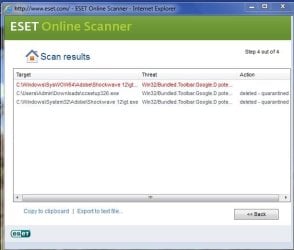
I re ran Eset online scanner with all options checked, very long scan. it found 3 things all google toolbars from different folders. deleted/quarantined 2 of them, took no action on 3rd.

Please take a look at the screen shot and let me know your thoughts. Thx!!!!
 

Attachments

  • ESET follow up scan all options checked.JPG
    ESET follow up scan all options checked.JPG
    38.2 KB · Views: 29

My Computer

Computer type
Laptop
Computer Manufacturer/Model Number
Toshiba Satellite c855-s5214
OS
windows 7 professional 64 bit Version 6.1.7601 Service Pack 1 Build 7601
CPU
Intel(R) Pentium(R) CPU B970 @ 2.30GHz, 2300 Mhz, 2 cores
Motherboard
Toshiba Portable BIOS Insyde Corp Version 1.60 Date 4/20/12
Memory
8Gb
Graphics Card(s)
Intel HD Graphics Driver Vers 9.17.10.3347 Date 10/31/20
Hard Drives
SanDisk Extreme Pro SSD 480 Gb (approx. 381gb free)
Firmware Version X21200RL
Migrated and Installed 4/3/2015
Antivirus
BitDefender AntiVirus Free Edition Version 1.0.21.1099
Browser
Internet Explorer 11 update version 11.0.16
Other Info
Additional Systems:

Samsung NP-QX410 Laptop Windows 7 Home Premium SP1
Samsung 850 EVO 250G 4G ram
Avast! Free 2015

Toshiba A205-S7468 Laptop Windows 7 Ultimate
WD 320G HDD 4G ram
AVG free 2015
Please delete:
C:\Windows\SysWOW64\Adobe\Shockwave 12\gt.exe found by Eset ---->Win32/Bundled.Toolbar.Google.D potentially unsafe application
 

My Computer

Computer type
PC/Desktop
Computer Manufacturer/Model Number
Bruce ... somewhere in his 40's
OS
Windows 7 Ultimate 32bit SP1
CPU
Intel(R) Core(TM)2 Quad CPU @ 2.40GHz, 2400 MHz
Motherboard
INTEL/D975XBX2
Memory
4 GB
Graphics Card(s)
ATI Radeon HD 2600 Pro
Monitor(s) Displays
Samsung SyncMaster 914v
Screen Resolution
1280 x 1024
Hard Drives
2/500GB each ... ST3500630AS ATA Device.
One is not connected
PSU
Rocketfish 700 W
Case
G.Skill Gigabyte Chassis
Keyboard
Standard PS/2 Keyboard
Mouse
Microsoft PS/2 Mouse
Internet Speed
DSL
Antivirus
Avira Internet Security
Browser
IE 11
Other Info
ATI HDMI Audio
Back
Top